ignition Lexus GX460 2019 / LEXUS 2019 GX460 (OM60Q84U) Owner's Guide
[x] Cancel search | Manufacturer: LEXUS, Model Year: 2019, Model line: GX460, Model: Lexus GX460 2019Pages: 636, PDF Size: 11.11 MB
Page 161 of 636

161
GX460_OM_OM60Q84U_(U)
4Driving
4-1. Before drivingDriving the vehicle ...................... 162
Cargo and luggage .................... 169
Vehicle load limits ....................... 173
Trailer towing (with towing hitch) ................... 174
Dinghy towing .............................. 192
4-2. Driving procedures Engine (ignition) switch ............ 193
Automatic transmission............ 198
Turn signal lever..........................204
Parking brake ............................. 205
4-3. Operating the lights and wipers
Headlight switch ........................ 206
Automatic High Beam .............. 210
Fog light switch ............................ 215
Windshield wipers and washer........................................... 217
Rear window wiper and washer.......................................... 222
Headlight cleaner switch ........ 224
4-4. Refueling Opening the fuel tank cap......225 4-5. Using the driving support
systems
Cruise control ............................. 229
Dynamic radar cruise control ......................................... 232
LDA (Lane Departure Alert) ........ 243
Intuitive parking assist .............. 249
Rear view monitor system ......258
Lexus parking assist monitor ........................................ 268
Wide view front & side monitor ........................................ 294
Multi-terrain Select .................... 312
Multi-terrain Monitor .................317
Rear height control air suspension .................................. 341
AVS (Adaptive Variable Suspension System)............... 345
Four-wheel drive system ........ 346
Crawl Control .............................350
Downhill assist control system ..........................................353
Driving assist systems ..............355
BSM (Blind Spot Monitor) ...... 361 • The Blind Spot Monitor function .................................... 366
• The Rear Cross Traffic Alert function ......................... 369
PCS (Pre-Collision system) .......... 372
4-6. Driving tips Winter driving tips ...................... 381
Off-road precautions ...............384
Page 193 of 636
193
GX460_OM_OM60Q84U_(U)4-2. Driving procedures
4
Driving
Engine (ignition) switch
Check that the parking brake is set.
Check that the shift lever is set in P.
Firmly depress the brake pedal.
The engine switch indicator will turn green.
If the indicator does not turn gree
n, the engine cannot be started.
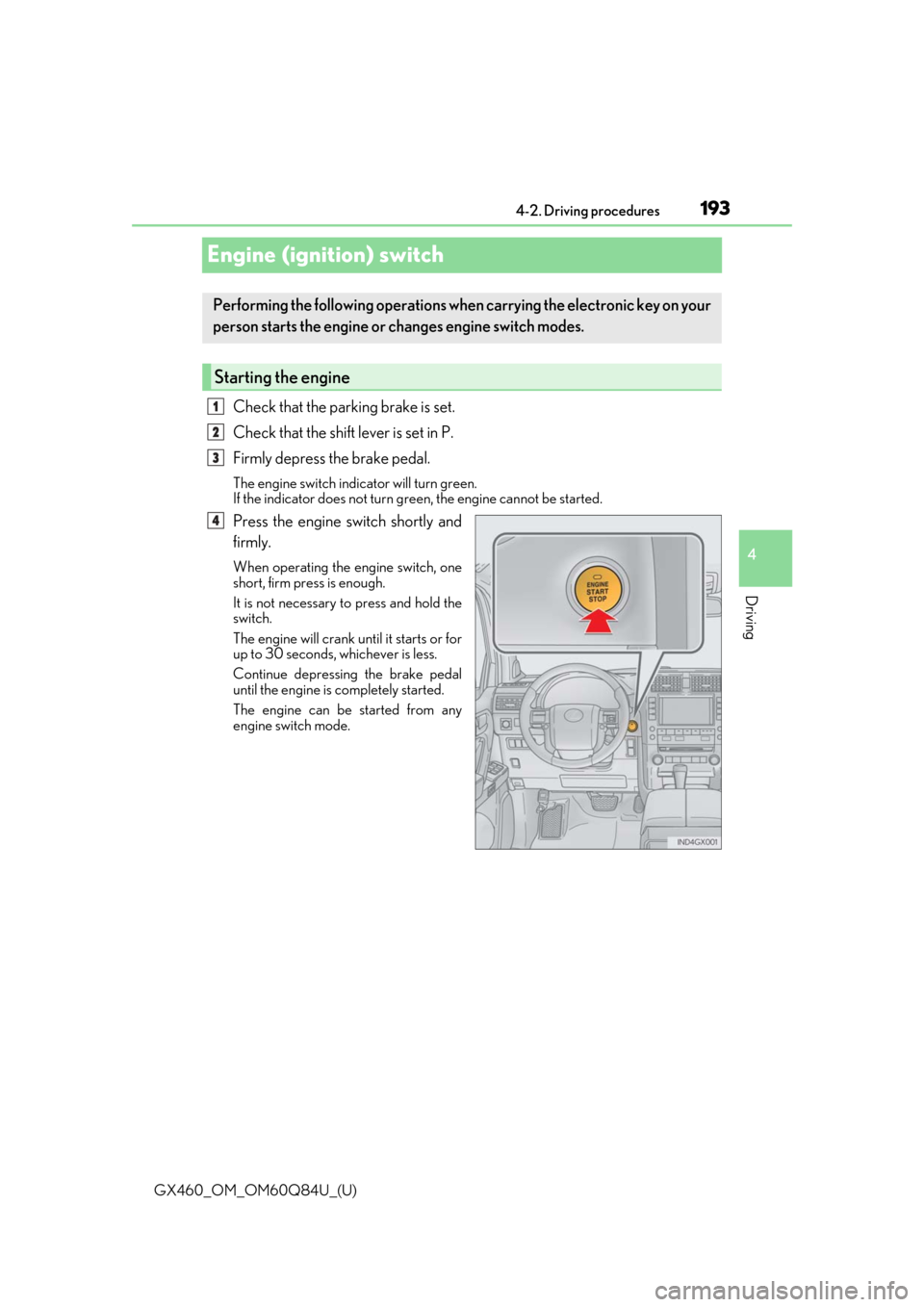
Press the engine switch shortly and
firmly.
When operating the engine switch, one
short, firm press is enough.
It is not necessary to press and hold the
switch.
The engine will crank until it starts or for
up to 30 seconds, whichever is less.
Continue depressing the brake pedal
until the engine is completely started.
The engine can be started from any
engine switch mode.
Performing the following operations wh en carrying the electronic key on your
person starts the engine or changes engine switch modes.
Starting the engine
1
2
3
4
Page 194 of 636
194
GX460_OM_OM60Q84U_(U)4-2. Driving procedures
Stop the vehicle.
Set the parking brake (
P. 205), and shift the shift lever to P.
Press the engine switch.
Release the brake pedal and check that the indicator on the engine switch is
off.
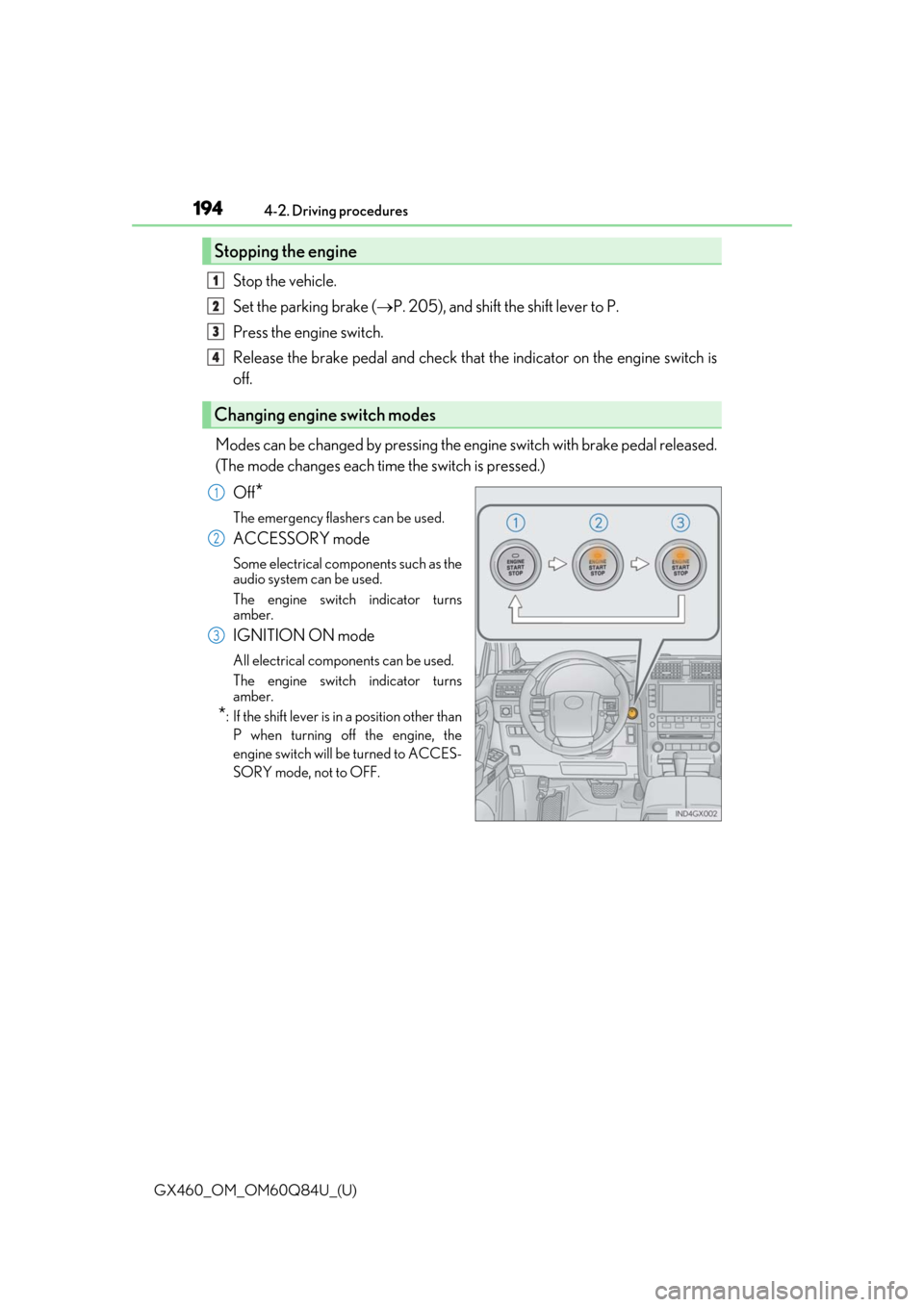
Modes can be changed by pressing the en gine switch with brake pedal released.
(The mode changes each time the switch is pressed.)
Off
*
The emergency flashers can be used.
ACCESSORY mode
Some electrical components such as the
audio system can be used.
The engine switch indicator turns
amber.
IGNITION ON mode
All electrical components can be used.
The engine switch indicator turns
amber.
*: If the shift lever is in a position other thanP when turning off the engine, the
engine switch will be turned to ACCES-
SORY mode, not to OFF.
Stopping the engine
Changing engine switch modes
1
2
3
4
1
2
3
Page 195 of 636

GX460_OM_OM60Q84U_(U)
1954-2. Driving procedures
4
Driving
If the engine is stopped with the shift lever in a position other than P, the engine
switch will not be turned off but instead be turned to ACCESSORY mode. Per-
form the following procedure to turn the switch off:
Check that the parking brake is set.
Shift the shift lever to P.
Check that the indicator on the engine switch is illuminated in amber and then
press the engine switch once.
Check that the indicator on the engine switch is off.
■Auto power off function
When the shift lever is in P, if the vehicl e is left in ACCESSORY or IGNITION ON mode
with the engine not running for more than 20 minutes (ACCESSORY mode) or one
hour (IGNITION ON mode), the engine switch will automatically turn off. However, this
function cannot entirely prevent battery discharge. Do not leave the vehicle with the
engine switch in ACCESSORY or IGNITION ON mode for long periods of time when
the engine is not running.
■Electronic key battery depletion
P. 100
■Conditions affe cting operation
P. 121
■Note for the entry function
P. 122
■If the engine does not start
The engine immobilizer system ma y not have been deactivated. (P. 77)
Contact your Lexus dealer.
■Steering lock
After turning the engine switch off and opening and closing the doors, the steering wheel
will be locked due to the steering lock func tion. Operating the engine switch again auto-
matically cancels the steering lock.
When stopping the engine with the shift lever in a position other than P
1
2
3
4
Page 197 of 636

GX460_OM_OM60Q84U_(U)
1974-2. Driving procedures
4
Driving
CAUTION
■When starting the engine
Always start the engine while sitting in the driver’s seat. Do not depress the accelerator
pedal while starting the engine under any circumstances.
Doing so may cause an accident resulting in death or serious injury.
■Caution while driving
If engine failure occurs while the vehicle is moving, do not lock or open the doors until
the vehicle reaches a safe and complete stop. Activation of the steering lock in this cir-
cumstance may lead to an accident, re sulting in death or serious injury.
■Stopping the engine in an emergency
If you want to stop the engine in an emergency while driving the vehicle, press and hold
the engine switch for more than 2 seconds, or press it briefly 3 times or more in succes-
sion. ( P. 509)
However, do not touch the engi ne switch while driving except in an emergency. Turning
the engine off while driving will not cause lo ss of steering or braking control, but the
power assist to these systems will be lost. Th is will make it more difficult to steer and
brake, so you should pull over and stop the vehicle as soon as it is safe to do so.
NOTICE
■To prevent battery discharge
●Do not leave the engine switch in ACCESSORY or IGNITION ON mode for long
periods of time without the engine running.
●If the indicator on the engine switch is illu minated, the engine switch is not off. When
exiting the vehicle, always check that the engine switch is off.
●Do not stop the engine when the shift lever is in a position other than P. If the engine is
stopped in another shift lever position, the engine switch will not be turned off but
instead be turned to ACCESSORY mode. If the vehicle is left in ACCESSORY
mode, battery discharge may occur.
■When starting the engine
●Do not race a cold engine.
●If the engine becomes difficult to start or stalls frequently, have your vehicle checked
by your Lexus dealer immediately.
■Symptoms indicating a malfun ction with the engine switch
If the engine switch seems to be operating somewhat differen tly than usual, such as the
switch sticking slightly, ther e may be a malfunction. Contact your Lexus dealer immedi-
ately.
Page 198 of 636
198
GX460_OM_OM60Q84U_(U)4-2. Driving procedures
Automatic transmission
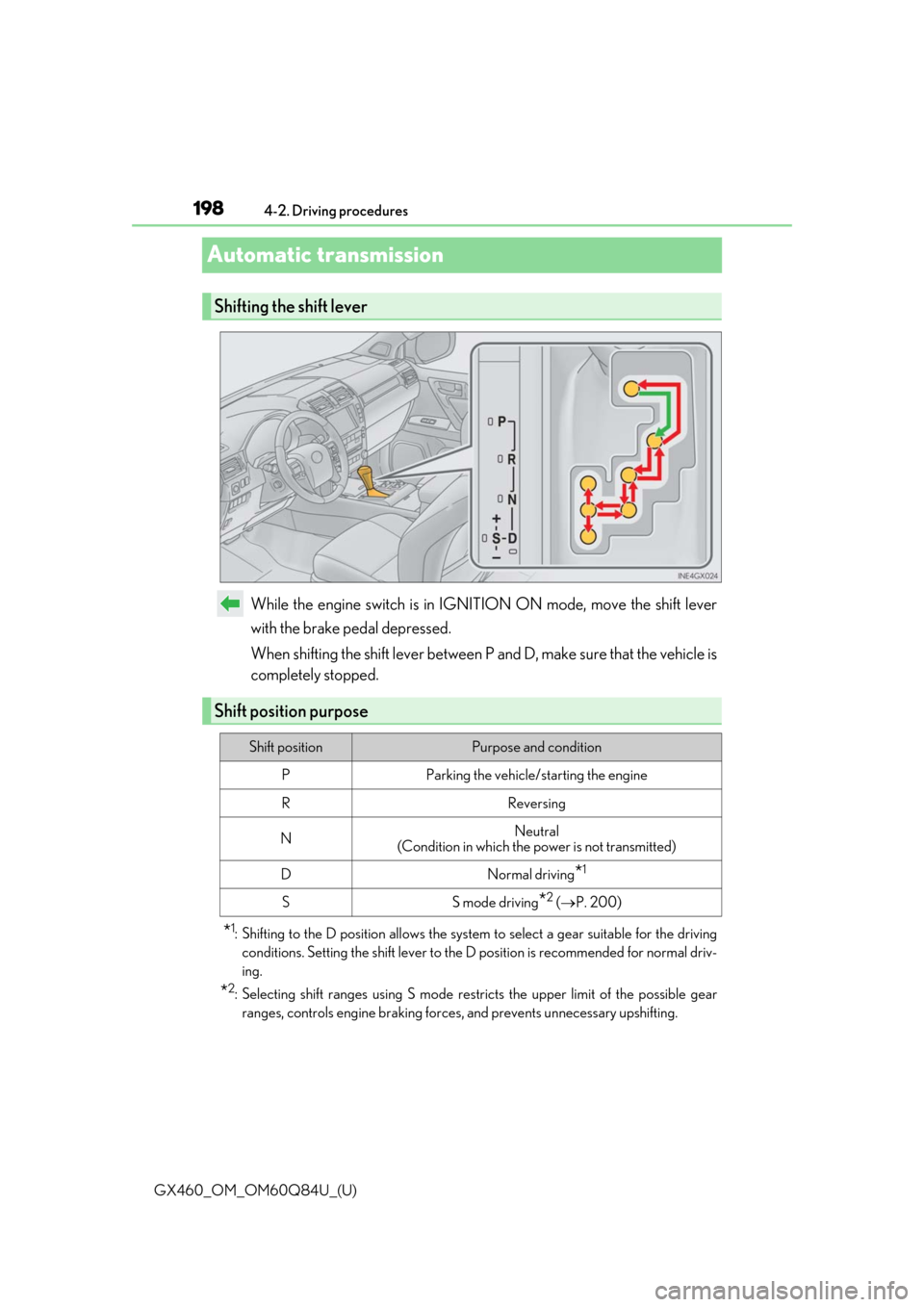
While the engine switch is in IGNITION ON mode, move the shift lever
with the brake pedal depressed.
When shifting the shift lever between P and D, make sure that the vehicle is
completely stopped.
*1: Shifting to the D position allows the system
to select a gear suitable for the driving
conditions. Setting the shift lever to the D position is recommended for normal driv-
ing.
*2: Selecting shift ranges using S mode rest ricts the upper limit of the possible gear
ranges, controls engine braking forces , and prevents unnecessary upshifting.
Shifting the shift lever
Shift position purpose
Shift positionPurpose and condition
PParking the vehicle/starting the engine
RReversing
NNeutral
(Condition in which the power is not transmitted)
DNormal driving*1
SS mode driving*2 ( P. 200)
Page 201 of 636

GX460_OM_OM60Q84U_(U)
2014-2. Driving procedures
4
Driving
■Driving on a downhill
On declines, there may be case where the vehicle shifts down automatically to obtain
engine braking. As a result of the down shifting, the engine speed may increase.
■Second start mode automatic deactivation
Second start mode is automatically deactivated if the engine is turned off after driving in
second start mode.
■S mode
When the shift range is 5 or lower, holding the shift lever toward “+” sets the shift range to
6.
■AI-SHIFT
AI-SHIFT automatically shifts the gear to the suitable position according to driver perfor-
mance and driving conditions.
AI-SHIFT automatically operates when the shift lever is in the D position. (Shifting the
shift lever to the S position cancels the function.)
■When driving with the cruise contro l or dynamic radar cruise control
Engine braking will not occur in S mode, even when downshifting to 5 or 4.
( P. 229, 232)
■Shift lock system
The shift lock system is a system to prevent ac cidental operation of the shift lever in start-
ing.
The shift lever can be shifted from P only when the engine switch is in the IGNITION ON
mode and the brake pedal is being depressed.
Page 204 of 636
204
GX460_OM_OM60Q84U_(U)4-2. Driving procedures
Turn signal lever
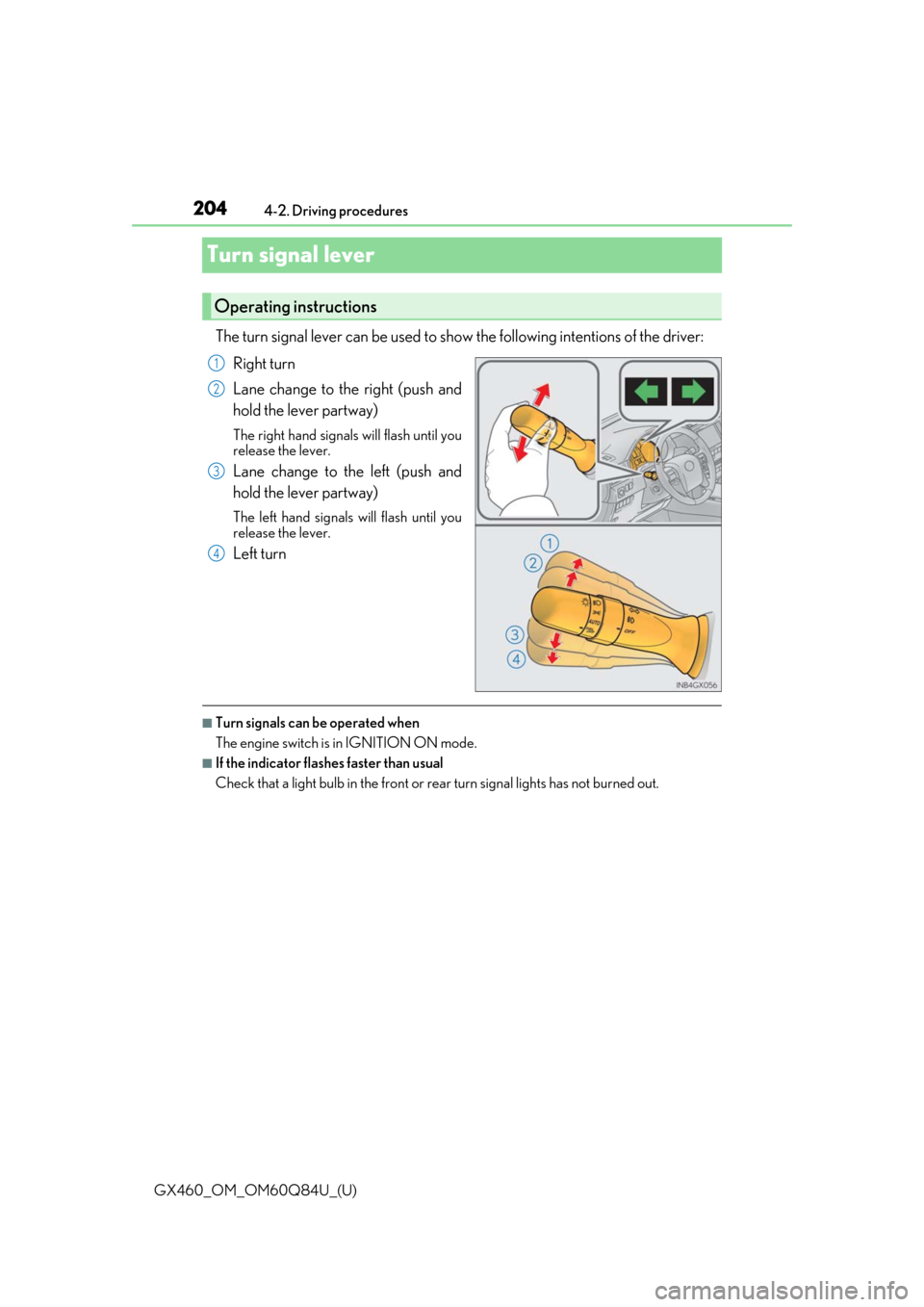
The turn signal lever can be used to show
the following intentions of the driver:
Right turn
Lane change to the right (push and
hold the lever partway)
The right hand signals will flash until you
release the lever.
Lane change to the left (push and
hold the lever partway)
The left hand signals will flash until you
release the lever.
Left turn
■Turn signals can be operated when
The engine switch is in IGNITION ON mode.
■If the indicator flashes faster than usual
Check that a light bulb in the front or rear turn signal lights has not burned out.
Operating instructions
1
2
3
4
Page 206 of 636
206
GX460_OM_OM60Q84U_(U)4-3. Operating the lights and wipers
Headlight switch
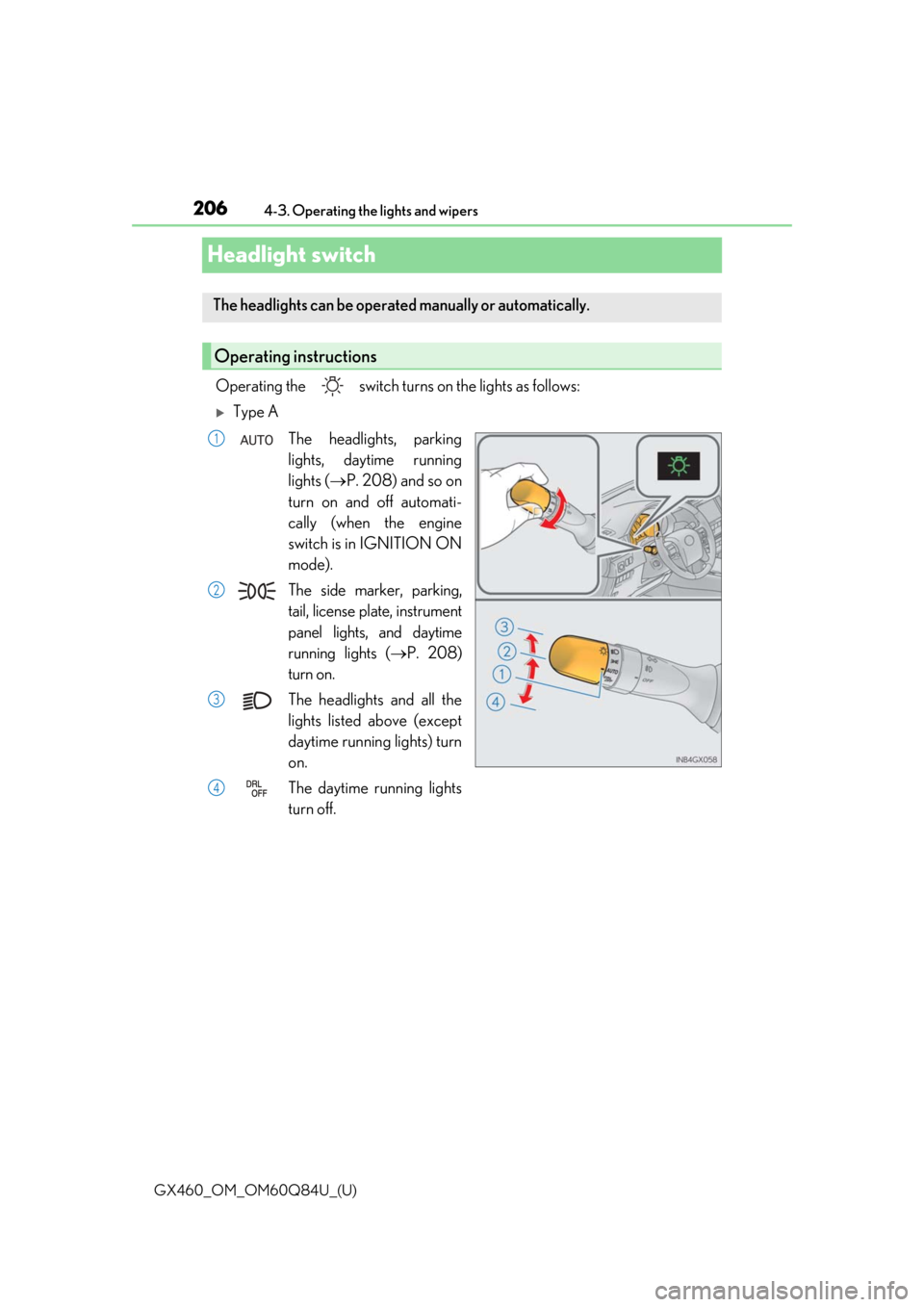
Operating the switch turn
s on the lights as follows:
Type A
The headlights, parking
lights, daytime running
lights ( P. 208) and so on
turn on and off automati-
cally (when the engine
switch is in IGNITION ON
mode).
The side marker, parking,
tail, license plate, instrument
panel lights, and daytime
running lights ( P. 208)
turn on.
The headlights and all the
lights listed above (except
daytime running lights) turn
on.
The daytime running lights
turn off.
The headlights can be operated manually or automatically.
Operating instructions
1
2
3
4
Page 207 of 636
GX460_OM_OM60Q84U_(U)
2074-3. Operating the lights and wipers
4
Driving
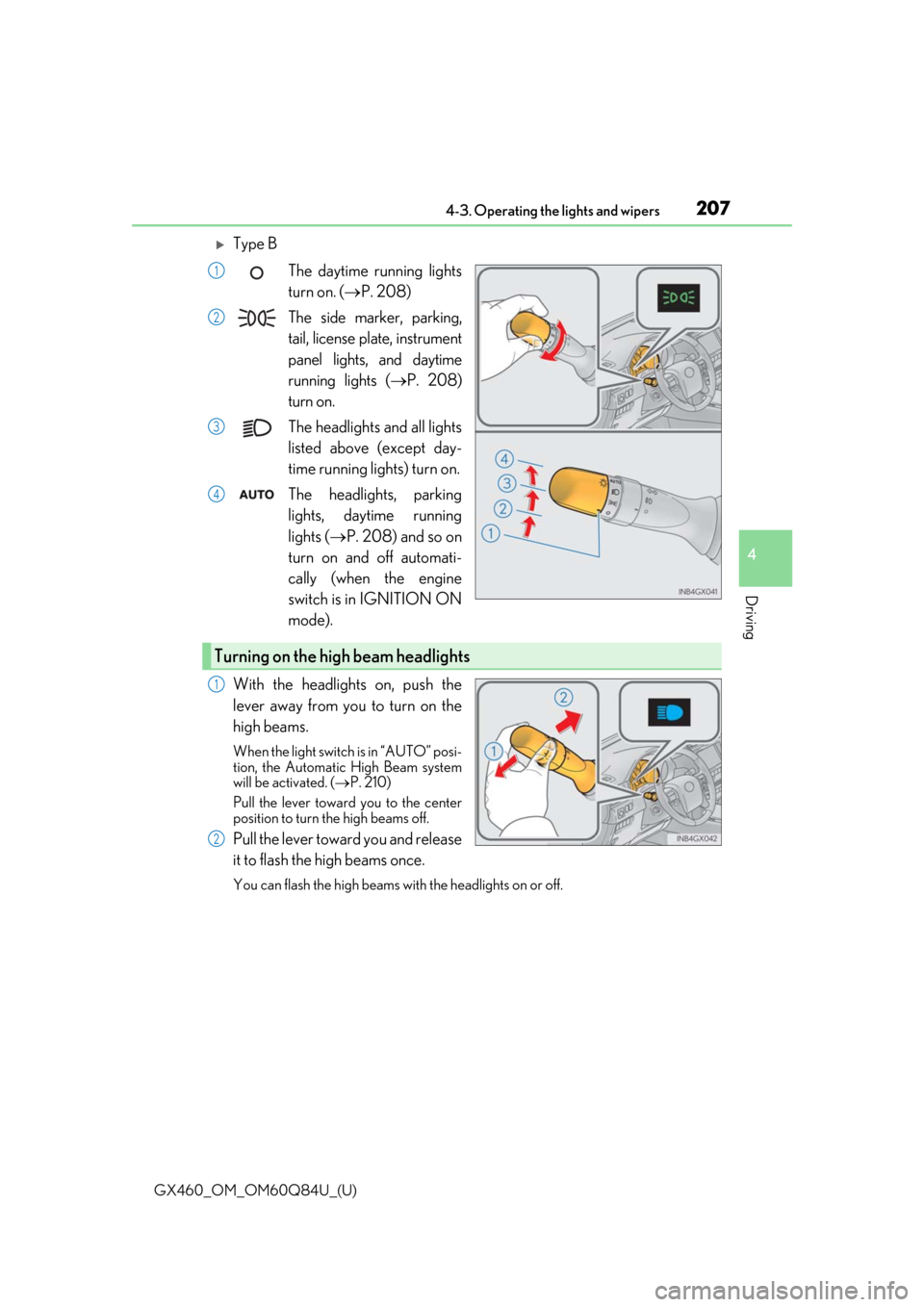
Type BThe daytime running lights
turn on. ( P. 208)
The side marker, parking,
tail, license plate, instrument
panel lights, and daytime
running lights ( P. 208)
turn on.
The headlights and all lights
listed above (except day-
time running lights) turn on.
The headlights, parking
lights, daytime running
lights ( P. 208) and so on
turn on and off automati-
cally (when the engine
switch is in IGNITION ON
mode).
With the headlights on, push the
lever away from you to turn on the
high beams.
When the light switch is in “AUTO” posi-
tion, the Automatic High Beam system
will be activated. ( P. 210)
Pull the lever toward you to the center
position to turn the high beams off.
Pull the lever toward you and release
it to flash the high beams once.
You can flash the high beams with the headlights on or off.
1
2
3
4
Turning on the high beam headlights
1
2