suspension Lexus GX460 2020 / LEXUS 2020 GX460 (OM60R27U) User Guide
[x] Cancel search | Manufacturer: LEXUS, Model Year: 2020, Model line: GX460, Model: Lexus GX460 2020Pages: 620, PDF Size: 12.41 MB
Page 191 of 620

GX460_OM_OM60R27U_(U)
1914-1. Before driving
4
Driving
■AVS (adaptive variable suspension system) (if equipped)
The suspension can be switched for improvement in driveability. (P. 339)
■Break-in schedule
If your vehicle is new or equipped with any new power train components (such as an
engine, transmission, differential or wheel bearing), Lexus recommends that you do not
tow a trailer until the vehicle has been driven for over 500 miles (800 km).
After the vehicle has been driven for over 500 miles (800 km), you can start towing.
However, for the next 500 miles (800 km), drive the vehicle at a speed of less than
50 mph (80 km/h) when towing a trailer, and avoid full throttle acceleration.
■Maintenance
●If you tow a trailer, your vehicle will require more frequent maintenance due to the addi-
tional load. (See “Owner’s Guide”, “Warranty and Services Guide”, “Owner’s Manual
Supplement” or “Warranty Booklet”.)
●Retighten the fixing bolts of the towing ba ll and bracket after approximately 600 miles
(1000 km) of trailer towing.
■If trailer sway occurs
One or more factors (crosswinds, passing ve hicles, rough roads, etc.) can adversely
affect handling of your vehicle and trailer, causing instability.
●If trailer swaying occurs:
• Firmly grip the steering wh eel. Steer straight ahead.
Do not try to control trailer sway ing by turning the steering wheel.
• Begin releasing the accelerator pedal im mediately but very gradually to reduce
speed.
Do not increase speed. Do not apply vehicle brakes.
If you make no extreme correction with the steering or brakes, your vehicle and trailer
should stabilize.
Page 236 of 620

236
GX460_OM_OM60R27U_(U)4-5. Using the driving support systems
◆Pre-collision braking
When the system determines that the po
ssibility of a frontal collision is high,
the system warns the driver. If the syst em determines that the possibility of a
frontal collision is extremely high, the br akes are automatically applied to help
avoid the collision or reduce the collision speed.
◆Suspension control (if equipped)
When the system determines that the po ssibility of a frontal collision is high,
the Adaptive Variable Suspension System ( P. 339) will control the damping
force of the shock absorbers to help ma intain an appropriate vehicle posture.
WARNING
■Limitations of the pre-collision system
●The driver is solely responsible for safe driving. Always drive safely, taking care to
observe your surroundings.
Do not use the pre-collision sy stem instead of normal braking operations under any
circumstances. This system will not preven t collisions or lessen collision damage or
injury in every situation. Do not overly rely on this system. Failure to do so may lead to
an accident, resulting in death or serious injury.
●Although this system is designed to help avoid a collision or help reduce the impact of
the collision, its effectivenes s may change according to various conditions, therefore
the system may not always be able to achieve the same level of performance.
Read the following conditions carefully. Do not overly rely on this system and always
drive carefully.
• Conditions under which the system may oper ate even if there is no possibility of a
collision: P. 240
• Conditions under which the system may not operate properly: P. 243
●Do not attempt to test the operation of the pre-collision system yourself.
Depending on the objects us ed for testing (dummies, cardboard objects imitating
detectable objects, etc.), the system may not operate properly, possibly leading to an
accident.
Page 248 of 620
248
GX460_OM_OM60R27U_(U)4-5. Using the driving support systems
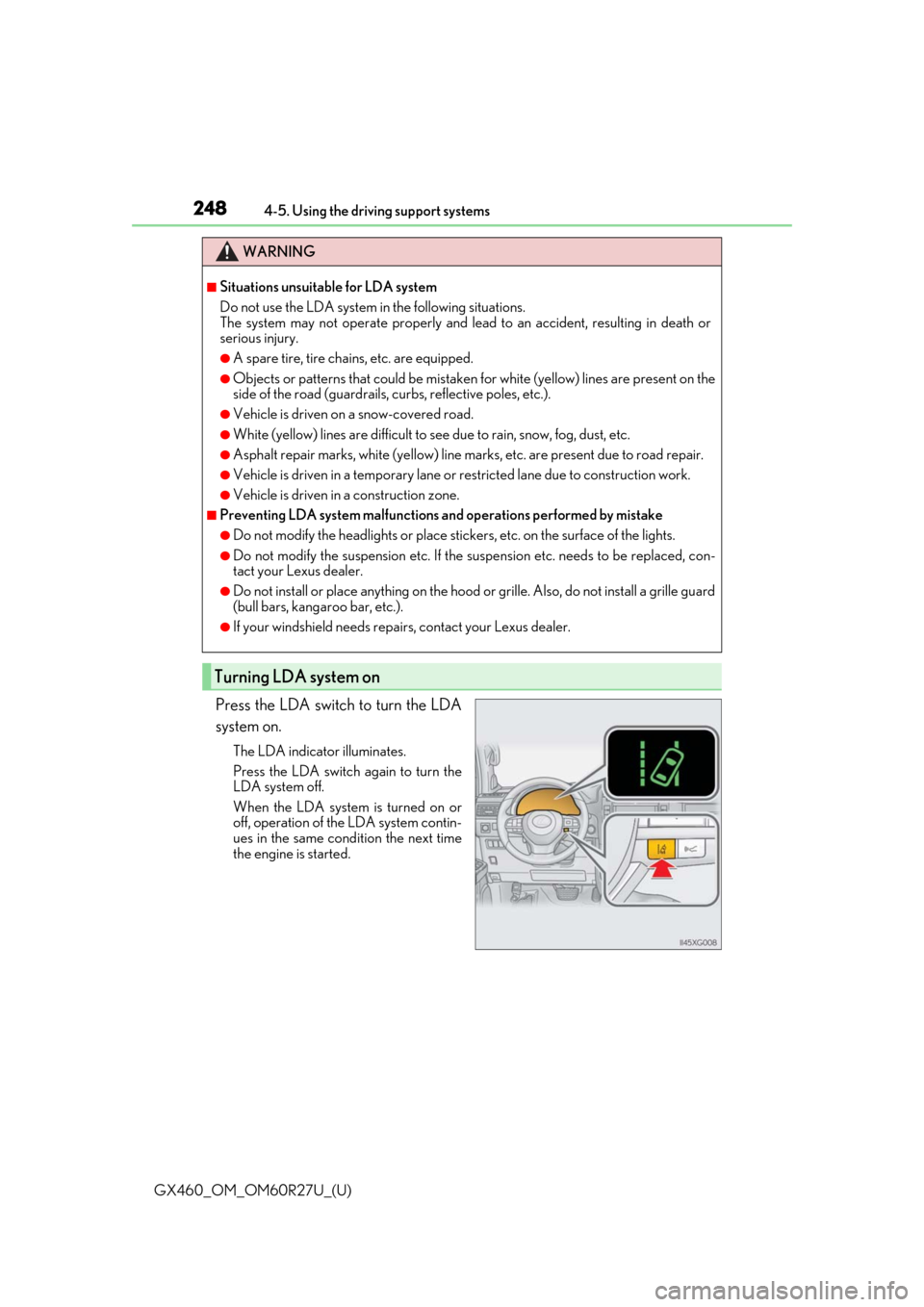
Press the LDA switch to turn the LDA
system on.
The LDA indicator illuminates.
Press the LDA switch again to turn the
LDA system off.
When the LDA system is turned on or
off, operation of the LDA system contin-
ues in the same cond
ition the next time
the engine is started.
WARNING
■Situations unsuitable for LDA system
Do not use the LDA system in the following situations.
The system may not operate properly and lead to an accident, resulting in death or
serious injury.
●A spare tire, tire chains, etc. are equipped.
●Objects or patterns that could be mistaken for white (yellow) lines are present on the
side of the road (guardrails, cu rbs, reflective poles, etc.).
●Vehicle is driven on a snow-covered road.
●White (yellow) lines are difficult to see due to rain, snow, fog, dust, etc.
●Asphalt repair marks, white (yellow) line marks, etc. are present due to road repair.
●Vehicle is driven in a temporary lane or restricted lane due to construction work.
●Vehicle is driven in a construction zone.
■Preventing LDA system malfunctions and operations performed by mistake
●Do not modify the headlights or place stickers, etc. on the surface of the lights.
●Do not modify the suspension etc. If the suspension etc. needs to be replaced, con-
tact your Lexus dealer.
●Do not install or place anything on the hood or grille. Also, do not install a grille guard
(bull bars, kangaroo bar, etc.).
●If your windshield needs repair s, contact your Lexus dealer.
Turning LDA system on
Page 271 of 620

GX460_OM_OM60R27U_(U)
2714-5. Using the driving support systems
4
Driving
■The intuitive parking assist can be operated when
●Front corner sensors:
• The engine switch is in IGNITION ON mode.
• The shift lever is in a position other than P.
• The vehicle speed is less than approximately 6 mph (10 km/h).
(At any speed when the shift lever is in R)
●Front center sensors:
• The engine switch is in IGNITION ON mode.
• The shift lever is in a position other than P or R.
• The vehicle speed is less than about 6 mph (10 km/h).
●Rear corner and rear center sensors:
• The engine switch is in IGNITION ON mode.
• The shift lever is in R.
■Intuitive parking assist display
When an obstacle is detected while the rear view monitor system, Lexus parking assist
monitor or Multi-terrain Monitor is in use, the warning indicator will appear in the upper
corner of the screen even if the display setting has been set to off.
■Sensor detection information
●The sensor’s detection areas are limited to the areas around the vehicle’s bumper.
●Certain vehicle conditions and the surrounding environment may affect the ability of a
sensor to correctly detect an obstacle. Pa rticular instances where this may occur are
listed below.
• There is dirt, snow or ice on the sensor . (Wiping the sensors will resolve this prob-
lem.)
• The sensor is frozen. (Thawing the area will resolve this problem.) In especially cold weather, if a sensor is frozen the screen may show an abnormal
display, or obstacles may not be detected.
• The sensor is covered in any way.
• The vehicle is leaning considerably to one side.
• On an extremely bumpy road, on an incline, on gravel, or on grass.
• The vicinity of the vehicle is noisy due to vehicle horns, motorcycle engines, air brakes of large vehicles, or other loud noises producing ultrasonic waves.
• There is another vehicle equipped with parking assist sensors in the vicinity.
• The sensor is coated with a sheet of spray or heavy rain.
• The vehicle is equipped with a fender pole or wireless antenna.
• The bumper or sensor re ceives a strong impact.
• The vehicle is approaching a tall or curved curb.
• In harsh sunlight or intense cold weather.
• The area directly under the bumpers is not detected.
• If obstacles draw too close to the sensor.
• A non-genuine Lexus suspension (low ered suspension etc.) is installed.
• People may not be detected if they are wearing certain types of clothing.
In addition to the examples above, there ar e instances in which, because of their shape,
signs and other objects may be judged by a sensor to be closer than they are.
Page 319 of 620
GX460_OM_OM60R27U_(U)
3194-5. Using the driving support systems
4
Driving
Observe the following precautions. Failure to do so may result in an unexpected
accident. Also, when driving, make sure to directly confirm the safety of your sur-
roundings and the area to the rear of the vehicle.
When using the Multi-terrain Monitor
WARNING
■Conditions under which the Multi-te rrain Monitor should not be used
Do not use the Multi-terrain Monitor in the following situations. The system may not
operate properly, resulting in an unexpected accident.
●When driving on an icy, snow-covered or otherwise slippery road surface
●When using tire chains or a spare tire
●When either front door or the back door is not completely closed
●When driving on an uneven road, such as a hill
●When tires or suspension parts other than those specified are equipped
When the tires are replaced, the position indicated by the guide lines displayed on the
screen may differ.
■Guide lines
The tire position indicator lines and vehicl e position indicator lines may differ from
actual vehicle positions depending on the number of passengers, cargo weight, road
grade, road surface conditions, brightness of the surrounding environment, etc. Always
drive the vehicle while confirming the safety of your surroundings.
Page 335 of 620
335
GX460_OM_OM60R27U_(U)4-5. Using the driving support systems
4
Driving
Rear height control air suspension
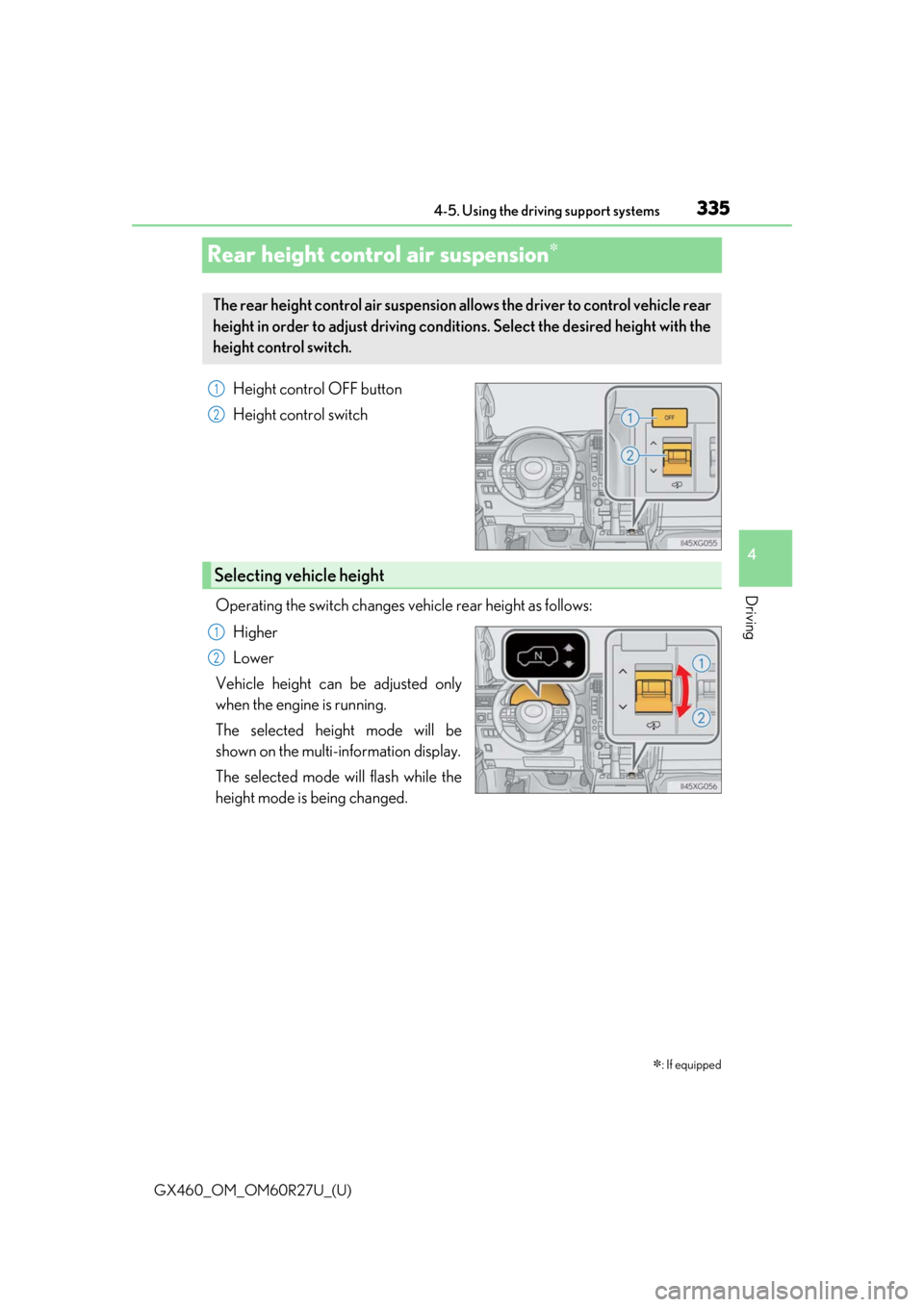
Height control OFF button
Height control switch
Operating the switch changes ve hicle rear height as follows:
Higher
Lower
Vehicle height can be adjusted only
when the engine is running.
The selected height mode will be
shown on the multi-information display.
The selected mode will flash while the
height mode is being changed.
: If equipped
The rear height control air suspension allows the driver to control vehicle rear
height in order to adjust driving condit ions. Select the desired height with the
height control switch.
1
2
Selecting vehicle height
1
2
Page 337 of 620

GX460_OM_OM60R27U_(U)
3374-5. Using the driving support systems
4
Driving
■When HI mode is selected
The vehicle height will change to N mode when driving at the speeds of 18 mph (30 km/h).
Even if vehicle speed is then reduced to un der 18 mph (30 km/h), height will not return to
HI mode.
■When LO mode is selected
The vehicle height will change to N mode when vehicle speed exceeds 7 mph (12 km/h).
Even if vehicle speed is then reduced to un der 7 mph (12 km/h), height will not return to
LO mode.
■Automatic leveling function
Regardless of the number of occupants and the luggage load, vehicle height in any mode
is always adjusted to a fixed height by the automatic leveling function.
■The rear height control air suspension will not operate in the following cases:
●The underbody of the vehicle is touching the surface of the road.
●The area around the suspension is covered with ice.
■Even if you hear an operating noise
This does not indicate a problem in th e rear height control air suspension.
■Parking and stopping tips
●If you immediately stop the engine after off- road driving, or park the vehicle for a long
time, the vehicle height may gradually lower. When parking, make sure there is nothing
under the vehicle that may come in contact with the underbody. The vehicle will return
to the set height when the engine is started.
●The vehicle height may change as the temperature changes when the engine is
stopped. The vehicle will return to the set height when the engine is started.
■When lowering the vehicle
In order to prevent the vehicle height from rising as occupants leave the vehicle, lowering
control will occur for a short while after the engine has been stopped.
■The rear height control air suspension failure warning
●If a malfunction occurs in the rear height control air suspension, N mode is automati-
cally selected. However, the system may not switch to N mode depending on the loca-
tion of the malfunction.
●The “CHECK AIR SUSPENSION SYSTEM”/“C heck air suspension system” is dis-
played on the multi-information display, and the rear height control air suspension can-
not be activated until the malfunction is corrected.
Stop the engine and start it again. If the warning message turns off, the system is operat-
ing correctly. If the warning message continues to be displayed, have your vehicle
inspected by your Lexus dealer as soon as possible.
Page 338 of 620
338
GX460_OM_OM60R27U_(U)4-5. Using the driving support systems
WARNING
■The rear height control air suspension must be turned off
Be sure to observe the following precautions. Otherwise, the automatic leveling func-
tion may cause vehicle height to change, an
d you may catch part of your body in the
vehicle, resulting in an accident:
●When jacking up the vehicle, installing tire chains or tying the vehicle with chains/
wires for transportation via flatbed truck, tu rn off the rear height control air suspen-
sion and stop the engine.
●When the vehicle must be towed or disconnect ing a trailer, put the vehicle height in N
mode and turn off the rear he ight control air suspension.
●When the vehicle is stuck, turn off the rear height control air suspension.
■Selecting the correct height mode
●HI mode should only be used when drivin g on rough roads, for example when driving
off-road.
Because the vehicle’s center of gravity will become higher when in the mode, the
vehicle may become unstable when turnin g abruptly, resulting in an accident.
●Do not select HI mode when loading cargo on the roof luggage carrier.
Because the vehicle’s center of gravity will become higher when in the mode, the
vehicle may become unstable when turnin g abruptly, resulting in an accident.
●Before lowering vehicle height, check that there is no one under the vehicle.
NOTICE
■Be careful in any place where overhead space is limited
The vehicle height will rise when a higher mode is selected or cargo is unloaded. This
may cause damage to the vehicle.
■Do not select LO mode when driving on bumpy roads
If the underbody of the vehicle touches a rugged road surface, the vehicle may be
damaged.
■Changing vehicle height
Do not change vehicle height frequently.
The compressor may overheat and stop operation.
■When on the extremely uneven roads with rocks
Sometimes the vehicle height is not adjusted because it is judged as uneven road driv-
ing.
Page 339 of 620
339
GX460_OM_OM60R27U_(U)4-5. Using the driving support systems
4
Driving
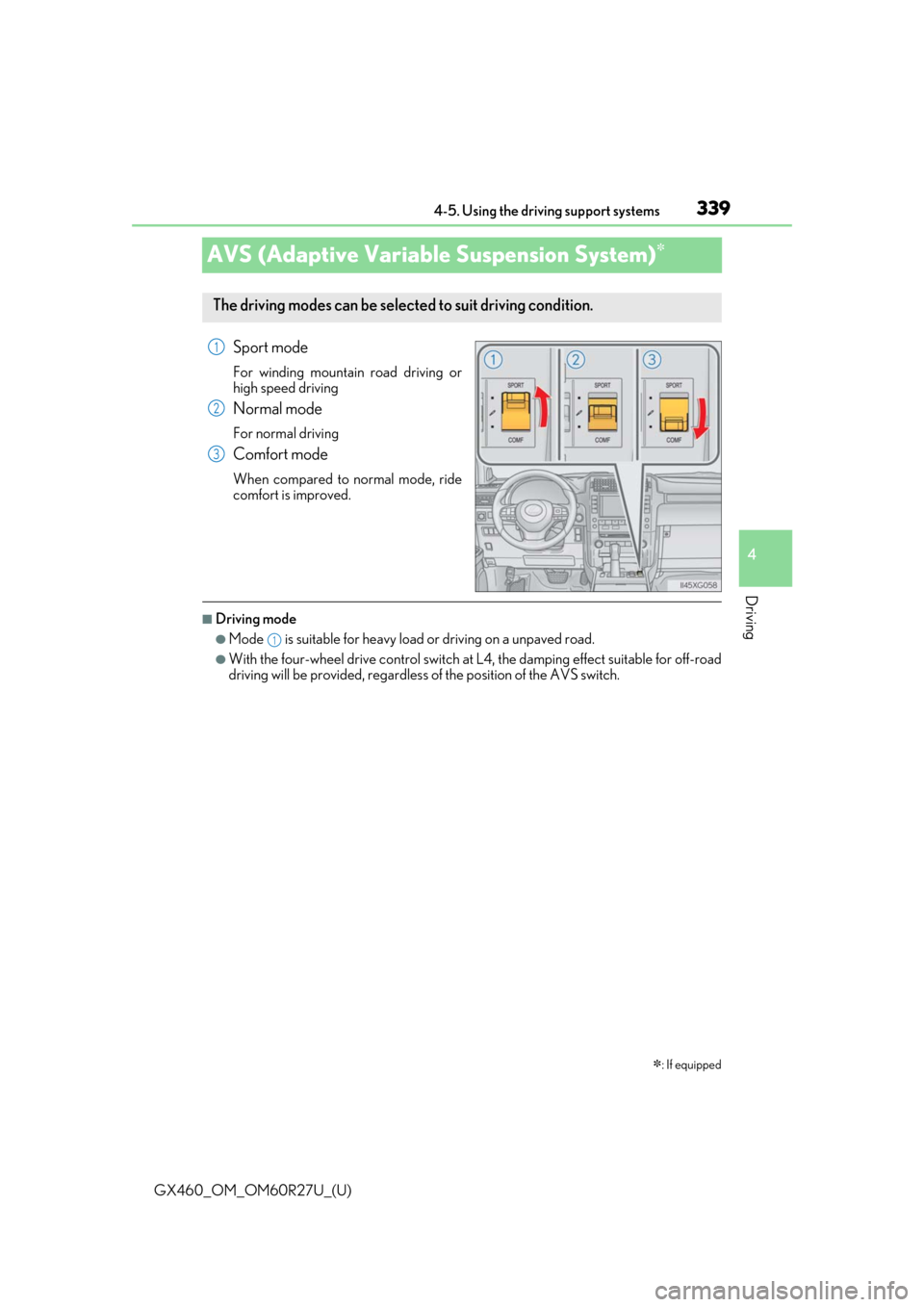
AVS (Adaptive Variable Suspension System)
Sport mode
For winding mountain
road driving or
high speed driving
Normal mode
For normal driving
Comfort mode
When compared to normal mode, ride
comfort is improved.
■Driving mode
●Mode is suitable for heavy load or driving on a unpaved road.
●With the four-wheel drive control switch at L4, the damping effect suitable for off-road
driving will be provided, regardless of the position of the AVS switch.
: If equipped
The driving modes can be selected to suit driving condition.
1
2
3
1
Page 352 of 620
352
GX460_OM_OM60R27U_(U)4-5. Using the driving support systems
◆Active TRAC (Traction Control) for L4 position*
Helps to maintain drive power and prevent the 4 wheels from spinning when starting
the vehicle or accelerating on slippe
ry roads, or in off-road conditions
*: The function only works in vehicles with Multi-terrain Sele ct when Multi-terrain
Select is switched on
◆Hill-start assist control
Helps to prevent the vehicle from rolling back ward when starting on an incline or slip-
pery slope
◆KDSS (Kinetic Dynamic Suspension System)
KDSS helps to enhance ride comfort and hand ling response by using a hydraulic con-
trol system to control the su spension stabilizer bars in response to road surface and
driving conditions during co rnering or off-road driving
◆Trailer Sway Control
Helps the driver to control trailer sway by selectively applying brake pressure for indi-
vidual wheels and reducing driving torque when trailer sway is detected.
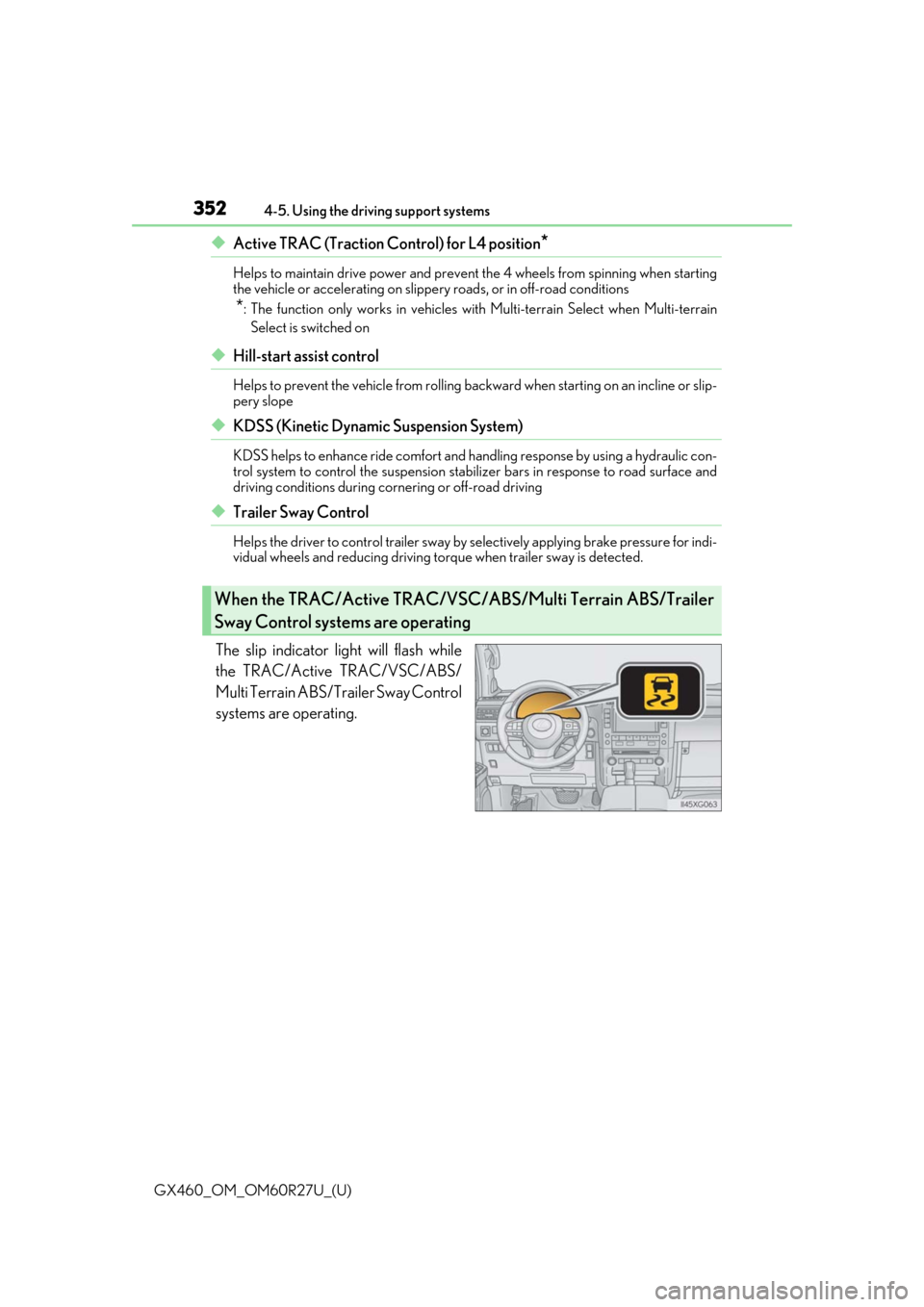
The slip indicator light will flash while
the TRAC/Active TRAC/VSC/ABS/
Multi Terrain ABS/Trailer Sway Control
systems are operating.
When the TRAC/Active TRAC/VSC/ABS/Multi Terrain ABS/Trailer
Sway Control systems are operating