Media Lexus GX470 2008 User Guide
[x] Cancel search | Manufacturer: LEXUS, Model Year: 2008, Model line: GX470, Model: Lexus GX470 2008Pages: 458, PDF Size: 5.93 MB
Page 145 of 458

144
2-4. Using other driving systems
■Cruise control can be set when
●The shift lever is in “D” or “4”.
●Vehicle speed is between approximately 25 mph (40 km/h) and 125 mph
(200 km/h).
■Accelerating
The vehicle can be accelerated normally. After acceleration, the set speed
resumes.
■Automatic cruise control cancelation
The set speed is automatically canceled in any of the following situations.
●Actual vehicle speed falls more than 10 mph (16 km/h) below the preset vehicle
speed
●Actual vehicle speed is below 25 mph (40 km/h)
●VSC is activated
■If the cruise control indicator light flashes
Turn the “ON-OFF” button off once, and then reactivate the system.
If the cruise control speed cannot be set or if the cruise control cancels immediately
after being activated, there may be a malfunction in the cruise control system. Have
the vehicle inspected by your Lexus dealer.
Page 154 of 458

153
2-4. Using other driving systems
2
When driving
■If the vehicle height does not change
If the area around the rear suspension is coated with ice, or the undercarriage has
come into contact with the road surface, the rear height control suspension will not
operate. In this case, the indicator lights will change as follows:
●The current mode indicator light will turn off, and the target mode indicator light
will begin flashing.
●The target mode indicator light will turn off, and the original mode indicator light
will be lit once more. (The vehicle height does not change.)
If the rear height control air suspension cannot be operated even after removing
the ice or progressing to a smooth driving surface, turn off and restart the engine.
■ Parking and stopping tips
●If you immediately stop the engine after off-road driving, or park the vehicle for
a long time, the vehicle height may gradually lower. When parking, make sure
there is nothing under the vehicle that may come in contact with the underbody.
The vehicle will return to the set height when the engine is started.
●The vehicle height may change as the temperature changes when the engine is
stopped. The vehicle will return to the set height when the engine is started.
■When lowering the vehicle
Even if the engine is stopped while the vehicle height is being lowered, operation
will continue for up to 25 seconds. If any of the side doors or the back door is
opened within this 25 seconds, operation will continue for a further 15 seconds.
■ Rear height control failure warning
●If a malfunction occurs in the rear height control air suspension, normal mode is
automatically selected.
The height control “OFF” indicator will blink, and the vehicle height control can-
not be activated until the malfunction is corrected. Have the vehicle checked at
your Lexus dealer as soon as possible.
●If the height control “OFF” indicator lig ht does not come on when the engine
switch is turned to the “ON” position, there is a malfunction in the rear height
control air suspension. You can continue normal driving, however have the vehi-
cle checked by your Lexus dealer as soon as possible.
Page 167 of 458
166
2-5. Driving information
CAUTION
■Off-road driving precautions
Always observe the following precautions to minimize the risk of serious personal
injury or damage to your vehicle:
●Drive carefully when off the road. Do not take unnecessary risks by driving in
dangerous places.
●Do not grip the steering wheel spokes when driving off-road. A bad bump could
jerk the wheel and injure your hands. Keep both hands and especially your
thumbs on the outside of the rim.
●Always check your brakes for effectiveness immediately after driving in sand,
mud, water or snow.
●After driving through tall grass, mud, rock, sand, rivers, etc., check that there is no
grass, bush, paper, rags, stone, sand, etc. adhering or trapped on the underbody.
Clear off any such matter from the underbody. If the vehicle is used with these
materials trapped or adhering to the underbody, a breakdown or fire could occur.
●When driving off-road or in rugged terrain, do not drive at excessive speeds,
jump, make sharp turns, strike objects, etc. This may cause loss of control or vehi-
cle rollover causing death or serious injury. You are also risking expensive dam-
age to your vehicle’s suspension and chassis.
NOTICE
■To prevent the water damage
Take all necessary safety measures to ensure that water damage to the engine or
other components does not occur.
●Water entering the engine air intake will cause severe engine damage.
●Water entering the automatic transmission will cause deterioration in shift quality,
locking up of your transmission accompanied by vibration, and ultimately dam-
age.
●Water can wash the grease from wheel bearings, causing rusting and premature
failure, and may also enter the differentials, transmission and transfer case, reduc-
ing the gear oil’s lubricating qualities.
Page 177 of 458
176
2-5. Driving information
Winter driving tips
Carry out the necessary preparations and inspections before driving the
vehicle in winter. Always drive the vehicle in a manner appropriate to the
prevailing weather conditions.
■Pre-winter preparations
●Use fluids that are appropriate to the prevailing outside tempera-
tures.
• Engine oil
• Engine coolant
• Washer fluid
● Have a service technician inspect the level and specific gravity of
battery electrolyte.
● Have the vehicle fitted with four snow tires or purchase a set of
tire chains for the rear tires.
Ensure that all tires are the same size and brand, and that chains match
the size of the tires.
■ Before driving the vehicle
Perform the following according to the driving conditions.
●Do not try to forcibly open a window or move a wiper that is fro-
zen. Pour warm water over the frozen area to melt the ice. Wipe
away the water immediately to prevent it from freezing.
● To ensure proper operation of the climate control system fan,
remove any snow that has accumulated on the air inlet vents in
front of the windshield.
● Remove any ice that has accumulated on the vehicle chassis.
● Periodically check for and remove any excess ice or snow that
may have accumulated in the wheel well or on the brakes.
Page 189 of 458

188
2-5. Driving information
●Note that when making a turn, the trailer wheels will be closer than the
vehicle wheels to the inside of the turn. Compensate by making a
larger than normal turning radius.
● Crosswinds and rough roads will adversely affect handling of your
vehicle and trailer, causing sway. Periodically check the rear to prepare
for being passed by large trucks or buses, which may cause your vehi-
cle and trailer to sway. If swaying occurs, firmly grip the steering wheel,
reduce speed immediately but gradually, and steer straight ahead.
Never increase speed. If you make no extreme correction with the
steering or brakes, your vehicle and trailer will stabilize.
● Take care when passing other vehicles. Passing requires considerable
distance. After passing a vehicle, do not forget the length of your
trailer, and be sure you have plenty of room before changing lanes.
● In order to maintain efficient engine braking and electrical charging
performance, do not use overdrive. Transmission shift range position
must be in “4”.
● Due to the added load of the trailer, your vehicle’s engine may overheat
on hot days (at temperatures over 85°F [30°C] when driving up a
long or steep grade. If the engine coolant temperature gauge indicates
overheating, immediately turn off the air conditioning (if in use), pull
your vehicle off the road and stop in a safe spot. (
→P. 4 0 8 )
Page 197 of 458

196
3-1. Using the air conditioning system and defogger
■Using the automatic mode
Fan speed is adjusted automatically in accordance with the temperature setting and
ambient conditions. As a result, the following may occur.
●The system may switch automatically to recirculated mode when the coolest
temperature setting is selected in summer.
●Immediately after the switch is pressed, the fan may stop for a while until warm
or cool air is ready to flow.
●Cool air may flow to the area around the upper body when the heater is on.
■Using the system in recirculated air mode
The windows will fog up more easily if the recirculated air mode is used for an
extended period.
■Window defogger feature
Recirculated air mode may automatically switch to
(outside air) mode in situ-
ations where the windows need to be defogged.
■Outside temperature approaches 32 °F (0 °C).
The air conditioning system may not operate even when is pressed.
■When the indicator light on flashes
Press
and turn off the air conditioning system before turning it on once more.
There may be a problem in the air conditioning system if the indicator light contin-
ues to flash. Turn the air conditioning system off and have it inspected by your Lexus
dealer.
Page 221 of 458
220
3-2. Using the audio system
■Canceling random, repeat and scan play
Press (RAND, RPT), or again.
■Error messages
→P. 2 1 4
■CD player protection feature
To protect the internal components, playback is automatically stopped when a
problem is detected while the CD player is being used.
■If CDs are left inside the CD player or in the ejected position for extended peri-
ods
CDs may be damaged and may not play properly.
■Lens cleaners
Do not use lens cleaners. Doing so may damage the CD player.
■MP3 and WMA files
MP3 (MPEG Audio LAYER 3) is a standard audio compression format.
Files can be compressed to approximately 1 /10 of their original size by using MP3
compression.
WMA (Windows Media
TMAudio) is a Microsoft audio compression format.
This format compresses audio data to a size smaller than that of the MP3 format.
There is a limit to the MP3 and WMA file standards and to the media/formats
recorded by them that can be used.
●MP3 file compatibility
• Compatible standards MP3 (MPEG1 LAYER3, MPEG2 LSF LAYER3)
• Compatible sampling frequencies MPEG1 LAYER3: 32, 44.1, 48 (kHz)
MPEG2 LSF LAYER3: 16, 22.05, 24 (kHz)
• Compatible bit rates MPEG1 LAYER3: 64, 80, 96, 112, 128, 160, 192, 224, 256, 320 (kbps)
• MPEG2 LSF LAYER3: 64, 80, 96, 112, 128, 144, 160 (kbps)
*: Compatible with VBR
• Compatible channel modes: stereo, joint stereo, dual channel and monaural
Page 222 of 458
221
3-2. Using the audio system
3
Interior features
●WMA file compatibility
• Compatible standardsWMA Ver. 7, 8, 9
• Compatible sampling frequencies 32, 44.1, 48 (kHz)
• Compatible bit rates Ver. 7, 8: CBR 48, 64, 80, 96, 128, 160, 192 (kbps)
Ver. 9: CBR 48, 64, 80, 96, 128, 160, 192, 256, 320 (kbps)
*: Only compatible with 2-channel playback
●Compatible media
Media that can be used for MP3 and WMA playback are CD-Rs and CD-RWs.
Playback in some instances may not be possible, depending on the status of the
CD-R or CD-RW. Playback may not be possible or the audio may jump if the disc
is scratched or marked with fingerprints.
●Compatible disc formats
The following disc formats can be used.
• Disc formats: CD-ROM Mode 1 and Mode 2
CD-ROM XA Mode 2, Form 1 and Form 2
• File formats: ISO9660 level 1, level 2, (Romeo, Joliet) MP3 and WMA files written in any format other than those listed above may
not play correctly, and their file names and folder names may not be dis-
played correctly.
Items related to standards and limitations are as follows:
• Maximum directory hierarchy: 8 levels
• Maximum length of folder names/file names: 32 characters
• Maximum number of folders: 192 (including the root)
• Maximum number of files per disc: 255
●File names
The only files that can be recognized as MP3/WMA and played are those with
the extension .mp3 or .wma.
●Multi-sessions
As the audio system is compatible with multi-sessions, it is possible to play discs
that contain MP3 and WMA files. However, only the first session can be played.
Page 223 of 458
222
3-2. Using the audio system
●ID3 and WMA tags
ID3 tags can be added to MP3 files, making it possible to record the track title
and artist name, etc.
The system is compatible with ID3 Ver. 1.0, 1.1, and Ver. 2.2, 2.3 ID3 tags. (The
number of characters is based on ID3 Ver. 1.0 and 1.1.)
WMA tags can be added to WMA files, making it possible to record the track
title and artist name in the same way as with ID3 tags.
●MP3 and WMA playback
When a disc containing MP3 or WMA files is inserted, all files on the disc are first
checked. Once the file check is finished, the first MP3 or WMA file is played. To
make the file check finish more quickly, we recommend you do not write in any
files other than MP3 or WMA files or create any unnecessary folders.
Discs that contain a mixture of music data and MP3 or WMA format data cannot
be played.
●Extensions
If the file extensions .mp3 and .wma are used for files other than MP3 and WMA
files, they will be mistakenly recognized and played as MP3 and WMA files. This
may result in large amounts of interference and damage to the speakers.
●Playback
• To play MP3 files with steady sound quality, we recommend a fixed bit rate of 128 kbps and a sampling frequency of 44.1 kHz.
• CD-R or CD-RW playback may not be possible in some instances, depend- ing on the characteristics of the disc.
• There is a wide variety of freeware and other encoding software for MP3 and WMA files on the market, and depending on the status of the encoding
and the file format, poor sound quality or noise at the start of playback may
result. In some cases, playback may not be possible at all.
• When files other than MP3 or WMA files are recorded on a disc, it may take more time to recognize th e disc and in some cases, playback may not be
possible at all.
• Microsoft, Windows, and Windows Media are the registered trademarks of Microsoft Corporation in the U.S. and other countries.
Page 289 of 458
288
3-6. Other interior features
Wait a few seconds until the compass direction is displayed.
The calibration is complete.
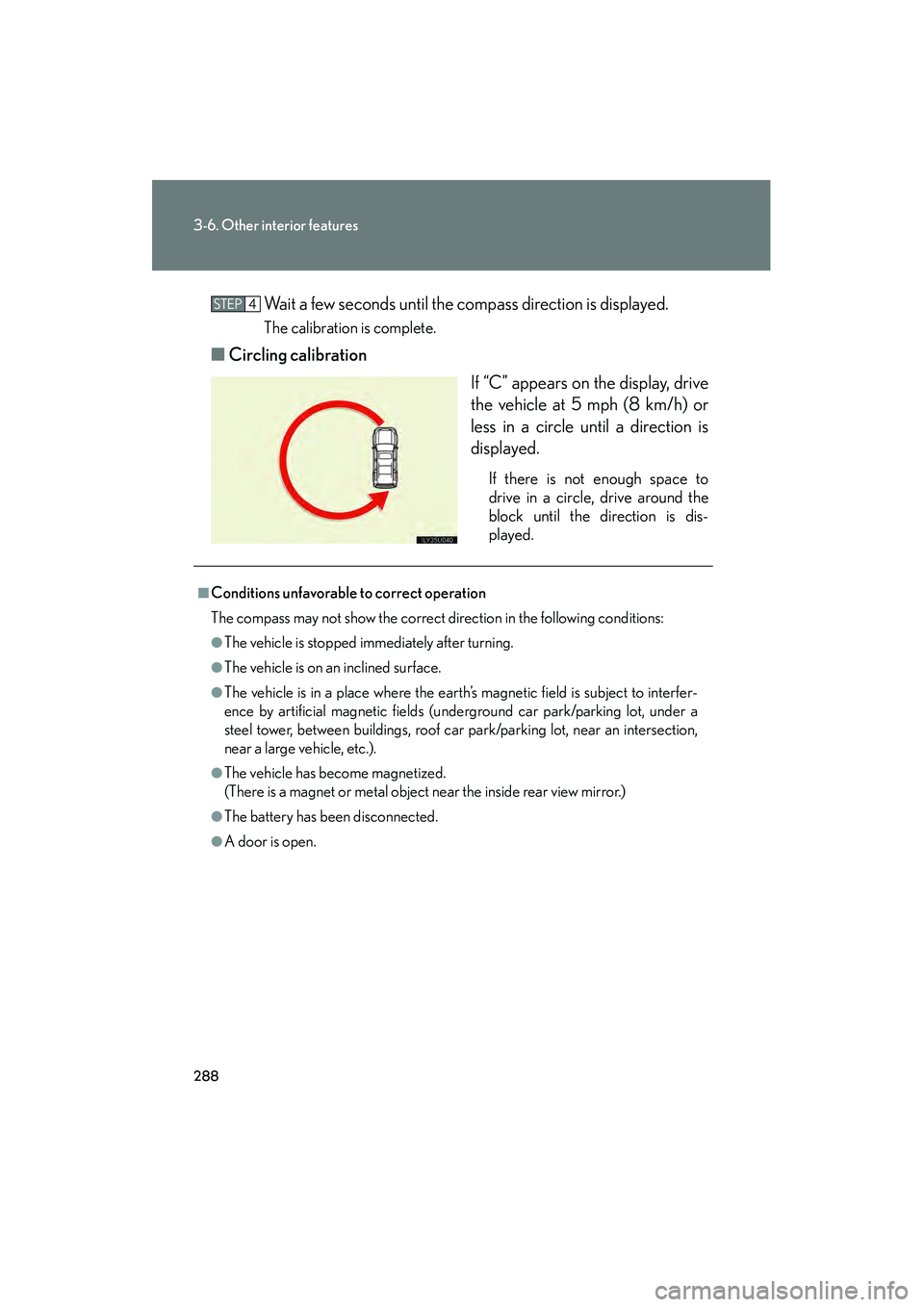
■Circling calibration
If “C” appears on the display, drive
the vehicle at 5 mph (8 km/h) or
less in a circle until a direction is
displayed.
If there is not enough space to
drive in a circle, drive around the
block until the direction is dis-
played.
STEP4
■Conditions unfavorable to correct operation
The compass may not show the correct direction in the following conditions:
●The vehicle is stopped immediately after turning.
●The vehicle is on an inclined surface.
●The vehicle is in a place where the earth’s magnetic field is subject to interfer-
ence by artificial magnetic fields (underground car park/parking lot, under a
steel tower, between buildings, roof car park/parking lot, near an intersection,
near a large vehicle, etc.).
●The vehicle has become magnetized.
(There is a magnet or metal object near the inside rear view mirror.)
●The battery has been disconnected.
●A door is open.