seat Lexus GX470 2008 Manual Online
[x] Cancel search | Manufacturer: LEXUS, Model Year: 2008, Model line: GX470, Model: Lexus GX470 2008Pages: 458, PDF Size: 5.93 MB
Page 227 of 458
226
3-2. Using the audio system
Changing the listening position (For a Mark Levinson brand audio
system is not available)
The speaker balance can be changed to produce the best sound for
each listening position.
Turn the dial while “POS” is shown on the display.
The listening position changes as follows each time the switch is
touched.
DisplayListening position
DRIVERPosition best suited to the driver’s seat
FRONTPosition best suited to the driver’s and front passen-
ger’s seat
REARPosition best suited to the rear seats
ALLPosition best suited to all seats
Page 232 of 458

231
3
Interior features
3-3. Using the rear audio system
Rear seat entertainment system features (if equipped)
The rear seat entertainment system is designed for the rear passengers to
enjoy audio and DVD video separately from the front audio system.
Front audio system
Display
DVD pla yer
Power outlet
Headphone volume control dials, headphone jacks and A/V input
adapter
Rear seat entertainment system controller
Power outlet main switch
Page 233 of 458
232
3-3. Using the rear audio system
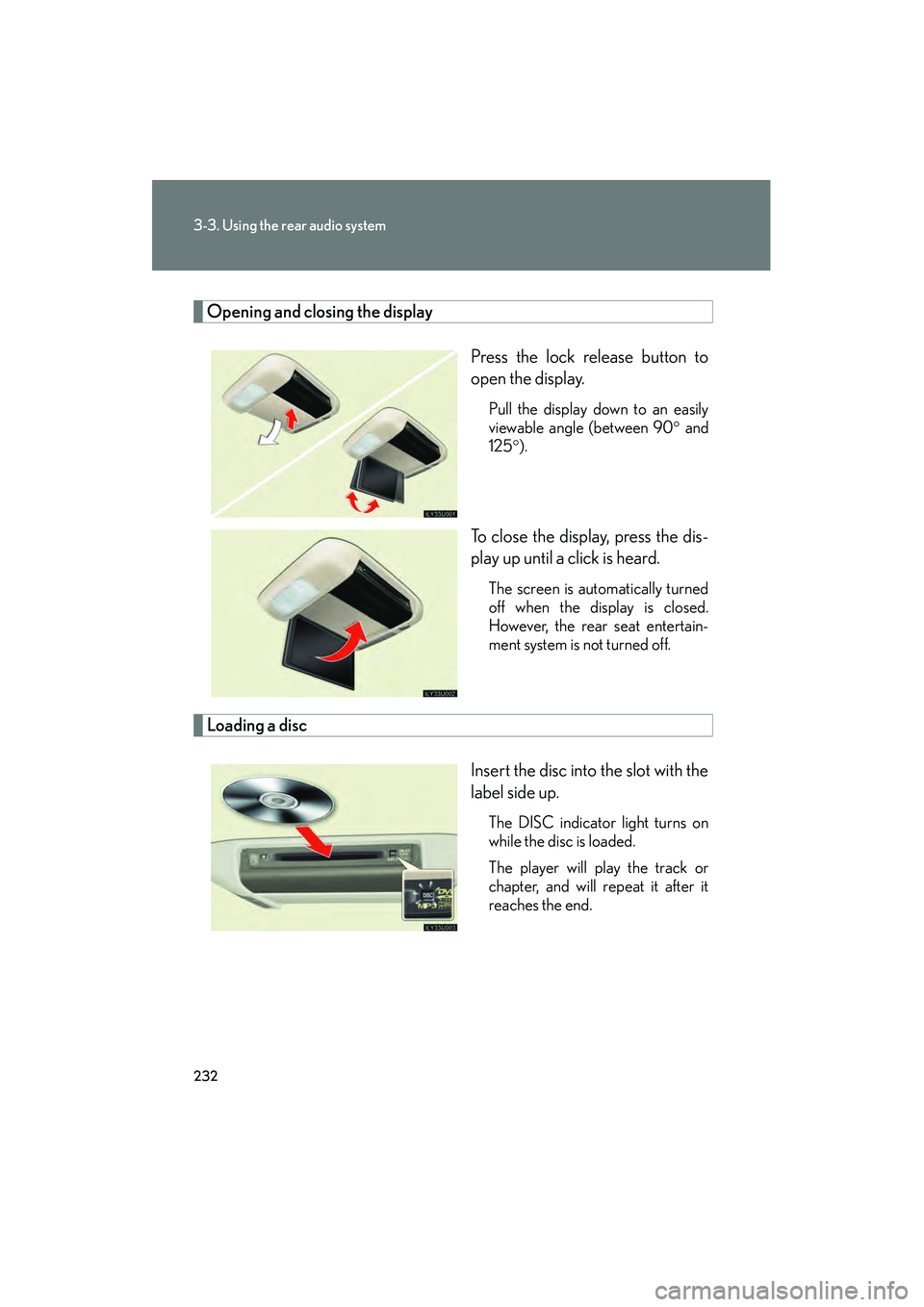
Opening and closing the displayPress the lock release button to
open the display.
Pull the display down to an easily
viewable angle (between 90° and
125° ).
To close the display, press the dis-
play up until a click is heard.
The screen is automatically turned
off when the display is closed.
However, the rear seat entertain-
ment system is not turned off.
Loading a disc
Insert the disc into the slot with the
label side up.
The DISC indicator light turns on
while the disc is loaded.
The player will play the track or
chapter, and will repeat it after it
reaches the end.
Page 235 of 458

234
3-3. Using the rear audio system
■The rear seat entertainment system can be used when
The engine switch is in the “ACC” or “ON” position.
■Discs that can be used
Discs with the marks shown below can be used.
Playback may not be possible depending on recording format or disc features, or
due to scratches, dirt or deterioration.
■When appears on the screen
This indicates that the selected operation is not currently available.
■Error messages
DISC CHECK: Indicates that the disc is dirty, damaged or was inserted upsidedown. Clean the disc or insert it correctly.
REGION ERROR: Indicates that the DVD region code is incorrect.
DVD ERROR: Indicates that there is a problem inside the player. Eject the disc, then reinsert it. If this problem persists, see your Lexus dealer.
If the malfunction still exists, take the vehicle to your Lexus
dealer.
■Before using the remote control (for new vehicle owners)
An insulating sheet is set to prevent the bat-
teries from being discharged. Remove the
insulating sheet before using the remote con-
trol.
Page 236 of 458

235
3-3. Using the rear audio system
3
Interior features
■Headphones
Some headphones may not receive signals from the system clearly. Lexus recom-
mends the use of Lexus genuine wireless headphones.
Please contact your Lexus dealer for further details.
■Vo l u m e
●Adjust the volume when you connect the headphones to the jack. Loud sounds
may have a significant impact on the human body.
●Conversational speech on some DVDs is recorded at a low volume to emphasize
the impact of sound effects. If you adjust the volume assuming that the conversa-
tions represent the maximum volume level that the DVD will play, you may be
startled by louder sound effects or when you change to a different audio source.
Be sure to adjust the volume with this in mind.
CAUTION
■While driving
Do not use headphones.
Doing so may cause an accident, resulting in death or serious injury.
■When the rear seat entertainment system is not used
Keep the display closed.
In the event of an accident or sudden braking, the opened display may hit an occu-
pant’s body, resulting in injury.
■To prevent accidents and electric shock
Do not disassemble or modify the remote control.
■When the remote control is not used
Stow the remote control to the remote control case.
Injuries may result in the event of an accident or sudden braking.
Page 249 of 458

248
3-3. Using the rear audio system
Using the video mode
Using the adapterOpen the cover.
The A/V input adapter is com-
posed of 3 input adapters.
Yellow: Image input adapter
White: Audio input adapter
Red: Audio input adapter
Press to select the video
mode.
Before switching to the video
mode, connect the audio
machine to the input terminal
adapter.
■A/V input adapter
The rear seat entertainment system plays videos and sound when audio-video
equipment is connected to the A/V input adapter. For details, refer to the manufac-
turer’s instructions.
■Po w e r o u t l e t
The power outlet is used to connect the audio device. ( →P. 2 7 2 )
NOTICE
■When the A/V input adapter is not in use
Keep the A/V input adapter cover closed.
Inserting anything other than an appropriate plug may cause electrical failure or
short circuit.
Page 259 of 458
258
3-4. Using the interior lights
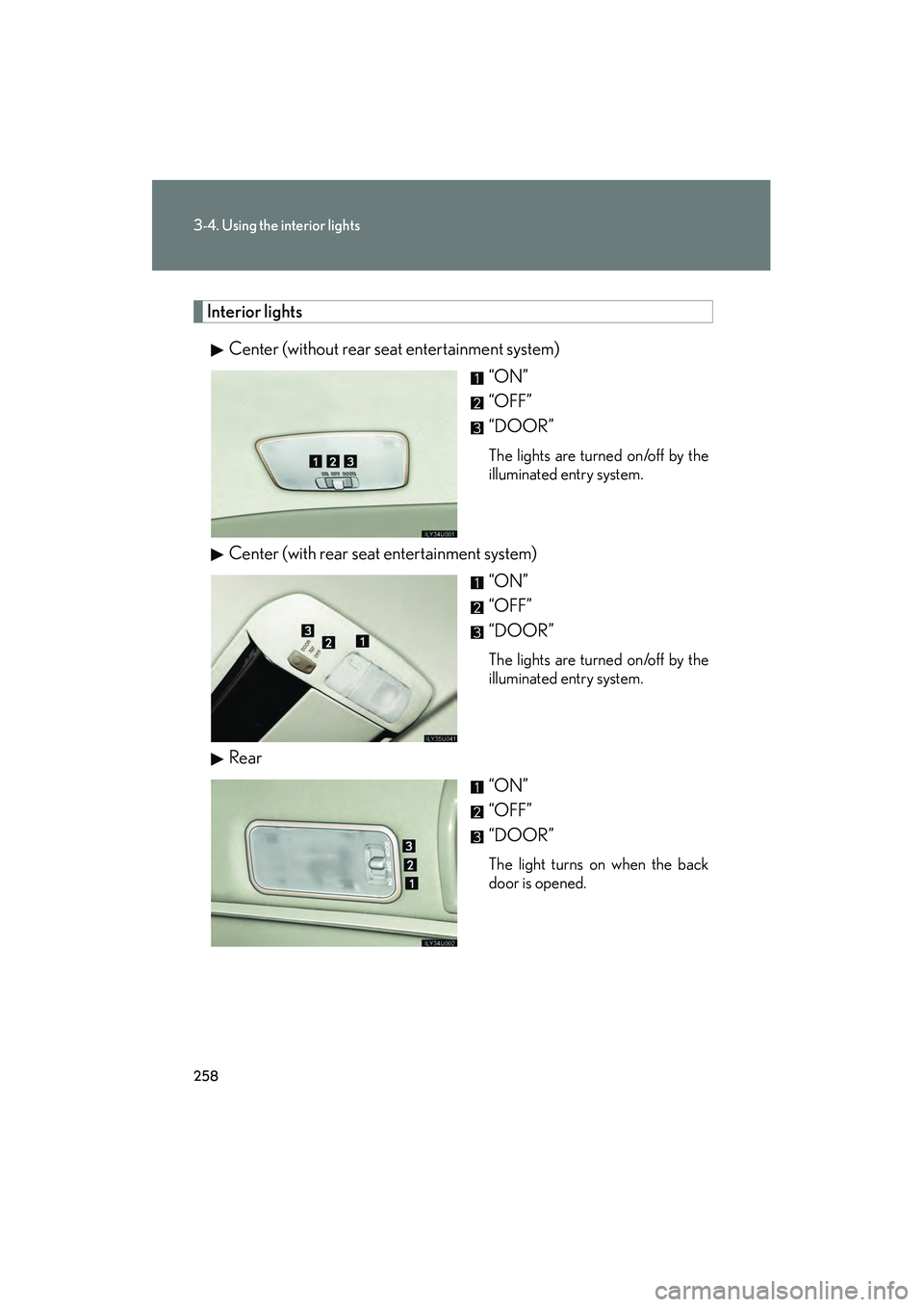
Interior lightsCenter (without rear seat entertainment system) “ON”
“OFF”
“DOOR”
The lights are turned on/off by the
illuminated entry system.
Center (with rear seat entertainment system)“ON”
“OFF”
“DOOR”
The lights are turned on/off by the
illuminated entry system.
Rear
“ON”
“OFF”
“DOOR”
The light turns on when the back
door is opened.
Page 263 of 458

262
3-5. Using the storage features
Cup holdersIn front of the console box To open, press down and release
the cup holder lid.
In the console box To use, open the console box and
pull down the cup holder.
Second seat armrest To open, press in and release the
rear cup holder on the armrest.
Page 264 of 458

263
3-5. Using the storage features
3
Interior features
Beside the third seat
Door pockets
CAUTION
■Items unsuitable for the cup holder
Do not place anything other than cups or aluminum cans in the cup holders.
Other items may be thrown out of the holders in the event of an accident or sudden
braking and cause injury. If possible, cover hot drinks to prevent burns.
■When not in use
Keep the cup holders closed.
Injuries may result in the event of an accident or sudden braking.
Page 275 of 458

274
3-6. Other interior features
Seat heaters
■The seat heaters can be used when
The engine switch is in the “ON” position.
■When not in use
Turn the dial until the indicator light turns off.
For driver’s seat
For front passenger’s seat
Turn the dial to heats the seat.
The indicator light comes on.