power Lexus HS250h 2010 Basic Information Before Operation / LEXUS 2010 HS250H OWNERS MANUAL (OM75006U)
[x] Cancel search | Manufacturer: LEXUS, Model Year: 2010, Model line: HS250h, Model: Lexus HS250h 2010Pages: 608, PDF Size: 9.89 MB
Page 535 of 608

5
When trouble arises
535
5-2. Steps to take in an emergency
To change “POWER” switch modes: Within 10 seconds of the
buzzer sounding, release the brake pedal and press the
“P
OWER” switch. Modes can be changed each time the switch is
pressed. ( P. 1 4 8 )
To start the hybrid system: Press the “POWER” switch within 10
seconds of the buzz
er sounding, keeping the brake pedal
depressed.
In the event that the hybrid system still cannot be oper
ated, contact your
Lexus dealer.
■Stopping the hybrid system
In the same method as the normal hybrid system stopping procedure, completely
stop
the vehicle and then press the “POWER” switch.
■Replacing the key battery
As the above procedure is a temporary measure, it is recommended that the elec -
tronic key battery be replaced immediately when the battery is depleted.
( P. 4 5 3 )
■When the electronic key does not work properly
Make sure that the smart access system wi th
push-button start has not been deacti-
vated in the customization setting. If it is off, turn the function on.
(Customizable features P. 5 7 2)
Page 537 of 608
5
When trouble arises
537
5-2. Steps to take in an emergency
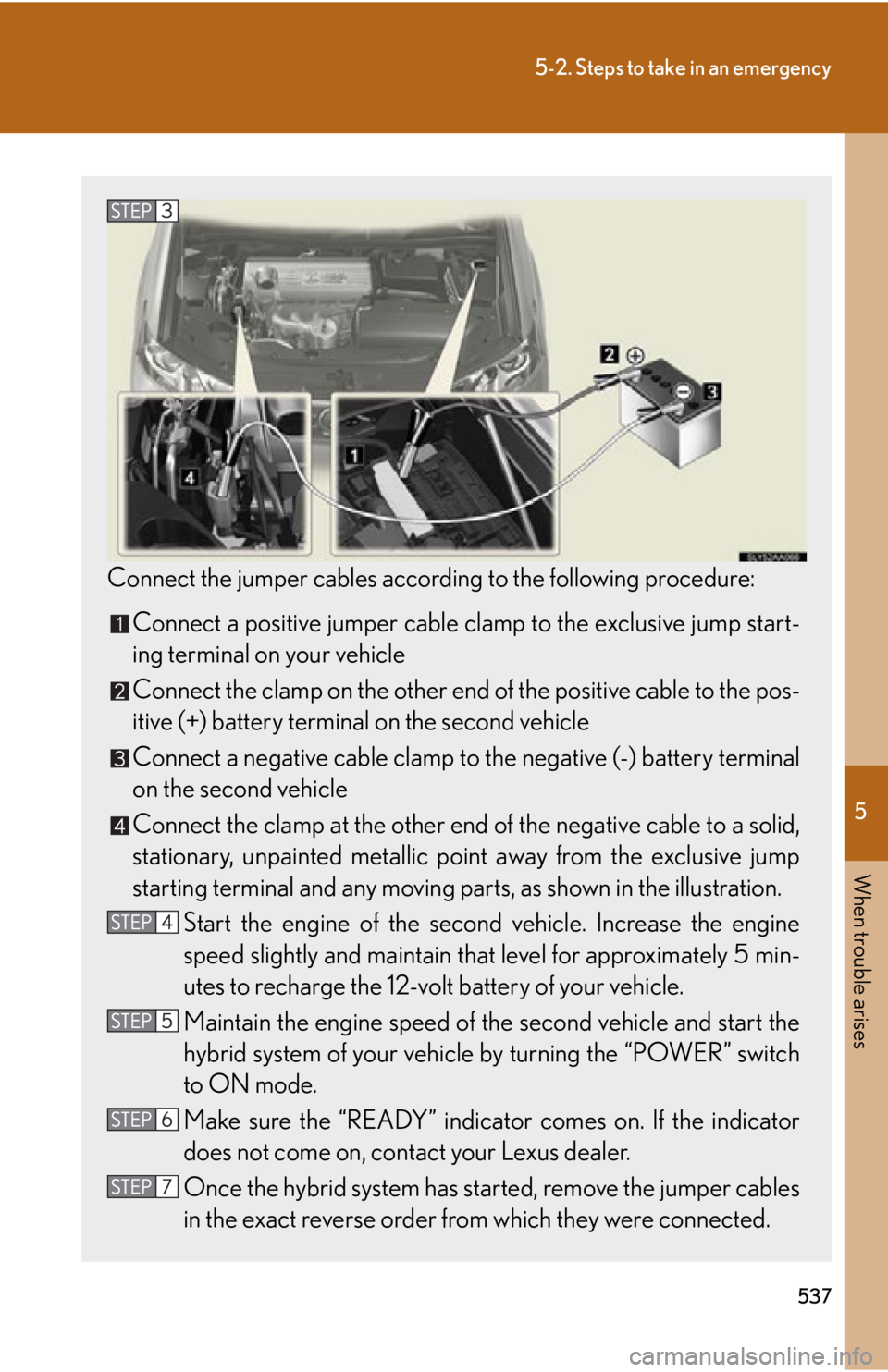
Connect the jumper cables according to the following procedure:
Connect a positive jumper cable clamp to the exclusive jump start-
ing terminal on your vehicle
Connect the clamp on the other end of the positiv
e cable to the pos-
itive (+) battery terminal on the second v
ehicle
Connect a negative cable clamp to the negative (-) battery terminal
on the second vehicle
Connect the clamp at the other end of the negative cable to a solid,
stationary, unpainted metallic point aw
ay from the exclusive jump
starting terminal and any moving part s, as shown in the illustration.
Start the engine of the second v
ehicle. Increase the engine
speed slightly and maintain that le
vel for approximately 5 min-
utes to recharge the 12-volt battery of your vehicle.
Maintain the engine sp eed of the second v
ehicle and start the
hybrid system of your vehicle by turning the “POWER” switch
to ON mode.
Make sure the “READY” indicator comes on. If the indicator
does not come on, contact your Lexus dealer.
Once the hybrid system has star
ted, remove the jumper cables
in the exact reverse order from which they were connected.
Page 541 of 608

5
When trouble arises
541
5-2. Steps to take in an emergency
If your vehicle overheats
Correction procedures
■If the engine coolant temperature warning light comes on or flashes
Stop the vehicle in a safe place an d turn of
f the air conditioning
system.
Check to see if steam is coming out from the engine area.
If you see steam:
Stop the hybrid system. Carefu lly lif
t the hood after the steam
subsides and then restart the hybrid system.
If you do not see steam:
Leave the hybrid system operating and carefully lift the hood.
Remove the engine compartment cover. ( P. 4 2 3 )
Check to see if the cooling fans are operating.
If the fans are operating:
Wait until the high engine coolant temperature warning light goes
of
f and then stop the hybrid system.
If the fans are not operating:
Stop the hybrid system immediately and call your Lexus dealer.
The following may indicate that your vehicle is overheating:
●The high engine coolant temperature warning light comes on or
flashes:
The engine may be overheating.
● “HYBRID S
YSTEM OVERHEAT” is sh own on the multi-information
display:
The power control unit may be overheating.
Follow the correction procedure as described below.
Page 543 of 608

5
When trouble arises
543
5-2. Steps to take in an emergency
After the hybrid system has cooled
down, check the power control
unit coolant level and inspect the
cooling system for leaks.
Add power control unit coolant if
nec
essary.
Water can be used in an emer -
gency if power control unit coolant
is una
vailable. ( P. 5 5 2 )
Have the vehicle inspected at the ne arest Lexus dealer as soon as possi-
ble.
■Overheating
The following symptoms may occur wh en
your vehicle is overheating:
●The high engine coolant temperature warn ing light comes on or flashes, or the
hybrid system output decreases.
●Steam comes out from the engine area.
●“HYBRID SYSTEM OVERHEAT” is displayed on the multi-information display.
Page 544 of 608
544
5-2. Steps to take in an emergency
CAUTION
■To prevent an accident or injury when inspecting under the hood of your vehicle
●If steam is seen coming from under the hood, do not open the hood until the
steam has subsided. The engine compartm ent may be very hot, causing serious
injuries such as burns.
●Check that the indicator on the “POWER ” switch and the READY indicator are
off.
●For vehicles with a hybrid system, there are times when the gasoline engine auto-
matically starts to run or the cooling fans suddenly start to operate. Do not touch
or approach the rotating parts of the belt or fans. Doing so may lead to fingers,
clothes or tools getting caught, resulting in injury.
●Do not loosen the coolant reservoir cap while the hybrid system and radiator are
hot.
Serious injuries, such as burns, may resu lt from hot coolant and steam released
under pressure.
NOTICE
■When adding engine/power control unit coolant
Wait until the hybrid system has cooled down before adding engine/power control
unit coolant.
When adding coolant, do so slowly. Adding cool coolant to a hot hybrid system too
quickly can cause damage to the hybrid system.
Page 552 of 608
552
6-1. Specifications
Cooling system
Ignition system
CapacityGasoline engine
Power control unit
7.7 qt. (7.3 L, 6.4 Imp. qt.)
3.1 qt. (2.9 L, 2.6 Imp. qt.)
Coolant type
Use either of the following.• “Toyota Super Long Life Coolant”
• A similar high-quality ethylene glycol-
based non-silicate, non-amine, non-nitrite,
and non-borate coolant with long-life
hybrid organic acid technology
Do not use plain water alone.
Spark plug
Make
GapDENSO SK20R11
NGK IFR6A11
0.043 in. (1.1 mm)
NOTICE
■Iridium-tipped spark plugs
Use only iridium-tipped spark plugs. Do not adjust spark plug gap.
Page 566 of 608

566
6-1. Specifications
Warning: The temperature grades of a tire assume that it is properly inflated
and not overloaded.
Excessive speed, underinflation, or excess iv
e loading, either separately or in
combination, can cause heat buildup and possible tire failure.
Glossary of tire terminology
Tire related termMeaning
Cold tire inflation pres-
sureTire pressure when the vehicle has been parked for
three hours or more, or has not been driven more
than 1 mile or 1.5 km under that condition
Maximum inflation pres-
sureThe maximum cold inflated pressure to which a tire
may be inflated, shown on the sidewall of the tire
Recommended inflation
pressureCold tire inflation pressure recommended by a man-
ufacturer
Accessory weight
The combined weight (in excess of those standard
items which may be replaced) of transmission, power
steering, power brakes, power windows, power seats,
radio and heater, to the extent that these items are
available as factory-installed equipment (whether
installed or not)
Curb weight
The weight of a motor vehicle with standard equip-
ment, including the maximum capacity of fuel, oil and
coolant, and if so equipp ed, air conditioning and
additional weight optional engine
Maximum loaded vehicle
weight
The sum of:
(a) Curb weight
(b) Accessory weight
(c) Vehicle capacity weight
(d) Production options weight
Normal occupant weight150 lb. (68 kg) times the number of occupants speci-
fied in the second column of Table 1
* that follows
Page 577 of 608

577
6-2. Customization
6
Vehicle specifications
Illumination
(
P. 3 6 0 )
Ti m e e l a p s e d
before the inte-
rior lights turn off
15 seconds
Off
O—OO
7. 5 s e c - onds
30 sec- onds
Operation after
the “POWER”
switch is turned
off
OnOff———O
Operation when
the doors are
unlocked
OnOff———O
Activate on
approach of per-
son carrying
smart key
OnOff———O
Ti m e e l a p s e d
before the exte-
rior lights turn off
15 seconds
Off
O—OO
7. 5 s e c -onds
30 sec- onds
Footwell lightingOnOff———O
*: Vehicles sold outside Canada
ItemFunctionDefault settingCustom- ized
setting
Page 580 of 608

580
6-2. Customization
Moon roof
(
P. 8 9 )
Mechanical key
linked opera-
tion*
OnOff———O
Linked operation
of components
when door key is
used
Slide onlyTilt only———O
Wireless remote
control linked
operation*On
(Open only)
Off———O
Linked operation
of components
when wireless
remote control
used
Slide onlyTilt only———O
Rear sun-
shade
( P. 3 7 8 )
Ti m e e l a p s e d
before the
reverse opera-
tion feature acti-
vates
0.7 sec-
onds
Off———O
0 seconds———O
0.9 sec-
onds———O
1.2 sec-onds———O
Reverse opera-
tionOnOff———O
*: This function cannot be customized un less power window operation using the
wireless remote control or mechanical key is enabled.
ItemFunctionDefault settingCustom- ized
setting
Page 582 of 608

582
6-2. Customization
Multi-information display (P. 169)
Settings that can be changed using the multi-information switches
Available unitsmiles (MPG), km (km/l), km (l/100 km)
Available languagesEnglish, French and Spanish
■Vehicle customization
●When the “Speed-detecting automatic door lock function” and “Selecting other
than P position locks all d oors” are both on, the door lock operates as follows.
• When shifting the shift lever to any position other than P, all the doors will be loc
ked.
• If the vehicle is started with all the doors locked, the “Speed-detecting auto -
matic door lock function” would not operate.
• If the vehicle is started with any do o
r unlocked, the “Speed-detecting auto-
matic door lock function” will operate.
●When the smart access syst em with push-button start is off, the “Smart door
unlocking function” cannot be customized.
●When the doors remain closed after un locking the doors and the “Automatic
door lock function” activates, the signals will be generated in accordance with
the “Operation signal (emergency flashers)” and the “Operation signal (buzzer
volume)” settings.
■In the following situations, customize mode in which the settings can be changed
through the multi-information switches will automatically be turned off.
●A warning message appears after the customize mode screen is displayed.
●The “POWER” switch is turned off.
●The vehicle begins to move while the customize mode screen is displayed.