trunk open Lexus HS250h 2010 User Guide
[x] Cancel search | Manufacturer: LEXUS, Model Year: 2010, Model line: HS250h, Model: Lexus HS250h 2010Pages: 611, PDF Size: 11 MB
Page 52 of 611
50
1-3. Opening, closing and locking the doors
HS250h_U_75033U(Canada)
■Note for the entry function
●Even when the electronic key is within the effective range (detection areas), the
system may not operate properly in the following cases:
• The electronic key is too close to the window or outside door handle, near theground, or in a high place when the doors are locked or unlocked.
• The electronic key is near the ground or in a high place, or too close to the rear bumper center when the trunk is unlocked.
• The electronic key is on the instrument panel, rear package tray or floor, or in
the door pockets or glove box when the hybrid system is started or
“POWER” switch modes are changed.
●As long as the electronic key is within the effective range, the doors may be
locked or unlocked by anyone.
●Even if the electronic key is not inside the vehicle, it may be possible to start the
hybrid system if the electronic key is near the window.
●The doors may unlock if a large amount of water splashes on the door handle,
such as in the rain or in a car wash when the electronic key is within the effective
range. (The door will automatically be locked after approximately 60 seconds if
the doors are not opened and closed.)
●Gripping the door handle when wearing a glove may not unlock the door.
●If the wireless remote control is used to lock the doors when the electronic key
is near the vehicle, there is a possibility that the door may not be unlocked by the
entry function. (Use the wireless remote control to unlock the doors.)
●A sudden approach to the effective range or door handle may prevent the
doors from being unlocked. In this case, return the door handle to the original
position and check that the doors unlock before pulling the door handle again.
■Notes for locking the doors
●Touching the door lock sensor while wearing gloves may delay or prevent lock
operation. Remove the gloves and touch the lock sensor again.
●When the lock operation is performed using the lock sensor, recognition signals
will be shown up to two consecutive time s. After this, no recognition signals will
be given.
●If the door handle becomes wet while the electronic key is within the effective
range, the door may lock and unlock repeatedly. Place the key in a position 6 ft.
(2 m) or more separate from the vehicle while the vehicle is being washed. (Take
care to ensure that the key is not stolen.)
Page 54 of 611
52
1-3. Opening, closing and locking the doors
HS250h_U_75033U(Canada)
Depending on the position and holding condition of the electronic key, the key may
not be detected correctly and the system may not operate properly. (The alarm may
go off accidentally, or the door lock prevention may not operate.)
■If the smart access system with push-button start does not operate properly
●Locking and unlocking the doors, unlocking the trunk: Use the mechanical key.
(→ P. 5 3 3 )
●Starting the hybrid system: →P. 5 3 4
■Electronic key battery depletion
●The standard battery life is 1 to 2 years. (The card key battery life is about a year
and a half.)
●If the battery becomes low, an alarm will sound in the cabin when the hybrid sys-
tem stops. ( →P. 4 8 )
●As the electronic key always transmits radio waves, the battery will become
depleted even if the electronic key is not used. The following symptoms indicate
that the electronic key battery may be depleted. Replace the battery when nec-
essary. ( →P. 4 5 3 )
• The smart access system with push-button start or the wireless remote con- trol does not operate.
• The detection area becomes smaller.
• The LED indicator on the key surface does not turn on.
●To avoid serious deterioration, do not leave the electronic key within 3 ft. (1 m) of
the following electrical appliances that produce a magnetic field:
•TVs
• Personal computers
• Cellular phones, cordless phones and battery chargers
• Recharging cellular phones or cordless phones
•Glass top ranges
•Table lamps
■When the electronic key battery is fully depleted
→ P. 4 5 3
■Customization
Settings (e.g. smart access system with push-button start) can be changed.
(Customizable features →P. 5 74 )
Page 56 of 611
54
1-3. Opening, closing and locking the doors
HS250h_U_75033U(Canada)
Wireless remote control
■Operation signals
Doors: A buzzer sounds and the emergency flashers flash to indicate that thedoors have been locked/unlocked. (Locked: Once; Unlocked: Twice)
Trunk: A buzzer sounds to indicate that the trunk has been unlocked.
Windows and moon roof: A buzzer sounds to indicate that the windows and moon roof are opening.
■Door lock buzzer
If an attempt to lock the doors is made when a door is not fully closed, a buzzer
sounds continuously. Fully close the door to stop the buzzer, and lock the vehicle
once more.
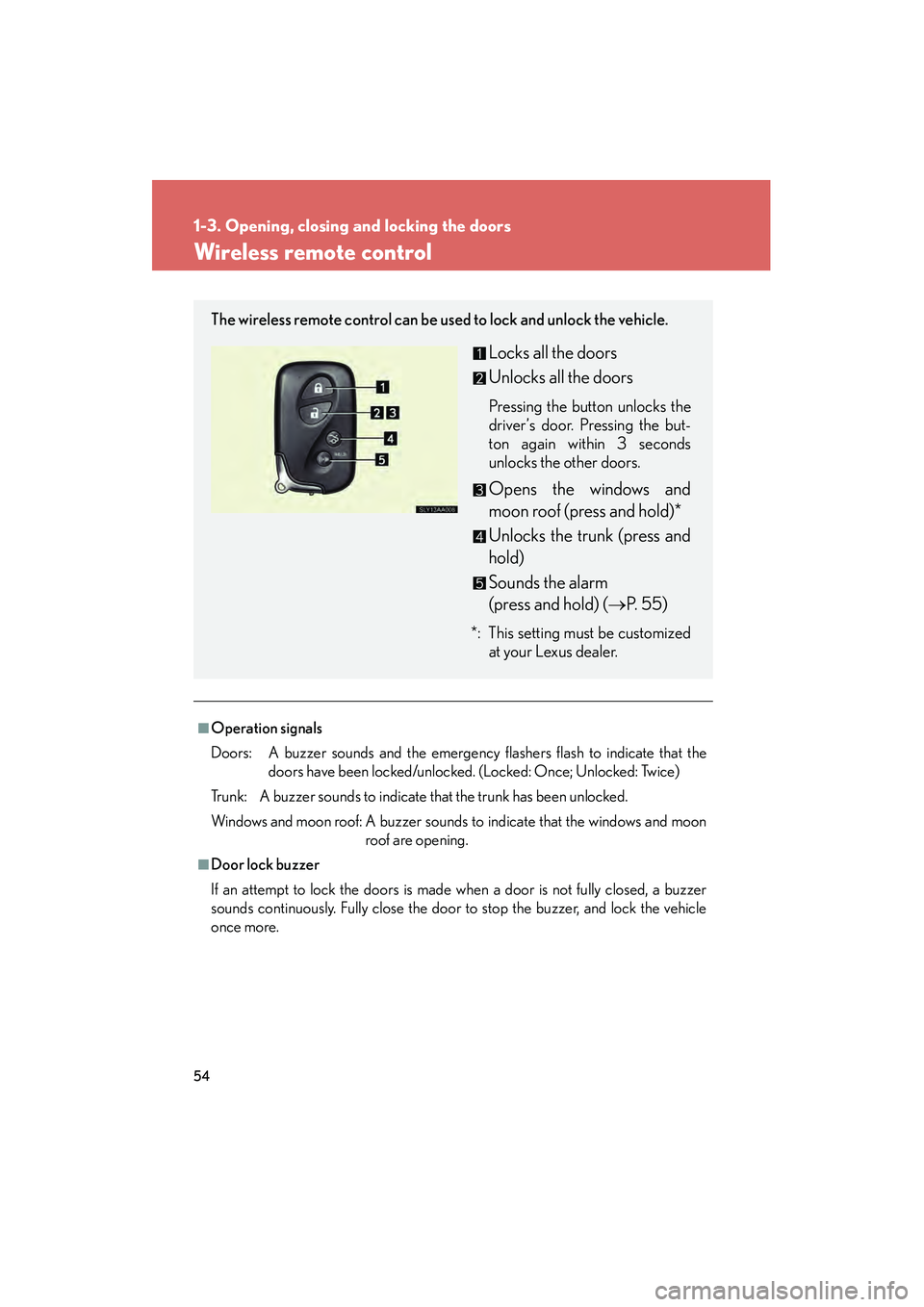
The wireless remote control can be us ed to lock and unlock the vehicle.
Locks all the doors
Unlocks all the doors
Pressing the button unlocks the
driver’s door. Pressing the but-
ton again within 3 seconds
unlocks the other doors.
Opens the windows and
moon roof (press and hold)*
Unlocks the trunk (press and
hold)
Sounds the alarm
(press and hold) (→P. 5 5 )
*: This setting must be customized
at your Lexus dealer.
Page 57 of 611
55
1-3. Opening, closing and locking the doors
1
Before driving
HS250h_U_75033U(Canada)
■Pa n i c m o d e
■Security feature
→P. 4 8
■Alarm
Using the wireless remote control to lock the doors will set the alarm system.
(→ P. 9 8 )
■Conditions affecting operation
→P. 4 9
■If the wireless remote control does not operate properly
Locking and unlocking the doors, unlocking the trunk: Use the mechanical key.
(→ P. 5 3 3 )
■Electric key battery depletion
→P. 5 2
■When the electric key battery is fully depleted
→P. 4 5 3
■Customization
Settings (e.g. door unlocking function) can be changed.
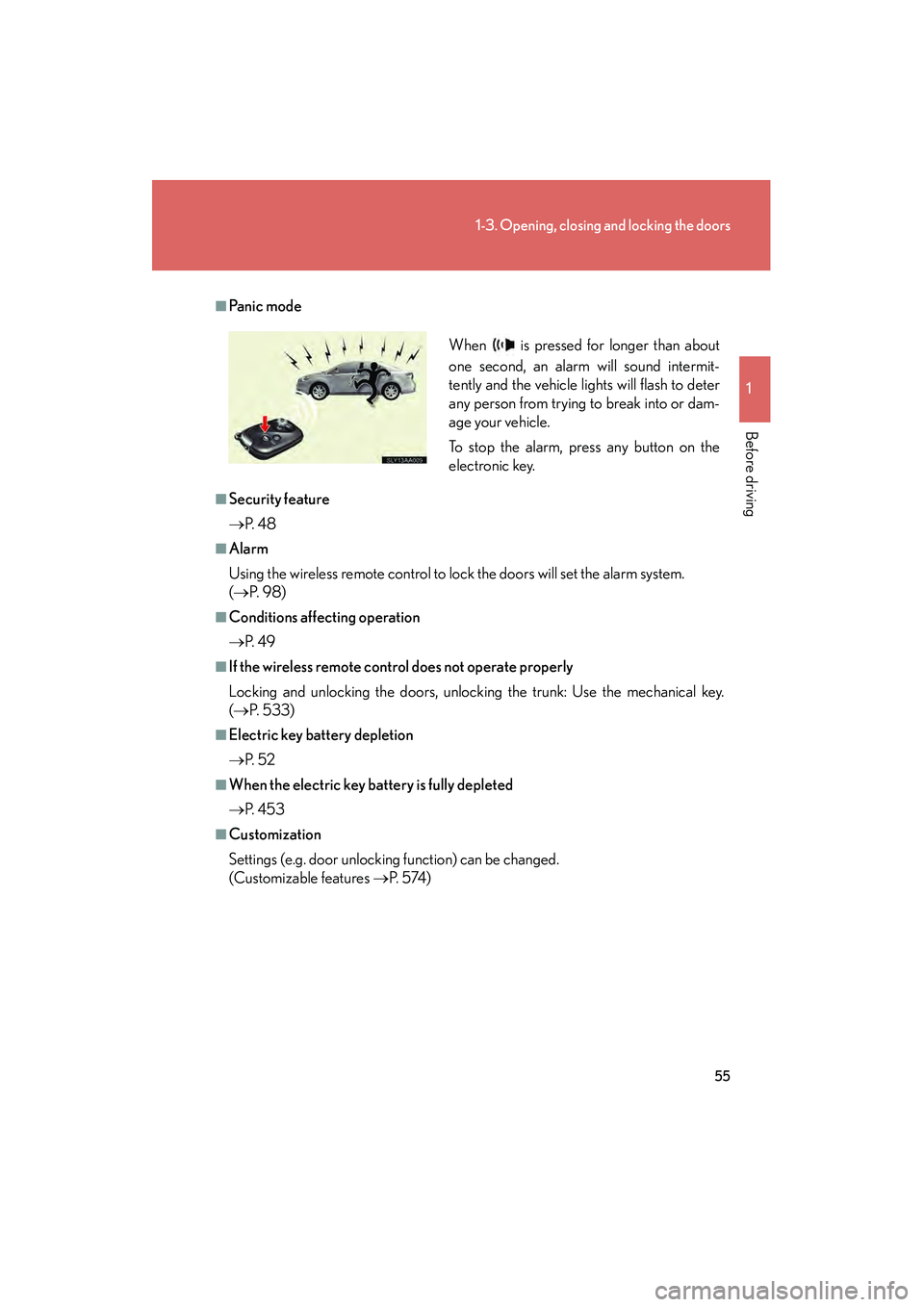
(Customizable features →P. 5 74 ) When is pressed for longer than about
one second, an alarm will sound intermit-
tently and the vehicle lights will flash to deter
any person from trying to break into or dam-
age your vehicle.
To stop the alarm, press any button on the
electronic key.
Page 62 of 611
60
1-3. Opening, closing and locking the doors
HS250h_U_75033U(Canada)
Tr u n k
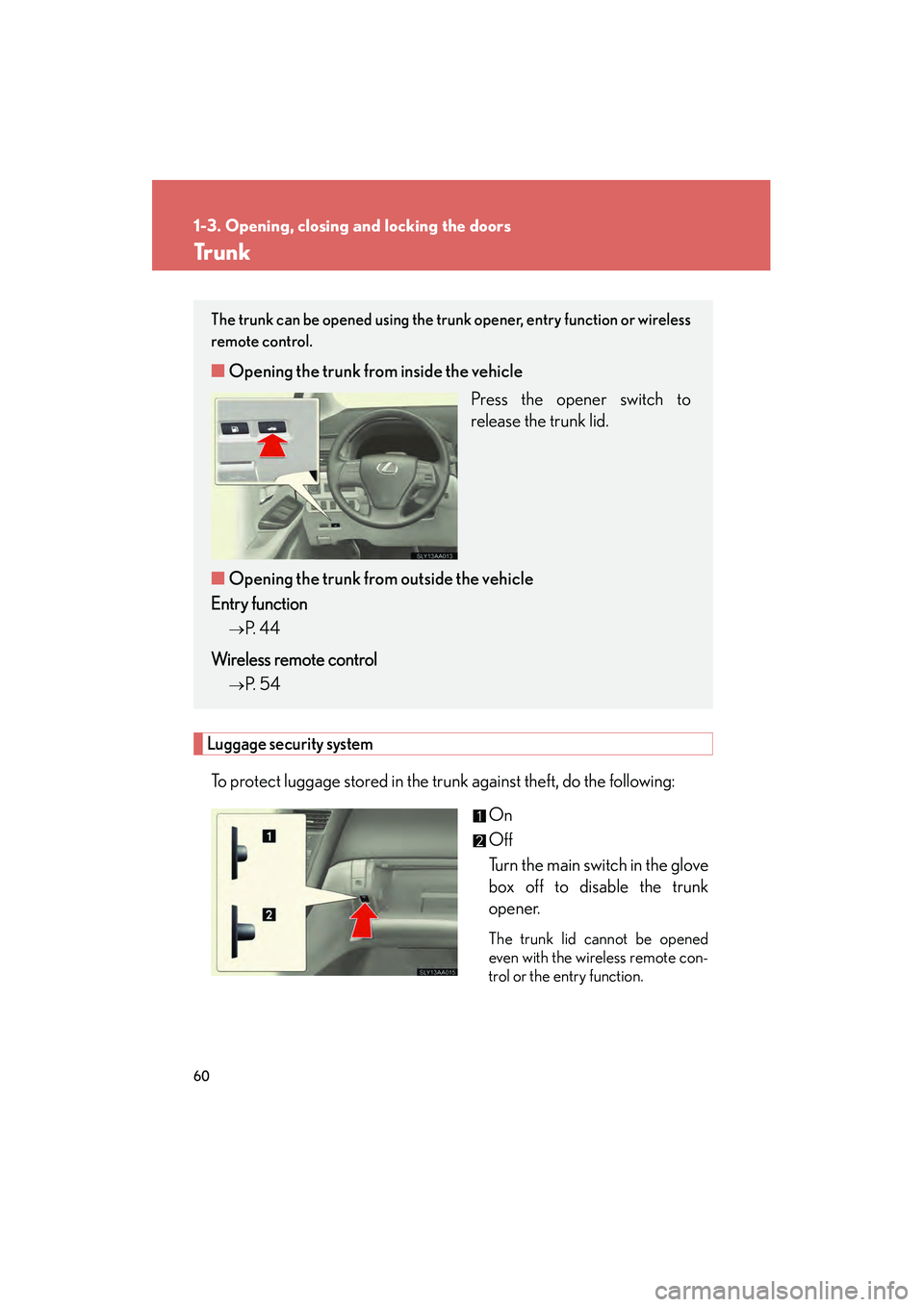
Luggage security system
To protect luggage stored in the trunk against theft, do the following:On
Off
Turn the main switch in the glove
box off to disable the trunk
opener.
The trunk lid cannot be opened
even with the wireless remote con-
trol or the entry function.
The trunk can be opened using the trunk opener, entry function or wireless
remote control.
■Opening the trunk from inside the vehicle
Press the opener switch to
release the trunk lid.
■ Opening the trunk from outside the vehicle
Entry function
→P. 4 4
Wireless remote control
→P. 54
Page 63 of 611

61
1-3. Opening, closing and locking the doors
1
Before driving
HS250h_U_75033U(Canada)
■Tr u n k h a n d l e
■Function to prevent the trunk being locked with the electronic key inside
●When all doors are being locked, closing the trunk lid with the electronic key left
inside the trunk will sound an alarm.
In this case, the trunk lid can be opened using the entry function.
●Even when the spare electronic key is put in the trunk with all the doors locked,
the key confinement prevention function can be activated so the trunk can be
opened. In order to prevent theft, take all electronic keys with you when leaving
the vehicle.
●Even when the electronic key is put in the trunk with all the doors are locked, the
key may not be detected depending on the places and the surrounding radio
wave conditions. In this case, the key confinement prevention function cannot
be activated, causing the doors to lock when the trunk is closed. Make sure to
check where the key is before closing the trunk.
●The key confinement prevention function cannot be activated if any one of the
doors is unlocked. In this case, open the trunk using the trunk opener.
■Internal trunk release lever
■Using the mechanical key
The trunk can be also opened using the mechanical key. (→P. 5 3 3 )
Use the trunk handle when closing the trunk.
The trunk lid can be opened by pulling down
on the glow-in-the-dark lever located on the
inside of the trunk lid.
The lever will continue to glow for some time
after the trunk lid is closed.
Page 64 of 611
62
1-3. Opening, closing and locking the doors
HS250h_U_75033U(Canada)
CAUTION
■Caution while driving
●Keep the trunk lid closed while driving.
If the trunk lid is left open, it may hit near-by objects while driving or luggage in
the trunk may be unexpectedly thrown out, causing an accident.
In addition, exhaust gases may enter the vehicle, causing death or a serious
health hazard. Make sure to close the trunk lid before driving.
●Before driving the vehicle, make sure that the trunk lid is fully closed. If the trunk
lid is not fully closed, it may open unexpectedly while driving, causing an accident.
●Never let anyone sit in the trunk. In the event of sudden braking or a collision, they
are susceptible to death or serious injury.
■When children are in the vehicle
Observe the following precautions.
Failure to do so may result in death or serious injury.
●Do not allow children to enter the trunk.
If a child is accidentally locked in the trunk, they could overheat or suffocate.
●Do not allow a child to open or close the trunk lid.
Doing so may cause the trunk lid to operate unexpectedly, or cause the child’s
hands, head, or neck to be caught by the closing trunk lid.
Page 65 of 611
63
1-3. Opening, closing and locking the doors
1
Before driving
HS250h_U_75033U(Canada)
CAUTION
■Using the trunk
Observe the following precautions.
Failure to do so may cause parts of the body to be caught, resulting in serious injury.
●Remove any heavy loads, such as snow and ice, from the trunk lid before opening
it. Failure to do so may cause the trunk lid to fall closed again after it is opened.
●When opening or closing the trunk lid, thoroughly check to make sure the sur-
rounding area is safe.
●If anyone is in the vicinity, make sure they are safe and let them know that the
trunk is about to open or close.
●Use caution when opening or closing the trunk lid in windy weather as it may
move abruptly in strong wind.
●Do not attach any accessories other than genuine Lexus parts to the trunk lid.
Such additional weight on the trunk lid may cause the lid to fall closed again after
it is opened.
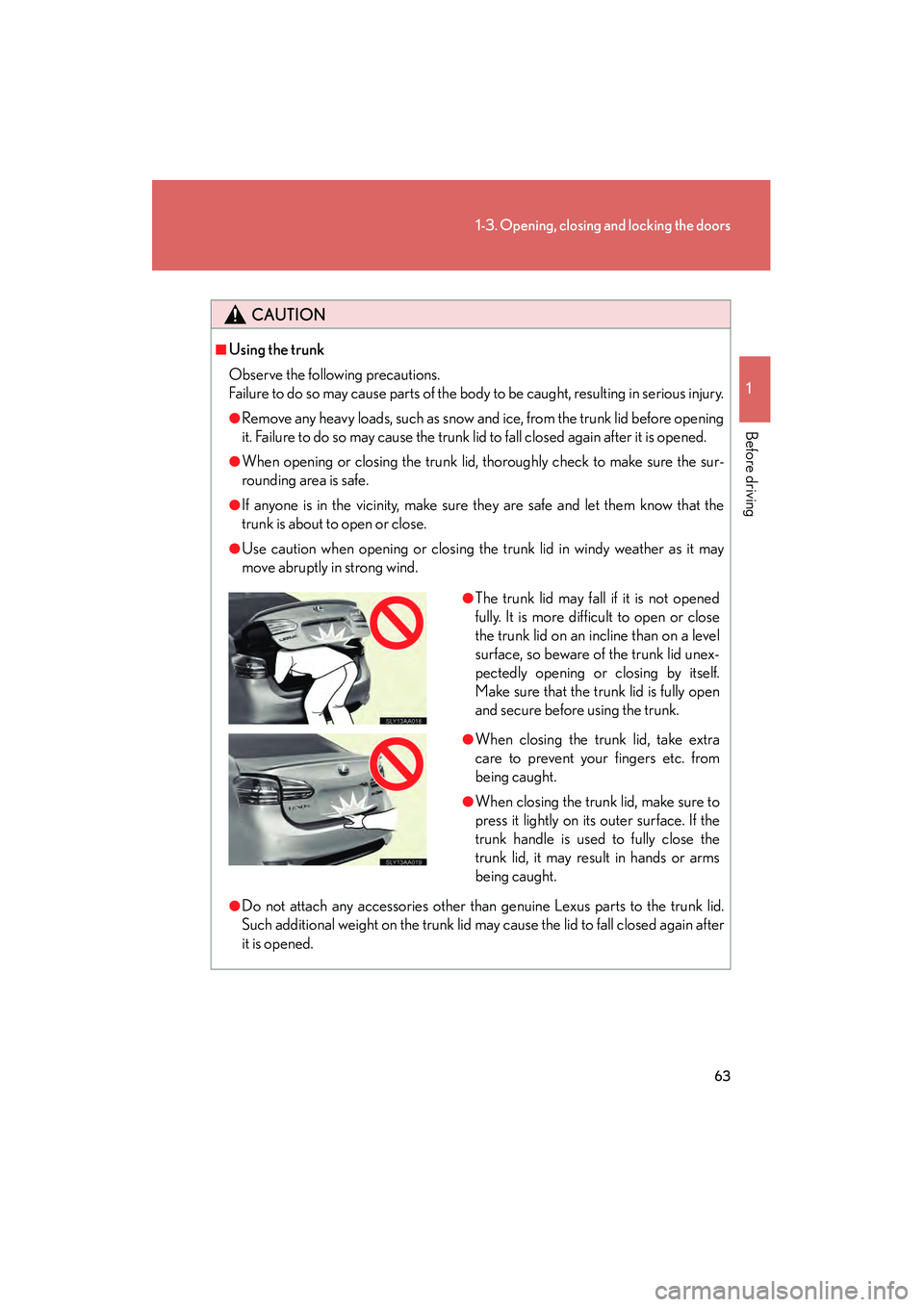
●The trunk lid may fall if it is not opened
fully. It is more difficult to open or close
the trunk lid on an incline than on a level
surface, so beware of the trunk lid unex-
pectedly opening or closing by itself.
Make sure that the trunk lid is fully open
and secure before using the trunk.
●When closing the trunk lid, take extra
care to prevent your fingers etc. from
being caught.
●When closing the trunk lid, make sure to
press it lightly on its outer surface. If the
trunk handle is used to fully close the
trunk lid, it may result in hands or arms
being caught.
Page 100 of 611

98
1-7. Theft deterrent system
HS250h_U_75033U(Canada)
Alarm
The system sounds the alarm and flashes the lights when forced entry is
detected.
■Triggering of the alarm
The alarm is triggered in the following situations when the alarm is
set:
●A locked door or trunk is unlocked or opened in any way other
than using the entry function, wireless remote control or mechan-
ical key. (The doors will lock again automatically.)
● The hood is opened.
■ Setting the alarm system
Without navigation system
Close the doors, trunk and hood,
and lock all the doors using the
entry function or wireless remote
control. The system will be set
automatically after 30 seconds.
The indicator light changes from
being on to flashing when the
system is set.
With navigation system
Close the doors, trunk and hood,
and lock all the doors using the
entry function or wireless remote
control. The system will be set
automatically after 30 seconds.The indicator light changes from
being on to flashing when the
system is set.
Page 102 of 611
100
1-7. Theft deterrent system
HS250h_U_75033U(Canada)
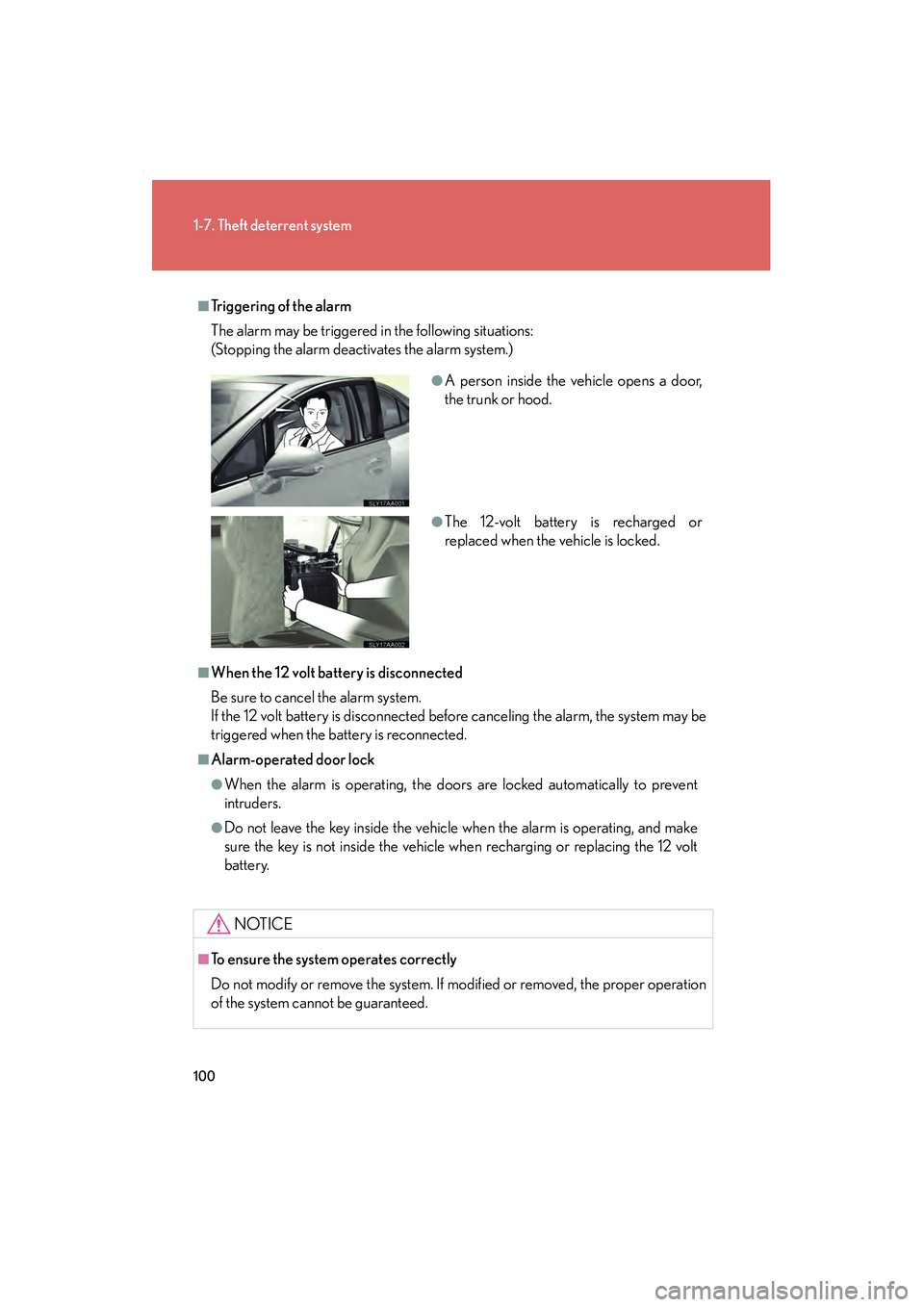
■Triggering of the alarm
The alarm may be triggered in the following situations:
(Stopping the alarm deactivates the alarm system.)
■When the 12 volt battery is disconnected
Be sure to cancel the alarm system.
If the 12 volt battery is disconnected before canceling the alarm, the system may be
triggered when the battery is reconnected.
■Alarm-operated door lock
●When the alarm is operating, the doors are locked automatically to prevent
intruders.
●Do not leave the key inside the vehicle when the alarm is operating, and make
sure the key is not inside the vehicle when recharging or replacing the 12 volt
battery.
NOTICE
■To ensure the system operates correctly
Do not modify or remove the system. If modified or removed, the proper operation
of the system cannot be guaranteed.
●A person inside the vehicle opens a door,
the trunk or hood.
●The 12-volt battery is recharged or
replaced when the vehicle is locked.