Mirrors Lexus HS250h 2010 Owner's Guide
[x] Cancel search | Manufacturer: LEXUS, Model Year: 2010, Model line: HS250h, Model: Lexus HS250h 2010Pages: 611, PDF Size: 11 MB
Page 80 of 611
78
1-4. Adjustable components (seats, mirrors, steering wheel)
HS250h_U_75033U(Canada)
CAUTION
●Do not attempt to install, remove, modify, disassemble or dispose of the seat belts.
Have any necessary repairs carried out by your Lexus dealer. Inappropriate han-
dling of the pretensioner may prevent it from operating properly, resulting in
death or serious injury.
■Using a seat belt extender
●Do not wear the seat belt extender if you can fasten the seat belt without the
extender.
●Do not use the seat belt extender when installing a child restraint system because
the belt will not securely hold the child restraint system, increasing the risk of
death or serious injury in the event of an accident.
●The personalized extender may not be safe on another vehicle, when used by
another person, or at a different seating position other than the one originally
intended.
NOTICE
■When using a seat belt extender
When releasing the seat belt, press on the buckle release button on the extender,
not on the seat belt.
This helps prevent damage to the vehicle interior and the extender itself.
Page 81 of 611
79
1
1-4. Adjustable components (seats, mirrors, steering wheel)
Before driving
HS250h_U_75033U(Canada)
Steering wheel
∗: If equipped
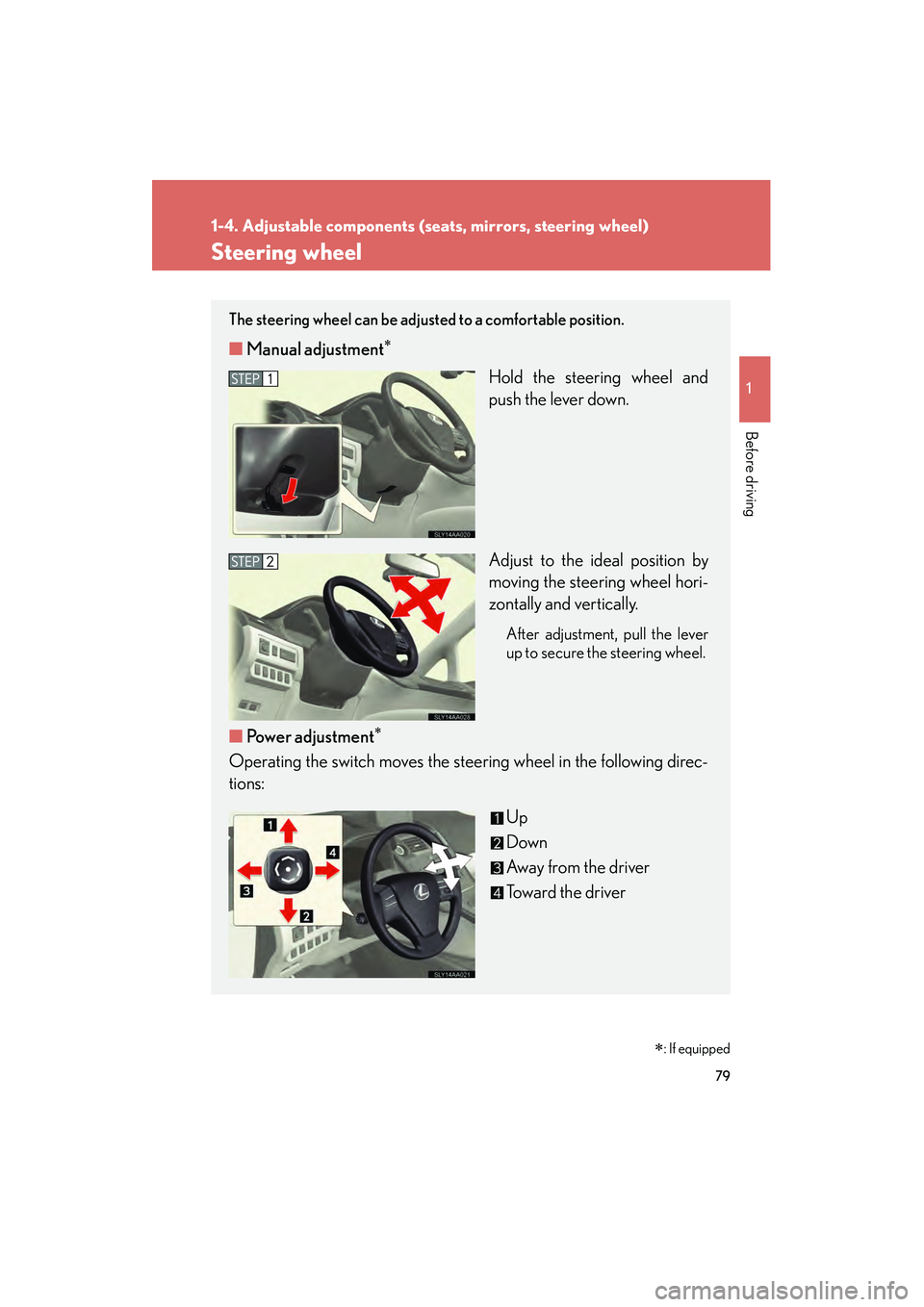
The steering wheel can be adjusted to a comfortable position.
■Manual adjustment∗
Hold the steering wheel and
push the lever down.
Adjust to the ideal position by
moving the steering wheel hori-
zontally and vertically.
After adjustment, pull the lever
up to secure the steering wheel.
■Power adjustment∗
Operating the switch moves the steering wheel in the following direc-
tions:
Up
Down
Away from the driver
Toward the driver
Page 82 of 611
80
1-4. Adjustable components (seats, mirrors, steering wheel)
HS250h_U_75033U(Canada)
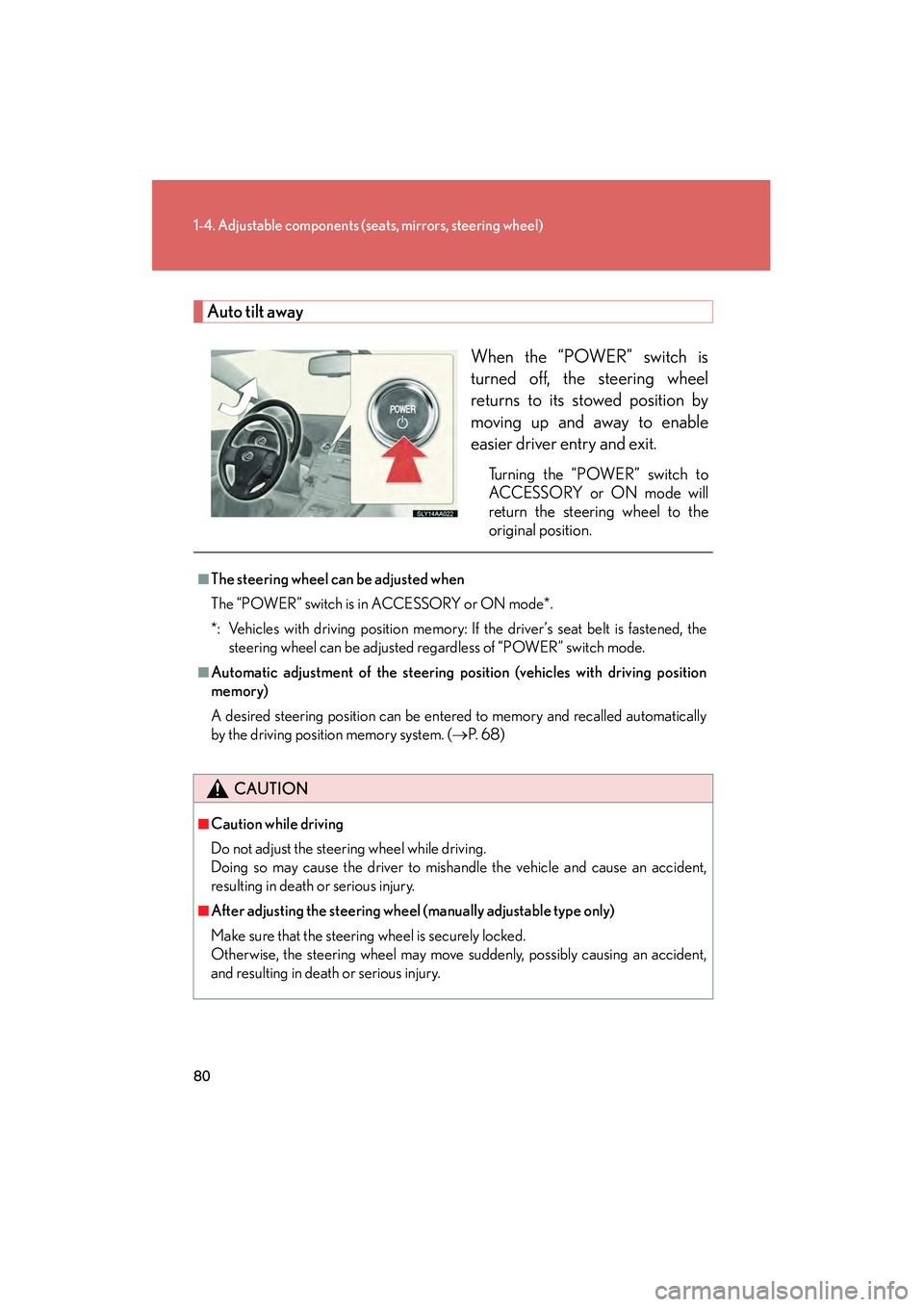
Auto tilt away
When the “POWER” switch is
turned off, the steering wheel
returns to its stowed position by
moving up and away to enable
easier driver entry and exit.
Turning the “POWER” switch to
ACCESSORY or ON mode will
return the steering wheel to the
original position.
■The steering wheel can be adjusted when
The “POWER” switch is in ACCESSORY or ON mode*.
*: Vehicles with driving position memory: If the driver’s seat belt is fastened, thesteering wheel can be adjusted regardless of “POWER” switch mode.
■Automatic adjustment of the steering position (vehicles with driving position
memory)
A desired steering position can be entered to memory and recalled automatically
by the driving position memory system. ( →P. 6 8 )
CAUTION
■Caution while driving
Do not adjust the steering wheel while driving.
Doing so may cause the driver to mishandle the vehicle and cause an accident,
resulting in death or serious injury.
■After adjusting the steering wheel (manually adjustable type only)
Make sure that the steering wheel is securely locked.
Otherwise, the steering wheel may move suddenly, possibly causing an accident,
and resulting in death or serious injury.
Page 83 of 611

81
1
1-4. Adjustable components (seats, mirrors, steering wheel)
Before driving
HS250h_U_75033U(Canada)
Inside rear view mirror
In automatic mode, sensors are used to detect the headlights of vehicles
behind and the reflected light is automatically reduced.
Type ATurns automatic mode on/ off
The indicator comes on when
automatic mode is turned on.
The mirror will revert to auto-
matic mode each time the
“POWER” switch is turned to
ON mode.
Type BTurns automatic mode on/off
The indicator comes on when
automatic mode is turned on.
The mirror will revert to auto-
matic mode each time the
“POWER” switch is turned to
ON mode.
Indicator
Indicator
Page 84 of 611
82
1-4. Adjustable components (seats, mirrors, steering wheel)
HS250h_U_75033U(Canada)
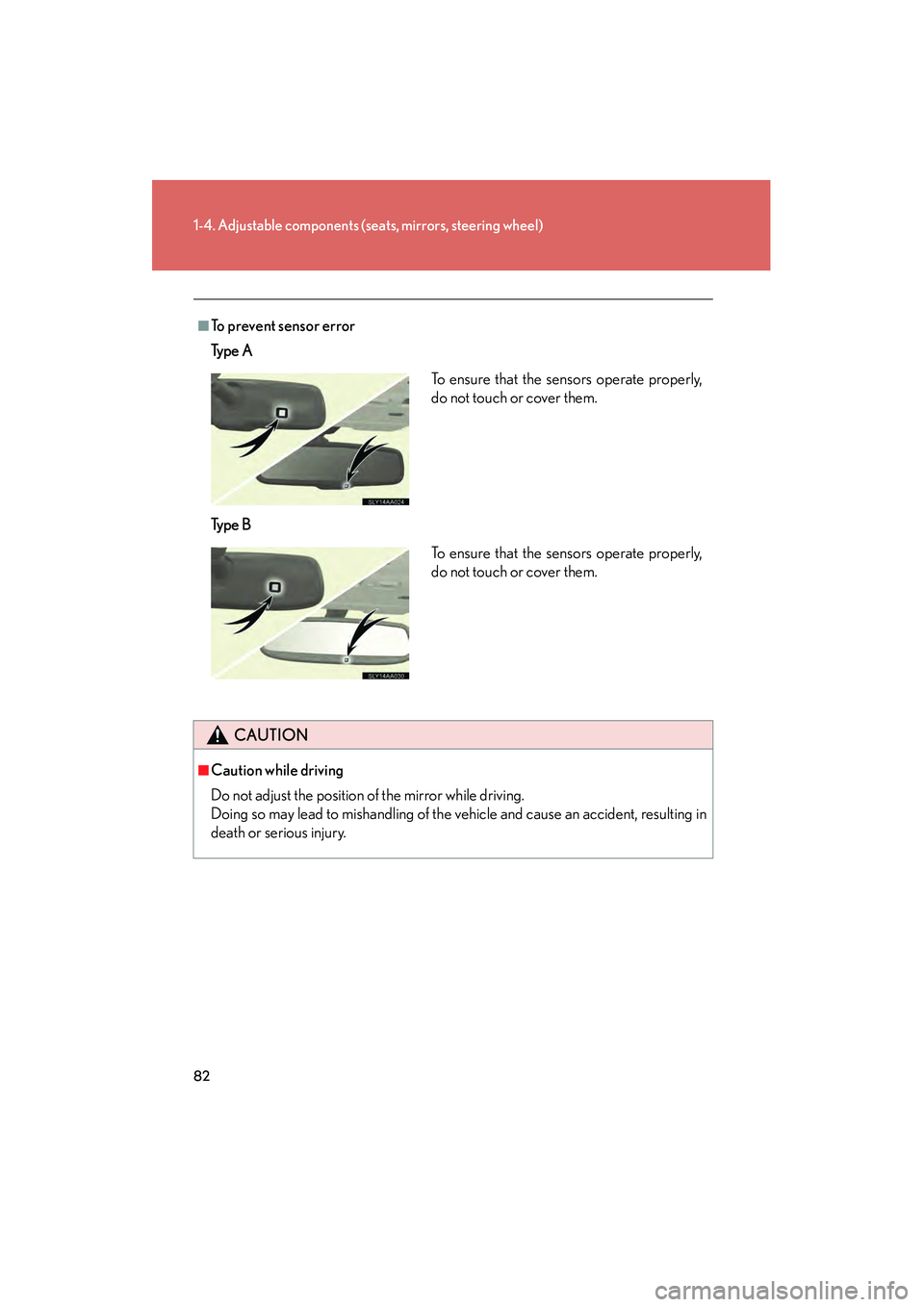
■To prevent sensor error
Ty p e A
Ty p e B
CAUTION
■Caution while driving
Do not adjust the position of the mirror while driving.
Doing so may lead to mishandling of the vehicle and cause an accident, resulting in
death or serious injury.
To ensure that the sensors operate properly,
do not touch or cover them.
To ensure that the sensors operate properly,
do not touch or cover them.
Page 85 of 611
83
1
1-4. Adjustable components (seats, mirrors, steering wheel)
Before driving
HS250h_U_75033U(Canada)
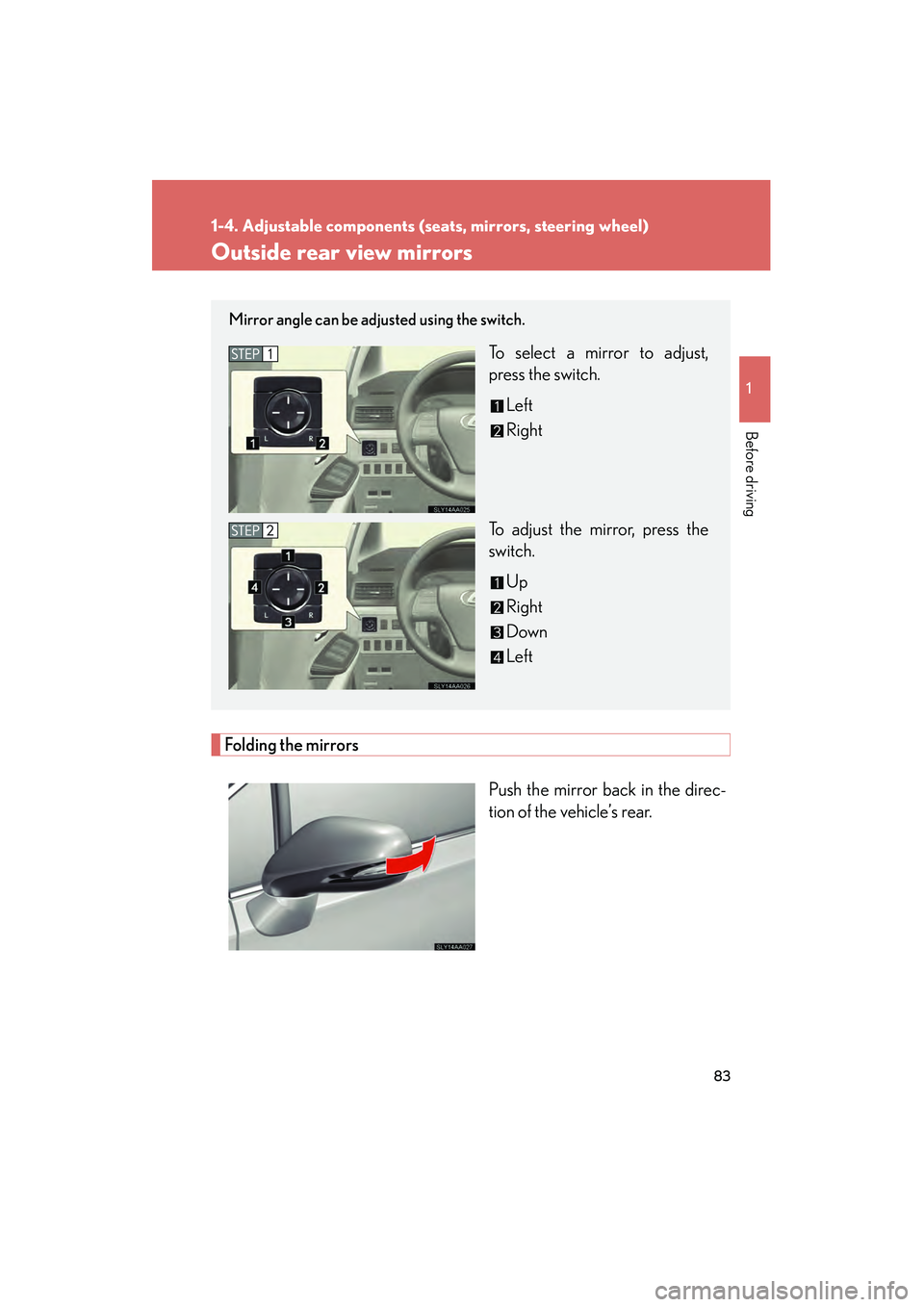
Outside rear view mirrors
Folding the mirrorsPush the mirror back in the direc-
tion of the vehicle’s rear.
Mirror angle can be adjusted using the switch.
To select a mirror to adjust,
press the switch.Left
Right
To adjust the mirror, press the
switch. Up
Right
Down
Left
Page 86 of 611
84
1-4. Adjustable components (seats, mirrors, steering wheel)
HS250h_U_75033U(Canada)
■Mirror angle can be adjusted when
The “POWER” switch is in ACCESSORY or ON mode.
■Linked mirror function when reversing (vehicles with driving position memory)
The outside rear view mirrors will automatically angle downwards when the vehicle
is reversing in order to give a better view of the ground. However, this function will
not operate when the mirror select switch is in the neutral position (between “L” and
“R”).
■Rain clearing mirrors (if equipped)
When water droplets collects on the mirror surface, for example when it rains, the
rain clearing (hydrophilic) effect of the mirrors causes the droplets to be spread out
into a film making the rear view clearer. In the following cases, the rain clearing
effect will be reduced temporarily, but will return after 1 or 2 days’ exposure to
direct sunlight.
●After wiping dirt off the mirrors
●When the mirrors fog up
●After waxing your vehicle in an automatic car wash
●After your vehicle has been parked for a long period in underground parking
lots etc. where there is no direct sunlight
■When the mirrors are fogged up
Turn on the mirror defoggers to defog the mirrors. ( →P. 260)
■Automatic adjustment of the mirror angl e (vehicles with driving position mem-
ory)
A desired mirror face angle can be entered to memory and recalled automatically
by the driving position memory. ( →P. 6 8 )
■Auto anti-glare fu nction (if equipped)
When the anti-glare inside rear view mirror is set to automatic mode, the outside
rear view mirrors will activate in conjunction with the anti-glare inside rear view mir-
ror to reduce reflected light. ( →P. 8 1 )
Page 87 of 611
85
1-4. Adjustable components (seats, mirrors, steering wheel)
1
Before driving
HS250h_U_75033U(Canada)
CAUTION
■When driving the vehicle
Observe the following precautions while driving.
Failing to do so may result in loss of control of the vehicle and cause an accident,
resulting in death or serious injury.
●Do not adjust the mirrors while driving.
●Do not drive with the mirrors folded.
●Both the driver and passenger side mirrors must be extended and properly
adjusted before driving.
■When a mirror is moving
To avoid personal injury and mirror malfunction, be careful not to get your hand
caught by the moving mirror.
■When the mirror defoggers are operating
Do not touch the rear view mirror surfaces, as they can become very hot and burn
you.
NOTICE
■If the mirrors become iced up (if equipped)
In order to retain the rain-clearing properties of the mirror, do not attempt to scrape
the ice off. Instead, remove it by turning on the mirror defoggers or by applying
warm water.
Page 142 of 611
140
2-1. Driving procedures
HS250h_U_75033U(Canada)
CAUTION
●Do not select shift position R when the vehicle is rolling forward, do not select D
when moving in reverse, and do not press the P position switch before the vehicle
stops fully. Doing so will cause the buzzer to sound and the shift position to
change to N. In addition, excessive force will be applied to the powertrain and
damage may result.
●Do not change the shift position to N while the vehicle is moving.
Doing so may cause insufficient engine braking, resulting in an accident.
●Do not turn the hybrid system off while driving.
The power steering and brake actuator will not operate properly if the hybrid sys-
tem is off.
●Use engine braking (shift position B) to maintain a safe speed when driving down
a steep hill.
Using the brakes continuously may cause the brakes to overheat and lose effec-
tiveness. (→P. 1 5 3 )
●Do not adjust the positions of the steering wheel, the seat, or the inside or outside
rear view mirrors while driving.
Doing so may result in a loss of vehicle control that can cause accidents, resulting
in death or serious injury.
●Always check that all passengers' arms, heads or other parts of their body are not
outside the vehicle, as this may result in death or serious injury.
●Do not drive in excess of the speed limit. Even if the legal speed limit permits it, do
not drive over 85 mph (140 km/h) unless your vehicle has high-speed capability
tires. Driving over 85 mph (140 km/h) may result in tire failure, loss of control and
possible injury. Be sure to consult a tire dealer to determine whether the tires on
your vehicle are high-speed capability tires or not before driving at such speeds.
■When driving on slippery road surfaces
●Sudden braking, acceleration and steering may cause tire slippage and reduce
your ability to control the vehicle, resulting in an accident.
●Abrupt changes from shift position D to B and rapid changes in the engine speed
could cause the vehicle to skid, resulting in an accident.
●After driving through a puddle, lightly depress the brake pedal to make sure that
the brakes are functioning properly. Wet brake pads may prevent the brakes from
functioning properly. If the brakes on only one side are wet and not functioning
properly, steering control may be affected, resulting in an accident.
Page 253 of 611

Interior features3
251
HS250h_U_75033U(Canada)
3-3. Using the Bluetooth® audio
system
Bluetooth
® audio system ...... 311
Using the Bluetooth®
audio system .......................... 314
Operating a Bluetooth
®
enabled portable player..... 319
Setting up a Bluetooth
®
enabled portable player... 322
Bluetooth
® audio system
setup ........................................ 327
3-4. Using the hands-free phone system (for cellular phones)
Hands-free system for cellular phones.................... 328
Using the hands-free system (for cellular
phones) .................................. 332
Making a phone call ............. 340
Setting a cellular phone ....... 345
Security and system setup ....................................... 350
Using the phone book........... 354 3-5. Using the interior lights
Interior lights list .................... 360
• Interior lights ......................... 361
• Personal lights ...................... 361
3-6. Using the storage features List of storage features......... 363
• Glove box .............................. 364
• Console box ......................... 365
• Cup holders .......................... 367
• Bottle holders....................... 369
• Auxiliary boxes .................... 370
3-7. Other interior features Sun visors .................................. 371
Vanity mirrors ......................... 372
Clock ......................................... 373
Power outlets ........................... 374
Seat heaters and ventilators ............................. 375
Armrest ..................................... 377
Rear sunshade ........................ 378
Floor mat .................................. 380
Trunk compartment features ................................... 381
Garage door opener ............ 383
Compass ................................... 391
Safety Connect ...................... 395