hybrid Lexus HS250h 2010 Owner's Guide
[x] Cancel search | Manufacturer: LEXUS, Model Year: 2010, Model line: HS250h, Model: Lexus HS250h 2010Pages: 611, PDF Size: 11 MB
Page 37 of 611
35
1-1. Hybrid system
1
Before driving
HS250h_U_75033U(Canada)
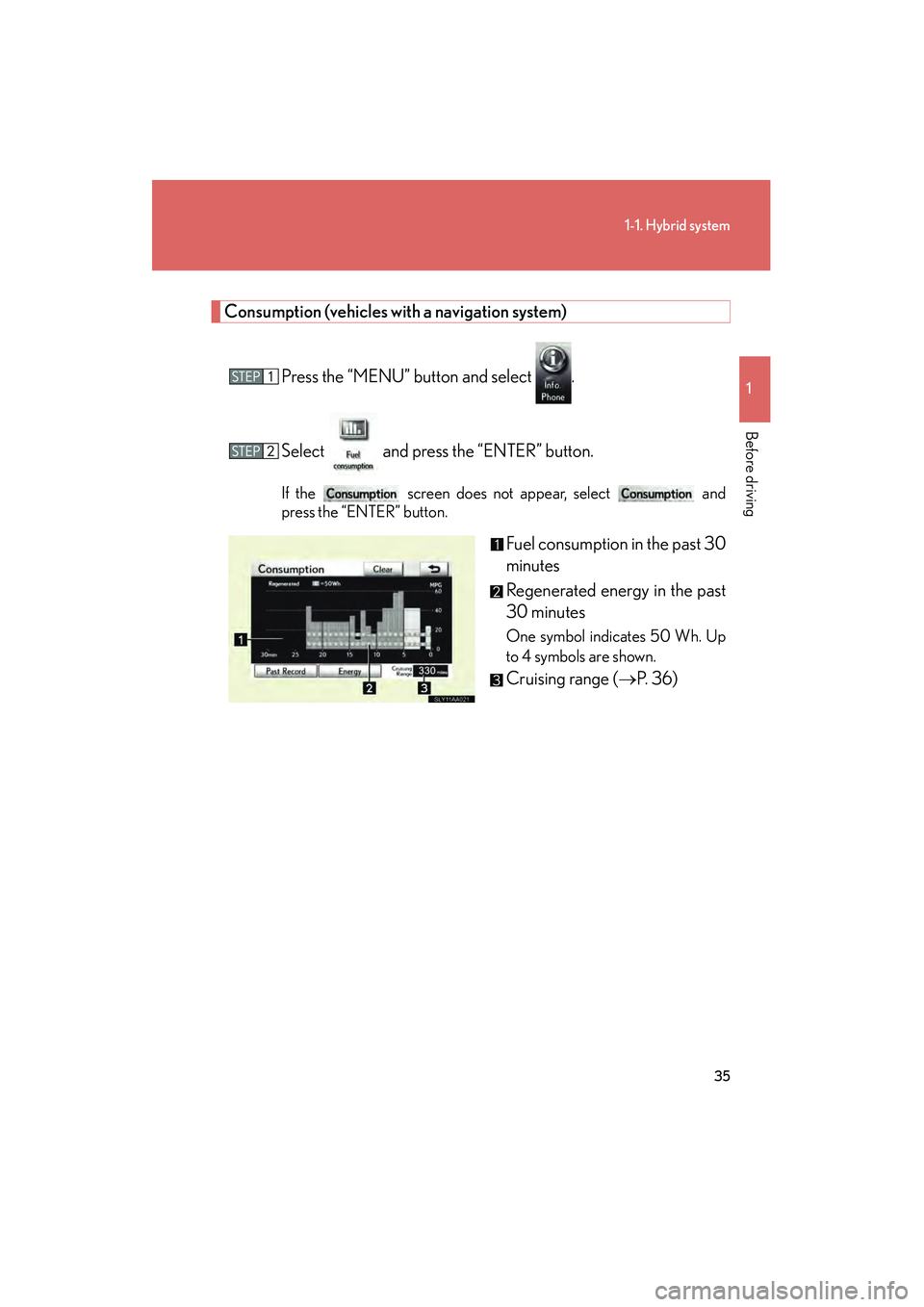
Consumption (vehicles with a navigation system)Press the “MENU” button and select .
Select and press the “ENTER” button.
If the screen does not appear, select and
press the “ENTER” button.
Fuel consumption in the past 30
minutes
Regenerated energy in the past
30 minutes
One symbol indicates 50 Wh. Up
to 4 symbols are shown.
Cruising range ( →P. 36)
Page 38 of 611

36
1-1. Hybrid system
HS250h_U_75033U(Canada)
Past record (vehicles with a navigation system)Press the “MENU” button and select .
Select and press the “ENTER” button.
If the screen does not appear, select and
press the “ENTER” button.
Best past fuel consumption
Average fuel consumption
Displays the average fuel consump-
tion between each reset of the total
average fuel consumption on the
multi-information display.
When resetting, if the total average
fuel consumption is better than the
best past fuel consumption, the best
past fuel consumption will be
updated.
These images are examples only, and may vary slightly from actual conditions.
■Resetting the consumption data
Selecting on the screen will reset the average fuel consump-
tion. Selecting on the screen will reset the past records.
Selecting will confirm resetting of all the data (except cruising range).
■Cruising range
Displays the estimated maximum distance that can be driven with the quantity of
fuel remaining.
This distance is computed based on your average fuel consumption.
As a result, the actual distance that can be driven may differ from that displayed.
Page 39 of 611
37
1
1-1. Hybrid system
Before driving
HS250h_U_75033U(Canada)
Hybrid vehicle driving tips
For economical and ecological driving, pay attention to the following
points:
■Using Eco Mode
When using Eco mode, the torque corre sponding to the accelerator pedal
depression amount can be generated more smoothly than it is in normal
conditions. In addition, the operation of the air conditioning system will be
minimized, improving the fuel economy.
( → P. 1 5 5 )
■Use of Hybrid System Indicator
The environmentally-friendly driving is possible by keeping the indicate of
Hybrid System Indicator within Eco area. ( →P. 1 6 4 )
■When braking the vehicle
Make sure to operate the brakes gently and in good time. A greater
amount of electrical energy can be retained when slowing down.
■Delays
Repeated acceleration and deceleration, as well as long waits at traffic
lights, will lead to bad fuel consumption. Check traffic reports before leav-
ing and avoid delays as much as po ssible. When encountering a delay,
gently release the brake pedal to allow the vehicle to move forward slightly
while avoiding overuse of the accelera tor pedal. Doing so can help control
excessive gasoline consumption.
■ Highway driving
Control your speed and keep at a constant speed. Also, before stopping at
a toll booth or similar, allow plenty of time to release the accelerator and
gently apply the brakes. A greater amount of electrical energy can be
retained when slowing down.
Page 40 of 611
38
1-1. Hybrid system
HS250h_U_75033U(Canada)
■Air conditioning
Use the air conditioning only when necessary. Doing so can help control
excessive gasoline consumption.
In summer: In high temperatures, use the recirculated air mode. Doing so
will help to reduce the burden on the air conditioner and reduce fuel con-
sumption as well.
In winter: Because the gasoline engine will not automatically cut out until
the gasoline engine and the interior of the vehicle are warm, it will con-
sume fuel. Also, fuel consumption can be improved by avoiding overuse of
the heater.
■ Checking tire inflation pressure
Make sure to check the tire inflation pressure frequently. Improper tire
inflation pressure can cause poor fuel consumption.
Also, as snow tires can cause large amounts of friction, their use on dry
roads can lead to poor fuel consumption. Use a tire that is appropriate for
the season.
■Luggage
Carrying heavy luggage can lead to poor fuel consumption. Avoid carry-
ing unnecessary luggage. Installing a large roof rack can also cause poor
fuel consumption.
■Warming up before driving
Since the gasoline engine starts up and cuts out automatically when cold,
warming up the engine is unnecessary. Moreover, frequently driving short
distances will cause the engine to repeatedly warm up, which can lead to
poor fuel consumption.
Page 46 of 611

44
HS250h_U_75033U(Canada)
1-3. Opening, closing and locking the doors
Smart access system with push-button start
The following operations can be performed simply by carrying the elec-
tronic key (including the card key) on your person, for example in your
pocket.
(The driver should always carry the electronic key.)
Locks and unlocks the doors (→P. 4 5 )
Unlocks the trunk ( →P. 4 5 )
Starts the hybrid system ( →P. 145)
Page 49 of 611

47
1-3. Opening, closing and locking the doors
1
Before driving
HS250h_U_75033U(Canada)■
Effective range (areas within wh ich the electronic key is detected)
When locking or unlocking
the doors
The system can be operated
when the electronic key is
within about 2.3 ft. (0.7 m) of
either of the front outside
door handles. (Only the doors
detecting the key can be
operated.)
When unlocking the trunk
The system can be operated
when the electronic key is
within about 2.3 ft. (0.7 m) of
the trunk release button.
When starting the hybrid
system or changing
“POWER” switch modes
The system can be operated
when the electronic key is
inside the vehicle.
■Operation signals
A buzzer sounds and the emergency flashers flash to indicate that the doors have
been locked/unlocked. (Locked: Once; Unlocked: Twice)
■When the door cannot be locked by the lo ck sensor on the upper part of the door
handle
Touch both lock sensors on the upper and
lower part of the door handle simultaneously.
Page 52 of 611
50
1-3. Opening, closing and locking the doors
HS250h_U_75033U(Canada)
■Note for the entry function
●Even when the electronic key is within the effective range (detection areas), the
system may not operate properly in the following cases:
• The electronic key is too close to the window or outside door handle, near theground, or in a high place when the doors are locked or unlocked.
• The electronic key is near the ground or in a high place, or too close to the rear bumper center when the trunk is unlocked.
• The electronic key is on the instrument panel, rear package tray or floor, or in
the door pockets or glove box when the hybrid system is started or
“POWER” switch modes are changed.
●As long as the electronic key is within the effective range, the doors may be
locked or unlocked by anyone.
●Even if the electronic key is not inside the vehicle, it may be possible to start the
hybrid system if the electronic key is near the window.
●The doors may unlock if a large amount of water splashes on the door handle,
such as in the rain or in a car wash when the electronic key is within the effective
range. (The door will automatically be locked after approximately 60 seconds if
the doors are not opened and closed.)
●Gripping the door handle when wearing a glove may not unlock the door.
●If the wireless remote control is used to lock the doors when the electronic key
is near the vehicle, there is a possibility that the door may not be unlocked by the
entry function. (Use the wireless remote control to unlock the doors.)
●A sudden approach to the effective range or door handle may prevent the
doors from being unlocked. In this case, return the door handle to the original
position and check that the doors unlock before pulling the door handle again.
■Notes for locking the doors
●Touching the door lock sensor while wearing gloves may delay or prevent lock
operation. Remove the gloves and touch the lock sensor again.
●When the lock operation is performed using the lock sensor, recognition signals
will be shown up to two consecutive time s. After this, no recognition signals will
be given.
●If the door handle becomes wet while the electronic key is within the effective
range, the door may lock and unlock repeatedly. Place the key in a position 6 ft.
(2 m) or more separate from the vehicle while the vehicle is being washed. (Take
care to ensure that the key is not stolen.)
Page 54 of 611
52
1-3. Opening, closing and locking the doors
HS250h_U_75033U(Canada)
Depending on the position and holding condition of the electronic key, the key may
not be detected correctly and the system may not operate properly. (The alarm may
go off accidentally, or the door lock prevention may not operate.)
■If the smart access system with push-button start does not operate properly
●Locking and unlocking the doors, unlocking the trunk: Use the mechanical key.
(→ P. 5 3 3 )
●Starting the hybrid system: →P. 5 3 4
■Electronic key battery depletion
●The standard battery life is 1 to 2 years. (The card key battery life is about a year
and a half.)
●If the battery becomes low, an alarm will sound in the cabin when the hybrid sys-
tem stops. ( →P. 4 8 )
●As the electronic key always transmits radio waves, the battery will become
depleted even if the electronic key is not used. The following symptoms indicate
that the electronic key battery may be depleted. Replace the battery when nec-
essary. ( →P. 4 5 3 )
• The smart access system with push-button start or the wireless remote con- trol does not operate.
• The detection area becomes smaller.
• The LED indicator on the key surface does not turn on.
●To avoid serious deterioration, do not leave the electronic key within 3 ft. (1 m) of
the following electrical appliances that produce a magnetic field:
•TVs
• Personal computers
• Cellular phones, cordless phones and battery chargers
• Recharging cellular phones or cordless phones
•Glass top ranges
•Table lamps
■When the electronic key battery is fully depleted
→ P. 4 5 3
■Customization
Settings (e.g. smart access system with push-button start) can be changed.
(Customizable features →P. 5 74 )
Page 89 of 611
87
1-5. Opening and closing the windows and moon roof
1
Before driving
HS250h_U_75033U(Canada)
■The power windows can be operated when
The “POWER” switch is in ON mode.
■Operating the power windows after turning the hybrid system off
The power windows can be operated for approximately 43 seconds even after the
“POWER” switch is turned to ACCESSORY mode or turned off. They cannot,
however, be operated once either front door is opened.
■Jam protection function
If an object becomes caught between the window and the window frame, window
travel is stopped and the window is opened slightly.
■Door lock linked window operation
●The power windows can be opened and closed using the mechanical key. *
(→ P. 5 3 3 )
●The power windows can be opened using the wireless remote control. *
(→ P. 5 4 )
*: This setting must be customized at your Lexus dealer.
■When the 12-volt battery is disconnected
The window lock switch is disabled. If necessary, press the window lock switch after
reconnecting the battery.
■Customization
Settings (e.g. linked door lock operation) can be changed.
(Customizable features →P. 5 74 )
Page 92 of 611

90
1-5. Opening and closing the windows and moon roof
HS250h_U_75033U(Canada)
■The moon roof can be operated when
The “POWER” switch is in ON mode.
■Operating the moon roof after turning the hybrid system off
The moon roof can be operated for approximately 43 seconds even after the
“POWER” switch is turned to ACCESSORY mode or turned off. It cannot, how-
ever, be operated once either front door is opened.
■Jam protection function
If an object is detected between the moon roof and the frame while the moon roof is
closing or tilting down, travel is stopped and the moon roof opens slightly.
■Sunshade
The sunshade can be opened and closed manually. However, the sunshade will
open automatically when the moon roof is opened.
■Door lock linked moon roof operation
●The moon roof can be opened and closed using the mechanical key.*
(→ P. 5 3 3 )
●The moon roof can be opened using the wireless remote control.* However, this
function is available only when the door windows can be opened and closed
with the wireless remote control. ( →P. 5 4 )
*: This setting must be customized at your Lexus dealer.
■When the moon roof does not close normally
Pressing and holding the “CLOSE” switch will close the moon roof.
■Moon roof open warning buzzer
The buzzer sounds and a message is shown on the multi-information display in the
instrument cluster when the “POWER” switch is turned off and the driver’s door is
opened with the moon roof open.
■Customization
Settings (e.g. linked door lock operation) can be changed.
(Customizable features →P. 5 74 )