warning Lexus HS250h 2010 Owner's Guide
[x] Cancel search | Manufacturer: LEXUS, Model Year: 2010, Model line: HS250h, Model: Lexus HS250h 2010Pages: 611, PDF Size: 11 MB
Page 162 of 611
160
2-1. Driving procedures
HS250h_U_75033U(Canada)
Parking brake
■Parking brake engaged warning buzzer
The buzzer sounds to indicate that parking brake is still engaged (with the vehicle
having reached a speed of 3 mph [5 km/h]). (→P. 506)
■Usage in winter time
See “Winter driving tips” for parking brake usage in winter time. ( →P. 2 4 4 )
NOTICE
■Before driving
Fully release the parking brake.
Driving the vehicle with the parking brake set will lead to brake components over-
heating, which may affect braking performance and increase brake wear.
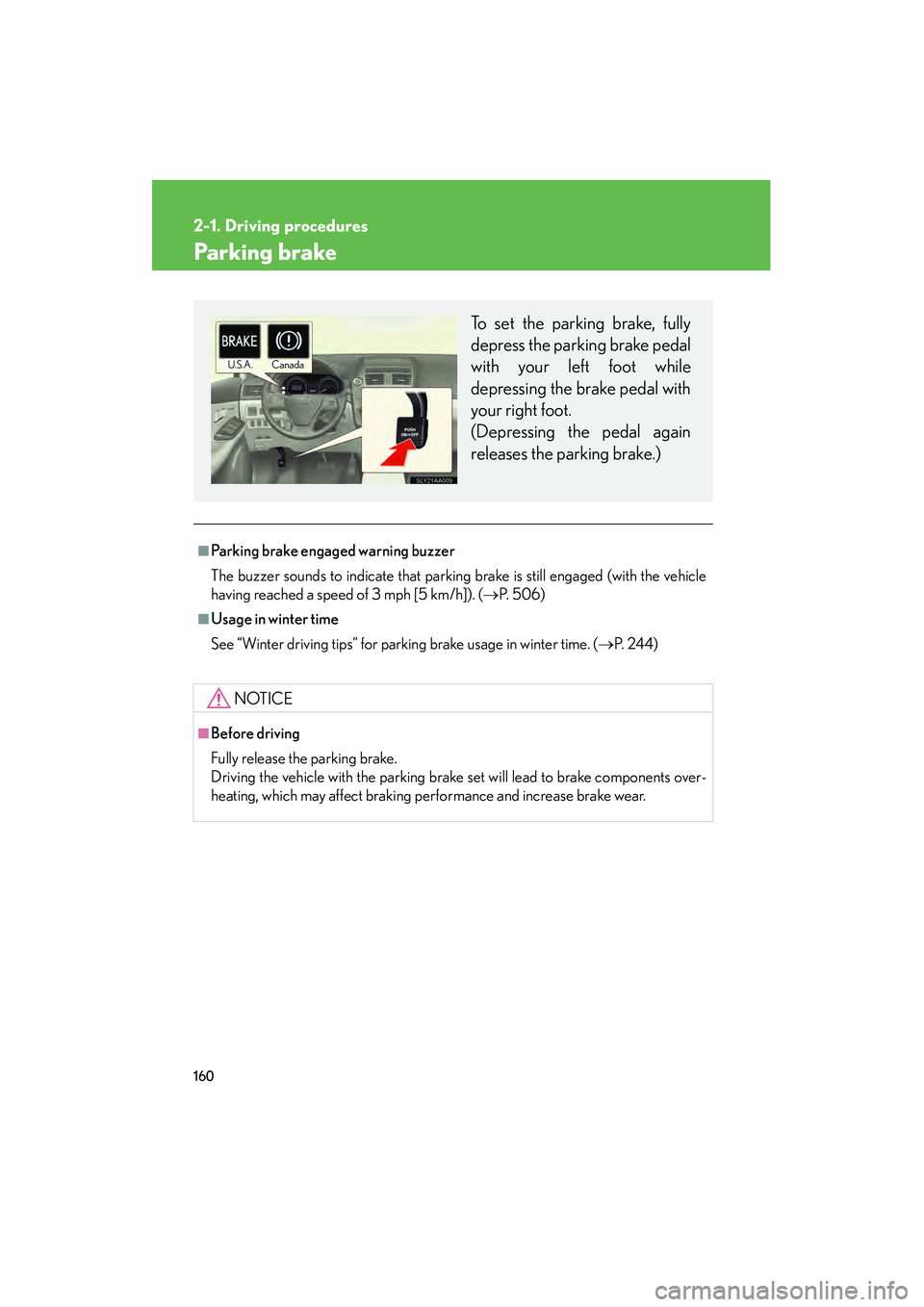
To set the parking brake, fully
depress the parking brake pedal
with your left foot while
depressing the brake pedal with
your right foot.
(Depressing the pedal again
releases the parking brake.)
U.S.A.Canada
Page 166 of 611

164
2-2. Instrument cluster
HS250h_U_75033U(Canada)
■Limitations of brightness adjustment
The brightness of the instrument panel lights is automatically adjusted based on the
light sensor detecting how bright the surroundings are. However, if the instrument
panel brightness has been manually set to either the brightest or dimmest setting,
the automatic adjustment will not be performed.
■Hybrid System Indicator
●By keeping the indicator needle within Eco area, environmentally-friendly driv-
ing can be achieved.
Hybrid Eco area shows that gasoline engine power is not being used very often.*
1
●Charge area indicates regeneration*2 status. Regenerated energy will be used
to charge the hybrid battery.
*
1: The gasoline engine will automatically stop and restart under various condi- tions.
*
2: When used in this manual, “regeneration” refers to the conversion of energy created by the movement of the vehicle into electrical energy.
■Customization
Settings (e.g. Sensitivity of the ambient light sensor used for dimming the meter
lights) can be changed. (Customizable features →P. 5 74 )
NOTICE
■To prevent damage to the hybrid system and its components
A high engine coolant temperature warning light (→ P. 492) is installed instead of
an engine coolant temperature gauge. If the high engine coolant temperature
warning light illuminates or flashes, the vehicle may be overheating. Immediately
stop the vehicle in a safe area ( →P. 5 4 1 ) .
Eco area
Eco Driving Indicator Light comes on
Hybrid Eco area
Eco Driving Indicator Light comes on
Charge area
Eco Driving Indicator Light comes on
Powe r a re a
Eco Driving Indicator Light turns off
Page 167 of 611

165
2-2. Instrument cluster
2
When driving
HS250h_U_75033U(Canada)
Indicators and warning lights
The indicator and warning lights on the instrument cluster and center
panel inform the driver of the status of the vehicle’s various systems.
Instrument cluster
Center panel (without a navigation system)
Center panel (with a navigation system)
Page 170 of 611

168
2-2. Instrument cluster
HS250h_U_75033U(Canada)
CAUTION
■If a safety system warning light does not come on
Should a safety system light such as the ABS and SRS airbag warning light not
come on when you start the hybrid system, this could mean that these systems are
not available to help protect you in an accident, which could result in death or seri-
ous injury. Have the vehicle inspected by your Lexus dealer immediately if this
occurs.
■Warning lights
Warning lights inform the driver of malfunctions in any of the vehi-
cle’s systems. ( →P. 4 9 2 )
*1: These lights turn on when the “POWER” switch is turned to ON mode
to indicate that a system check is being performed. They will turn off
after the hybrid system is on, or after a few seconds. There may be a
malfunction in a system if a light does not come on, or if the lights do not
turn off. Have the vehicle inspected by your Lexus dealer.
*2: The indicator flashes to indicate a malfunction.
(U.S.A.)(Canada)(U.S.A.)(Canada)
redyellow
(U.S.A.)(Canada)(if equipped)
(if equipped)(if equipped)(if equipped)
(if equipped)(for driver)(for front
passenger)
*1*1*1*1*1*1*1
*1*1*1*1*1, 2
*1*1, 2*2*2*2*1*1
*2
Page 175 of 611

173
2-2. Instrument cluster
2
When driving
HS250h_U_75033U(Canada)■
Average vehicle speed
Displays the average vehicle speed since the function was reset
The function can be reset by pushing the “ENTER” switch for longer than 1
second when the average vehicle speed is displayed.
■Outside temperature
Displays the outside temperature
■ Tire inflation pressure
Displays inflation pressure of each tire. There is no correlation between
the order of the displayed values and the tire positions.
It may take a few minutes to display the tire inflation pressure after the
“POWER” switch is turned to ON mode. It may also take a few minutes to
display the tire inflation pressure after the inflation pressure has been
adjusted.
■Electronic feature control can be turned on/off when
The “POWER” switch is in ON mode.
■Conditions for ending electronic feature control
In the following situations, the electronic feature control will end:
●The menu switch is pressed
●The radar cruise control is operated (if equipped)
●The lane keeping assist is operated (if equipped)
●Intuitive parking assist starts operating (if equipped)
●No action is performed for some time after the electronic feature control
screen is displayed
●A warning message appears after the electronic feature control screen is dis-
played
Page 178 of 611
176
2-2. Instrument cluster
HS250h_U_75033U(Canada)
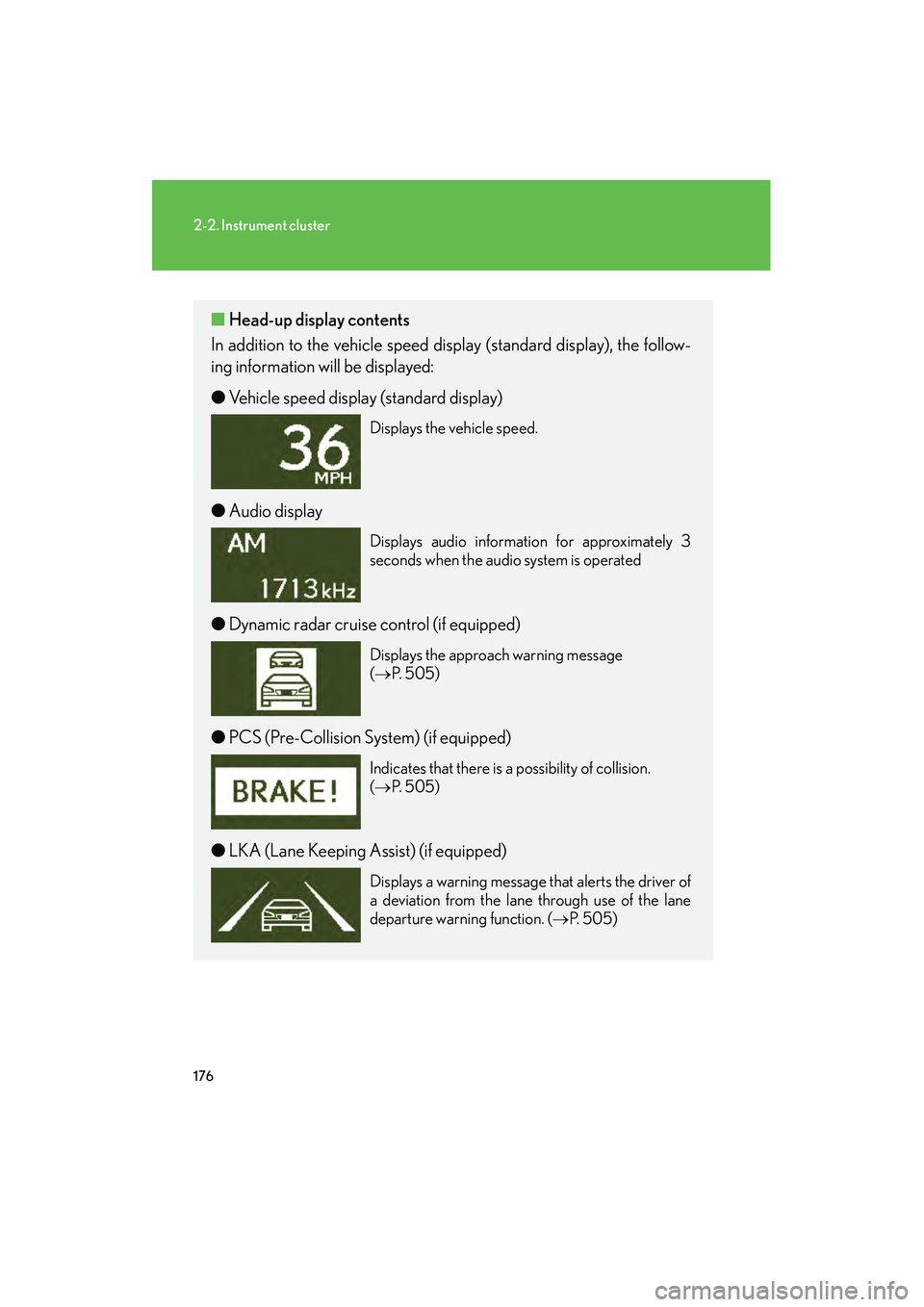
■Head-up display contents
In addition to the vehicle speed display (standard display), the follow-
ing information will be displayed:
● Vehicle speed display (standard display)
Displays the vehicle speed.
●Audio display
Displays audio information for approximately 3
seconds when the audio system is operated
●Dynamic radar cruise control (if equipped)
Displays the approach warning message
(→ P. 505)
●PCS (Pre-Collision System) (if equipped)
Indicates that there is a possibility of collision.
(→ P. 505)
●LKA (Lane Keeping Assist) (if equipped)
Displays a warning message that alerts the driver of
a deviation from the lane through use of the lane
departure warning function. ( →P. 505)
Page 211 of 611
209
2-4. Using other driving systems
2
When driving
HS250h_U_75033U(Canada)
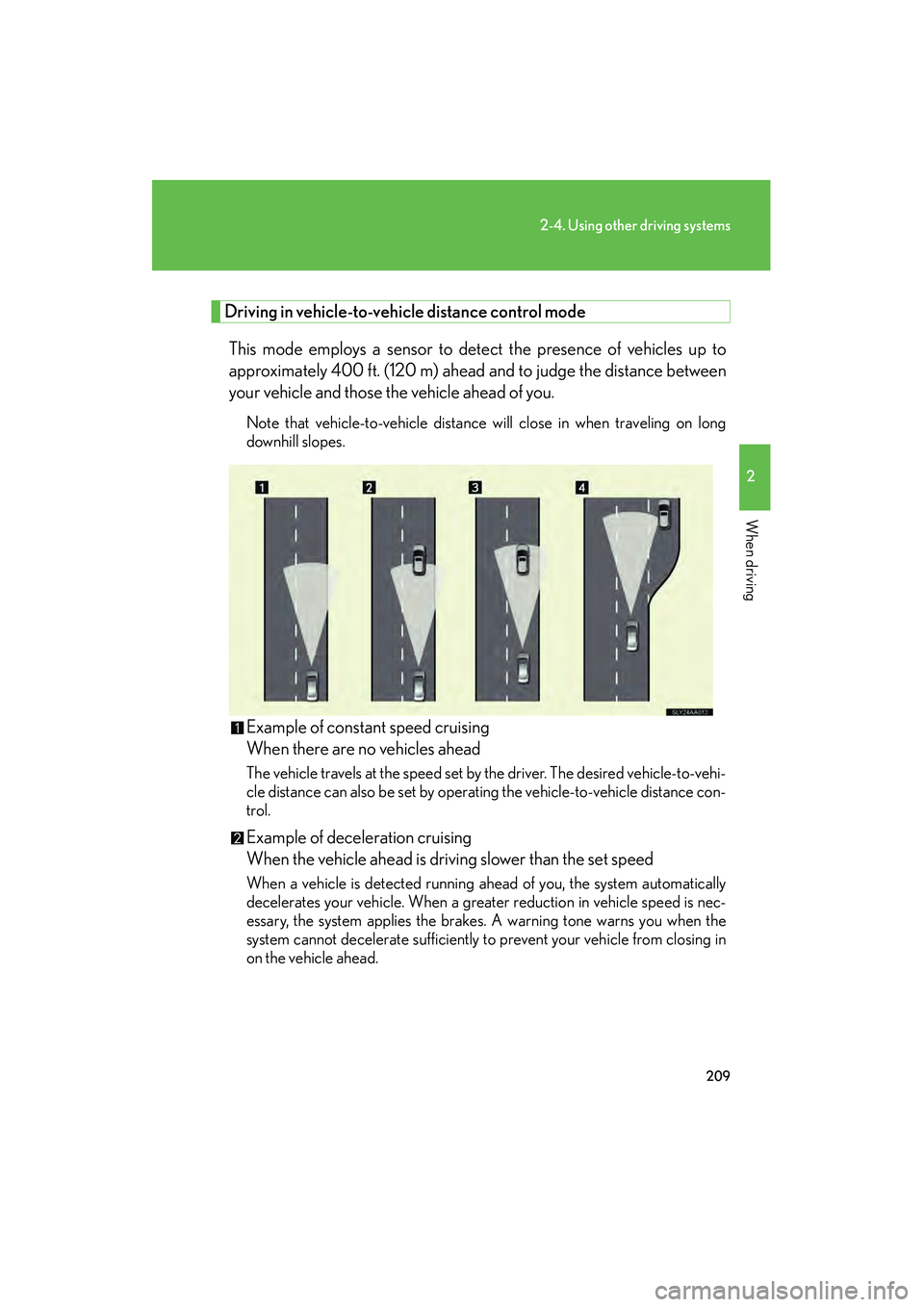
Driving in vehicle-to-vehicle distance control mode
This mode employs a sensor to detect the presence of vehicles up to
approximately 400 ft. (120 m) ahead and to judge the distance between
your vehicle and those the vehicle ahead of you.
Note that vehicle-to-vehicle distance will close in when traveling on long
downhill slopes.
Example of constant speed cruising
When there are no vehicles ahead
The vehicle travels at the speed set by the driver. The desired vehicle-to-vehi-
cle distance can also be set by operating the vehicle-to-vehicle distance con-
trol.
Example of deceleration cruising
When the vehicle ahead is driving slower than the set speed
When a vehicle is detected running ahead of you, the system automatically
decelerates your vehicle. When a greater reduction in vehicle speed is nec-
essary, the system applies the brakes. A warning tone warns you when the
system cannot decelerate sufficiently to prevent your vehicle from closing in
on the vehicle ahead.
Page 212 of 611

210
2-4. Using other driving systems
HS250h_U_75033U(Canada)Example of follow-up cruising
When following a vehicle driving slower than the set speed
The system continues follow-up cruising while adjusting for changes in the
speed of the vehicle ahead in order to maintain the vehicle-to-vehicle dis-
tance set by the driver.
Example of acceleration
When there are no longer any vehicles ahead driving slower than the
set speed.
The system slowly accelerates until the set speed is reached. The system then
returns to constant speed cruising.
Approach warning
When your vehicle is too close to a vehicle ahead, and sufficient auto-
matic deceleration via the cruise control is not possible, the display will
flash and the buzzer will sound to alert the driver. An example of this
would be if another driver cuts in front of you while you are following a
vehicle. Apply the brakes to ensure an appropriate vehicle-to-vehicle dis-
tance.
■Dynamic radar cruise can be set when
●The shift position is in D.
●Vehicle speed is above approximately 30 mph (50 km/h).
■Switching modes
The mode cannot be switched to constant speed control mode if vehicle-to-vehicle
distance control mode has been used. The mode also cannot be switched from
constant speed control to vehicle-to-vehicle distance control mode. Turn the sys-
tem off by pressing the “ON-OFF” button, and turn it on again.
■Accelerating
The vehicle can be accelerated normally. After acceleration, the set speed resume.
However, during vehicle-to-vehicle distance control mode, the vehicle speed may
decrease below the set speed in order to maintain the distance to the vehicle
ahead.
Page 214 of 611
212
2-4. Using other driving systems
HS250h_U_75033U(Canada)
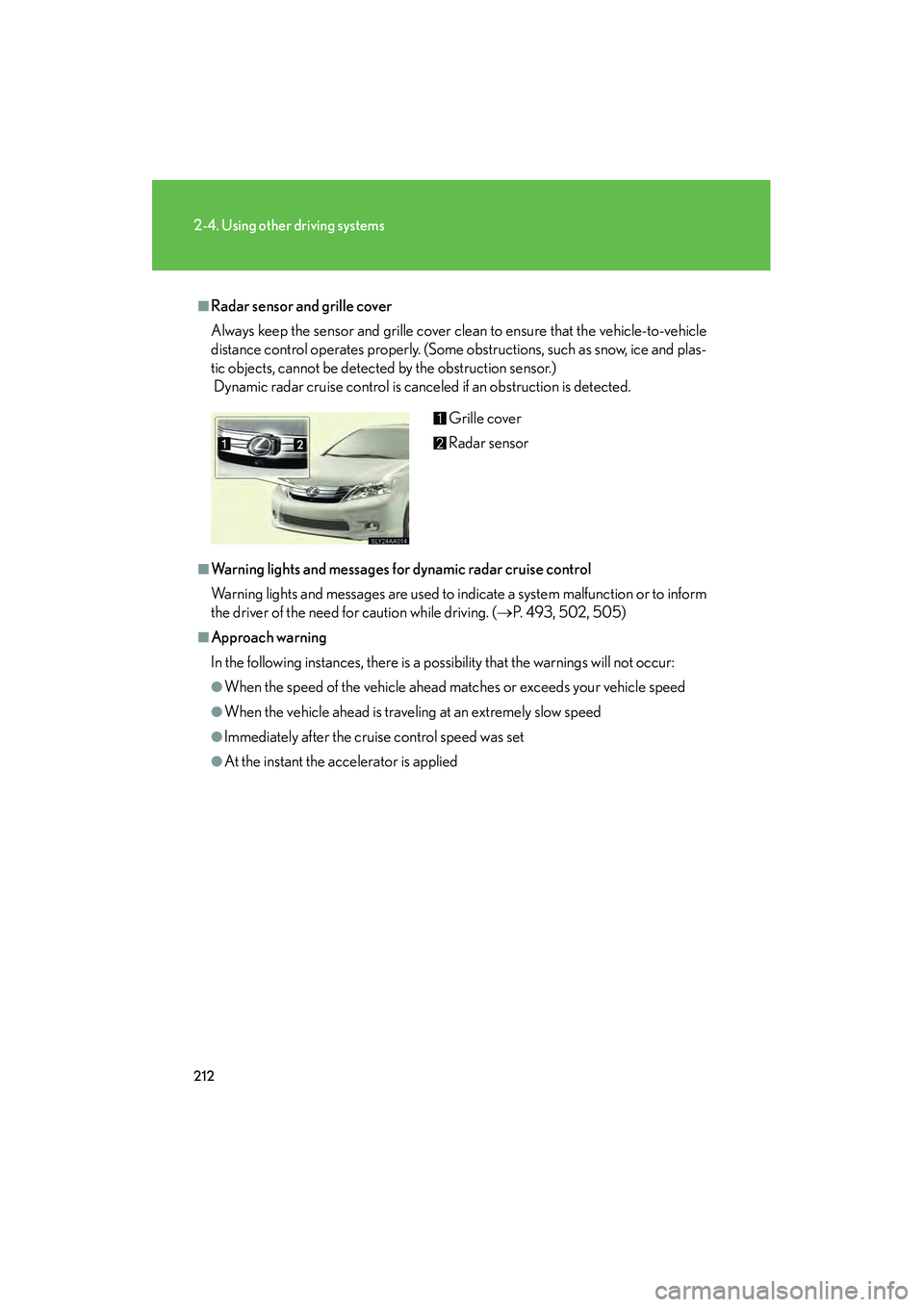
■Radar sensor and grille cover
Always keep the sensor and grille cover clean to ensure that the vehicle-to-vehicle
distance control operates properly. (Some obstructions, such as snow, ice and plas-
tic objects, cannot be detected by the obstruction sensor.)
Dynamic radar cruise control is canceled if an obstruction is detected.
■Warning lights and messages for dynamic radar cruise control
Warning lights and messages are used to indicate a system malfunction or to inform
the driver of the need for caution while driving. (→P. 493, 502, 505)
■Approach warning
In the following instances, there is a possibility that the warnings will not occur:
●When the speed of the vehicle ahead matches or exceeds your vehicle speed
●When the vehicle ahead is traveling at an extremely slow speed
●Immediately after the cruise control speed was set
●At the instant the accelerator is applied Grille cover
Radar sensor
Page 215 of 611
213
2-4. Using other driving systems
2
When driving
HS250h_U_75033U(Canada)
■Certification
For vehicles sold in the U.S.A.
FCC ID: HYQDNMWR004
This device complies with Part 15 of the FCC Rules. Operation is subject to the fol-
lowing two conditions: (1) this device may not cause harmful interference, and (2)
this device must accept any interference received, including interference that may
cause undesired operation.
FCC WARNING
Changes or modifications not expressly approved by the party responsible for
compliance could void the user’s authority to operate the equipment.
Radio frequency radiation exposure Information:
This equipment complies with FCC radiation exposure limits set forth for an uncon-
trolled environment.
This equipment should be installed and operated with minimum distance of 20 cm
between the radiator (antenna) and your body.
This transmitter must not be co-located or operating in conjunction with any other
antenna or transmitter.
CAUTION
■Before using dynamic radar cruise control
Do not overly rely on vehicle-to-vehicle distance control.
Be aware of the set speed. If automatic deceleration/acceleration is not appropri-
ate, adjust the vehicle speed, as well as the distance between your vehicle and vehi-
cles ahead by applying the brakes etc.