light Lexus HS250h 2010 Workshop Manual
[x] Cancel search | Manufacturer: LEXUS, Model Year: 2010, Model line: HS250h, Model: Lexus HS250h 2010Pages: 611, PDF Size: 11 MB
Page 151 of 611
149
2-1. Driving procedures
2
When driving
HS250h_U_75033U(Canada)
NOTICE
■To prevent 12-volt battery discharge
●Do not leave the “POWER” switch in ACCESSORY or ON mode for long peri-
ods of time without the hybrid system on.
●If the hybrid system is off, but the indicator on the “POWER” switch is illuminated,
this indicates that the “POWER” switch is still turned on. When exiting the vehi-
cle, always check that the “POWER” switch is off.
■When starting the hybrid system
Do not depress the accelerator pedal unnecessarily.
■Symptoms indicating a malfunction with the “POWER” switch
If the “POWER” switch seems to be operating somewhat differently than usual,
such as the switch sticking slightly, there may be a malfunction. Contact your Lexus
dealer immediately.
Page 161 of 611

159
2-1. Driving procedures
2
When driving
HS250h_U_75033U(Canada)
Turn signal lever
■Turn signals can be operated when
The “POWER” switch is in ON mode.
■If the indicator flashes faster than usual
Check that a light bulb in the front or rear turn signal lights has not burned out.
The turn signal lever can be used to show the following intention of the
driver: Right turn
Left turn
Lane change to the right
(push and hold the lever part-
way)
The right hand signals will flash
until you release the lever.
Lane change to the left (push
and hold the lever partway)
The left hand signals will flash
until you release the lever.
Page 165 of 611
163
2-2. Instrument cluster
2
When driving
HS250h_U_75033U(Canada)
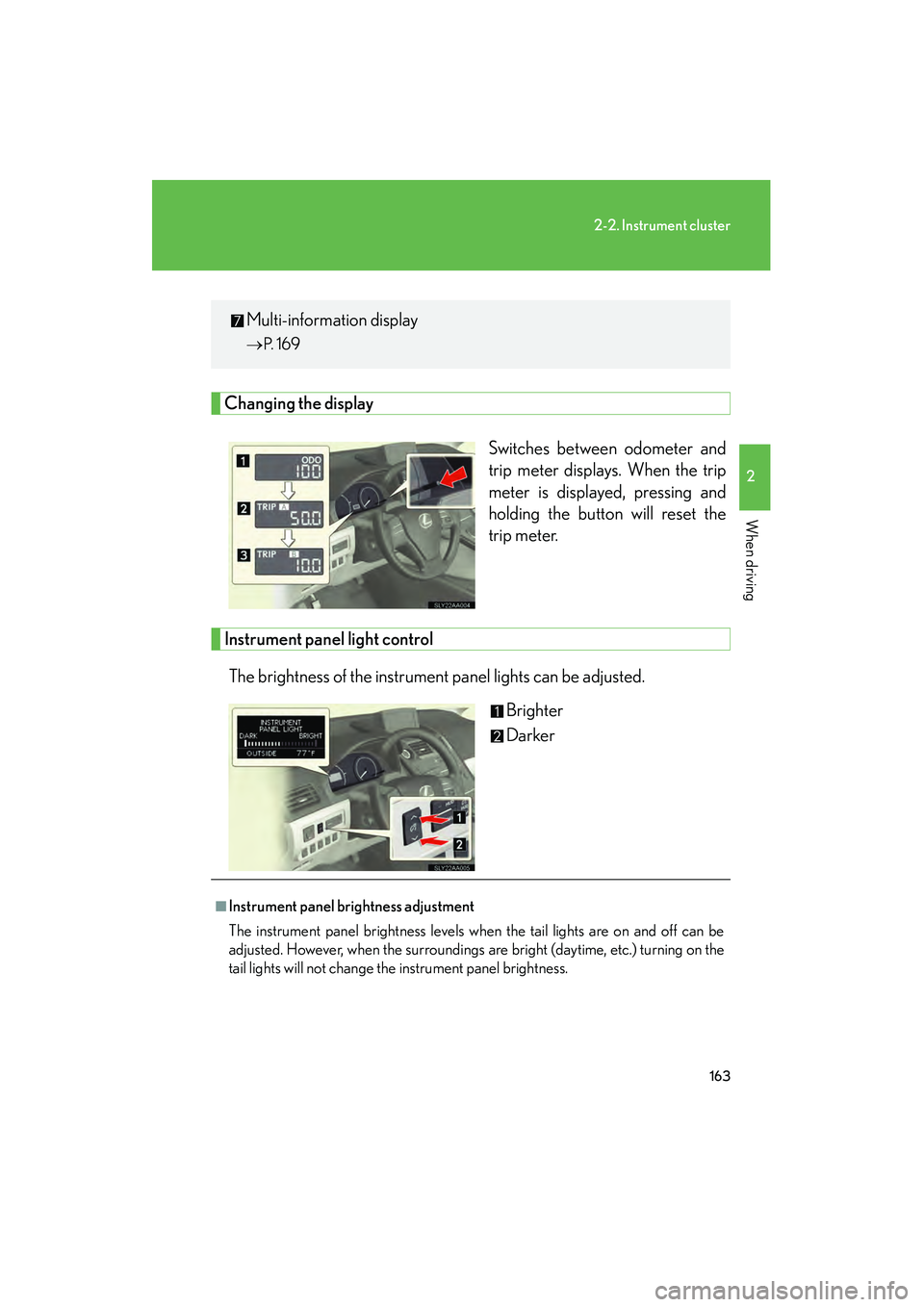
Changing the displaySwitches between odometer and
trip meter displays. When the trip
meter is displayed, pressing and
holding the button will reset the
trip meter.
Instrument panel light controlThe brightness of the instrument panel lights can be adjusted. Brighter
Darker
Multi-information display
→P. 1 6 9
■Instrument panel bri ghtness adjustment
The instrument panel brightness levels when the tail lights are on and off can be
adjusted. However, when the surroundings are bright (daytime, etc.) turning on the
tail lights will not change the instrument panel brightness.
Page 166 of 611

164
2-2. Instrument cluster
HS250h_U_75033U(Canada)
■Limitations of brightness adjustment
The brightness of the instrument panel lights is automatically adjusted based on the
light sensor detecting how bright the surroundings are. However, if the instrument
panel brightness has been manually set to either the brightest or dimmest setting,
the automatic adjustment will not be performed.
■Hybrid System Indicator
●By keeping the indicator needle within Eco area, environmentally-friendly driv-
ing can be achieved.
Hybrid Eco area shows that gasoline engine power is not being used very often.*
1
●Charge area indicates regeneration*2 status. Regenerated energy will be used
to charge the hybrid battery.
*
1: The gasoline engine will automatically stop and restart under various condi- tions.
*
2: When used in this manual, “regeneration” refers to the conversion of energy created by the movement of the vehicle into electrical energy.
■Customization
Settings (e.g. Sensitivity of the ambient light sensor used for dimming the meter
lights) can be changed. (Customizable features →P. 5 74 )
NOTICE
■To prevent damage to the hybrid system and its components
A high engine coolant temperature warning light (→ P. 492) is installed instead of
an engine coolant temperature gauge. If the high engine coolant temperature
warning light illuminates or flashes, the vehicle may be overheating. Immediately
stop the vehicle in a safe area ( →P. 5 4 1 ) .
Eco area
Eco Driving Indicator Light comes on
Hybrid Eco area
Eco Driving Indicator Light comes on
Charge area
Eco Driving Indicator Light comes on
Powe r a re a
Eco Driving Indicator Light turns off
Page 167 of 611

165
2-2. Instrument cluster
2
When driving
HS250h_U_75033U(Canada)
Indicators and warning lights
The indicator and warning lights on the instrument cluster and center
panel inform the driver of the status of the vehicle’s various systems.
Instrument cluster
Center panel (without a navigation system)
Center panel (with a navigation system)
Page 168 of 611

166
2-2. Instrument cluster
HS250h_U_75033U(Canada)
■Indicators
The indicators inform the driver of the operating state of the vehi-
cle’s various systems.
Turn signal indicator
(→ P. 1 5 9 )“ECO MODE” indicator
(→ P. 1 5 5 )
(U.S.A.)
Headlight indicator
(→ P. 1 8 3 )“PWR MODE” indicator
(→ P. 1 5 5 )
(Canada)
Tail light indicator
(→ P. 1 8 3 )Cruise control indicator
(→ P. 201, 205)
Headlight high beam
indicator ( →P. 1 8 5 )
(if equipped)
Radar cruise control
indicator (→ P. 2 0 5 )
(if equipped)
Automatic High Beam
indicator
(→ P. 1 8 8 )
(if equipped)
“LKA” indicator
(→ P. 2 1 8 )
Front fog light indicator
(→ P. 1 9 4 )“SET” indicator
(→ P. 201, 205)
“READY” indicator
(→ P. 1 4 5 )
(if equipped)
Intuitive parking assist
indicator (Refer to “Navi-
gation System Owner’s
Manual”.)
EV drive mode indicator
(→ P. 1 5 0 )
(if equipped)
“AFS OFF” indicator
(→ P. 1 8 5 )
Eco Driving Indicator
Light ( →P. 1 3 8 )Slip indicator
(→ P. 226, 230)
*1
*1*1, 2
Page 169 of 611

167
2-2. Instrument cluster
2
When driving
HS250h_U_75033U(Canada)
*1:These lights turn on when the “POWER” switch is turned to the ON modeto indicate that a system check is being performed. They will turn off after
the hybrid system is on, or after a few seconds. There may be a malfunction
in a system if a light does not come on, or if the lights do not turn off. Have
the vehicle inspected by your Lexus dealer.
*2:The indicator flashes to indicate that the system is operating.
*3:The indicator flashes faster than usual to indicate that the system is operat-
ing.
VSC OFF indicator
( → P. 2 2 6 ) Shift position indicators
(→ P. 1 5 3 )
(if equipped)
“PCS” indicator
(→ P. 2 3 3 )SRS airbag on-off
indicator ( →P. 116)
*1
*1, 3*1
Page 170 of 611

168
2-2. Instrument cluster
HS250h_U_75033U(Canada)
CAUTION
■If a safety system warning light does not come on
Should a safety system light such as the ABS and SRS airbag warning light not
come on when you start the hybrid system, this could mean that these systems are
not available to help protect you in an accident, which could result in death or seri-
ous injury. Have the vehicle inspected by your Lexus dealer immediately if this
occurs.
■Warning lights
Warning lights inform the driver of malfunctions in any of the vehi-
cle’s systems. ( →P. 4 9 2 )
*1: These lights turn on when the “POWER” switch is turned to ON mode
to indicate that a system check is being performed. They will turn off
after the hybrid system is on, or after a few seconds. There may be a
malfunction in a system if a light does not come on, or if the lights do not
turn off. Have the vehicle inspected by your Lexus dealer.
*2: The indicator flashes to indicate a malfunction.
(U.S.A.)(Canada)(U.S.A.)(Canada)
redyellow
(U.S.A.)(Canada)(if equipped)
(if equipped)(if equipped)(if equipped)
(if equipped)(for driver)(for front
passenger)
*1*1*1*1*1*1*1
*1*1*1*1*1, 2
*1*1, 2*2*2*2*1*1
*2
Page 173 of 611

171
2-2. Instrument cluster
2
When driving
HS250h_U_75033U(Canada)
Display order may vary depending on vehicle condition.
Electronic feature control contentsSetting electronic feature controls
AFS (if equipped)→P. 1 8 5
Intuitive parking assist
(if equipped)Refer to “Navigation System
Owner’s Manual”.
Other contentsDe ta ils
Customization ( →P. 5 74 )
Settings of functions such as the
door lock and light illumination time
can be changed
Dynamic radar cruise control
(if equipped) ( →P. 2 0 5 )Automatically displayed when using
the dynamic radar cruise control
LKA (Lane Keeping Assist)
(if equipped) ( →P. 2 1 7 )Automatically displayed when using
the lane keeping assist
PCS (Pre-Collision System)
(if equipped) ( →P. 232, 502, 505)Automatically displayed if there is a
possibility of collision.
Page 182 of 611

180
2-2. Instrument cluster
HS250h_U_75033U(Canada)■
Touch tracer display
Only the switch that is being
operated is highlighted, and
thus, the driver can perceive
which button is being operated.
The applicable switch displayed
on the head-up display will
change in response to the
switch operation.
Taking your finger off the steering
switch returns the display to the
vehicle speed indication.
It is possible to turn the touch
tracer display ON/OFF as neces-
sary. (→P. 181)
Turn-by-turn navigation
When the vehicle approaches an
intersection, the direction the vehi-
cle should go is guided by the
arrow.
When the vehicle approaches an
intersection, the route guidance
will start and the distance
* to the
intersection will also be displayed.
The animation guidance changes
according to the vehicle conditions
(running or stopped).
*:The distance decreases in incre- ments of 50 yards and the dis-
tance indication will disappear
when the vehicle passes through
the intersection.