turn Lexus HS250h 2010 Setup / LEXUS 2010 HS250H QUICK GUIDE OWNERS MANUAL (OM75023U)
[x] Cancel search | Manufacturer: LEXUS, Model Year: 2010, Model line: HS250h, Model: Lexus HS250h 2010Pages: 86, PDF Size: 5.16 MB
Page 2 of 86
2
Hands-free System For Cellular Phone (with navigation system)
Bluetooth
® phone pairing ......................................................................................................... 47
Phonebook transfer ......................................................................................................................48
Registering a voice tag ................................................................................................................ 49
Registering a speed dial ............................................................................................................. 50
Calling by name............................................................................................................................... 51
Calling by speed dial .................................................................................................................... 52
Receiving a call ...............................................................................................................................53
Headlights ...............................................................................................................................................33
Head-up Display.................................................................................................................................. 30
Hybrid System ........................................................................................................................................ 10
Hybrid transmission ............................................................................................................................. 19
Intuitive Parking Assist .......................................................................................................................32
Keys ............................................................................................................................................................. 14
Lexus Enform with Safety Connect ...............................................................................................76
LKA (Lane-Keeping Assist)............................................................................................................. 29
Moon Roof .............................................................................................................................................. 79
Multi-information Display ................................................................................................................. 22
Navigation System
Register home .................................................................................................................................. 41
Destination input - Search by address .................................................................................. 42
Destination input - Search points of interest by name.................................................... 44
Destination input - Search points of interest by category............................................. 45
Destination input - Search points of interest by telephone number .........................46
Portable Audio Device Adapters ................................................................................................... 71
Power (Ignition) Switch ....................................................................................................................... 17
Power Windows .................................................................................................................................... 79
Remote Touch ....................................................................................................................................... 38
Safety Connect ......................................................................................................................................74
Smart Access System with Push-button Start........................................................................... 15
Theft Deterrent System ...................................................................................................................... 16
Turn Signal Lever .................................................................................................................................. 24
Voice Command System
Basic operation ...............................................................................................................................66
Command list .................................................................................................................................. 67
Wide View Front Monitor .................................................................................................................32
Windshield Wipers and Washer ....................................................................................................36
Page 3 of 86
3
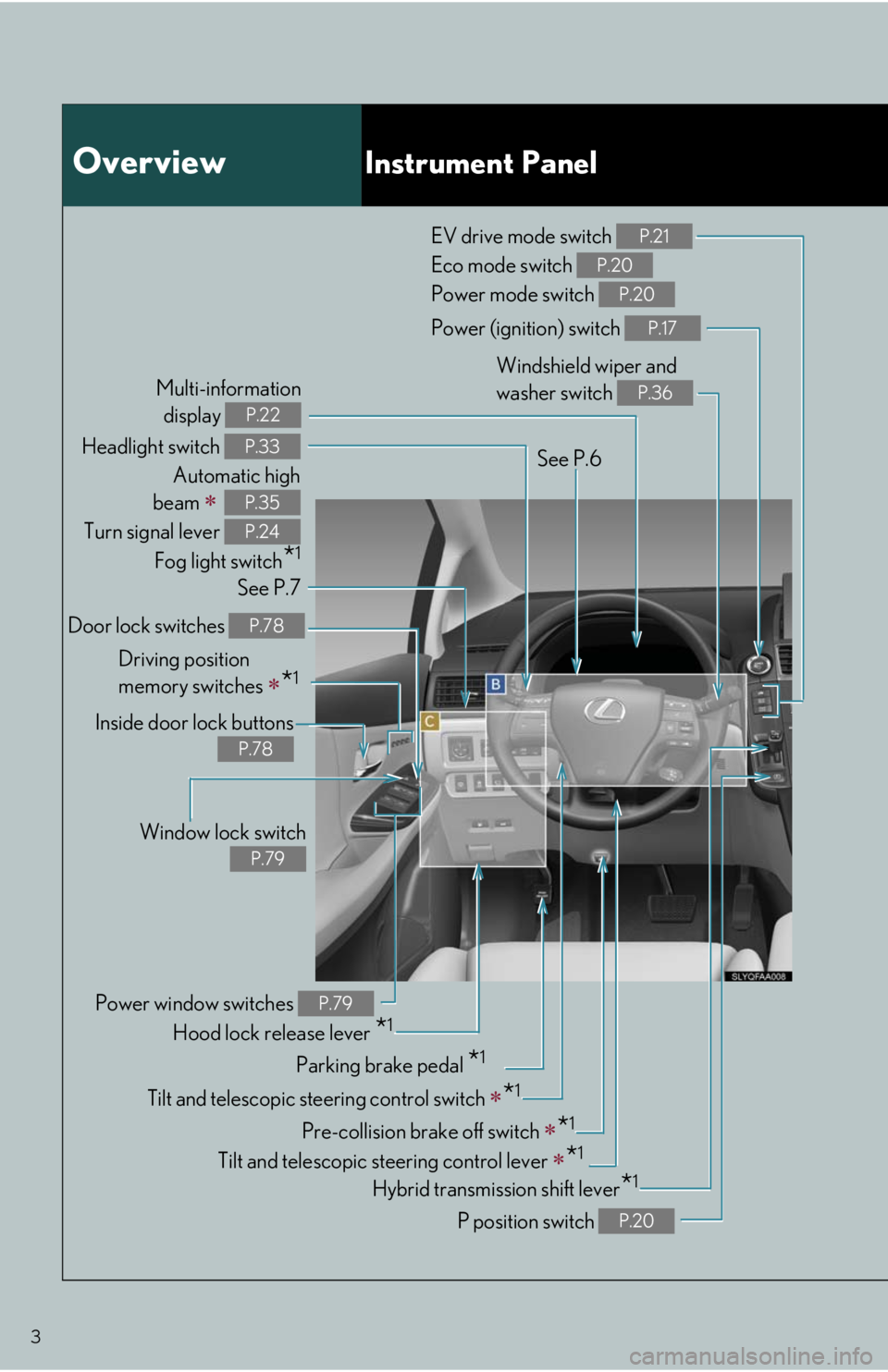
OverviewInstrument Panel
Headlight switch
Automatic high
beam
Turn signal lever
Fog light switch
*1
P.33
P.35
P.24
Power (ignition) switch P.17
See P.6
See P.7Windshield wiper and
washer switch
P.36
EV drive mode switch
Eco mode switch
Power mode switch P.21
P.20
P.20
Hybrid transmission shift lever*1
P position switch P.20
Tilt and telescopic steering control switch *1
Pre-collision brake off switch *1
Tilt and telescopic steering control lever *1
Parking brake pedal *1
Hood lock release lever *1 Door lock switches
P.78
Power window switches P.79
Window lock switch
P.79
Inside door lock buttons
P.78
Driving position
memory switches
*1
Multi-information
display
P.22
Page 10 of 86
10
Hybrid System
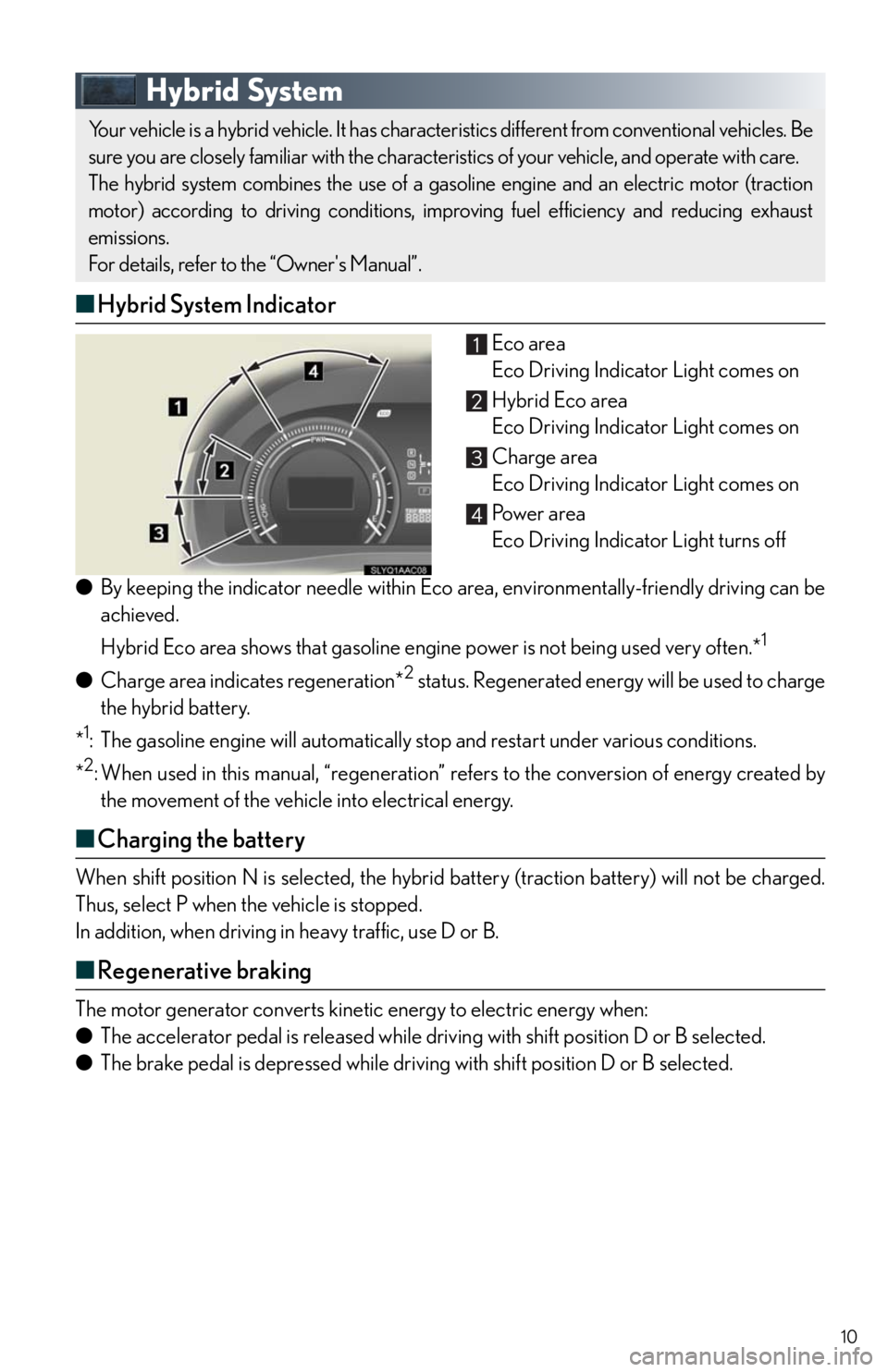
■Hybrid System Indicator
Eco area
Eco Driving Indicator Light comes on
Hybrid Eco area
Eco Driving Indicator Light comes on
Charge area
Eco Driving Indicator Light comes on
Pow e r a r e a
Eco Driving Indicator Light turns off
●By keeping the indicator needle within Eco area, environmentally-friendly driving can be
achieved.
Hybrid Eco area shows that gasoline engine power is not being used very often.*
1
●Charge area indicates regeneration*2 status. Regenerated energy will be used to charge
the hybrid battery.
*
1: The gasoline engine will automatically stop and restart under various conditions.
*
2: When used in this manual, “regeneration” refers to the conversion of energy created by
the movement of the vehicle into electrical energy.
■Charging the battery
When shift position N is selected, the hybrid battery (traction battery) will not be charged.
Thus, select P when the vehicle is stopped.
In addition, when driving in heavy traffic, use D or B.
■Regenerative braking
The motor generator converts kinetic energy to electric energy when:
●The accelerator pedal is released while driving with shift position D or B selected.
●The brake pedal is depressed while driving with shift position D or B selected.
Your vehicle is a hybrid vehicle. It has characteristics different from conventional vehicles. Be
sure you are closely familiar with the characteristics of your vehicle, and operate with care.
The hybrid system combines the use of a gasoline engine and an electric motor (traction
motor) according to driving conditions, improving fuel efficiency and reducing exhaust
emissions.
For details, refer to the “Owner's Manual”.
Page 16 of 86
16
Theft Deterrent System
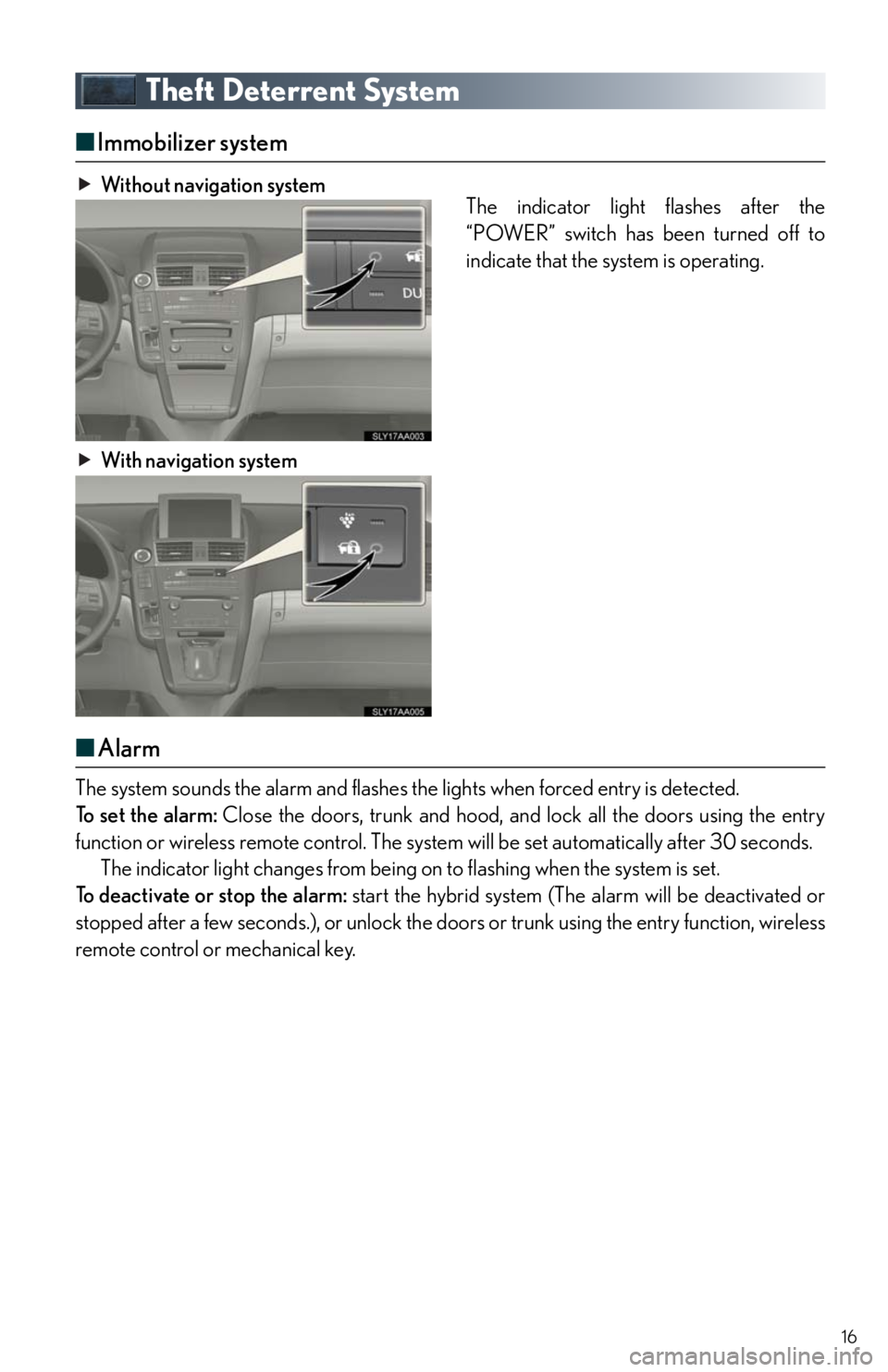
■Immobilizer system
Without navigation system
The indicator light flashes after the
“POWER” switch has been turned off to
indicate that the system is operating.
With navigation system
■Alarm
The system sounds the alarm and flashes the lights when forced entry is detected.
To set the alarm: Close the doors, trunk and hood, and lock all the doors using the entry
function or wireless remote control. The system will be set automatically after 30 seconds.
The indicator light changes from being on to flashing when the system is set.
To deactivate or stop the alarm: start the hybrid system (The alarm will be deactivated or
stopped after a few seconds.), or unlock the doors or trunk using the entry function, wireless
remote control or mechanical key.
Page 17 of 86

17
Power (Ignition) Switch
■Starting the hybrid system
Check that the parking brake is set.
Firmly depress the brake pedal.
The “POWER” switch indicator will
turn green. If the indicator does not
turn green, the hybrid system cannot
be started.
When shift position N is selected, the
hybrid system cannot start. Select the
P position when starting the hybrid
system.
Press the “POWER” switch.
After a while, the “READY” indictor
comes on with a beep sound.
The vehicle can move when the
“READY” indicator is on even if the
engine is stopped.
Continue depressing the brake pedal
until the hybrid system is completely
started.
The hybrid system can be started
from any mode.
■Stopping the hybrid system
Stop the vehicle by depressing the brake pedal.
Set the parking brake.
Press the P position switch to shift into P.
Check that the shift position indicator on the instrument cluster shows P.
Press the “POWER” switch.
Slowly release the brake pedal and check that the indicator on the “POWER” switch is
off.
Performing the following operations when carrying the electronic key on your person
starts the hybrid system or changes “POWER” switch modes.
Page 18 of 86

18
■Changing “POWER” switch modes
Modes can be changed by pressing the “POWER” switch with the brake pedal released.
(The mode changes each time the switch is pressed.)
Off
The emergency flashers can be used.
ACCESSORY mode
Some electrical components such as the
audio system can be used.
The “POWER” switch indicator turns
amber.
ON mode
All electrical components can be used.
The “POWER” switch indicator turns
amber.
Page 19 of 86

19
Hybrid transmission
■Shifting the shift lever
Shift lever
Operate the shift lever gently and
ensure correct shifting operation.
When shifting to the D or R
positions, move the shift lever
along the shift gate.
To shift to the N position, slide
the shift lever to the left and hold
it. The shift position will change
to N.
Shifting to B is only possible
when shift position D is selected.
The shift lever will always return
to this position after a shifting
operation.
When shifting from P to D or R, from D
to R, or from R to D, ensure that the
brake pedal is being depressed and the
vehicle is stationary.
Shift position indicator
When selecting the shift position, make
sure that the shift position has been
changed to the desired position by
checking the shift position indicator pro-
vided on the instrument panel.
When any shift position other than D or
B is selected, the arrow toward B disap-
pears from the shift position indicator.
■Shift position purpose
*: For good fuel economy and noise reduction, the D position should usually be used.
Shift positionFunction
PParking the vehicle/starting the hybrid system
RReversing
NNeutral
DNormal driving*
BApplying moderate engine braking when driving down hills or on
steep slopes
Page 21 of 86
21
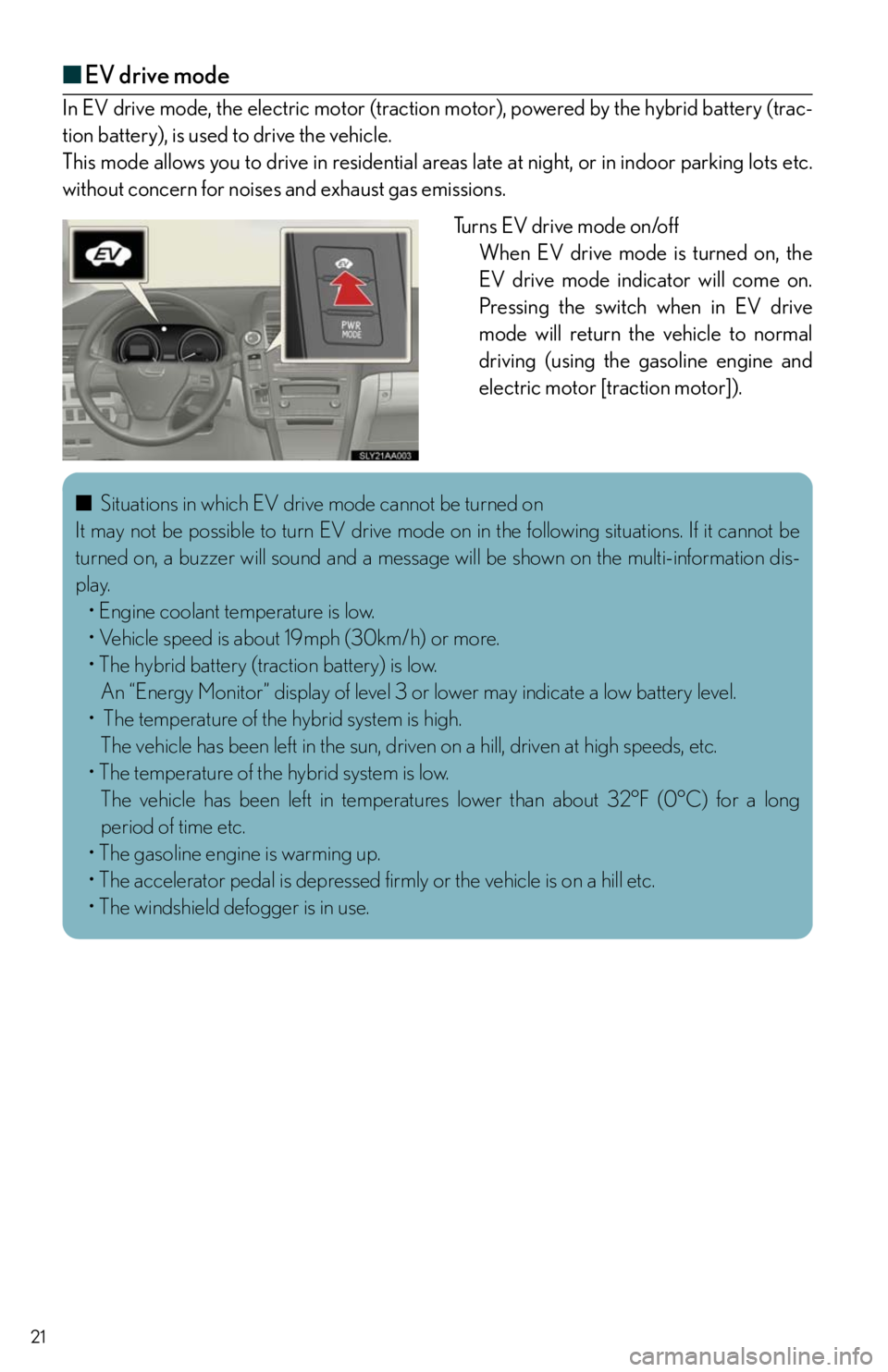
■EV drive mode
In EV drive mode, the electric motor (traction motor), powered by the hybrid battery (trac-
tion battery), is used to drive the vehicle.
This mode allows you to drive in residential areas late at night, or in indoor parking lots etc.
without concern for noises and exhaust gas emissions.
Tu r n s E V d r i v e m o d e o n /o f f
When EV drive mode is turned on, the
EV drive mode indicator will come on.
Pressing the switch when in EV drive
mode will return the vehicle to normal
driving (using the gasoline engine and
electric motor [traction motor]).
■Situations in which EV drive mode cannot be turned on
It may not be possible to turn EV drive mode on in the following situations. If it cannot be
turned on, a buzzer will sound and a message will be shown on the multi-information dis-
play.
• Engine coolant temperature is low.
• Vehicle speed is about 19mph (30km/h) or more.
• The hybrid battery (traction battery) is low.
An “Energy Monitor” display of level 3 or lower may indicate a low battery level.
• The temperature of the hybrid system is high.
The vehicle has been left in the sun, driven on a hill, driven at high speeds, etc.
• The temperature of the hybrid system is low.
The vehicle has been left in temperatures lower than about 32°F (0°C) for a long
period of time etc.
• The gasoline engine is warming up.
• The accelerator pedal is depressed firmly or the vehicle is on a hill etc.
• The windshield defogger is in use.
Page 22 of 86
22
Multi-information Display
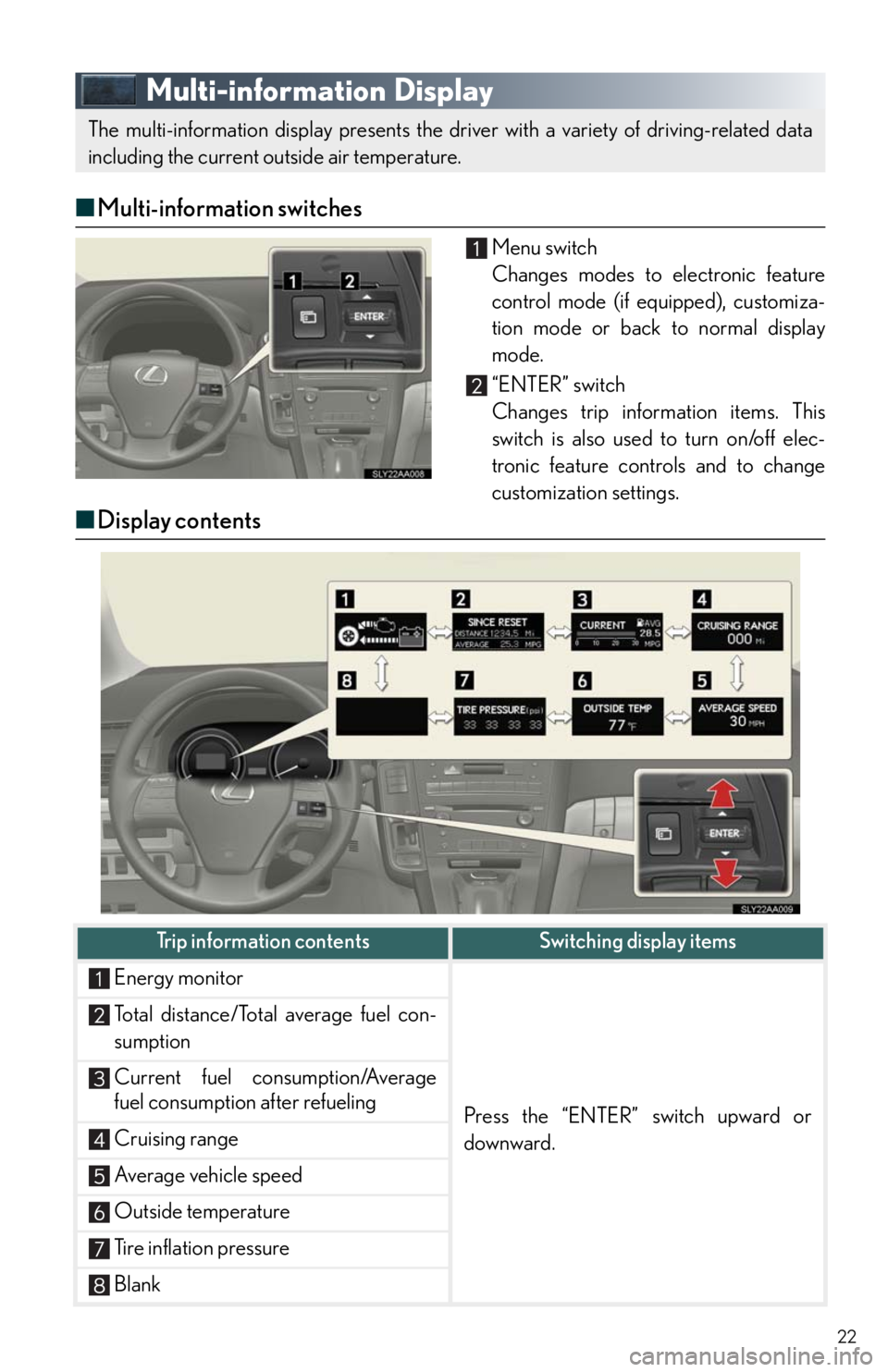
■Multi-information switches
Menu switch
Changes modes to electronic feature
control mode (if equipped), customiza-
tion mode or back to normal display
mode.
“ENTER” switch
Changes trip information items. This
switch is also used to turn on/off elec-
tronic feature controls and to change
customization settings.
■Display contents
The multi-information display presents the driver with a variety of driving-related data
including the current outside air temperature.
Trip information contentsSwitching display items
Energy monitor
Press the “ENTER” switch upward or
downward.
Total distance/Total average fuel con-
sumption
Current fuel consumption/Average
fuel consumption after refueling
Cruising range
Average vehicle speed
Outside temperature
Tire inflation pressure
Blank
Page 24 of 86
24
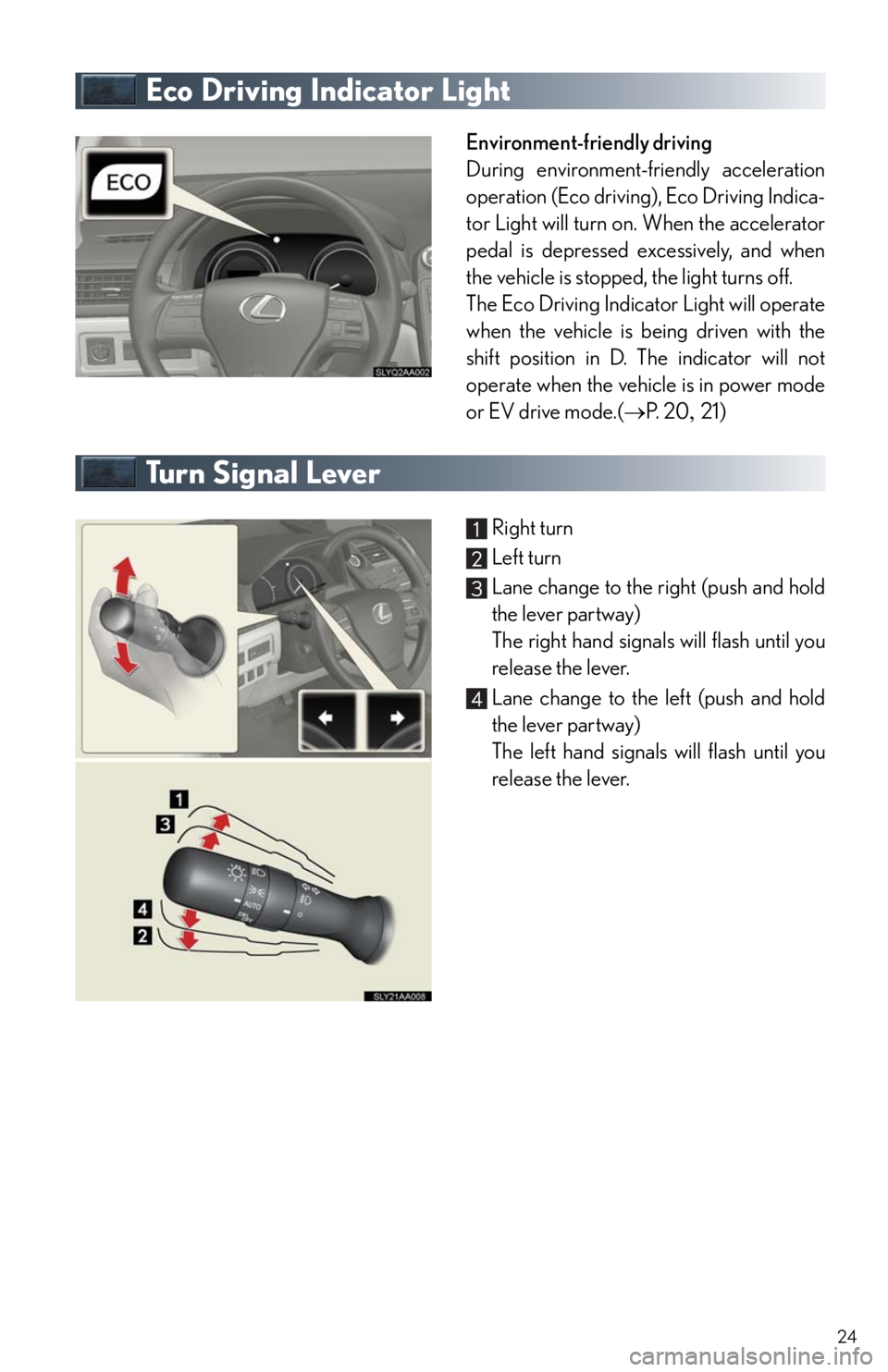
Eco Driving Indicator Light
Environment-friendly driving
During environment-friendly acceleration
operation (Eco driving), Eco Driving Indica-
tor Light will turn on. When the accelerator
pedal is depressed excessively, and when
the vehicle is stopped, the light turns off.
The Eco Driving Indicator Light will operate
when the vehicle is being driven with the
shift position in D. The indicator will not
operate when the vehicle is in power mode
or EV drive mode.(P. 2 021)
Tu r n S i g n a l L e v e r
Right turn
Left turn
Lane change to the right (push and hold
the lever partway)
The right hand signals will flash until you
release the lever.
Lane change to the left (push and hold
the lever partway)
The left hand signals will flash until you
release the lever.