tow Lexus HS250h 2011 Do-it-yourself maintenance / LEXUS 2011 HS250H (OM75037U) User Guide
[x] Cancel search | Manufacturer: LEXUS, Model Year: 2011, Model line: HS250h, Model: Lexus HS250h 2011Pages: 628, PDF Size: 10.69 MB
Page 115 of 628
115
1-8. Safety information
1
Before driving
CAUTION
■SRS airbag precautions
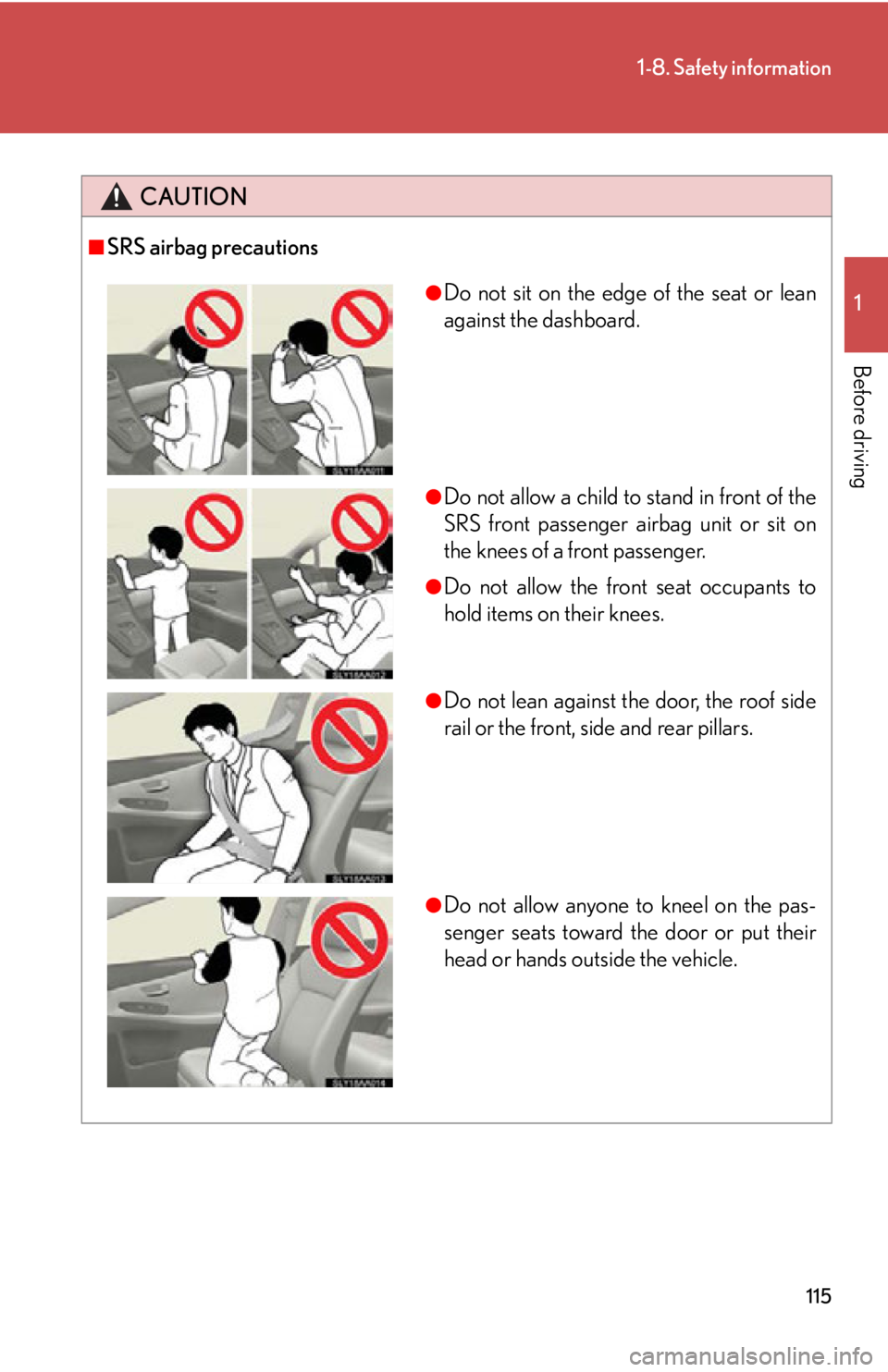
●Do not sit on the edge of the seat or lean
against the dashboard.
●Do not allow a child to stand in front of the
SRS front passenger airbag unit or sit on
the knees of a front passenger.
●Do not allow the front seat occupants to
hold items on their knees.
●Do not lean against the door, the roof side
rail or the front, side and rear pillars.
●Do not allow anyone to kneel on the pas-
senger seats toward the door or put their
head or hands outside the vehicle.
Page 137 of 628
When driving2
137
2-1. Driving proceduresDriving the vehicle.................. 138
Power (ignition) switch .......... 147
EV drive mode.......................... 152
Hybrid transmission ............... 155
Turn signal lever ........................ 161
Parking brake ........................... 162
Horn ............................................ 163
2-2. Instrument cluster Gauges and meters ................ 164
Indicators and warning lights ......................................... 168
Multi-information display ..... 172
Head-up display ...................... 178
2-3. Operating the lights and windshield wipers
Headlight switch...................... 186
Automatic High Beam ............ 191
Fog light switch ........................ 197
Windshield wipers and washer ..................................... 198
Headlight cleaner switch.... 203 2-4. Using other driving systems
Cruise control......................... 204
Dynamic radar cruise control .................................... 208
LKA (Lane-Keeping Assist) ........ 221
Driving assist systems ........... 229
Hill-start assist control ......... 234
Pre-Collision System ............ 236
2-5. Driving information Cargo and luggage ............... 245
Vehicle load limits .................. 248
Winter driving tips ................. 249
Trailer towing .......................... 252
Dinghy towing ......................... 253
Page 155 of 628
155
2-1. Driving procedures
2
When driving
Hybrid transmission
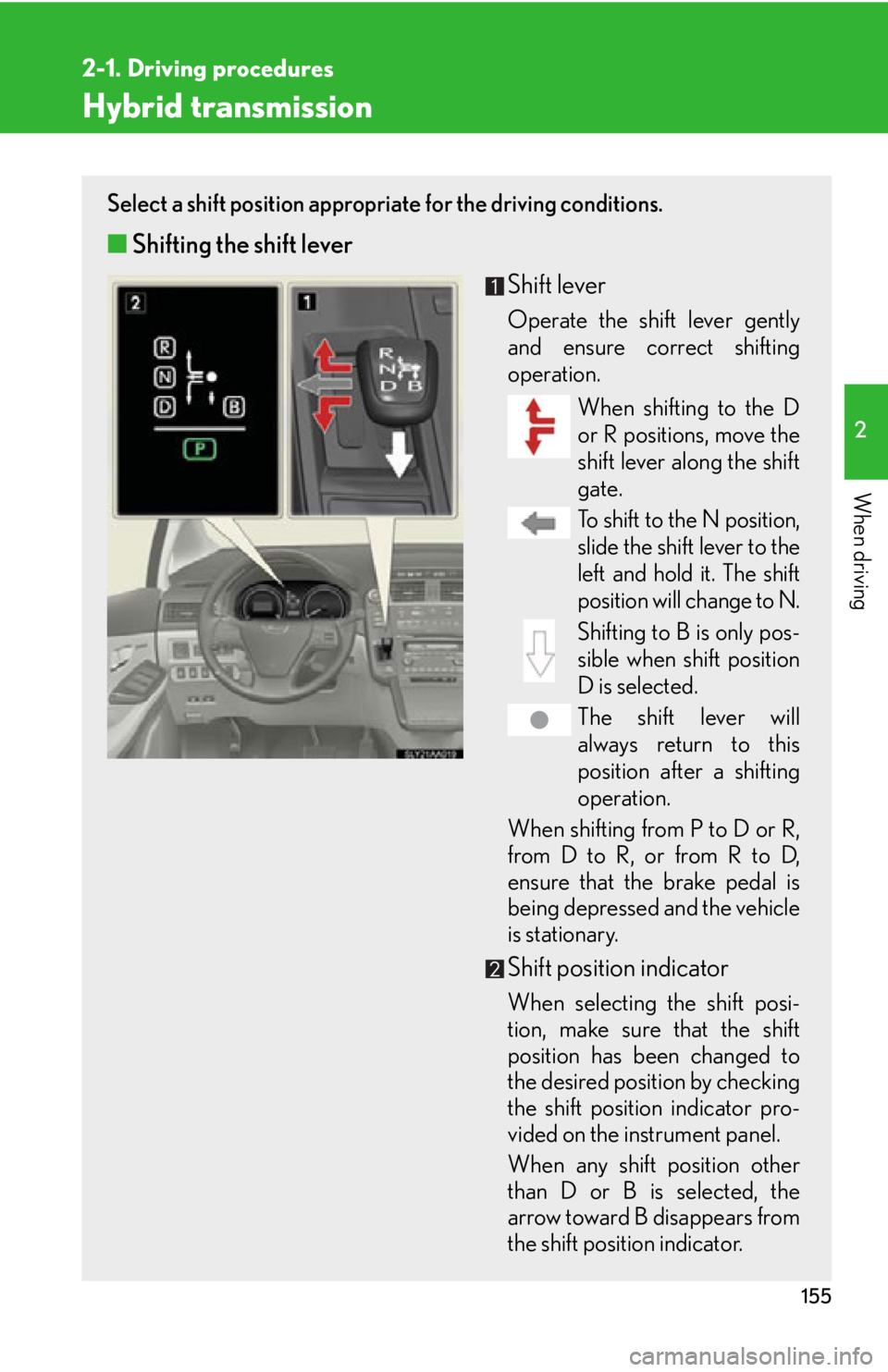
Select a shift position appropriate for the driving conditions.
■Shifting the shift lever
Shift lever
Operate the shift lever gently
and ensure correct shifting
operation.When shifting to the D
or R positions, move the
shift lever along the shift
gate.
To shift to the N position,
slide the shift lever to the
left and hold it. The shift
position will change to N.
Shifting to B is only pos-
sible when shift position
D is selected.
The shift lever will
always return to this
position after a shifting
operation.
When shifting from P to D or R,
from D to R, or from R to D,
ensure that the brake pedal is
being depressed and the vehicle
is stationary.
Shift position indicator
When selecting the shift posi-
tion, make sure that the shift
position has been changed to
the desired position by checking
the shift position indicator pro-
vided on the instrument panel.
When any shift position other
than D or B is selected, the
arrow toward B disappears from
the shift position indicator.
Page 188 of 628
188
2-3. Operating the lights and windshield wipers
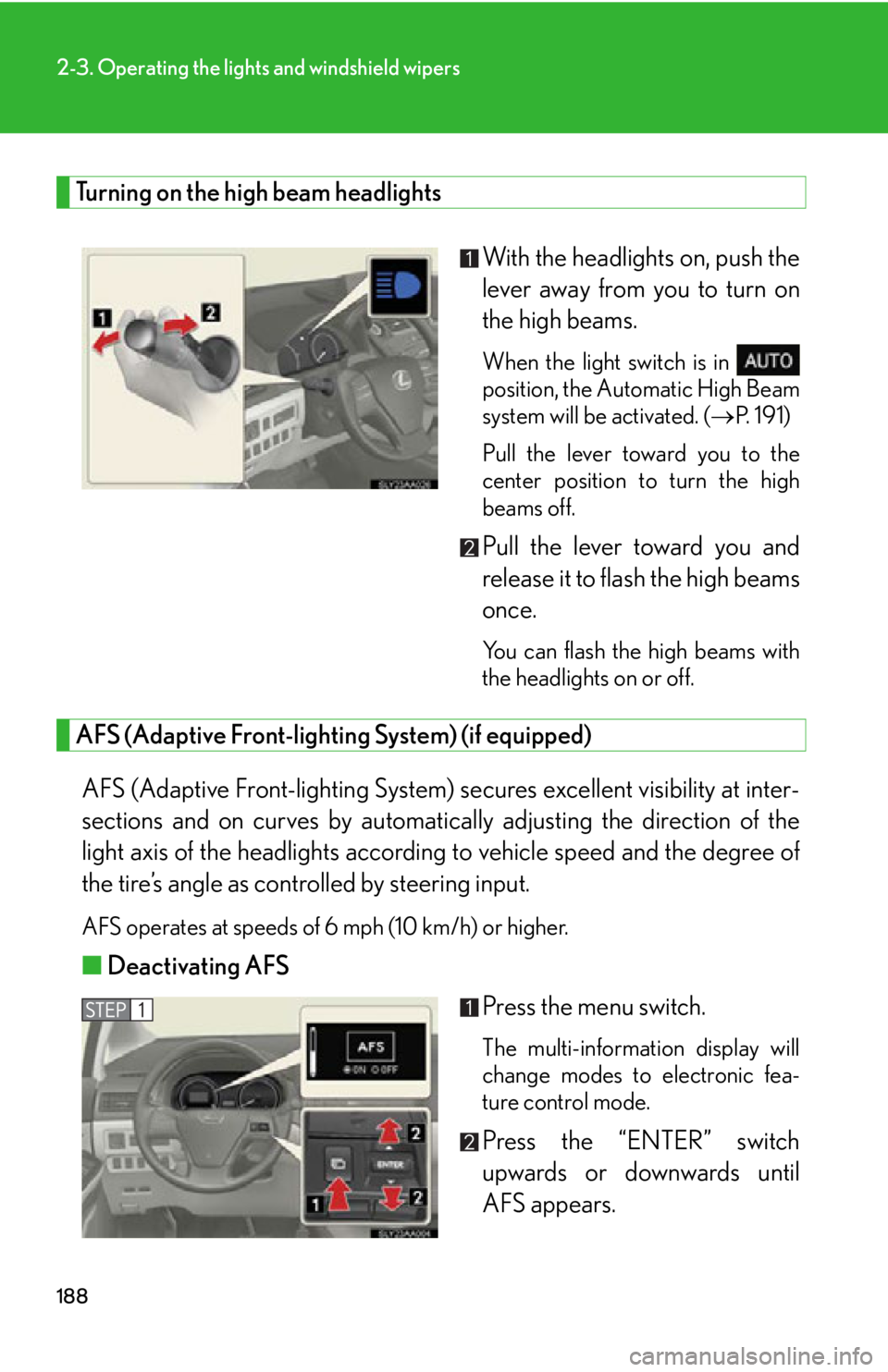
Turning on the high beam headlightsWith the headlights on, push the
lever away from you to turn on
the high beams.
When the light switch is in
position, the Automatic High Beam
system will be activated. (P. 1 9 1 )
Pull the lever toward you to the
center position to turn the high
beams off.
Pull the lever toward you and
release it to flash the high beams
once.
You can flash the high beams with
the headlights on or off.
AFS (Adaptive Front-lighting System) (if equipped)
AFS (Adaptive Front-lighting System) secures excellent visibility at inter-
sections and on curves by automatically adjusting the direction of the
light axis of the headlights according to vehicle speed and the degree of
the tire’s angle as controlled by steering input.
AFS operates at speeds of 6 mph (10 km/h) or higher.
■ Deactivating AFS
Press the menu switch.
The multi-information display will
change modes to electronic fea-
ture control mode.
Press the “ENTER” switch
upwards or downwards until
AFS appears.
Page 194 of 628

194
2-3. Operating the lights and windshield wipers
●The following factors may affect the amount of time taken to turn high beam on
or off:
• The brightness of headlights, fog lights , and tail lights of oncoming and pre-
ceding vehicles
• Road conditions (wetness, ice, snow etc.)
• The number of passengers and amount of baggage
●High beam may be turned on or off when unexpected by the driver.
●In the situations below, the system may not be able to correctly detect the sur-
rounding brightness levels, and may flash or expose nearby pedestrians to the
high beam. Therefore, you should consider turning the high beams on or off
manually rather than relying on the Automatic High Beam System.
• In bad weather (rain, snow, fog, sandstorms etc.)
• The windshield is obscured by fog, mist, ice, dirt etc.
• The windshield is cracked or damaged.
• The inside rear view mirror or camera sensor is deformed or dirty.
• Surrounding brightness levels are equa l to those of headlights, tail lights or
fog lights.
• Vehicles ahead have headlights that are either switched off, dirty, are chang- ing color, or have are not aimed properly.
• When driving through an area of intermittently changing brightness and darkness
• When frequently and repeatedly driving ascending/descending roads, or
roads with rough, bumpy or uneven surfaces (such as stone-paved roads,
gravel tracks etc.)
• When frequently and repeatedly taking curves or driving on a winding road
• There is a highly reflective object ahead of the vehicle, such as a sign or a mir- ror.
• The vehicle’s headlights are damaged or dirty.
• The vehicle is listing or tilting, due to a flat tire, a trailer being towed etc.
• The Automatic High Beam indicator is flashing.
• The high beam and low beam are repeatedly being switched between in an
abnormal manner.
• The driver believes that the high beam may be causing problems or distress to
other drivers or pedestrians nearby.
Page 206 of 628
206
2-4. Using other driving systems
■Cruise control can be set when
●The shift position is in D.
●Vehicle speed is above approximately 25 mph (40 km/h).
■Accelerating
The vehicle can be accelerated normally. After acceleration, the set speed
resumes.
■Automatic cruise control cancellation
Cruise control will stop maintaining the ve hicle speed in any of the following situa-
tions.
●Actual vehicle speed falls more than approximately 10 mph (16 km/h) below the
preset vehicle speed.
At this time, the memorized set speed is not retained.
●Actual vehicle speed is below approximately 25 mph (40 km/h).
●VSC is activated.
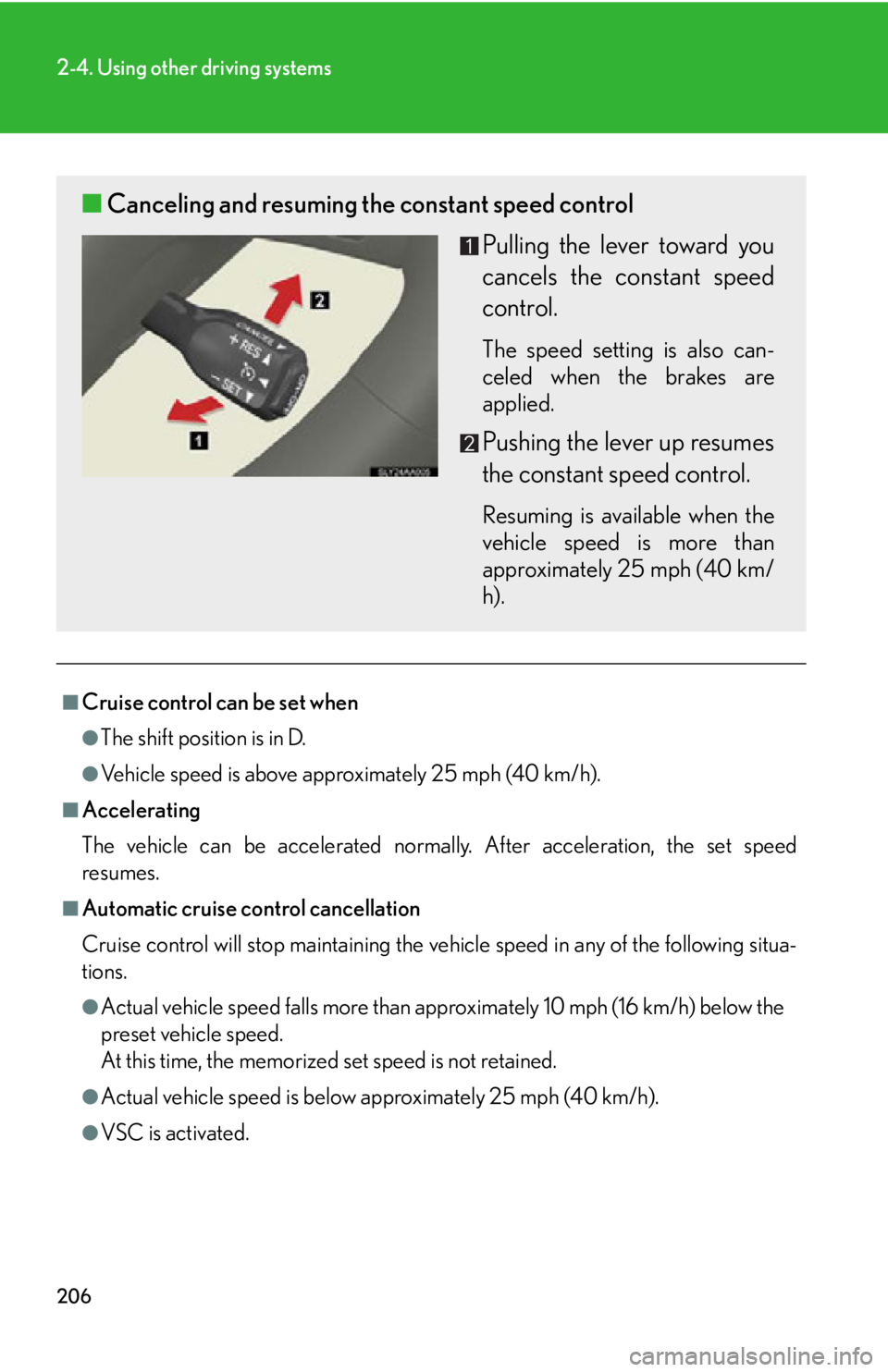
■ Canceling and resuming the constant speed control
Pulling the lever toward you
cancels the constant speed
control.
The speed setting is also can-
celed when the brakes are
applied.
Pushing the lever up resumes
the constant speed control.
Resuming is available when the
vehicle speed is more than
approximately 25 mph (40 km/
h).
Page 211 of 628
211
2-4. Using other driving systems
2
When driving
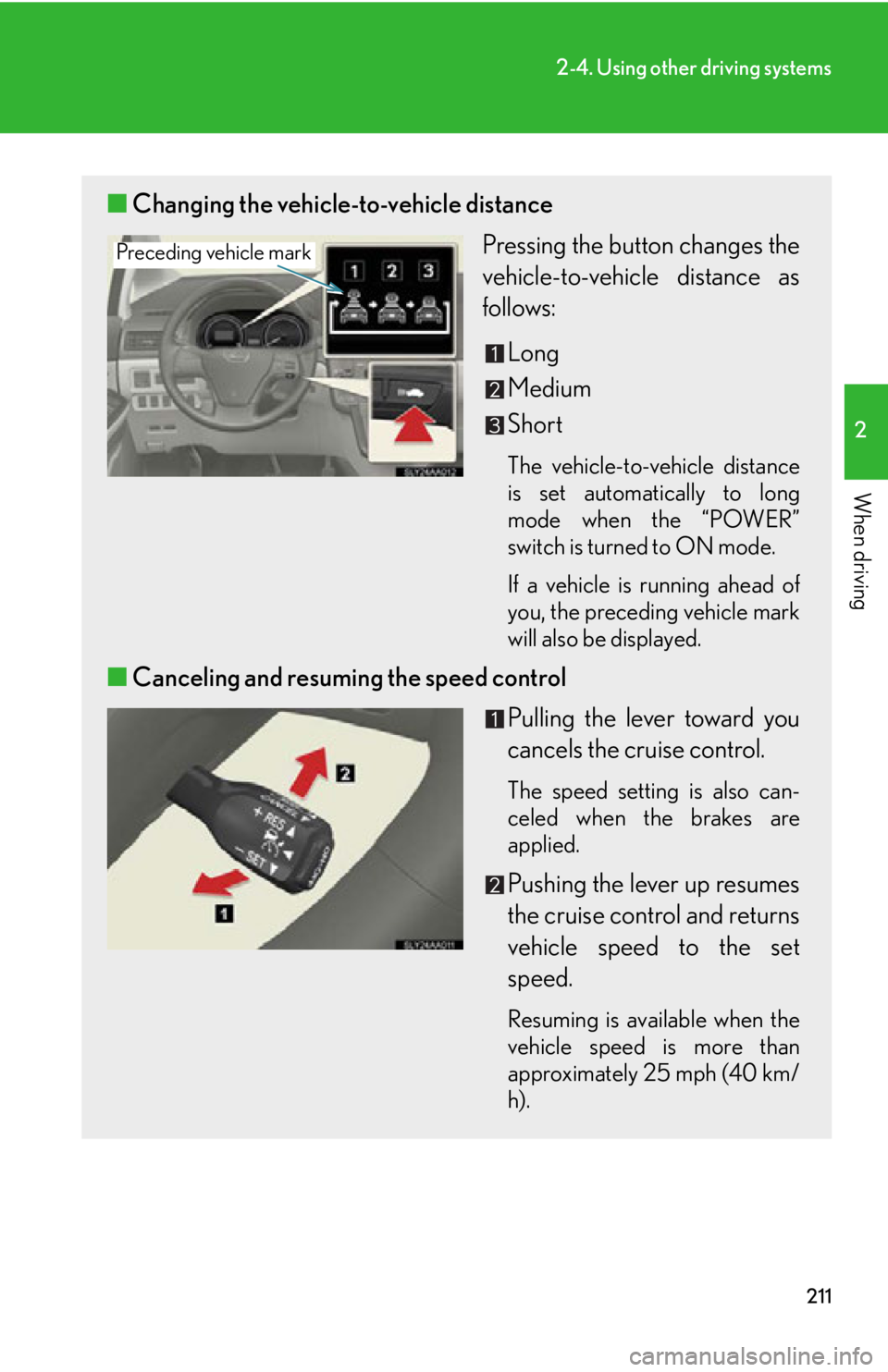
■Changing the vehicle-to-vehicle distance
Pressing the button changes the
vehicle-to-vehicle distance as
follows:
Long
Medium
Short
The vehicle-to-vehicle distance
is set automatically to long
mode when the “POWER”
switch is turned to ON mode.
If a vehicle is running ahead of
you, the preceding vehicle mark
will also be displayed.
■Canceling and resuming the speed control
Pulling the lever toward you
cancels the cruise control.
The speed setting is also can-
celed when the brakes are
applied.
Pushing the lever up resumes
the cruise control and returns
vehicle speed to the set
speed.
Resuming is available when the
vehicle speed is more than
approximately 25 mph (40 km/
h).
Preceding vehicle mark
Page 226 of 628
226
2-4. Using other driving systems
CAUTION
■Before using the LKA system
Do not rely on the LKA system to remain within a selected lane. The LKA system is
not designed to enable inattentive driving. The steering wheel should be operated
by the driver to maintain the vehicle in a suitable position within its lane. Always
drive carefully.
■Turn the LKA off while driving in any of the following conditions:
Do not use LKA in any of the following situations.
Otherwise, the system may not function correctly and could result in an accident.
●When driving with snow tires, tire ch ains, a spare tire, or similar equipment.
●When driving with non-standard parts or aftermarket equipment installed.
(including modified tires and suspensions, etc.)
●When towing a trailer.
●When there are objects or structures alon g the roadside that might be misinter-
preted as lane markers. (such as guardrails, curb, reflector posts, etc.)
●When there are wheel ruts, icy trademarks, etc. or if snow remains on the road
surface.
●When there are shadows on the road running parallel with lane markers, or if a
shadow covers the lane markers.
●When there are visible lines on the pavement from road repairs, or if the remains
of old lane markers are still visible on the road.
●When driving on slippery roads, such as those covered with rain, ice or snow.
●When driving in a lane other than the driving or passing lanes on a freeway or
highway.
●When driving on a road with lane closur es due to maintenance, or when driving
in a temporary lane.
●When driving on winding roads or roads that are rough or uneven.
Page 245 of 628
245
2
When driving
2-5. Driving information
Cargo and luggage
Capacity and distributionCargo capacity depends on the to tal weight of the occupants.
(Cargo capacity) = (Total load capa city) — (Total weight of occupants)
Steps for Determining Correct Load Limit
(1) Locate the statement “The combined weight of occupants and cargo should never exceed XXX kg or XXX lbs.” on your vehicle’s placard.
(2) Determine the combined weight of th e driver and passengers that will
be riding in your vehicle.
(3)Subtract the combined weight of the driver and passengers from XXX kg or XXX lbs.
(4)The resulting figure equals the av ailable amount of cargo and luggage
load capacity.
For example, if the “XXX” amount equals 1400 lbs. and there will be
five 150 lb passengers in your ve hicle, the amount of available cargo
and luggage load capacity is 650 lbs. (1400 750 (5150) = 650
lbs.)
(5)Determine the combined weight of luggage and cargo being loaded
on the vehicle. That weight may no t safely exceed the available cargo
and luggage load capacity calculated in Step 4.
Take notice of the following information about storage precautions, cargo
capacity and load:
●Stow cargo and luggage in the trunk whenever possible.
● Be sure all items are secured in place.
● To maintain vehicle balance while driving, position luggage evenly
within the luggage compartment.
● For better fuel economy, do not carry unnecessary weight.
Page 246 of 628
246
2-5. Driving information
(6)If your vehicle will be towing a trailer, load from your trailer will betransferred to your vehicle. Consul t this manual to determine how this
reduces the available cargo and luggage load capacity of your vehi-
cle. ( P. 2 4 8 )
Lexus does not recommend towing a trailer with your vehicle. Your vehicle is
not designed for trailer towing.
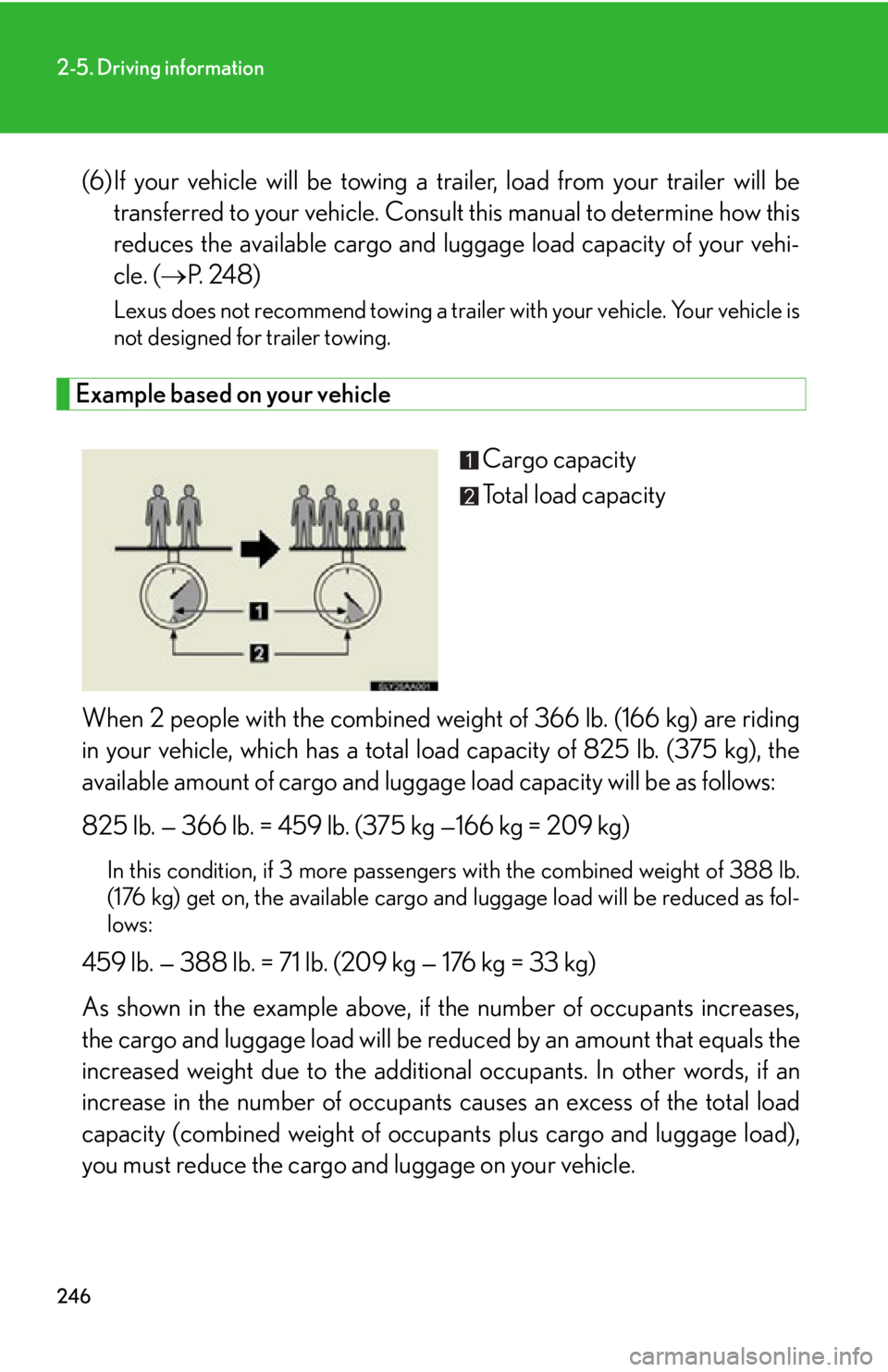
Example based on your vehicle
Cargo capacity
Total load capacity
When 2 people with the combined weight of 366 lb. (166 kg) are riding
in your vehicle, which has a total load capacity of 825 lb. (375 kg), the
available amount of cargo and luggag e load capacity will be as follows:
825 lb. — 366 lb. = 459 lb. (375 kg —166 kg = 209 kg)
In this condition, if 3 more passengers with the combined weight of 388 lb.
(176 kg) get on, the available cargo and luggage load will be reduced as fol-
lows:
459 lb. — 388 lb. = 71 lb. (209 kg — 176 kg = 33 kg)
As shown in the example above, if the number of occupants increases,
the cargo and luggage load will be re duced by an amount that equals the
increased weight due to the addition al occupants. In other words, if an
increase in the number of occupants ca uses an excess of the total load
capacity (combined weight of occupants plus cargo and luggage load),
you must reduce the cargo and luggage on your vehicle.