warning Lexus HS250h 2011 Do-it-yourself maintenance / LEXUS 2011 HS250H (OM75037U) Owner's Manual
[x] Cancel search | Manufacturer: LEXUS, Model Year: 2011, Model line: HS250h, Model: Lexus HS250h 2011Pages: 628, PDF Size: 10.69 MB
Page 162 of 628
162
2-1. Driving procedures
Parking brake
■Parking brake engaged warning buzzer
The buzzer sounds to indicate that parking brake is still engaged (with the vehicle
having reached a speed of 3 mph [5 km/h]). ( P. 5 1 2 )
■Usage in winter time
See “Winter driving tips” for parking brake usage in winter time. ( P. 2 4 9 )
NOTICE
■Before driving
Fully release the parking brake.
Driving the vehicle with the parking brake set will lead to brake components over-
heating, which may affect braking performance and increase brake wear.
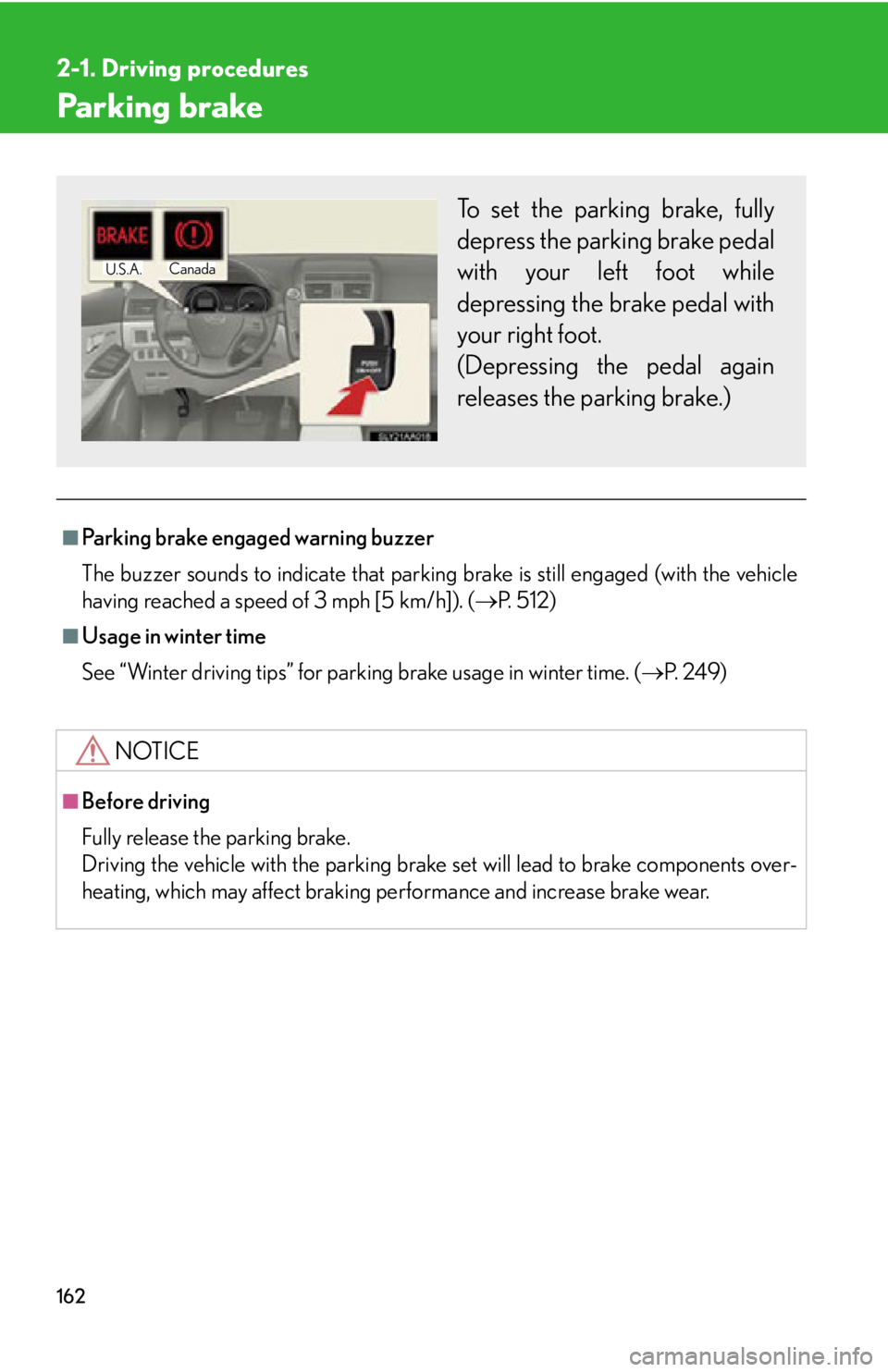
To set the parking brake, fully
depress the parking brake pedal
with your left foot while
depressing the brake pedal with
your right foot.
(Depressing the pedal again
releases the parking brake.)
U.S.A.Canada
Page 167 of 628

167
2-2. Instrument cluster
2
When driving
NOTICE
■To prevent damage to the hybrid system and its components
A high engine coolant temperature warning light (P. 498) is installed instead of
an engine coolant temperature gauge. If the high engine coolant temperature
warning light illuminates or flashes, the vehicle may be overheating. Immediately
stop the vehicle in a safe area ( P. 5 4 8 ) .
Page 168 of 628
168
2-2. Instrument cluster
Indicators and warning lights
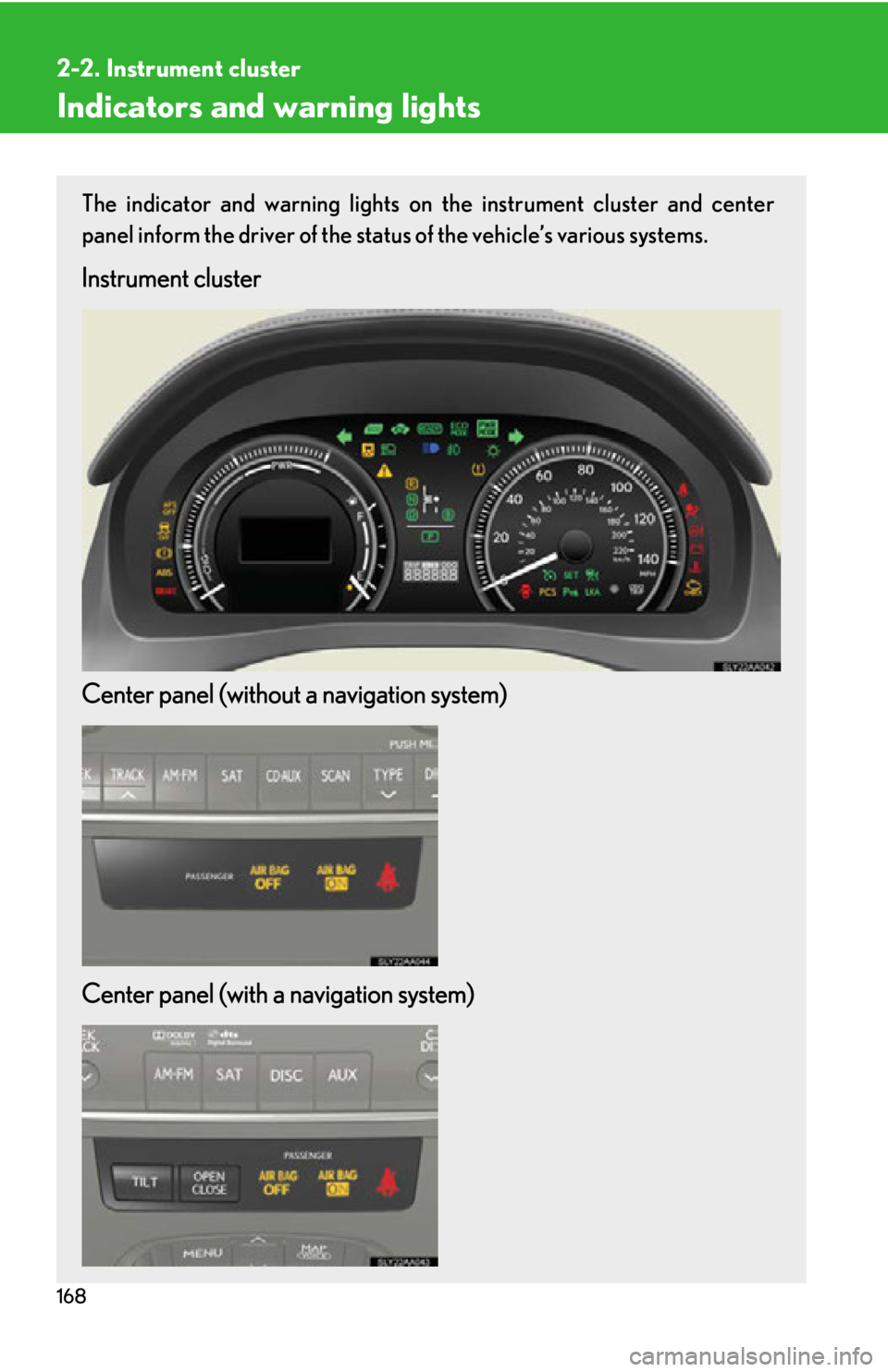
The indicator and warning lights on the instrument cluster and center
panel inform the driver of the status of the vehicle’s various systems.
Instrument cluster
Center panel (without a navigation system)
Center panel (with a navigation system)
Page 170 of 628
170
2-2. Instrument cluster
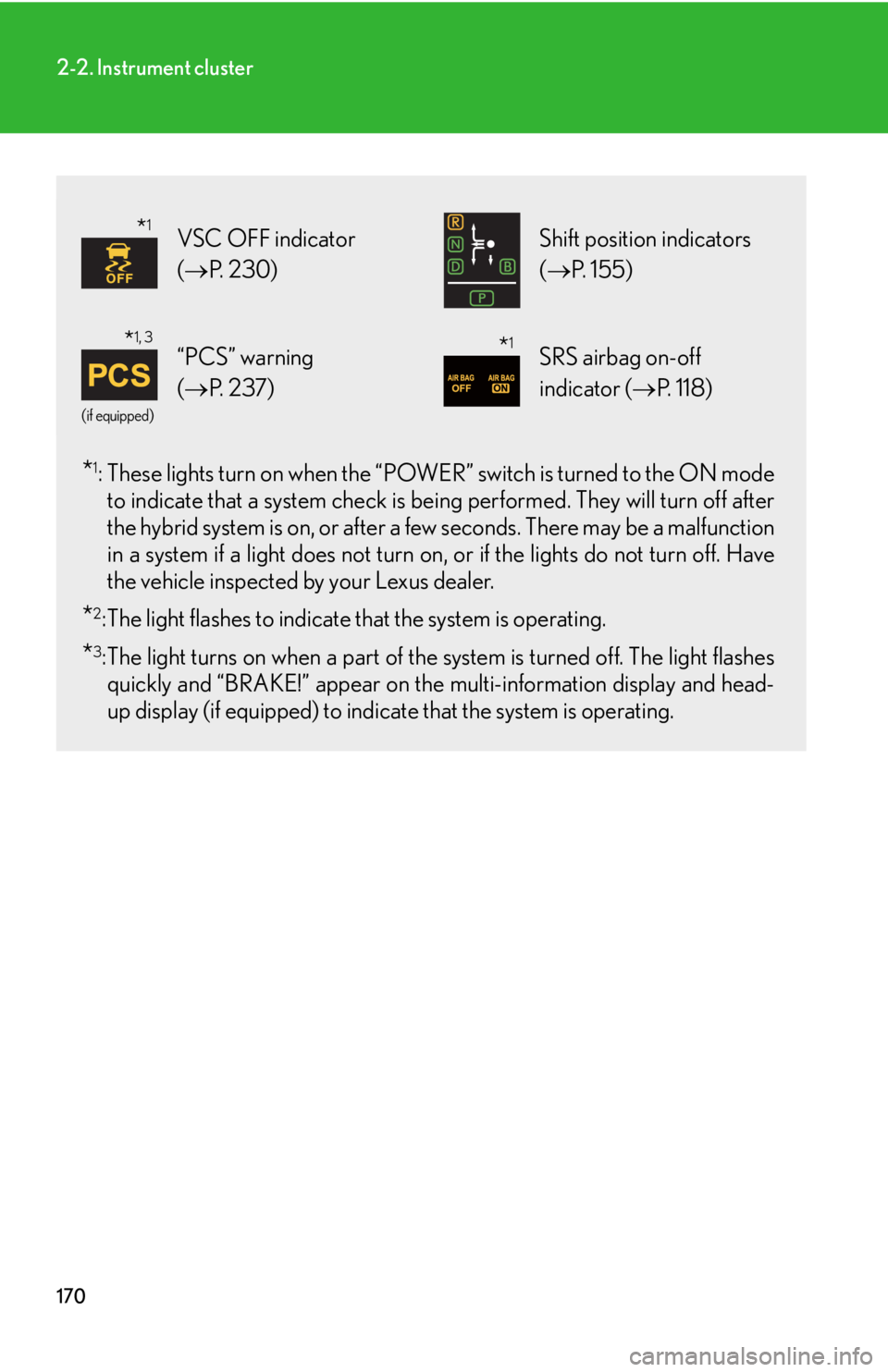
*1: These lights turn on when the “POWER” switch is turned to the ON mode
to indicate that a system check is be ing performed. They will turn off after
the hybrid system is on, or after a fe w seconds. There may be a malfunction
in a system if a light does not turn on , or if the lights do not turn off. Have
the vehicle inspected by your Lexus dealer.
*2: The light flashes to indicate that the system is operating.
*3:The light turns on when a part of the system is turned off. The light flashes quickly and “BRAKE!” appear on the multi-information display and head-
up display (if equipped) to indicat e that the system is operating.
VSC OFF indicator
(P. 2 3 0 ) Shift position indicators
(P. 1 5 5 )
(if equipped)
“PCS” warning
(P. 2 3 7 )SRS airbag on-off
indicator ( P. 118)
*1
*1, 3*1
Page 171 of 628
171
2-2. Instrument cluster
2
When driving
CAUTION
■If a safety system warning light does not come on
Should a safety system light such as the ABS and SRS airbag warning light not
come on when you start the hybrid system , this could mean that these systems are
not available to help protect you in an accid ent, which could result in death or seri-
ous injury. Have the vehicle inspected by your Lexus dealer immediately if this
occurs.
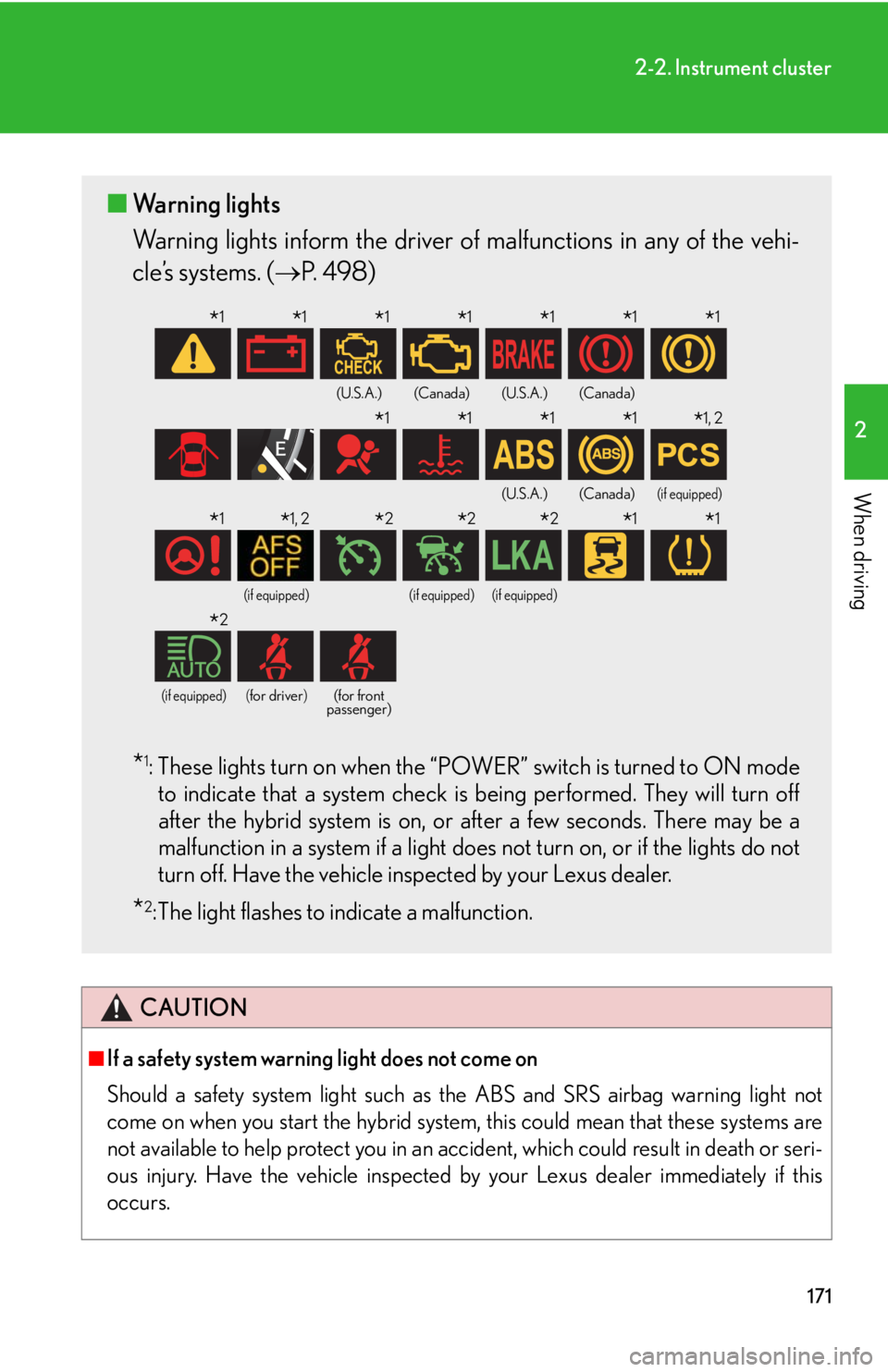
■ Warning lights
Warning lights inform the driver of malfunctions in any of the vehi-
cle’s systems. ( P. 4 9 8 )
*1: These lights turn on when the “POWER” switch is turned to ON mode
to indicate that a system check is being performed. They will turn off
after the hybrid system is on, or after a few seconds. There may be a
malfunction in a system if a light does not turn on, or if the lights do not
turn off. Have the vehicle inspected by your Lexus dealer.
*2: The light flashes to indicate a malfunction.
(U.S.A.)(Canada)(U.S.A.)(Canada)
(U.S.A.)(Canada)(if equipped)
(if equipped)(if equipped)(if equipped)
(if equipped)(for driver)(for front
passenger)
*1*1*1*1*1*1*1
*1*1*1*1*1, 2
*1*1, 2*2*2*2*1*1
*2
Page 176 of 628

176
2-2. Instrument cluster
■Average vehicle speed
Displays the average vehicle speed since the function was reset
The function can be reset by pushing the “ENTER” switch for longer than 1
second when the average vehicle speed is displayed.
■ Outside temperature
Displays the outside temperature
■ Tire inflation pressure
Displays inflation pressure of each tire. There is no correlation between
the order of the displayed values and the tire positions.
It may take a few minutes to display the tire inflation pressure after the
“POWER” switch is turned to ON mode. It may also take a few minutes to
display the tire inflation pressure after the inflation pressure has been
adjusted.
■Electronic feature control can be turned on/off when
The “POWER” switch is in ON mode.
■Conditions for ending electronic feature control
In the following situations, the electronic feature control will end:
●The menu switch is pressed
●The radar cruise control is operated (if equipped)
●The lane keeping assist is operated (if equipped)
●Intuitive parking assist starts operating (if equipped)
●No action is performed for some time after the electronic feature control
screen is displayed
●A warning message appears after the electronic feature control screen is dis-
played
Page 179 of 628
179
2-2. Instrument cluster
2
When driving
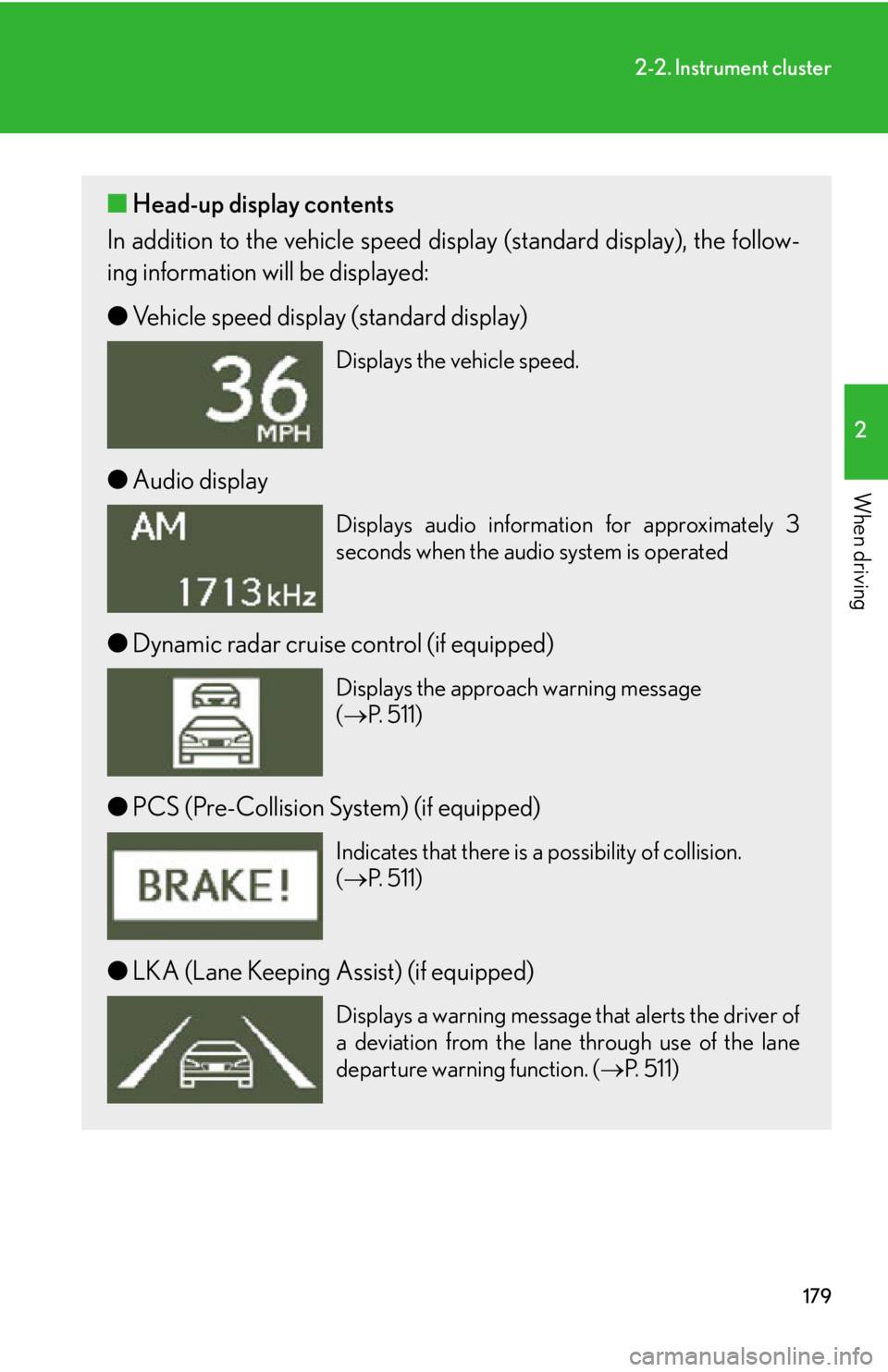
■Head-up display contents
In addition to the vehicle speed d isplay (standard display), the follow-
ing information will be displayed:
● Vehicle speed display (standard display)
Displays the vehicle speed.
●Audio display
Displays audio information for approximately 3
seconds when the audio system is operated
●Dynamic radar cruise control (if equipped)
Displays the approach warning message
( P. 5 1 1 )
●PCS (Pre-Collision System) (if equipped)
Indicates that there is a possibility of collision.
( P. 5 1 1 )
●LKA (Lane Keeping Assist) (if equipped)
Displays a warning message that alerts the driver of
a deviation from the lane through use of the lane
departure warning function. ( P. 5 1 1 )
Page 212 of 628
212
2-4. Using other driving systems
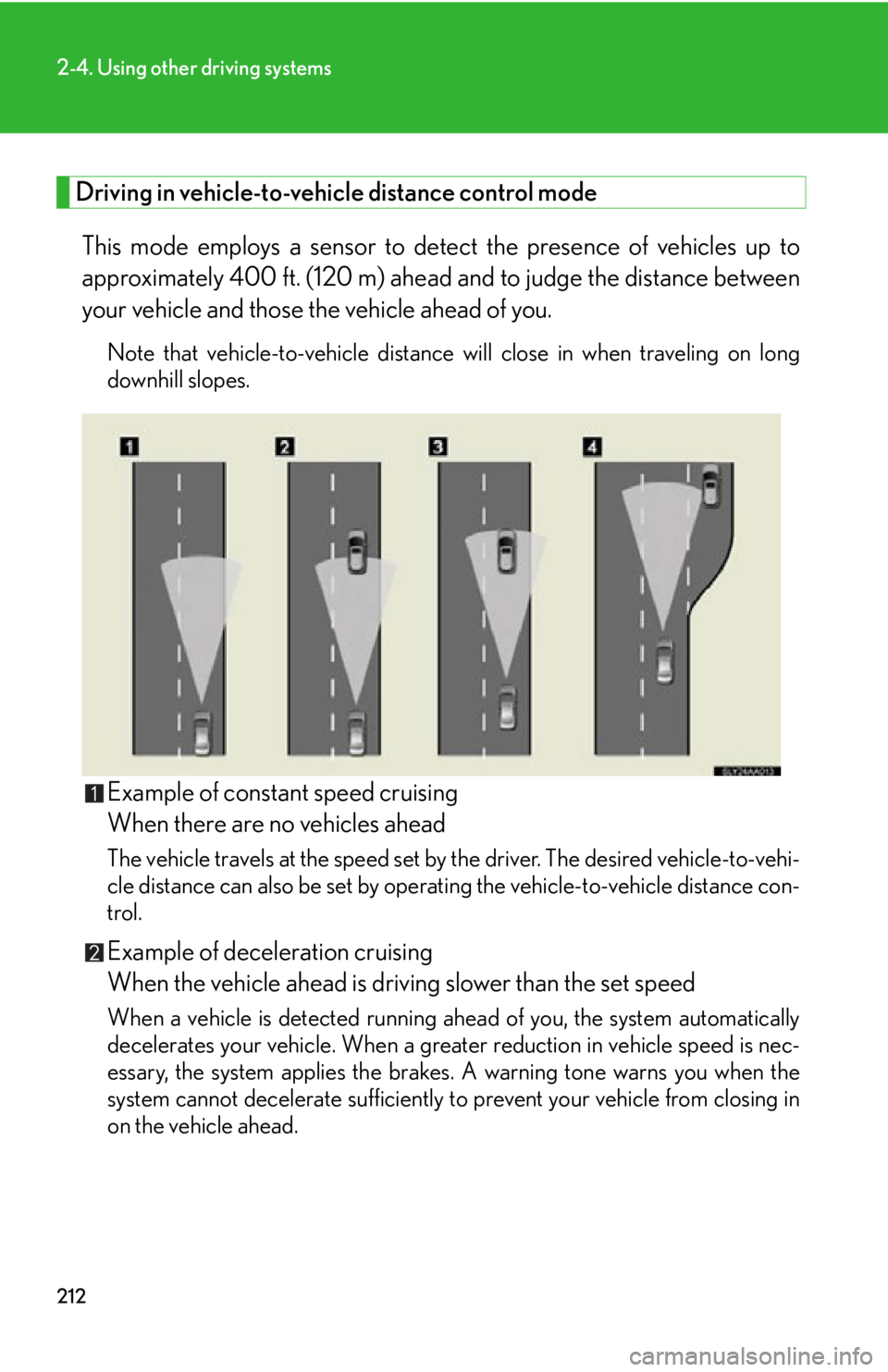
Driving in vehicle-to-vehicle distance control mode This mode employs a sensor to detect the presence of vehicles up to
approximately 400 ft. (120 m) ahead and to judge the distance between
your vehicle and those the vehicle ahead of you.
Note that vehicle-to-vehicle distance will close in when traveling on long
downhill slopes.
Example of constant speed cruising
When there are no vehicles ahead
The vehicle travels at the speed set by the driver. The desired vehicle-to-vehi-
cle distance can also be set by operat ing the vehicle-to-vehicle distance con-
trol.
Example of deceleration cruising
When the vehicle ahead is driving slower than the set speed
When a vehicle is detected running ahead of you, the system automatically
decelerates your vehicle. When a grea ter reduction in vehicle speed is nec-
essary, the system applies the brakes. A warning tone warns you when the
system cannot decelerate sufficiently to prevent your vehicle from closing in
on the vehicle ahead.
Page 213 of 628

213
2-4. Using other driving systems
2
When driving
Example of follow-up cruising
When following a vehicle driving slower than the set speed
The system continues follow-up cruising while adjusting for changes in the
speed of the vehicle ahead in order to maintain the vehicle-to-vehicle dis-
tance set by the driver.
Example of acceleration
When there are no longer any vehicles ahead driving slower than the
set speed.
The system accelerates until the set speed is reached. The system then
returns to constant speed cruising.
Approach warning
When your vehicle is too close to a vehicle ahead, and sufficient auto-
matic deceleration via the cruise co ntrol is not possible, the display will
flash and the buzzer will sound to al ert the driver. An example of this
would be if another driver cuts in fron t of you while you are following a
vehicle. Apply the brakes to ensure an appropriate vehicle-to-vehicle dis-
tance.
Page 216 of 628
216
2-4. Using other driving systems
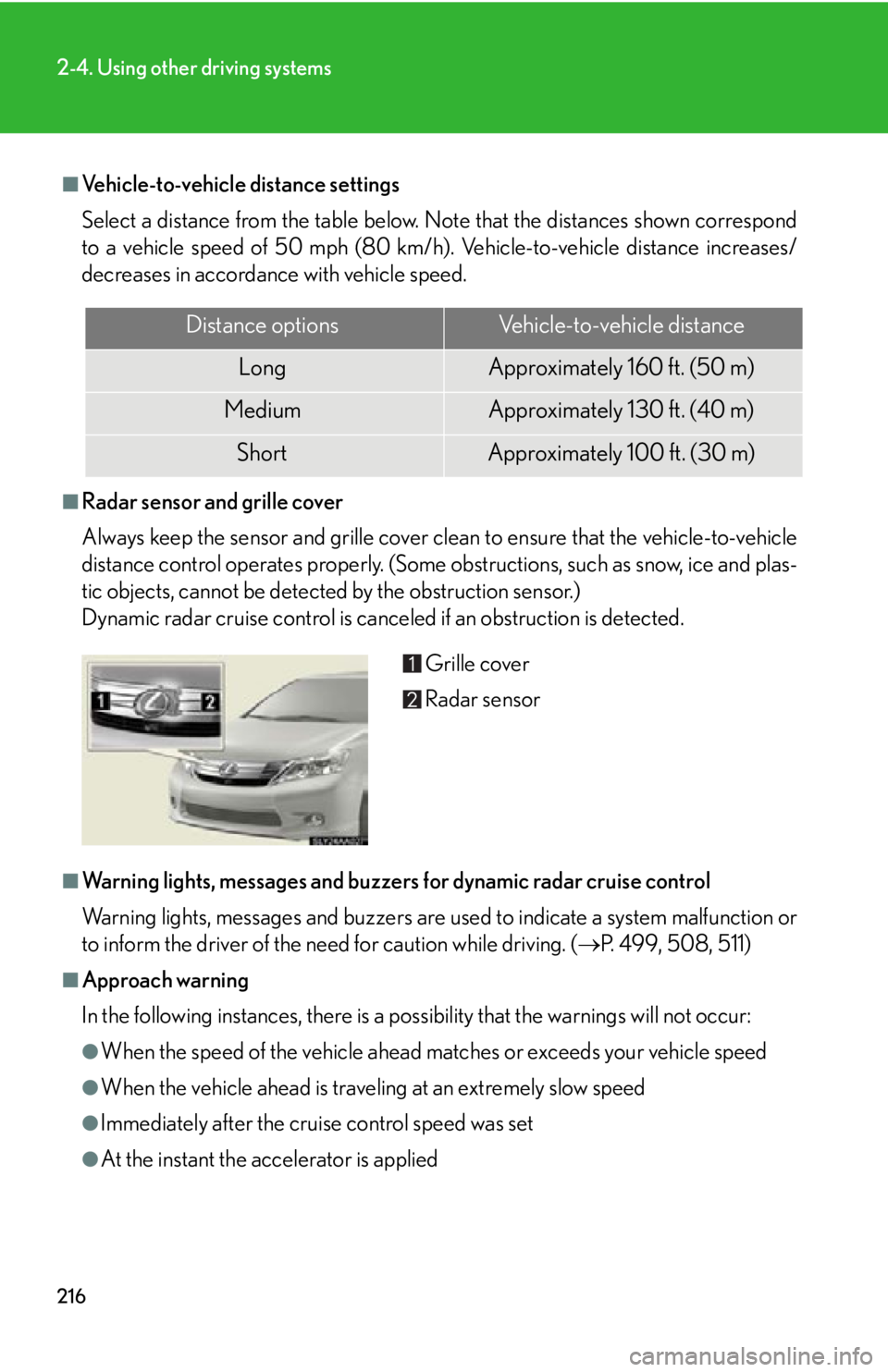
■Vehicle-to-vehicle distance settings
Select a distance from the table below. Note that the distances shown correspond
to a vehicle speed of 50 mph (80 km/h). Vehicle-to-vehicle distance increases/
decreases in accordance with vehicle speed.
■Radar sensor and grille cover
Always keep the sensor and grille cover clean to ensure that the vehicle-to-vehicle
distance control operates properly. (Some obstructions, such as snow, ice and plas-
tic objects, cannot be detected by the obstruction sensor.)
Dynamic radar cruise control is canceled if an obstruction is detected.
■Warning lights, messages and buzzers for dynamic radar cruise control
Warning lights, messages and buzzers are us ed to indicate a system malfunction or
to inform the driver of the need for caution while driving. ( P. 499, 508, 511)
■Approach warning
In the following instances, there is a po ssibility that the warnings will not occur:
●When the speed of the vehicle ahead ma tches or exceeds your vehicle speed
●When the vehicle ahead is traveling at an extremely slow speed
●Immediately after the cruise control speed was set
●At the instant the accelerator is applied
Distance optionsVehicle-to-vehicle distance
LongApproximately 160 f t. (50 m)
MediumApproximately 130 ft. (40 m)
ShortApproximately 100 f t. (30 m)
Grille cover
Radar sensor