flat tire Lexus HS250h 2011 Do-it-yourself maintenance / LEXUS 2011 HS250H OWNERS MANUAL (OM75037U)
[x] Cancel search | Manufacturer: LEXUS, Model Year: 2011, Model line: HS250h, Model: Lexus HS250h 2011Pages: 628, PDF Size: 10.69 MB
Page 1 of 628

TABLE OF CONTENTS
1
1Before driving
Information on the hybrid system and adjusting and operat-
ing features such as door locks, mirrors, and steering col-
umn
2When drivingDriving, stopping and safe-driving information
3Interior featuresAir conditioning and audio systems, as well as other interior
features for a comfortable driving experience
4Maintenance
and careCleaning and protecting your vehicle, performing do-it-your-
self maintenance, and maintenance information
5When trouble
arisesWhat to do if the vehicle needs to be towed, gets a flat tire,
or is involved in an accident
6Vehicle
specificationsDetailed vehicle information
7For ownersReporting safety defects for U.S. owners, and seat belt and
SRS airbag instructions for Canadian owners
IndexAlphabetical listing of inform ation contained in this manual
Page 5 of 628

1
2
3
4
5
6
7
5
3-6. Using the storage featuresList of storage features............... 367
• Glove box ................................... 368
• Console box ................................ 369
• Cup holders.................................. 371
• Bottle holders ............................. 373
• Auxiliary boxes........................... 374
3-7. Other interior features Sun visors......................................... 375
Vanity mirrors ................................ 376
Clock ................................................. 377
Power outlets ................................. 378
Seat heaters and ventilators ..................................... 379
Armrest ............................................. 381
Rear sunshade .............................. 382
Floor mat......................................... 384
Trunk compartment features......................................... 386
Garage door opener................. 388
Compass.......................................... 396
Safety Connect ............................ 400 4-1. Maintenance and care
Cleaning and protecting the vehicle exterior.................. 408
Cleaning and protecting the vehicle interior ..................... 412
4-2. Maintenance Maintenance requirements ...... 415
General maintena nce .................. 417
Emission inspection and maintenance (I/M)
programs ....................................... 421
4-3. Do-it-yourself maintenance Do-it-yourself service precautions .................................. 422
Hood ................................................. 425
Positioning a floor jack............... 426
Engine compartment.................. 428
12-volt battery................................ 439
Tires ................................................... 443
Tire inflation pressure.................. 451
Wheels ............................................. 454
Air conditioning filter.................. 456
Electronic key battery ................ 459
Checking and replacing fuses ................................................. 461
Headlight aim (LED headlights) ....................... 473
Light bulbs ....................................... 475
4Maintenance and care
Page 6 of 628

TABLE OF CONTENTSIndex
6
5-1. Essential informationEmergency flashers.................... 488
If your vehicle needs to be towed ...................................... 489
If you think something is wrong ............................................. 495
Event data recorder .................... 496
5-2. Steps to take in an emergency If a warning light turns on or a warning buzzer
sounds... ........................................ 498
If a warning message is displayed ....................................... 507
If you have a flat tire..................... 527
If the hybrid system will not start ................................................. 537
If you lose your keys ................... 539
If the electronic key does not operate properly .............. 540
If the vehicle 12-volt battery is discharged ............................... 543
If your vehicle overheats .......... 548
If the vehicle becomes stuck................................................ 552
If your vehicle has to be stopped in
an emergency ............................ 554 6-1. Specifications
Maintenance data (fuel, oil level, etc.).................... 556
Fuel information ........................... 565
Tire information............................ 568
6-2. Customization Customizable features.............. 580
6-3. Initialization Items to initialize ........................... 592
Reporting safety defects for U.S. owners........................... 594
Seat belt instructions for Canadian owners
(in French) ................................... 595
SRS airbag instructions for Canadian owners
(in French) .................................... 597
5When trouble arises6Vehicle specifications
7For owners
Page 9 of 628
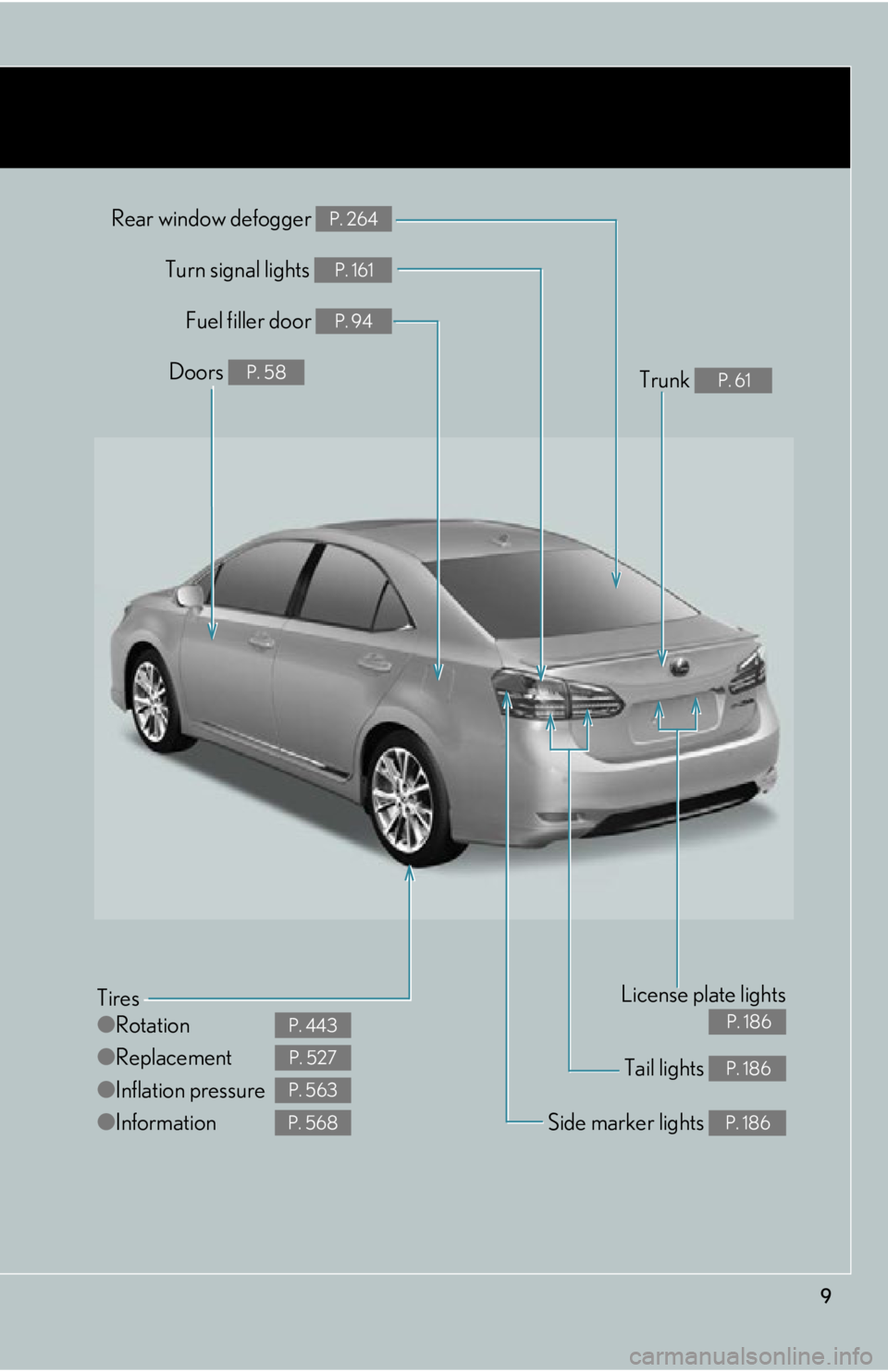
9
Tail lights P. 186
Rear window defogger P. 264
Tires
●Rotation
● Replacement
● Inflation pressure
● Information
P. 443
P. 527
P. 563
P. 568Side marker lights P. 186
Fuel filler door P. 94
Turn signal lights P. 161
License plate lights
P. 186
Doors P. 58Trunk P. 61
Page 39 of 628
39
1-1. Hybrid system
1
Before driving
■Air conditioning
Use the air conditioning only when necessary. Doing so can help control
excessive gasoline consumption.
In summer: In high temperatures, use the recirculated air mode. Doing so
will help to reduce the burden on the air conditioner and reduce fuel con-
sumption as well.
In winter: Because the gasoline engine will not automatically cut out until
the gasoline engine and the interior of the vehicle are warm, it will con-
sume fuel. Also, fuel consumption can be improved by avoiding overuse of
the heater.
■ Checking tire inflation pressure
Make sure to check the tire inflatio n pressure frequently. Improper tire
inflation pressure can cause poor fuel consumption.
Also, as snow tires can cause large amounts of friction, their use on dry
roads can lead to poor fuel consumptio n. Use a tire that is appropriate for
the season.
■ Luggage
Carrying heavy luggage can lead to poor fuel consumption. Avoid carry-
ing unnecessary luggage. Installing a large roof rack can also cause poor
fuel consumption.
■ Warming up before driving
Since the gasoline engine starts up and cuts out automatically when cold,
warming up the engine is unnecessary. Moreover, frequently driving short
distances will cause the engine to repeatedly warm up, which can lead to
poor fuel consumption.
Page 146 of 628

146
2-1. Driving procedures
NOTICE
■Avoiding damage to vehicle parts
●Do not turn the steering wheel fully in either direction and hold it there for an
extended period of time.
Doing so may damage the power steering motor.
●When driving over bumps in the road, drive as slowly as possible to avoid damag-
ing the wheels, underside of the vehicle, etc.
■If you get a flat tire while driving
A flat or damaged tire may cause the following situations. Hold the steering wheel
firmly and gradually depress the brak e pedal to slow down the vehicle.
●It may be difficult to control your vehicle.
●The vehicle will make abnormal sounds or vibrations.
●The vehicle will lean abnormally.
Information on what to do in case of a flat tire. ( P. 5 2 7 )
■When encountering flooded roads
Do not drive on a road that has flooded after heavy rain etc. Doing so may cause the
following serious damage to the vehicle:
●Engine stalling
●Short in electrical components
●Engine damage caused by water immersion
In the event that you drive on a flooded road and the vehicle is flooded, be sure to
have your Lexus dealer check the following:
●Brake function
●Changes in quantity and quality of engine oil, transaxle fluid for the hybrid system
etc.
●Lubricant condition for the bearings and suspension joints (where possible), and
the function of all joints, bearings, etc.
As flooding may damage components involv ed in P position control, the parking
lock may jam in the locked position.
■If the vehicle will not shift out of the P position
There is a possibility that the 12-volt batt ery is discharged. Check the 12-volt battery
in this situation.
Page 173 of 628
173
2-2. Instrument cluster
2
When driving
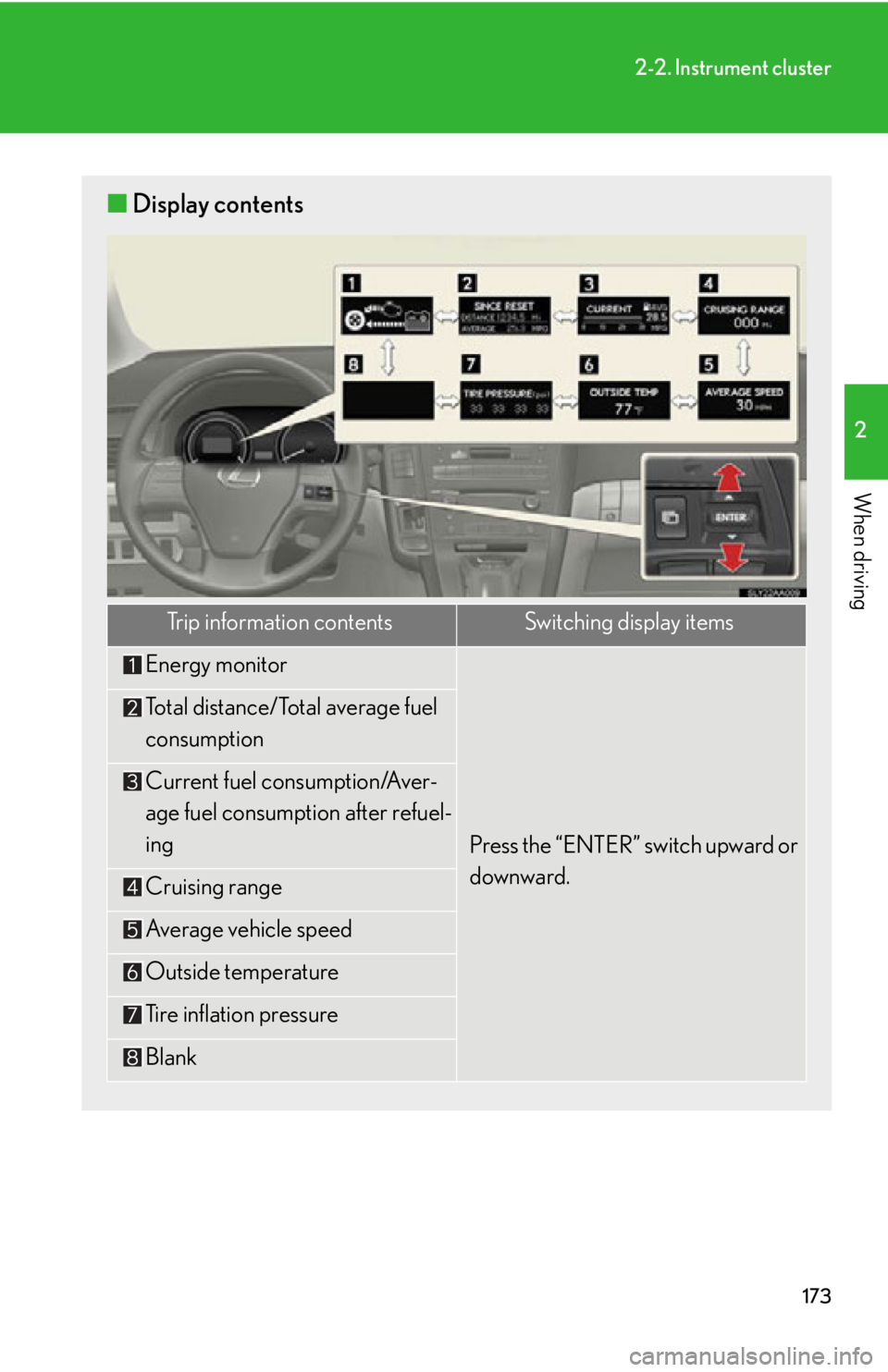
■Display contents
Trip information contentsSwitching display items
Energy monitor
Press the “ENTER” switch upward or
downward.
Total distance/Total average fuel
consumption
Current fuel consumption/Aver-
age fuel consumption after refuel-
ing
Cruising range
Average vehicle speed
Outside temperature
Tire inflation pressure
Blank
Page 176 of 628

176
2-2. Instrument cluster
■Average vehicle speed
Displays the average vehicle speed since the function was reset
The function can be reset by pushing the “ENTER” switch for longer than 1
second when the average vehicle speed is displayed.
■ Outside temperature
Displays the outside temperature
■ Tire inflation pressure
Displays inflation pressure of each tire. There is no correlation between
the order of the displayed values and the tire positions.
It may take a few minutes to display the tire inflation pressure after the
“POWER” switch is turned to ON mode. It may also take a few minutes to
display the tire inflation pressure after the inflation pressure has been
adjusted.
■Electronic feature control can be turned on/off when
The “POWER” switch is in ON mode.
■Conditions for ending electronic feature control
In the following situations, the electronic feature control will end:
●The menu switch is pressed
●The radar cruise control is operated (if equipped)
●The lane keeping assist is operated (if equipped)
●Intuitive parking assist starts operating (if equipped)
●No action is performed for some time after the electronic feature control
screen is displayed
●A warning message appears after the electronic feature control screen is dis-
played
Page 194 of 628

194
2-3. Operating the lights and windshield wipers
●The following factors may affect the amount of time taken to turn high beam on
or off:
• The brightness of headlights, fog lights , and tail lights of oncoming and pre-
ceding vehicles
• Road conditions (wetness, ice, snow etc.)
• The number of passengers and amount of baggage
●High beam may be turned on or off when unexpected by the driver.
●In the situations below, the system may not be able to correctly detect the sur-
rounding brightness levels, and may flash or expose nearby pedestrians to the
high beam. Therefore, you should consider turning the high beams on or off
manually rather than relying on the Automatic High Beam System.
• In bad weather (rain, snow, fog, sandstorms etc.)
• The windshield is obscured by fog, mist, ice, dirt etc.
• The windshield is cracked or damaged.
• The inside rear view mirror or camera sensor is deformed or dirty.
• Surrounding brightness levels are equa l to those of headlights, tail lights or
fog lights.
• Vehicles ahead have headlights that are either switched off, dirty, are chang- ing color, or have are not aimed properly.
• When driving through an area of intermittently changing brightness and darkness
• When frequently and repeatedly driving ascending/descending roads, or
roads with rough, bumpy or uneven surfaces (such as stone-paved roads,
gravel tracks etc.)
• When frequently and repeatedly taking curves or driving on a winding road
• There is a highly reflective object ahead of the vehicle, such as a sign or a mir- ror.
• The vehicle’s headlights are damaged or dirty.
• The vehicle is listing or tilting, due to a flat tire, a trailer being towed etc.
• The Automatic High Beam indicator is flashing.
• The high beam and low beam are repeatedly being switched between in an
abnormal manner.
• The driver believes that the high beam may be causing problems or distress to
other drivers or pedestrians nearby.
Page 227 of 628

227
2-4. Using other driving systems
2
When driving
NOTICE
■In the following situations, the LKA will not work, or will not perform reliably:
●When lane markers are interrupted or are not present, such as before a tollbooth.
●When lane markers are only on one side of the road.
●When driving on a sharp curve.
●When lanes are extremely narrow or extremely wide.
●When the vehicle leans to one side an unusual amount due to a heavy load or
improper tire inflation pressure.
●When the following distance between your vehicle and the vehicle ahead is
extremely short.
●When the lane markers are broken, “Botts’ dots”, or “Raised pavement marker”.
●When lane markers are obscured or partially obscured by sand, dirt, etc.
●When driving on a particularly brig ht road surface, such as concrete.
●When driving on a road surface that is bright due to reflected light.
●When driving in a location where the light level changes rapidly, such as the
entrance to or exit from a tunnel.
●When sunlight or the headlights of oncoming vehicles are shining directly into the
camera lens.
●When driving on roads that are branching or merging.
●When pavement lane markers are difficult to see due to rain, snow, fog, etc.
●When driving on a road surface that is wet due to rain, previous rainfall, standing
water, etc.
●When the vehicle experiences strong up-a nd-down motion such as when driving
on an extremely rough road or on a seam in the pavement.
●When headlight brightness is reduced due to dirt on the lenses, or when the
headlights are misaligned.
●When driving with a strong crosswind.