phone Lexus HS250h 2011 Do-it-yourself maintenance / LEXUS 2011 HS250H OWNERS MANUAL QUICK GUIDE (OM75039U)
[x] Cancel search | Manufacturer: LEXUS, Model Year: 2011, Model line: HS250h, Model: Lexus HS250h 2011Pages: 94, PDF Size: 6.01 MB
Page 1 of 94
1
The Quick Guide is not intended as a substitute for your Owner’s
Manual. We strongly encourage you to review the Owner’s
Manual and supplementary manuals so you will have a better
understanding of your vehicle’s capabilities and limitations.
Air Conditioning System (without navigation system)*
Using the automatic mode......................................................................................................... 72
Adjusting the temperature......................................................................................................... 72
Air Conditioning System (with navigation system)
*
Using the automatic mode......................................................................................................... 64
Adjusting the temperature......................................................................................................... 64
Audio System (without navigation system)
*
Basic operation ............................................................................................................................... 69
Radio ................................................................................................................................................... 69
CD player.......................................................................................................................................... 70
Operating an iPod ...........................................................................................................................71
Remote control (steering wheel switches)............................................................................71
Audio System (with navigation system)
*
Audio control screen....................................................................................................................60
Basic operation ...............................................................................................................................60
Radio .....................................................................................................................................................61
DVD player/CD player .................................................................................................................61
Operating an iPod .........................................................................................................................63
Remote control (steering wheel switches)..........................................................................63
Automatic High Beam.......................................................................................................................38
Cruise Control...................................................................................................................................... 26
Door Locks............................................................................................................................................ 85
Dynamic Radar Cruise Control.....................................................................................................28
Eco Driving Indicator Light.............................................................................................................. 25
Energy Monitor / Consumption Screen..................................................................................... 12
Fuel Tank Cap....................................................................................................................................... 88
Garage Door Opener....................................................................................................................... 79
Hands-free System For Cellular Phone (without navigation system)
*
Bluetooth® phone pairing .........................................................................................................65
Calling by number .........................................................................................................................65
Calling by name.............................................................................................................................. 66
Calling by speed dial .................................................................................................................... 66
Phonebook transfer ...................................................................................................................... 67
Changing the registered name ................................................................................................68
Registering a speed dial ..............................................................................................................68
*: This feature may be operated by Voice Command (See P. 73)
Page 2 of 94
2
Hands-free System For Cellular Phone (with navigation system)*
Bluetooth® phone pairing ......................................................................................................... 52
Phonebook transfer ......................................................................................................................53
Registering a voice tag ................................................................................................................54
Registering a speed dial ..............................................................................................................55
Calling by name.............................................................................................................................. 57
Calling by speed dial ................................................................................................................... 58
Receiving a call ...............................................................................................................................59
Headlights...............................................................................................................................................36
Head-up Display..................................................................................................................................33
Hybrid System........................................................................................................................................ 10
Hybrid transmission............................................................................................................................. 19
Intuitive Parking Assist.......................................................................................................................35
Keys............................................................................................................................................................. 14
Lexus Enform with Safety Connect............................................................................................. 83
LKA (Lane-Keeping Assist).............................................................................................................32
Moon Roof.............................................................................................................................................. 87
Multi-information Display.................................................................................................................23
Navigation System
*
Register home ................................................................................................................................. 44
Destination input - Search by address .................................................................................. 45
Destination input - Search points of interest by name.................................................... 47
Destination input - Search points of interest by category............................................. 49
Destination input - Search points of interest by telephone number ........................ 50
Voice Command System ............................................................................................................73
Portable Audio Device Adapters.................................................................................................. 78
Power (Ignition) Switch....................................................................................................................... 17
Po we r Wi n d o w s................................................................................................................................... 86
Remote Touch......................................................................................................................................... 41
Safety Connect...................................................................................................................................... 81
Smart Access System with Push-button Start.......................................................................... 15
Theft Deterrent System...................................................................................................................... 16
Tu r n S i g n a l L e v e r..................................................................................................................................25
Voice Command System
*
Basic operation ............................................................................................................................... 73
Command list ...................................................................................................................................74
Wide View Front Monitor.................................................................................................................35
Windshield Wipers and Washer....................................................................................................39
*: This feature may be operated by Voice Command (See P. 73)
Page 6 of 94
6
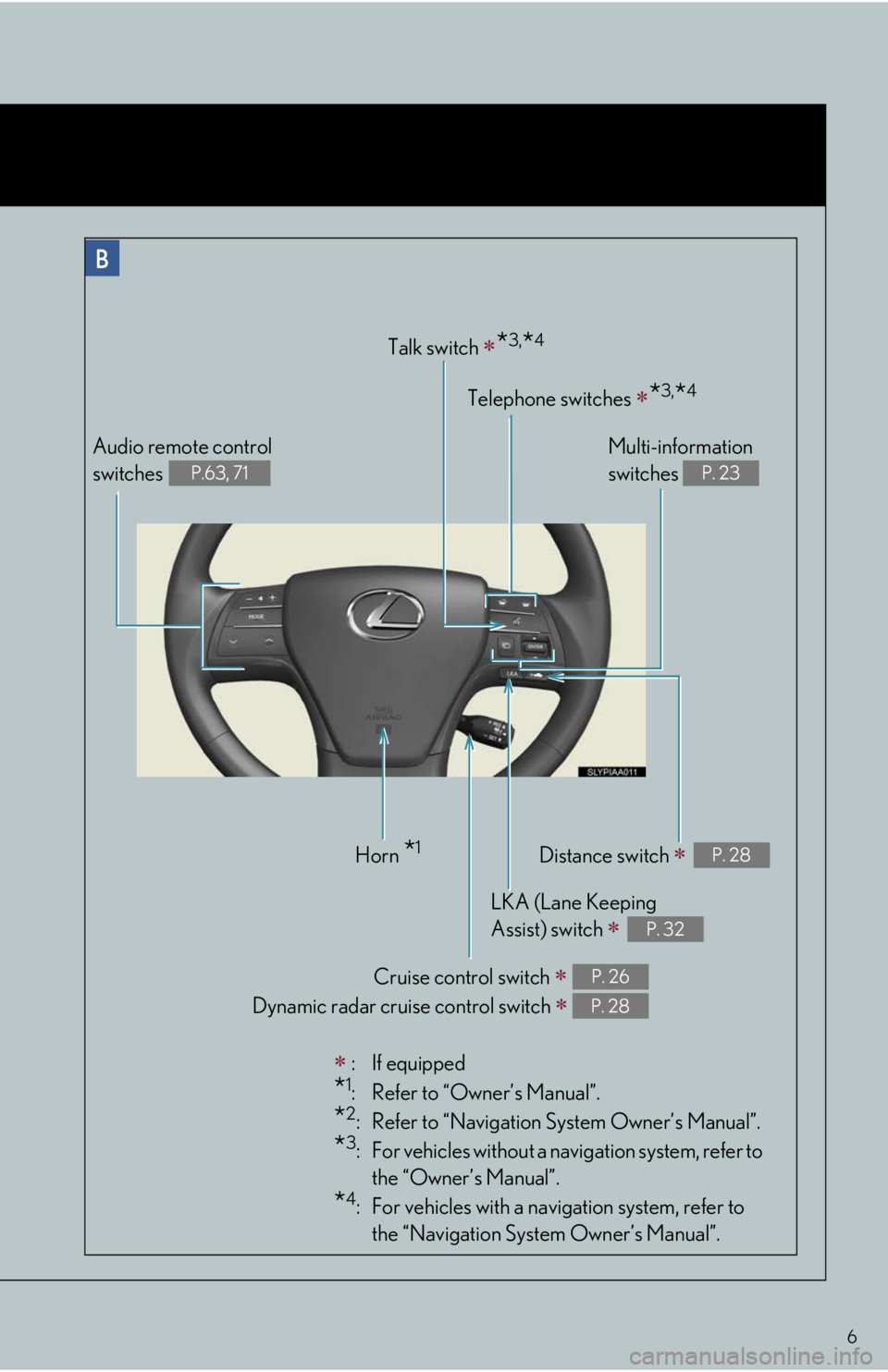
:If equipped
*1: Refer to “Owner’s Manual”.
*2: Refer to “Navigation System Owner’s Manual”.
*3: For vehicles without a navigation system, refer to
the “Owner’s Manual”.
*4: For vehicles with a navigation system, refer to
the “Navigation System Owner’s Manual”.
Audio remote control
switches
P.63, 71
Horn *1
Cruise control switch
Dynamic radar cruise control switch
P. 26
P. 28
LKA (Lane Keeping
Assist) switch
P. 32
Distance switch P. 28
Talk switch *3,*4
Telephone switches *3,*4
Multi-information
switches
P. 23
Page 12 of 94
12
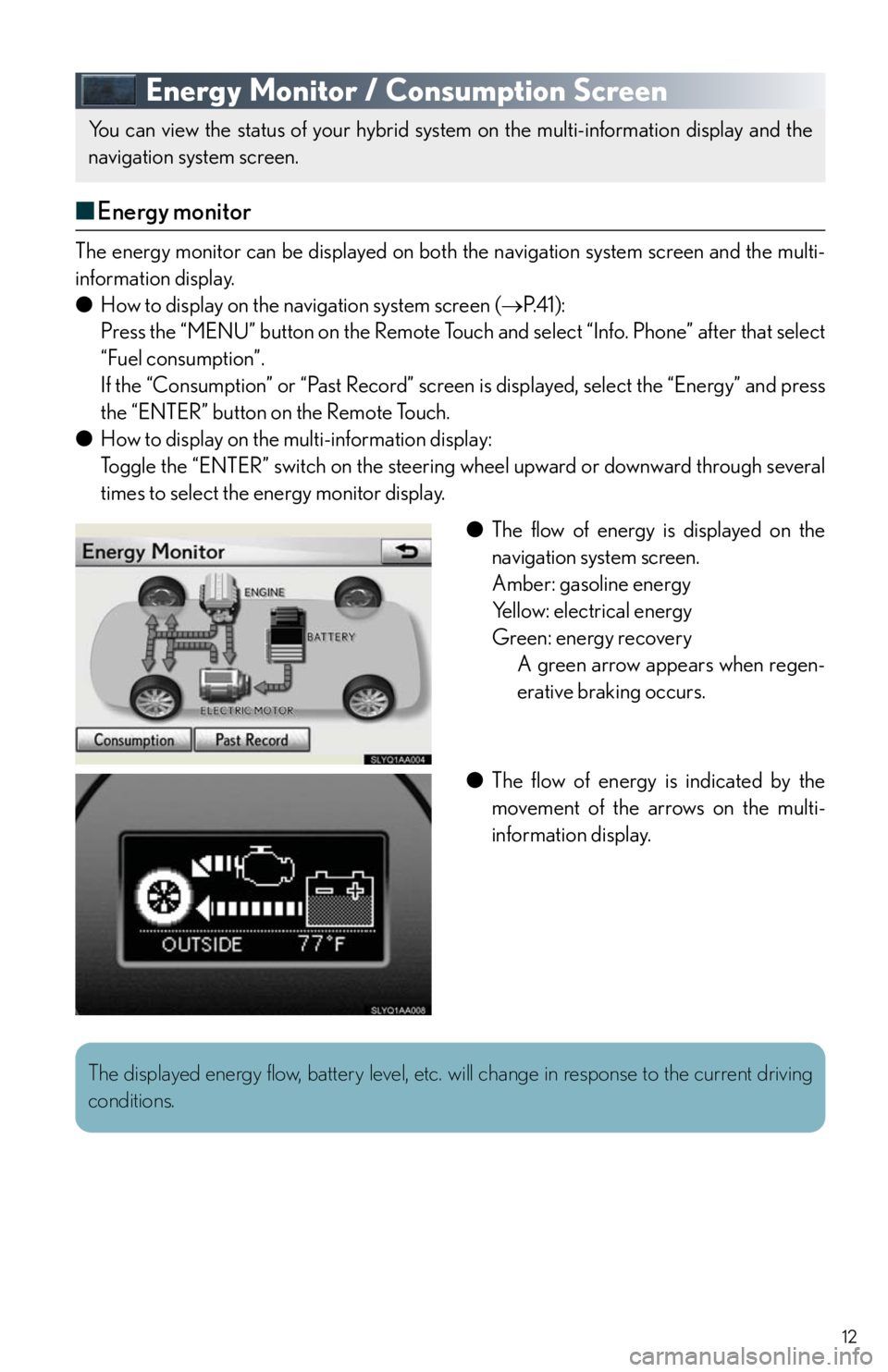
Energy Monitor / Consumption Screen
■Energy monitor
The energy monitor can be displayed on both the navigation system screen and the multi-
information display.
●How to display on the navigation system screen (P. 4 1 ) :
Press the “MENU” button on the Remote Touch and select “Info. Phone” after that select
“Fuel consumption”.
If the “Consumption” or “Past Record” screen is displayed, select the “Energy” and press
the “ENTER” button on the Remote Touch.
●How to display on the multi-information display:
Toggle the “ENTER” switch on the steering wheel upward or downward through several
times to select the energy monitor display.
●The flow of energy is displayed on the
navigation system screen.
Amber: gasoline energy
Yellow: electrical energy
Green: energy recovery
A green arrow appears when regen-
erative braking occurs.
●The flow of energy is indicated by the
movement of the arrows on the multi-
information display.
You can view the status of your hybrid system on the multi-information display and the
navigation system screen.
The displayed energy flow, battery level, etc. will change in response to the current driving
conditions.
Page 13 of 94
13
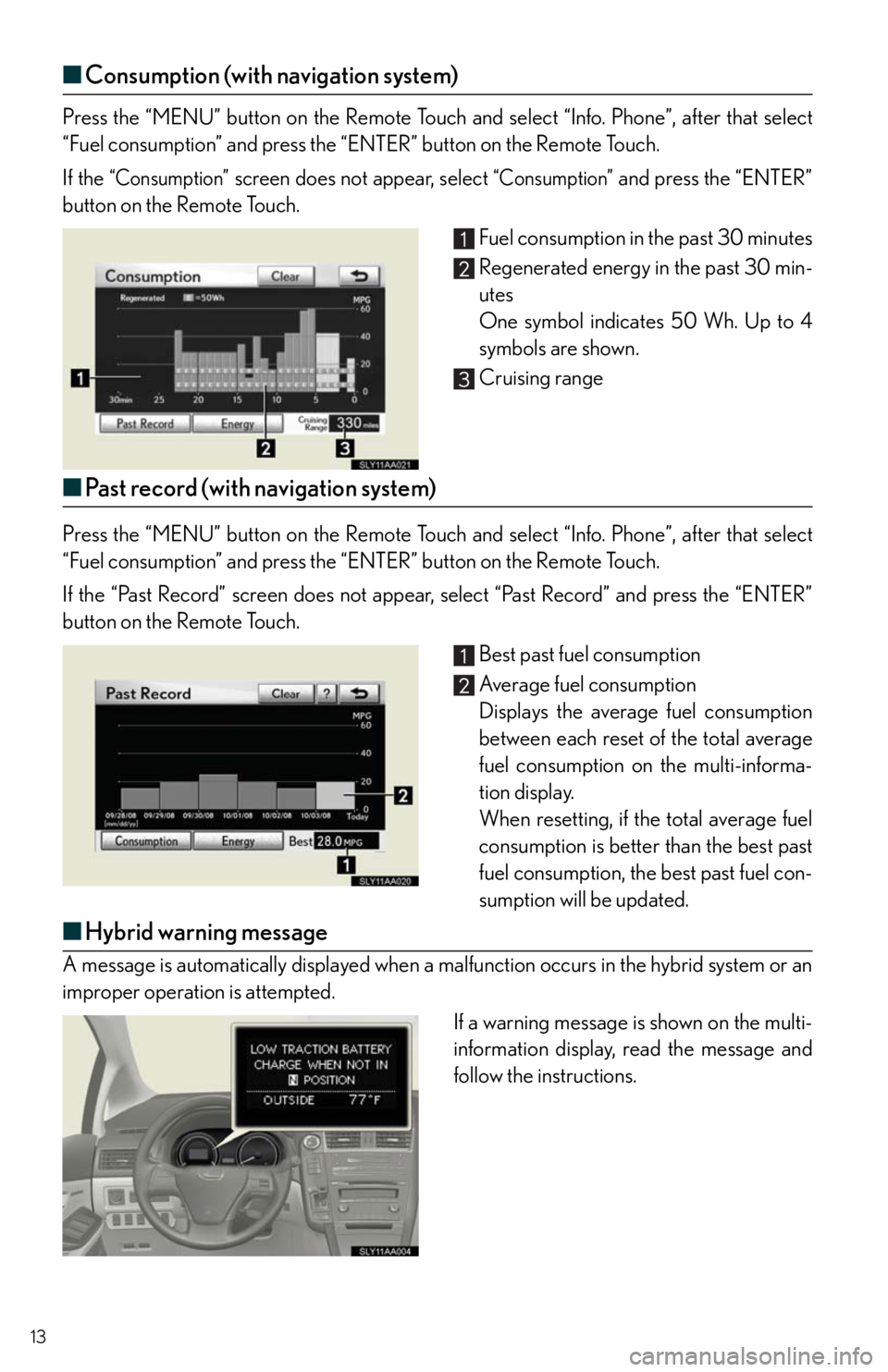
■Consumption (with navigation system)
Press the “MENU” button on the Remote Touch and select “Info. Phone”, after that select
“Fuel consumption” and press the “ENTER” button on the Remote Touch.
If the
“Consumption” screen does not appear, select “Consumption” and press the “ENTER”
button on the Remote Touch.
Fuel consumption in the past 30 minutes
Regenerated energy in the past 30 min-
utes
One symbol indicates 50 Wh. Up to 4
symbols are shown.
Cruising range
■Past record (with navigation system)
Press the “MENU” button on the Remote Touch and select “Info. Phone”, after that select
“Fuel consumption” and press the “ENTER” button on the Remote Touch.
If the “Past Record” screen does not appear, select “Past Record” and press the “ENTER”
button on the Remote Touch.
Best past fuel consumption
Average fuel consumption
Displays the average fuel consumption
between each reset of the total average
fuel consumption on the multi-informa-
tion display.
When resetting, if the total average fuel
consumption is better than the best past
fuel consumption, the best past fuel con-
sumption will be updated.
■Hybrid warning message
A message is automatically displayed when a malfunction occurs in the hybrid system or an
improper operation is attempted.
If a warning message is shown on the multi-
information display, read the message and
follow the instructions.
Page 42 of 94
42
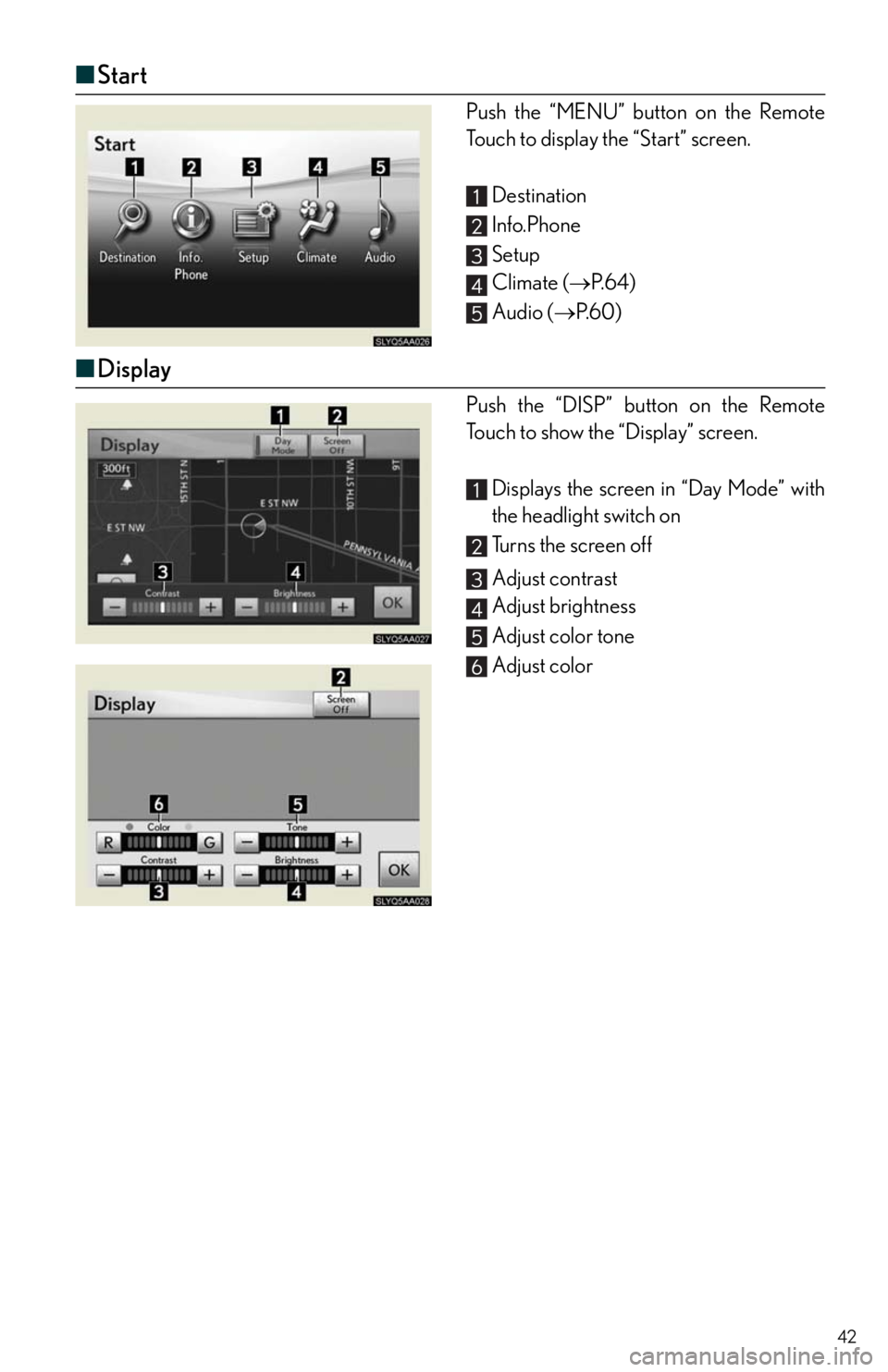
■Start
Push the “MENU” button on the Remote
Touch to display the “Start” screen.
Destination
Info.Phone
Setup
Climate (P. 6 4 )
Audio (P. 6 0 )
■Display
Push the “DISP” button on the Remote
Touch to show the “Display” screen.
Displays the screen in “Day Mode” with
the headlight switch on
Turns the screen off
Adjust contrast
Adjust brightness
Adjust color tone
Adjust color
Page 50 of 94
50
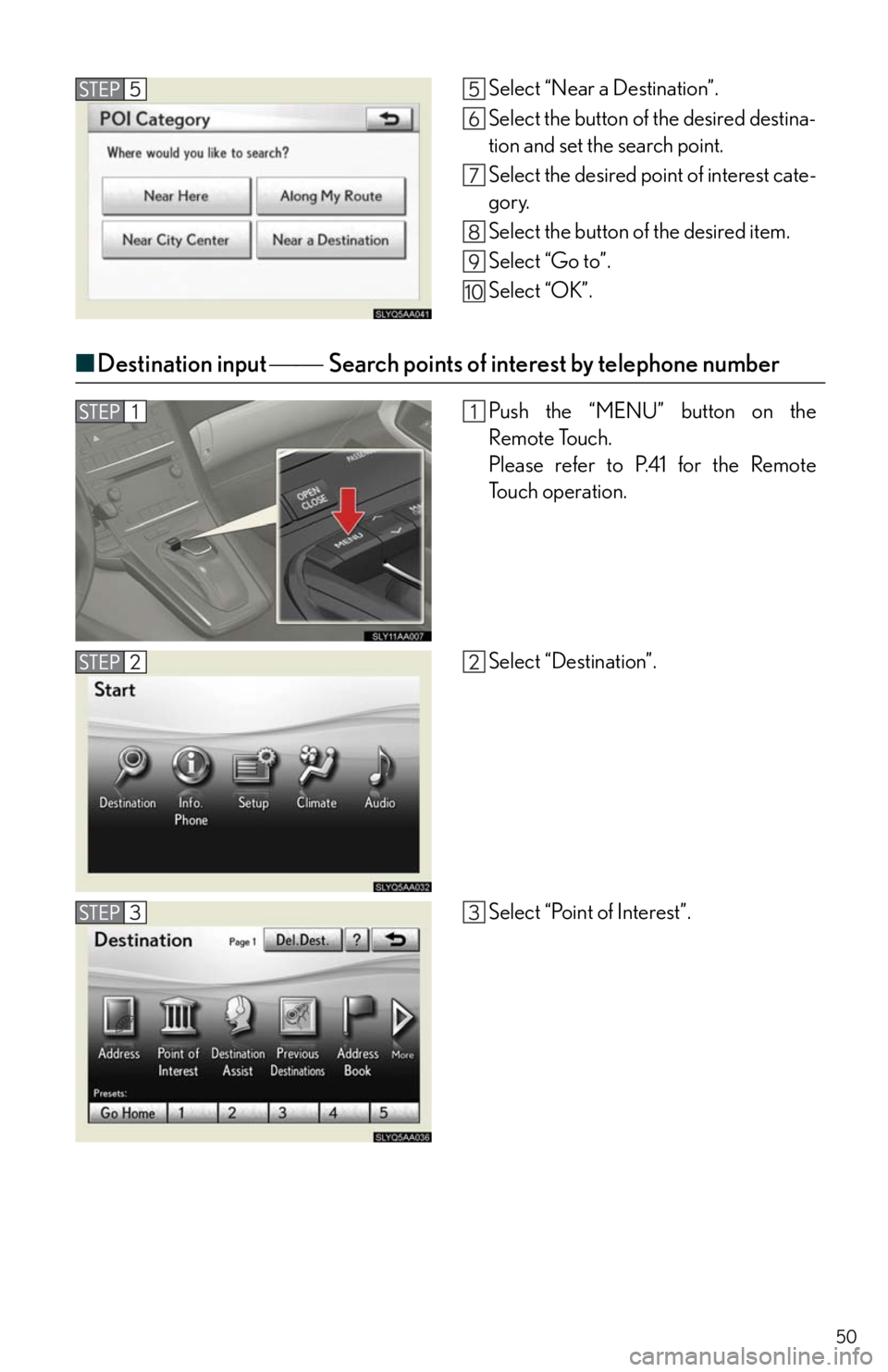
■Destination input Search points of interest by telephone number
Select “Near a Destination”.
Select the button of the desired destina-
tion and set the search point.
Select the desired point of interest cate-
gory.
Select the button of the desired item.
Select “Go to”.
Select “OK”.
Push the “MENU” button on the
Remote Touch.
Please refer to P.41 for the Remote
To u c h o p e r a t i o n .
Select “Destination”.
Select “Point of Interest”.
Page 51 of 94
51
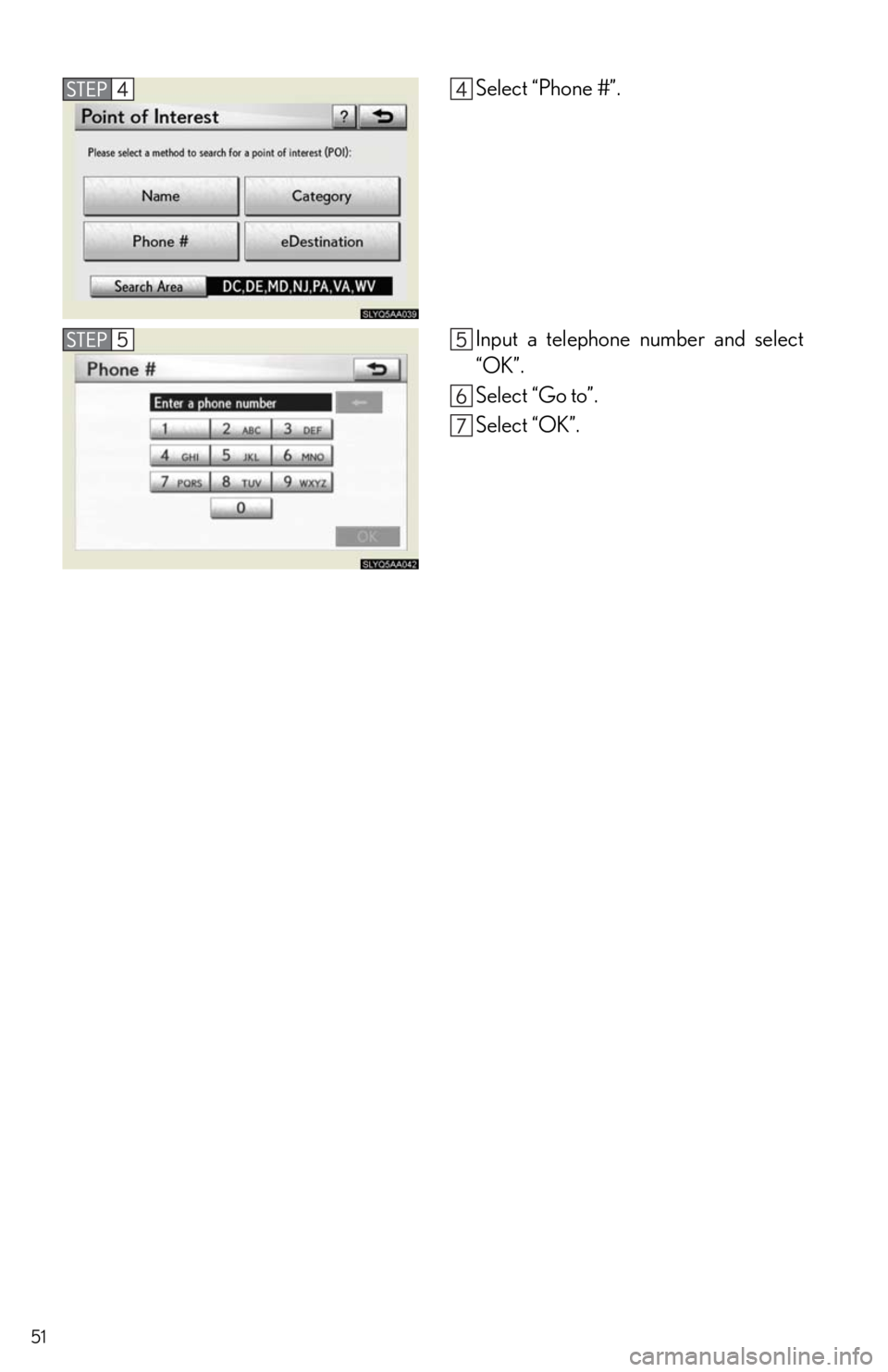
Select “Phone #”.
Input a telephone number and select
“OK”.
Select “Go to”.
Select “OK”.
Page 52 of 94
52
Hands-free System For Cellular Phone
(with navigation system)
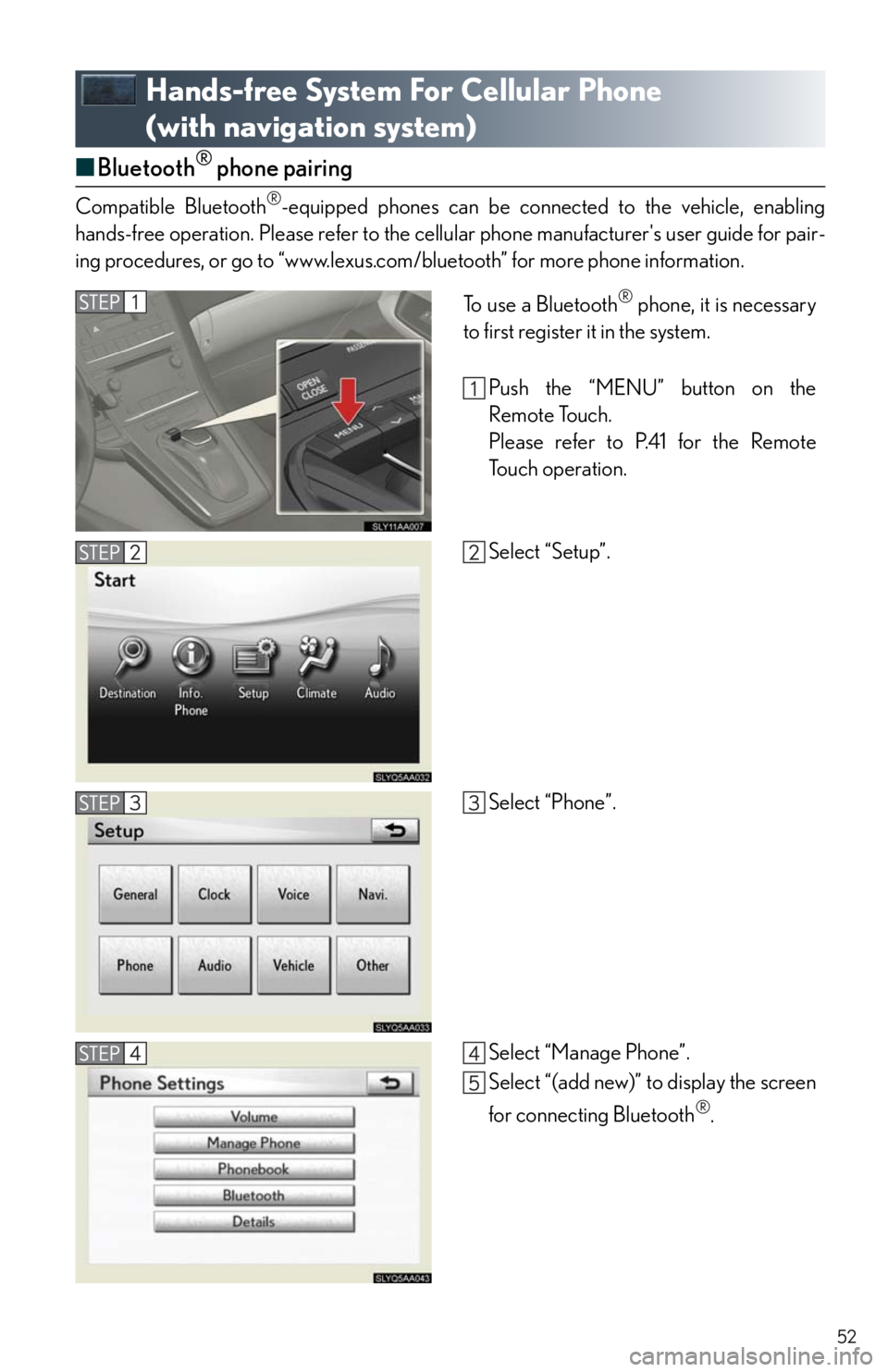
■Bluetooth® phone pairing
Compatible Bluetooth®-equipped phones can be connected to the vehicle, enabling
hands-free operation. Please refer to the cellular phone manufacturer's user guide for pair-
ing procedures, or go to “www.lexus.com/bluetooth” for more phone information.
To use a Bluetooth® phone, it is necessary
to first register it in the system.
Push the “MENU” button on the
Remote Touch.
Please refer to P.41 for the Remote
To u c h o p e r a t i o n .
Select “Setup”.
Select “Phone”.
Select “Manage Phone”.
Select “(add new)” to display the screen
for connecting Bluetooth
®.
Page 53 of 94
53
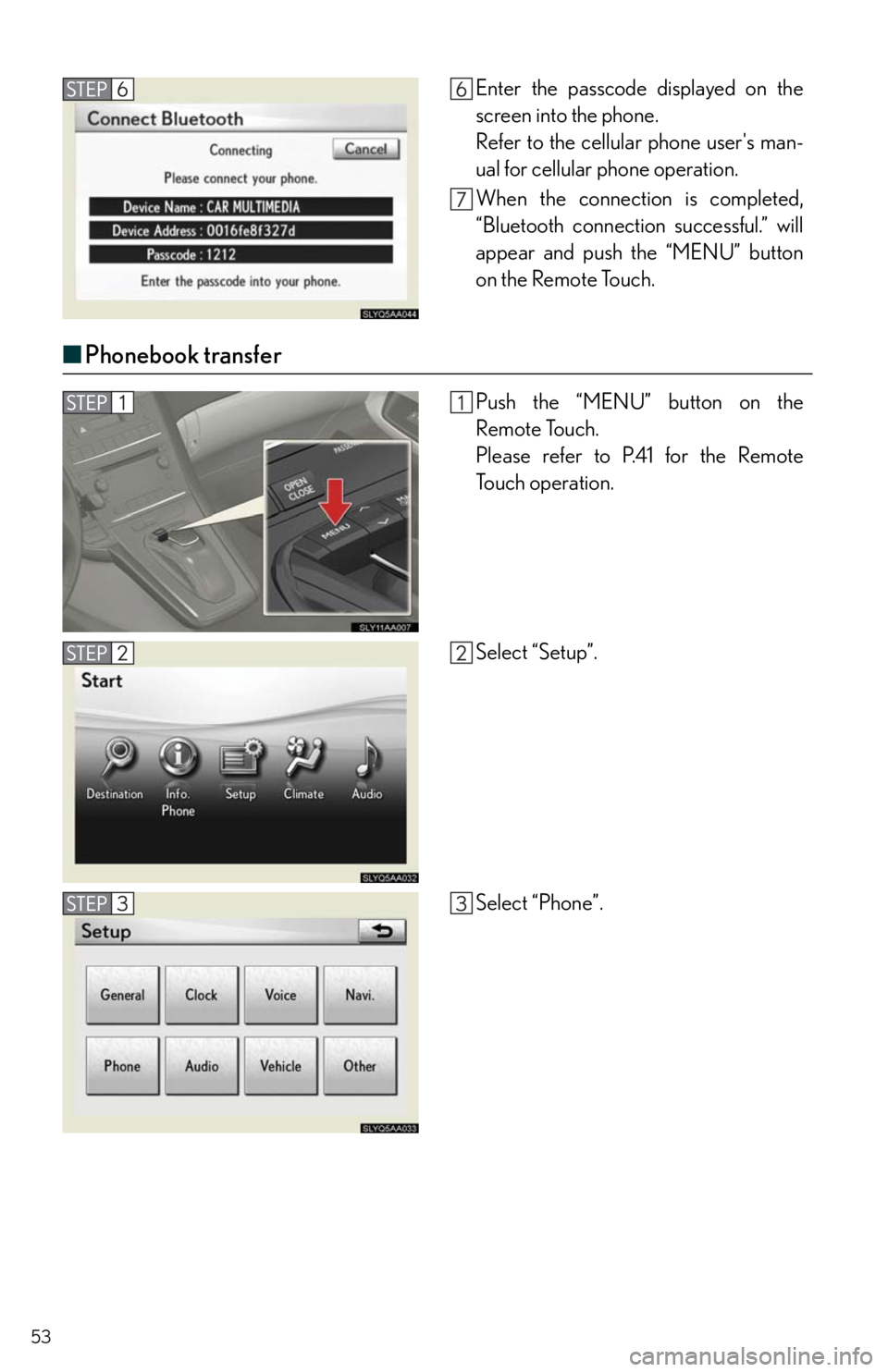
■Phonebook transfer
Enter the passcode displayed on the
screen into the phone.
Refer to the cellular phone user's man-
ual for cellular phone operation.
When the connection is completed,
“Bluetooth connection successful.” will
appear and push the “MENU” button
on the Remote Touch.
Push the “MENU” button on the
Remote Touch.
Please refer to P.41 for the Remote
To u c h o p e r a t i o n .
Select “Setup”.
Select “Phone”.