park assist Lexus HS250h 2011 Hybrid system / LEXUS 2011 HS250H (OM75037U) User Guide
[x] Cancel search | Manufacturer: LEXUS, Model Year: 2011, Model line: HS250h, Model: Lexus HS250h 2011Pages: 628, PDF Size: 10.69 MB
Page 235 of 628

235
2-4. Using other driving systems
2
When driving
■Hill-start assist control buzzer
●When hill-start assist control is activated, the buzzer will sound once.
●In the following situations, hill-start assist control will be canceled and the
buzzer will sound twice.
• No attempt is made to drive the vehi cle within approximately 2 seconds of
releasing the brake pedal.
•Push the P position switch.
• The parking brake is applied.
• The brake pedal is depressed again.
• The brake pedal has been depressed for more than approximately 3 minutes.
■If the slip indicator comes on
It may indicate a malfunction in th e system. Contact your Lexus dealer.
CAUTION
■Hill-start assist control
●Do not overly rely on hill-start assist cont rol. Hill-start assist control may not oper-
ate effectively on extremely steep inclines or roads covered in ice.
●Unlike the parking brake, hill-start assist control is not intended to hold the vehi-
cle stationary for an extended period of time. Do not attempt to use hill-start
assist control to hold the vehicle on an incline for an extended period of time, as
doing so may lead to an accident.
Page 493 of 628
5
When trouble arises
493
5-1. Essential information
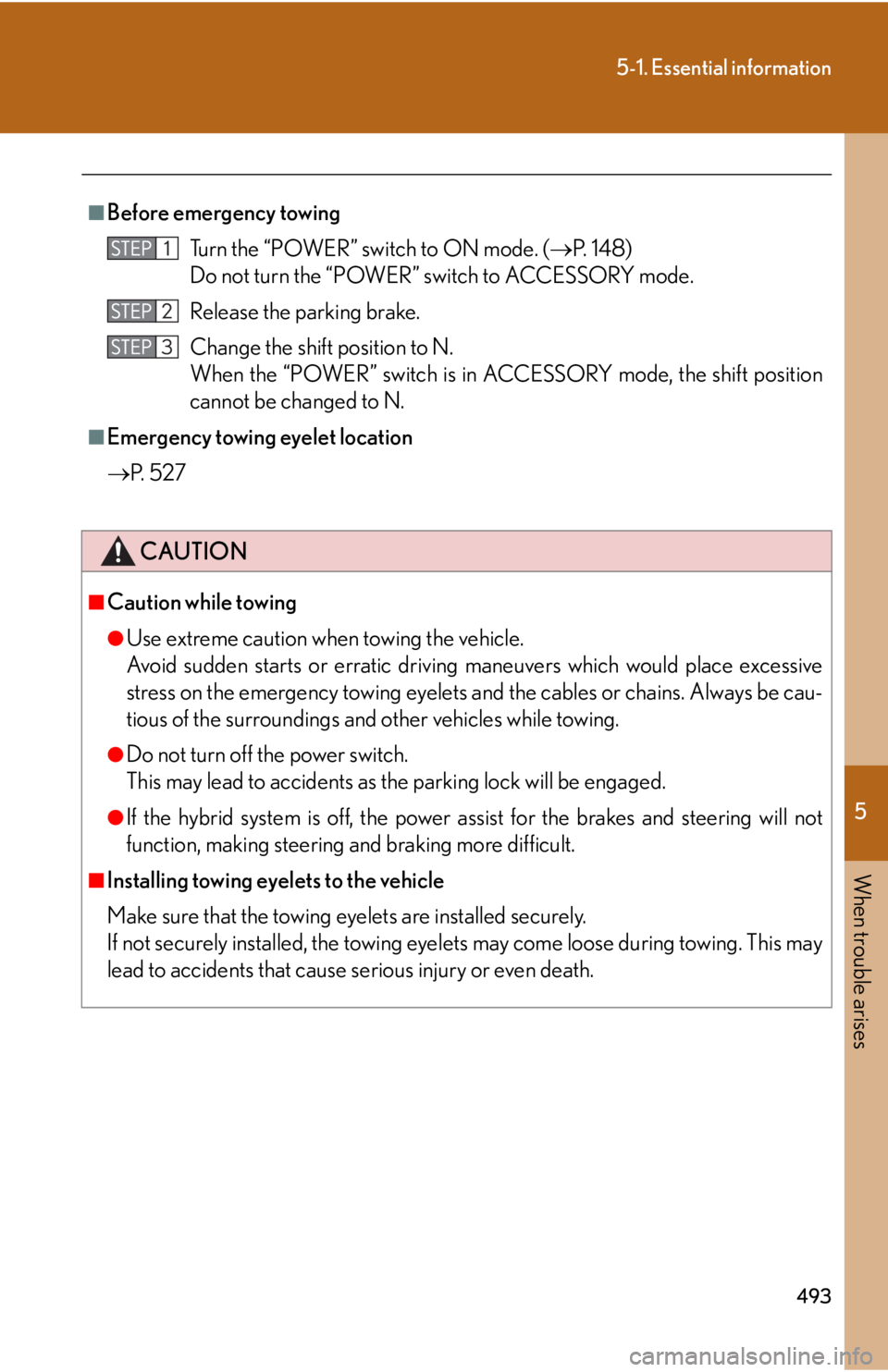
■Before emergency towingTurn the “POWER” switch to ON mode. ( P. 1 4 8 )
Do not turn the “POWER” switch to ACCESSORY mode.
Release the parking brake.
Change the shift position to N.
When the “POWER” switch is in ACCESSORY mode, the shift position
cannot be changed to N.
■Emergency towing eyelet location
P. 5 2 7
CAUTION
■Caution while towing
●Use extreme caution when towing the vehicle.
Avoid sudden starts or erratic driving maneuvers which would place excessive
stress on the emergency towing eyelets and the cables or chains. Always be cau-
tious of the surroundings and other vehicles while towing.
●Do not turn off the power switch.
This may lead to accidents as th e parking lock will be engaged.
●If the hybrid system is off, the power assist for the brakes and steering will not
function, making steering and braking more difficult.
■Installing towing eyelets to the vehicle
Make sure that the towing eyelets are installed securely.
If not securely installed, the towing eyel ets may come loose during towing. This may
lead to accidents that cause serious injury or even death.
Page 509 of 628
5
When trouble arises
509
5-2. Steps to take in an emergency
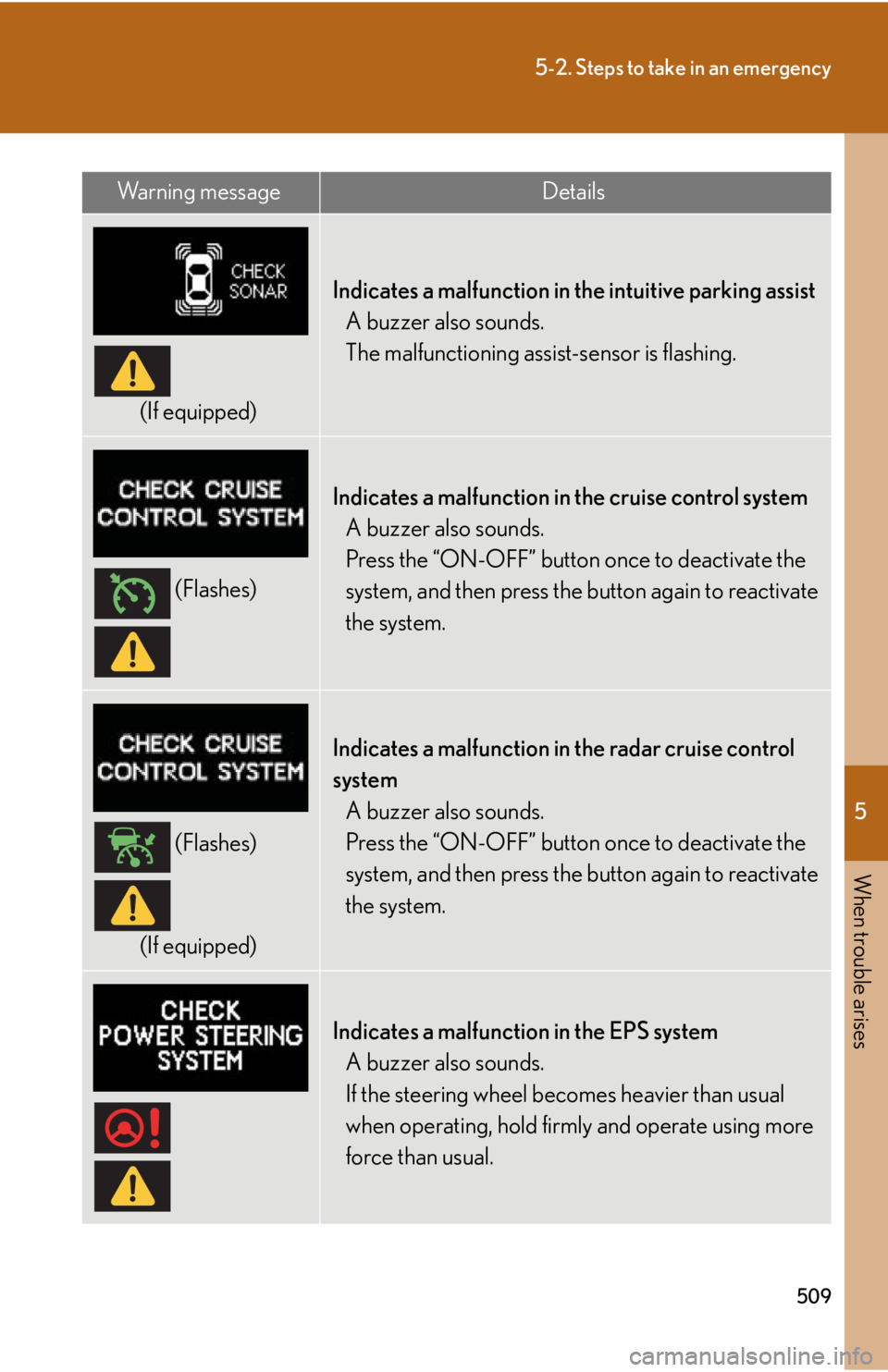
(If equipped)
Indicates a malfunction in the intuitive parking assistA buzzer also sounds.
The malfunctioning assi st-sensor is flashing.
(Flashes)
Indicates a malfunction in the cruise control system
A buzzer also sounds.
Press the “ON-OFF” button once to deactivate the
system, and then press the button again to reactivate
the system.
(Flashes)
(If equipped)
Indicates a malfunction in the radar cruise control
system A buzzer also sounds.
Press the “ON-OFF” button once to deactivate the
system, and then press the button again to reactivate
the system.
Indicates a malfunction in the EPS systemA buzzer also sounds.
If the steering wheel becomes heavier than usual
when operating, hold firm ly and operate using more
force than usual.
Wa r n i n g m e s s a g eDetails
Page 513 of 628
5
When trouble arises
513
5-2. Steps to take in an emergency
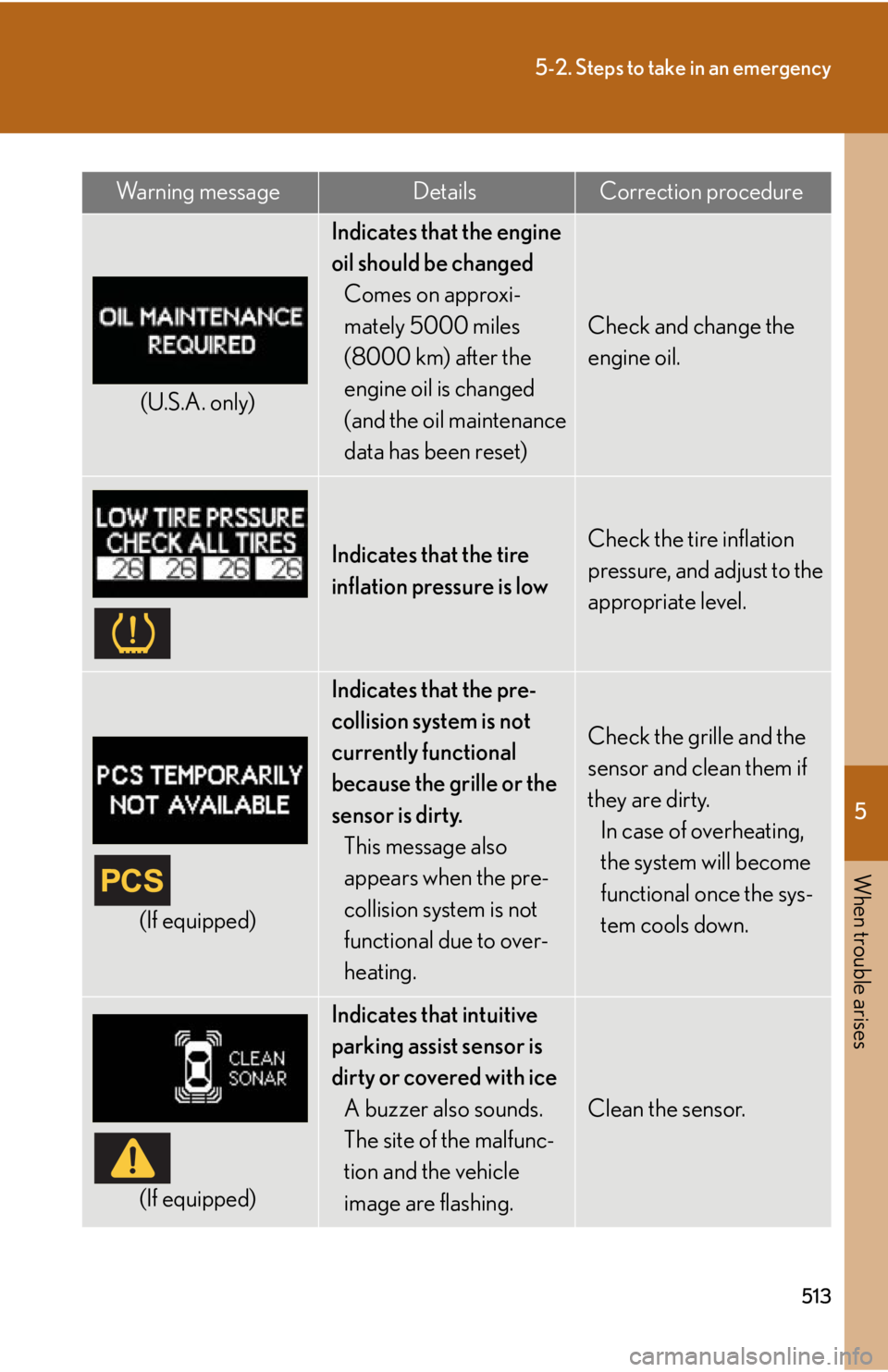
(U.S.A. only)
Indicates that the engine
oil should be changedComes on approxi-
mately 5000 miles
(8000 km) after the
engine oil is changed
(and the oil maintenance
data has been reset)
Check and change the
engine oil.
Indicates that the tire
inflation pressure is lowCheck the tire inflation
pressure, and adjust to the
appropriate level.
(If equipped)
Indicates that the pre-
collision system is not
currently functional
because the grille or the
sensor is dirty.
This message also
appears when the pre-
collision system is not
functional due to over-
heating.
Check the grille and the
sensor and clean them if
they are dirty.In case of overheating,
the system will become
functional once the sys-
tem cools down.
(If equipped)
Indicates that intuitive
parking assist sensor is
dirty or covered with ice
A buzzer also sounds.
The site of the malfunc-
tion and the vehicle
image are flashing.
Clean the sensor.
Wa r n i n g m e s s a g eDetailsCorrection procedure
Page 533 of 628
5
When trouble arises
533
5-2. Steps to take in an emergency
CAUTION
■When using the compact spare tire
●Remember that the compact spare tire provided is specifically designed for use
with your vehicle. Do not use your compact spare tire on another vehicle.
●Do not use more than one compact spare tire simultaneously.
●Replace the compact spare tire with a standard tire as soon as possible.
●Avoid sudden acceleration, deceleration an d braking, as well as sharp cornering.
■When storing the compact spare tire
Be careful not to catch fingers or other body parts between the compact spare tire
and the body of the vehicle.
■When the compact spare tire is attached
The vehicle speed may not be correctly detected, and the following systems may
not operate correctly:
●ABS & Brake assist
●Enhanced VSC
●TRAC
●Cruise control system
●Dynamic radar cruise control system (if equipped)
●Lane keeping assist (if equipped)
●Adaptive Front-lighting System (if equipped)
●Intuitive parking assist (if equipped)
●Pre-collision system (if equipped)
●Navigation system (if equipped)
■Speed limit when using the compact spare tire
Do not drive at speeds in excess of 50 mph (80 km/h) when a compact spare tire is
installed on the vehicle.
The compact spare tire is not designed for driving at high speeds. Failure to observe
this precaution may lead to an accident causing death or serious injury.
Page 546 of 628
546
5-2. Steps to take in an emergency
CAUTION
■Avoiding battery fires or explosions
The flammable gas that may be generated by the assisting vehicle battery may
catch fire and explode. Make sure to observe the following to prevent fire or sparks.
●Make sure each jumper cable is connecte d to the correct terminal and that it is
not unintentionally in contact with any part other than the intended terminal.
●Do not allow the other end of the jumper cable connected to the “+” terminal to
come into contact with any other parts or metal surfaces in the area, such as
brackets or unpainted metal.
●Do not allow the + and - clamps of the jumper cables to come into contact with
each other.
●Do not allow open flame or use matches, cigarette lighters or smoke near the
battery.
■12-volt battery precautions
The 12-volt battery contains poisonous and corrosive acidic electrolyte, while
related parts contain lead and lead compounds. Observe the following precautions
when handling the 12-volt battery:
●When working with the 12-volt battery, always wear safety glasses and take care
not to allow any battery fluids (acid) to co me into contact with skin, clothing or the
vehicle body.
●Do not lean over the 12-volt battery.
●In the event that battery fluid comes into contact with the skin or eyes, immedi-
ately wash the affected area with water and seek medical attention. Place a wet
sponge or cloth over the affected area until medical attention can be received.
●Always wash your hands after handling the battery support, terminals, and other
battery-related parts.
●Do not allow children near the 12-volt battery.
Page 589 of 628
589
6-2. Customization
6
Vehicle specifications
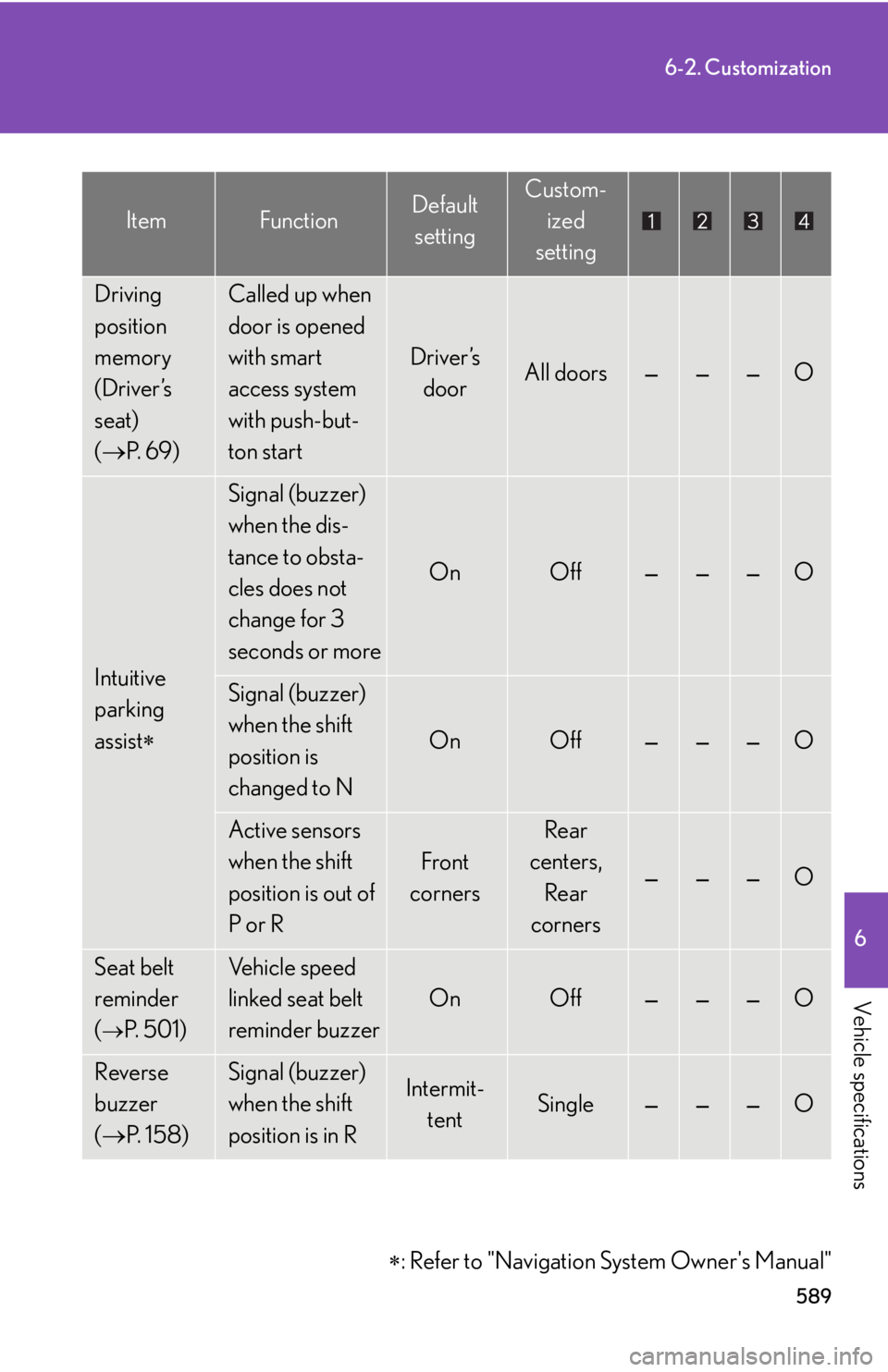
Driving
position
memory
(Driver’s
seat)
( P. 6 9 )Called up when
door is opened
with smart
access system
with push-but-
ton start
Driver’s
doorAll doors———O
Intuitive
parking
assist
Signal (buzzer)
when the dis-
tance to obsta-
cles does not
change for 3
seconds or more
OnOff———O
Signal (buzzer)
when the shift
position is
changed to N
OnOff———O
Active sensors
when the shift
position is out of
P or R
Front
corners
Rear
centers,
Rear
corners
———O
Seat belt
reminder
(
P. 5 0 1 )
Vehicle speed
linked seat belt
reminder buzzer
OnOff———O
Reverse
buzzer
( P. 1 5 8 )Signal (buzzer)
when the shift
position is in RIntermit-
tentSingle———O
: Refer to "Navigation System Owner's Manual"
ItemFunctionDefault
settingCustom- ized
setting
Page 607 of 628
Index
607
For information regarding the equipment listed below,
refer to the “Navigation System Owner’s Manual”.
• Navigation system
• Audio/video system
• Air conditioning
• Rear window and outside rear view mirror defogging
• Windshield wiper de-icer
• Climate control
•Rear view monitor system
• Wide view front monitor system
• Intuitive parking assist
Abbreviation list .................... 608
Alphabetical index .................. 610
What to do if... ....................... 624
Page 611 of 628

611
Alphabetical index
Audio system (vehicles with navigation system)*
Audio/video system*
Audio visual input (vehicles without navigation system) .............. 311
Audio visual input (vehicles with navigation system)*
Automatic air conditioning system (vehicles without navigation system)Air conditioning filter ....................... 456
Air conditioning system ................. 256
Automatic air conditioning system.................................................. 256
Automatic air conditioning system (vehicles with navigation system)*
Automatic headlight leveling system ......................................................190
Automatic light control system ........186
AUX port (vehicles without navigation system)............................... 311
AUX port (vehicles with navigation system)*
Auxiliary box ...........................................374 Back-up lights
Replacing light bulbs ........................ 476
Wattage ................................................. 564
Battery Checking ...............................................439
If the vehicle has a discharged 12-volt battery...................................543
Preparing and checking before winter .................................... 249
Bluetooth
® (vehicles without
navigation system) ............................. 315
Bluetooth
® (vehicles with navigation
system)*
Bottle holders ......................................... 373
Brake Fluid...........................................................562
Parking brake ........................................162
Brake assist.............................................. 229
Break-in tips ............................................. 139
Brightness control Instrument panel light control ................................................... 165
*: Refer to “Navigation System Owner’s Manual”.
B
Page 616 of 628

616
Alphabetical index
Horn ............................................................ 163
Hybrid systemEmergency shut off system ............. 29
Energy monitor/consumption........................................ 33
Engine switch......................................... 147
High voltage components ............... 28
Hybrid system in dicators................ 168
Ignition switch........................................ 147
Power switch ......................................... 147
I/M test ....................................................... 421
Identification Engine ..................................................... 557
Vehicle ....................................................556
Ignition switch...........................................147
Illuminated entry system .................... 364
Immobilizer system .................................98
Indicator lights......................................... 168
Initialization Items to initialize ................................. 592
Inside rear view mirror ..........................82
Instrument panel light control........... 165
Interior lights Interior lights......................................... 364
Switch ......................................................365
Wattage..................................................564
Intuitive parking assist* Jack
Positioning the jack ...........................426
Vehicle-equipped jack....................527
Jack handle ............................................. 527
Keyless entry ............................................. 55
Keys Electronic key ........................................ 40
Engine switch ........................................ 147
If the electronic key does not operate properly............................ 540
If you lose your keys ........................ 539
Key number............................................. 40
Keyless entry........................................... 55
Keys............................................................. 40
Mechanical key ........................................41
Wireless remote control key.......... 55
Lane keeping assist................................ 221
License plate lights Replacing light bulbs ........................476
Wattage ................................................. 564
Light bulbs Replacing ...............................................475
Wattage ................................................. 564
I
J
K
L