remote control Lexus HS250h 2011 Hybrid system / LEXUS 2011 HS250H (OM75037U) Owner's Manual
[x] Cancel search | Manufacturer: LEXUS, Model Year: 2011, Model line: HS250h, Model: Lexus HS250h 2011Pages: 628, PDF Size: 10.69 MB
Page 391 of 628
391
3-7. Other interior features
3
Interior features
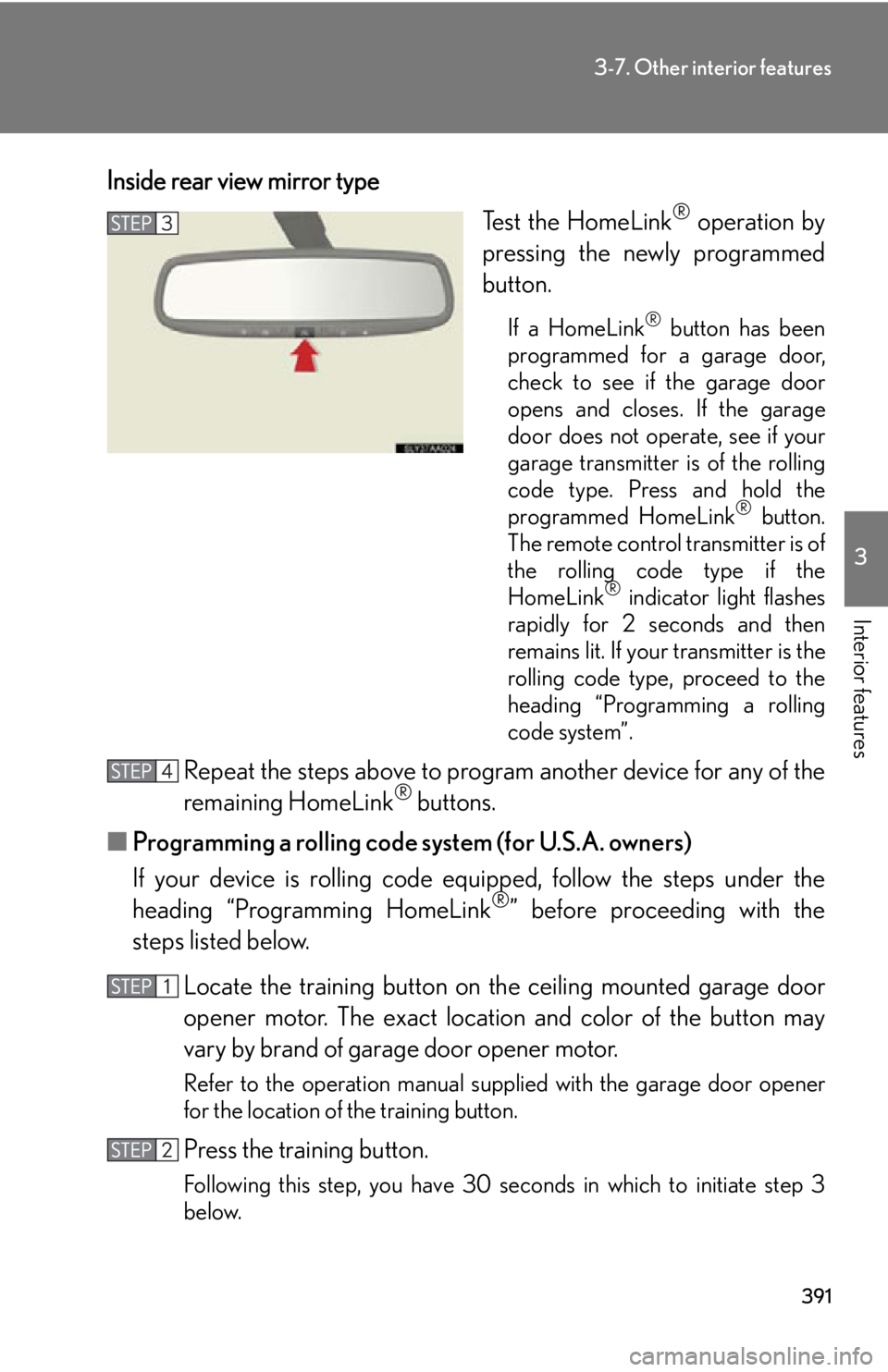
Inside rear view mirror typeTest the HomeLink
® operation by
pressing the newly programmed
button.
If a HomeLink® button has been
programmed for a garage door,
check to see if the garage door
opens and closes. If the garage
door does not operate, see if your
garage transmitter is of the rolling
code type. Press and hold the
programmed HomeLink
® button.
The remote control transmitter is of
the rolling code type if the
HomeLink
® indicator light flashes
rapidly for 2 seconds and then
remains lit. If your transmitter is the
rolling code type, proceed to the
heading “Programming a rolling
code system”.
Repeat the steps above to progra m another device for any of the
remaining HomeLink® buttons.
■ Programming a rolling code system (for U.S.A. owners)
If your device is rolling code eq uipped, follow the steps under the
heading “Programming HomeLink
®” before proceeding with the
steps listed below.
Locate the training button on th e ceiling mounted garage door
opener motor. The exact location and color of the button may
vary by brand of garage door opener motor.
Refer to the operation manual supplied with the garage door opener
for the location of the training button.
Press the training button.
Following this step, you have 30 se conds in which to initiate step 3
below.
Page 392 of 628
392
3-7. Other interior features
Press and hold the vehicle’s programmed HomeLink® button for
2 seconds and release it. Repeat this step once again. The garage
door may open.
If the garage door opens, the programming process is complete. If the
door does not open, press and release the button a third time. This third
press and release will complete the programming process by opening
the garage door.
The ceiling mounted garage door op ener motor should now recognize
the HomeLink
® signal and operate the garage door.
Repeat the steps above to prog ram another rolling code system
for any of the remaining HomeLink® buttons.
■ Programming an entry gate (for U.S. owners)/Programming a
devices in the Canadian market
Place the remote control transmitter 1 to 3 in. (25 to 75 mm)
away from the HomeLink
® buttons.
Keep the HomeLink® indicator light in view while programming.
Press and hold the selected HomeLink® button.
Repeatedly press and release (cycle) the remote control trans-
mitter for 2 seconds each until step 4 is completed.
When the HomeLink
® indicator light star ts to flash rapidly,
release the buttons.
Test the HomeLink
® operation by pressing the newly pro-
grammed button. Check to see if the gate/device operates cor-
rectly.
Repeat the steps above to progra m another device for any of the
remaining HomeLink
® buttons.
■ Programming other devices
To program other devices such as home security systems, home door
locks and lighting, contact your Lexus dealer for assistance.
■ Reprogramming a button
The individual HomeLink
® buttons cannot be erased but can be
reprogrammed. To reprogram a button, follow the “Reprogramming a
HomeLink
® button” instructions.
Page 394 of 628

394
3-7. Other interior features
■Before programming
●Install a new battery in the remote control transmitter.
●The battery side of the remote control transmitter must be pointed away from
the HomeLink® button.
■Certification for the garage door opener
For vehicles sold in the U.S.A.
Overhead console type
FCC ID: CB2070AHL4
Inside rear view mirror type
FCC ID: NZLWZLHL4
FCC ID: NZLOBIHL4
NOTE:
This device complies with Part 15 of the FCC Rules.
Operation is subject to the following two conditions: (1) this device may not cause
harmful interference, and (2) this device must accept any interference received,
including interference that may cause undesired operation.
FCC WARNING:
Changes or modifications not expressly approved by the party responsible for
compliance could void the user’s authority to operate the equipment.
For vehicles sold in Canada
NOTE:
Operation is subject to the following two conditions: (1) this device may not cause
interference, and (2) this device must accept any interference, including interfer-
ence that may cause undesired operation of the device.
■When support is necessary
Visit on the web at www.homelink.com
or call 1-800-355-3515.
Page 395 of 628
395
3-7. Other interior features
3
Interior features
CAUTION
■When programming a garage door or other remote control device
The garage door or other device may operate, so ensure people and objects are
out of danger to prevent potential harm.
■Conforming to federal safety standards
Do not use the HomeLink
® compatible transceiver with any garage door opener
or device that lacks safety stop and reverse features as required by federal safety
standards.
This includes any garage door that cannot detect an interfering object. A door or
device without these featur es increases the risk of death or serious injury.
Page 440 of 628
440
4-3. Do-it-yourself maintenance
■Before recharging
When recharging, the 12-volt battery produces hydrogen gas which is flammable
and explosive. Therefore, observe the following precautions before recharging:
●If recharging with the 12-volt battery installed on the vehicle, be sure to discon-
nect the ground cable.
●Make sure the power switch on the charger is off when connecting and discon-
necting the charger cables to the 12-volt battery.
■After recharging/reconnecting the 12-volt battery
●Unlocking the doors using the smart key system may not be possible immedi-
ately after reconnecting the 12-volt batt ery. If this happens, use the wireless
remote control or the mechanical key to lock/unlock the doors.
●Start the hybrid system with the “POWER” switch in ACCESSORY mode. The
hybrid system may not start with the “POWER” switch turned OFF. However,
the hybrid system will operate normally from the second attempt.
●The “POWER” switch mode is recorded by the vehicle. If the battery is recon-
nected, the vehicle will return the “POWER” switch mode to the status it was in
before the battery was disconnected. Make sure to turn off the power before
disconnect the battery. Take extra care when connecting the battery if the
“POWER” switch mode prior to discharge is unknown.
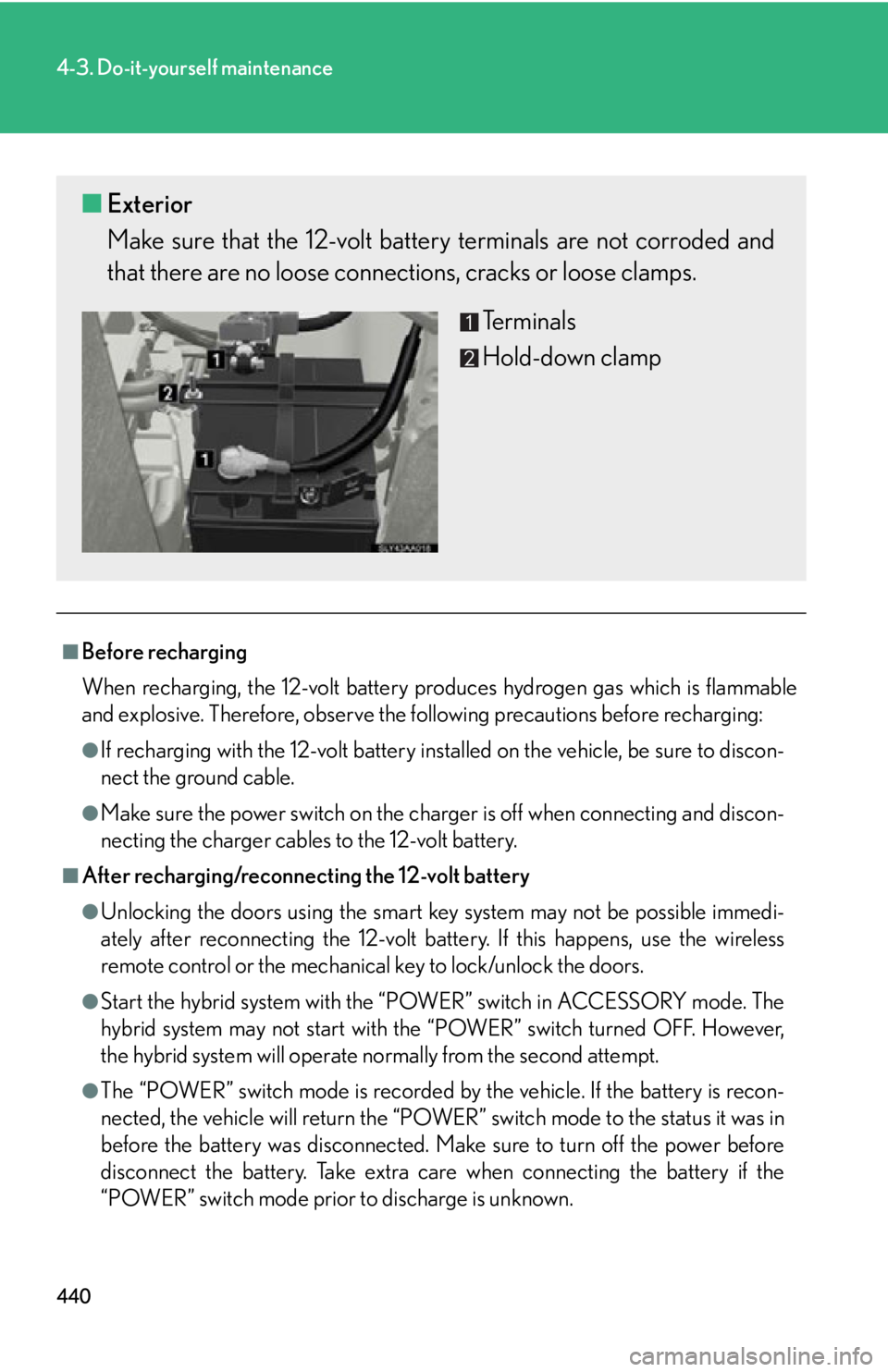
■ Exterior
Make sure that the 12-volt ba ttery terminals are not corroded and
that there are no loose connect ions, cracks or loose clamps.
Terminals
Hold-down clamp
Page 460 of 628
460
4-3. Do-it-yourself maintenance
■Use a CR1632 lithium battery
●Batteries can be purchased at your Lexus dealer, local electrical appliance
shops or camera stores.
●Replace only with the same or equivalent type recommended by the manufac-
turer.
●Dispose of used batteries according to local laws.
■When the card key battery needs to be replaced (if equipped)
The battery for the card key is available only at Lexus dealers. Your Lexus dealer
can replace the battery for you.
■If the electronic key battery is depleted
The following symptoms may occur:
●The smart access system with push-button start and wireless remote control will
not function properly.
●The operational range will be reduced.
CAUTION
■Removed battery and other parts
Keep away from children. These parts are small and if swallowed by a child, they can
cause choking. Failure to do so coul d result in death or serious injury.
NOTICE
■For normal operation after replacing the battery
Observe the following precautions to prevent accidents:
●Always work with dry hands.
Moisture may cause the battery to rust.
●Do not touch or move any other comp onents inside the remote control.
●Do not bend either of the battery terminals.
Page 540 of 628
540
5-2. Steps to take in an emergency
If the electronic key does not operate properly
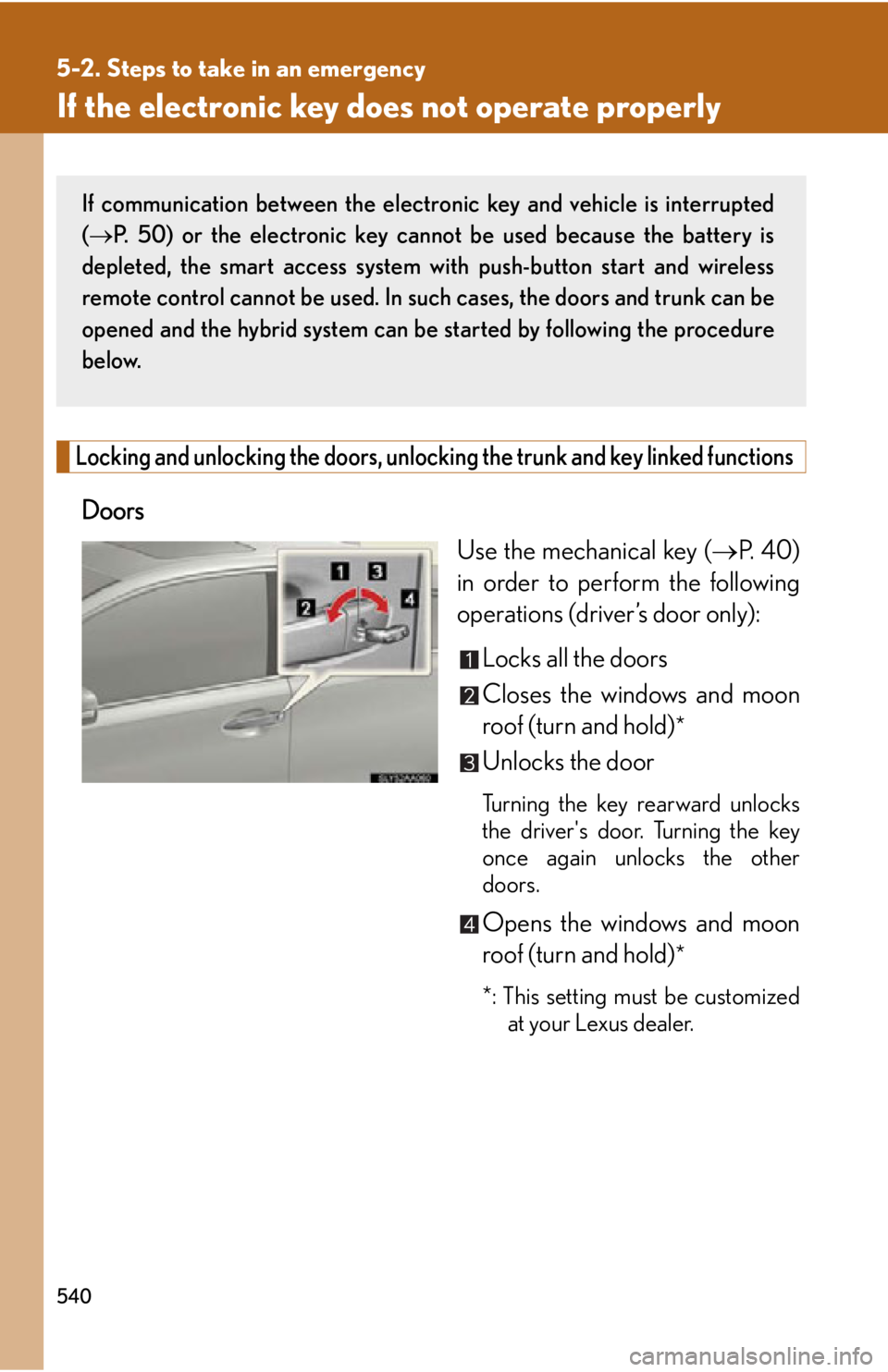
Locking and unlocking the doors, unlocking the trunk and key linked functions
Doors
Use the mechanical key (P. 4 0 )
in order to perform the following
operations (driver’s door only):
Locks all the doors
Closes the windows and moon
roof (turn and hold)
*
Unlocks the door
Turning the key rearward unlocks
the driver's door. Turning the key
once again unlocks the other
doors.
Opens the windows and moon
roof (turn and hold)
*
*: This setting must be customized at your Lexus dealer.
If communication between the electron ic key and vehicle is interrupted
( P. 50) or the electronic key cannot be used because the battery is
depleted, the smart access system with push-button start and wireless
remote control cannot be used. In su ch cases, the doors and trunk can be
opened and the hybrid system can be started by following the procedure
below.
Page 584 of 628
584
6-2. Customization
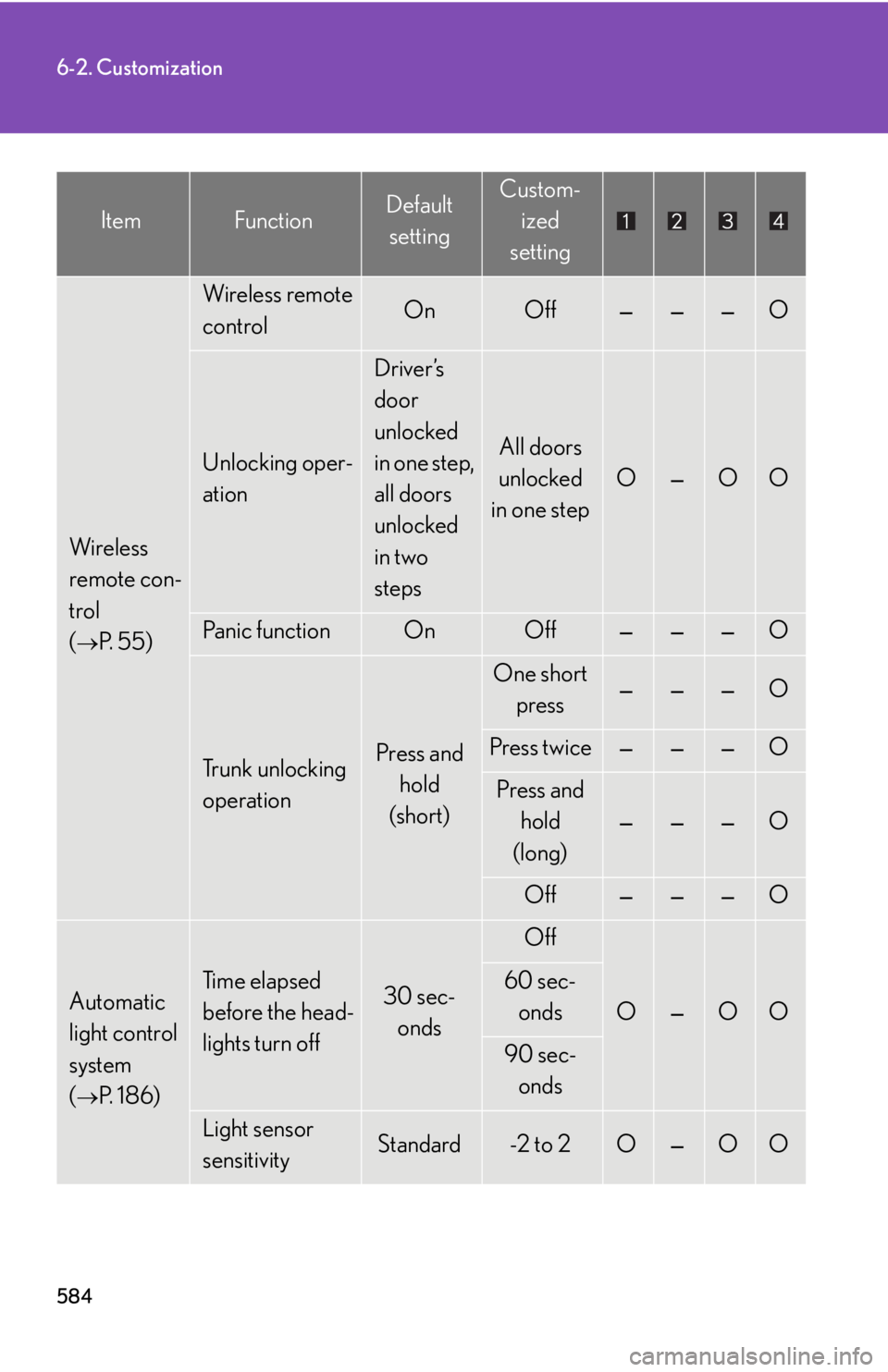
Wireless
remote con-
trol
(
P. 5 5 )
Wireless remote
controlOnOff———O
Unlocking oper-
ation
Driver’s
door
unlocked
in one step,
all doors
unlocked
in two
steps
All doors
unlocked
in one step
O—OO
Pa n i c f u n c t i o nOnOff———O
Trunk unlocking
operationPress and hold
(short)
One short press———O
Press twice———O
Press and hold
(long)
———O
Off———O
Automatic
light control
system
(
P. 1 8 6 )
Ti m e e l a p s e d
before the head-
lights turn off30 sec-
onds
Off
O—OO
60 sec-onds
90 sec-onds
Light sensor
sensitivityStandard-2 to 2O—OO
ItemFunctionDefault settingCustom- ized
setting
Page 587 of 628
587
6-2. Customization
6
Vehicle specifications
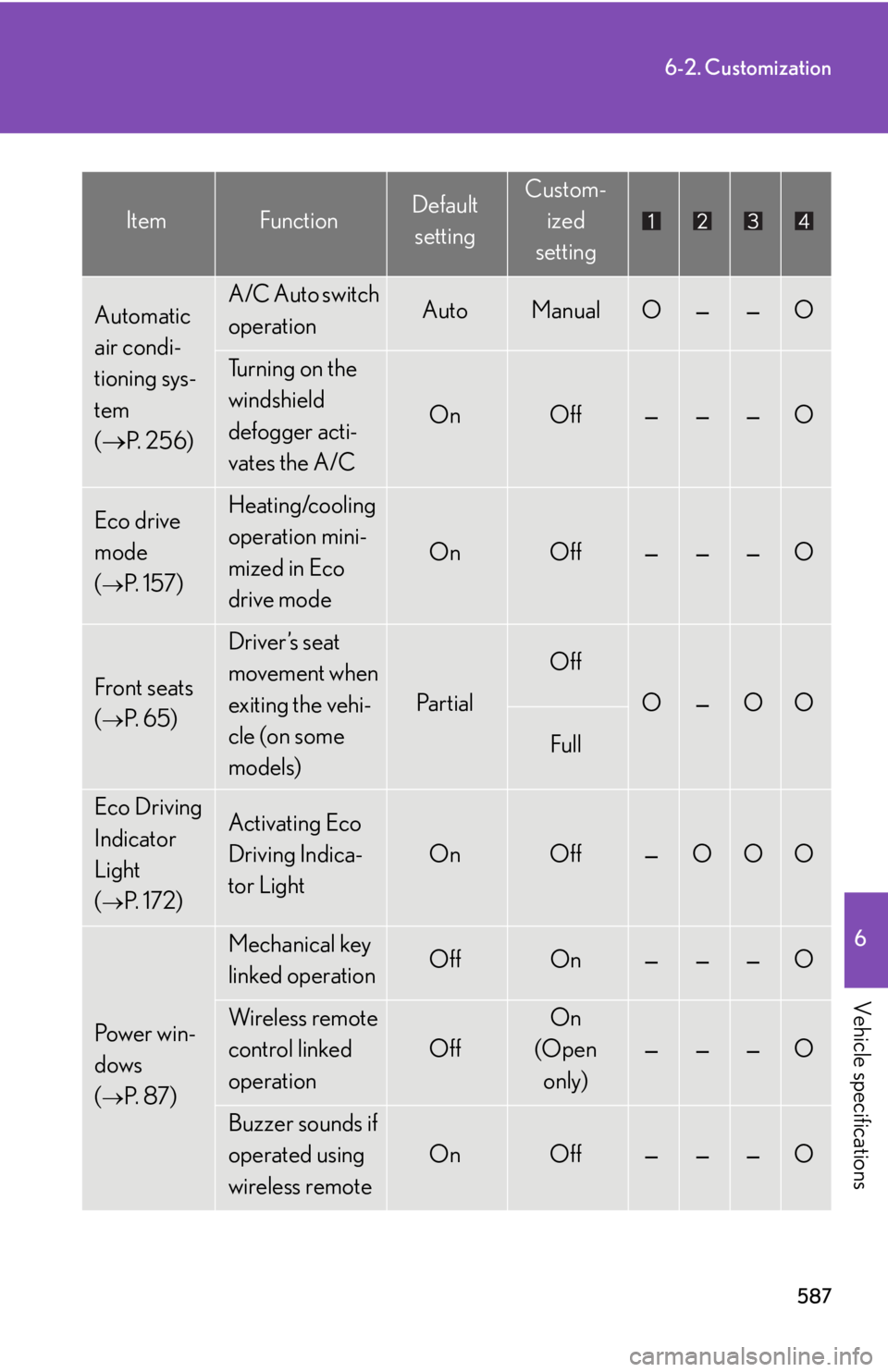
Automatic
air condi-
tioning sys-
tem
( P. 2 5 6 )A/C Auto switch
operationAutoManualO——O
Turning on the
windshield
defogger acti-
vates the A/C
OnOff———O
Eco drive
mode
(
P. 1 5 7 )
Heating/cooling
operation mini-
mized in Eco
drive mode
OnOff———O
Front seats
(
P. 6 5 )
Driver’s seat
movement when
exiting the vehi-
cle (on some
models)
Pa r t i a l
Off
O—OO
Full
Eco Driving
Indicator
Light
(
P. 1 7 2 )
Activating Eco
Driving Indica-
tor Light
OnOff—OOO
Pow e r w i n -
dows
(
P. 8 7 )
Mechanical key
linked operationOffOn———O
Wireless remote
control linked
operation
Off
On
(Open
only)
———O
Buzzer sounds if
operated using
wireless remote
OnOff———O
ItemFunctionDefault settingCustom- ized
setting
Page 588 of 628
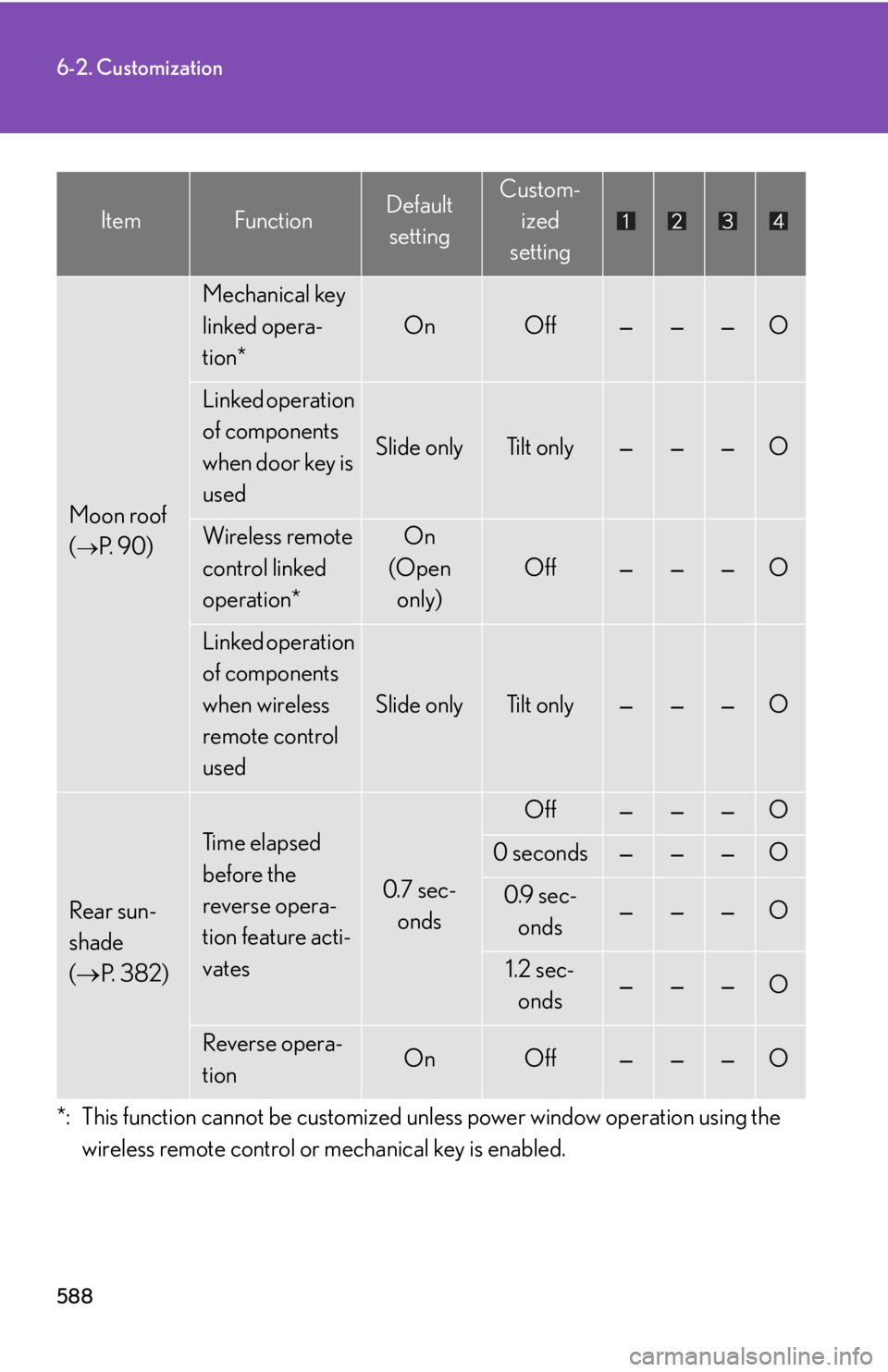
588
6-2. Customization
Moon roof
(
P. 9 0 )
Mechanical key
linked opera-
tion*
OnOff———O
Linked operation
of components
when door key is
used
Slide onlyTilt only———O
Wireless remote
control linked
operation*On
(Open only)
Off———O
Linked operation
of components
when wireless
remote control
used
Slide onlyTilt only———O
Rear sun-
shade
( P. 3 8 2 )
Ti m e e l a p s e d
before the
reverse opera-
tion feature acti-
vates
0.7 sec-
onds
Off———O
0 seconds———O
0.9 sec-
onds———O
1.2 sec-onds———O
Reverse opera-
tionOnOff———O
*: This function cannot be customized un less power window operation using the
wireless remote control or mechanical key is enabled.
ItemFunctionDefault settingCustom- ized
setting