window Lexus HS250h 2011 Hybrid system / LEXUS 2011 HS250H OWNERS MANUAL (OM75037U)
[x] Cancel search | Manufacturer: LEXUS, Model Year: 2011, Model line: HS250h, Model: Lexus HS250h 2011Pages: 628, PDF Size: 10.69 MB
Page 2 of 628
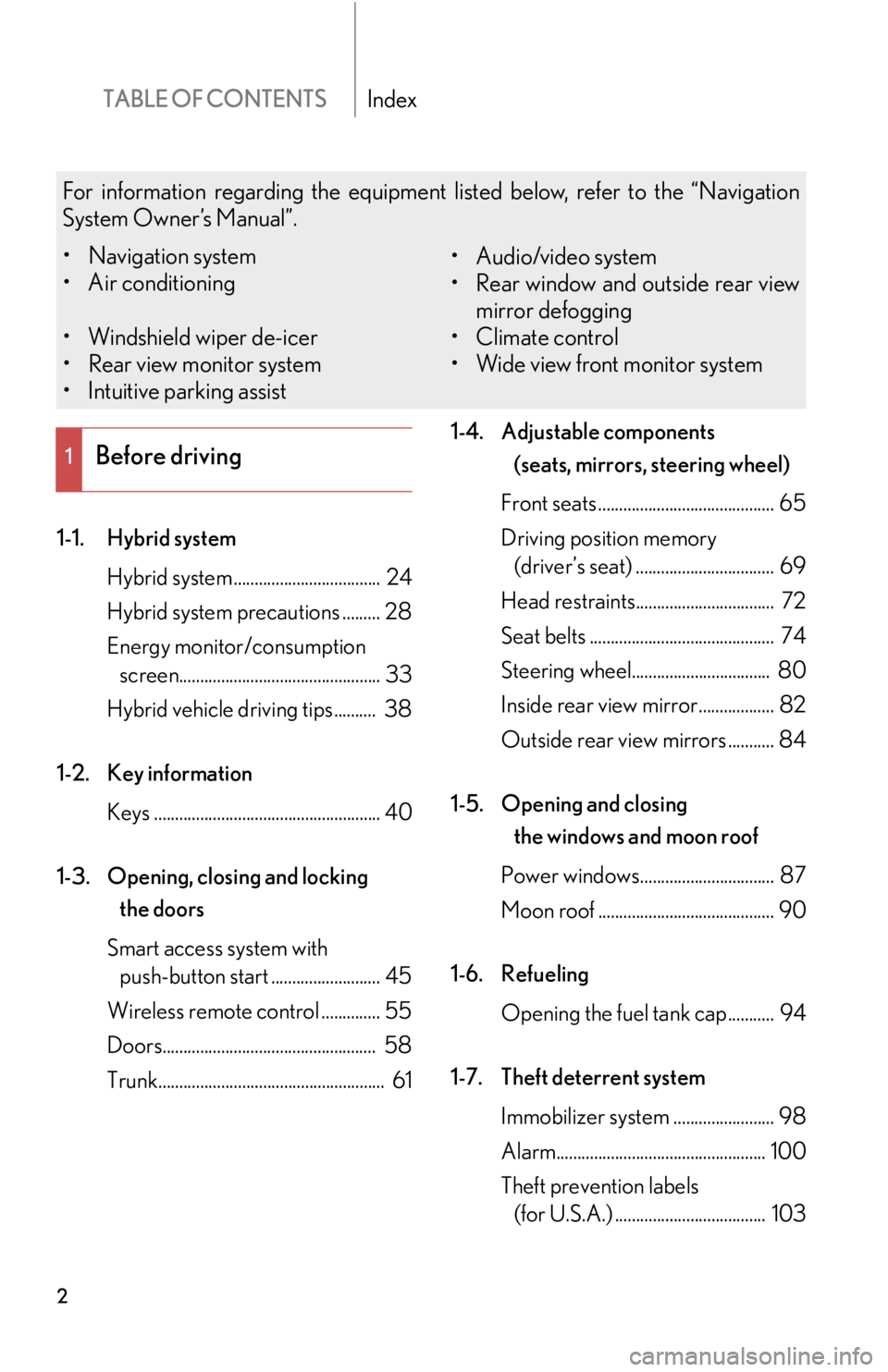
TABLE OF CONTENTSIndex
2
1-1. Hybrid systemHybrid system ................................... 24
Hybrid system precautions ......... 28
Energy monitor/consumption screen................................................ 33
Hybrid vehicle driving tips.......... 38
1-2. Key information Keys ...................................................... 40
1-3. Opening, closing and locking the doors
Smart access system with push-button start .......................... 45
Wireless remote control .............. 55
Doors................................................... 58
Trunk...................................................... 61 1-4. Adjustable components
(seats, mirrors, steering wheel)
Front seats .......................................... 65
Driving position memory (driver’s seat) ................................. 69
Head restraints................................. 72
Seat belts ............................................ 74
Steering wheel................................. 80
Inside rear view mirror.................. 82
Outside rear view mirrors ........... 84
1-5. Opening and closing the windows and moon roof
Power windows................................ 87
Moon roof .......................................... 90
1-6. Refueling Opening the fuel tank cap........... 94
1-7. Theft deterrent system Immobilizer system ........................ 98
Alarm.................................................. 100
Theft prevention labels (for U.S.A.) .................................... 103
1Before driving
For information regarding the equipment listed below, refer to the “Navigation
System Owner’s Manual”.
• Navigation system
• Air conditioning
• Windshield wiper de-icer
• Rear view monitor system
• Intuitive parking assist • Audio/video system
• Rear window and outside rear view
mirror defogging
• Climate control
• Wide view front monitor system
Page 4 of 628

TABLE OF CONTENTSIndex
4
3-1. Using the air conditioning system and defogger
Automatic air conditioning system ............................................ 256
Rear window defogger switch.............................................. 264
Windshield wiper de-icer ......... 265
3-2. Using the audio system Audio system ................................. 266
Using the radio .............................. 269
Using the CD player ................... 277
Playing MP3 and WMA discs ............................................... 285
Operating an iPod ....................... 292
Operating a USB memory...... 300
Optimal use of the audio system ........................................... 308
Using the AUX po rt....................... 311
Using the steering wheel audio switches ............................. 312 3-3. Using the Bluetooth
® audio
system
Bluetooth
® audio system .......... 315
Using the Bluetooth
® audio
system ............................................. 318
Operating a Bluetooth
®
enabled portable player ......... 323
Setting up a Bluetooth
®
enabled portable player ......... 326
Bluetooth
® audio system
setup ................................................ 331
3-4. Using the hands-free phone system (for cellular phones)
Hands-free system for cellular phones ........................................... 332
Using the hands-free system (for cellular phones) ................. 336
Making a phone call.................... 344
Setting a cellular phone ............. 349
Security and system setup ........ 354
Using the phone book............... 358
3-5. Using the interior lights Interior lights list............................ 364
• Interior lights ............................... 365
• Personal lights ............................ 365
3Interior features
Page 9 of 628
9
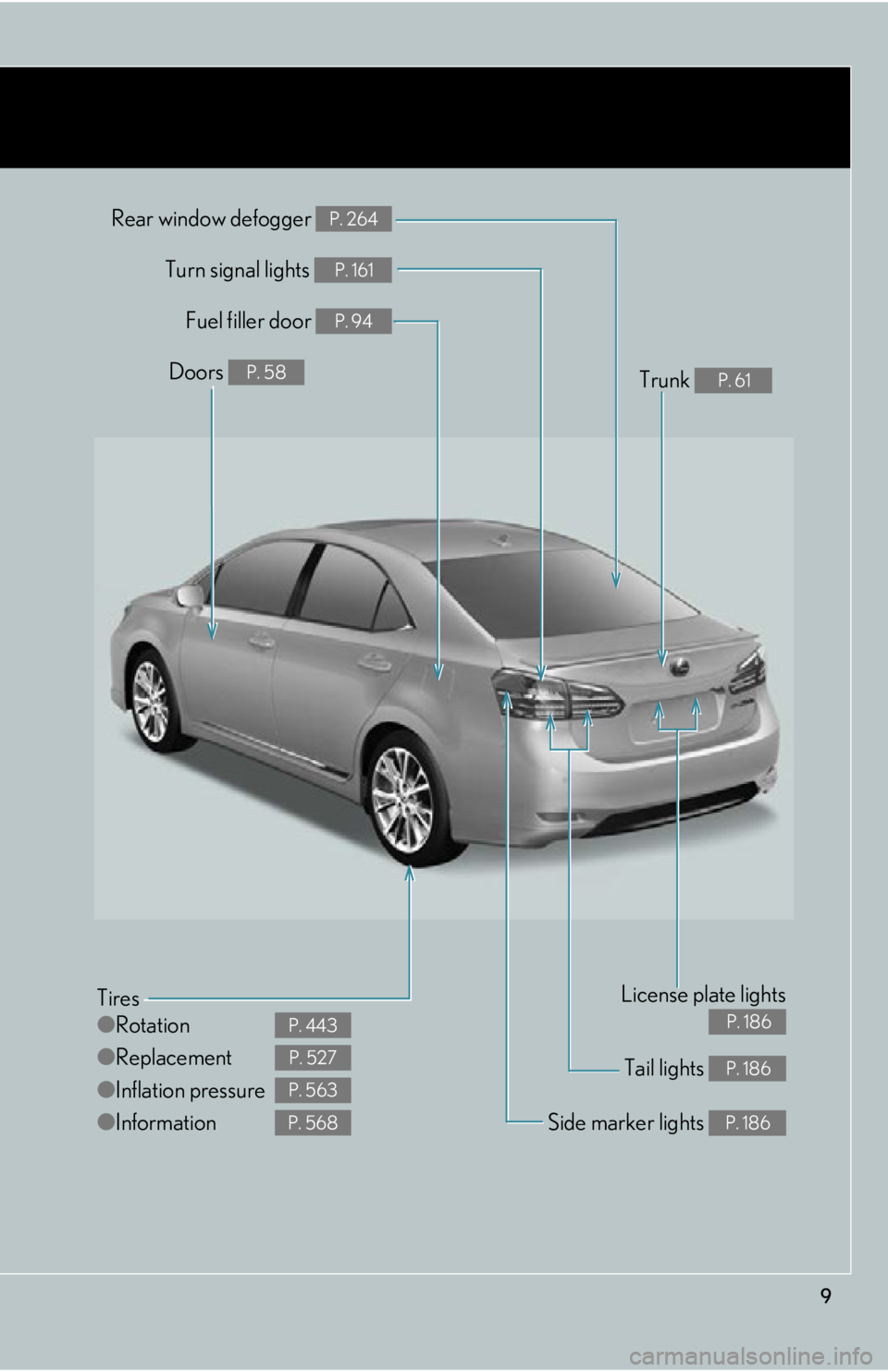
Tail lights P. 186
Rear window defogger P. 264
Tires
●Rotation
● Replacement
● Inflation pressure
● Information
P. 443
P. 527
P. 563
P. 568Side marker lights P. 186
Fuel filler door P. 94
Turn signal lights P. 161
License plate lights
P. 186
Doors P. 58Trunk P. 61
Page 12 of 628

12
Driving position memory switches P. 69
Door lock switches P. 58
Window lock switch P. 87
Power window switches P. 87
Inside door lock buttons P. 58
Pictorial indexInterior
Page 15 of 628
15
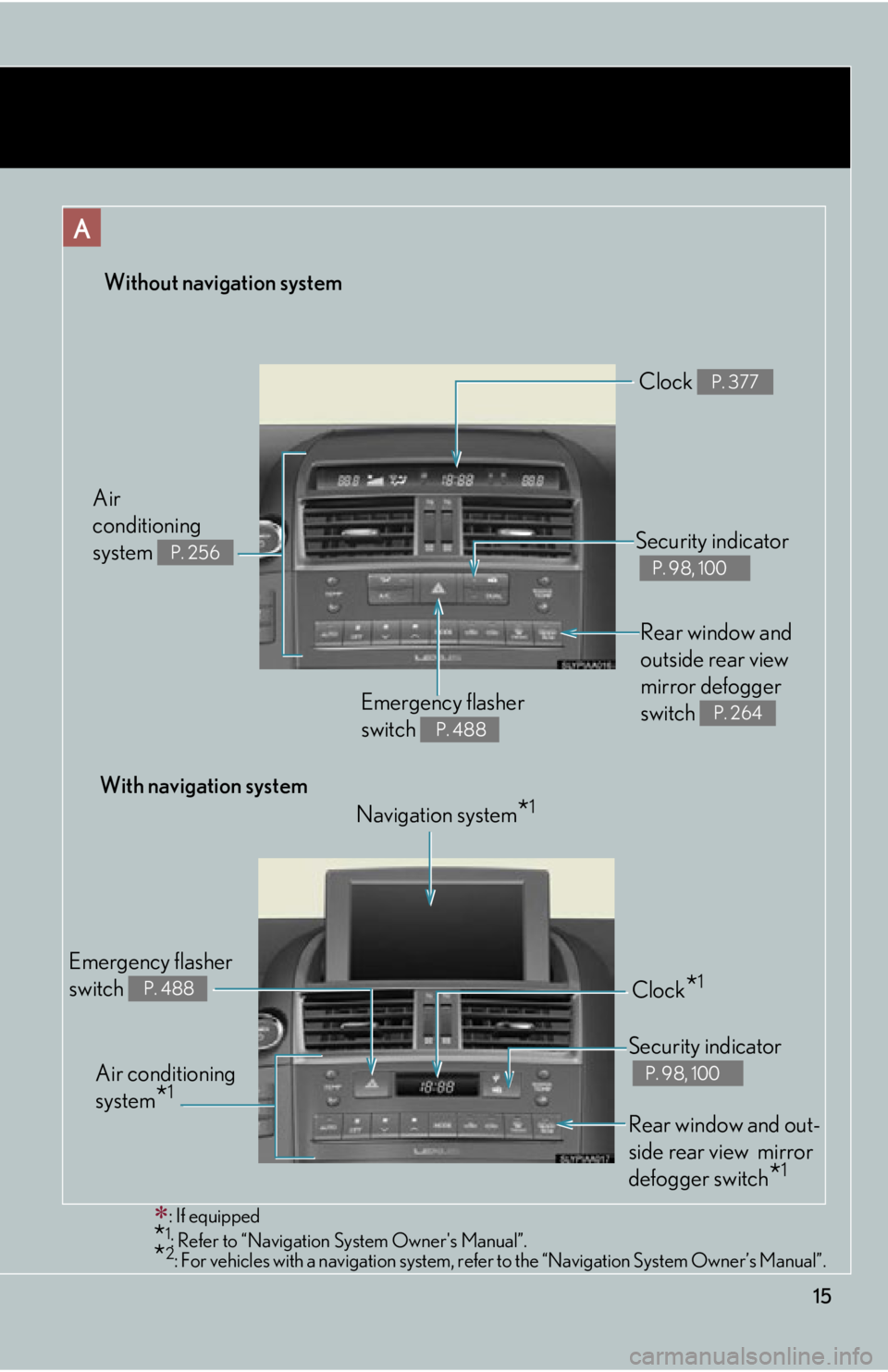
Without navigation system
: If equipped
*1: Refer to “Navigation System Owner's Manual”.*2: For vehicles with a navigation system, refe r to the “Navigation System Owner’s Manual”.
Rear window and
outside rear view
mirror defogger
switch
P. 264Emergency flasher
switch
P. 488
Security indicator
P. 98, 100
Clock P. 377
Air
conditioning
system
P. 256
With navigation system
Navigation system
*1
Air conditioning
system
*1
Emergency flasher
switch
P. 488Clock*1
Security indicator
P. 98, 100
Rear window and out-
side rear view mirror
defogger switch
*1
Page 20 of 628

20
CAUTION
■General precautions while driving
Driving under the influence: Never drive your vehicle when under the influence of
alcohol or drugs that have impaired your ability to operate your vehicle. Alcohol
and certain drugs delay reaction time, im pair judgment and reduce coordination,
which could lead to an accident that could result in death or serious injury.
Defensive driving: Always drive defensively. Anticipate mistakes that other drivers
or pedestrians might make and be ready to avoid accidents.
Driver distraction: Always give your full at tention to driving. Anything that distracts
the driver, such as adjusting controls, ta lking on a cellular phone or reading can
result in a collision with resulting death or serious injury to you, your occupants or
others.
■General precaution regarding children’s safety
Never leave children unattended in the vehi cle, and never allow children to have or
use the key.
Children may be able to start the vehicle or shift the vehicle into neutral. There is
also a danger that children may injure themselves by playing with the cigarette
lighter, the windows, the moon roof, or othe r features of the vehicle. In addition, heat
build-up or extremely cold temperatures insi de the vehicle can be fatal to children.
■Disposal of the hybrid battery (traction battery)
If your vehicle is disposed of without the hybrid battery having been removed, there
is a danger of serious electric shock if high voltage parts, cables and their connec-
tors are touched. In the event that your ve hicle must be disposed of, the hybrid bat-
tery must be disposed of by your Lexus dealer or a qualified service shop. If the
hybrid battery is not disposed of properly, it may cause electric shock that can result
in death or serious injury.
Page 23 of 628

Before driving1
23
1-1. Hybrid systemHybrid system ............................ 24
Hybrid system precautions ... 28
Energy monitor/consumption screen ............. 33
Hybrid vehicle driving tips..... 38
1-2. Key information Keys .............................................. 40
1-3. Opening, closing and locking the doors
Smart access system with push-button start .................... 45
Wireless remote control ......... 55
Doors ........................................... 58
Trunk .............................................. 61
1-4. Adjustable components
(seats, mirrors, steering
wheel)
Front seats ................................... 65
Driving position memory (driver’s seat) ........................... 69
Head restraints .......................... 72
Seat belts ..................................... 74
Steering wheel .......................... 80
Inside rear view mirror ........... 82 Outside rear view mirrors...... 84
1-5. Opening and closing the windows and moon roof
Power windows .......................... 87
Moon roof ................................... 90
1-6. Refueling Opening the fuel tank cap ..... 94
1-7. Theft deterrent system Immobilizer system .................. 98
Alarm.......................................... 100
Theft prevention labels (for U.S.A.) ............................. 103
1-8. Safety information Correct driving posture ....... 104
SRS airbags .............................. 106
Front passenger occupant classification system............. 118
Child restraint systems ......... 123
Installing child restraints........ 127
Page 50 of 628

50
1-3. Opening, closing and locking the doors
●If the smart access system with push-button start has not been used for 14 days
or longer, the doors cannot be unlocked at any doors except the driver’s door. In
this case, take hold of the driver’s door handle, or use the wireless remote con-
trol or the mechanical key, to unlock the doors.
■Conditions affecting operation
The smart access system with push-button start uses weak radio waves. In the fol-
lowing situations, the communication betw een the electronic key and the vehicle
may be affected, preventing the smart access system with push-button start, wire-
less remote control and immobilize r system from operating properly.
(Ways of coping: P. 5 4 0 )
●When the electronic key battery is depleted
●Near a TV tower, electric power plant, gas station, radio station, large display,
airport or other facility that generates strong radio waves or electrical noise
●When carrying a portable radio, cellular phone, cordless phone or other wire-
less communication devices
●When the electronic key is in contact wi th, or is covered by the following metal-
lic objects
• Cards to which aluminum foil is attached
• Cigarette boxes that have aluminum foil inside
• Metallic wallets or bags
•Coins
• Hand warmers made of metal
• Media such as CDs and DVDs
●When other wireless key (that emit radio waves) is being used nearby
●When carrying the electronic key togeth er with the following devices that emit
radio waves
• Another vehicle’s electronic key or a wireless key that emits radio waves
• Personal computers or person al digital assistants (PDAs)
• Digital audio players
• Portable game systems
●If window tint with a metallic content or metallic objects are attached to the rear
window
Page 51 of 628

51
1-3. Opening, closing and locking the doors
1
Before driving
■Note for the entry function
●Even when the electronic key is within the effective range (detection areas), the
system may not operate properly in the following cases:
• The electronic key is too close to the window or outside door handle, near the
ground, or in a high place when the doors are locked or unlocked.
• The electronic key is near the ground or in a high place, or too close to the rear bumper center when the trunk is unlocked.
• The electronic key is on the instrument panel, rear package tray or floor, or in the door pockets or glove box when the hybrid system is started or
“POWER” switch modes are changed.
●As long as the electronic key is within the effective range, the doors may be
locked or unlocked by anyone.
●Even if the electronic key is not inside th e vehicle, it may be possible to start the
hybrid system if the electronic key is near the window.
●The doors may unlock if a large amount of water splashes on the door handle,
such as in the rain or in a car wash when the electronic key is within the effective
range. (The door will automatically be locked after approximately 60 seconds if
the doors are not opened and closed.)
●Gripping the door handle when wearing a glove may not unlock the door.
●If the wireless remote control is used to lock the doors when the electronic key
is near the vehicle, there is a possibility that the door may not be unlocked by the
entry function. (Use the wireless re mote control to unlock the doors.)
●A sudden approach to the effective range or door handle may prevent the
doors from being unlocked. In this case, return the door handle to the original
position and check that the doors unlock before pulling the door handle again.
■Notes for locking the doors
●Touching the door lock sensor while we aring gloves may delay or prevent lock
operation. Remove the gloves and touch the lock sensor again.
●When the lock operation is performed using the lock sensor, recognition signals
will be shown up to two consecutive times. After this, no recognition signals will
be given.
●If the door handle becomes wet while the electronic key is within the effective
range, the door may lock and unlock repeatedly. Place the key in a position 6 ft.
(2 m) or more separate from the vehicle while the vehicle is being washed. (Take
care to ensure that the key is not stolen.)
Page 55 of 628
55
1
1-3. Opening, closing and locking the doors
Before driving
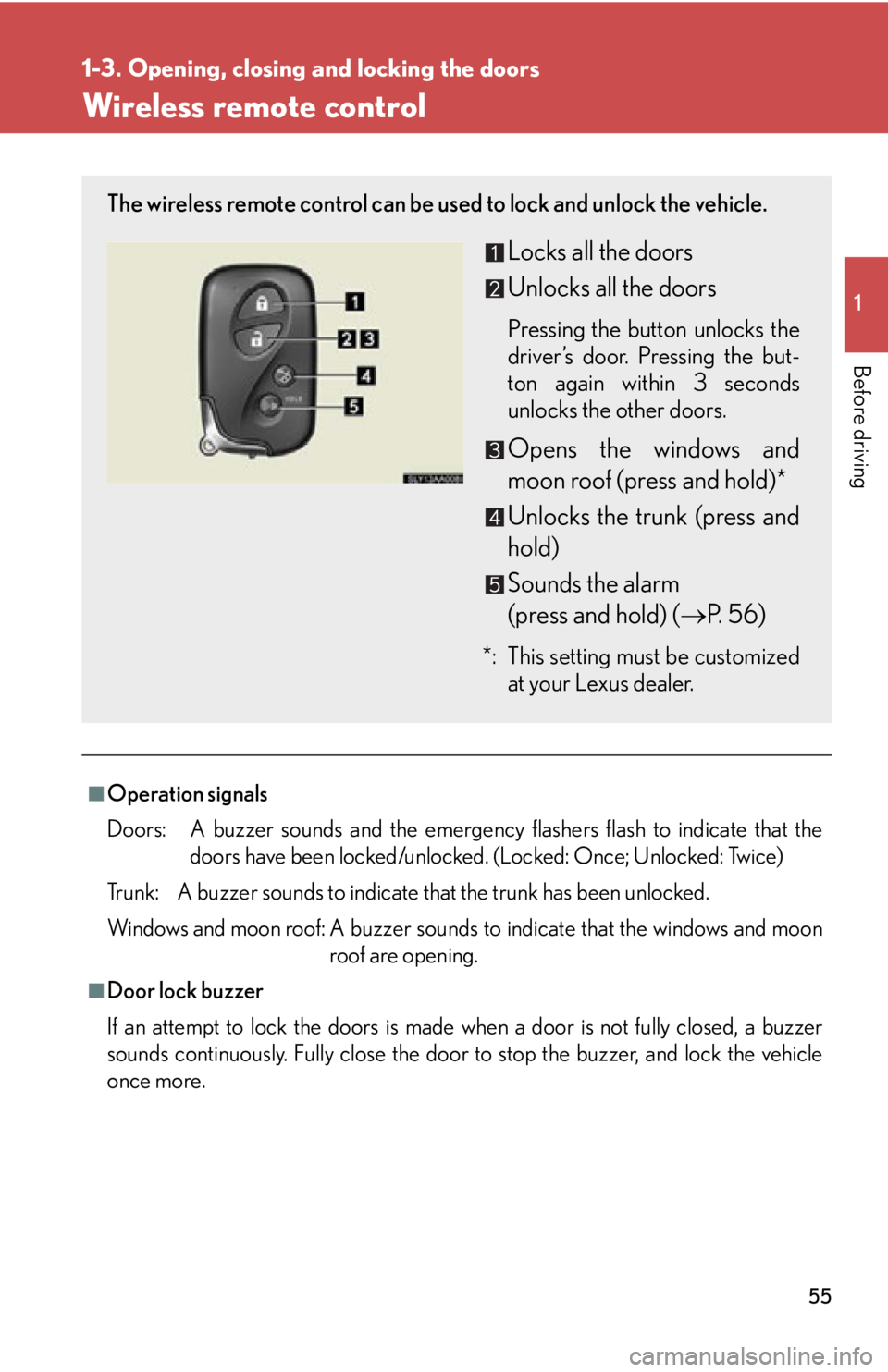
Wireless remote control
■Operation signals
Doors: A buzzer sounds and the emergency flashers flash to indicate that thedoors have been locked/unlocked. (Locked: Once; Unlocked: Twice)
Trunk: A buzzer sounds to indicate that the trunk has been unlocked.
Windows and moon roof: A buzzer sounds to indicate that the windows and moon
roof are opening.
■Door lock buzzer
If an attempt to lock the doors is made when a door is not fully closed, a buzzer
sounds continuously. Fully close the door to stop the buzzer, and lock the vehicle
once more.
The wireless remote control can be used to lock and unlock the vehicle.
Locks all the doors
Unlocks all the doors
Pressing the button unlocks the
driver’s door. Pressing the but-
ton again within 3 seconds
unlocks the other doors.
Opens the windows and
moon roof (press and hold)*
Unlocks the trunk (press and
hold)
Sounds the alarm
(press and hold) ( P. 56)
*: This setting must be customized
at your Lexus dealer.