phone Lexus HS250h 2011 Hybrid system /
[x] Cancel search | Manufacturer: LEXUS, Model Year: 2011, Model line: HS250h, Model: Lexus HS250h 2011Pages: 94, PDF Size: 6.01 MB
Page 54 of 94
54
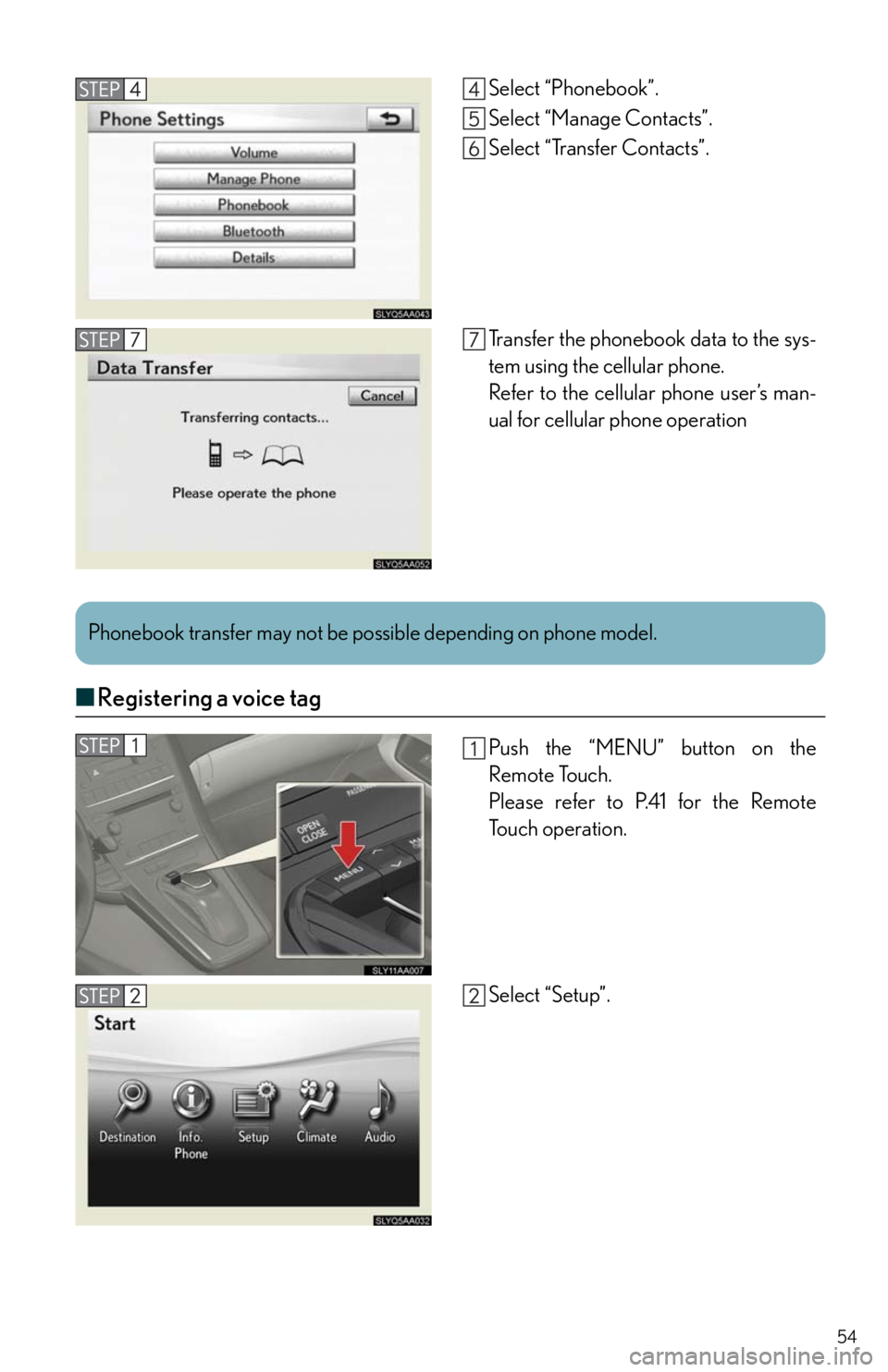
■Registering a voice tag
Select “Phonebook”.
Select “Manage Contacts”.
Select “Transfer Contacts”.
Transfer the phonebook data to the sys-
tem using the cellular phone.
Refer to the cellular phone user’s man-
ual for cellular phone operation
Phonebook transfer may not be possible depending on phone model.
Push the “MENU” button on the
Remote Touch.
Please refer to P.41 for the Remote
To u c h o p e r a t i o n .
Select “Setup”.
Page 55 of 94
55
■Registering a speed dial
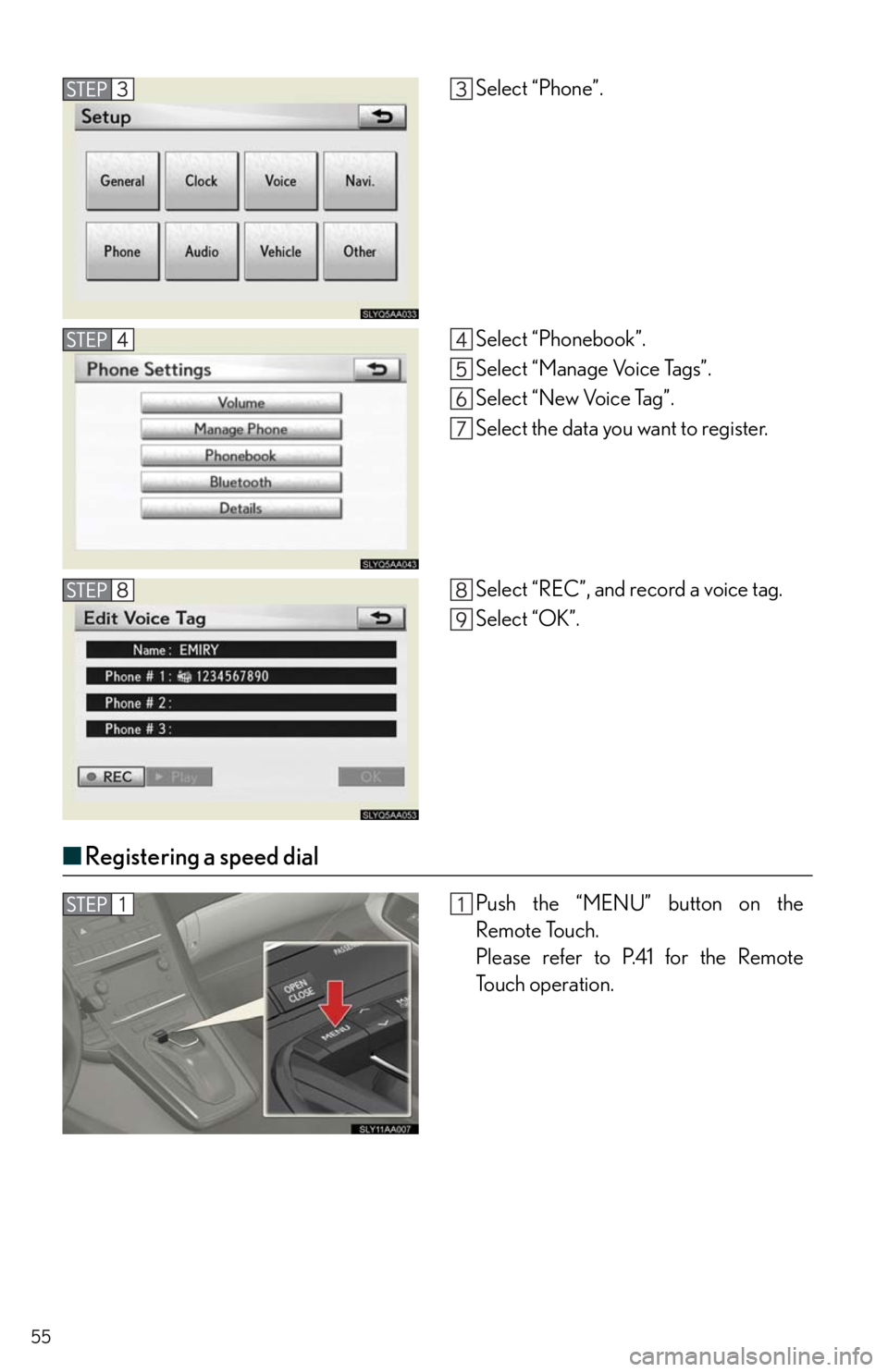
Select “Phone”.
Select “Phonebook”.
Select “Manage Voice Tags”.
Select “New Voice Tag”.
Select the data you want to register.
Select “REC”, and record a voice tag.
Select “OK”.
Push the “MENU” button on the
Remote Touch.
Please refer to P.41 for the Remote
To u c h o p e r a t i o n .
Page 56 of 94
56
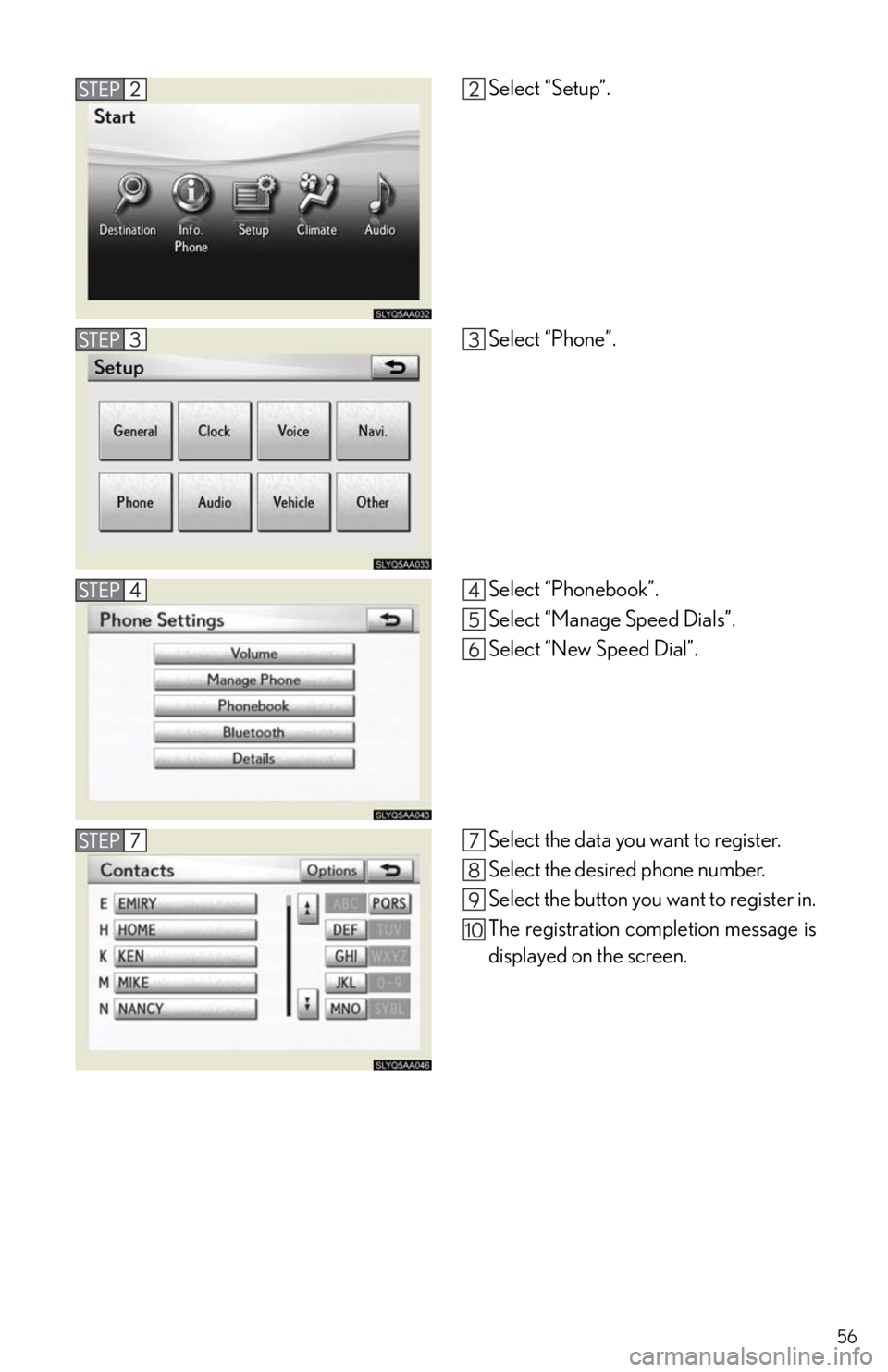
Select “Setup”.
Select “Phone”.
Select “Phonebook”.
Select “Manage Speed Dials”.
Select “New Speed Dial”.
Select the data you want to register.
Select the desired phone number.
Select the button you want to register in.
The registration completion message is
displayed on the screen.
Page 57 of 94

57
■Calling by name
You can call by saying a voice tag registered in the phonebook. For setting the voice recog-
nition, refer to the “Navigation System Owner's Manual”. Only when English is selected as
the system language can you call by saying a name registered in the phonebook without
registering any voice tags beforehand. (Names in the phonebook work as voice tags.)
Press .
Follow the voice guidance and say
“Phone”.
Follow the voice guidance and say “Dial
by name”.
Follow the voice guidance and say a
contact name.
Follow the voice guidance and say the
type of phone number (home, mobile,
work, other).
Follow the voice guidance and say
“Dial”
: Pressing this switch turns the voice command system on. Say a command
after the beep.
Page 59 of 94
59
■Receiving a call
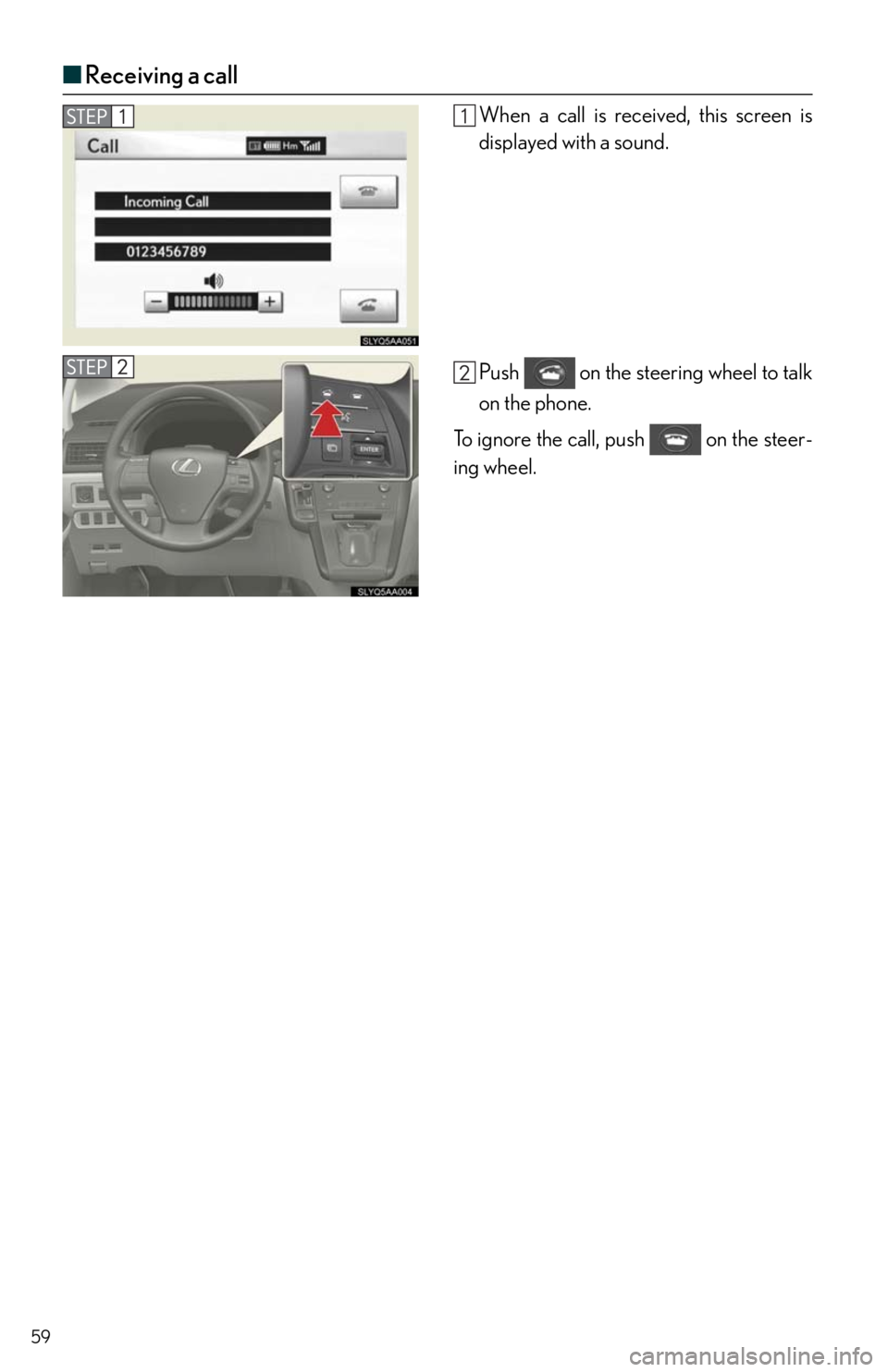
When a call is received, this screen is
displayed with a sound.
Push on the steering wheel to talk
on the phone.
To ignore the call, push on the steer-
ing wheel.
Page 65 of 94
65
Hands-free System For Cellular Phone
(without navigation system)
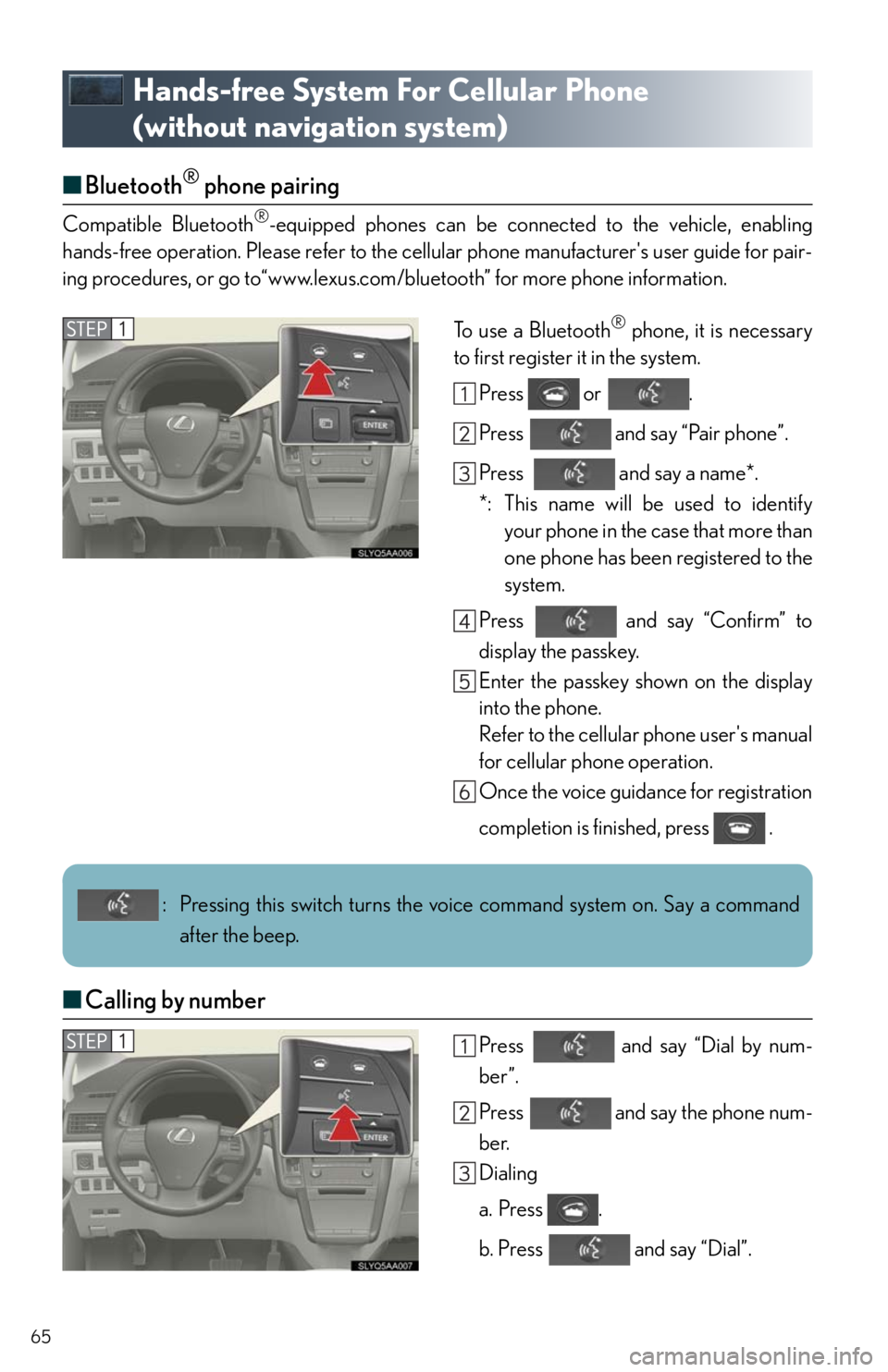
■Bluetooth® phone pairing
Compatible Bluetooth®-equipped phones can be connected to the vehicle, enabling
hands-free operation. Please refer to the cellular phone manufacturer's user guide for pair-
ing procedures, or go to“www.lexus.com/bluetooth” for more phone information.
To use a Bluetooth
® phone, it is necessary
to first register it in the system.
Press or .
Press and say “Pair phone”.
Press and say a name*.
*: This name will be used to identify
your phone in the case that more than
one phone has been registered to the
system.
Press and say “Confirm” to
display the passkey.
Enter the passkey shown on the display
into the phone.
Refer to the cellular phone user's manual
for cellular phone operation.
Once the voice guidance for registration
completion is finished, press .
■Calling by number
Press and say “Dial by num-
ber”.
Press and say the phone num-
ber.
Dialing
a. Press .
b. Press and say “Dial”.
: Pressing this switch turns the voice command system on. Say a command
after the beep.
Page 66 of 94
66
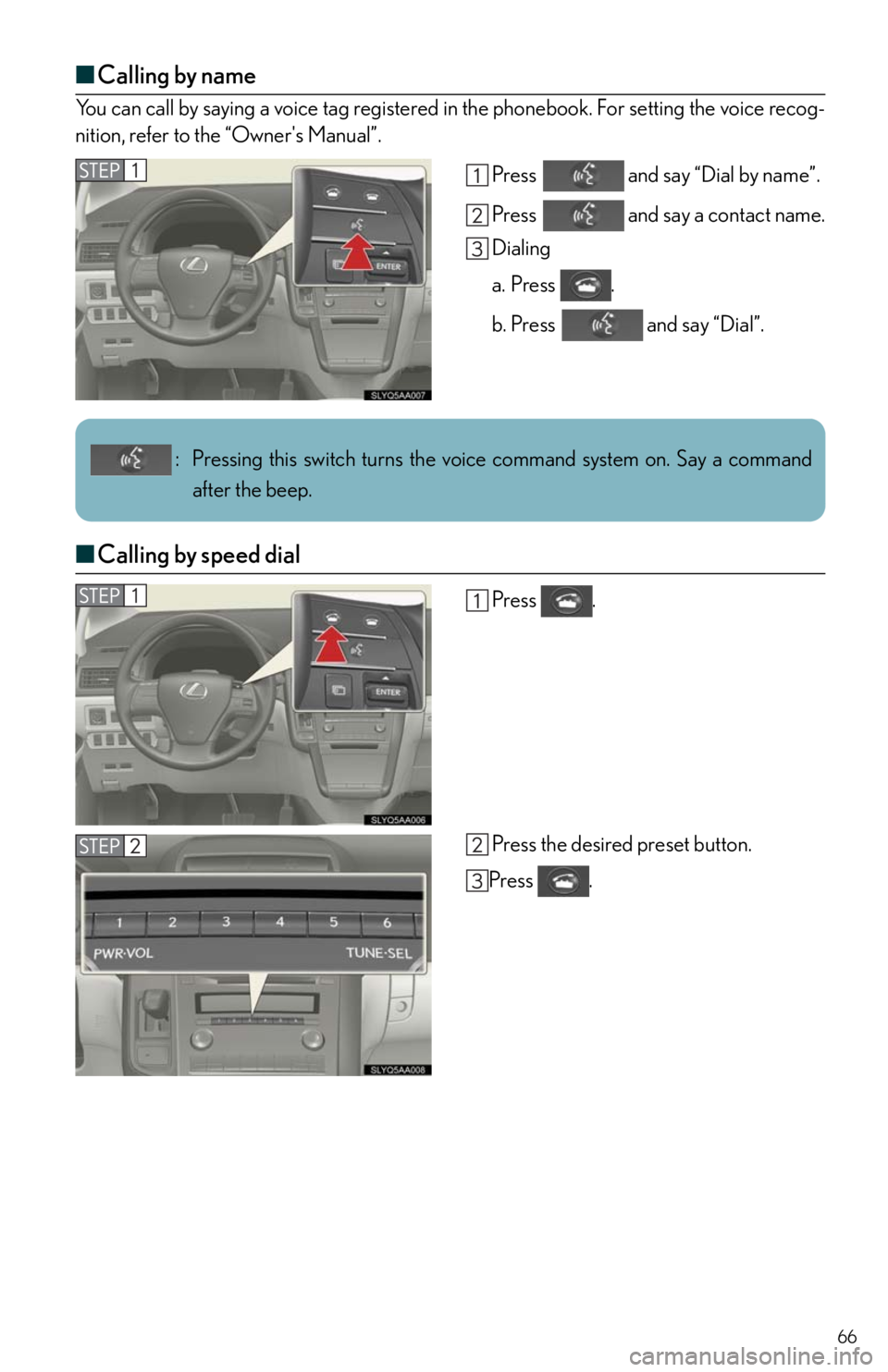
■Calling by name
You can call by saying a voice tag registered in the phonebook. For setting the voice recog-
nition, refer to the “Owner's Manual”.
Press and say “Dial by name”.
Press and say a contact name.
Dialing
a. Press .
b. Press and say “Dial”.
■Calling by speed dial
Press .
Press the desired preset button.
Press .
: Pressing this switch turns the voice command system on. Say a command
after the beep.
Page 67 of 94
67
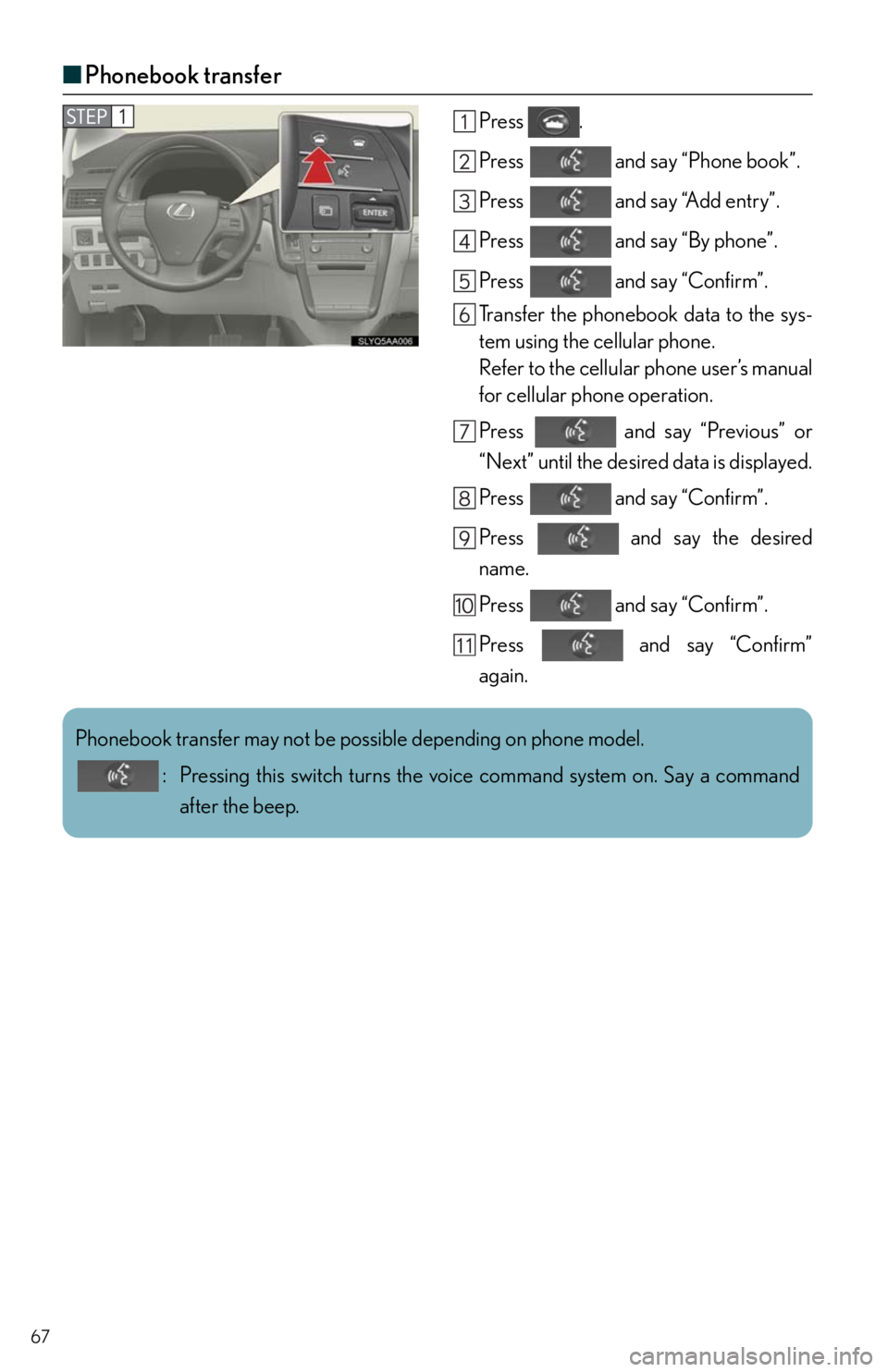
■Phonebook transfer
Press .
Press and say “Phone book”.
Press and say “Add entry”.
Press and say “By phone”.
Press and say “Confirm”.
Transfer the phonebook data to the sys-
tem using the cellular phone.
Refer to the cellular phone user’s manual
for cellular phone operation.
Press and say “Previous” or
“Next” until the desired data is displayed.
Press and say “Confirm”.
Press and say the desired
name.
Press and say “Confirm”.
Press and say “Confirm”
again.
Phonebook transfer may not be possible depending on phone model.
: Pressing this switch turns the voice command system on. Say a command
after the beep.
Page 68 of 94
68
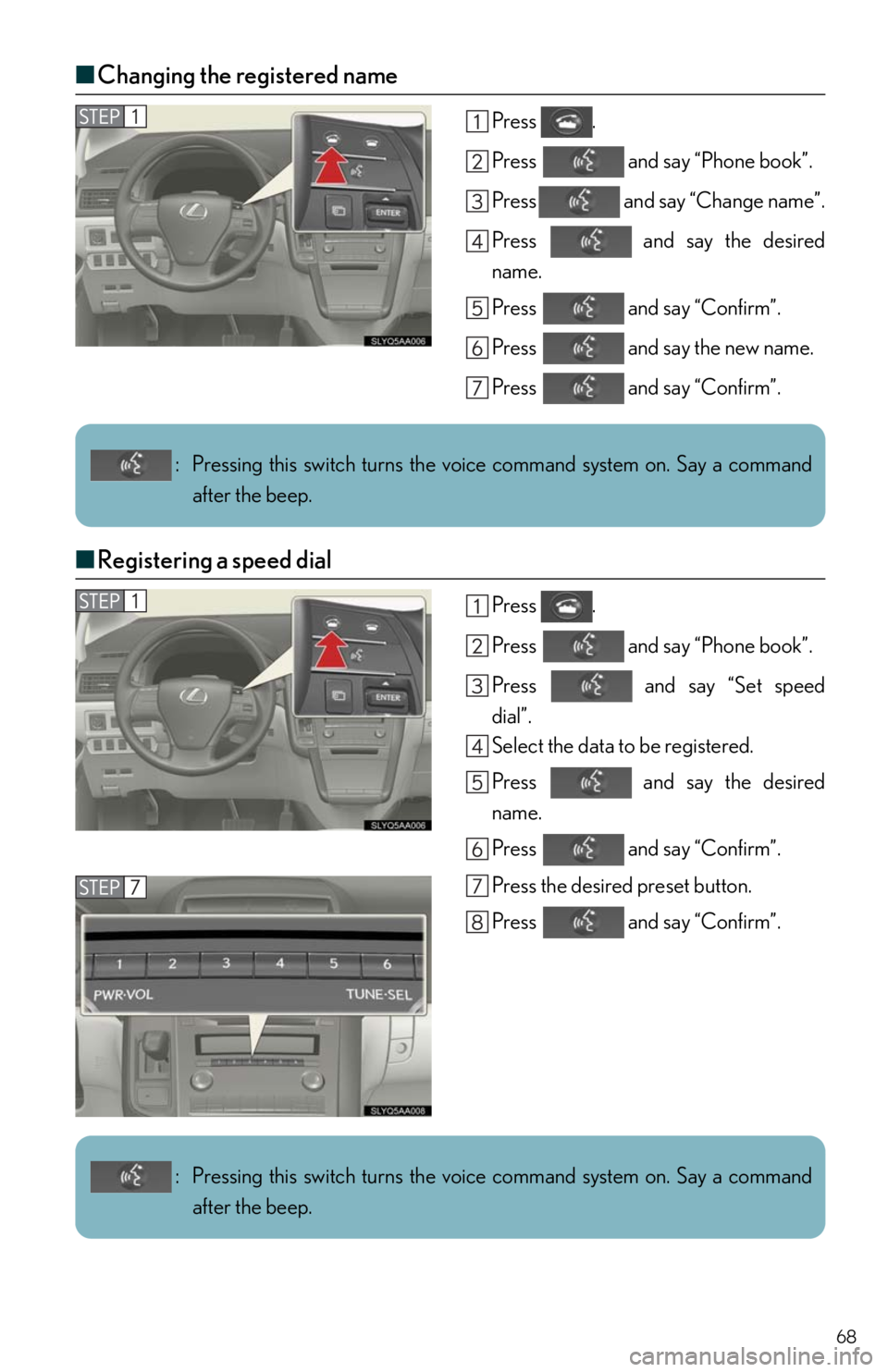
■Changing the registered name
Press .
Press and say “Phone book”.
Press and say “Change name”.
Press and say the desired
name.
Press and say “Confirm”.
Press and say the new name.
Press and say “Confirm”.
■Registering a speed dial
Press .
Press and say “Phone book”.
Press and say “Set speed
dial”.
Select the data to be registered.
Press and say the desired
name.
Press and say “Confirm”.
Press the desired preset button.
Press and say “Confirm”.
: Pressing this switch turns the voice command system on. Say a command
after the beep.
: Pressing this switch turns the voice command system on. Say a command
after the beep.
Page 73 of 94
73
Voice Command System
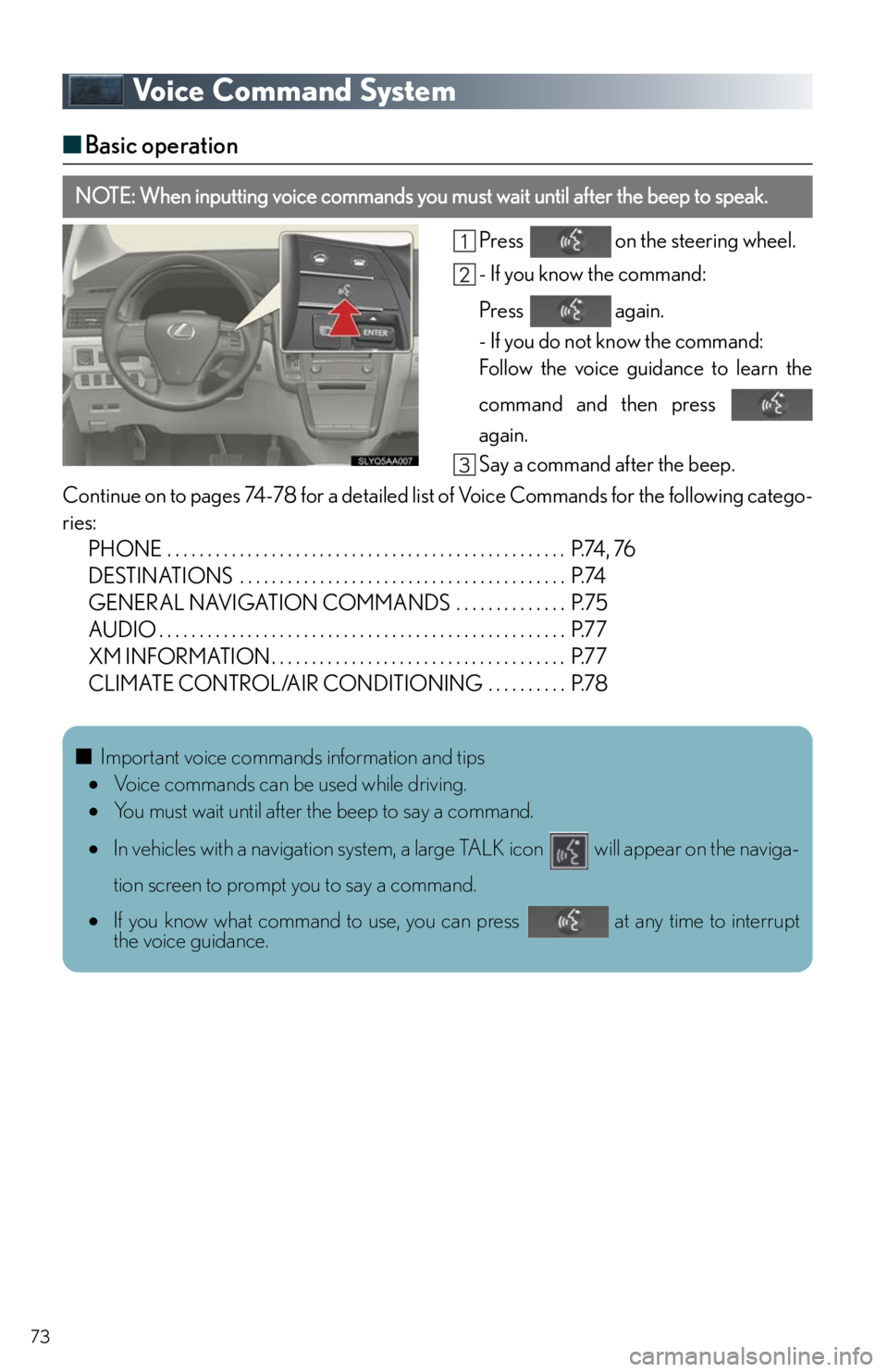
■Basic operation
Press on the steering wheel.
- If you know the command:
Press again.
- If you do not know the command:
Follow the voice guidance to learn the
command and then press
again.
Say a command after the beep.
Continue on to pages 74-78 for a detailed list of Voice Commands for the following catego-
ries:
PHONE . . . . . . . . . . . . . . . . . . . . . . . . . . . . . . . . . . . . . . . . . . . . . . . . . . P.74, 76
DESTINATIONS . . . . . . . . . . . . . . . . . . . . . . . . . . . . . . . . . . . . . . . . . P.74
GENERAL NAVIGATION COMMANDS . . . . . . . . . . . . . . P.75
AUDIO . . . . . . . . . . . . . . . . . . . . . . . . . . . . . . . . . . . . . . . . . . . . . . . . . . . P.77
XM INFORMATION . . . . . . . . . . . . . . . . . . . . . . . . . . . . . . . . . . . . . P.77
CLIMATE CONTROL/AIR CONDITIONING . . . . . . . . . . P.78
NOTE: When inputting voice commands you must wait until after the beep to speak.
■Important voice commands information and tips
Voice commands can be used while driving.
You must wait until after the beep to say a command.
In vehicles with a navigation system, a large TALK icon will appear on the naviga-
tion screen to prompt you to say a command.
If you know what command to use, you can press at any time to interrupt
the voice guidance.