interior lights Lexus HS250h 2012 Owner's Manual
[x] Cancel search | Manufacturer: LEXUS, Model Year: 2012, Model line: HS250h, Model: Lexus HS250h 2012Pages: 630, PDF Size: 16.1 MB
Page 5 of 630
TABLE OF CONTENTSIndex
HS250h_U_75050U
4
3-1. Using the air conditioning system and defogger
Automatic air conditioning system ............................................ 266
Rear window defogger switch.............................................. 274
Windshield wiper de-icer ......... 275
3-2. Using the audio system Audio system ................................. 276
Using the radio .............................. 279
Using the CD player ................... 287
Playing MP3 and WMA discs ......................... 295
Operating an iPod ...................... 302
Operating a USB memory........ 310
Optimal use of the audio system ............................................. 318
Using the AUX port..................... 321
Using the steering wheel audio switches ............................ 322 3-3. Using the Bluetooth
® audio
system
Bluetooth
® audio system ......... 325
Using the Bluetooth
® audio
system ........................................... 328
Operating a Bluetooth
®
enabled portable player ......... 333
Setting up a Bluetooth
®
enabled portable player ......... 336
Bluetooth
® audio system
setup ................................................ 341
3-4. Using the hands-free phone system (for cellular phones)
Hands-free system for cellular phones ........................................... 342
Using the hands-free system (for cellular phones) ................. 346
Making a phone call.................... 354
Setting a cellular phone ............ 359
Security and system setup ........ 364
Using the phone book............... 368
3-5. Using the interior lights Interior lights list............................ 374
• Interior lights ................................375
• Personal lights ............................ 375
3Interior features
Page 12 of 630
HS250h_U_75050U
11
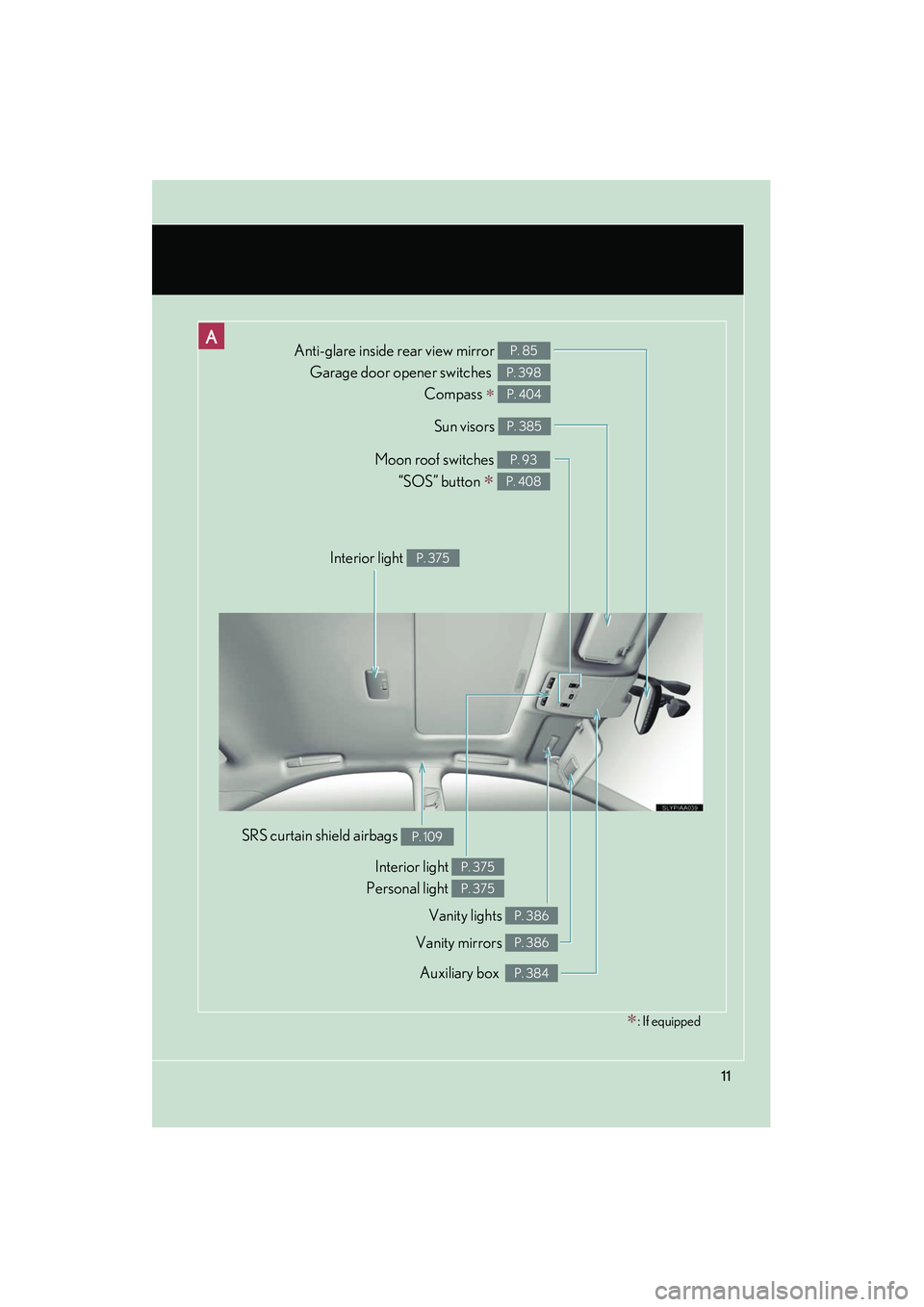
Anti-glare inside rear view mirror Garage door opener switches
Compass
∗
P. 85
P. 398
P. 404
Sun visors P. 385
Auxiliary box P. 384
SRS curtain shield airbags P. 109
Interior light
Personal light P. 375
P. 375
Moon roof switches “SOS” button
∗
P. 93
P. 408
Vanity mirrors P. 386
∗: If equipped
Vanity lights P. 386
Interior light P. 375
Page 266 of 630
Interior features3
265
HS250h_U_75050U
3-3. Using the Bluetooth® audio
system
Bluetooth
® audio system ... 325
Using the Bluetooth® audio
system .................................... 328
Operating a Bluetooth
®
enabled portable player... 333
Setting up a Bluetooth
®
enabled portable player.... 336
Bluetooth
® audio system
setup ......................................... 341
3-4. Using the hands-free phone system (for cellular phones)
Hands-free system for cellular phones..................... 342
Using the hands-free system (for cellular phones) ........... 346
Making a phone call .............. 354
Setting a cellular phone ....... 359
Security and system setup ........................................ 364
Using the phone book.......... 368
3-5. Using the interior lights Interior lights list ..................... 374
• Interior lights ........................ 375
• Personal lights ...................... 375 3-6. Using the storage features
List of storage features.......... 377
• Glove box .............................. 378
• Console box ......................... 379
• Cup holders ........................... 381
• Bottle holders....................... 383
• Auxiliary boxes .................... 384
3-7. Other interior features Sun visors ................................. 385
Vanity mirrors ......................... 386
Clock ......................................... 387
Power outlets .......................... 388
Seat heaters and ventilators ............................. 389
Armrest ..................................... 391
Rear sunshade ........................ 392
Floor mat .................................. 394
Trunk compartment features .................................. 396
Garage door opener ............ 398
Compass .................................. 404
Safety Connect ...................... 408
Page 375 of 630
374
HS250h_U_75050U
3-5. Using the interior lights
Interior lights list
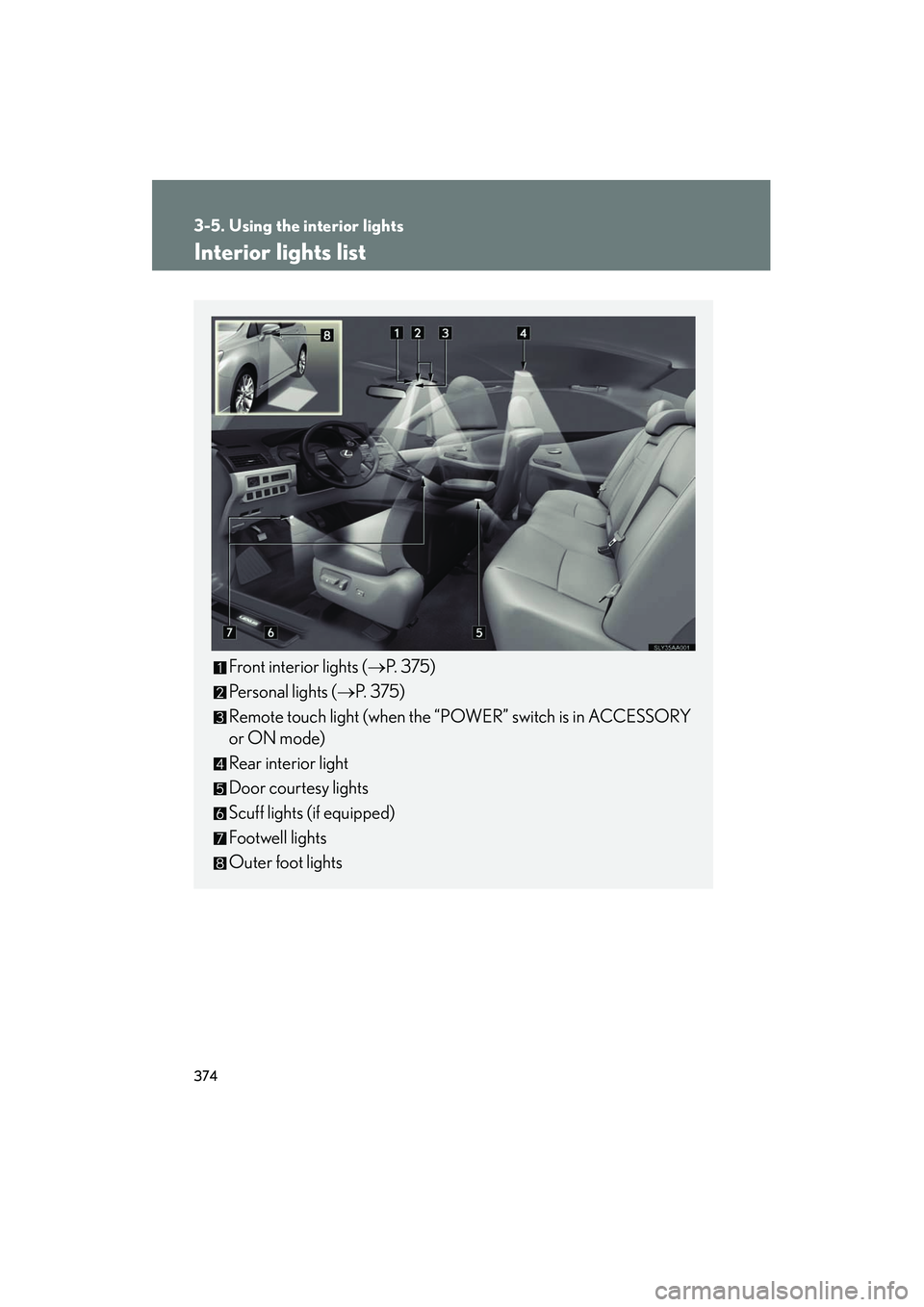
Front interior lights (→P. 375)
Personal lights ( →P. 375)
Remote touch light (when the “POWER” switch is in ACCESSORY
or ON mode)
Rear interior light
Door courtesy lights
Scuff lights (if equipped)
Footwell lights
Outer foot lights
Page 376 of 630
375
3-5. Using the interior lights
3
Interior features
HS250h_U_75050U
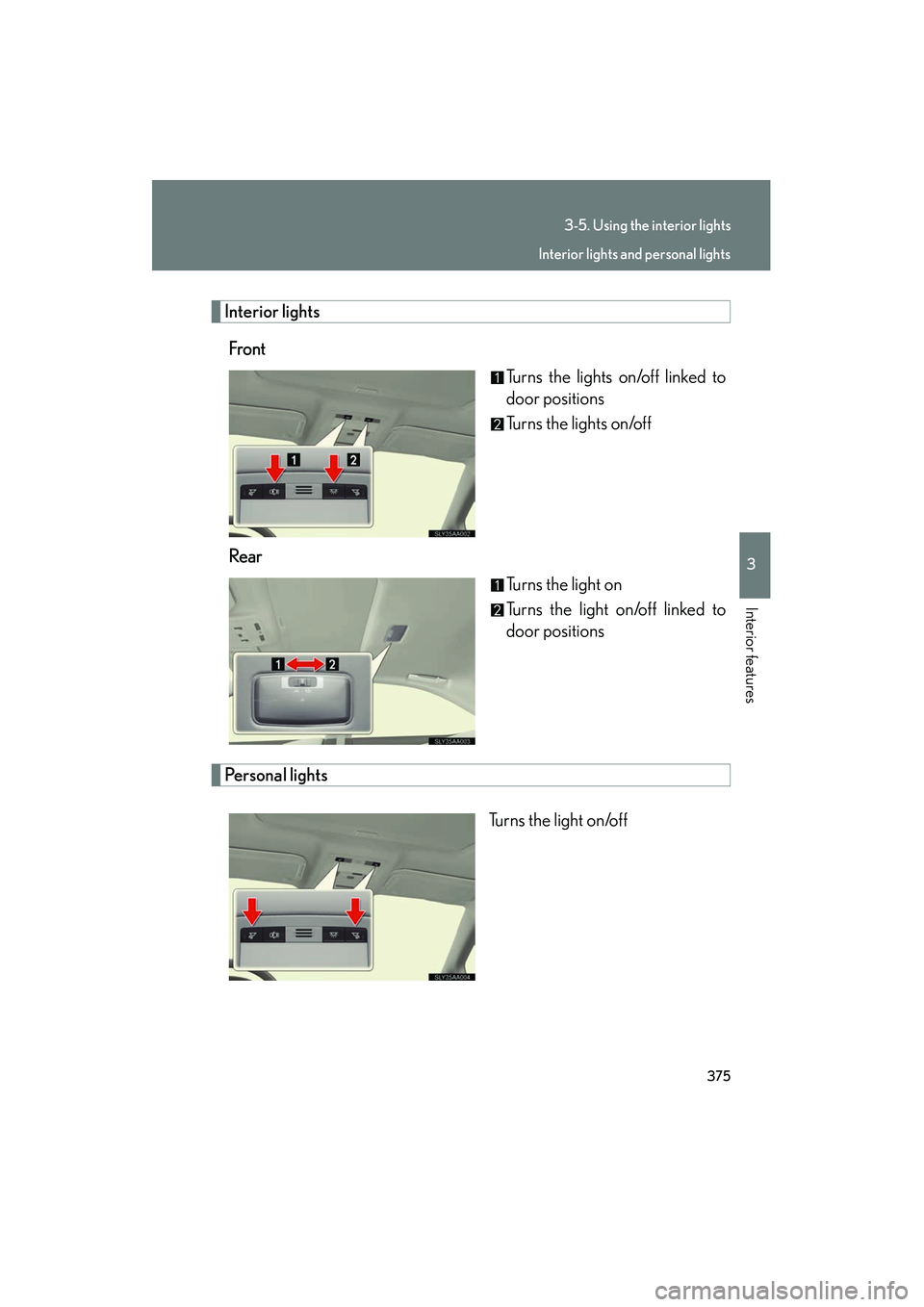
Interior lightsFront Turns the lights on/off linked to
door positions
Turns the lights on/off
Rear Turns the light on
Turns the light on/off linked to
door positions
Personal lights
Turns the light on/off
Interior lights and personal lights
Page 377 of 630
376
3-5. Using the interior lights
HS250h_U_75050U
■Illuminated entry system
The lights automatically turn on/off according to “POWER” switch mode, the pres-
ence of the electronic key, whether the doors are locked/unlocked, and whether
the doors are opened/closed.
■To prevent 12-volt battery discharge
If the interior lights remain on when the door is not fully closed and the interior light
switch (door position on/ off) is on, the lights will go off automatically after 20 min-
utes.
■Customization
Settings (e.g. the time elapsed before the lights turn off) can be changed. (Custom-
izable features →P. 5 8 4 )
Personal lights
Page 387 of 630
386
3-7. Other interior features
HS250h_U_75050U
Vanity mirrors
NOTICE
■To prevent 12-volt battery discharge
Do not leave the vanity lights on for extended periods while the hybrid system is off.
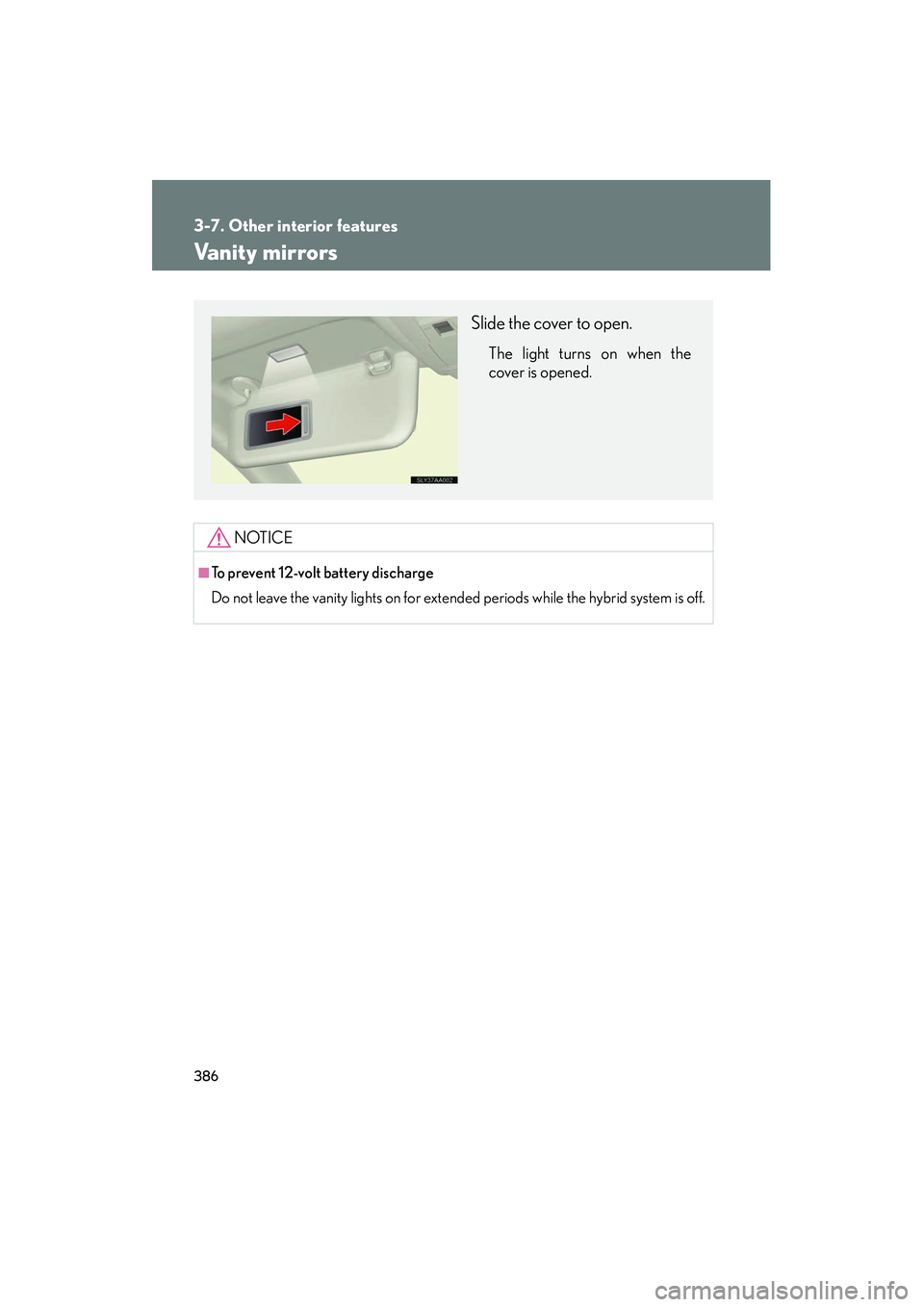
Slide the cover to open.
The light turns on when the
cover is opened.
Page 428 of 630
427
4-2. Maintenance
4
Maintenance and care
HS250h_U_75050U
Vehicle interior
ItemsCheck points
Accelerator pedal
• The accelerator pedal should move smoothly (without uneven pedal
effort or catching).
Brake pedal
• Does the brake pedal move smoothly?
• Does the brake pedal have appro- priate clearance from the floor?
(→ P. 5 6 6 )
• Does the brake pedal have the cor- rect amount of free play?
(→ P. 5 6 6 )
Brakes
• The vehicle should not pull to one
side when the brakes are applied.
• The brakes should work effectively.
• The brake pedal should not feel spongy.
• The brake pedal should not get too close to the floor when the brakes
are applied.
Head restraints• Do the head restraints move smoothly and lock securely?
Hybrid transmission “Park” mecha-
nism• Can the vehicle be held securely on an incline with the shift position
in P?
Indicators/buzzers• Do the indicators and buzzers
function properly?
Lights• Do all the lights come on?
Page 475 of 630
474
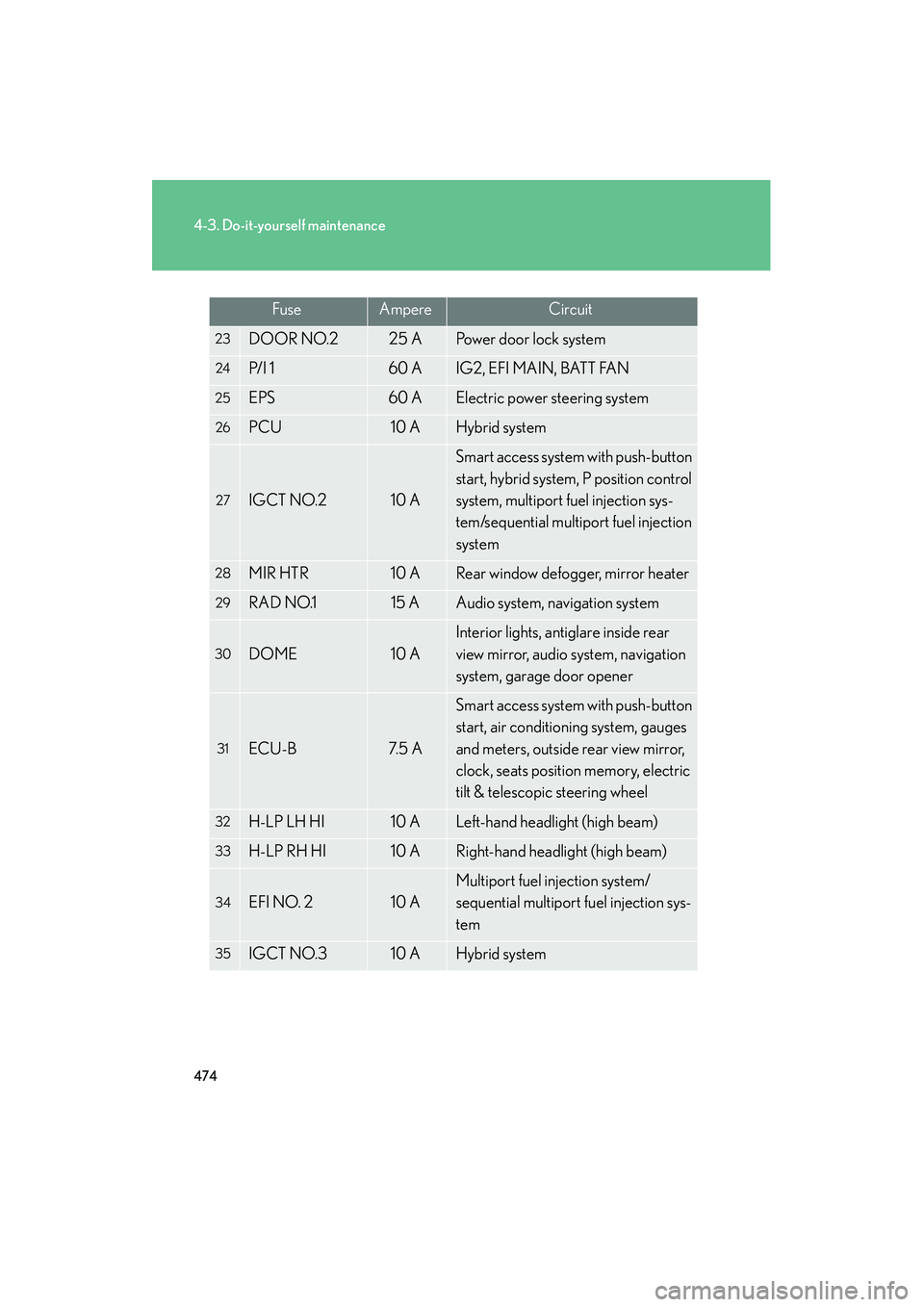
4-3. Do-it-yourself maintenance
HS250h_U_75050U
23DOOR NO.225 APower door lock system
24P/ I 160 AIG2, EFI MAIN, BATT FAN
25EPS60 AElectric power steering system
26PCU10 AHybrid system
27IGCT NO.210 A
Smart access system with push-button
start, hybrid system, P position control
system, multiport fuel injection sys-
tem/sequential multiport fuel injection
system
28MIR HTR10 ARear window defogger, mirror heater
29RAD NO.115 AAudio system, navigation system
30DOME10 A
Interior lights, antiglare inside rear
view mirror, audio system, navigation
system, garage door opener
31ECU-B7. 5 A
Smart access system with push-button
start, air conditioning system, gauges
and meters, outside rear view mirror,
clock, seats position memory, electric
tilt & telescopic steering wheel
32H-LP LH HI10 ALeft-hand headlight (high beam)
33H-LP RH HI10 ARight-hand headlight (high beam)
34EFI NO. 210 A
Multiport fuel injection system/
sequential multiport fuel injection sys-
tem
35IGCT NO.310 AHybrid system
FuseAmpereCircuit
Page 542 of 630
5
When trouble arises
541
5-2. Steps to take in an emergency
HS250h_U_75050U
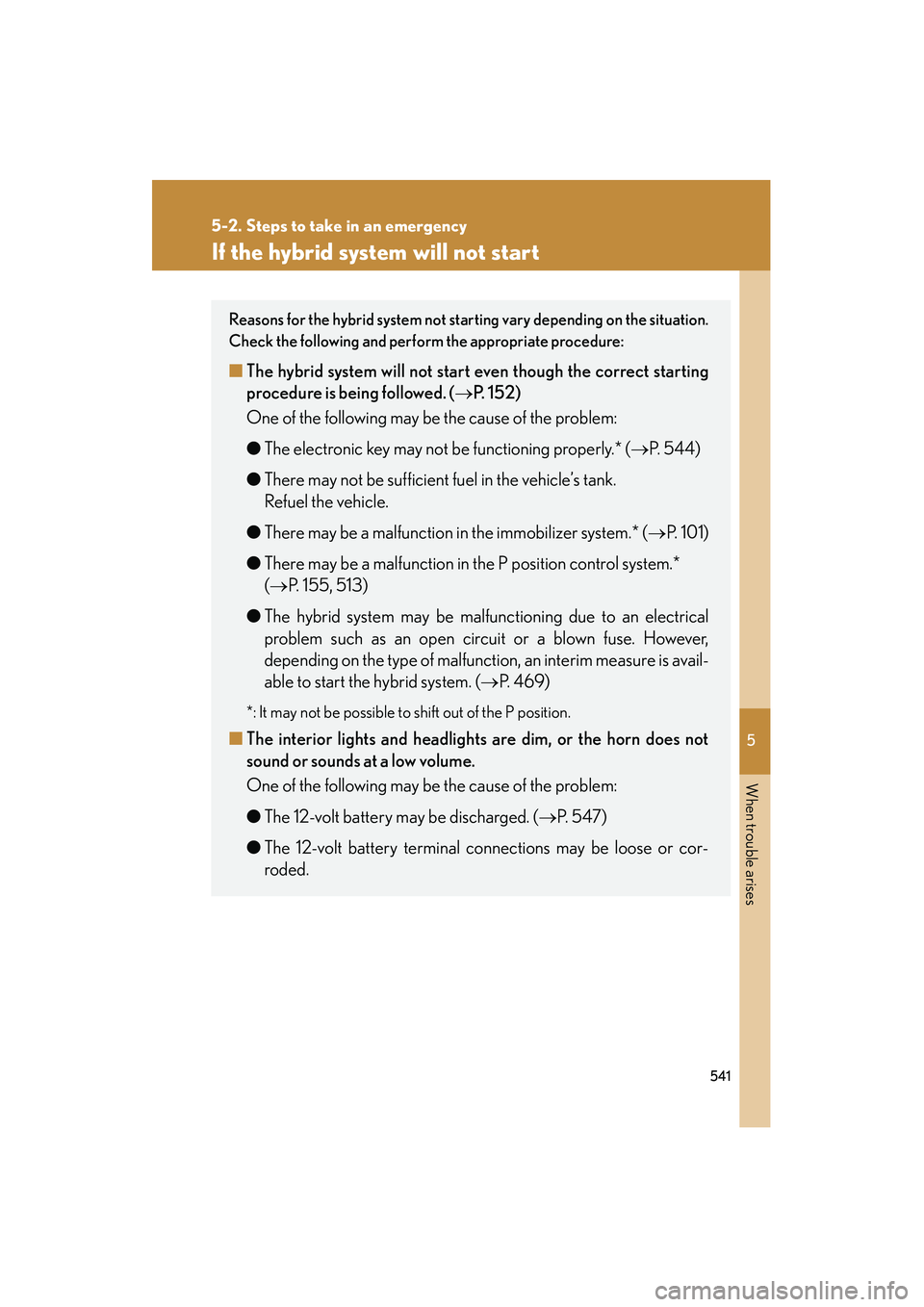
If the hybrid system will not start
Reasons for the hybrid system not starting vary depending on the situation.
Check the following and perform the appropriate procedure:
■ The hybrid system will not star t even though the correct starting
procedure is being followed. ( →P. 152)
One of the following may be the cause of the problem:
● The electronic key may not be functioning properly.* ( →P. 544)
● There may not be sufficient fuel in the vehicle’s tank.
Refuel the vehicle.
● There may be a malfunction in the immobilizer system.* ( →P. 1 0 1 )
● There may be a malfunction in the P position control system.*
(→ P. 155, 513)
● The hybrid system may be malfunctioning due to an electrical
problem such as an open circuit or a blown fuse. However,
depending on the type of malfunction, an interim measure is avail-
able to start the hybrid system. ( →P. 4 6 9 )
*: It may not be possible to shift out of the P position.
■The interior lights and headlights are dim, or the horn does not
sound or sounds at a low volume.
One of the following may be the cause of the problem:
● The 12-volt battery may be discharged. ( →P. 547)
● The 12-volt battery terminal connections may be loose or cor-
roded.