phone Lexus IS F 2008 Navigation Manual
[x] Cancel search | Manufacturer: LEXUS, Model Year: 2008, Model line: IS F, Model: Lexus IS F 2008Pages: 316, PDF Size: 23.49 MB
Page 39 of 316
Finish
DESTINATION SEARCH
38
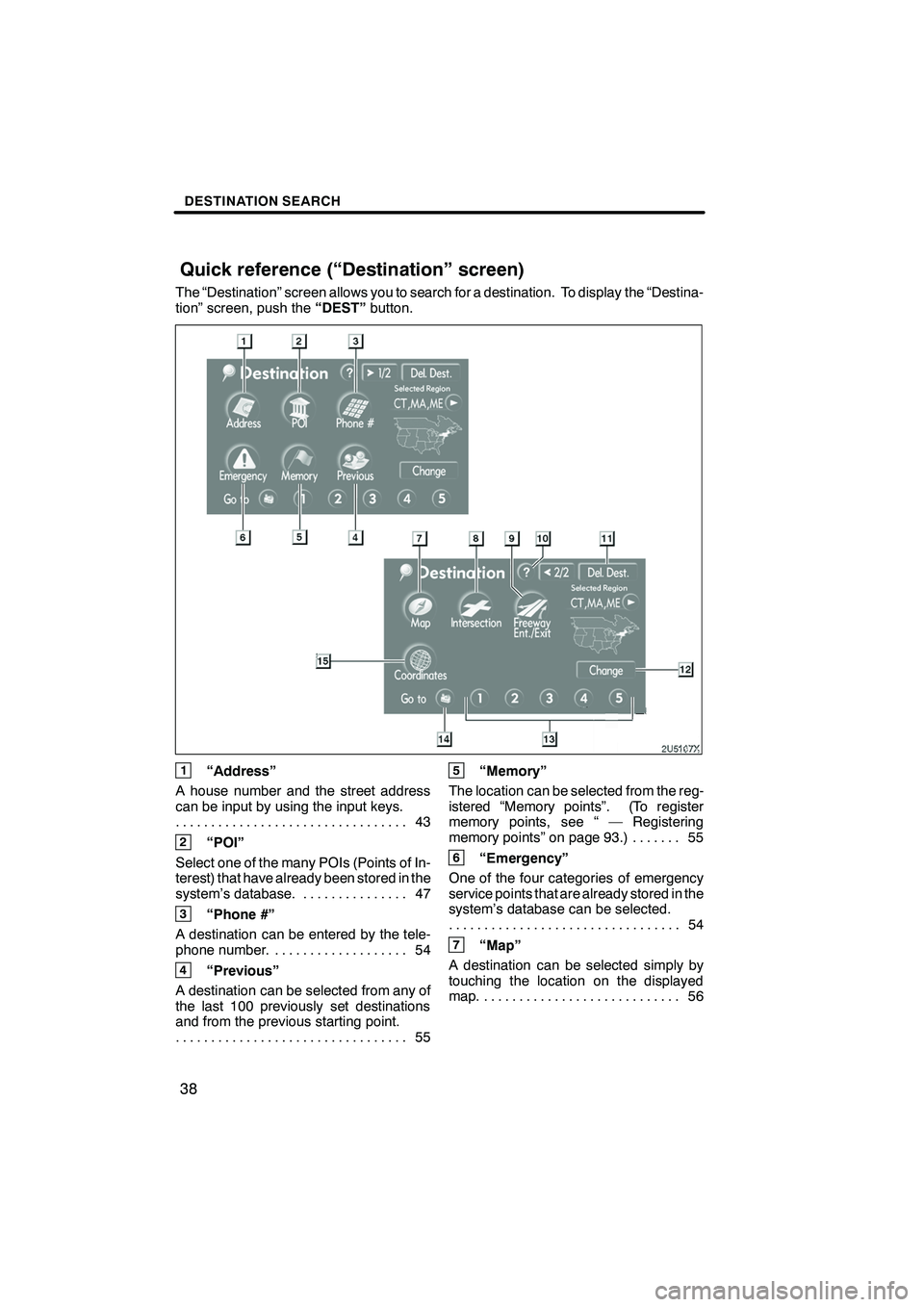
The “Destination” screen allows you to search for a destination. To display the “Destina-
tion” screen, push the“DEST”button.
1“Address”
A house number and the street address
can be input by using the input keys. 43
.................................
2“POI”
Select one of the many POIs (Points of In-
terest) that have already been stored in the
system’s database. 47 ...............
3“Phone #”
A destination can be entered by the tele-
phone number. 54 ...................
4“Previous”
A destination can be selected from any of
the last 100 previously set destinations
and from the previous starting point. 55
.................................
5“Memory”
The location can be selected from the reg-
istered “Memory points”. (To register
memory points, see “ — Registering
memory points” on page 93.) 55 .......
6“Emergency”
One of the four categories of emergency
service points that are already stored in the
system’s database can be selected. 54
.................................
7“Map”
A destination can be selected simply by
touching the location on the displayed
map. 56 ............................
IS F/350/250_Navi_U
(L/O 0712)
Quick reference (“Destination” screen)
Page 55 of 316
Finish
DESTINATION SEARCH
54
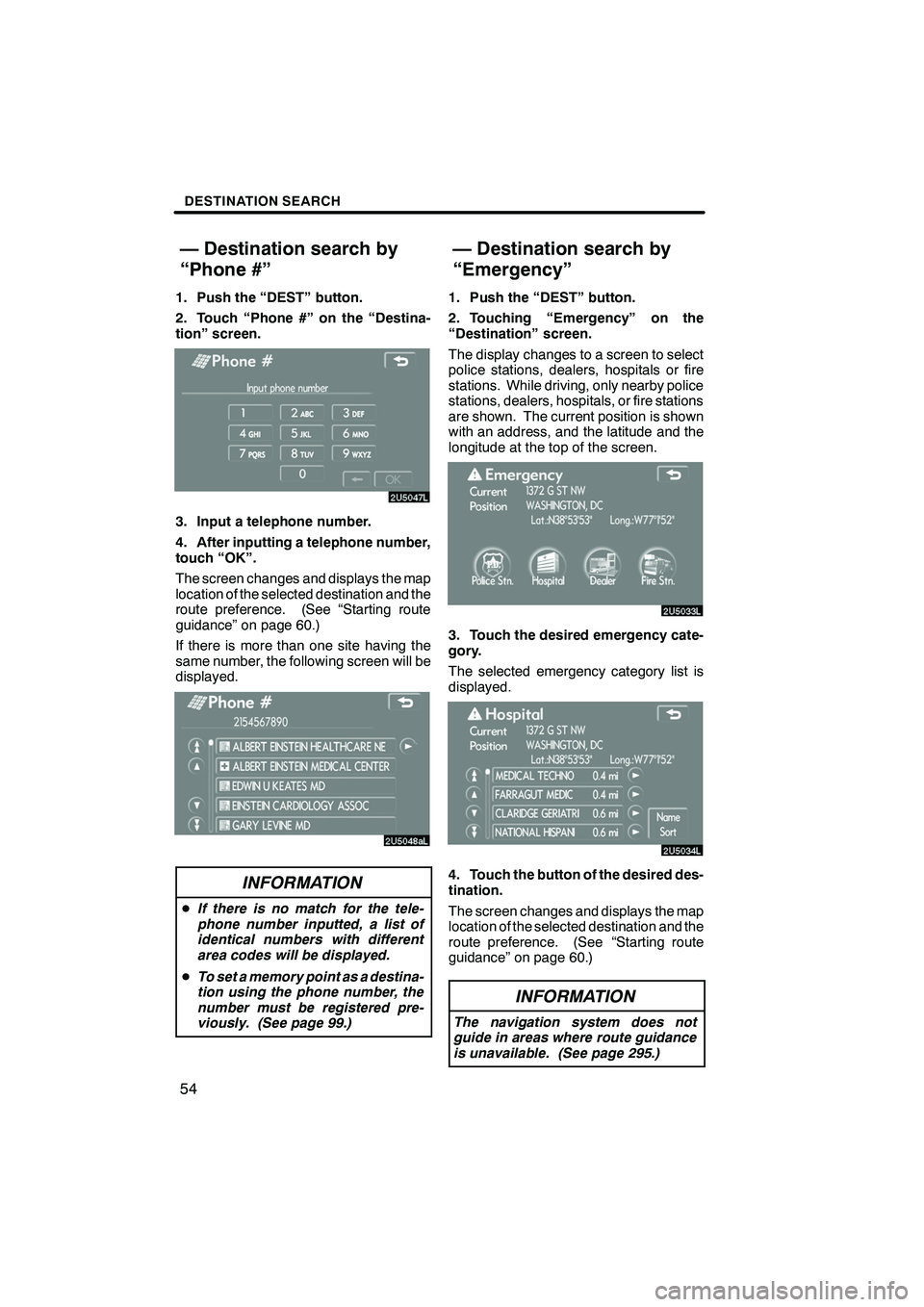
1. Push the “DEST” button.
2. Touch “Phone #” on the “Destina-
tion” screen.
3. Input a telephone number.
4. After inputting a telephone number,
touch “OK”.
The screen changes and displays the map
location of the selected destination and the
route preference. (See “Starting route
guidance” on page 60.)
If there is more than one site having the
same number, the following screen will be
displayed.
INFORMATION
DIf there is no match for the tele-
phone number inputted, a list of
identical numbers with different
area codes will be displayed.
D To set a memory point as a destina-
tion using the phone number, the
number must be registered pre-
viously. (See page 99.)
1. Push the “DEST” button.
2. Touching “Emergency” on the
“Destination” screen.
The display changes to a screen to select
police stations, dealers, hospitals or fire
stations. While driving, only nearby police
stations, dealers, hospitals, or fire stations
are shown. The current position is shown
with an address, and the latitude and the
longitude at the top of the screen.
3. Touch the desired emergency cate-
gory.
The selected emergency category list is
displayed.
4. Touch the button of the desired des-
tination.
The screen changes and displays the map
location of the selected destination and the
route preference. (See “Starting route
guidance” on page 60.)
INFORMATION
The navigation system does not
guide in areas where route guidance
is unavailable. (See page 295.)
IS F/350/250_Navi_U
(L/O 0712)
— Destination search by
“Phone #” — Destination search by
“Emergency”
Page 61 of 316
Finish
DESTINATION SEARCH
60
5. If more than one destination is set,
touch “OK” after deleting the destina-
tions.
The system searches for the guidance
route again, and displays the entire route.
INFORMATION
Set destinations can also be deleted
by touching “Route”. (See “ — Delet-
ing destinations” on page 73.)
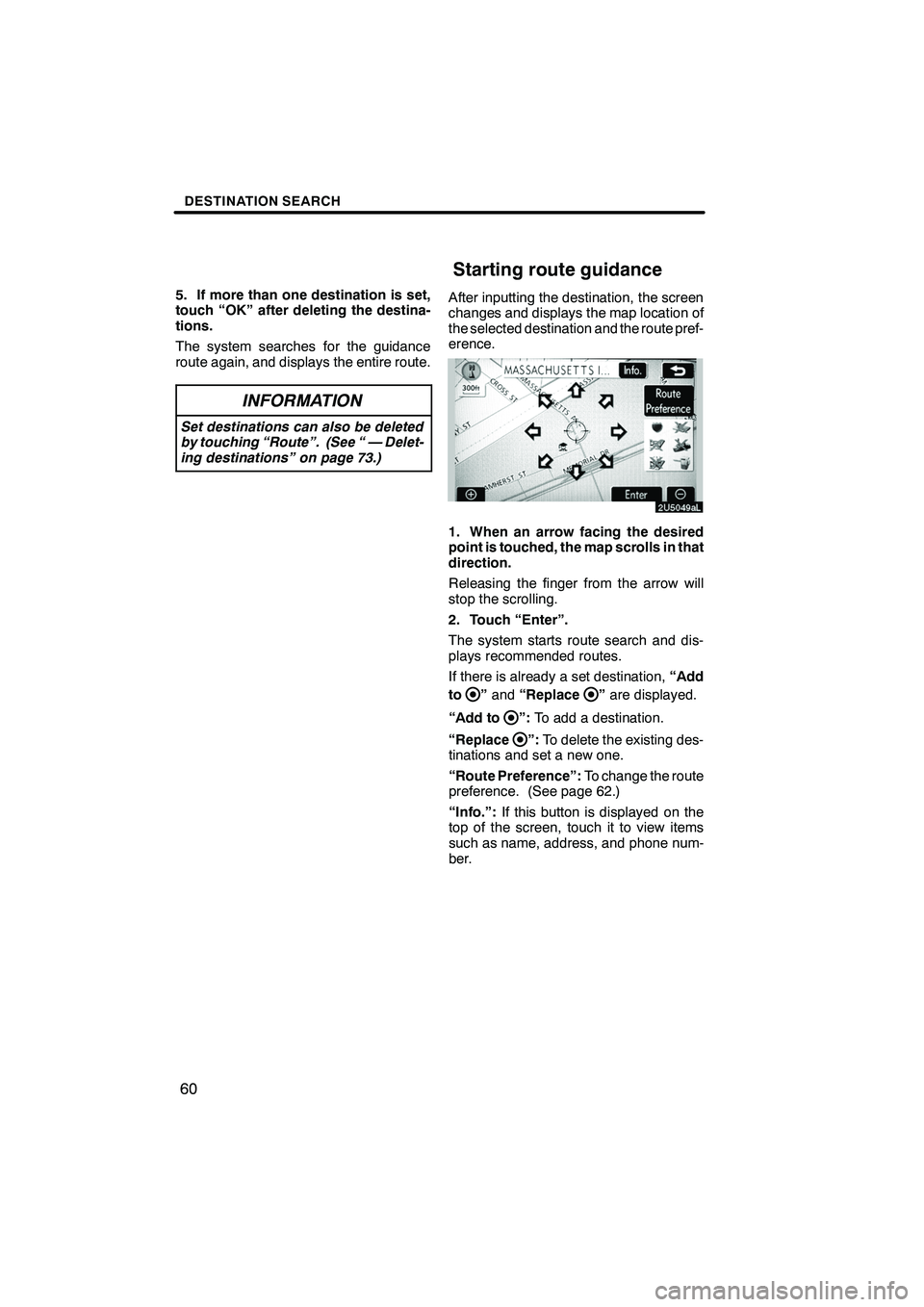
After inputting the destination, the screen
changes and displays the map location of
the selected destination and the route pref-
erence.
1. When an arrow facing the desired
point is touched, the map scrolls in that
direction.
Releasing the finger from the arrow will
stop the scrolling.
2. Touch “Enter”.
The system starts route search and dis-
plays recommended routes.
If there is already a set destination,“Add
to
” and “Replace”are displayed.
“Add to
”: To add a destination.
“Replace
”: To delete the existing des-
tinations and set a new one.
“Route Preference”: To change the route
preference. (See page 62.)
“Info.”: If this button is displayed on the
top of the screen, touch it to view items
such as name, address, and phone num-
ber.
IS F/350/250_Navi_U
(L/O 0712)
Starting route guidance
Page 95 of 316
Finish
ADVANCED FUNCTIONS
94
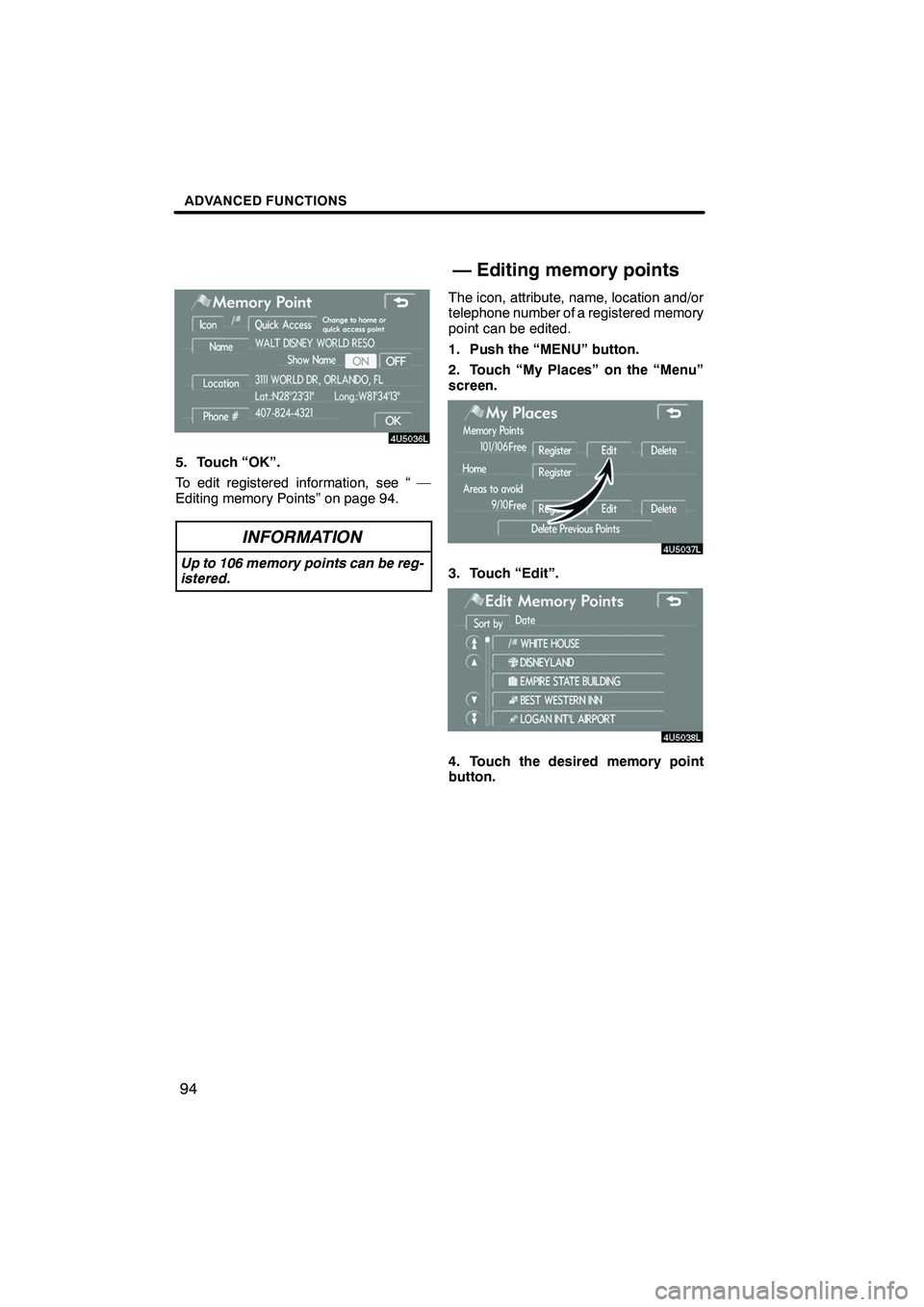
5. Touch “OK”.
To edit registered information, see “ —
Editing memory Points” on page 94.
INFORMATION
Up to 106 memory points can be reg-
istered.
The icon, attribute, name, location and/or
telephone number of a registered memory
point can be edited.
1. Push the “MENU” button.
2. Touch “My Places” on the “Menu”
screen.
3. Touch “Edit”.
4. Touch the desired memory point
button.
IS F/350/250_Navi_U
(L/O 0712)
— Editing memory points
Page 96 of 316
Finish
ADVANCED FUNCTIONS
95
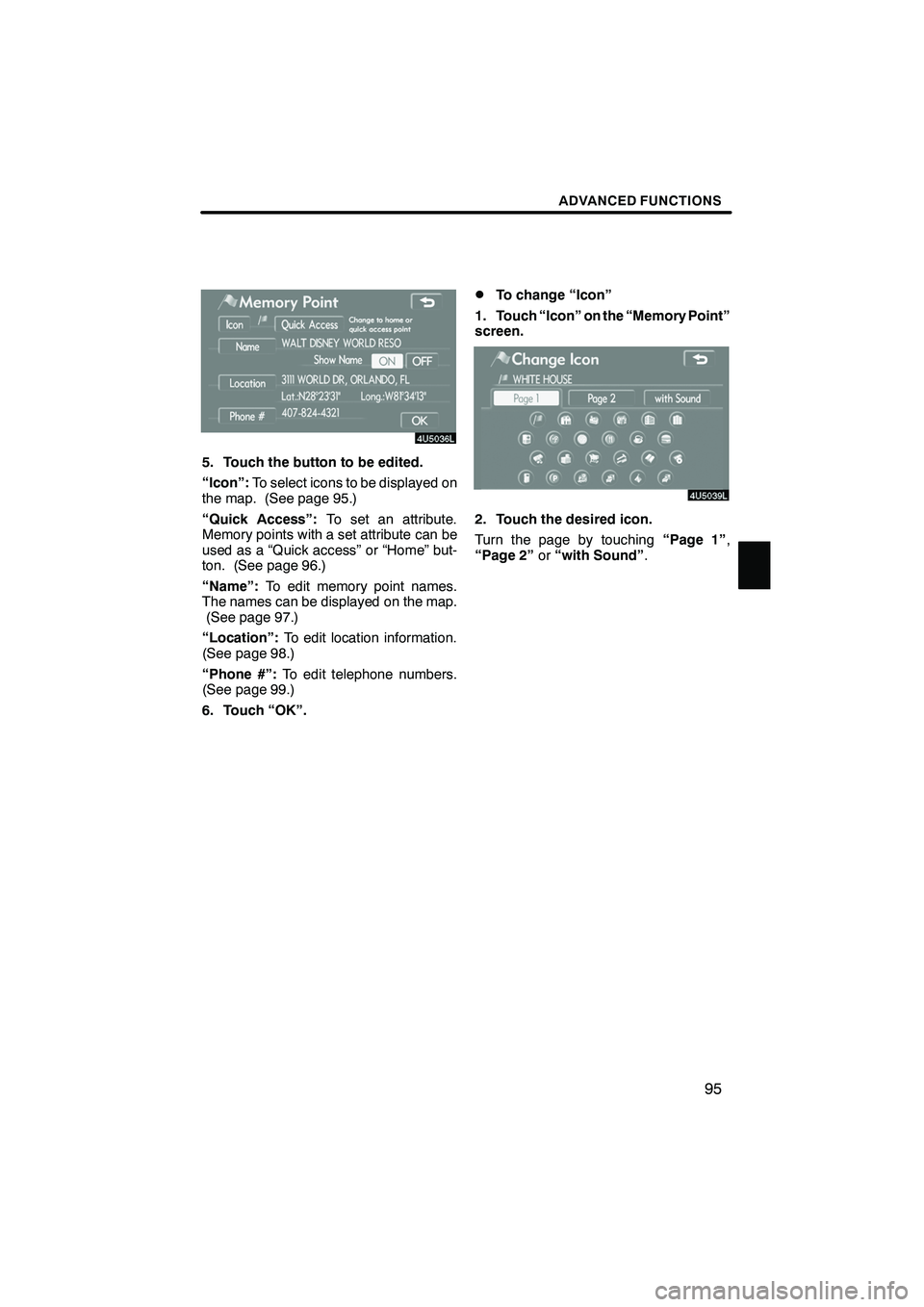
5. Touch the button to be edited.
“Icon”:To select icons to be displayed on
the map. (See page 95.)
“Quick Access”: To set an attribute.
Memory points with a set attribute can be
used as a “Quick access” or “Home” but-
ton. (See page 96.)
“Name”: To edit memory point names.
The names can be displayed on the map. (See page 97.)
“Location”: To edit location information.
(See page 98.)
“Phone #”: To edit telephone numbers.
(See page 99.)
6. Touch “OK”.
DTo change “Icon”
1. Touch “Icon” on the “Memory Point”
screen.
2. Touch the desired icon.
Turn the page by touching “Page 1”,
“Page 2” or“with Sound” .
IS F/350/250_Navi_U
(L/O 0712)
Page 100 of 316
Finish
ADVANCED FUNCTIONS
99
D
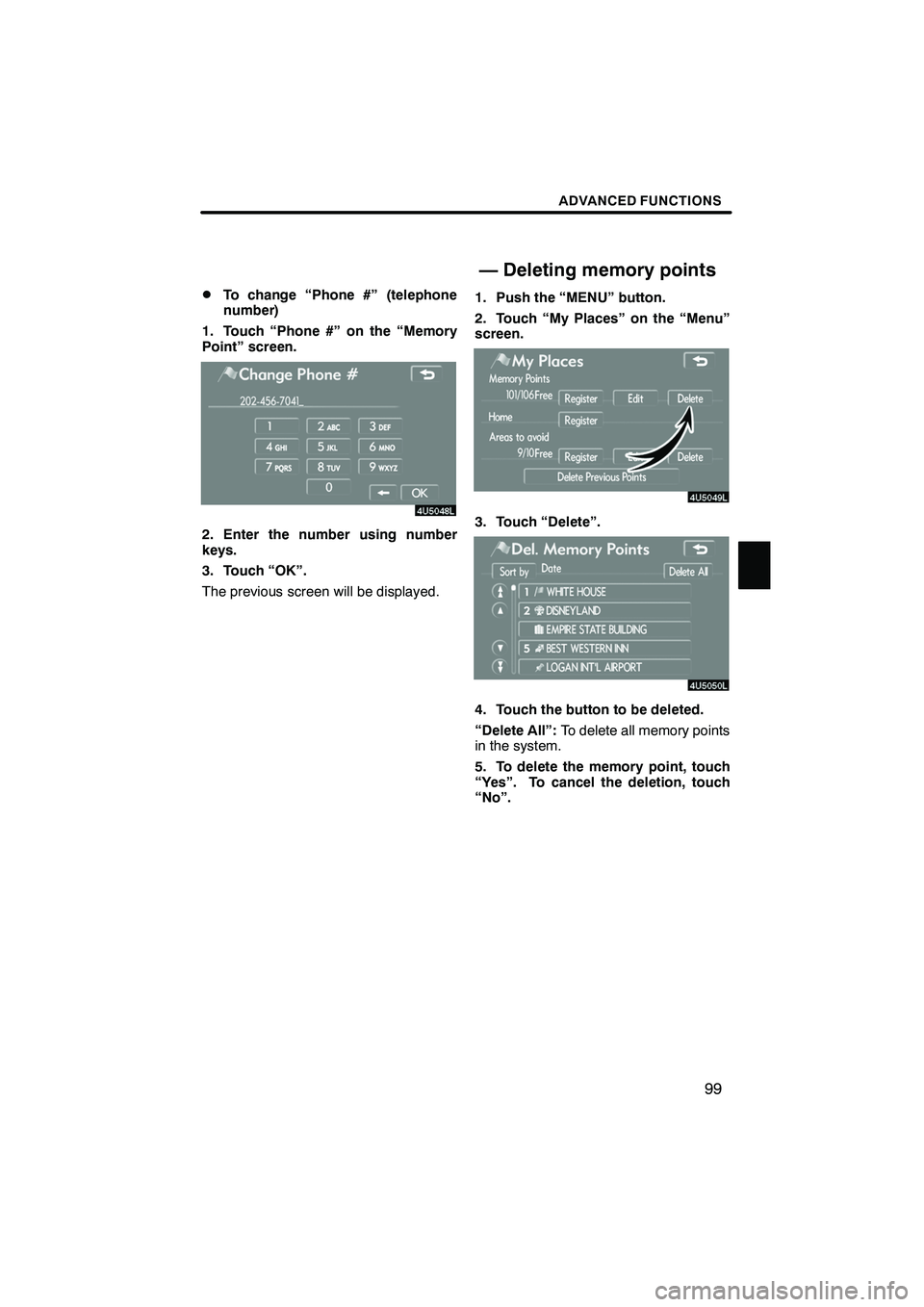
To change “Phone #” (telephone
number)
1. Touch “Phone #” on the “Memory
Point” screen.
2. Enter the number using number
keys.
3. Touch “OK”.
The previous screen will be displayed. 1. Push the “MENU” button.
2. Touch “My Places” on the “Menu”
screen.3. Touch “Delete”.
4. Touch the button to be deleted.
“Delete All”:
To delete all memory points
in the system.
5. To delete the memory point, touch
“Yes”. To cancel the deletion, touch
“No”.
IS F/350/250_Navi_U
(L/O 0712)
— Deleting memory points
Page 118 of 316
Finish
SECTION
5
OTHER FUNCTIONS
11 7
OTHER FUNCTIONS
D Maintenance information 11 8
..............................
Maintenance information setting 118
.......................
Dealer setting 120
......................................
D Calendar with memo 122
..................................
Adding a memo 124
.....................................
Editing a memo 125
.....................................
Memo list 125
...........................................
D Hands −free system (for cellular phone) 127
...................
D Speech command system 174
..............................
D Help screen 177
...........................................
D Screen adjustment 178
.....................................
D Screen setting 180
........................................
D Beep setting 183
..........................................
D Selecting a language 183
...................................
IS F/350/250_Navi_U
(L/O 0712)
Page 121 of 316
Finish
OTHER FUNCTIONS
120
It is possible to register a dealer in the sys-
tem. With dealer information registered,
route guidance to the dealer is available.
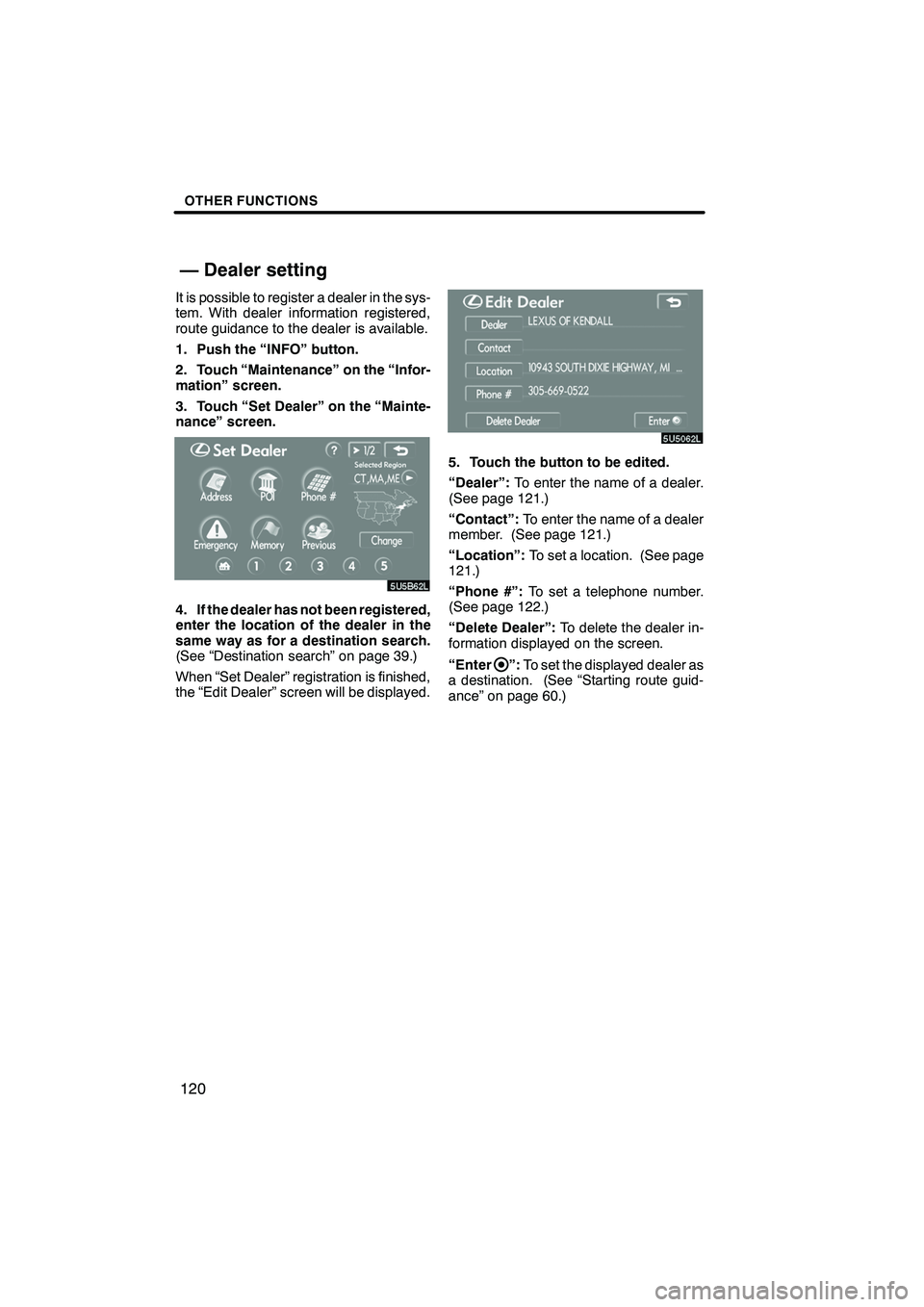
1. Push the “INFO” button.
2. Touch “Maintenance” on the “Infor-
mation” screen.
3. Touch “Set Dealer” on the “Mainte-
nance” screen.
4. If the dealer has not been registered,
enter the location of the dealer in the
same way as for a destination search.
(See “Destination search” on page 39.)
When “Set Dealer” registration is finished,
the “Edit Dealer” screen will be displayed.
5. Touch the button to be edited.
“Dealer”:To enter the name of a dealer.
(See page 121.)
“Contact”: To enter the name of a dealer
member. (See page 121.)
“Location”: To set a location. (See page
121.)
“Phone #”: To set a telephone number.
(See page 122.)
“Delete Dealer”: To delete the dealer in-
formation displayed on the screen.
“Enter
”: To set the displayed dealer as
a destination. (See “Starting route guid-
ance” on page 60.)
IS F/350/250_Navi_U
(L/O 0712)
— Dealer setting
Page 123 of 316
Finish
OTHER FUNCTIONS
122
D
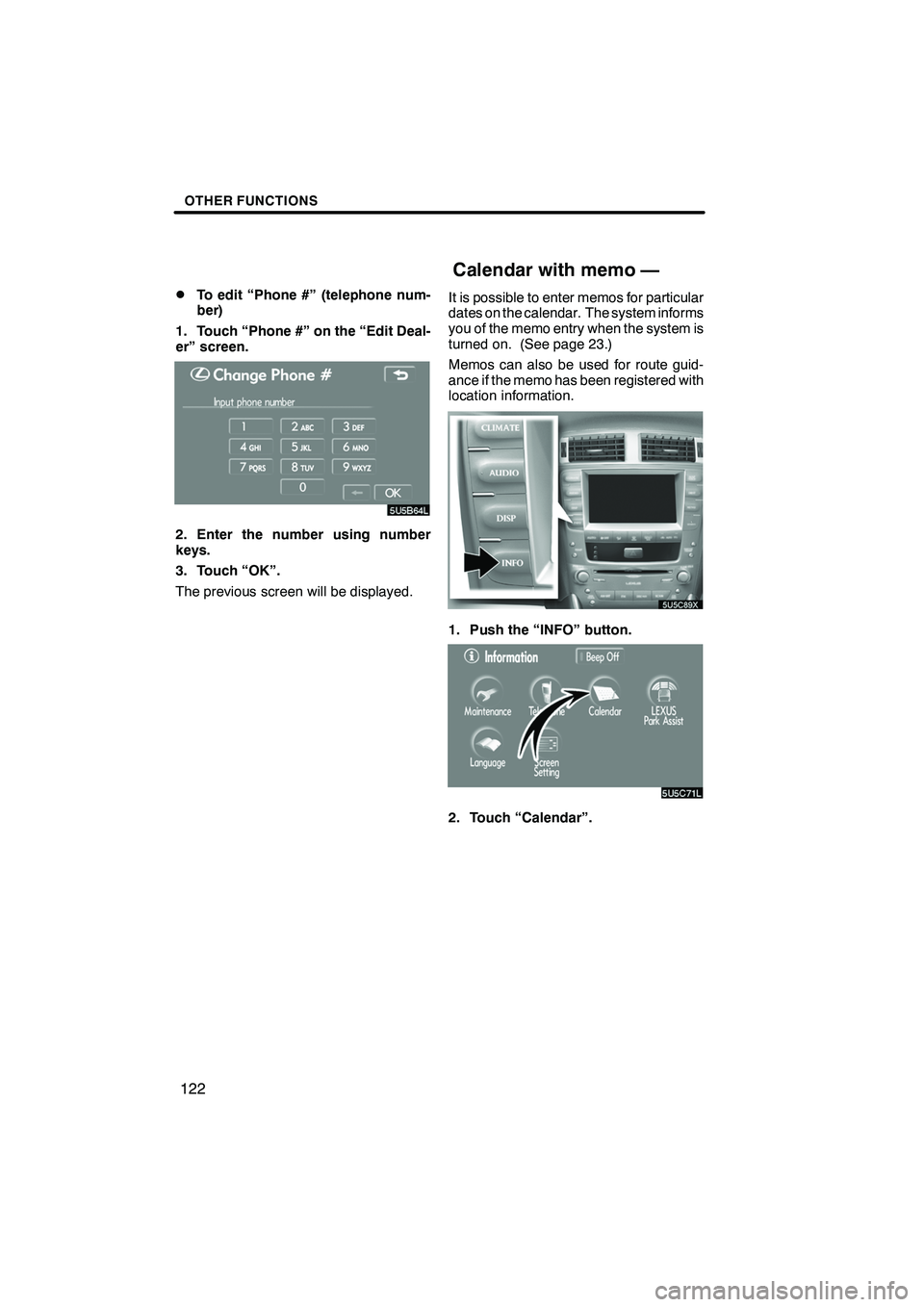
To edit “Phone #” (telephone num-
ber)
1. Touch “Phone #” on the “Edit Deal-
er” screen.
2. Enter the number using number
keys.
3. Touch “OK”.
The previous screen will be displayed. It is possible to enter memos for particular
dates on the calendar. The system informs
you of the memo entry when the system is
turned on. (See page 23.)
Memos can also be used for route guid-
ance if the memo has been registered with
location information.
1. Push the “INFO” button.
2. Touch “Calendar”.
IS F/350/250_Navi_U
(L/O 0712)
Calendar with memo —
Page 128 of 316
Finish
OTHER FUNCTIONS
127
Hands−free system allows you to make
or receive a call without taking your
hands off the steering wheel by con-
necting your cellular phone.
This system supports Bluetooth r.
Bluetooth ris a wireless data system by
which you can call without your cellular
phone being connected with a cable or
placed on a cradle.
If your cellular phone does not support
Bluetooth r, this system can not function.
CAUTION
While driving, do not use a cellular
phone or connect the Bluetooth r
phone.
NOTICE
Do not leave your cellular phone in
the car. The temperature indoor may
be high and damage the phone.
INFORMATION
In the following conditions, the sys-
tem may not function.
DThe cellular phone is turned off.
DThe current position is outside the
communication area.
DThe cellular phone is not con-
nected.
DThe cellular phone has a low bat-
tery.
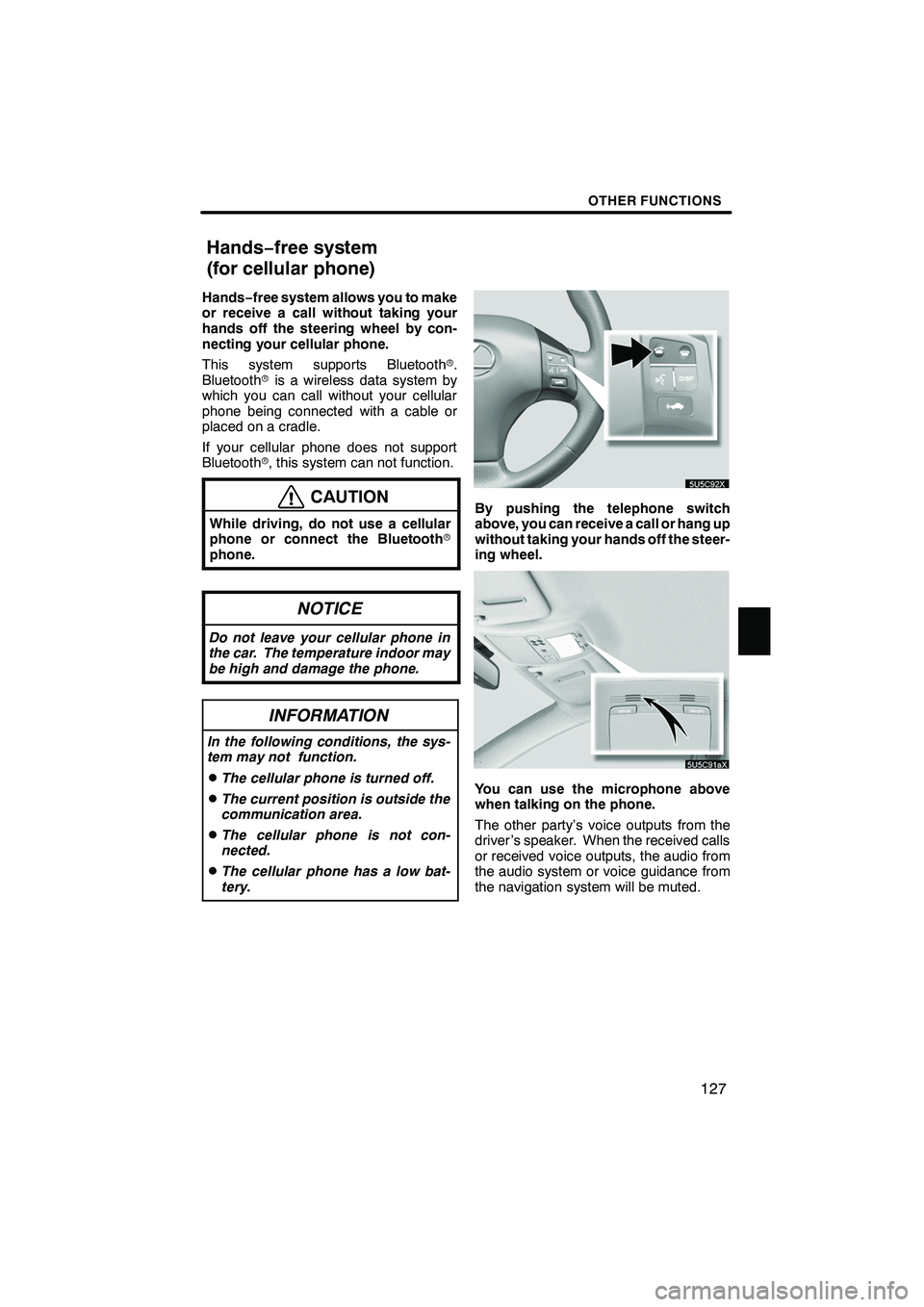
By pushing the telephone switch
above, you can receive a call or hang up
without taking your hands off the steer-
ing wheel.
You can use the microphone above
when talking on the phone.
The other party’s voice outputs from the
driver ’s speaker. When the received calls
or received voice outputs, the audio from
the audio system or voice guidance from
the navigation system will be muted.
IS F/350/250_Navi_U
(L/O 0712)
Hands− free system
(for cellular phone)