AUX Lexus IS F 2010 Audio/video System / LEXUS 2010 IS F OWNERS MANUAL (OM53A21U)
[x] Cancel search | Manufacturer: LEXUS, Model Year: 2010, Model line: IS F, Model: Lexus IS F 2010Pages: 540, PDF Size: 16.03 MB
Page 3 of 540

1
2
3
4
5
6
7
3
Multi-information display........... 146
2-3. Operating the lights and
windshield wipers
Headlight switch ............................ 150
Fog light switch .............................. 153
Windshield wipers and
washer............................................. 154
Headlight cleaner switch ........... 157
2-4. Using other driving systems
Cruise control ................................ 158
Dynamic radar cruise control .... 161
Intuitive parking assist ................... 171
Driving assist systems................... 177
PCS (Pre-Collision System)..... 184
2-5. Driving information
Cargo and luggage ...................... 188
Vehicle load limits ........................... 191
Winter driving tips ........................ 192
Trailer towing .................................. 194
Dinghy towing ................................ 195
3-1. Using the air conditioning
system and defogger
Automatic air conditioning
system ............................................. 198
Rear window and outside rear
view mirror defoggers ............ 2063-2. Using the audio system
Audio system type ....................... 207
Using the radio............................... 210
Using the CD player.................... 218
Playing back MP3 and WMA
discs ................................................ 225
Operating an iPod
®................... 233
Operating a USB memory........ 241
Optimal use of the audio
system ........................................... 250
Using the AUX adapter ............ 252
Using the steering wheel
audio switches ............................ 254
3-3. Using the Bluetooth
® audio
system
Bluetooth
® audio system ......... 257
Using the Bluetooth
® audio
system ............................................ 260
Operating a Bluetooth
®
enabled portable player ......... 265
Setting up a Bluetooth
®
enabled portable player ......... 268
Bluetooth
® audio system
setup ............................................... 274
3-4. Using the hands-free phone
system (for mobile phones)
Hands-free system for mobile
phones ........................................... 275
Using the hands-free system
(for mobile phones) .................. 279
Making a phone call.................... 287
Setting a mobile phone ............... 291
3Interior features
Page 8 of 540
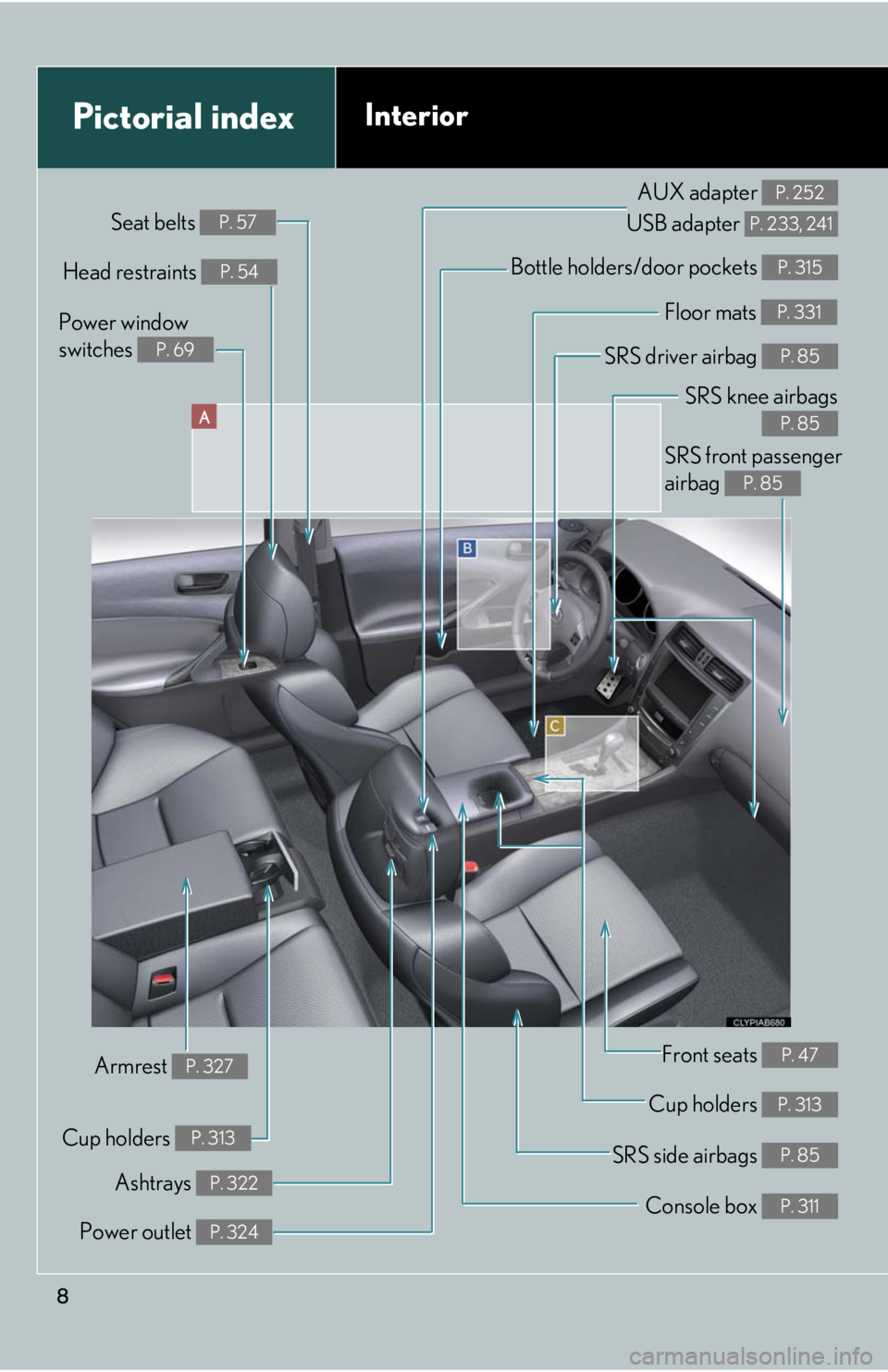
8
A
Power window
switches
P. 69
Pictorial indexInterior
Seat belts P. 57
SRS front passenger
airbag
P. 85
SRS knee airbags
P. 85
SRS driver airbag P. 85
Floor mats P. 331
Bottle holders/door pockets P. 315Head restraints P. 54
Front seats P. 47
Cup holders P. 313
SRS side airbags P. 85
Console box P. 311
Power outlet P. 324
Ashtrays P. 322
Armrest P. 327
AUX adapter
USB adapter P. 252
P. 233, 241
Cup holders P. 313
Page 196 of 540

196
3-1. Using the air conditioning system and defogger
Automatic air conditioning system...................................... 198
Rear window and
outside rear view
mirror defoggers................. 206
3-2. Using the audio system Audio system type ................. 207
Using the radio ........................ 210
Using the CD player .............. 218
Playing back MP3 and WMA discs ........................... 225
Operating an iPod
®.............. 233
Operating a USB memory...................... 241
Optimal use of the audio system..................................... 250
Using the AUX adapter....... 252
Using the steering wheel audio switches...................... 254
Interior features3
Page 208 of 540

208
3-2. Using the audio system
Ti t l ePa g e
Using the radioP. 2 1 0
Using the CD playerP. 2 1 8
Playing back MP3 and WMA discsP. 225
Operating an iPod®P. 2 3 3
Operating a USB memoryP. 2 4 1
Optimal use of the audio systemP. 2 5 0
Using the AUX adapterP. 2 5 2
Using the steering wheel audio switchesP. 2 5 4
Page 252 of 540
252
3-2. Using the audio system
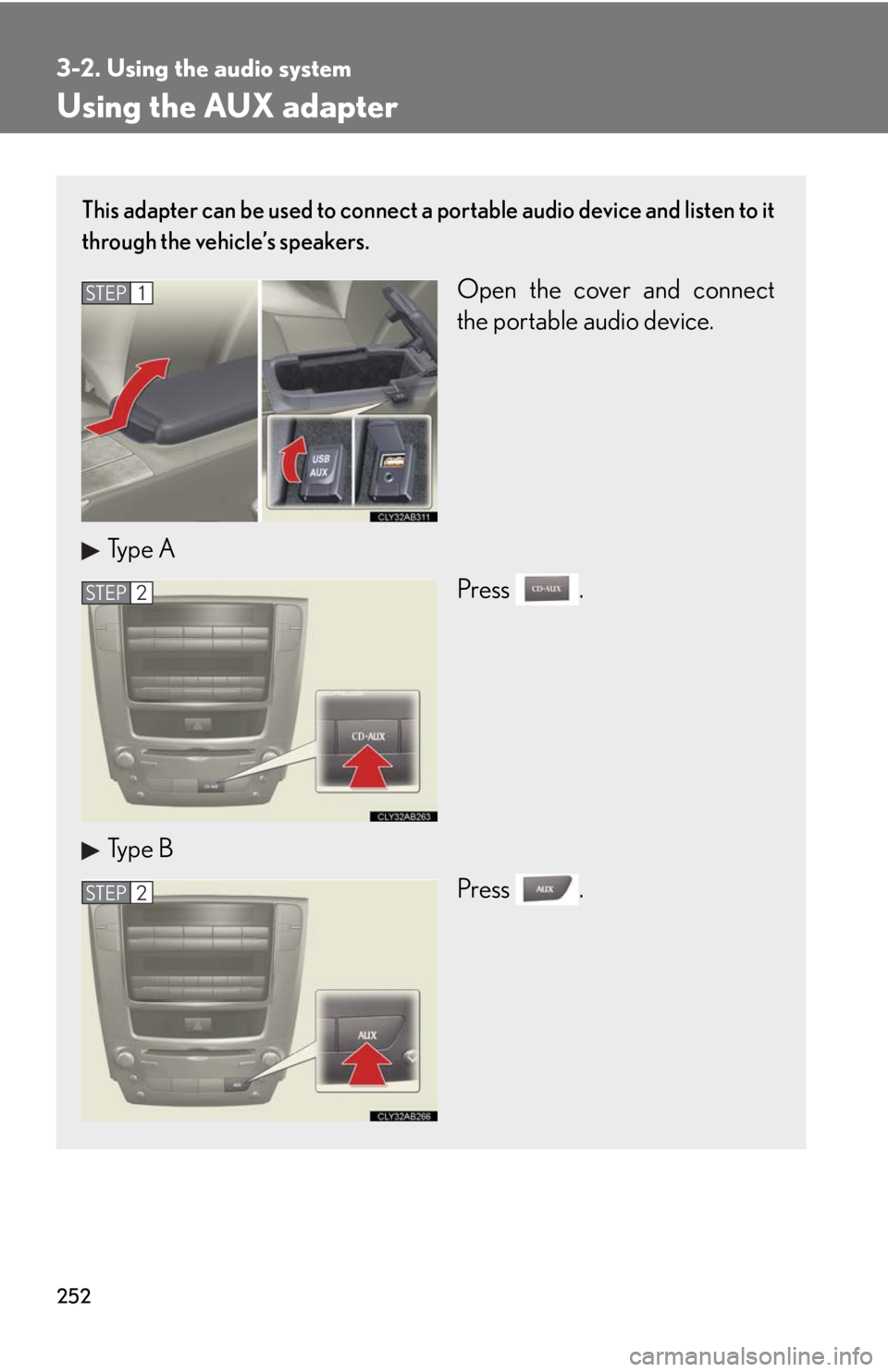
Using the AUX adapter
This adapter can be used to connect a portable audio device and listen to it
through the vehicle’s speakers.
Open the cover and connect
the portable audio device.
Type A
Press .
Type B
Press .STEP1
STEP2
STEP2
Page 255 of 540

255
3-2. Using the audio system
3
Interior features
Changing the audio source
Press when the audio system is turned on. The audio source
changes as follows each time is pressed. If no discs are inserted in
the player, or if the external device is not connected, that mode will be
skipped.
Type A:
FM1FM2SAT1SAT2SAT3CD player
Bluetooth
® audioAUXiPod® or USB memoryAM
Type B:
FM1FM2CD playerAUXiPod
® or USB memoryAM
Adjusting the volume
Press “+” on to increase the volume and “-” to decrease the vol-
ume.
Hold down to continue increasing or decreasing the volume.
Selecting a radio station
Press to select radio mode.
Press “”or “” on to select a radio station.
To scan for receivable stations, press and hold until you hear a
beep.
Selecting a track/file or song
Press to select CD, Bluetooth
® audio, iPod® or USB
memory mode.
Press “” or “” on to select the desired track/file or song.
STEP1
STEP2
STEP1
STEP2
Page 261 of 540

261
3-3. Using the Bluetooth® audio system
3
Interior features
Operating the system using voice commands
By following voice guidance instructions output from the speaker, voice
commands enable the operation of the Bluetooth
® audio system without
the need to check the display or operate , and .
■Operation procedure when using voice commands
Press the talk switch and follow voice guidance instructions.
■Auxiliary commands when using voice commands
The following auxiliary commands can be used when operating the
system using a voice command:
“Cancel”: Exits the Bluetooth
® audio system
“Repeat”: Repeats the previous voice guidance instruction
“Go back”: Returns to the previous procedure
“Help”: Reads aloud the function summary if a help comment is regis-
tered for the selected function
Page 281 of 540

281
3-4. Using the hands-free phone system (for mobile phones)
3
Interior features
Operating the system using voice commands
By following voice guidance instructions output from the speaker, voice
commands enable the operation of the hands-free phone system without
the need to check the display or operate , and .
■Operation procedure when using voice commands
Press the talk switch and follow the voice guidance instructions.
■Auxiliary commands when using voice commands
The following auxiliary commands can be used when operating the
system using a voice command:
“Cancel”: Exits the hands-free phone system
“Repeat”: Repeats the previous voice guidance instruction
“Go back”: Returns to the previous procedure
“Help”: Reads aloud the function summary if a help comment is regis-
tered for the selected function
Page 369 of 540

369
4-3. Do-it-yourself maintenance
4
Maintenance and care
Hood
CAUTION
■Pre-driving check
Check that the hood is fully closed and locked.
If the hood is not locked properly it may open while the vehicle is in motion and
cause an accident, which may result in death or serious injury.
Release the lock from the inside of the vehicle to open the hood.
Pull the hood release lever.
The hood will pop up slightly.
Lift the auxiliary catch lever and
lift the hood.
STEP1
STEP2
Page 528 of 540

528
Alphabetical index
Alphabetical index
A/C ............................................................. 198
ABS............................................................... 177
ACCESSORY mode .......................... 124
AFS ................................................................151
Adaptive front lighting system ...........151
Air conditioning filter ..........................403
Air conditioning system
Air conditioning filter .......................403
Automatic air conditioning
system ................................................... 198
Airbags
Airbag operating conditions...........88
Airbag precautions for your
child.......................................................... 92
Airbag warning light ........................ 442
Curtain shield airbag operating
conditions..............................................88
Curtain shield airbag
precautions .......................................... 92
Front passenger occupant
classification system......................... 97
General airbag precautions ........... 92
Locations of airbags............................ 85
Modification and disposal of
airbags .................................................... 96
Proper driving posture ............. 83, 92
Side airbag operating
conditions..............................................88
Side airbag precautions .................... 92
SRS airbags ............................................. 85Alarm ............................................................ 80
Antenna ......................................................215
Anti-lock brake system ........................ 177
Armrest .................................................... 327
Ashtrays.................................................... 322
Audio input.............................................. 252
Audio system
Antenna.................................................... 215
Audio input ............................................252
AUX adapter .......................................252
Bluetooth
® audio ..............................257
CD player/changer ........................... 218
iPod
®.......................................................233
MP3/WMA disc................................225
Optimal use ......................................... 250
Portable music player ......................252
Radio ......................................................... 210
Steering wheel audio switch........ 254
USB memory ........................................ 241
Automatic air conditioning
system ..................................................... 198
Automatic headlight leveling
system ......................................................152
Automatic light control system........ 150
Automatic transmission
Automatic transmission ................... 128
If the shift lever cannot be
shifted from P....................................475
M mode ................................................... 132
AUX adapter ......................................... 252
A