air conditioning Lexus IS F 2010 Audio/video System / LEXUS 2010 IS F (OM53A25U) User Guide
[x] Cancel search | Manufacturer: LEXUS, Model Year: 2010, Model line: IS F, Model: Lexus IS F 2010Pages: 543, PDF Size: 16.07 MB
Page 205 of 543
202
3-1. Using the air conditioning system and defogger
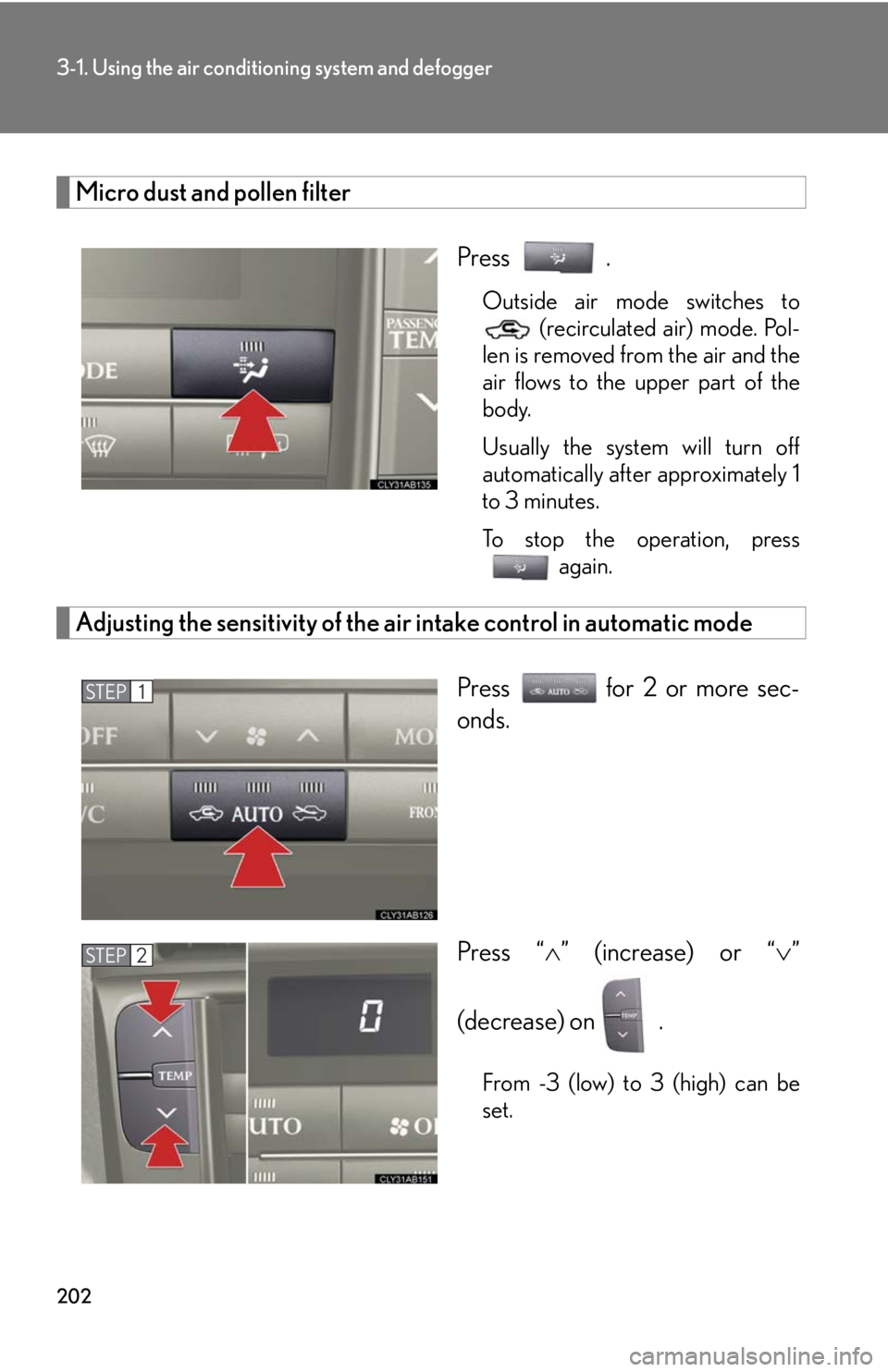
Micro dust and pollen filter
Press .
Outside air mode switches to
(recirculated air) mode. Pol-
len is removed from the air and the
air flows to the upper part of the
body.
Usually the system will turn off
automatically after approximately 1
to 3 minutes.
To stop the operation, press
again.
Adjusting the sensitivity of the air intake control in automatic mode
Press for 2 or more sec-
onds.
Press “” (increase) or “”
(decrease) on .
From -3 (low) to 3 (high) can be
set.
STEP1
STEP2
Page 206 of 543
203
3-1. Using the air conditioning system and defogger
3
Interior features
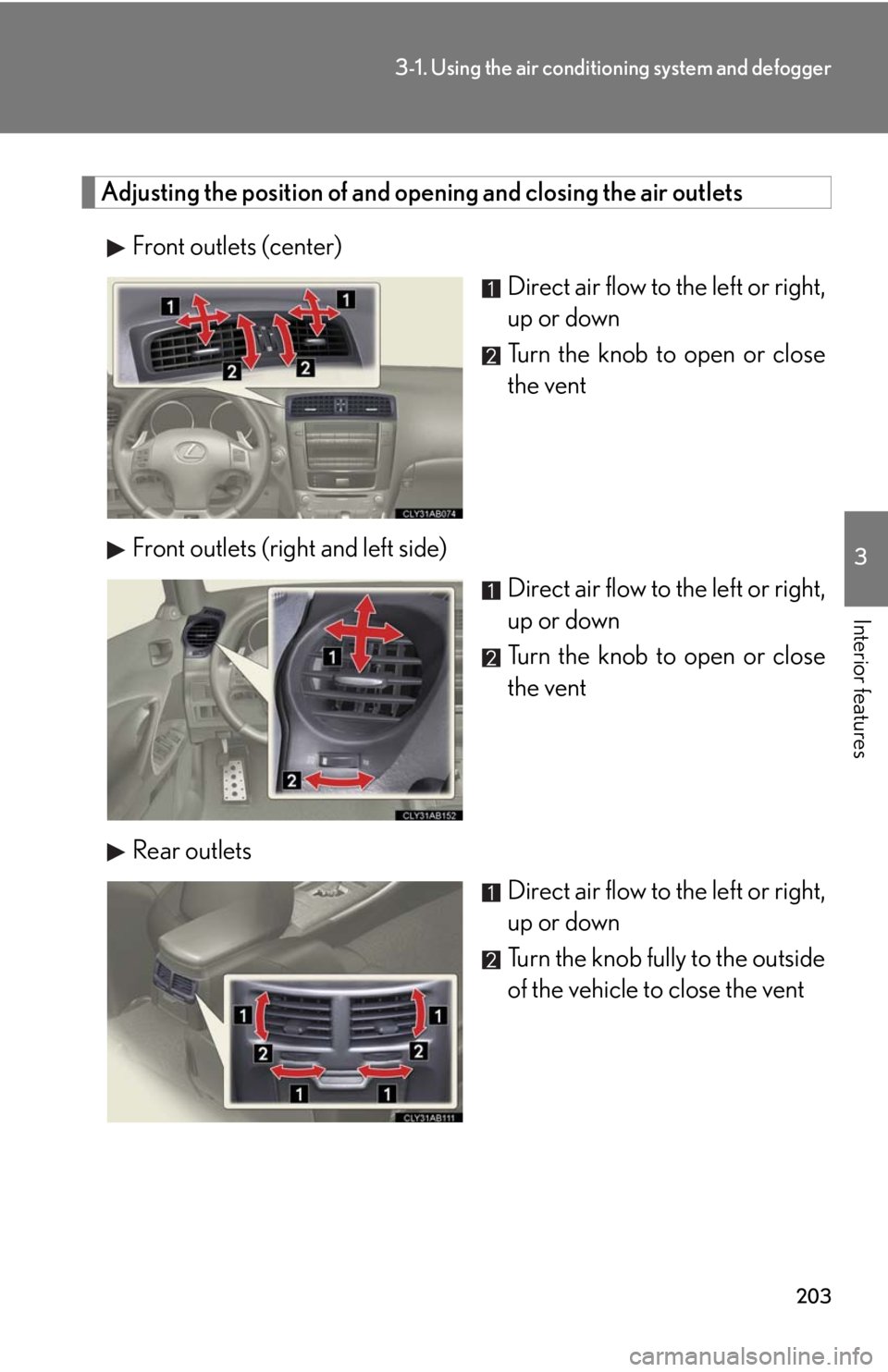
Adjusting the position of and opening and closing the air outlets
Front outlets (center)
Direct air flow to the left or right,
up or down
Turn the knob to open or close
the vent
Front outlets (right and left side)
Direct air flow to the left or right,
up or down
Turn the knob to open or close
the vent
Rear outlets
Direct air flow to the left or right,
up or down
Turn the knob fully to the outside
of the vehicle to close the vent
Page 207 of 543

204
3-1. Using the air conditioning system and defogger
■Using the automatic mode
Fan speed is adjusted automatically in accordance with the temperature setting and
ambient conditions. As a result, the following may occur.
●Immediately after is pressed, the fan may stop for a while until warm or
cool air is ready to flow.
●Cool air may flow to the area around the upper body when the heater is on.
■Using the system in recirculated air mode
The windows will fog up more easily if recirculated air mode is used for an extended
period.
■Switching between outside air and recirculated air modes
Recirculated air mode or outside air mode may be automatically switched in accor-
dance with the temperature setting and the inside temperature.
■Window defogger feature
Recirculated air mode may automatically switch to
(outside air) mode in situ-
ations where the windows need to be defogged.
■When outside air temperature approaches 32F (0C)
The air conditioning system may not operate even when is pressed.
■When the indicator light on flashes
Press and turn off the air conditioning system before turning it on once
more. There may be a problem in the air conditioning system if the indicator light
continues to flash. Turn the air conditioning system off and have it inspected by your
Lexus dealer.
■Automatic mode for air intake control
In automatic mode, the system detects exhaust gas and other pollutants and auto-
matically switches between outside air and recirculated air modes.
■Micro dust and pollen filter
●In order to prevent the windshield from fogging up when the outside air is cold,
the following may occur.
• Outside air mode does not switch to .
• The air conditioning system operates automatically.
• The operation cancels after 1 minute.
●In rainy weather, the windows may fog up. Press .
Page 208 of 543
205
3-1. Using the air conditioning system and defogger
3
Interior features
■Air conditioning odors
●During use, various odors from inside and outside the vehicle may enter into and
accumulate in the air conditioning system. This may then cause odor to be emit-
ted from the vents.
●To reduce potential odors from occurring:
• It is recommended that the air conditioning system be set to outside air mode
prior to turning the vehicle off.
• The start timing of the blower may be delayed for a short period of time imme-
diately after the air conditioning system is started in automatic mode.
.
CAUTION
■To prevent the windshield from fogging up
Do not use during cool air operation in extremely humid weather. The dif-
ference between the temperature of the outside air and that of the windshield can
cause the outer surface of the windshield to fog up, blocking your vision.
NOTICE
■To prevent battery discharge
Do not leave the air conditioning system on longer than necessary when the engine
is off.
Page 209 of 543

206
3-1. Using the air conditioning system and defogger
Rear window and outside rear view mirror defoggers
■The defogger can be operated when
The “ENGINE START STOP” switch is in IGNITION ON mode.
CAUTION
■When the outside rear view mirror defoggers are on
Do not touch the outside surface of the rear view mirror, as it can become very hot
and burn you.
These features are used to defog the rear window, and to remove rain-
drops, dew and frost from the outside rear view mirrors.
On/off
The defoggers will automatically
turn off after 15 to 60 minutes.
The operation time changes
according to the ambient tem-
perature and vehicle speed.
Page 267 of 543
264
3-3. Using the Bluetooth® audio system
■When using a voice command
For numbers, say a combination of single digits from zero to nine.
Say the command correctly and clearly.
■Situations in which the system may not recognize your voice
●When driving on rough roads
●When driving at high speeds
●When air is blowing out of the vents onto the microphone
●When the air conditioning fan emits a loud noise
■Operations that cannot be performed while driving
●Operating the system with , and
●Registering a portable player to the system
■Changing the passkey
P. 2 7 2
Page 279 of 543

276
3-4. Using the hands-free phone system (for mobile phones)
■Conditions under which the system will not operate
●If using a mobile phone that does not support Bluetooth®
●If the mobile phone is switched off
●If you are outside service range
●If the mobile phone is not connected
●If the mobile phone's battery is low
●If the mobile phone is behind the seat or in the glove box or console box
●If metal is covering or touching the phone
■When using the hands-free system
●The audio system and voice guidance are muted when making a call.
●If both parties speak at the same time, it may be difficult to hear.
●If the incoming call volume is overly loud, an echo may be heard.
●Try to face toward the microphone as much as possible when speaking.
●In the following circumstances, it may be difficult to hear the other party:
• When driving on unpaved roads
• When driving at high speeds
• When a window is open
• When the air conditioning is blowing directly on the microphone
• When the air conditioning is set to high
■When transferring ownership of the vehicle
Be sure to initialize the system to prevent personal data from being improperly
accessed. (P. 2 9 8 )
■About Bluetooth®
Bluetooth is a registered trademark of
Bluetooth SIG. Inc.
Page 289 of 543

286
3-4. Using the hands-free phone system (for mobile phones)
■Automatic volume adjustment
When vehicle speed reaches 50 mph (80 km/h) or more, the volume automati-
cally increases. The volume returns to the previous volume setting when vehicle
speed drops to 43 mph (70 km/h) or less.
■When using a voice command
For numbers, say a combination of single digits from zero to nine, # (pound),
(star), and + (plus).
Say the command correctly and clearly.
■Situations in which the system may not recognize your voice
●When driving on rough roads
●When driving at high speeds
●When air is blowing out of the vents onto the microphone
●When the air conditioning fan emits a loud noise
■Operations that cannot be performed while driving
●Operating the system with , and
●Registering a mobile phone to the system
■Changing the passkey
P. 2 9 4
Page 356 of 543

Maintenance and care4
353
4-1. Maintenance and care
Cleaning and protecting
the vehicle exterior............. 354
Cleaning and protecting
the vehicle interior .............. 357
4-2. Maintenance
Maintenance
requirements ........................ 360
General maintenance .......... 362
Emission inspection and
maintenance (I/M)
programs................................ 3654-3. Do-it-yourself maintenance
Do-it-yourself service
precautions ........................... 366
Hood .......................................... 369
Positioning a floor jack ......... 370
Engine compartment ........... 372
Tires............................................ 386
Tire inflation pressure........... 397
Wheels ....................................... 401
Air conditioning filter ........... 403
Electronic key battery.......... 406
Checking and replacing
fuses ........................................ 408
Headlight aim ......................... 422
Light bulbs ................................ 424
Page 371 of 543

368
4-3. Do-it-yourself maintenance
CAUTION
The engine compartment contains many mechanisms and fluids that may move sud-
denly, become hot, or become electrically energized. To avoid death or serious injury,
observe the following precautions.
■When working on the engine compartment:
●Keep hands, clothing, and tools away from the moving fan and engine drive belt.
●Be careful not to touch the engine, radiator, exhaust manifold, etc. right after driv-
ing as they may be hot. Oil and other fluids may also be hot.
●Do not leave anything that may burn easily, such as paper or rags, in the engine
compartment.
●Do not smoke, cause sparks or expose an open flame to fuel or the battery. Fuel
and battery fumes are flammable.
●Be extremely cautious when working on the battery. It contains poisonous and
corrosive sulfuric acid.
■When working near the electric cooling fan or radiator grille:
Be sure the “ENGINE START STOP” switch is OFF.
With the “ENGINE START STOP” switch in IGNITION ON mode, the electric
cooling fan may automatically start to run if the air conditioning is on and/or the
coolant temperature is high. (P. 3 8 0 )
■Safety glasses
Wear safety glasses to prevent flying or falling material, fluid spray, etc. from getting
in the eyes.
NOTICE
■If you remove the air cleaner filter
Driving with the air cleaner filter removed may cause excessive engine wear due to
dirt in the air. Also, a backfire could cause a fire in the engine compartment.