fuel Lexus IS F 2011 User Guide
[x] Cancel search | Manufacturer: LEXUS, Model Year: 2011, Model line: IS F, Model: Lexus IS F 2011Pages: 529, PDF Size: 13.89 MB
Page 99 of 529

92
1-5. Refueling
IS F_EE
NOTICE
Refueling
Do not spill fuel during refueling.
Failing to do so may damage the vehicle, such as causing the exhaust sys-
tems to operate abnormally or damaging fuel system components or the
vehicle's painted surface.
Page 147 of 529

137
2-1. Driving procedures
2
When driving
IS F_EE
Driving in the rain
Drive carefully when it is raining, because visibility will be reduced, the
windows may become fogged-up, and the road will be slippery.
Drive carefully when it starts to rain, because the road surface will be
especially slippery.
Refrain from high speeds when driving on an expressway in the rain,
because there may be a layer of water between the tires and the road sur-
face, preventing the steering and brakes from operating properly.
Engine speed while driving
In the following conditions, the engine speed may become high while driv-
ing. This is due to automatic up-shifting control or down-shifting implemen-
tation to meet driving conditions. It does not indicate sudden acceleration.
The vehicle is judged to be driving uphill or downhill
When the accelerator pedal is released
Breaking in your new Lexus
To extend the life of the vehicle, the following precautions are recom-
mended to observe:
For the first 300 km (186 miles):
Avoid sudden stops.
For the first 1000 km (621 miles):
• Do not drive at extremely high speeds.
• Avoid sudden acceleration.
• Do not drive continuously in the low gears.
• Do not drive at a constant speed for extended periods.
Drum-in-disc type parking brake system
Your vehicle has a drum-in-disc type parking brake system. This type of
brake system needs bedding-down of the brake shoes periodically or when-
ever the parking brake shoes and/or drum are replaced. Have any authorized
Lexus dealer or repairer, or another duly qualified and equipped profes-
sional, perform the bedding down.
Operating your vehicle in a foreign country
Comply with the relevant vehicle registration laws and confirm the avail-
ability of the correct fuel. (P. 4 7 4 )
Page 160 of 529
150
2-1. Driving procedures
IS F_EE
Automatic transmission
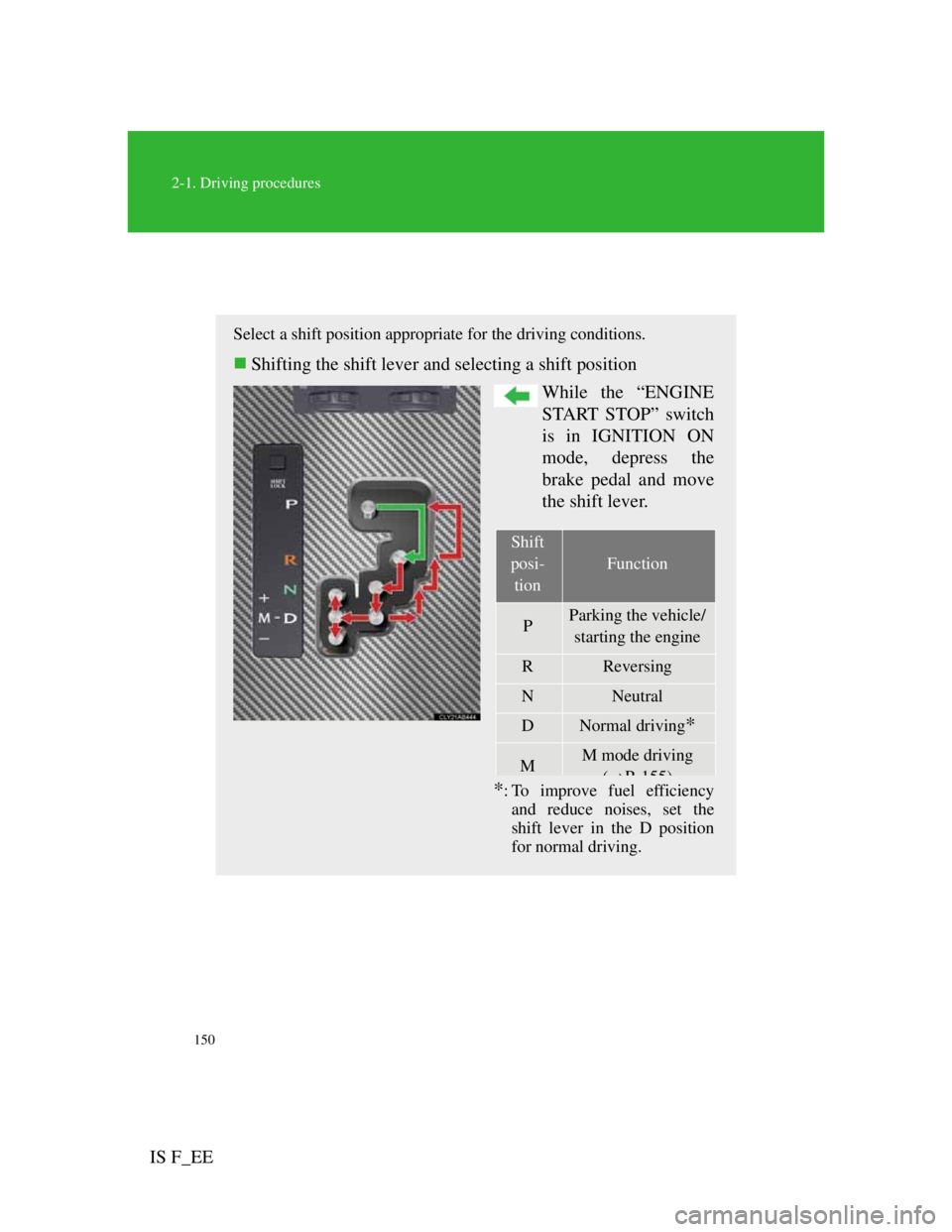
Select a shift position appropriate for the driving conditions.
Shifting the shift lever and selecting a shift position
While the “ENGINE
START STOP” switch
is in IGNITION ON
mode, depress the
brake pedal and move
the shift lever.
*: To improve fuel efficiency
and reduce noises, set the
shift lever in the D position
for normal driving.
Shift
posi-
tion
Function
PParking the vehicle/
starting the engine
RReversing
NNeutral
DNormal driving*
MM mode driving
(P155)
Page 173 of 529

162
2-2. Instrument cluster
IS F_EE
Instrument panel light control
The brightness of the instrument panel lights can be adjusted.
Darker
Brighter
Shift position and shift range/gear display
Displays the shift position along with the currently selected shift
range or gear. (P. 153, 155)
Odometer/trip meter and trip meter reset button
Switches between odometer and trip meter displays. Pushing and
holding the button will reset the trip meter when the trip meter is
being displayed.
Speedometers
Display the vehicle speed.
Fuel gauge
il h i ff l ii i h k
Page 178 of 529

167
2-2. Instrument cluster
2
When driving
IS F_EE
Multi-information display
The multi-information display presents the driver with a variety of
driving-related data, including the current outside air temperature.
Trip information (P.
168)
Displays driving range, fuel
consumption and other cruis-
ing-related information.
Lexus parking assist-sen-
sor display (if equipped)
(P. 199)
Automatically displayed
when using Lexus parking
assist-sensor.
Satellite switch mode dis-
play
(P. 3 3 3 )
This switch is used to config-
ure various function settings.
Dynamic radar cruise con-
trol display (if equipped)
(P.
184)
Automatically displayed
when using dynamic radar
cruise control.
Warning messages
(P. 4 3 1 )
Page 179 of 529
168
2-2. Instrument cluster
IS F_EE
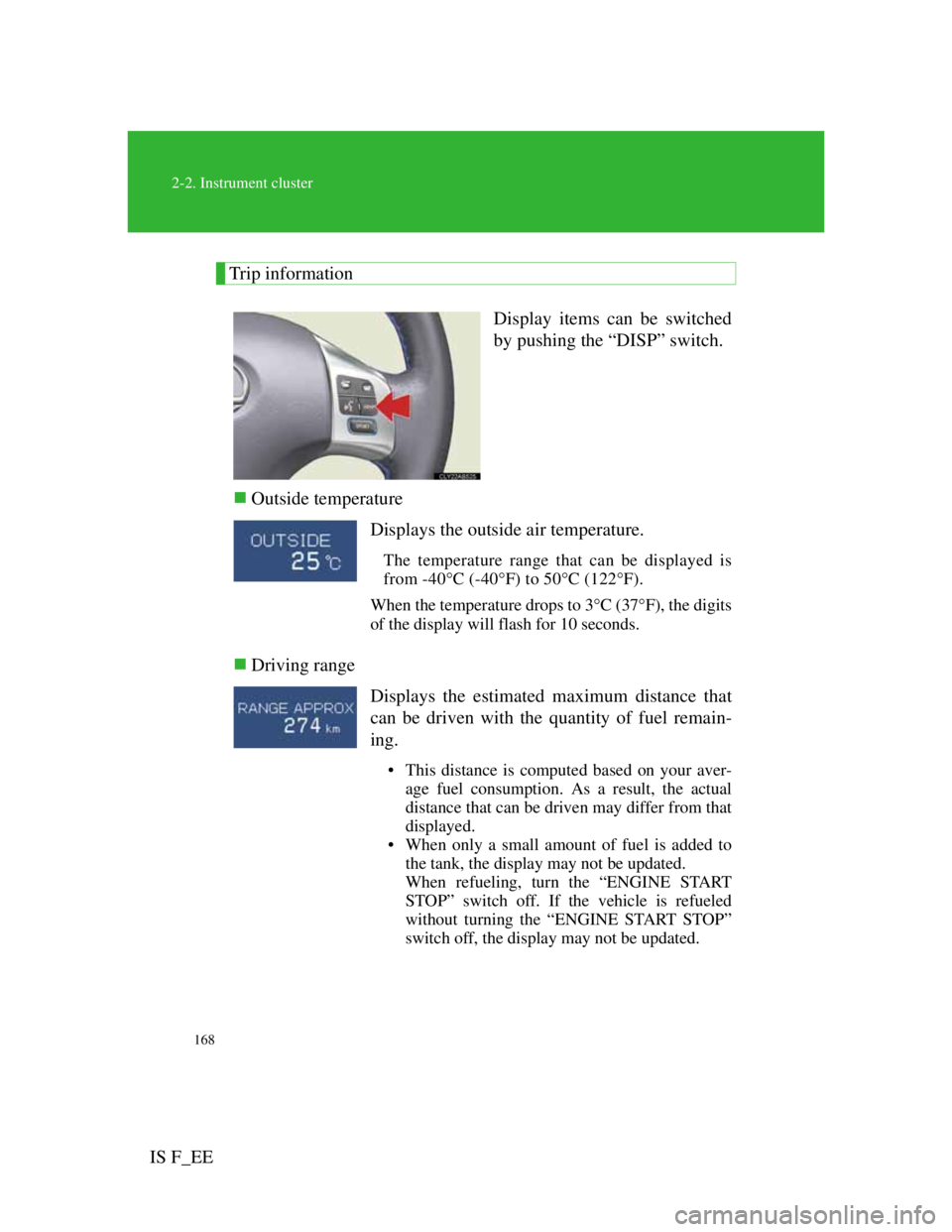
Trip information
Display items can be switched
by pushing the “DISP” switch.
Outside temperature
Driving range
Displays the outside air temperature.
The temperature range that can be displayed is
from -40C (-40F) to 50C (122F).
When the temperature drops to 3C (37F), the digits
of the display will flash for 10 seconds.
Displays the estimated maximum distance that
can be driven with the quantity of fuel remain-
ing.
• This distance is computed based on your aver-
age fuel consumption. As a result, the actual
distance that can be driven may differ from that
displayed.
• When only a small amount of fuel is added to
the tank, the display may not be updated.
When refueling, turn the “ENGINE START
STOP” switch off. If the vehicle is refueled
without turning the “ENGINE START STOP”
switch off, the display may not be updated.
Page 180 of 529

169
2-2. Instrument cluster
2
When driving
IS F_EEAverage fuel consumption
Average fuel consumption after refueling
Current fuel consumption
Average vehicle speedDisplays the average fuel consumption since the
function was reset.
• The function can be reset by pushing the
“DISP” switch for longer than one second when
the average fuel consumption is displayed.
• Use the displayed average fuel consumption as
a reference.
Displays the average fuel consumption since the
vehicle was last refueled.
Use the displayed average fuel consumption as a
reference.
Displays the current rate of fuel consumption.
Displays the average vehicle speed since the
engine was started or the function was reset.
The function can be reset by pushing the “DISP”
switch for longer than one second when the aver-
age vehicle speed is displayed.
Page 234 of 529

220
IS F_EE
2-5. Driving information
Cargo and luggage
CAUTION
Things that must not be carried in the trunk
The following things may cause a fire if loaded in the trunk.
Receptacles containing gasoline
Aerosol cans
Storage precautions
Observe the following precautions.
Failing to do so may result in death or serious injury.
Do not place cargo or luggage in or on the following locations as the item
may get under the brake or accelerator pedal and prevent pedals from
being depressed properly, block the driver's vision, or hit the driver or pas-
sengers, causing an accident.
• Driver’s feet
• Front passenger or rear seats (when stacking items)
• Package tray
• Instrument panel
• Dashboard
Secure all items in the occupant compartment, as they may shift and injure
someone during sudden braking, sudden swerving or an accident.
Take notice of the following information about storage precautions,
cargo capacity and load.
Stow cargo and luggage in the trunk whenever possible.
Be sure all items are secured in place.
Be careful to keep the vehicle level. Placing the weight as far
forward as possible helps maintain vehicle balance.
For better fuel economy, do not carry unnecessary weight.
Page 369 of 529
350
IS F_EE
4-1. Maintenance and care
Cleaning and protecting the vehicle exterior
Automatic car washes
Fold the mirrors back before washing the vehicle.
Brushes used in automatic car washes may scratch the vehicle surface
and harm your vehicle’s paint.
Turn the wipers off before washing the vehicle.
High pressure car washes
Do not allow the nozzles of the car wash to come within close proximity
of the windows.
Before car wash, check that the fuel filler door on your vehicle is closed
properly.
Touch-up paint (if equipped)
Touch-up paint may be used to cover small chips or scratches.
Apply the paint soon after the damage occurs or corrosion may set in. To
apply the touch-up paint so it is hardly noticeable the trick is to apply it only
to the bare spots. Apply only the smallest amount possible and do not paint
the surface around the scratch or chip.
Perform the following to protect the vehicle and maintain it in prime
condition.
Working from top to bottom, liberally apply water to the
vehicle body, wheel wells and underside of the vehicle to
remove any dirt and dust.
Wash the vehicle body using a sponge or soft cloth, such as
a chamois.
For hard-to-remove marks, use car wash soap and rinse
thoroughly with water.
Wipe away any water.
Wax the vehicle when the waterproof coating deteriorates.
If water does not bead on a clean surface, apply wax when the vehi-
cle body is cool.
Page 381 of 529
361
4-3. Do-it-yourself maintenance
4
Maintenance and care
IS F_EE
CAUTION
The engine compartment contains many mechanisms and fluids that may
move suddenly, become hot, or become electrically energized. To avoid death
or serious injury, observe the following precautions.
When working on the engine compartment:
Keep hands, clothing, and tools away from the moving fan and engine
drive belt.
Be careful not to touch the engine, radiator, exhaust manifold, etc. right
after driving as they may be hot. Oil and other fluids may also be hot.
Do not leave anything that may burn easily, such as paper or rags, in the
engine compartment.
Do not smoke, cause sparks or expose an open flame to fuel or the battery.
Fuel and battery fumes are flammable.
Be extremely cautious when working on the battery. It contains poisonous
and corrosive sulfuric acid.
Take care because brake fluid can harm your hands or eyes and damage
painted surfaces.
If fluid gets on your hands or in your eyes, flush the affected area with
clean water immediately.
If you still experience discomfort, see a doctor.
When working near the electric cooling fan or radiator grille:
Be sure the “ENGINE START STOP” switch is OFF.
With the “ENGINE START STOP” switch in IGNITION ON mode, the
electric cooling fan may automatically start to run if the air conditioning is
on and/or the coolant temperature is high. (P. 374)
CAUTION
Safety glasses
Wear safety glasses to prevent flying or falling material, fluid spray, etc.
from getting in the eyes.