phone Lexus IS200d 2011 s Owner's Guide
[x] Cancel search | Manufacturer: LEXUS, Model Year: 2011, Model line: IS200d, Model: Lexus IS200d 2011Pages: 609, PDF Size: 14.63 MB
Page 348 of 609
331
3-4. Using the hands-free phone system (for mobile phones)
3
Interior features
IS250/220d/200d_EE
Using the hands-free system (for mobile phones)
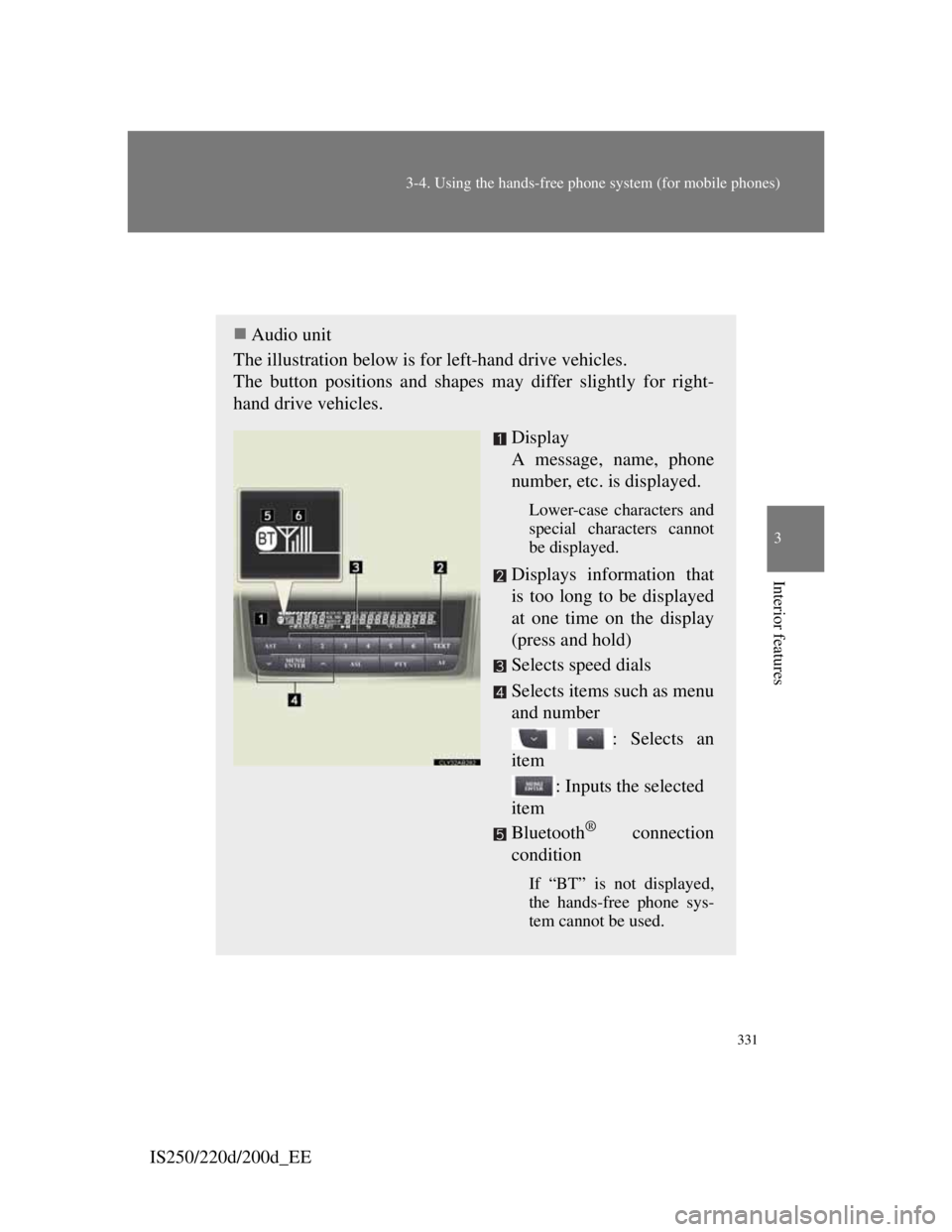
Audio unit
The illustration below is for left-hand drive vehicles.
The button positions and shapes may differ slightly for right-
hand drive vehicles.
Display
A message, name, phone
number, etc. is displayed.
Lower-case characters and
special characters cannot
be displayed.
Displays information that
is too long to be displayed
at one time on the display
(press and hold)
Selects speed dials
Selects items such as menu
and number
: Selects an
item
: Inputs the selected
item
Bluetooth
® connection
condition
If “BT” is not displayed,
the hands-free phone sys-
tem cannot be used.
Page 349 of 609
332
3-4. Using the hands-free phone system (for mobile phones)
IS250/220d/200d_EE
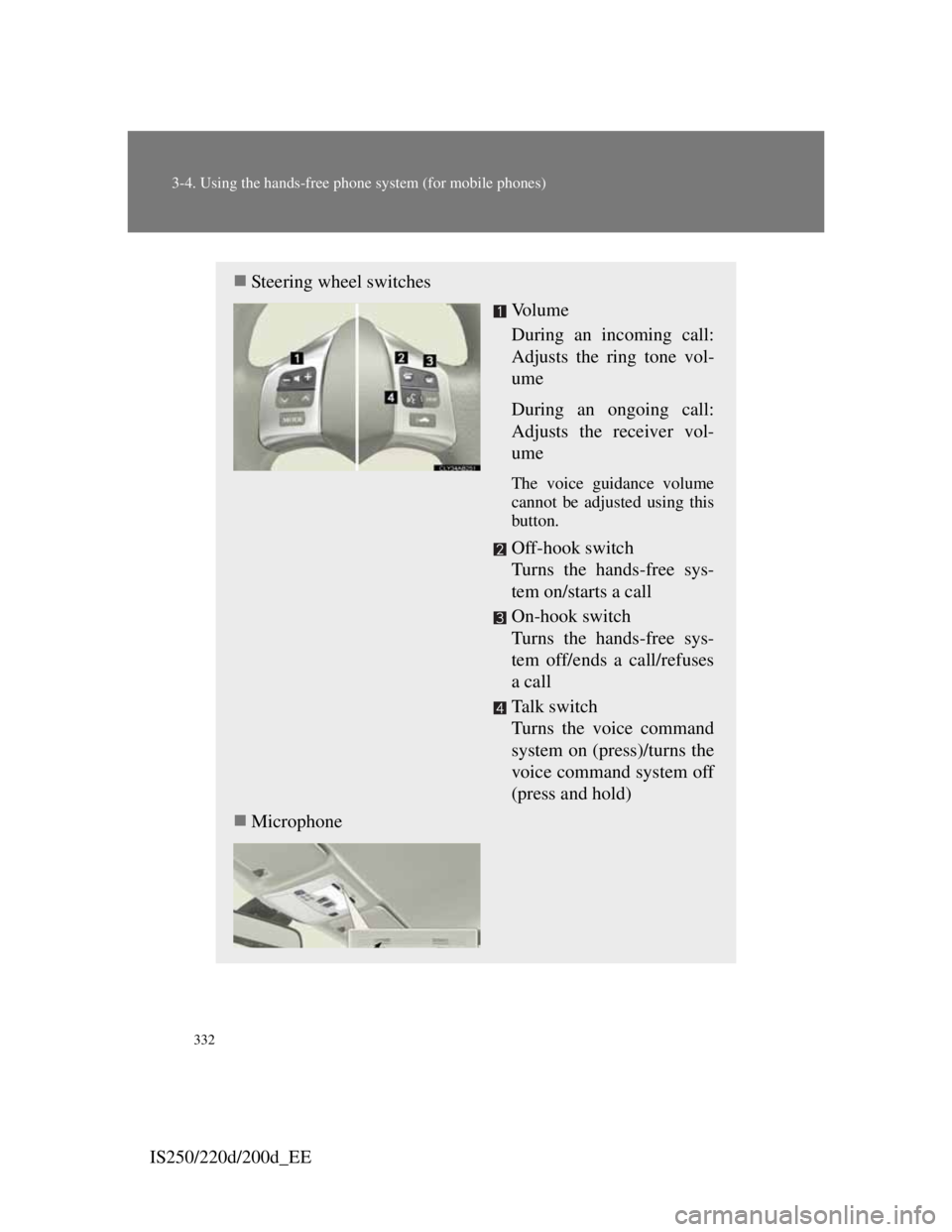
Steering wheel switches
Vo l u m e
During an incoming call:
Adjusts the ring tone vol-
ume
During an ongoing call:
Adjusts the receiver vol-
ume
The voice guidance volume
cannot be adjusted using this
button.
Off-hook switch
Turns the hands-free sys-
tem on/starts a call
On-hook switch
Turns the hands-free sys-
tem off/ends a call/refuses
a call
Ta l k s w i t c h
Turns the voice command
system on (press)/turns the
voice command system off
(press and hold)
Microphone
Page 350 of 609

333
3-4. Using the hands-free phone system (for mobile phones)
3
Interior features
IS250/220d/200d_EE
Using the hands-free phone system for the first time
Before using the hands-free phone system, it is necessary to regis-
ter a mobile phone in the system. The system will enter phone reg-
istration mode automatically when starting the system with no
mobile phone registered. Follow the procedure below to register
(pair) a mobile phone:
Press the off-hook switch or the talk switch, and select “Pair
Phone” using , and .
Select “Record Name” using , and , and
say the name to be registered after the beep.
The name to be registered will be repeated aloud.
Select “Confirm” using , and .
A passkey will be displayed.
Input the passkey into the mobile phone.
Refer to the manual that comes with the mobile phone for the
operation of the phone.
If the mobile phone has a Bluetooth® audio player, the audio
player can be registered at the same time.
When “Pair Audio?” is displayed, select “Yes” or “No”
using , and . (Bluetooth
® audio player
P. 309)
STEP1
STEP2
STEP3
STEP4
STEP5
Page 351 of 609
334
3-4. Using the hands-free phone system (for mobile phones)
IS250/220d/200d_EE
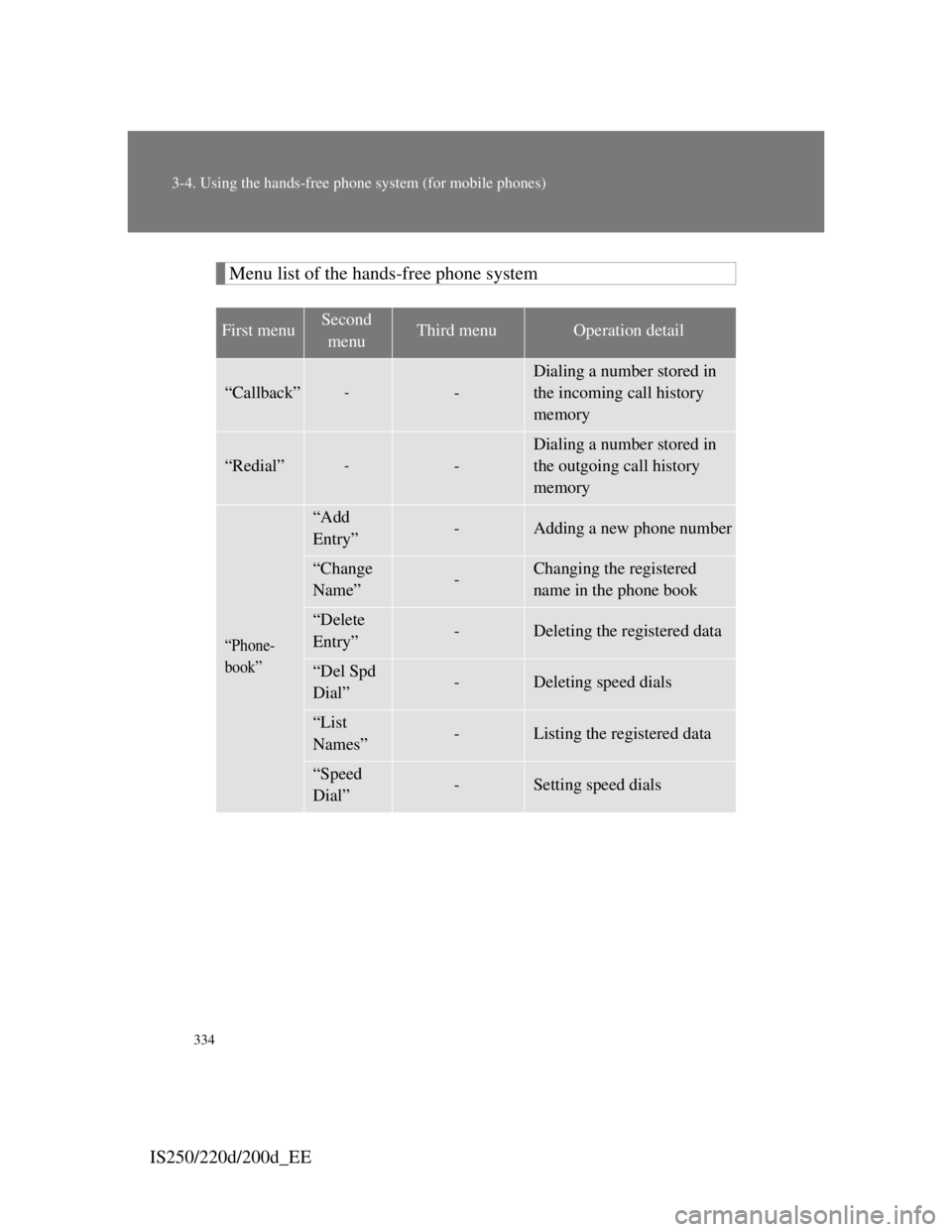
Menu list of the hands-free phone system
First menuSecond
menuThird menuOperation detail
“Callback”--
Dialing a number stored in
the incoming call history
memory
“Redial”--
Dialing a number stored in
the outgoing call history
memory
“Phone-
book”
“Add
Entry”-Adding a new phone number
“Change
Name”-Changing the registered
name in the phone book
“Delete
Entry”-Deleting the registered data
“Del Spd
Dial”-Deleting speed dials
“List
Names”-Listing the registered data
“Speed
Dial”-Setting speed dials
Page 352 of 609
335
3-4. Using the hands-free phone system (for mobile phones)
3
Interior features
IS250/220d/200d_EE
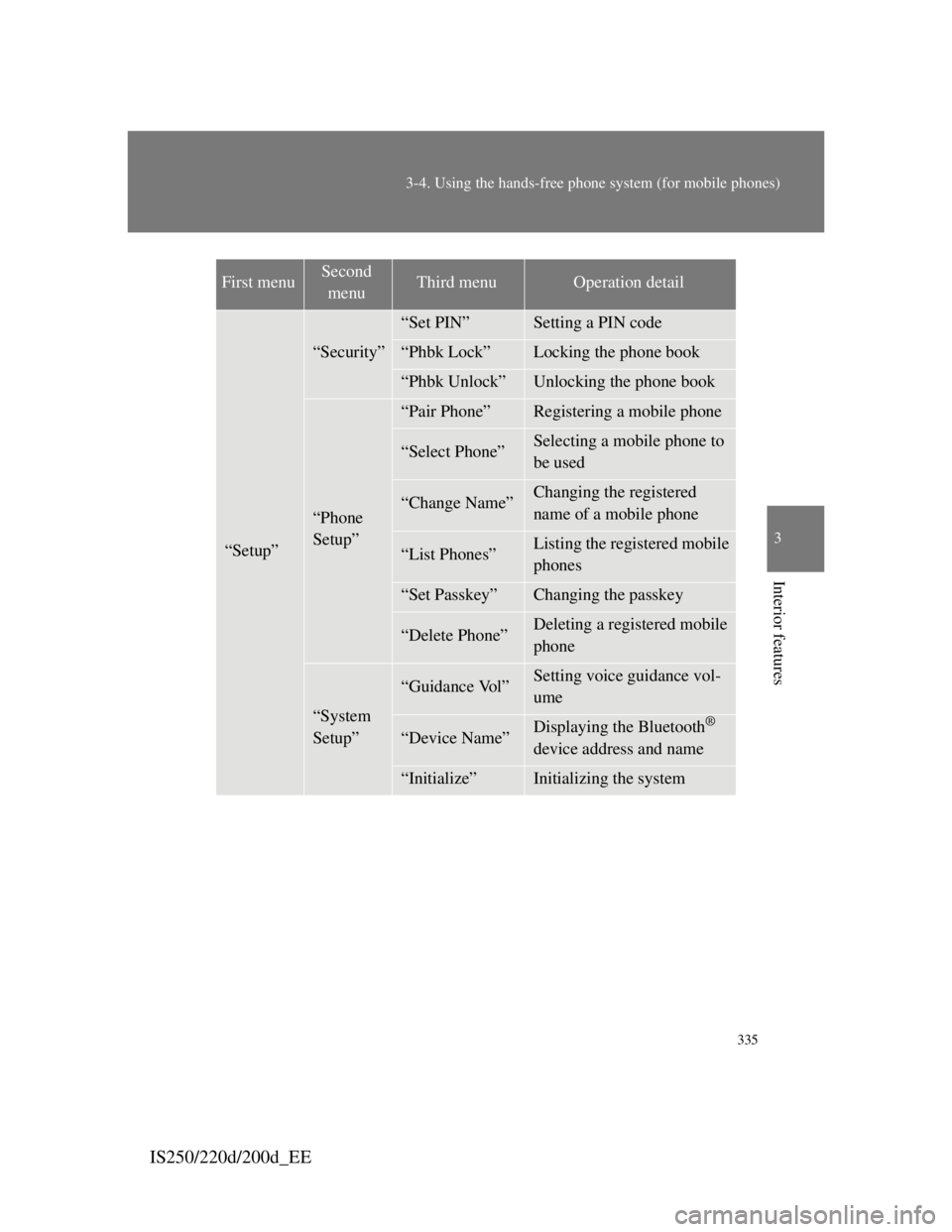
“Setup”
“Security”
“Set PIN”Setting a PIN code
“Phbk Lock”Locking the phone book
“Phbk Unlock”Unlocking the phone book
“Phone
Setup”
“Pair Phone”Registering a mobile phone
“Select Phone”Selecting a mobile phone to
be used
“Change Name”Changing the registered
name of a mobile phone
“List Phones”Listing the registered mobile
phones
“Set Passkey”Changing the passkey
“Delete Phone”Deleting a registered mobile
phone
“System
Setup”
“Guidance Vol”Setting voice guidance vol-
ume
“Device Name”Displaying the Bluetooth®
device address and name
“Initialize”Initializing the system
First menuSecond
menuThird menuOperation detail
Page 353 of 609
336
3-4. Using the hands-free phone system (for mobile phones)
IS250/220d/200d_EE
Automatic volume adjustment
When vehicle speed reaches 80 km/h (50 mph) or more, the volume auto-
matically increases. The volume returns to the previous volume setting
when vehicle speed drops to 70 km/h (43 mph) or less.
Operations that cannot be performed while driving
Operating the system with , and
Registering a mobile phone to the system
Changing the passkey
P. 3 4 3
Page 354 of 609
337
3-4. Using the hands-free phone system (for mobile phones)
3
Interior features
IS250/220d/200d_EE
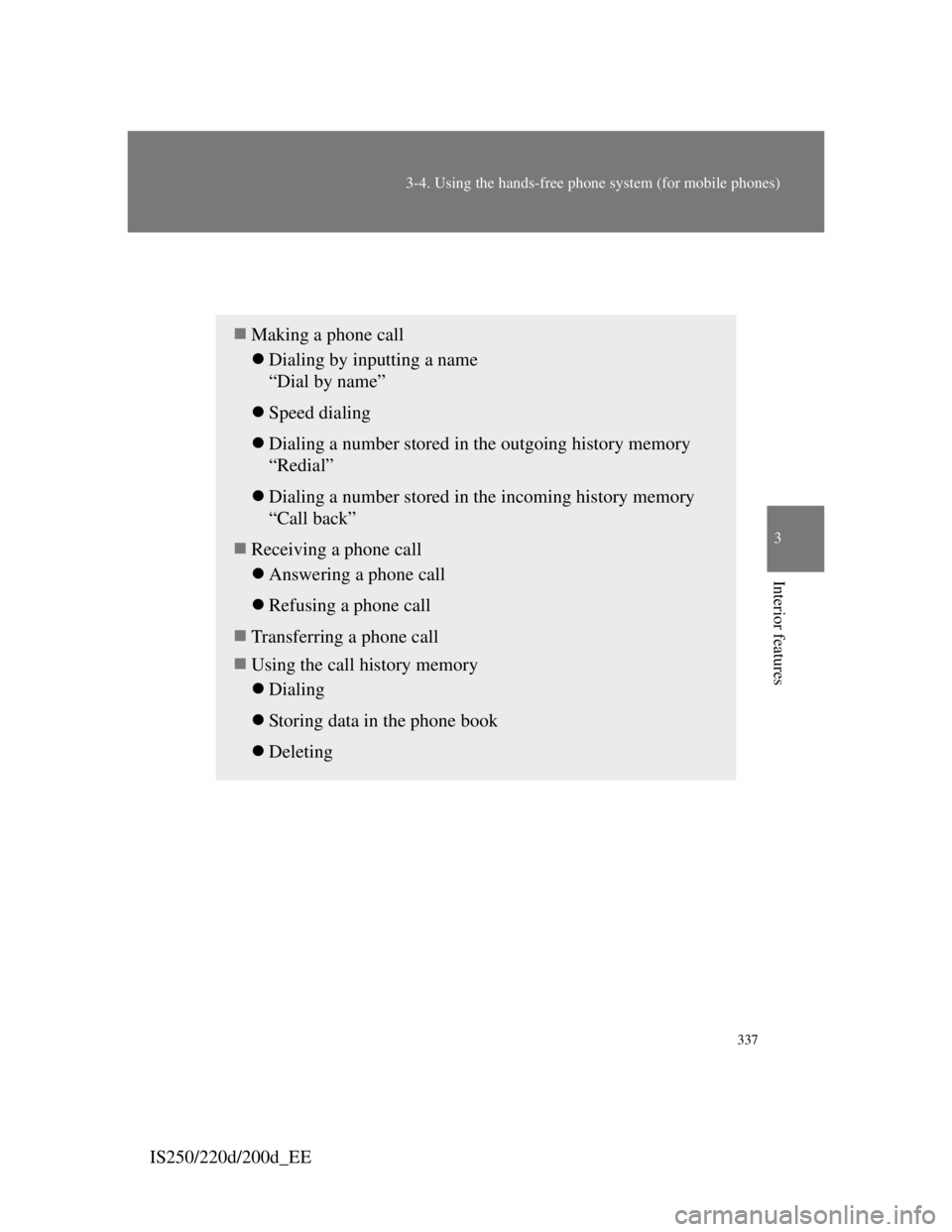
Making a phone call
Making a phone call
Dialing by inputting a name
“Dial by name”
Speed dialing
Dialing a number stored in the outgoing history memory
“Redial”
Dialing a number stored in the incoming history memory
“Call back”
Receiving a phone call
Answering a phone call
Refusing a phone call
Transferring a phone call
Using the call history memory
Dialing
Storing data in the phone book
Deleting
Page 355 of 609
338
3-4. Using the hands-free phone system (for mobile phones)
IS250/220d/200d_EE
Dialing by inputting a name
Press the talk switch and say a registered name.
The desired name or number is displayed.
Dial by one of the following methods:
a. Press the off-hook switch.
b. Select “Dial” using , and .
In , if the pronounced name cannot be recognized, select
the desired name using
, and .
Speed dialing
Press the off-hook switch.
Press the preset button in which the desired number is regis-
tered.
Press the off-hook switch.
When receiving a phone call
Answering a phone call
Press the off-hook switch.
Refusing a phone call
Press the on-hook switch.
STEP1
STEP2
STEP1
STEP1
STEP2
STEP3
Page 356 of 609

339
3-4. Using the hands-free phone system (for mobile phones)
3
Interior features
IS250/220d/200d_EE
Transferring a phone call
A call can be transferred between the mobile phone and system
while dialing, receiving a call, or during a call. Use one of the fol-
lowing methods:
a. Operate the mobile phone.
Refer to the manual that comes with the mobile phone for the
operation of the phone.
b. Press the off-hook switch*.
*:This operation can be performed only when transferring a call
from the mobile phone to the system during a call.
Page 357 of 609
340
3-4. Using the hands-free phone system (for mobile phones)
IS250/220d/200d_EE
Using the call history memory
Follow the procedure below to use a number stored in the call his-
tory memory:
Press the off-hook switch and select “Redial” (when using a
number stored in the outgoing call history memory) or
“Call back” (when using a number stored in the incoming
call history memory) using , and .
Select the desired number using , and .
The following operations can be performed:
Dialing: Press the off-hook switch or select “Dial” using ,
and .
Storing the number in the phone book: Select “Store” and then
“Confirm” using , and .
Deleting: Select “Delete” and then “Confirm” using ,
and .
Call history
Up to 5 numbers can be stored in each of the outgoing and incoming call
history memories.
When talking on the phone
Do not talk at the same time as the other party.
Keep the volume of the incoming voice down. Otherwise, voice echo
will increase.
STEP1
STEP2
STEP3