brake light Lexus IS220d 2012 User Guide
[x] Cancel search | Manufacturer: LEXUS, Model Year: 2012, Model line: IS220d, Model: Lexus IS220d 2012Pages: 609, PDF Size: 14.63 MB
Page 166 of 609
157
2-1. Driving procedures
2
When driving
IS250/220d/200d_EE
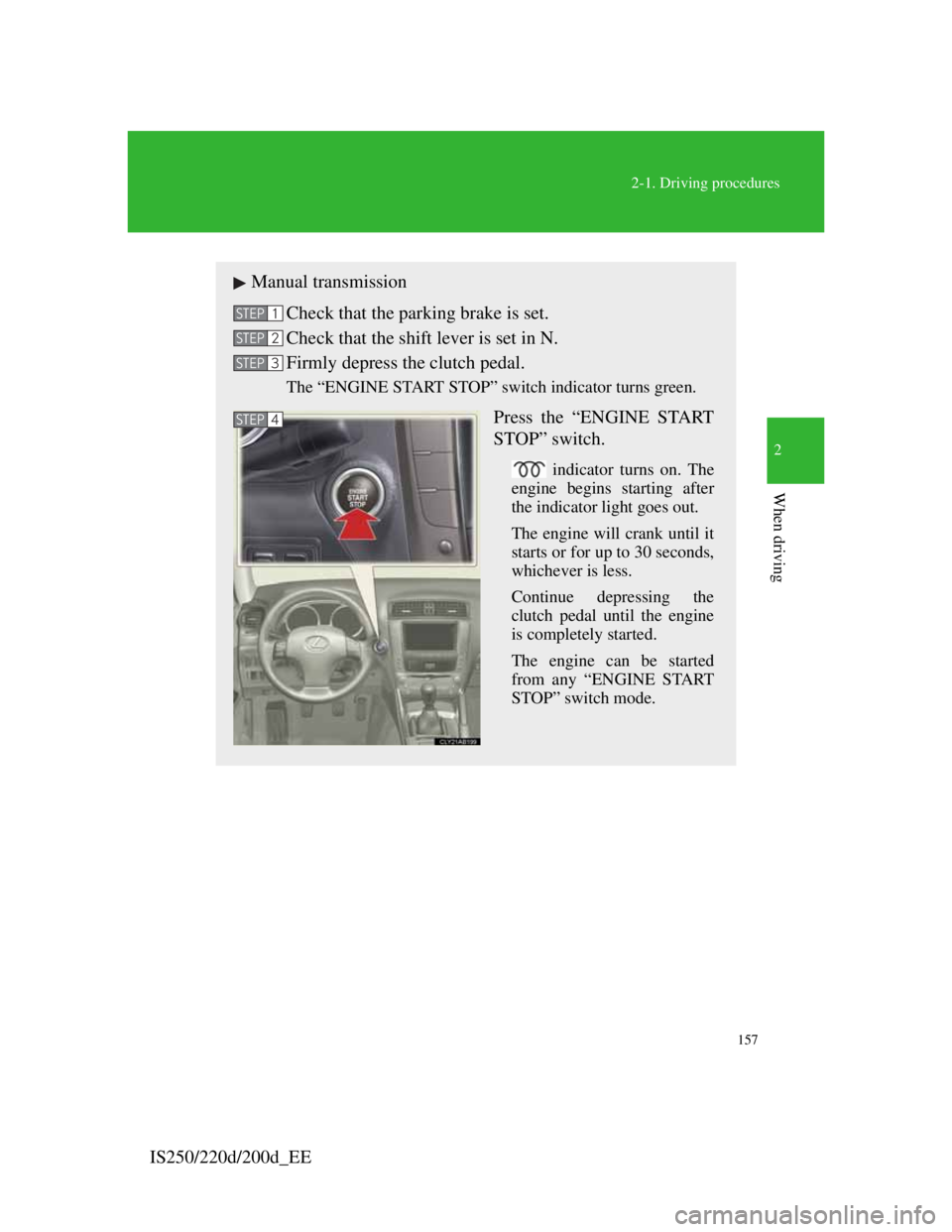
Manual transmission
Check that the parking brake is set.
Check that the shift lever is set in N.
Firmly depress the clutch pedal.
The “ENGINE START STOP” switch indicator turns green.
Press the “ENGINE START
STOP” switch.
indicator turns on. The
engine begins starting after
the indicator light goes out.
The engine will crank until it
starts or for up to 30 seconds,
whichever is less.
Continue depressing the
clutch pedal until the engine
is completely started.
The engine can be started
from any “ENGINE START
STOP” switch mode.
STEP1
STEP2
STEP3
STEP4
Page 180 of 609
171
2-1. Driving procedures
2
When driving
IS250/220d/200d_EE
Parking brake
Usage in winter time
See “Winter driving tips” for parking brake usage in winter time. (P. 2 3 9 )
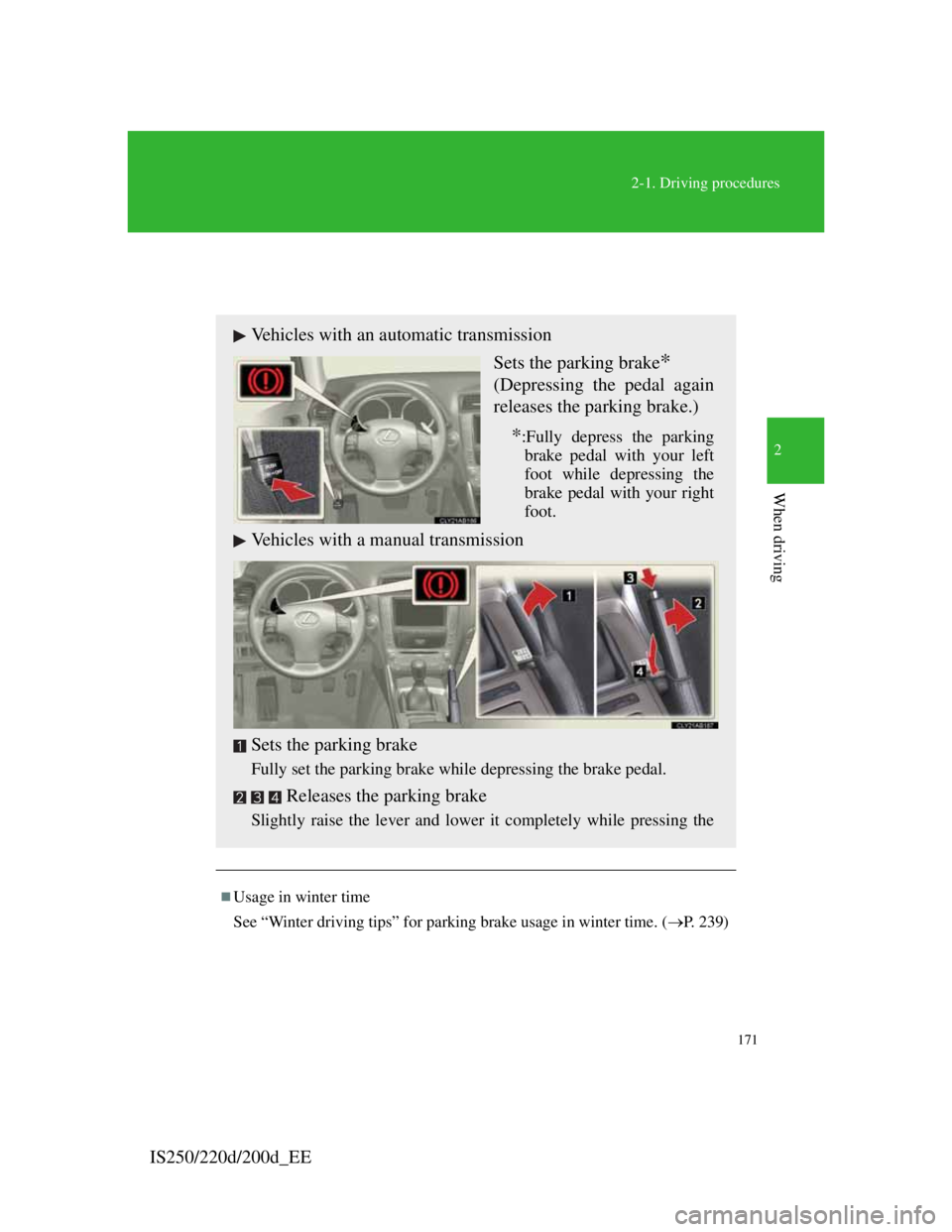
Vehicles with an automatic transmission
Sets the parking brake
*
(Depressing the pedal again
releases the parking brake.)
*:Fully depress the parking
brake pedal with your left
foot while depressing the
brake pedal with your right
foot.
Vehicles with a manual transmission
Sets the parking brake
Fully set the parking brake while depressing the brake pedal.
Releases the parking brake
Slightly raise the lever and lower it completely while pressing the
Page 228 of 609
216
2-4. Using other driving systems
IS250/220d/200d_EE
CAUTION
Conditions under which the vehicle-to-vehicle distance control may not
function correctly
Apply the brakes as necessary in the following conditions as the radar sen-
sor may not be able to correctly detect vehicles ahead, and a fatal or serious
accident may result:
When water or snow thrown up by the surrounding vehicles hinders the
functioning of the sensor
When your vehicle is pointing upwards (caused by a heavy load in the
trunk etc.)
When the road curves or when the lanes are narrow
When steering wheel operation or your position in the lane is unstable
When the vehicle ahead of you decelerates suddenly
Handling the radar sensor
Observe the following to ensure the cruise control system can function
effectively.
Otherwise, the system may not function correctly and could result in an
accident.
Keep the sensor and front grille cover clean at all times.
Clean the sensor and front grille cover with a soft cloth so you do not
mark or damage them.
Do not subject the sensor or surrounding area to a strong impact.
If the sensor moves even slightly off position, the system may malfunc-
tion. If the sensor or surrounding area is subject to a strong impact, always
have the area inspected and adjusted by any authorized Lexus dealer or
repairer, or another duly qualified and equipped professional.
Do not disassemble the sensor.
Do not attach accessories or stickers to the sensor, grille cover or sur-
rounding area.
Do not modify or paint the sensor and grille cover.
Do not replace them with non-genuine parts.
Page 234 of 609

222
2-4. Using other driving systems
IS250/220d/200d_EE
Sensor detection information
Certain vehicle conditions and the surrounding environment may affect
the ability of the sensor to correctly detect obstacles. Particular instances
where this may occur are listed below.
• There is dirt, snow or ice on the sensor.
• The sensor is frozen.
• The sensor is covered in any way.
• The vehicle is leaning considerably to one side.
• On an extremely bumpy road, on an incline, on gravel, or on grass.
• The vicinity of the vehicle is noisy due to vehicle horns, motorcycle
engines, air brakes of large vehicles, or other loud noises producing
ultrasonic waves.
• There is another vehicle equipped with parking assist sensors in the
vicinity.
• The sensor is coated with a sheet of spray or heavy rain.
• The vehicle is equipped with a fender pole or wireless antenna.
• Towing eyelets are installed.
• The bumper or sensor receives a strong impact.
• The vehicle is approaching a tall or curved curb.
• In harsh sunlight or intense cold weather.
In addition to the examples above, there are instances in which, because of
their shapes, signs and other objects may be judged by the sensor to be
closer than they are.
The shape of the obstacle may prevent the sensor from detecting it. Pay
particular attention to the following obstacles.
• Wires, fences, ropes etc.
• Cotton, snow and other materials that absorb radio waves
• Sharply-angled objects
•Low obstacles
• Tall obstacles with upper sections projecting outwards in the direction
of your vehicle
If the display flashes and a message is displayed
P. 4 7 3
Customization that can be configured at any authorized Lexus dealer or
repairer, or another duly qualified and equipped professional
Settings (e.g. buzzer volume) can be changed. (Customizable features P.
556)
Page 239 of 609

227
2-4. Using other driving systems
2
When driving
IS250/220d/200d_EE
Sounds and vibrations caused by the ABS, brake assist, VSC, TRC and hill-
start assist control systems
A sound may be heard from the engine compartment if the brake pedal is
depressed repeatedly when the engine is started or just after the vehicle
begins to move. This sound does not indicate that a malfunction has
occurred in any of these systems.
Any of the following conditions may occur when the above systems are
operating. None of these indicates that a malfunction has occurred.
• Vibrations may be felt through the vehicle body and steering.
• A motor sound may be heard after the vehicle comes to a stop.
• The brake pedal may pulsate slightly when the ABS is activated.
• The brake pedal may move down slightly after the ABS is activated.
Hill-start assist control is operational when
The shift lever is in the D or S position.
The brake pedal is not depressed.
The vehicle rolls backward.
EPS operation sound
When the steering wheel operates, a motor sound (whirring sound) may be
heard. This does not indicate a malfunction.
Reduced effectiveness of EPS
The effectiveness of EPS is reduced to prevent the system from overheating
when there is frequent steering input over an extended period of time. The
steering wheel may feel heavy as a result. Should this occur, refrain from
excessive steering input or stop the vehicle and turn the engine OFF. The
system should return to normal within 10 minutes.
If the slip indicator comes on
It may indicate a malfunction in the VSC, TRC or hill start assist control
function. Contact any authorized Lexus dealer or repairer, or another duly
qualified and equipped professional.
Page 242 of 609
230
2-4. Using other driving systems
IS250/220d/200d_EE
PCS (Pre-Crash Safety system)
When the radar sensor detects possibility of a frontal collision, the pre-
crash safety system such as the brakes and seat belts are automatically
engaged to lessen impact and injuries to occupants as well as vehicle
damage.
Pre-crash seat belts
If the pre-crash sensor detects that a collision is unavoidable, the
pre-crash safety system will retract the seat belt before the collision
occurs.
The same will happen if the driver makes an emergency braking or
loses control of the vehicle. (P. 7 6 )
However, the system will not operate in the event of skidding when
the VSC systems are disabled.
Pre-crash brake assist
When there is a high possibility of a frontal collision, the system
applies greater braking force in relation to how strongly the brake
pedal is depressed.
Pre-crash braking
When there is a high possibility of a frontal collision, the system
warns the driver using a warning light, warning display and buzzer.
If the system determines that a collision is unavoidable, the brakes
are automatically applied to reduce the collision speed. The pre-
: If equipped
Page 243 of 609
231
2-4. Using other driving systems
2
When driving
IS250/220d/200d_EE
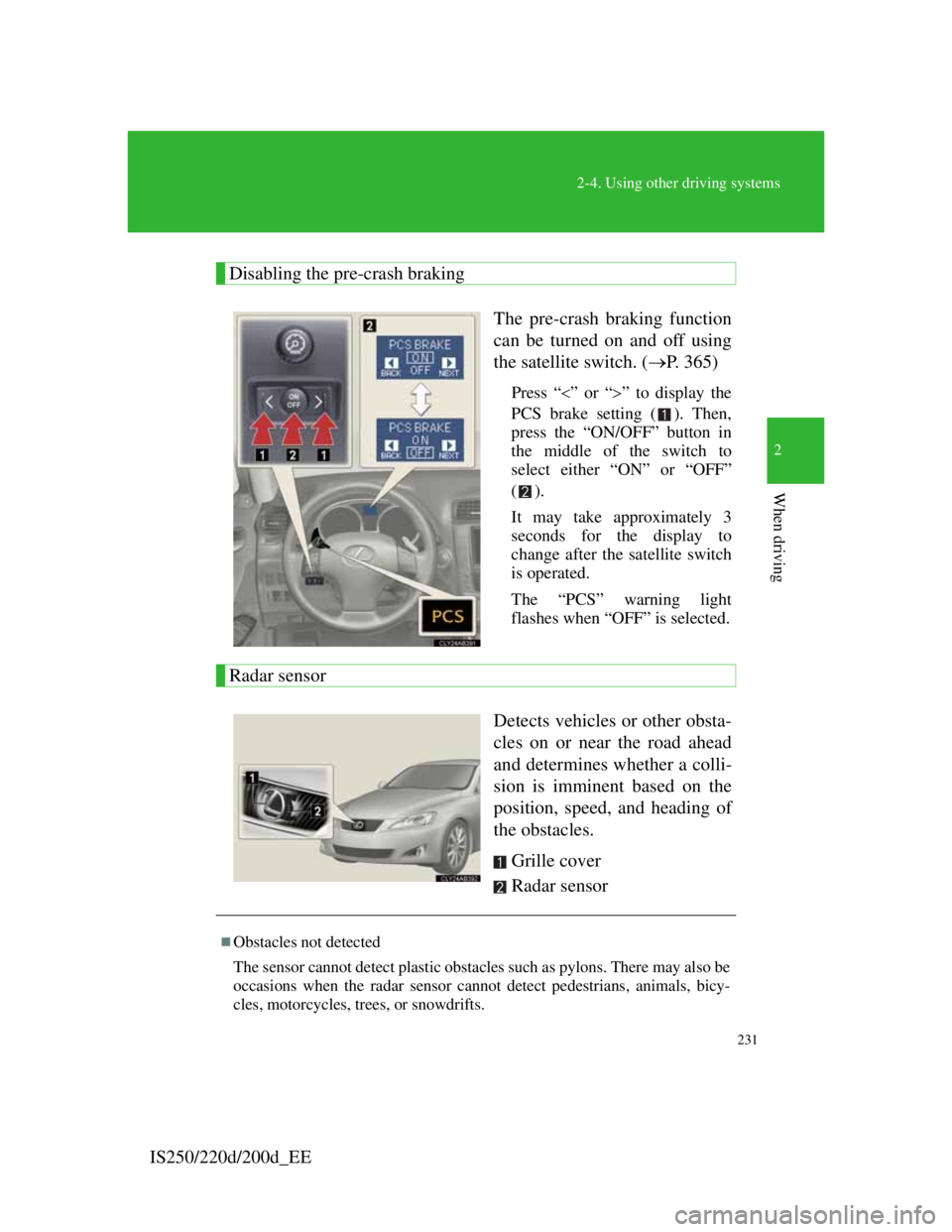
Disabling the pre-crash braking
The pre-crash braking function
can be turned on and off using
the satellite switch. (P. 365)
Press “”or “” to display the
PCS brake setting ( ). Then,
press the “ON/OFF” button in
the middle of the switch to
select either “ON” or “OFF”
().
It may take approximately 3
seconds for the display to
change after the satellite switch
is operated.
The “PCS” warning light
flashes when “OFF” is selected.
Radar sensor
Detects vehicles or other obsta-
cles on or near the road ahead
and determines whether a colli-
sion is imminent based on the
position, speed, and heading of
the obstacles.
Grille cover
Radar sensor
Obstacles not detected
The sensor cannot detect plastic obstacles such as pylons. There may also be
occasions when the radar sensor cannot detect pedestrians, animals, bicy-
cles, motorcycles, trees, or snowdrifts.
Page 422 of 609

401
4-3. Do-it-yourself maintenance
4
Maintenance and care
IS250/220d/200d_EE
NOTICE
If you remove the air cleaner
Driving with the air cleaner removed may cause excessive engine wear due
to dirt in the air. Also, a backfire could cause a fire in the engine compart-
ment.
If the fluid level is low or high
It is normal for the brake fluid level to go down slightly as the brake pads
wear or when the fluid level in the accumulator is high.
If the reservoir needs frequent refilling, it may indicate a serious problem.
Page 493 of 609
5
467
When trouble arises
IS250/220d/200d_EE
5-2. Steps to take in an emergency
If a warning light turns on or a warning buzzer sounds...
Stop the vehicle immediately. Continuing to drive the vehicle may be danger-
ous.
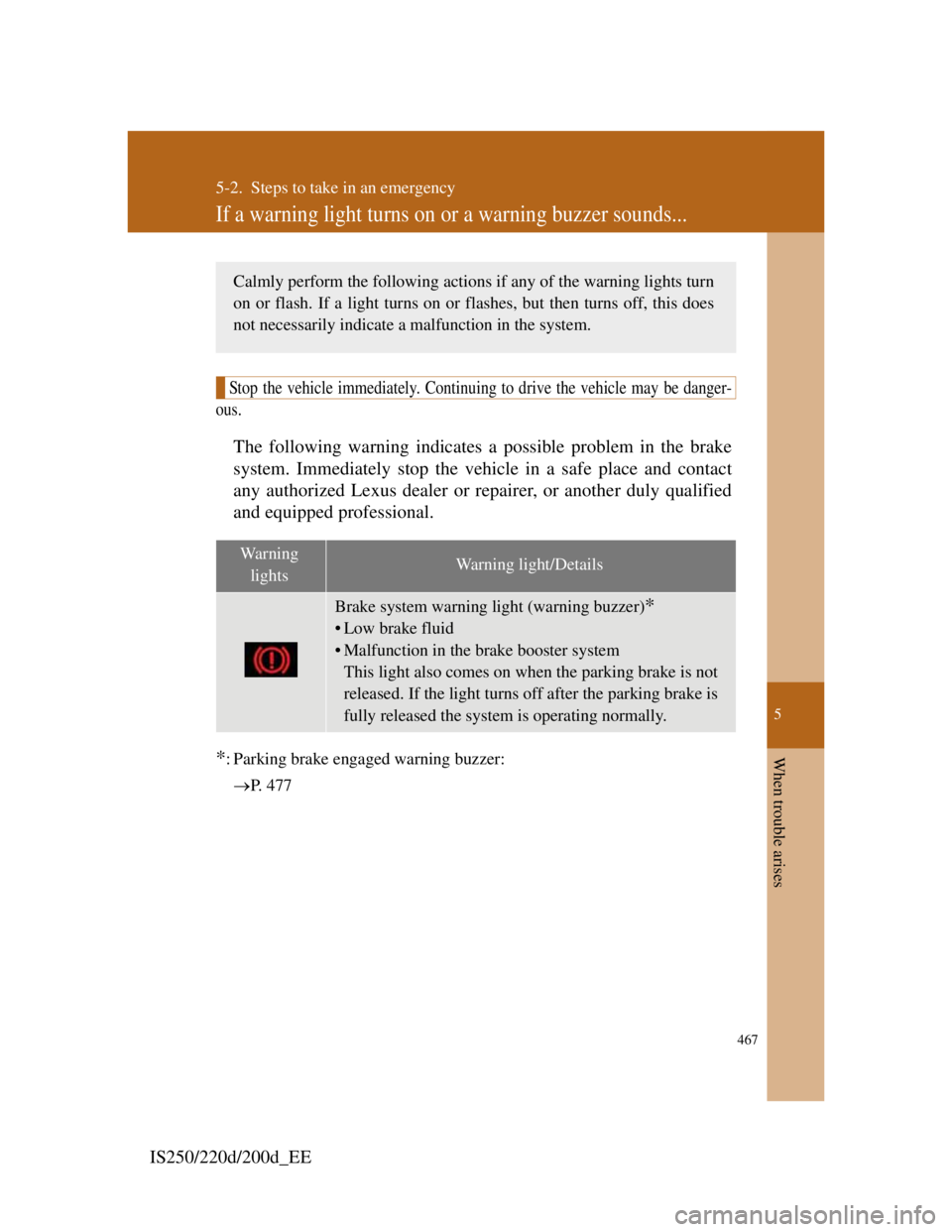
The following warning indicates a possible problem in the brake
system. Immediately stop the vehicle in a safe place and contact
any authorized Lexus dealer or repairer, or another duly qualified
and equipped professional.
*: Parking brake engaged warning buzzer:
P. 4 7 7
Wa r n i n g
lightsWarning light/Details
Brake system warning light (warning buzzer)*
• Low brake fluid
• Malfunction in the brake booster system
This light also comes on when the parking brake is not
released. If the light turns off after the parking brake is
fully released the system is operating normally.
Calmly perform the following actions if any of the warning lights turn
on or flash. If a light turns on or flashes, but then turns off, this does
not necessarily indicate a malfunction in the system.
Page 494 of 609
468
5-2. Steps to take in an emergency
IS250/220d/200d_EE
Stop the vehicle immediately.
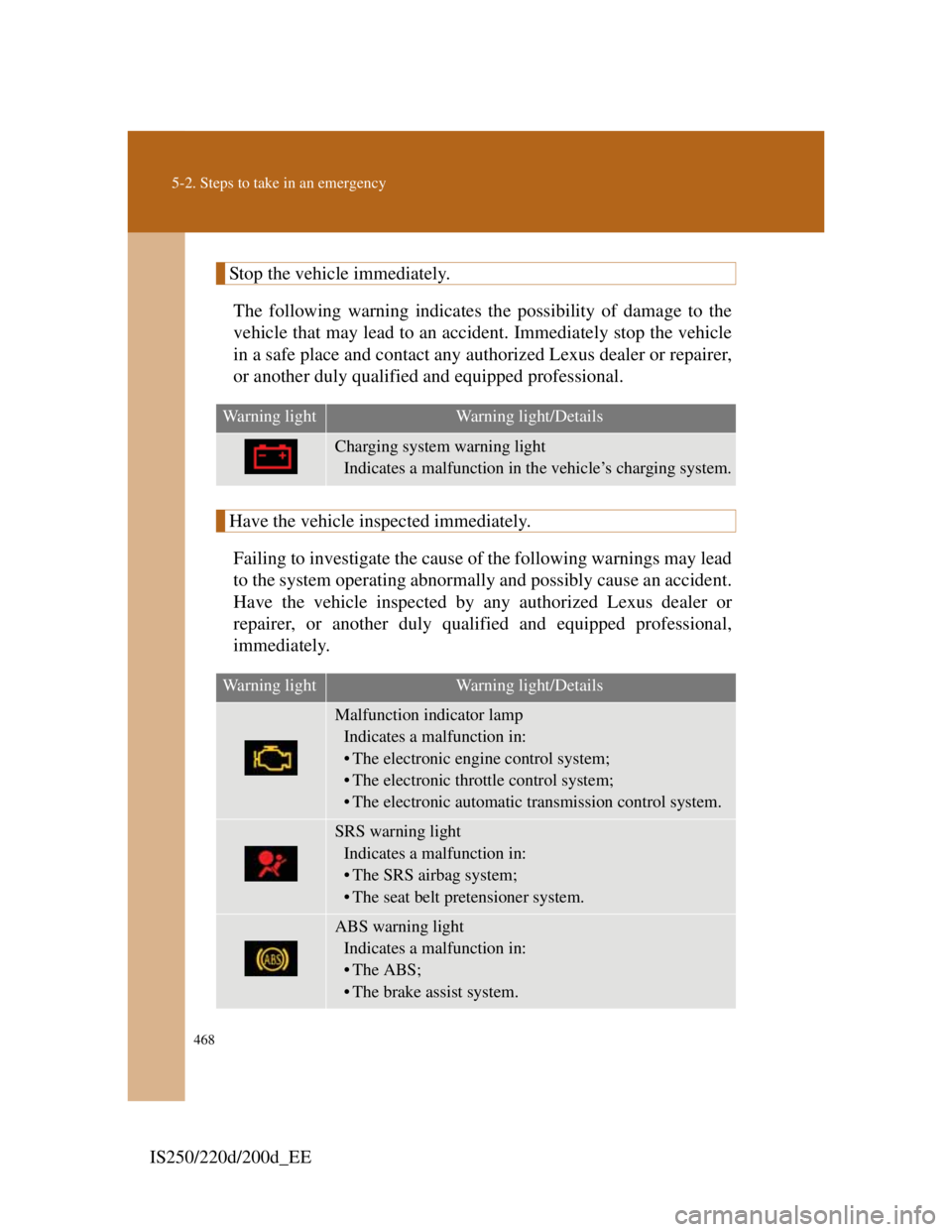
The following warning indicates the possibility of damage to the
vehicle that may lead to an accident. Immediately stop the vehicle
in a safe place and contact any authorized Lexus dealer or repairer,
or another duly qualified and equipped professional.
Have the vehicle inspected immediately.
Failing to investigate the cause of the following warnings may lead
to the system operating abnormally and possibly cause an accident.
Have the vehicle inspected by any authorized Lexus dealer or
repairer, or another duly qualified and equipped professional,
immediately.
Warning lightWarning light/Details
Charging system warning light
Indicates a malfunction in the vehicle’s charging system.
Warning lightWarning light/Details
Malfunction indicator lamp
Indicates a malfunction in:
• The electronic engine control system;
• The electronic throttle control system;
• The electronic automatic transmission control system.
SRS warning light
Indicates a malfunction in:
• The SRS airbag system;
• The seat belt pretensioner system.
ABS warning light
Indicates a malfunction in:
•The ABS;
• The brake assist system.