radio Lexus IS220d 2012 Owner's Manual
[x] Cancel search | Manufacturer: LEXUS, Model Year: 2012, Model line: IS220d, Model: Lexus IS220d 2012Pages: 609, PDF Size: 14.63 MB
Page 4 of 609

TABLE OF CONTENTSIndex
IS250/220d/200d_EE
4
3-2. Using the audio system
Audio system types ............ 266
Using the radio ................... 269
Using the CD player........... 273
Playing back MP3 and
WMA discs ...................... 280
Operating an iPod............... 287
Operating a USB memory .. 294
Optimal use of the audio
system .............................. 302
Using the AUX port ........... 304
Using the steering wheel
audio switches .................. 305
3-3. Using the Bluetooth
®
audio system
Bluetooth
® audio system ... 308
Using the Bluetooth
®
audio system .................... 313
Operating a Bluetooth
®
enabled portable player .... 316
Setting up a Bluetooth
®
enabled portable player .... 319
Bluetooth
® audio system
setup ................................. 3223-4. Using the hands-free phone
system (for mobile phones)
Hands-free system for
mobile phones .................. 323
Using the hands-free system
(for mobile phones) .......... 330
Making a phone call ........... 336
Setting a mobile phone ....... 340
Security and system setup .. 343
Using the phone book ........ 347
3-5. Using the interior lights
Interior lights list ................ 351
• Interior lights.................... 353
• Personal lights .................. 354
3-6. Using the storage features
List of storage features ....... 355
• Glove box ......................... 356
• Console boxes .................. 356
• Overhead console ............. 358
• Cup holders ...................... 359
• Bottle holders/door
pockets ............................. 360
• Auxiliary box ................... 361
Page 34 of 609
34
1-1. Key information
IS250/220d/200d_EE
The card key is not waterproof.
When required to leave a key to the vehicle with a parking attendant
Turn the trunk opener main switch off and lock the glove box as circum-
stances demand. (P. 60, 356)
Remove the mechanical key for your own use and provide the attendant
with the electronic key only.
Key number plate
Keep the plate in a safe place, not in the vehicle. In the event that a mechan-
ical key is lost, a new key can be made by any authorized Lexus dealer or
repairer, or another duly qualified and equipped professional, using the key
number plate. (P. 515)
When riding in an aircraft
When bringing an electronic key onto an aircraft, make sure you do not
press any buttons on the electronic key while inside the aircraft cabin. If you
are carrying an electronic key in your bag etc, ensure that the buttons are not
likely to be pressed accidentally. Pressing a button may cause the electronic
key to emit radio waves that could interfere with the operation of the air-
craft.
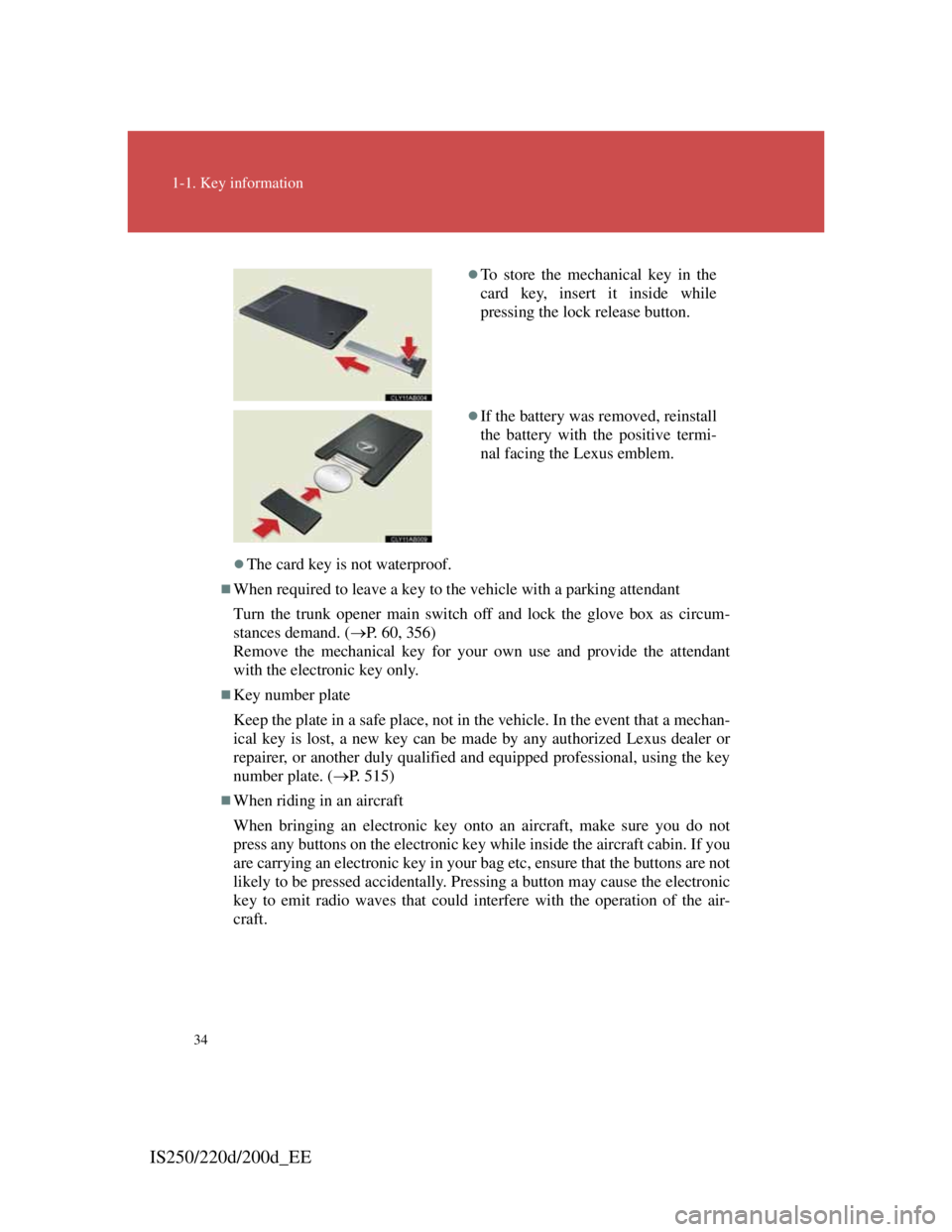
To store the mechanical key in the
card key, insert it inside while
pressing the lock release button.
If the battery was removed, reinstall
the battery with the positive termi-
nal facing the Lexus emblem.
Page 35 of 609

35
1-1. Key information
1
Before driving
IS250/220d/200d_EE
NOTICE
To prevent key damage
Observe the following.
Do not drop the keys, subject them to strong shocks or bend them.
Do not expose the keys to high temperatures for a long period of time.
Do not get the keys wet or wash them in an ultrasonic washer etc.
Do not attach metallic or magnetic materials to the keys or place the keys
close to such materials.
Do not disassemble the keys.
Do not attach stickers that contain materials that block radio waves, such
as metallic materials, to the key.
Do not place the keys near objects that produce magnetic fields, such as
TVs, audio systems, glass top ranges, or medical electrical equipment,
such as low-frequency therapy equipment.
Precautions for handling the card keys
Do not apply excess force when inserting the mechanical key to the card
key. Doing so may damage the card key.
If the battery or card key terminals get wet, the battery may corrode and
the card key may stop working.
If the key is dropped into water, or if drinking water etc. is spilled on the
key, immediately remove the battery cover and wipe the battery and ter-
minals. (To remove the battery cover, lightly grasp it and pull.) If the bat-
tery is corroded, have any authorized Lexus dealer or repairer, or another
duly qualified and equipped professional, replace the battery.
Do not crush the battery cover or use a screwdriver to remove the battery
cover. Forcibly removing the battery cover may bend or damage the key.
If the battery cover is frequently removed, the battery cover may become
loose.
When installing the battery, make sure to check the direction of the bat-
tery.
Installing the battery in the wrong direction may cause the battery to
deplete rapidly.
Page 36 of 609

36
1-1. Key information
IS250/220d/200d_EE
NOTICE
The surface of the card key may be damaged, or its coating may peel off
in the following situations.
• The card key is carried together with hard objects, such as coins or
keys.
• The card key is scraped with a sharp object, such as a tip of mechanical
pencil.
• The surface of the card key is wiped with thinners or benzene.
Carrying the electronic key on your person
When carrying the key, maintain a distance of at least 10 cm (3.9 in.) from
any of the following electrical appliances with their power on. If a distance
of 10 cm (3.9 in.) is not kept, radio waves may be interfered with, causing
the key to not function correctly.
• A portable radio, cellular phone, cordless phone or other wireless com-
munication device
• Personal computers or personal digital assistants (PDAs)
• Digital audio players
• Portable game systems
Page 42 of 609

42
1-2. Opening, closing and locking the doors and trunk
IS250/220d/200d_EE
Operation signals
Doors: The emergency flashers flash to indicate that the doors have been
locked/unlocked. (Locked: Once; Unlocked: Twice)
Windows and moon roof: A buzzer sounds to indicate that the windows and
moon roof are operating.
Conditions affecting operation
The smart entry & start system uses weak radio waves. In the following sit-
uations, the communication between the electronic key and the vehicle may
be affected, preventing the smart entry & start system and wireless remote
control from operating properly:
(Ways of coping: P. 516)
When the electronic key battery is depleted
Near a TV tower, electric power plant, gas station, radio station, large
display, airport or other facility that generates strong radio waves or elec-
trical noise
When carrying a portable radio, cellular phone, cordless phone or other
wireless communication devices
When the electronic key is in contact with, or is covered by the follow-
ing metallic objects
• Cards to which aluminum foil is attached
• Cigarette boxes that have aluminum foil inside
• Metallic wallets or bags
• Coins
• Hand warmers made of metal
• Media such as CDs and DVDs
When multiple electronic keys are in the vicinity
When another wireless key (that emits radio waves) is being used nearby
When carrying or using the electronic key together with the following
devices that emit radio waves
• Another vehicle's electronic key or a wireless key that emits radio
waves
• Personal computer or personal digital assistant (PDA)
• Digital audio player
• Portable game system
If window tint with a metallic content or metallic objects are attached to
the rear window
Page 44 of 609

44
1-2. Opening, closing and locking the doors and trunk
IS250/220d/200d_EE
Battery-saving function
In the following circumstances, the entry function is disabled in order to
prevent the vehicle and electronic key batteries from discharging.
When the entry function has not been used for a month or more
When the electronic key has been left within approximately 1 m (3 ft.) of
the vehicle for 10 minutes or more
The system will resume operation when
The vehicle is locked using the door handle lock switch.
The vehicle is locked/unlocked using the wireless remote control func-
tion.
(P. 55)
The vehicle is locked/unlocked using the mechanical key. (P. 516)
Electronic key battery depletion
The standard battery life is 1 to 2 years. (The card key battery life is
about a year and a half.)
If the battery becomes low, an alarm will sound in the cabin when the
engine stops. (P. 481)
The battery becomes depleted even if the electronic key is not used
because the key always receives radio waves. If the smart entry & start
system or the wireless remote control does not operate, or the detection
area becomes smaller, the battery may be depleted. Replace the battery
when necessary.
(P. 431)
To avoid serious deterioration, do not leave the electronic key within 1 m
(3 ft.) of the following electrical appliances that produce a magnetic
field.
•TVs
• Personal computers
• Cellular phones, cordless phones and battery chargers
• Recharging cellular phones or cordless phones
• Glass top ranges
• Table lamps
Page 46 of 609

46
1-2. Opening, closing and locking the doors and trunk
IS250/220d/200d_EE
To operate the system properly
Make sure to carry the electronic key when operating the system. Do not get
the electronic key too close to the vehicle when operating the system from
the outside of the vehicle.
Depending on the position and holding condition of the electronic key, the
key may not be detected correctly and the system may not operate properly.
(The alarm may go off accidentally, or the door lock prevention may not
function.)
Note for the entry function
Even when the electronic key is within the effective range (detection
areas), the system may not operate properly in the following cases.
• The electronic key is too close to the window or outside door handle,
near the ground, or in a high place when the doors are locked or
unlocked.
• The electronic key is near the ground or in a high place, or too close to
the rear bumper center when the trunk is unlocked.
• The electronic key is on the instrument panel, rear package tray or
floor, or in the glove box when the engine is started or “ENGINE
START STOP” switch modes are changed.
Do not leave the electronic key on top of the instrument panel or near the
door pockets when exiting the vehicle. Depending on the radio wave
reception conditions, it may be detected by the antenna outside the cabin
and the door will become lockable from the outside, possibly trapping
the electronic key inside the vehicle.
As long as the electronic key is within the effective range, the doors may
be locked or unlocked by anyone.
Even if the electronic key is not inside the vehicle, it may be possible to
start the engine if the electronic key is near the window.
The doors may unlock if a large amount of water splashes on the door
handle, such as in the rain or in a car wash. (The doors will automatically
be locked after approximately 30 seconds if the doors are not opened and
closed.)
Gripping the door handle when wearing a glove may not unlock the
door.
If the wireless remote control is used to lock the doors when the elec-
tronic key is near the vehicle, there is a possibility that the door may not
be unlocked by the entry function. (Use the wireless remote control to
unlock the doors.)
A sudden approach to the effective range or door handle operation may
prevent the doors from being unlocked. In this case, return the door han-
dle to the original position and check that the doors unlock before pulling
the door handle again.
Page 54 of 609

54
1-2. Opening, closing and locking the doors and trunk
IS250/220d/200d_EE
CAUTION
Caution regarding interference with electronic devices
People with implanted pacemakers or cardiac defibrillators should main-
tain a reasonable distance between themselves and the smart entry & start
system antennas. (P. 3 9 )
The radio waves may affect the operation of such devices. If necessary,
the entry function can be disabled. Ask any authorized Lexus dealer or
repairer, or another duly qualified and equipped professional, for details,
such as the frequency of radio waves and timing of emitting the radio
waves. Then, consult your doctor to see if you should disable the entry
function.
User of any electrical medical device other than implanted pacemakers
and implanted cardiac defibrillators should consult the manufacturer of
the device for information about its operation under the influence of radio
waves.
Radio waves could have unexpected effects on the operation of such med-
ical devices.
Ask any authorized Lexus dealer or repairer, or another duly qualified and
equipped professional, for details for disabling the entry function.
Page 234 of 609

222
2-4. Using other driving systems
IS250/220d/200d_EE
Sensor detection information
Certain vehicle conditions and the surrounding environment may affect
the ability of the sensor to correctly detect obstacles. Particular instances
where this may occur are listed below.
• There is dirt, snow or ice on the sensor.
• The sensor is frozen.
• The sensor is covered in any way.
• The vehicle is leaning considerably to one side.
• On an extremely bumpy road, on an incline, on gravel, or on grass.
• The vicinity of the vehicle is noisy due to vehicle horns, motorcycle
engines, air brakes of large vehicles, or other loud noises producing
ultrasonic waves.
• There is another vehicle equipped with parking assist sensors in the
vicinity.
• The sensor is coated with a sheet of spray or heavy rain.
• The vehicle is equipped with a fender pole or wireless antenna.
• Towing eyelets are installed.
• The bumper or sensor receives a strong impact.
• The vehicle is approaching a tall or curved curb.
• In harsh sunlight or intense cold weather.
In addition to the examples above, there are instances in which, because of
their shapes, signs and other objects may be judged by the sensor to be
closer than they are.
The shape of the obstacle may prevent the sensor from detecting it. Pay
particular attention to the following obstacles.
• Wires, fences, ropes etc.
• Cotton, snow and other materials that absorb radio waves
• Sharply-angled objects
•Low obstacles
• Tall obstacles with upper sections projecting outwards in the direction
of your vehicle
If the display flashes and a message is displayed
P. 4 7 3
Customization that can be configured at any authorized Lexus dealer or
repairer, or another duly qualified and equipped professional
Settings (e.g. buzzer volume) can be changed. (Customizable features P.
556)
Page 266 of 609
252
3-1. Using the air conditioning sys-
tem and defogger
Automatic air
conditioning system ....... 254
Power heater .................... 262
Rear window and outside
rear view mirror
defoggers ....................... 264
Windshield wiper de-icer . 265
3-2. Using the audio system
Audio system types.......... 266
Using the radio................. 269
Using the CD player ........ 273
Playing back MP3 and
WMA discs .................... 280
Operating an iPod ............ 287
Operating a USB
memory .......................... 294
Optimal use of the audio
system ............................ 302
Using the AUX port......... 304
Using the steering
wheel audio switches ..... 305