driver Lexus IS250 2006 Audio/video System / LEXUS 2006 IS350/250 QUICK REFERENCE GUIDE
[x] Cancel search | Manufacturer: LEXUS, Model Year: 2006, Model line: IS250, Model: Lexus IS250 2006Pages: 54, PDF Size: 3.36 MB
Page 13 of 54
Topic 2
Before Driving
13
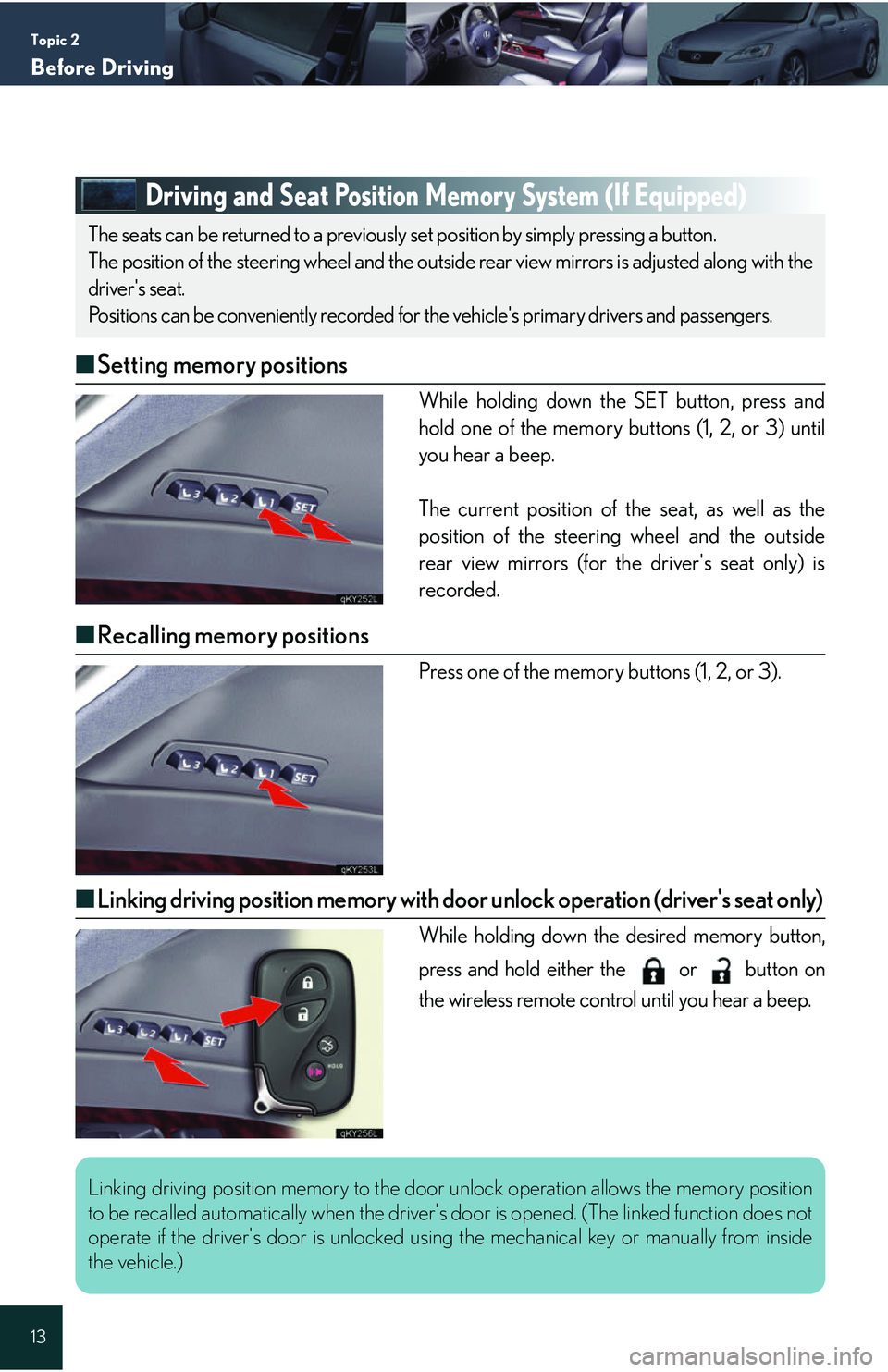
Driving and Seat Position Memory System (If Equipped)
■Setting memory positions
While holding down the SET button, press and
hold one of the memory buttons (1, 2, or 3) until
you hear a beep.
The current position of the seat, as well as the
position of the steering wheel and the outside
rear view mirrors (for the driver's seat only) is
recorded.
■Recalling memory positions
Press one of the memory buttons (1, 2, or 3).
■Linking driving position memory with door unlock operation (driver's seat only)
While holding down the desired memory button,
press and hold either the or button on
the wireless remote control until you hear a beep.
The seats can be returned to a previously set position by simply pressing a button.
The position of the steering wheel and the outside rear view mirrors is adjusted along with the
driver's seat.
Positions can be conveniently recorded for the vehicle's primary drivers and passengers.
Linking driving position memory to the door unlock operation allows the memory position
to be recalled automatically when the driver's door is opened. (The linked function does not
operate if the driver's door is unlocked us ing the mechanical key or manually from inside
the vehicle.)
Page 15 of 54
Topic 2
Before Driving
15
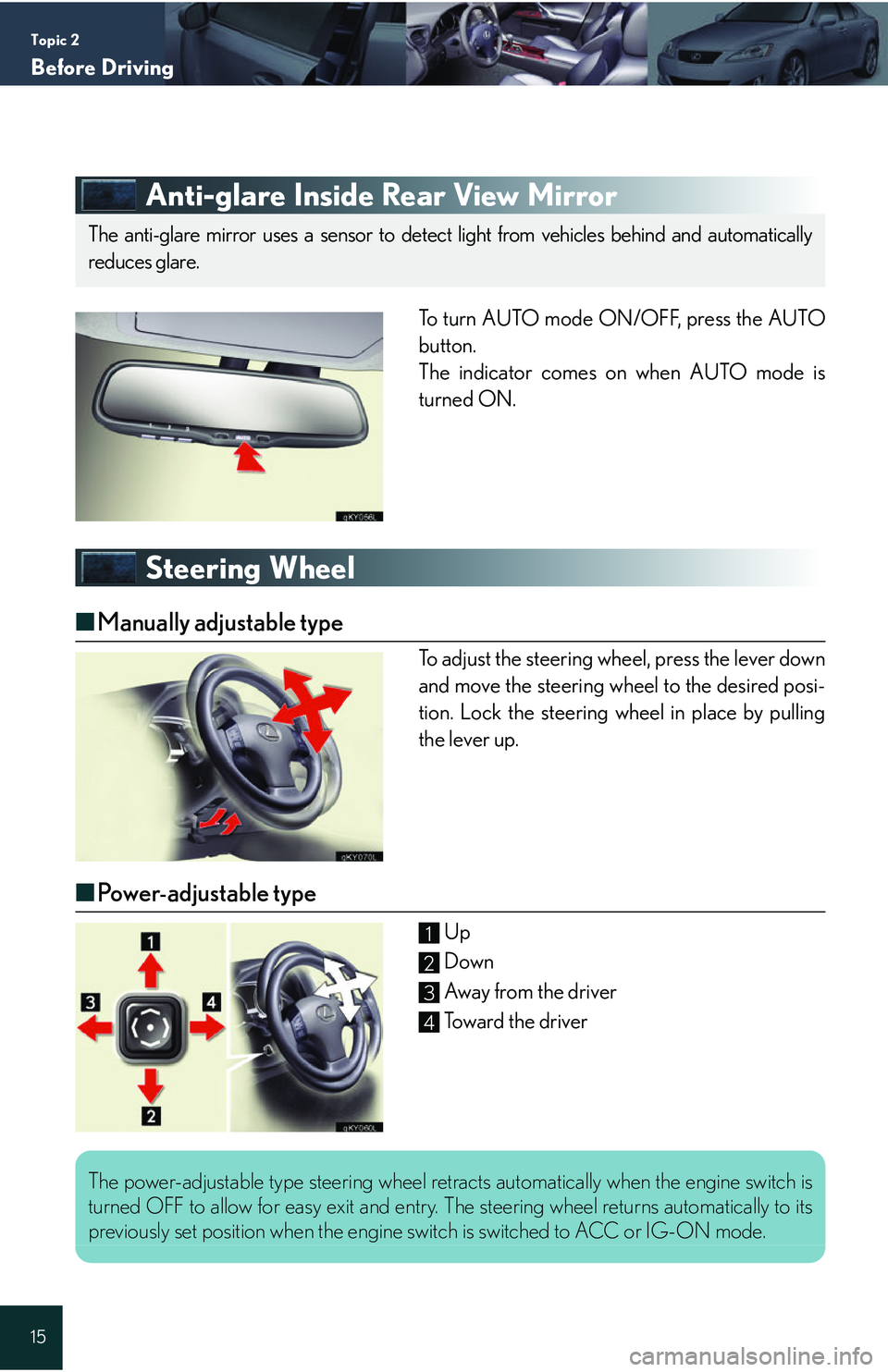
Anti-glare Inside Rear View Mirror
To turn AUTO mode ON/OFF, press the AUTO
button.
The indicator comes on when AUTO mode is
turned ON.
Steering Wheel
■Manually adjustable type
To adjust the steering wheel, press the lever down
and move the steering wheel to the desired posi-
tion. Lock the steering wheel in place by pulling
the lever up.
■Power-adjustable type
Up
Down
Away from the driver
Toward the driver
The anti-glare mirror uses a sensor to detect light from vehicles behind and automatically
reduces glare.
1
2
3
4
The power-adjustable type steering wheel retracts automatically when the engine switch is
turned OFF to allow for easy exit and entry. The steering wheel returns automatically to its
previously set position when the engine switch is switched to ACC or IG-ON mode.
Page 18 of 54

Topic 3
When Driving
18
Entering and Exiting
Before DrivingBefore Driving
When DrivingWhen Driving
Rain and
Night Driving
Driving Comfort
Opening and Closing
What to do if ...
Customizing Yo u r L e x u s
Automatic Transmission
■ Shift positions
P Pa r k *
R Reverse
N Neutral (drive not engaged)
D Drive
S S mode
* : The engine can only be started in P.
The vehicle can only be shifted out of P whenthe engine switch is in IG-ON mode and the
brake pedal is depressed.
■ S mode
S mode allows the driver to select the shift range manually based on driving conditions.
Shift the shift lever to S.
To u p s h i f t : shift the shift lever toward "+", or
press the "+" shift paddle switch on the steering
wheel.
To d o w n s h i f t : shift the shift lever toward "-", or
press the "-" shift paddle switch on the steering
wheel.
The selected shift range is displayed on the
instrument cluster.
Page 23 of 54

Topic 3
When Driving
23
ETCS Switch (Manual Transmissions)
An indicator comes on when in snow mode.
Press again to return to normal mode.
Lexus Parking Assist-sensor (If Equipped)
■Turning the system on and off
The system can be turned on and off using the satellite switch. ( P. 2 1 )
■Screen display
Sensors are used to detect obstacles near the
vehicle. The distance to a detected obstacle is
shown by the number of indicator bars.
Indicates obstacles detected by the corner
sensors
Indicates obstacles detected by the back sen-
sors
Use the ETCS switch to change to snow mode when starting or accelerating on snow-
covered roads or other slippery surfaces.
The system uses a screen display and buzzer to inform the driver of obstacles near the
vehicle when parking or driving at low speed.
1
2
Page 24 of 54
Topic 3
When Driving
24
Entering and Exiting
Before DrivingBefore Driving
When DrivingWhen Driving
Rain and
Night Driving
Driving Comfort
Opening and Closing
What to do if ...
Customizing Yo u r L e x u s
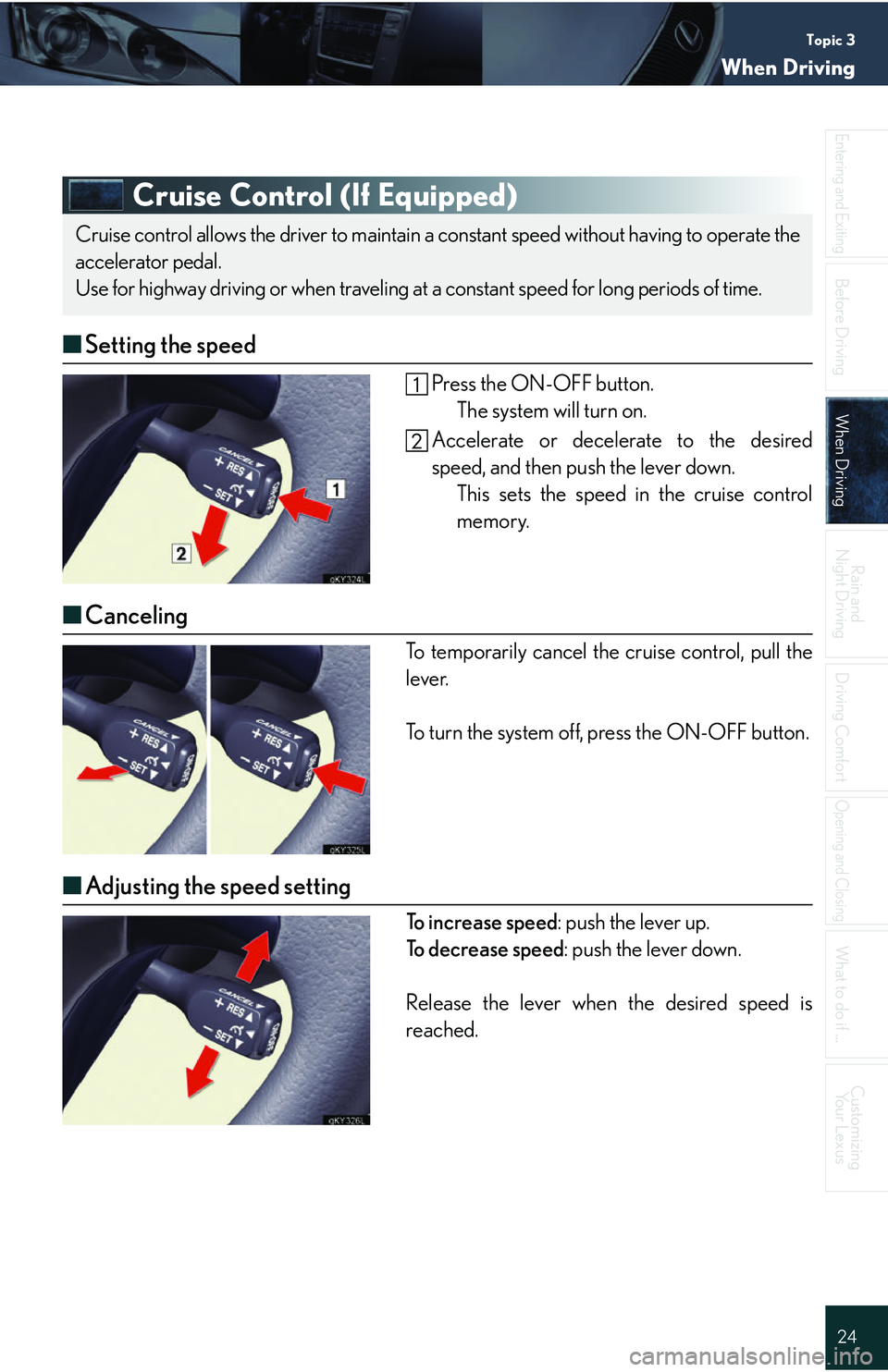
Cruise Control (If Equipped)
■ Setting the speed
Press the ON-OFF button.
The system will turn on.
Accelerate or decelerate to the desired
speed, and then push the lever down. This sets the speed in the cruise control
memory.
■Canceling
To temporarily cancel the cruise control, pull the
lever.
To turn the system off, press the ON-OFF button.
■Adjusting the speed setting
To i n c r e a s e s p e e d : push the lever up.
To decrease speed : push the lever down.
Release the lever when the desired speed is
reached.
Cruise control allows the driver to maintain a constant speed without having to operate the
accelerator pedal.
Use for highway driving or when traveling at a constant speed for long periods of time.
Page 34 of 54
Topic 5
Driving Comfort
34
Entering and Exiting
When Driving
Rain and
Night Driving
Driving ComfortDriving Comfort
Opening and Closing
What to do if ...
Customizing Your Lexus
Before Driving
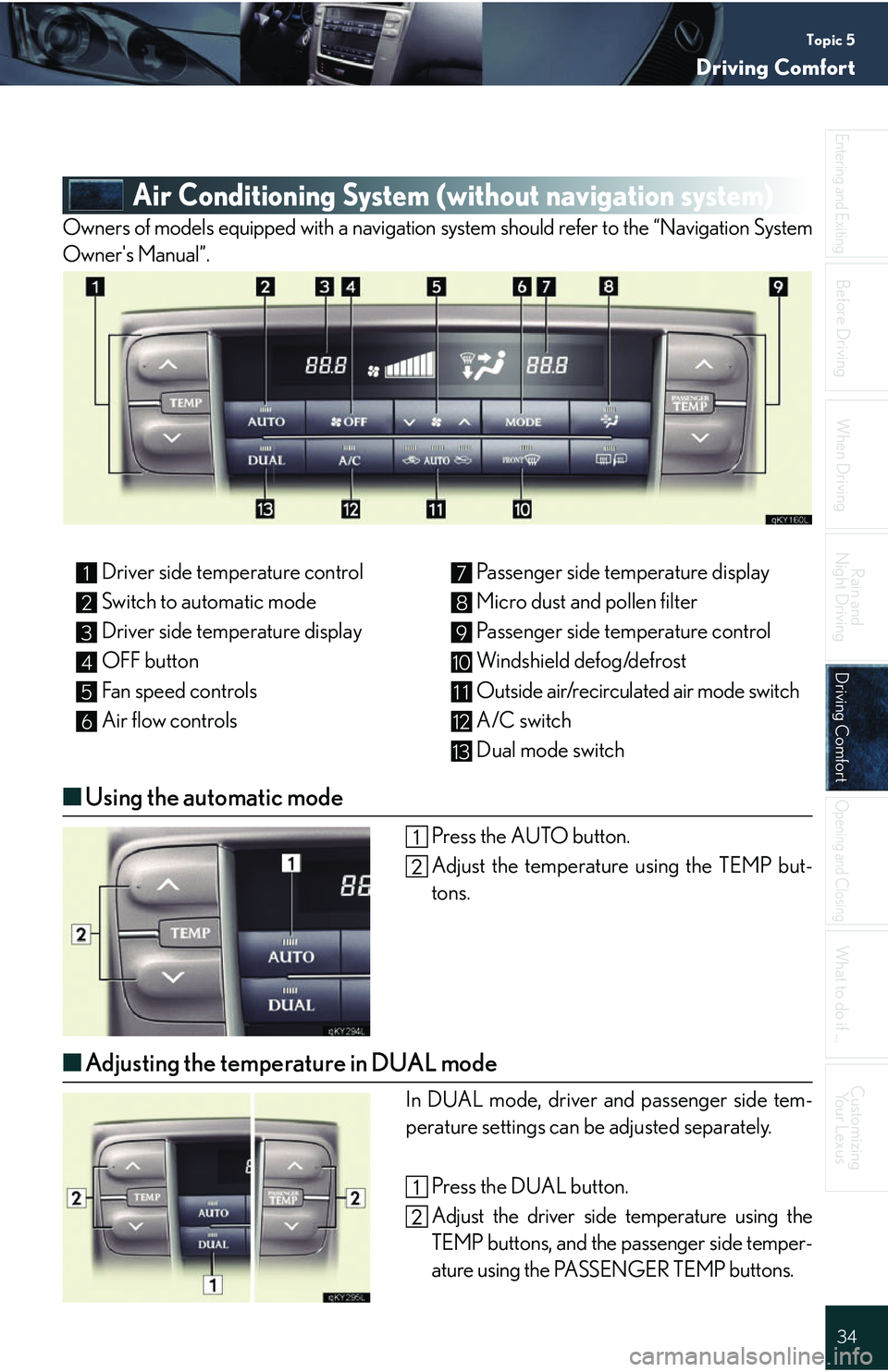
Air Conditioning System (wit hout navigation system)
Owners of models equipped with a navigation system should refer to the “Navigation System
Owner's Manual”.
■Using the automatic mode
Press the AUTO button.
Adjust the temperature using the TEMP but-
tons.
■Adjusting the temperature in DUAL mode
In DUAL mode, driver and passenger side tem-
perature settings can be adjusted separately.
Press the DUAL button.
Adjust the driver side temperature using the
TEMP buttons, and the passenger side temper-
ature using the PASSENGER TEMP buttons.
Driver side temperature control
Switch to automatic mode
Driver side temperature display
OFF button
Fan speed controls
Air flow controls Passenger side temperature display
Micro dust and pollen filter
Passenger side temperature control
Windshield defog/defrost
Outside air/recirculated air mode switch
A/C switch
Dual mode switch1
2
3
4
5
6
7
8
9
10
11
12
13
Page 42 of 54
Topic 6
Opening and Closing
42
Entering and Exiting
Before DrivingBefore Driving
When Driving
Rain and
Night Driving
Driving Comfort
Opening and ClosingOpening and Closing
What to do if ...
Customizing Your Lexus
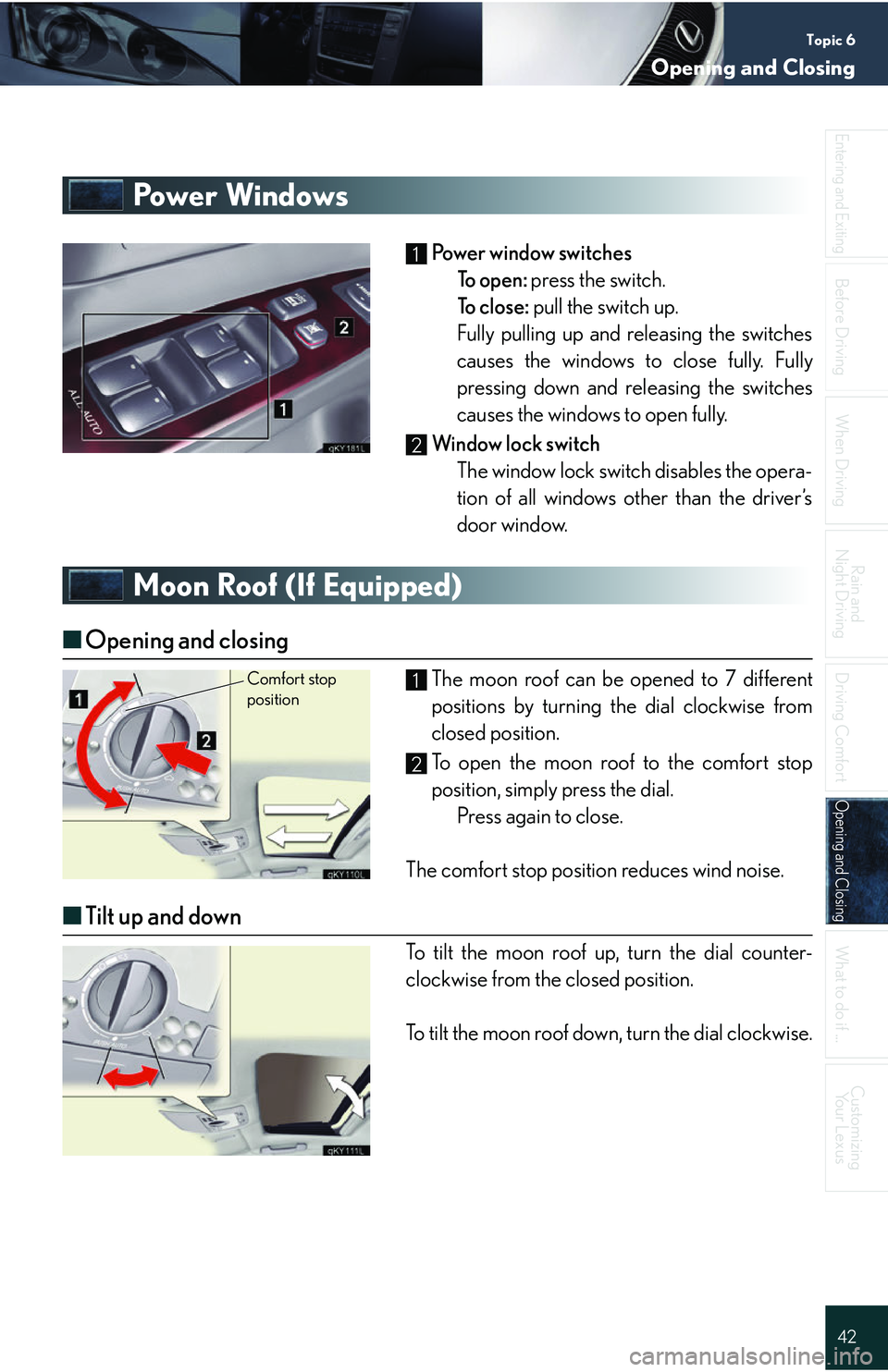
Power Windows
Power window switches
To open: press the switch.
To close: pull the switch up.
Fully pulling up and releasing the switches
causes the windows to close fully. Fully
pressing down and releasing the switches
causes the windows to open fully.
Window lock switch The window lock switch disables the opera-
tion of all windows other than the driver’s
door window.
Moon Roof (If Equipped)
■Opening and closing
The moon roof can be opened to 7 different
positions by turning the dial clockwise from
closed position.
To open the moon roof to the comfort stop
position, simply press the dial. Press again to close.
The comfort stop position reduces wind noise.
■ Tilt up and down
To tilt the moon roof up, turn the dial counter-
clockwise from the closed position.
To tilt the moon roof down, turn the dial clockwise.
1
2
Comfort stop position1
2
Page 46 of 54
46
Entering and Exiting
Before Driving
When Driving
Rain and
Night Driving
Driving Comfort
Opening and Closing
What to do if ...
Customizing Yo u r L e x u s
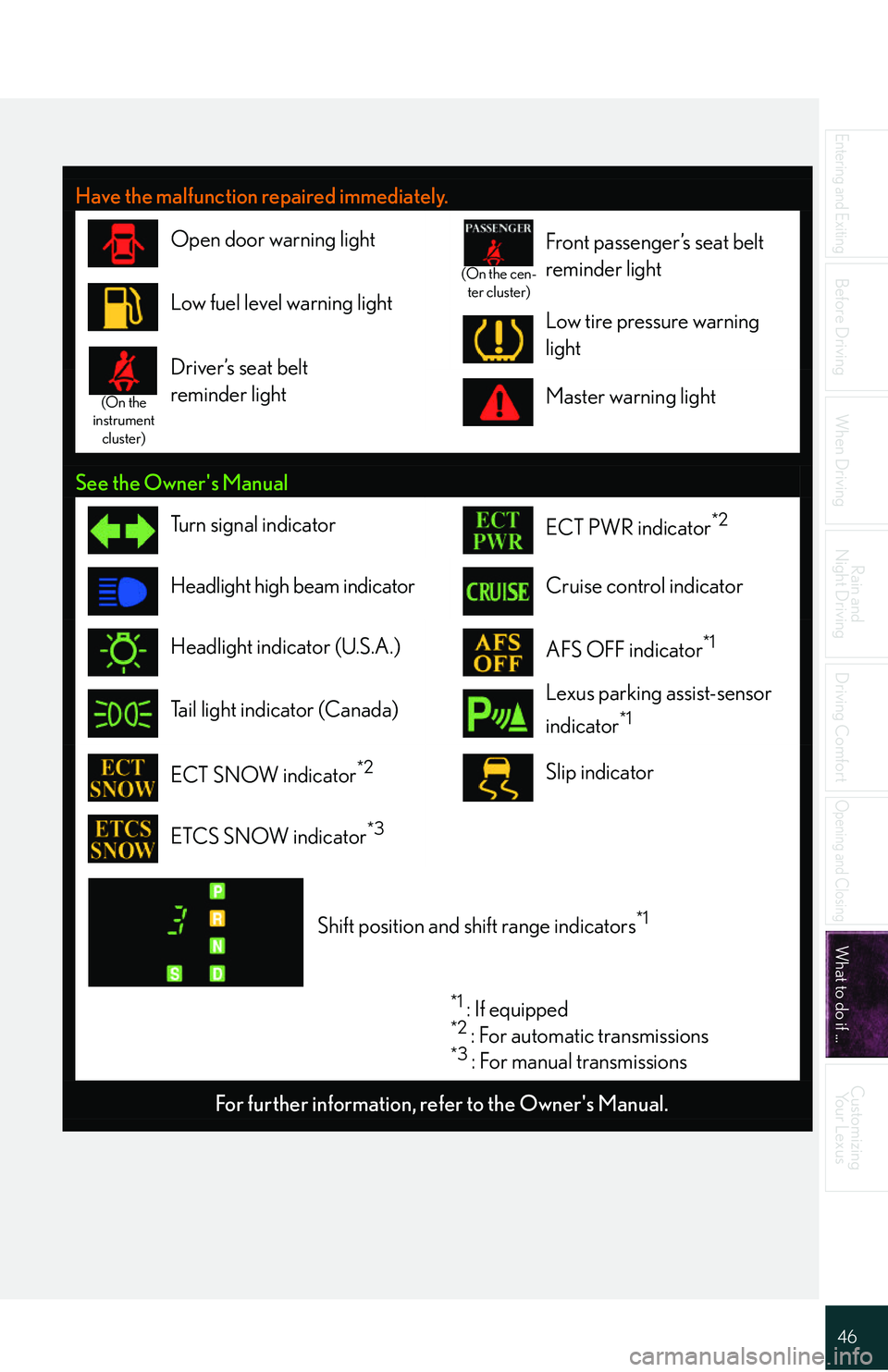
Have the malfunction repaired immediately.
Open door warning light
(On the cen-
ter cluster)
Front passenger’s seat belt
reminder light
Low fuel level warning lightLow tire pressure warning
lighta
(On the
instrument cluster)
Driver’s seat belt
reminder light
Master warning light
See the Owner's Manual
Tu r n s i g n a l i n d i c a t o rECT PWR indicator*2
Headlight high beam indicatorCruise control indicator
Headlight indicator (U.S.A.)AFS OFF indicator*1
Tail light indicator (Canada)Lexus parking assist-sensor
indicator
*1
ECT SNOW indicator*2Slip indicator
ETCS SNOW indicator*3
Shift position and shift range indicators*1
*1 : If equipped*2 : For automatic transmissions*3 : For manual transmissions
For further information, re fer to the Owner's Manual.
Page 48 of 54

48
Entering and Exiting
Before Driving
When Driving
Rain and
Night Driving
Driving Comfort
Opening and Closing
What to do if ...
Customizing Your Lexus
If the electronic key battery becomes
discharged
■ Unlocking and locking the doors
To unlock or lock the vehicle, use the mechanical
key to remove the lock cover on the driver's door
handle. The mechanical key is stored inside the
electronic key.
Unlocks
Locks
■Starting the engine
Depress the brake pedal (for automatic trans-
missions) or clutch pedal (for manual transmis-
sions).
Hold the electronic key close to the engine
switch (within 0.4 in. [10 mm]), making sure that
the button side of the key is facing toward you.
Press the engine switch within 5 seconds of
the buzzer, keeping the brake pedal (for auto-
matic transmissions) or clutch pedal (for man-
ual transmissions) depressed.
1
2
For instructions on replacing the electronic key battery, refer to the Owner's Manual. If you
need further assistance, contact your Lexus dealer.
Page 50 of 54
50
Entering and Exiting
Before Driving
When Driving
Rain and
Night Driving
Driving Comfort
Opening and Closing
What to do if ...
Customizing Yo u r L e x u s
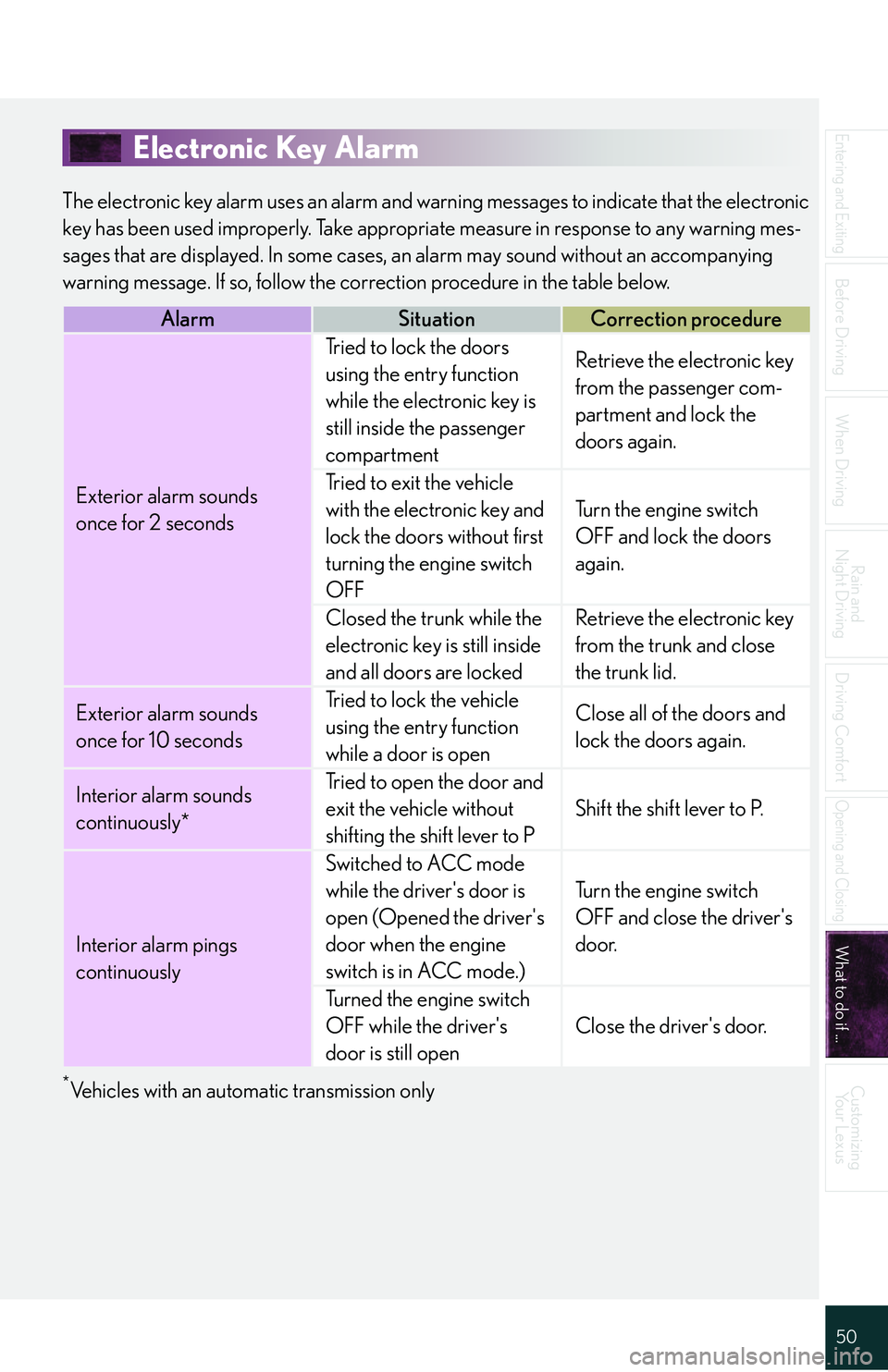
Electronic Key Alarm
The electronic key alarm uses an alarm and warn ing messages to indicate that the electronic
key has been used improperly. Take appropri ate measure in response to any warning mes-
sages that are displayed. In some cases, an alarm may sound without an accompanying
warning message. If so, follow the co rrection procedure in the table below.
*Vehicles with an automatic transmission only
AlarmSituationCorrection procedure
Exterior alarm sounds
once for 2 seconds
Tried to lock the doors
using the entry function
while the electronic key is
still inside the passenger
compartmentRetrieve the electronic key
from the passenger com-
partment and lock the
doors again.
Tried to exit the vehicle
with the electronic key and
lock the doors without first
turning the engine switch
OFF
Tu r n t h e e n g i n e s w i t c h
OFF and lock the doors
again.
Closed the trunk while the
electronic key is still inside
and all doors are lockedRetrieve the electronic key
from the trunk and close
the trunk lid.
Exterior alarm sounds
once for 10 secondsTried to lock the vehicle
using the entry function
while a door is openClose all of the doors and
lock the doors again.
Interior alarm sounds
continuously*Tried to open the door and
exit the vehicle without
shifting the shift lever to P
Shift the shift lever to P.
Interior alarm pings
continuously
Switched to ACC mode
while the driver's door is
open (Opened the driver's
door when the engine
switch is in ACC mode.)
Tu r n t h e e n g i n e s w i t c h
OFF and close the driver's
door.
Turned the engine switch
OFF while the driver's
door is still open
Close the driver's door.