ECO mode Lexus IS250 2008 User Guide
[x] Cancel search | Manufacturer: LEXUS, Model Year: 2008, Model line: IS250, Model: Lexus IS250 2008Pages: 462, PDF Size: 25.52 MB
Page 117 of 462

116
2-1. Driving procedures
08_IS350/250_U_(L/O_0708)
NOTICE
■If you hear a squealing or scraping noise (brake pad wear limit indicators)
Have your Lexus dealer check and replace the brake pads as soon as possible.
The rotor damage can result if the pads are not replaced when needed.
Front brake only: Moderate levels of the brake pad and disc wear allow enhanced
front braking power. As a result, the discs may wear more quickly than conventional
brake discs. Therefore, when replacing the brake pads, Lexus recommends that you
also have the thickness of the discs measured.
It is dangerous to drive the vehicle when the wear limits of the brake pads and/or
that of the brake discs are exceeded.
■If you get a flat tire while driving
A flat or damaged tire may cause the following situations. Hold the steering wheel
firmly and gradually press the brake pedal to slow down the vehicle.
●It may be difficult to control your vehicle.
●The vehicle will make abnormal sounds.
●The vehicle will behave abnormally.
Replace a flat tire with a new one. ( →P. 3 8 4 )
■When encountering flooded roads
Do not drive on a road that has flooded after heavy rain etc. Doing so may cause the
following serious damage to the vehicle.
●Engine stalling
●Short in electrical components
●Engine damage caused by water immersion
In the event that you drive on a flooded road and the vehicle is flooded, be sure to
have your Lexus dealer check the following.
●Brake function
●Changes in quantity and quality of oil and fluid used for the engine, transmission,
differential, etc.
●Lubricant condition for the propeller shaft, bearings and suspension joints (where
possible) and the function of all joints, bearings, etc.
Page 122 of 462

121
2-1. Driving procedures
2
When driving
08_IS350/250_U_(L/O_0708)
NOTICE
■To prevent battery discharge
Do not leave the “ENGINE START STOP” switch in ACCESSORY or IGNITION
ON mode for long periods without the engine running.
■When starting the engine
●Do not race a cold engine.
●If the engine becomes difficult to start or stalls frequently, have the engine
checked immediately.
Page 134 of 462

133
2-2. Instrument cluster
2
When driving
08_IS350/250_U_(L/O_0708)■
Changing the indicator setting
The satellite switch can be used to change the set speed at which the
yellow speed or tacho indicator ring comes on.
The setting can be made only when the “ENGINE START STOP”
switch is in IGNITION ON mode and the vehicle is stopped.
Push
< or > to select the speed or tacho indicator set mode. ( ) Turn the
speed or tacho indicator to “OFF” and then “ON” by pushing the “ON/
OFF” button. ( )
After one second, the mode enters
the indicator setting mode.
The speedometer or tachometer
needle moves to the previously set
speed.
STEP1
Page 135 of 462
134
2-2. Instrument cluster
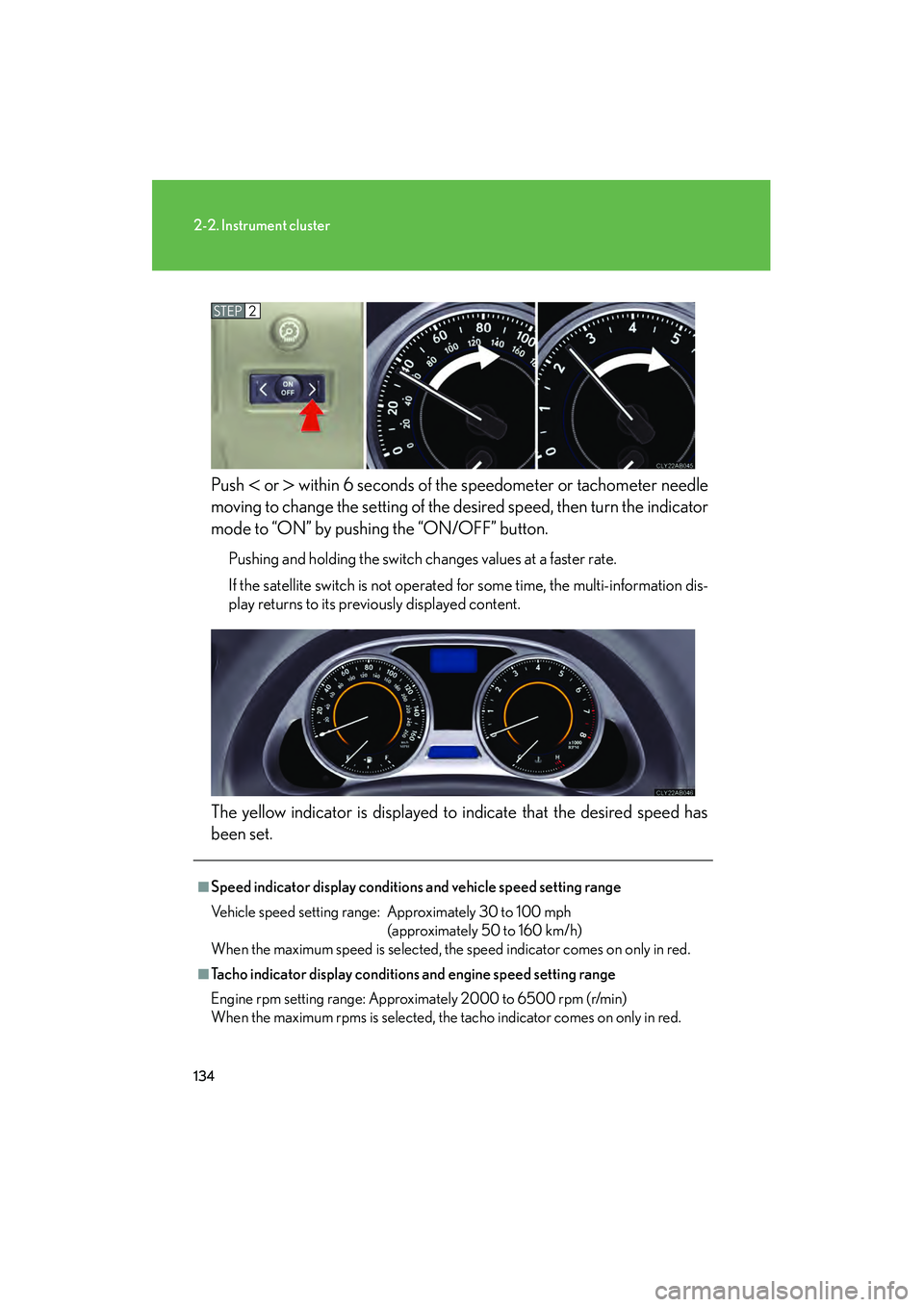
08_IS350/250_U_(L/O_0708)Push
< or > within 6 seconds of the speedometer or tachometer needle
moving to change the setting of the de sired speed, then turn the indicator
mode to “ON” by pushing the “ON/OFF” button.
Pushing and holding the switch changes values at a faster rate.
If the satellite switch is not operated for some time, the multi-information dis-
play returns to its previously displayed content.
The yellow indicator is displayed to indicate that the desired speed has
been set.
STEP2
■Speed indicator display conditions and vehicle speed setting range
Vehicle speed setting range: Approximately 30 to 100 mph (approximately 50 to 160 km/h)
When the maximum speed is selected, the speed indicator comes on only in red.
■Tacho indicator display conditions and engine speed setting range
Engine rpm setting range: Approximately 2000 to 6500 rpm (r/min)
When the maximum rpms is selected, the tacho indicator comes on only in red.
Page 150 of 462

149
2-3. Operating the lights and windshield wipers
2
When driving
08_IS350/250_U_(L/O_0708)
■Rain drop sensor (vehicles equipped with the rain-sensing windshield wipers)
If the wiper switch is turned to “AUTO” position while the “ENGINE START STOP”
switch is in IGNITION ON mode, the wiper operate once to show that “AUTO”
mode is activated.
■Outside rear view mirror defogger activation linked to windshield wiper opera-
tion
The outside rear view mirror defogger automatically turns on when you operate the
windshield wipers.
■If no windshield washer fluid sprays
Check that the washer nozzles are not blocked if there is washer fluid in the wind-
shield washer fluid reservoir.
■Customization that can be configured at Lexus dealer
Settings (e.g. drip prevention function) can be changed. (Customizable features
→ P. 4 3 6 )
CAUTION
■Caution regarding the use of windshield wipers in “AUTO” mode
The windshield wipers may operate unexpectedly if the sensor is touched or the
windshield is subject to vibration in “AUTO” mode. Take care that your fingers or
anything else do not become caught in the windshield wipers.
The sensor judges the amount of raindrops.
Page 156 of 462

155
2-4. Using other driving systems
2
When driving
08_IS350/250_U_(L/O_0708)
Dynamic radar cruise control (if equipped)
Dynamic radar cruise control supplements conventional cruise control
with a vehicle-to-vehicle distance control. In the vehicle-to-vehicle dis-
tance control mode, the vehicle automatically accelerates or decelerates
in order to maintain a set following distance from vehicles ahead.
■ Select cruise mode
Selecting vehicle-to-vehicle dis-
tance control modeTurn the “ON-OFF” button
on.
Push the button once more to
deactivate.
Selecting conventional con-
stant speed control mode Turn the “ON-OFF” button
on.
Push the button once more to
deactivate.
Vehicle-to-vehicle distance con-
trol mode is always reset when
the “ENGINE START STOP”
switch is switched to IGNITION
ON mode.
Switch to constant speed
control mode.
(push and hold for approxi-
mately one second)
Page 190 of 462
189
2-5. Driving information
2
When driving
08_IS350/250_U_(L/O_0708)
Dinghy towing (vehicles with a manual transmission)
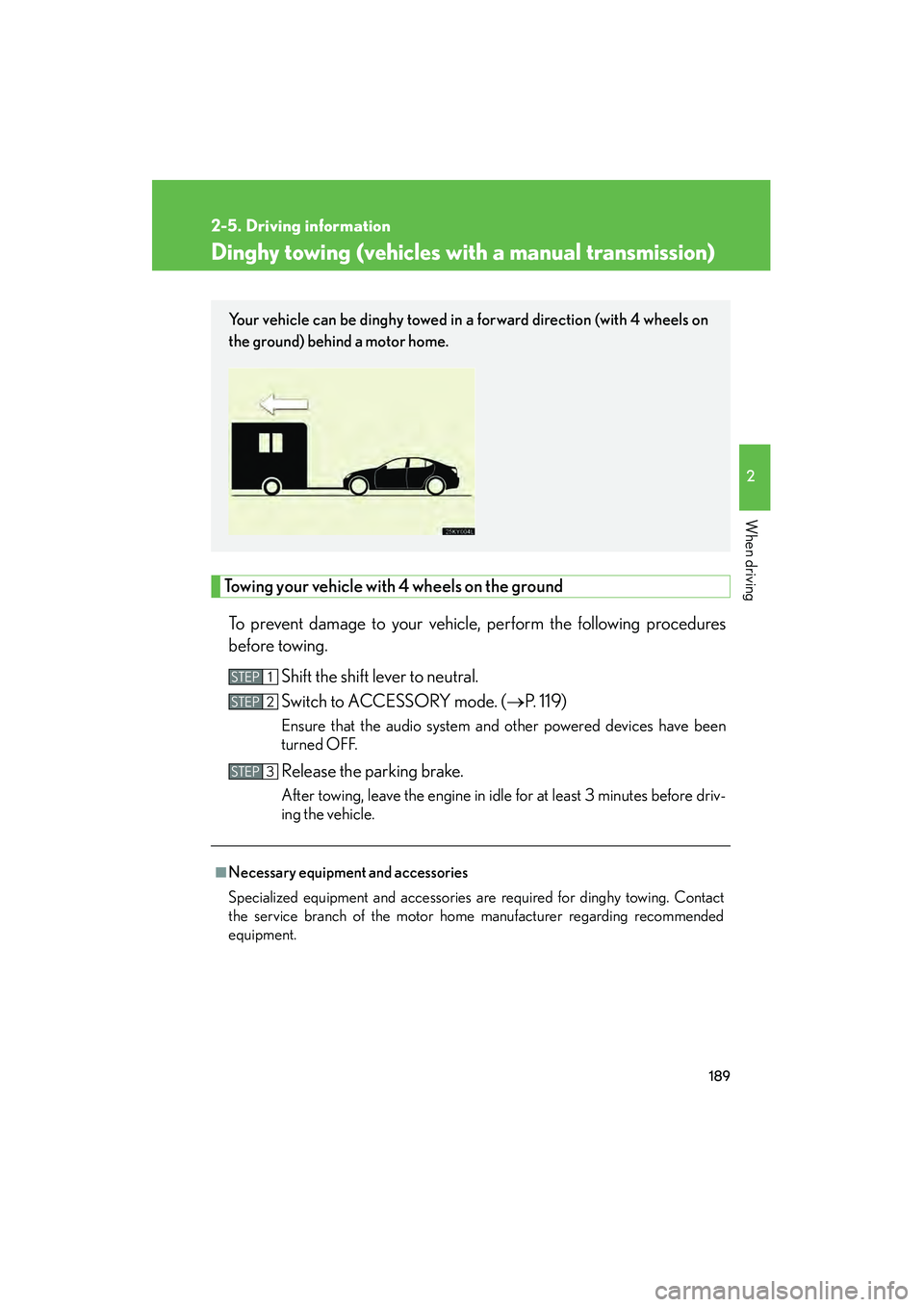
Towing your vehicle with 4 wheels on the groundTo prevent damage to your vehicle, perform the following procedures
before towing. Shift the shift lever to neutral.
Switch to ACCESSORY mode. ( →P. 1 1 9 )
Ensure that the audio system and other powered devices have been
turned OFF.
Release the parking brake.
After towing, leave the engine in idle for at least 3 minutes before driv-
ing the vehicle.
■Necessary equipment and accessories
Specialized equipment and accessories are required for dinghy towing. Contact
the service branch of the motor home manufacturer regarding recommended
equipment.
Your vehicle can be dinghy towed in a forward direction (with 4 wheels on
the ground) behind a motor home.
STEP1
STEP2
STEP3
Page 205 of 462
204
3-2. Using the audio system
08_IS350/250_U_(L/O_0708)
Using the radio
Setting station presets (excluding XM® Satellite Radio)
Search for desired stations by turning
or pressing ∧ or ∨
on .
Press and hold the button (from to ) the station is to
be set to, and you hear a beep.
Scanning radio stations (excluding XM® Satellite Radio)
■ Scanning the preset radio stations
Press and hold until you hear a beep.
Preset stations will be played for 5 seconds each.
When the desired station is reached, press the button once again.
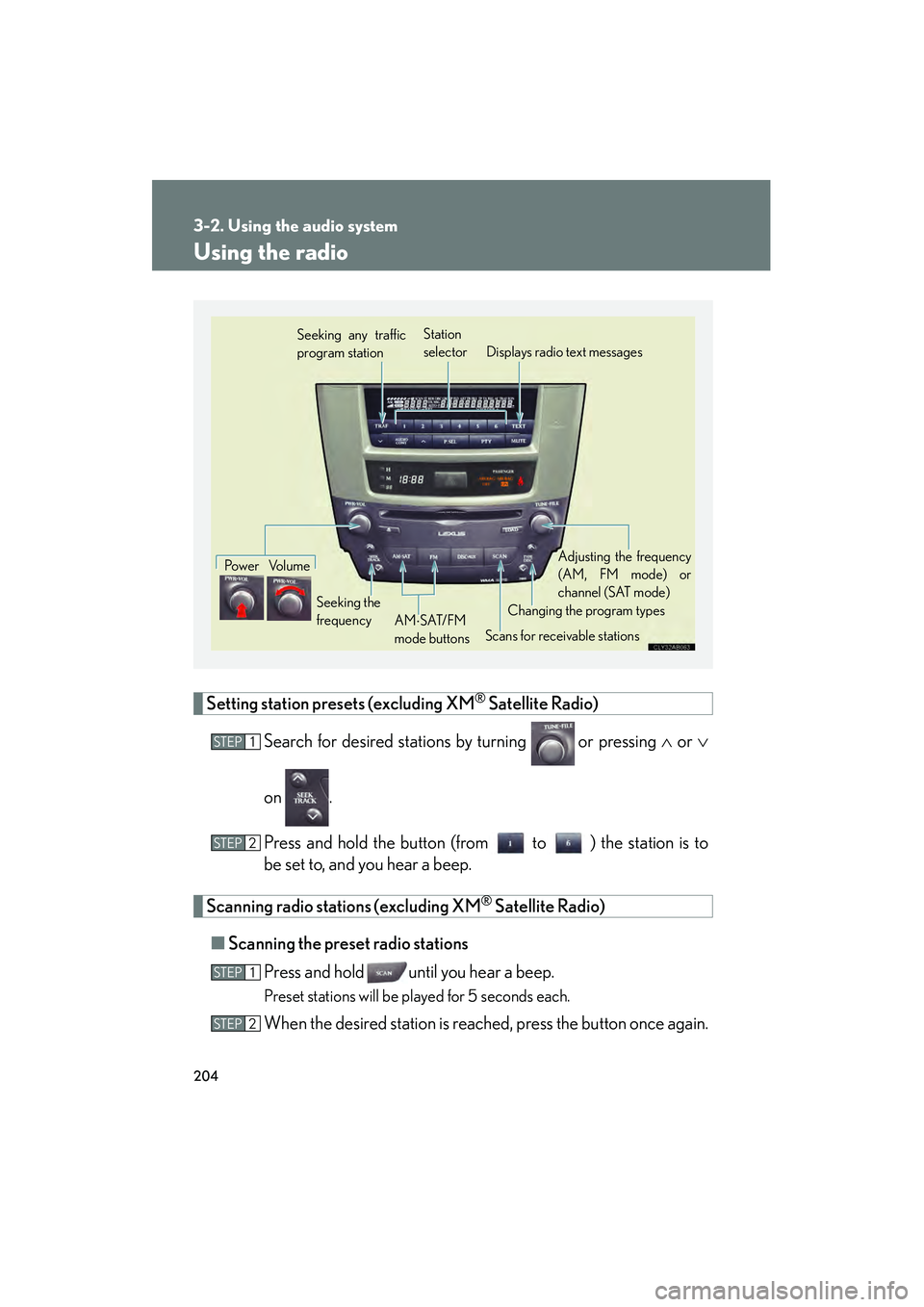
Seeking any traffic
program station Station
selector Displays radio text messages
Po w e r Vo l u m e
Scans for receivable stations
Seeking the
frequency
Changing the program typesAdjusting the frequency
(AM, FM mode) or
channel (SAT mode)
AM ⋅SAT/FM
mode buttons
STEP1
STEP2
STEP1
STEP2
Page 221 of 462
220
3-2. Using the audio system
08_IS350/250_U_(L/O_0708)
■MP3 and WMA files
MP3 (MPEG Audio LAYER 3) is a standard audio compression format.
Files can be compressed to approximately 1 /10 of their original size by using MP3
compression.
WMA (Windows Media
TMAudio) is a Microsoft audio compression format.
This format compresses audio data to a size smaller than that of the MP3 format.
There is a limit to the MP3 and WMA file standards and to the media/formats
recorded by them that can be used.
●MP3 file compatibility
• Compatible standards MP3 (MPEG1 LAYER3, MPEG2 LSF LAYER3)
• Compatible sampling frequencies MPEG1 LAYER3: 32, 44.1, 48 (kHz)
MPEG2 LSF LAYER3: 16, 22.05, 24 (kHz)
• Compatible bit rates MPEG1 LAYER3: 64, 80, 96, 112, 128, 160, 192, 224, 256, 320 (kbps)
• MPEG2 LSF LAYER3: 64, 80, 96, 112, 128, 144, 160 (kbps)
* Compatible with VBR
• Compatible channel modes: stereo, joint stereo, dual channel and monaural
●WMA file compatibility
• Compatible standards WMA Ver. 7, 8, 9
• Compatible sampling frequencies 32, 44.1, 48 (kHz)
• Compatible bit rates Ver. 7, 8: CBR 48, 64, 80, 96, 128, 160, 192 (kbps)
Ver. 9: CBR 48, 64, 80, 96, 128, 160, 192, 256, 320 (kbps)
*Only compatible with 2-channel playback
●Compatible media
Media that can be used for MP3 and WMA playback are CD-Rs and CD-RWs.
Playback in some instances may not be possible, depending on the status of the
CD-R or CD-RW. Playback may not be possible or the audio may jump if the disc
is scratched or marked with fingerprints.
Page 222 of 462
221
3-2. Using the audio system
3
Interior features
08_IS350/250_U_(L/O_0708)
●Compatible disc formats
The following disc formats can be used.
• Disc formats: CD-ROM Mode 1 and Mode 2CD-ROM XA Mode 2, Form 1 and Form 2
• File formats: ISO9660 Level 1, Level 2, (Romeo, Joliet) MP3 and WMA files written in any format other than those listed above may
not play correctly, and their file names and folder names may not be dis-
played correctly.
Items related to standards and limitations are as follows.
• Maximum directory hierarchy: 8 levels
• Maximum length of folder names/file names: 32 characters
• Maximum number of folders: 192 (including the root)
• Maximum number of files per disc: 255
●File names
The only files that can be recognized as MP3/WMA and played are those with
the extension .mp3 or .wma.
●Multi-sessions
As the audio system is compatible with multi-sessions, it is possible to play discs
that contain MP3 and WMA files. However, only the first session can be played.
●ID3 and WMA tags
ID3 tags can be added to MP3 files, maki ng it possible to record the track title
and artist name, etc.
The system is compatible with ID3 Ver. 1.0, 1.1, and Ver. 2.2, 2.3 ID3 tags. (The
number of characters is based on ID3 Ver. 1.0 and 1.1.)
WMA tags can be added to WMA files, making it possible to record the track
title and artist name in the same way as with ID3 tags.