tire Lexus IS250 2010 User Guide
[x] Cancel search | Manufacturer: LEXUS, Model Year: 2010, Model line: IS250, Model: Lexus IS250 2010Pages: 578, PDF Size: 30.78 MB
Page 201 of 578
200
2-4. Using other driving systems
IS350/250_U
■Hill-start assist control is operational when
●The shift lever is in the D or S position.
●The brake pedal is not depressed.
■EPS operation sound
When the steering wheel operates, a motor sound (whirring sound) may be heard.
This does not indicate a malfunction.
■Reduced effectiveness of EPS
The effectiveness of EPS is reduced to prevent the system from overheating when
there is frequent steering input over an extended period of time. The steering wheel
may feel heavy as a result. Should this occur, refrain from excessive steering input or
stop the vehicle and turn the engine OFF. The system should return to normal within
10 minutes.
■If the slip indicator comes on
It may indicate a malfunction in the VSC, TRAC or hill start assist control function.
Contact your Lexus dealer.
CAUTION
■The ABS does not operate effectively when
●The limits of tire gripping performance have been exceeded.
●The vehicle hydroplanes while driving at high speed on the wet or slick road.
■Stopping distance when the ABS is operating will exceed that of normal condi-
tions
The ABS is not designed to shorten the vehicle’s stopping distance. Always main-
tain a safe distance from the vehicle in front of you in the following situations.
●When driving on dirt, gravel or snow-covered roads
●When driving with tire chains
●When driving over bumps in the road
●When driving over roads with potholes or roads with uneven surfaces
Page 202 of 578
201
2-4. Using other driving systems
2
When driving
IS350/250_U
CAUTION
■TRAC may not operate effectively when
Directional control and power may not be achievable while driving on slippery road
surfaces, even if the TRAC system is operating.
Do not drive the vehicle in conditions where stability and power may be lost.
■If hill-start assist control does not operate effectively
(vehicles with an automatic transmission)
Do not overly rely on the hill-start assist control. The hill-start assist control may not
operate effectively on steep inclines and roads covered in ice.
■When the VSC is activated
The slip indicator light flashes and a warning buzzer sounds. Always drive carefully.
Reckless driving may cause an accident. Exercise particular care when the indica-
tor light flashes and a buzzer sounds.
■When TRAC and VSC are off
Be especially careful and drive at a speed appropriate to the road conditions. As
these are systems to ensure vehicle stability and driving force, do not turn off TRAC
and VSC unless necessary.
■Replacing tires
Make sure that all tires are of the specified size, brand, tread pattern and total load
capacity. In addition, make sure that the tires are inflated to the recommended tire
pressure level.
The ABS and VSC systems will not function correctly if different tires are fitted on
the vehicle.
Contact your Lexus dealer for further information when replacing tires or wheels.
■Handling of tires and suspension
Using tires with any kind of problem or modifying the suspension will affect the driv-
ing assist systems, and may cause the system to malfunction.
Page 210 of 578
209
2-5. Driving information
2
When driving
IS350/250_U
Vehicle load limits
■Total load capacity and seating capacity
These details are also described on the tire and loading information label.
(→ P. 4 2 5 )
CAUTION
■Overloading the vehicle
Do not overload the vehicle.
It may not only cause damage to the tires, but also degrade steering and braking
ability, resulting in an accident.
Vehicle load limits include total load capacity, seating capacity, towing
capacity and cargo capacity.
■Total load capacity: 825 lb. (375 kg)
Total load capacity means the combined weight of occupants, cargo and
luggage.
■Seating capacity: 5 occupants (Front 2, Rear 3)
Seating capacity means the maximum number of occupants whose esti-
mated average weight is 150 lb. (68 kg) per person.
■Towing capacity
Lexus does not recommend towing a trailer with your vehicle.
■Cargo capacity
Cargo capacity may increase or decrease depending on the weight and
the number of occupants.
Page 211 of 578
210
2-5. Driving information
IS350/250_U
Winter driving tips
Carry out the necessary preparations and inspections before driving the
vehicle in winter. Always drive the vehicle in a manner appropriate to the
prevailing weather conditions.
■Pre-winter preparations
● Use fluids that are appropriate to the prevailing outside tempera-
tures.
• Engine oil
• Engine coolant
• Washer fluid
● Have a service technician inspect the level and specific gravity of
battery electrolyte.
● Have the vehicle fitted with four snow tires or purchase a set of
tire chains for the rear tires.
Ensure that all tires are the specified size and the same brand, and that
chains match the size of the tires.
■Before driving the vehicle
Perform the following according to the driving conditions.
● Do not try to forcibly open a window or move a wiper that is fro-
zen. Pour warm water over the frozen area to melt the ice. Wipe
away the water immediately to prevent it from freezing.
● To ensure proper operation of the climate control system fan,
remove any snow that has accumulated on the air inlet vents in
front of the windshield.
● Remove any ice that has accumulated on the vehicle chassis.
● Periodically check for and remove any excess ice or snow that
may have accumulated in the wheel well or on the brakes.
Page 212 of 578
211
2-5. Driving information
2
When driving
IS350/250_U
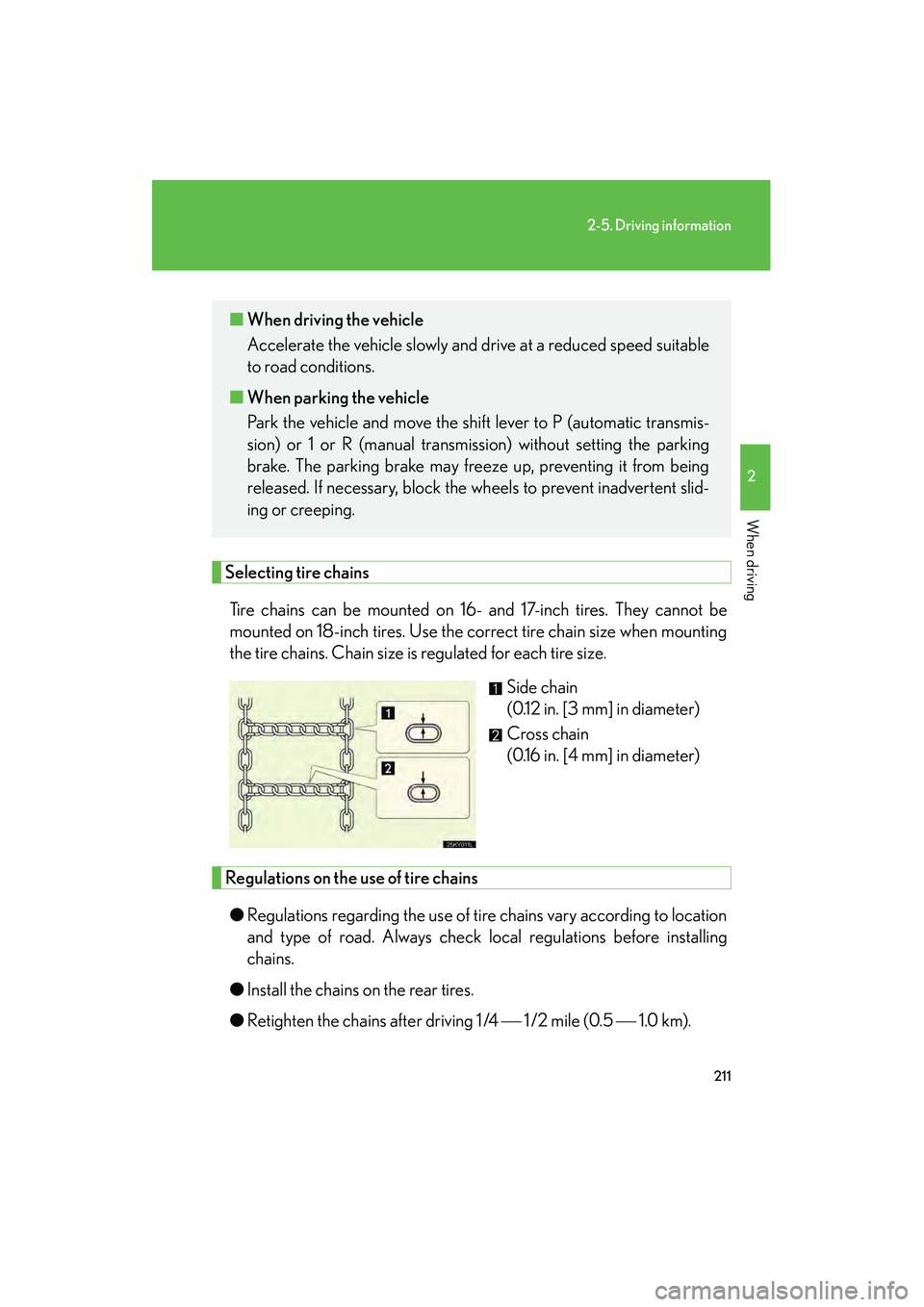
Selecting tire chainsTire chains can be mounted on 16- and 17-inch tires. They cannot be
mounted on 18-inch tires. Use the correct tire chain size when mounting
the tire chains. Chain size is regulated for each tire size. Side chain
(0.12 in. [3 mm] in diameter)
Cross chain
(0.16 in. [4 mm] in diameter)
Regulations on the use of tire chains
● Regulations regarding the use of tire chains vary according to location
and type of road. Always check local regulations before installing
chains.
● Install the chains on the rear tires.
● Retighten the chains after driving 1 /4 1 /2 mile (0.5 1.0 km).
■When driving the vehicle
Accelerate the vehicle slowly and drive at a reduced speed suitable
to road conditions.
■ When parking the vehicle
Park the vehicle and move the shift lever to P (automatic transmis-
sion) or 1 or R (manual transmission) without setting the parking
brake. The parking brake may freeze up, preventing it from being
released. If necessary, block the wheels to prevent inadvertent slid-
ing or creeping.
Page 213 of 578
212
2-5. Driving information
IS350/250_U
■Snow chain installation
Observe the following precautions when installing and removing chains.
●Install and remove tire chains in a safe location.
●Install tire chains on the rear tires only. Do not install tire chains on front tires.
●Install the tire chains on rear tires as tightly as possible. Retighten chains after
driving 1 /4 - 1 /2 mile (0.5 - 1.0 km).
●Install tire chains following the instructions provided in the accompanying
instructions.
CAUTION
■Driving with snow tires
Observe the following precautions to reduce the risk of accidents.
Failing to do so may result in a loss of vehicle control and cause death or serious
injury.
●Use tires of the size specified for your vehicle.
●Maintain the recommended level of air pressure.
●Do not drive in excess of 75 mph (120 km/h), regardless of the type of snow tires
being used.
●Use snow tires on all, not just some wheels.
■Driving with tire chains
Observe the following precautions to reduce the risk of accidents.
Failing to do so may result in the vehicle being unable to be driven safely, and may
cause death or serious injury.
●Do not drive in excess of the speed limit specified for the tire chains being used,
or 30 mph (50 km/h), whichever is lower.
●Avoid driving on bumpy road surfaces or over potholes.
●Avoid sudden turns and braking, as use of chains may adversely affect vehicle
handling.
●Slow down sufficiently before entering a curve to ensure that vehicle control is
maintained.
Page 214 of 578
213
2-5. Driving information
2
When driving
IS350/250_U
NOTICE
■Repairing or replacing snow tires
Request repairs of and obtain replacement snow tires from Lexus dealers or legiti-
mate tire retailers.
This is because the removal and attachment of snow tires affects the operation of
the tire pressure warning system.
■Fitting tire chains
The tire pressure warning system may not function correctly when tire chains are fit-
ted.
Page 296 of 578

295
3-3. Using the Bluetooth® audio system
3
Interior features
IS350/250_U
Listing the registered portable playersSelect “List Audio Players (List Audios)” using a voice command or , and . The list of registered portable players will be
read aloud.
When listing is complete, the system returns to “BT•A Setup”.
Pressing the talk switch while the name of a portable player is being read
aloud selects the portable player, and the following functions will become
available:
● Selecting a portable player: “Connect Audio Player (Connect)”
● Changing a registered name: “Change Name”
● Deleting a portable player: “Delete Audio Player (Delete Audio)”
Changing the passkey
Select “Set Passkey” using a voice command or ,
and .
Pattern A
Press the talk switch, say a 4 to 8-digit number, and select “Con-
firm” using a voice command or , and .
Pattern B
Select a 4 to 8-digit number using , and .
The number should be input 1 digit at a time.
When the entire number to be registered as a passkey has been
input, press again.
If the number to be registered has 8 digits, pressing is not nec-
essary.
STEP1
STEP2
STEP2
STEP3
Page 318 of 578

317
3-4. Using the hands-free phone system (for mobile phones)
3
Interior features
IS350/250_U
Listing the registered mobile phonesSelect “List Phones” using a voice command or , and .
The list of registered mobile phones will be read aloud.
When listing is complete, the system returns to “Phone Setup”.
Pressing the talk switch while the name of a mobile phone is being read
aloud selects the mobile phone, and the following functions will become
available:
● Selecting a mobile phone: “Connect Phone (Connect)”
● Changing a registered name: “Change Name”
● Deleting a mobile phone: “Delete Phone”
Changing the passkey
Select “Set Passkey” using a voice command or ,
and .
Pattern A
Press the talk switch, say a 4 to 8-digit number, and select “Con-
firm” using a voice command or , and .
Pattern B
Select a 4 to 8-digit number using , and .
The number should be input 1 digit at a time.
When the entire number to be registered as a passkey has been
input, press again.
If the number to be registered has 8 digits, pressing is not nec-
essary.
STEP1
STEP2
STEP2
STEP3
Page 344 of 578
343
3-7. Other interior features
3
Interior features
IS350/250_U
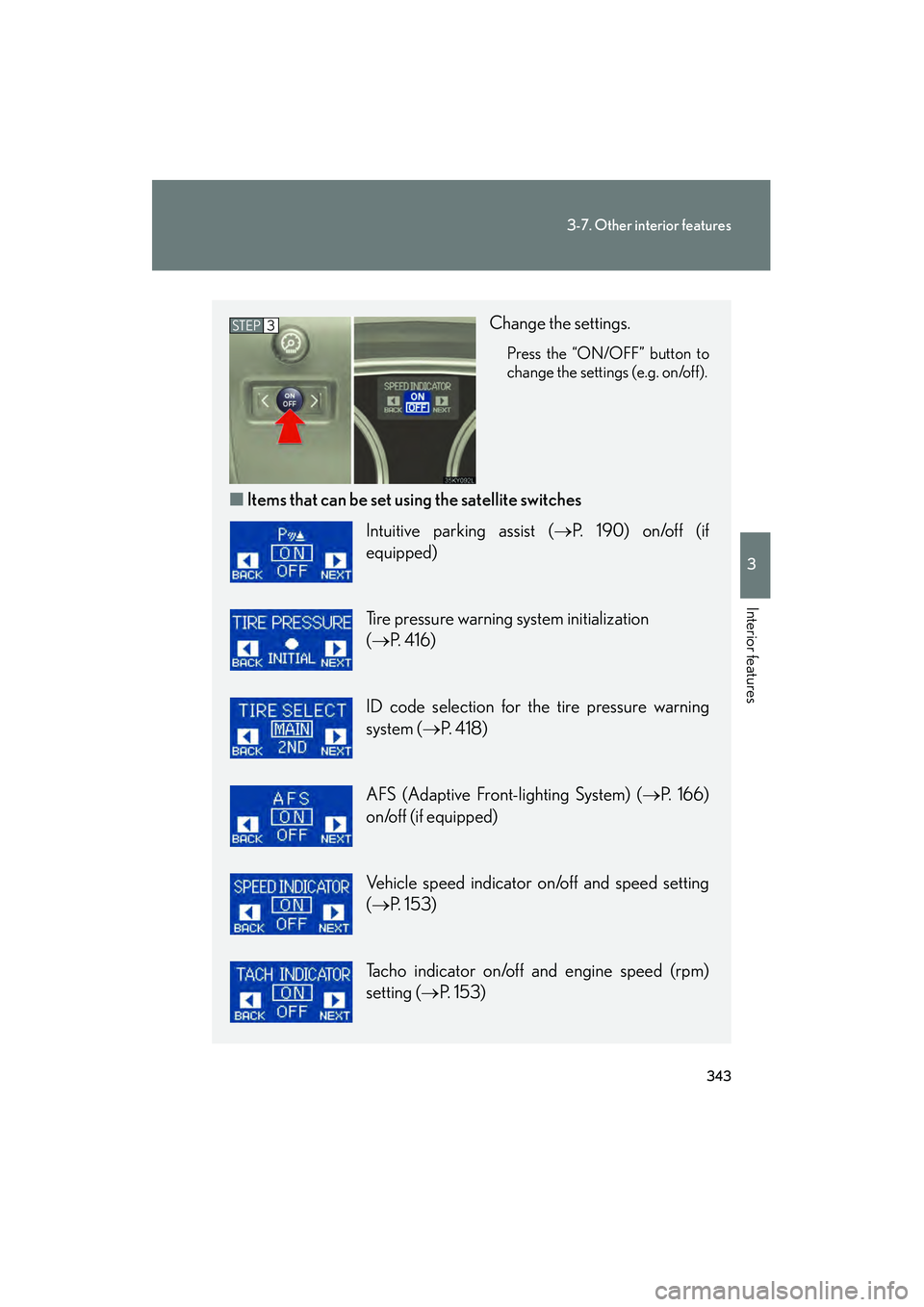
Change the settings.
Press the “ON/OFF” button to
change the settings (e.g. on/off).
■Items that can be set us ing the satellite switches
STEP3
Intuitive parking assist ( →P. 190) on/off (if
equipped)
Tire pressure warning system initialization
(→ P. 4 1 6 )
ID code selection for the tire pressure warning
system ( →P. 4 1 8 )
AFS (Adaptive Front-lighting System) ( →P. 166)
on/off (if equipped)
Vehicle speed indicator on/off and speed setting
(→ P. 153)
Tacho indicator on/off and engine speed (rpm)
setting ( →P. 153)