open Lexus IS250 2011 Key Information / LEXUS 2011 IS250/IS350 OWNERS MANUAL QUICK GUIDE (OM53A38U)
[x] Cancel search | Manufacturer: LEXUS, Model Year: 2011, Model line: IS250, Model: Lexus IS250 2011Pages: 78, PDF Size: 4.22 MB
Page 1 of 78

Contents
The Quick Guide is not intended as a substitute for your Owner’s
Manual. We strongly encourage you to review the Owner’s
Manual and supplementary manuals so you will have a better
understanding of your vehicle’s capabilities and limitations.
1
Air Conditioning System (without navigation system)
Using the automatic mode ........................................................................................................50
Adjusting the temperature in DUAL mode ....................................................................... 50
Anti-glare Inside Rear View Mirror...............................................................................................13
Ashtrays ................................................................................................................................................... 53
Audio System (without navigation system)
Basic operation .............................................................................................................................. 44
Radio................................................................................................................................................... 45
CD player ......................................................................................................................................... 46
Operating an iPod ........................................................................................................................ 49
Remote control (steering wheel switches) ......................................................................... 49
Automatic Transmission ..................................................................................................................... 16
Compass ................................................................................................................................................. 58
Console Boxes ..................................................................................................................................... 55
Cruise Control...................................................................................................................................... 25
Cup Holders .......................................................................................................................................... 56
Door Locks............................................................................................................................................. 63
Driving Position Memory System .................................................................................................... 11
ECT Switch (Automatic Transmission) ...................................................................................... 23
Emergency Flasher Switch ...............................................................................................................22
Engine (ignition) Switch ......................................................................................................................15
ETCS Switch (Manual Transmission).......................................................................................... 23
Fog Lights.................................................................................................................................................27
Fuel Tank Cap ....................................................................................................................................... 65
Garage Door Opener ........................................................................................................................51
Glove Box............................................................................................................................................... 56
Hands-free System For Cellular Phone (with navigation system)
Bluetooth
® phone pairing...........................................................................................................31
Phonebook transfer ..................................................................................................................... 32
Registering a voice tag ............................................................................................................... 33
Registering a speed dial ............................................................................................................. 34
Calling by name ............................................................................................................................. 35
Calling by speed dial.................................................................................................................... 36
Receiving a call................................................................................................................................37
Page 3 of 78

3
OverviewInstrument Panel
Shift paddle switch (automatic transmission)
P.17, 18
Headlight switch
Turn signal lever Fog light switch P.26
P.22
P.27
Headlight cleaner switch P.30
Rear sunshade switch P.57
Inside lock button P.63
Fuel filler door opener P.65
Driving position
memory switches
P.11
Power window switches P.64
Window lock switch P.64
Outside rear view
mirror switches
P.13
Trunk opener P.67
Hood release lever P.66
Parking brake pedal
(automatic transmission)
P.19
Satellite switches P.21
Tilt and telescopic steering lock release lever
P.14Tilt and telesc opic steering
control switch
P.14
Multi-information
display
P.20
Door lock switches P.63
Page 4 of 78

4
Shift paddle switch (automatic transmission)
P.17, 18
Windshield wiper and
washer switch
P.28
Engine (ignition) switch P.15
Air conditioning system P.50
Emergency flasher switch P.22
Rear window and outside rear view
mirror defoggers switch
P.30
Security indicator P.8
Audio system P.44
Glove box P.56
Trunk opener main switch P.67
See P.5.
Cruise control switch
P.25
ECT switch (automatic transmission)
ETCS switch (manual transmission)P.23
P.23
: If equipped
Page 6 of 78

6
Keys
■Electronic key
Smart access system with push-button start
(P. 7 , 1 5 )
*: If equipped
■Mechanical key
●Locks and unlocks the doors
●Opens the trunk
●Locks and unlocks the glove box
The mechanical key is stored inside the electronic
key. To extract the key, release the latch and pull,
or if equipped with a card key, press the button
and pull.
■Wireless remote control
Locks all doors
Unlocks all doors
Unlocks the trunk (press and hold)
Sounds alarm (press and hold)
(Use the alarm to attract attention to the vehi-
cle in order to help deter break-ins. To stop the
alarm, press any button on the wireless remote
control.)
Card key*
1
2
3
4
Page 7 of 78

7
Smart Access System with Push-button Start
■Entering the vehicle
To unlock the vehicle, simply grasp either of the
front door handles.
■Exiting the vehicle
To lock the vehicle, press the lock button on either
of the front door handles.
■Opening the trunk
To open the trunk, press and hold the trunk
release button.
The smart access system with push-button start allows you to enter and exit the vehicle
or start the engine by simply carrying the electronic key in your pocket or bag.
For details on starting the engine, see page 15.
For details on what to do when the electronic key does not operate properly, see page 70.
Page 11 of 78

11
Driving Position Memory System (If Equipped)
■Setting memory positions
Press the SET button, then within 3 seconds press
one of the memory buttons (1, 2, or 3) until you
hear a beep.
The current position of the seat, as well as the
position of the steering wheel and the outside
rear view mirrors is recorded.
■Recalling memory positions
Press one of the memory buttons (1, 2, or 3).
■Linking driving position memory with door unlock operation
While holding down the desired memory button,
press and hold the button on the wireless
remote control or door lock switch until you hear a
beep.
To prevent triggering of the alarm, open one of
the doors within 180 seconds after the beep is
heard.
The seats can be returned to a previously set position by simply pressing a button.
The position of the steering wheel and the outside rear view mirrors is adjusted along with the
driver's seat.
Positions can be conveniently recorded for the vehicle's primary drivers.
Linking driving position memory to the door unlock operation allows the memory position
to be recalled automatically when the driver's door is opened. (The linked function does not
operate if the driver's door is unlocked using the mechanical key or manually from inside
the vehicle.)
Page 51 of 78

51
Garage Door Opener
The garage door opener (HomeLink Universal Transceiver) is manufactured under license
from HomeLink.
The HomeLink compatible transceiver in your
vehicle has 3 buttons which can be programmed
to operate 3 different devices.
■Programming HomeLink®
Hold your hand-held transmitter within 3
inches of the HomeLink buttons.
Press and hold down the desired HomeLink
button.
For U.S.A. owners:
While pressing the HomeLink
button,
press and hold down the button on the hand-
held transmitter until the indicator light
changes from a slow to a rapid flash.
For Canadian owners:
While pressing the HomeLink
button,
repeatedly press and release (cycle) the but-
ton on the hand-held transmitter every 2
seconds until the indicator light changes
from a slow to a rapid flash.
If your garage door is of the rolling code type:
Press the learn button on the motor-head unit in
your garage.
Following this step, you have 30 seconds in
which to initiate step below.
Press and hold the vehicle’s programmed
HomeLink
button for 2 seconds and release
it. Repeat this step once again.
If the door does not open, press and release
the same button once again.
The garage door opener can be programmed to operate garage doors, gates, entry
doors, door locks, home lighting systems, security systems, and other devices.
Page 55 of 78

55
Console Boxes
Front
To open, slide and lift the armrest with the knob
pulled up.
Rear (if equipped)
To open, press the lock release button and lift the
armrest.
Overhead console
To open, press the lid.
There is a power outlet located in the front console box.
Page 56 of 78

56
Glove Box
Open: press the button.
Lock
Unlock
The glove box can be locked and unlocked using
the mechanical key.
Cup Holders
Front (press-in type)
To open, press down on the front of the lid.
Front (slide type)
To open, pull and hold the knob and slide the arm-
rest.
Rear
To open, press in and release.
1
2
3
Page 58 of 78
58
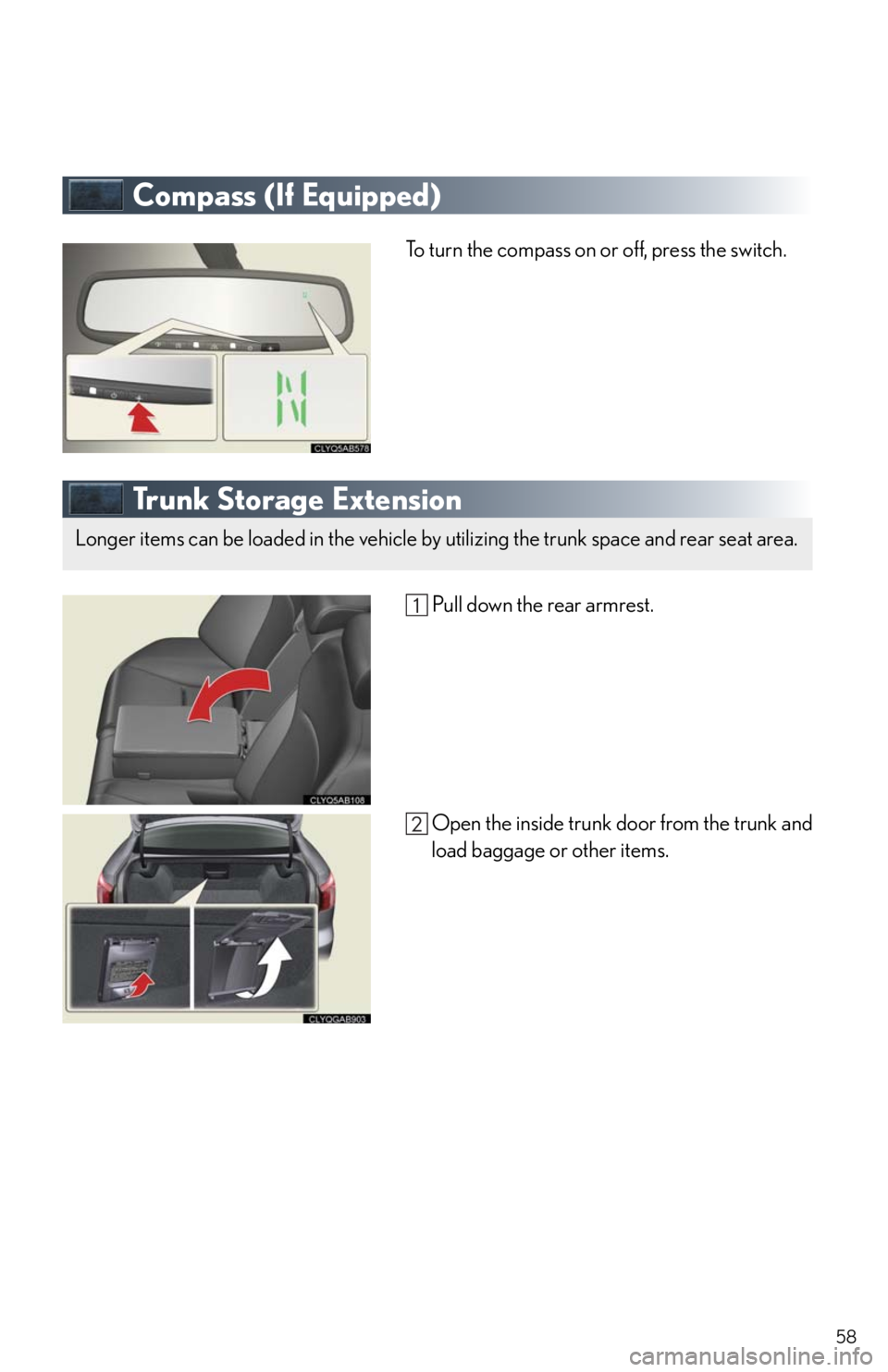
Compass (If Equipped)
To turn the compass on or off, press the switch.
Tr u n k S t o r a g e E x t e n s i o n
Pull down the rear armrest.
Open the inside trunk door from the trunk and
load baggage or other items.
Longer items can be loaded in the vehicle by utilizing the trunk space and rear seat area.