ECO mode Lexus IS250 2011 User Guide
[x] Cancel search | Manufacturer: LEXUS, Model Year: 2011, Model line: IS250, Model: Lexus IS250 2011Pages: 578, PDF Size: 31.12 MB
Page 136 of 578
135
2-1. Driving procedures
2
When driving
IS350/250_U
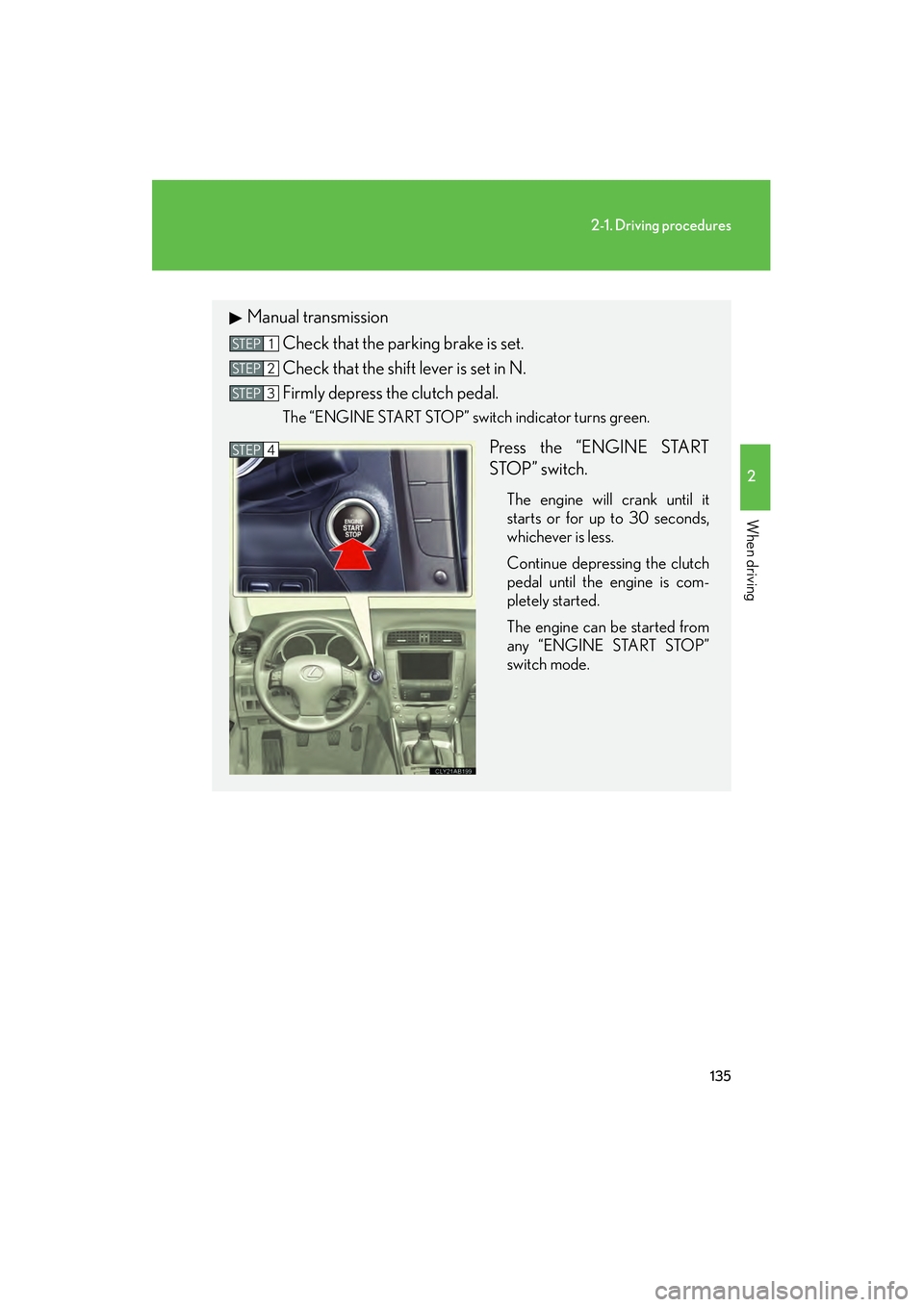
Manual transmissionCheck that the parking brake is set.
Check that the shift lever is set in N.
Firmly depress the clutch pedal.
The “ENGINE START STOP” switch indicator turns green.
Press the “ENGINE START
STOP” switch.
The engine will crank until it
starts or for up to 30 seconds,
whichever is less.
Continue depressing the clutch
pedal until the engine is com-
pletely started.
The engine can be started from
any “ENGINE START STOP”
switch mode.
STEP1
STEP2
STEP3
STEP4
Page 139 of 578
138
2-1. Driving procedures
IS350/250_U
CAUTION
■When starting the engine
Always start the engine while sitting in the driver’s seat. Do not press the accelera-
tor while starting the engine under any circumstances.
Doing so may cause an accident resulting in death or serious injury.
■Stopping the engine in an emergency
If you want to stop the engine in an emergency while driving the vehicle, push and
hold the “ENGINE START STOP” switch for more than 3 seconds.
However, do not touch the “ENGINE START STOP” switch while driving except in
an emergency. Turning the engine off while driving will not cause loss of steering or
braking control, but the power assist to these systems will be lost. This will make it
more difficult to steer and brake, so you should pull over and stop the vehicle as
soon as it is safe to do so.
NOTICE
■To prevent battery discharge
Do not leave the “ENGINE START STOP” switch in ACCESSORY or IGNITION
ON mode for long periods without the engine running.
■When starting the engine
●Do not race a cold engine.
●If the engine becomes difficult to start or stalls frequently, have the engine
checked immediately.
Page 155 of 578

154
2-2. Instrument cluster
IS350/250_U■
Changing the indicator setting
The satellite switch can be used to change the set speed at which the
yellow speed or tacho indicator ring comes on.
The setting can be made only when the “ENGINE START STOP”
switch is in IGNITION ON mode and the vehicle is stopped.
Push “
<” or “>” to select the speed or tacho indicator set mode. ( ) Turn
the speed or tacho indicator to “ OFF” and then “ON” by pushing the
“ON/OFF” button. ( )
After one second, the mode enters
the indicator setting mode.
The speedometer or tachometer
needle moves to the previously set
speed.
STEP1
Page 156 of 578
155
2-2. Instrument cluster
2
When driving
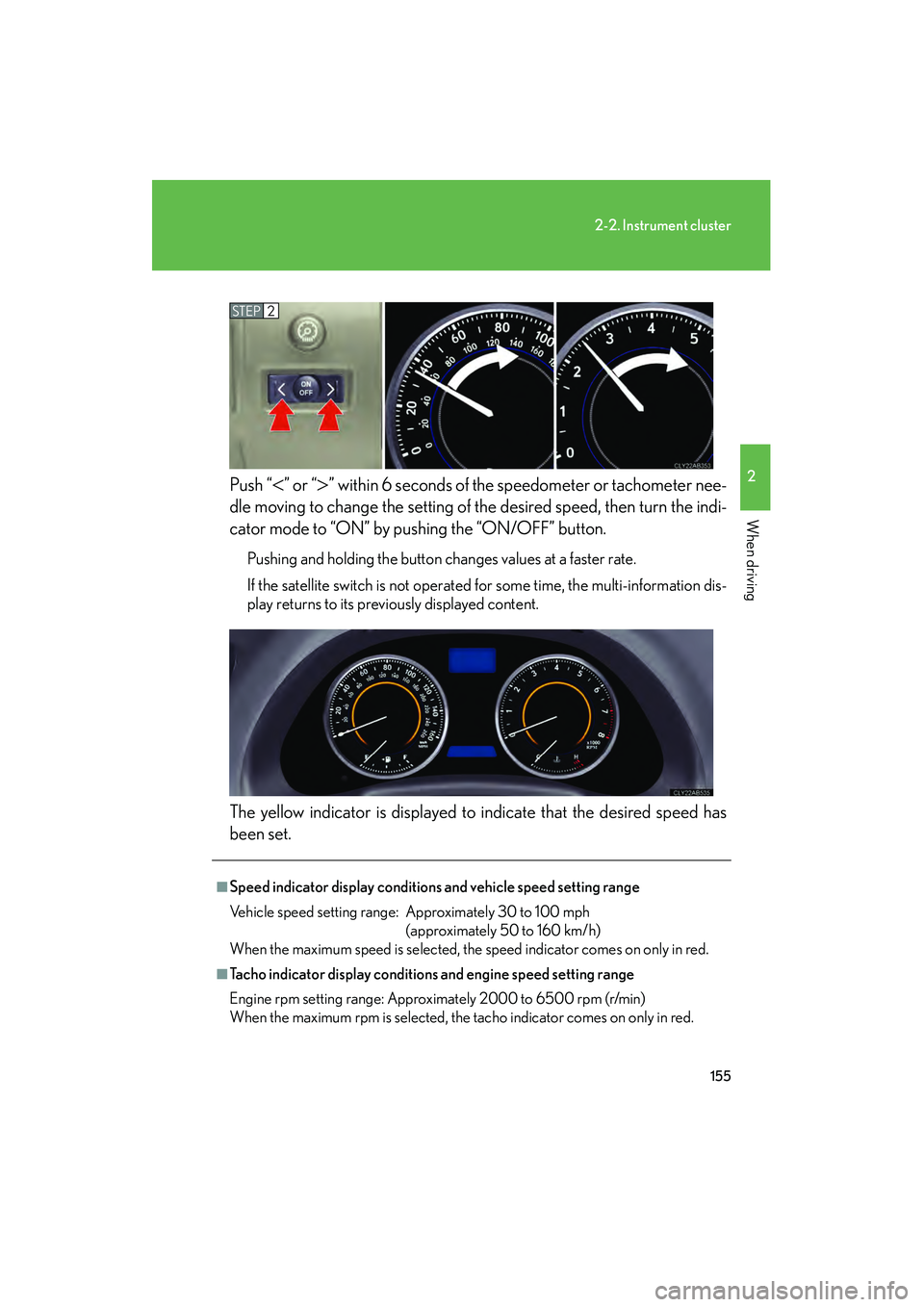
IS350/250_UPush “
<” or “>” within 6 seconds of the speedometer or tachometer nee-
dle moving to change the setting of the desired speed, then turn the indi-
cator mode to “ON” by pushing the “ON/OFF” button.
Pushing and holding the button changes values at a faster rate.
If the satellite switch is not operated for some time, the multi-information dis-
play returns to its previously displayed content.
The yellow indicator is displayed to indicate that the desired speed has
been set.
STEP2
■Speed indicator display conditions and vehicle speed setting range
Vehicle speed setting range: Approximately 30 to 100 mph (approximately 50 to 160 km/h)
When the maximum speed is selected, the speed indicator comes on only in red.
■Tacho indicator display conditions and engine speed setting range
Engine rpm setting range: Approximately 2000 to 6500 rpm (r/min)
When the maximum rpm is selected, the tacho indicator comes on only in red.
Page 160 of 578
159
2-2. Instrument cluster
2
When driving
IS350/250_U
CAUTION
■If a safety system warning light does not come on
Should a safety system light such as the ABS and SRS warning light not come on
when you start the engine, this could mean that these systems are not available to
help protect you in an accident, which could result in death or serious injury. Have
the vehicle inspected by your Lexus dealer immediately if this occurs.
*1: These lights turn on when the “ENGINE START STOP” switch isturned to IGNITION ON mode to indicate that a system check is
being performed. They will turn off after the engine is started, or after a
few seconds. There may be a malfunction in a system if a light does not
come on, or if the lights do not turn off. Have the vehicle inspected by
your Lexus dealer.
*2: The light flashes to indicate that the system is operating.
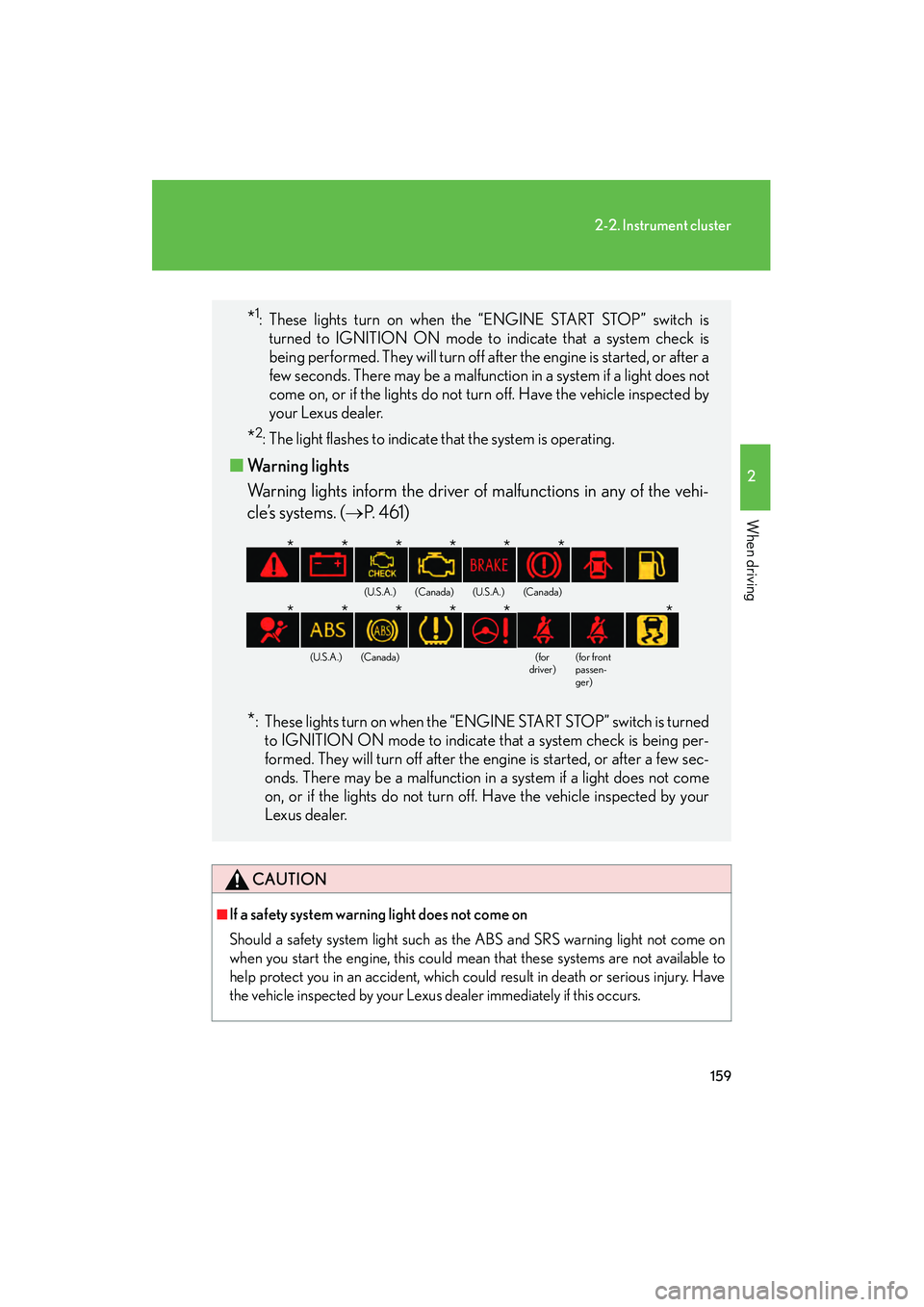
■ Warning lights
Warning lights inform the driver of malfunctions in any of the vehi-
cle’s systems. (→ P. 4 6 1 )
*: These lights turn on when the “ENGINE START STOP” switch is turned
to IGNITION ON mode to indicate that a system check is being per-
formed. They will turn off after the engine is started, or after a few sec-
onds. There may be a malfunction in a system if a light does not come
on, or if the lights do not turn off. Have the vehicle inspected by your
Lexus dealer.
(U.S.A.)(Canada)(U.S.A.)(Canada)
(U.S.A.)(Canada)(for
driver)(for front
passen-
ger)
******
******
Page 164 of 578
163
2-2. Instrument cluster
2
When driving
IS350/250_U■
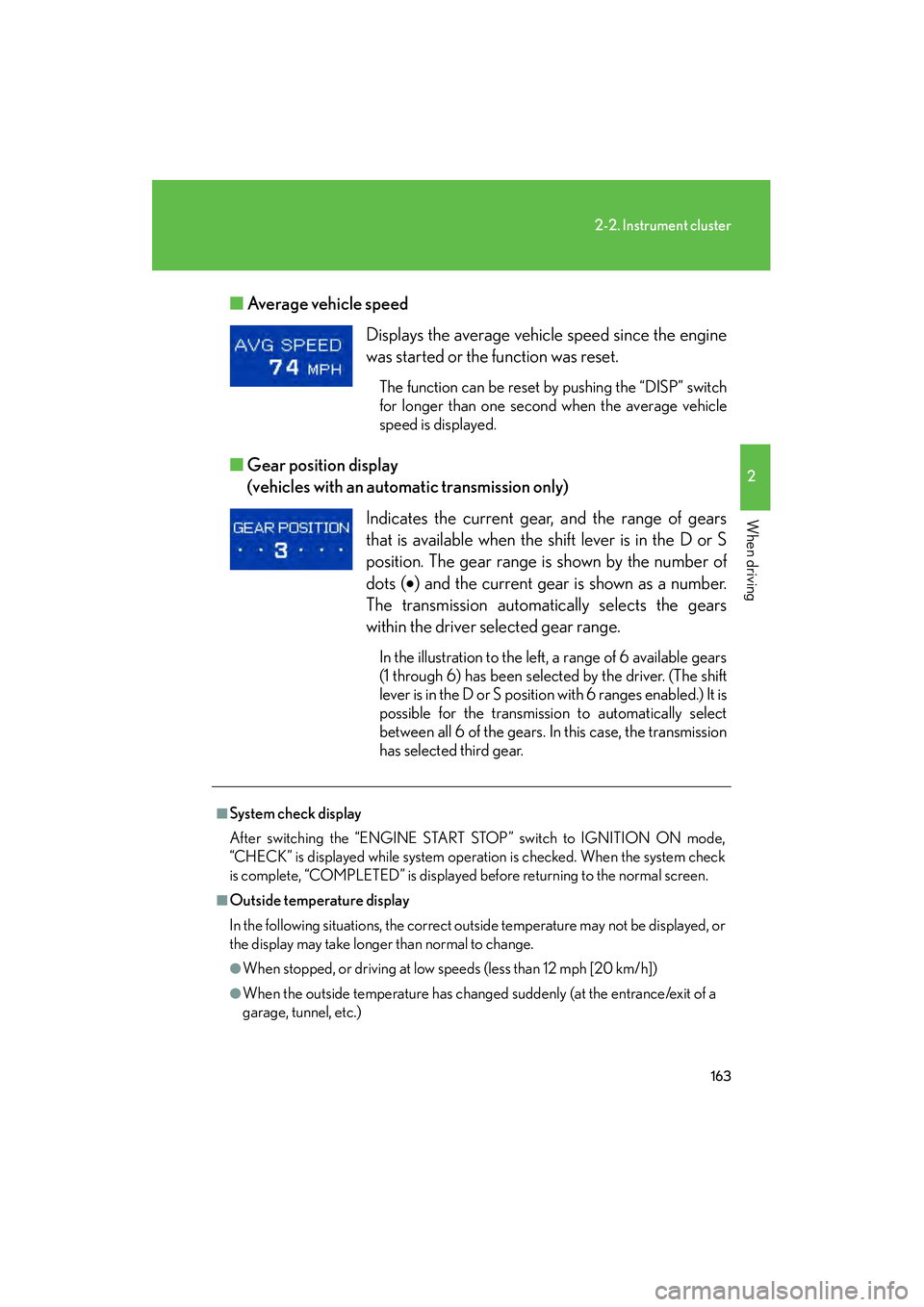
Average vehicle speed
■ Gear position display
(vehicles with an automatic transmission only)
Displays the average vehicle speed since the engine
was started or the function was reset.
The function can be reset by pushing the “DISP” switch
for longer than one second when the average vehicle
speed is displayed.
Indicates the current gear, and the range of gears
that is available when the shift lever is in the D or S
position. The gear range is shown by the number of
dots ( •) and the current gear is shown as a number.
The transmission automatically selects the gears
within the driver selected gear range.
In the illustration to the left, a range of 6 available gears
(1 through 6) has been selected by the driver. (The shift
lever is in the D or S position with 6 ranges enabled.) It is
possible for the transmission to automatically select
between all 6 of the gears. In this case, the transmission
has selected third gear.
■System check display
After switching the “ENGINE START STOP” switch to IGNITION ON mode,
“CHECK” is displayed while system operation is checked. When the system check
is complete, “COMPLETED” is displayed before returning to the normal screen.
■Outside temperature display
In the following situations, the correct outside temperature may not be displayed, or
the display may take longer than normal to change.
●When stopped, or driving at low speeds (less than 12 mph [20 km/h])
●When the outside temperature has changed suddenly (at the entrance/exit of a
garage, tunnel, etc.)
Page 168 of 578
167
2-3. Operating the lights and windshield wipers
2
When driving
IS350/250_U
■Automatic light off system
●When the headlights come on: The headlights and tail lights turn off 30 seconds
after a door is opened and closed if the “ENGINE START STOP” switch has
been switched to ACCESSORY mode or turned OFF. (The lights turn off
immediately if on the key is pressed after all doors are locked.)
●When only the tail lights come on: The tail lights turn off automatically if the
“ENGINE START STOP” switch is switched to ACCESSORY mode or turned
OFF and driver’s door is opened.
To turn the lights on again, switch to IGNITION ON mode, or turn the light switch
off once and then back to or
.
■Automatic headlight leveling system (vehicles with discharge headlights)
The level of the headlights is automatically adjusted according to the number of
passengers and the loading condition of the vehicle to ensure that the headlights do
not interfere with other road users.
■Customization that can be configured at Lexus dealer
Settings (e.g. light sensor sensitivity) can be changed.
(Customizable features →P. 5 4 0 )
NOTICE
■To prevent battery discharge
Do not leave the lights on longer than necessary when the engine is not running.
Page 173 of 578

172
2-3. Operating the lights and windshield wipers
IS350/250_U
■Raindrop sensor (vehicles with rain-sensing windshield wipers)
●If the wiper switch is turned to the “AUTO” position while the “ENGINE START
STOP” switch is in IGNITION ON mode, the wiper will operate once to show
that auto mode is activated.
●If the temperature of the raindrop sensor is 194°F (90°C) or higher, or -22°F
(-30°C) or lower, automatic operation may not occur. In this case, operate the
wipers in any mode other than “AUTO”.
■Outside rear view mirror defogger activation linked to windshield wiper opera-
tion
The outside rear view mirror defogger automatically turns on when you operate the
windshield wipers.
■If no windshield washer fluid sprays
Check that the washer nozzles are not blocked if there is washer fluid in the wind-
shield washer fluid reservoir.
■Customization that can be configured at Lexus dealer
Settings (e.g. drip prevention function) can be changed.
(Customizable features →P. 5 4 0 )
CAUTION
■Caution regarding the use of windshield wipers in “AUTO” mode (vehicles with
rain-sensing windshield wipers)
The windshield wipers may operate unexpectedly if the sensor is touched or the
windshield is subjected vibration in “AUTO” mode. Take care that your fingers etc.
do not become caught in the windshield wipers.
●The sensor judges the amount of rain-
drops.
Page 202 of 578
201
2-5. Driving information
2
When driving
IS350/250_U
Dinghy towing (vehicles with a manual transmission)
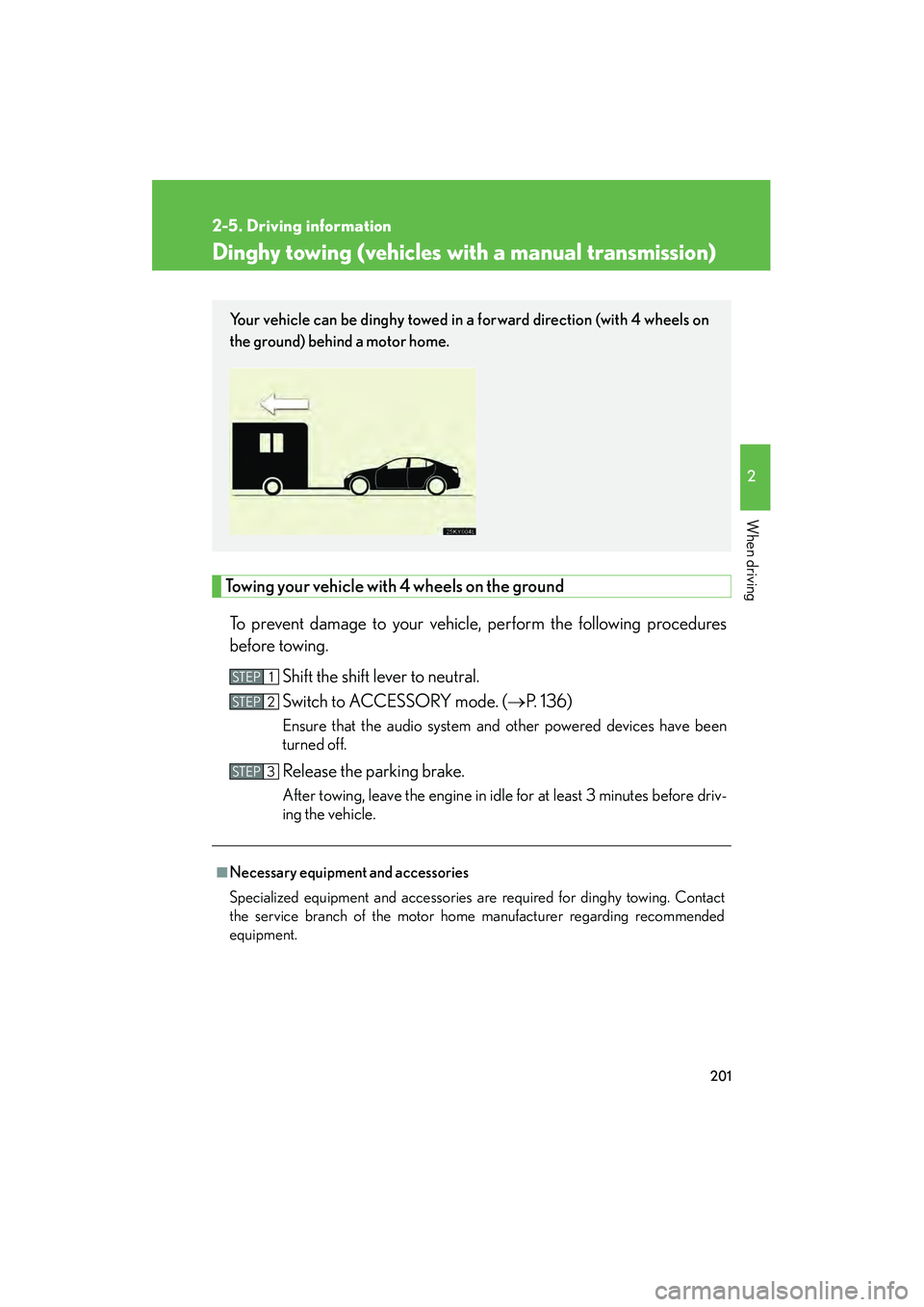
Towing your vehicle with 4 wheels on the groundTo prevent damage to your vehicle, perform the following procedures
before towing. Shift the shift lever to neutral.
Switch to ACCESSORY mode. ( →P. 1 3 6 )
Ensure that the audio system and other powered devices have been
turned off.
Release the parking brake.
After towing, leave the engine in idle for at least 3 minutes before driv-
ing the vehicle.
■Necessary equipment and accessories
Specialized equipment and accessories are required for dinghy towing. Contact
the service branch of the motor home manufacturer regarding recommended
equipment.
Your vehicle can be dinghy towed in a forward direction (with 4 wheels on
the ground) behind a motor home.
STEP1
STEP2
STEP3
Page 214 of 578

213
3-1. Using the air conditioning system and defogger
3
Interior features
IS350/250_U
■Automatic mode for air intake control (IS350 only)
In automatic mode, the system detects exhaust gas and other pollutants and auto-
matically switches between outside air and recirculated air modes.
■Micro dust and pollen filter
●In order to prevent the windshield from fogging up when the outside air is cold,
the following may occur.
• Outside air mode does not switch to .
• The air conditioning system operates automatically.
• The operation cancels after 1 minute.
●In rainy weather, the windows may fog up. Press .
■Air conditioning odors
●During use, various odors from inside and outside the vehicle may enter into
and accumulate in the air conditioning system. This may then cause odor to be
emitted from the vents.
●To reduce potential odors from occurring:
• It is recommended that the air conditioning system be set to outside air mode
prior to turning the vehicle off.
• The start timing of the blower may be delayed for a short period of time immediately after the air conditioning system is started in automatic mode.
CAUTION
■To prevent the windshield from fogging up
Do not use during cool air operation in extremely humid weather. The dif-
ference between the temperature of the outside air and that of the windshield can
cause the outer surface of the windshield to fog up, blocking your vision.
NOTICE
■To prevent battery discharge
Do not leave the air conditio ning system on longer than necessary when the engine
is off.