SNOW Lexus IS250 2011 Owner's Manual
[x] Cancel search | Manufacturer: LEXUS, Model Year: 2011, Model line: IS250, Model: Lexus IS250 2011Pages: 578, PDF Size: 31.12 MB
Page 51 of 578
50
1-2. Opening, closing and locking the doors and trunk
IS350/250_U
CAUTION
■Using the trunk
Observe the following precautions.
Failure to do so may cause parts of the body to be caught, resulting in serious injury.
●Remove any heavy loads, such as snow and ice, from the trunk lid before opening
it. Failure to do so may cause the trunk lid to fall closed again after it is opened.
●When opening or closing the trunk lid, thoroughly check to make sure the sur-
rounding area is safe.
●If anyone is in the vicinity, make sure they are safe and let them know that the
trunk is about to open or close.
●Use caution when opening or closing the trunk lid in windy weather as it may
move abruptly in strong wind.
●Do not attach any accessories other than genuine Lexus parts to the trunk lid.
Such additional weight on the trunk lid may cause the lid to fall closed again after
it is opened.
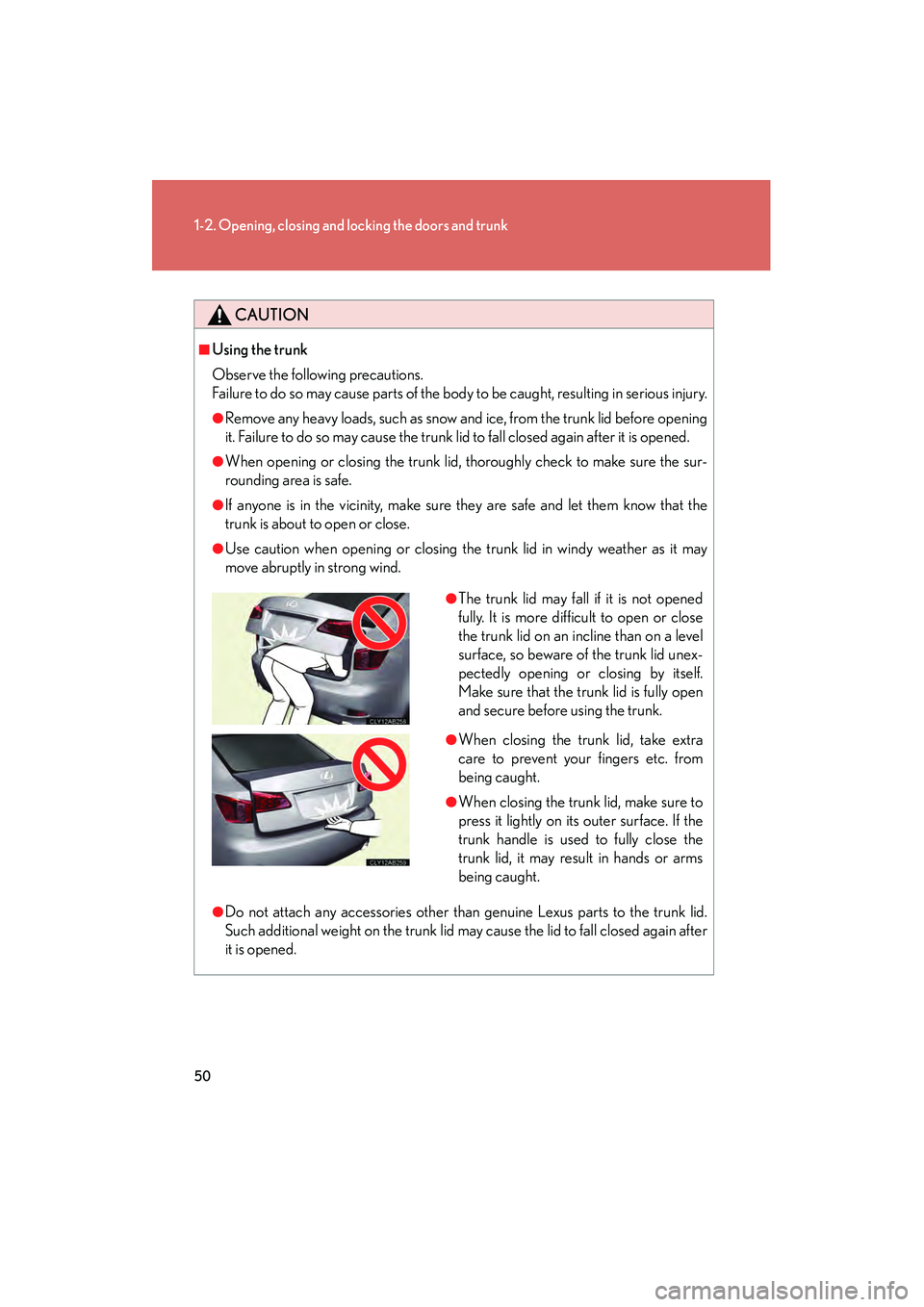
●The trunk lid may fall if it is not opened
fully. It is more difficult to open or close
the trunk lid on an incline than on a level
surface, so beware of the trunk lid unex-
pectedly opening or closing by itself.
Make sure that the trunk lid is fully open
and secure before using the trunk.
●When closing the trunk lid, take extra
care to prevent your fingers etc. from
being caught.
●When closing the trunk lid, make sure to
press it lightly on its outer surface. If the
trunk handle is used to fully close the
trunk lid, it may result in hands or arms
being caught.
Page 104 of 578
103
1-7. Safety information
1
Before driving
IS350/250_U
CAUTION
■Modification and disposal of SRS airbag system components
Do not dispose of your vehicle or perform any of the following modifications with-
out consulting your Lexus dealer.
The SRS airbag may malfunction or deploy (inflate) accidentally, causing death or
serious injury.
●Installation, removal, disassembly and repair of the SRS airbags
●Repairs, modifications, removal or replacement of the steering wheel, instrument
panel, dashboard, seats or seat upholstery, front, side and rear pillars or roof side
rails
●Repairs or modifications of the front fender, front bumper, or side of the occupant
compartment
●Installation of snow plows, winches, etc. to the front grille (bull bars, kangaroo bar
etc.)
●Modifications to the vehicle's suspension system
●Installation of electronic devices such as mobile two-way radios or CD players
●Modifications to your vehicle for a person with a physical disability
Page 131 of 578
130
2-1. Driving procedures
IS350/250_U
CAUTION
■When the vehicle is parked
●Do not leave glasses, cigarette lighters, spray cans, or soft drink cans in the vehi-
cle when it is in the sun.
Doing so may result in the following.
• Gas may leak from a cigarette lighter or spray can, and may lead to a fire.
• The temperature inside the vehicle may cause the plastic lenses and plasticmaterial of eye glasses to deform or crack.
• Soft drink cans may fracture, causing the contents to spray over the interior of the vehicle, and may also cause a short circuit in the vehicle's electrical com-
ponents.
●Always apply the parking brake, shift the shift lever to P (vehicles with an auto-
matic transmission only), stop the engine and lock the vehicle.
Do not leave the vehicle unattended while the engine is running.
●Do not touch the exhaust pipe while the engine is running or immediately after
turning the engine off.
Doing so may cause burns.
●Do not leave the engine running in an area with snow build-up, or where it is
snowing. If snowbanks build up around the vehicle while the engine is running,
exhaust gases may collect and enter the vehicle. This may lead to death or a seri-
ous health hazard.
■Exhaust gases
Exhaust gases include harmful carbon monoxi de (CO) that is colorless and odor-
less. Inhaling exhaust gases may lead to death or a serious health hazard.
●If the vehicle is in a poorly ventilated area, stop the engine. In a closed area, such
as a garage, exhaust gases may collect and enter the vehicle. This may lead to
death or a serious health hazard.
●The exhaust should be checked occasionally. If there is a hole or crack caused by
corrosion, damage to a joint or abnormal exhaust noise, be sure to have the vehi-
cle inspected and repaired by your Lexus dealer. Failure to do so may allow
exhaust gases to enter the vehicle, resulting in death or a serious health hazard.
Page 141 of 578
140
2-1. Driving procedures
IS350/250_U
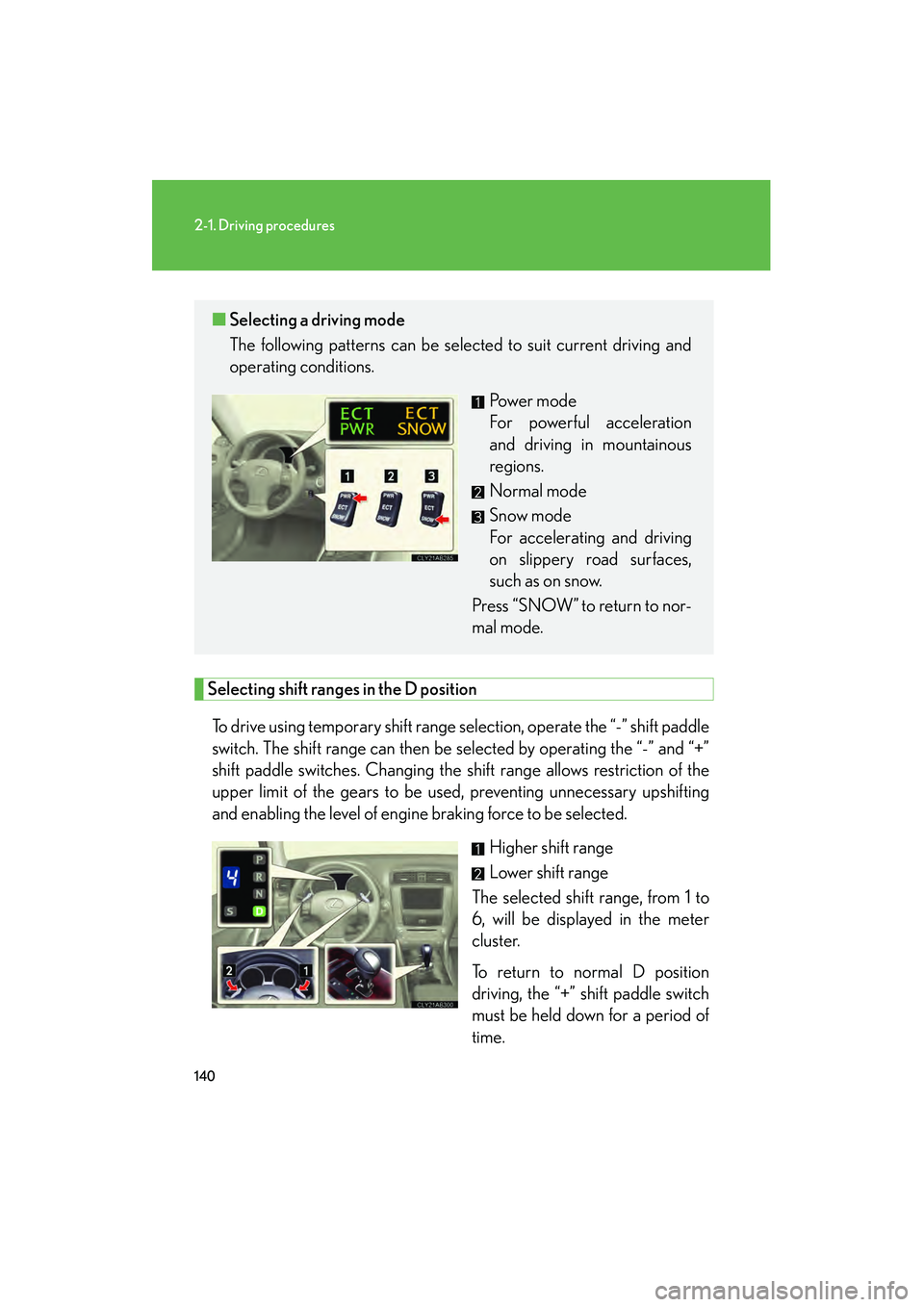
Selecting shift ranges in the D position
To drive using temporary shift range selection, operate the “-” shift paddle
switch. The shift range can then be selected by operating the “-” and “+”
shift paddle switches. Changing the shift range allows restriction of the
upper limit of the gears to be used , preventing unnecessary upshifting
and enabling the level of engine braking force to be selected.
Higher shift range
Lower shift range
The selected shift range, from 1 to
6, will be displayed in the meter
cluster.
To return to normal D position
driving, the “+” shift paddle switch
must be held down for a period of
time.
■ Selecting a driving mode
The following patterns can be selected to suit current driving and
operating conditions.
Power mode
For powerful acceleration
and driving in mountainous
regions.
Normal mode
Snow mode
For accelerating and driving
on slippery road surfaces,
such as on snow.
Press “SNOW”
to return to nor-
mal mode.
Page 144 of 578
143
2-1. Driving procedures
2
When driving
IS350/250_U
■When the “-” shift paddle switch is operated in the D position
When the “-” shift paddle switch is operated in the D position, a shift range will be
automatically selected. The highest gear of the first shift range will be one gear
lower than the gear in use during normal D position driving.
■Automatic deactivation of shift range selection in the D position
Shift range selection in the D position will be deactivated in the following situations:
●When the vehicle comes to a stop
●When range 6 is selected and the accelerator pedal is depressed
●If the accelerator pedal is depressed for more than a certain period of time
■To protect automatic transmission
A function is adopted that automatically selects a higher shift range when the fluid
temperature is high.
■Gear position display when driving
The current gear is displayed on the multi-information display. (→P. 1 6 3 )
■Downshifting restrictions warning buzzer
To help ensure safety and driving performance, downshifting operation may some-
times be restricted. In some circumstances, downshifting may not be possible even
when the shift lever or shift paddle switch is operated. (The warning buzzer will
sound twice.)
■When driving with the cruise control system
Engine braking will not occur during shift range selection in the D position or S
mode, even when downshifting to range 5 or 4. ( →P. 1 7 5 )
■Snow mode automatic deactivation
Snow mode is automatically deactivated if the “ENGINE START STOP” switch is
turned off after driving in snow mode.
■If the shift lever cannot be shifted from P
→P. 4 9 1
Page 147 of 578
146
2-1. Driving procedures
IS350/250_U
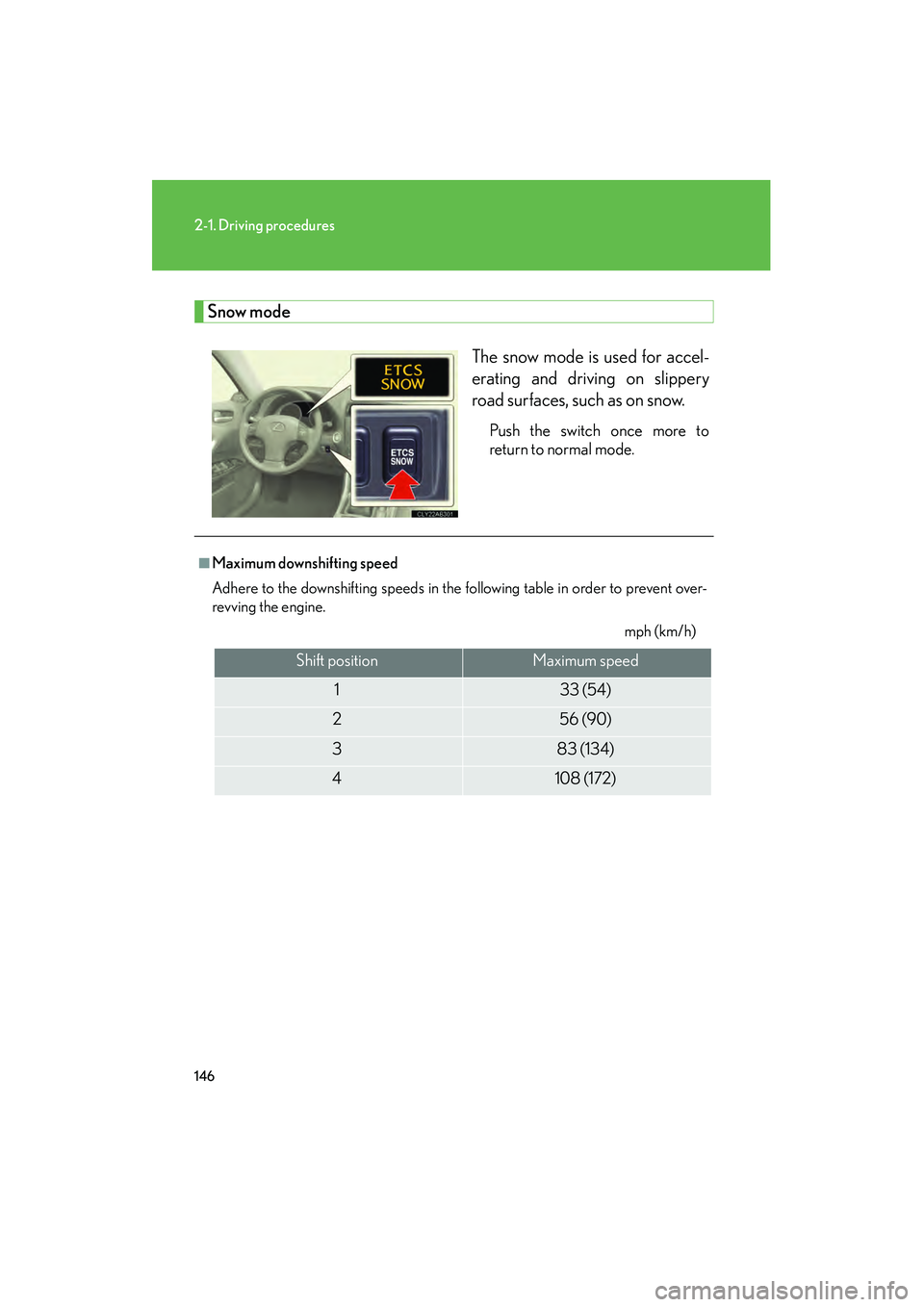
Snow modeThe snow mode is used for accel-
erating and driving on slippery
road surfaces, such as on snow.
Push the switch once more to
return to normal mode.
■Maximum downshifting speed
Adhere to the downshifting speeds in the following table in order to prevent over-
revving the engine. mph (km/h)
Shift positionMaximum speed
133 (54)
256 (90)
383 (134)
4108 (172)
Page 159 of 578
158
2-2. Instrument cluster
IS350/250_U
■Indicators
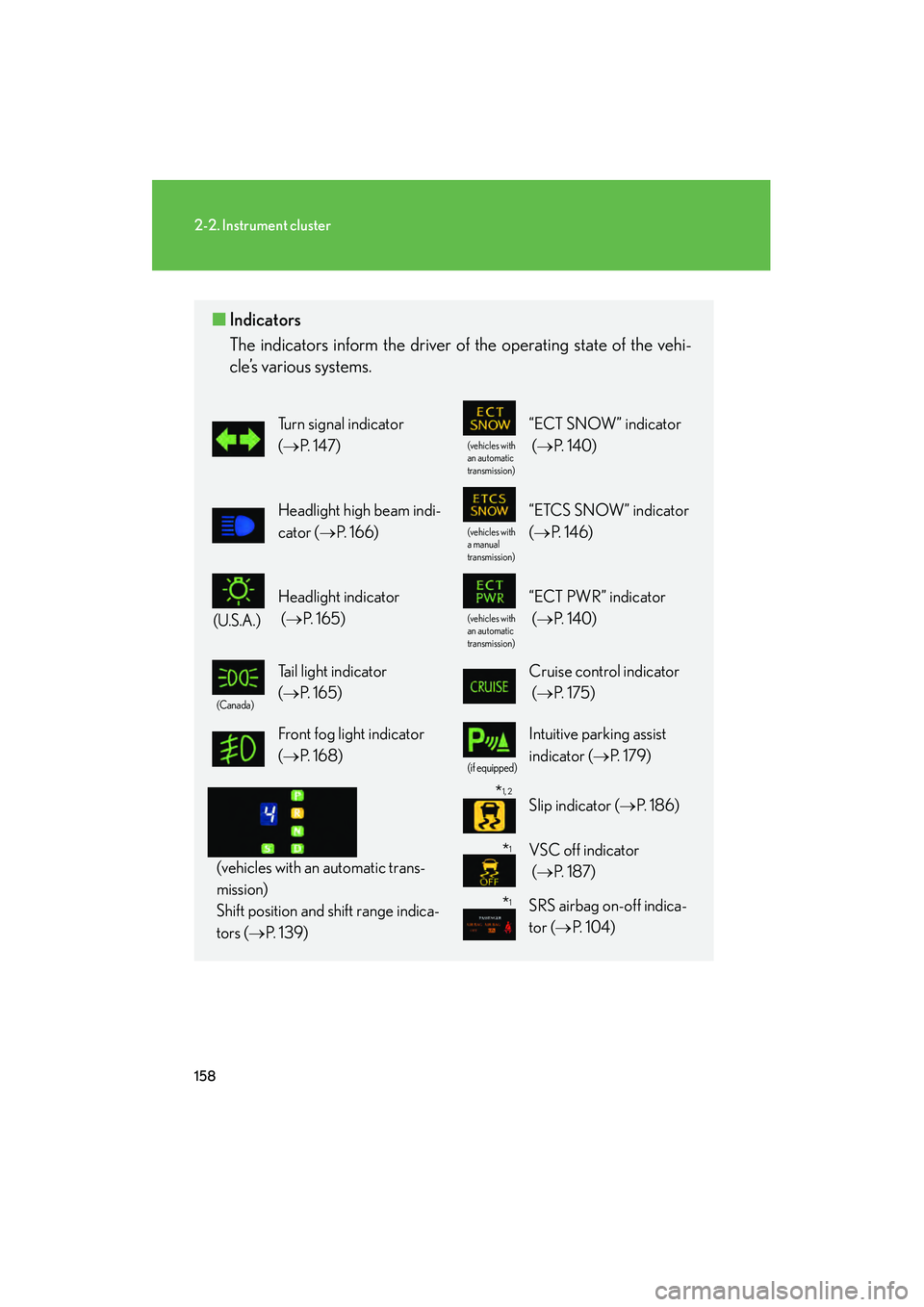
The indicators inform the driver of the operating state of the vehi-
cle’s various systems.
Turn signal indicator
(→ P. 1 4 7 )
(vehicles with
an automatic
transmission)
“ECT SNOW” indicator
(→ P. 1 4 0 )
Headlight high beam indi-
cator ( →P. 1 6 6 )
(vehicles with
a manual
transmission)
“ETCS SNOW” indicator
(→ P. 1 4 6 )
(U.S.A.)
Headlight indicator
(→ P. 1 6 5 )
(vehicles with
an automatic
transmission)
“ECT PWR” indicator
(→ P. 1 4 0 )
(Canada)
Tail light indicator
(→ P. 1 6 5 ) Cruise control indicator
(→ P. 1 7 5 )
Front fog light indicator
(→ P. 1 6 8 )
(if equipped)
Intuitive parking assist
indicator ( →P. 1 7 9 )
(vehicles with an automatic trans-
mission)
Shift position and shift range indica-
tors ( →P. 1 3 9 )
Slip indicator ( →P. 1 8 6 )
VSC off indicator
(→ P. 1 8 7 )
SRS airbag on-off indica-
tor (→ P. 1 0 4 )
*1
*1
*1, 2
Page 179 of 578
178
2-4. Using other driving systems
IS350/250_U
CAUTION
■To avoid operating the cruise control by mistake
Keep the “ON-OFF” button off when not in use.
■Situations unsuitable for cruise control
Do not use cruise control in any of the following situations.
Doing so may result in control of the vehicle being lost and could cause an accident
resulting in death or serious injury.
●In heavy traffic
●On roads with sharp bends
●On slippery roads, such as those covered with rain, ice or snow
●On steep hills
●On winding roads
●When your vehicle is towing anything
Page 184 of 578
183
2-4. Using other driving systems
2
When driving
IS350/250_U
■Sensor detection information
●Certain vehicle conditions and the surrounding environment may affect the
ability of the sensor to correctly detect obstacles. Particular instances where this
may occur are listed below.
• There is dirt, snow or ice on the sensor.
• The sensor is frozen.
• The sensor is covered in any way.
• The vehicle is leaning considerably to one side.
• On an extremely bumpy road, on an incline, on gravel, or on grass.
• The vicinity of the vehicle is noisy due to vehicle horns, motorcycle engines,air brakes of large vehicles, or other loud noises producing ultrasonic waves.
• There is another vehicle equipped with parking assist sensors in the vicinity.
• The sensor is coated with a sheet of spray or heavy rain.
• The vehicle is equipped with a fender pole or wireless antenna.
• Towing eyelets are installed.
• The bumper or sensor receives a strong impact.
• The vehicle is approaching a tall or curved curb.
• In harsh sunlight or intense cold weather.
In addition to the examples above, there are instances in which, because of their
shapes, signs and other objects may be judged by the sensor to be closer than they
are.
●The shape of the obstacle may prevent the sensor from detecting it. Pay particu-
lar attention to the following obstacles.
• Wires, fences, ropes etc.
• Cotton, snow and other materials that absorb radio waves
• Sharply-angled objects
•Low obstacles
• Tall obstacles with upper sections projecting outwards in the direction of your
vehicle
■When the display flashes and a message is displayed
→ P. 4 7 0
Page 188 of 578
187
2-4. Using other driving systems
2
When driving
IS350/250_U
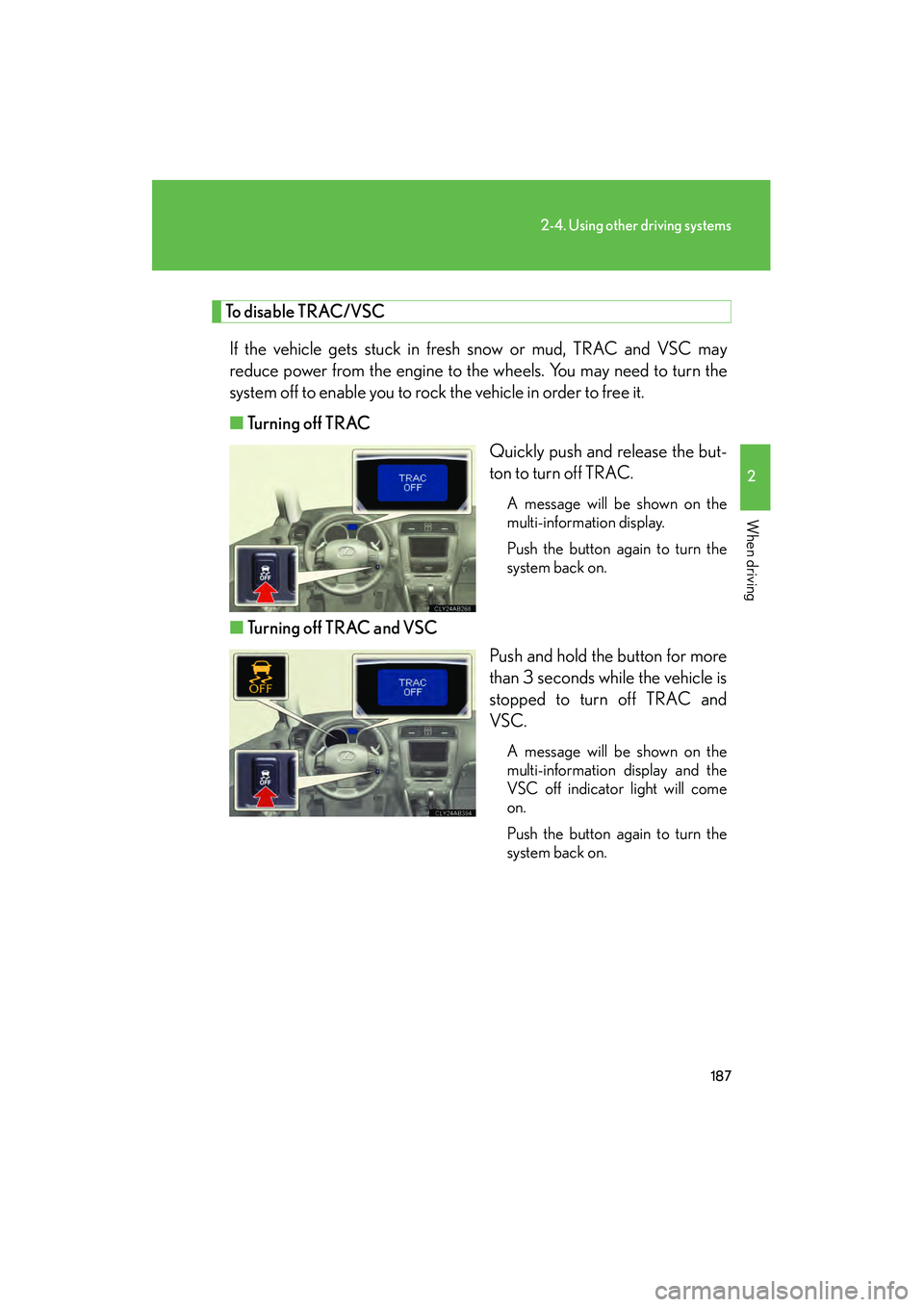
To disable TRAC/VSCIf the vehicle gets stuck in fresh snow or mud, TRAC and VSC may
reduce power from the engine to the wheels. You may need to turn the
system off to enable you to rock the vehicle in order to free it.
■ Turning off TRAC
Quickly push and release the but-
ton to turn off TRAC.
A message will be shown on the
multi-information display.
Push the button again to turn the
system back on.
■Turning off TRAC and VSC
Push and hold the button for more
than 3 seconds while the vehicle is
stopped to turn off TRAC and
VSC.
A message will be shown on the
multi-information display and the
VSC off indicator light will come
on.
Push the button again to turn the
system back on.