ad blue Lexus IS250 2012 Navigation Manual
[x] Cancel search | Manufacturer: LEXUS, Model Year: 2012, Model line: IS250, Model: Lexus IS250 2012Pages: 393, PDF Size: 38.23 MB
Page 184 of 393

AUDIO/VIDEO SYSTEM
183
7“AUX” button
Push this button to turn the
Bluetoothraudio player, AUX, USB
memory or iPod on. For details, see
pages 189, 195, 245 and 253.
8“DISC” button
Push this button to turn the DVD
changer on. For details, see pages
189 and 225.
9“FM” button
Push this button to choose an FM sta-
tion. For details, see pages 189 and
195.
10“AM” button
Push this button to choose an AM sta-
tion. For details, see pages 189 and
195.
11“” button
Push this button to eject the discs.
For details, see pages 223 and 224.
12“SEEK/TRACK” button
Push the “”or “”button to seek
up or down for a station, or to access
a desired track, file or chapter. For
details, see pages 197, 202, 212,
215, 231, 232, 242, 251 and 256.
13“PWR·VOL” knob
Push this knob to turn the audio sys-
tem on and off, and turn it to adjust the
volume. For details, see page 189.
14“AUDIO” button
Push this button to display the audio
control screen. For details, see page
189.
ISF/IS NAVI (U)
Finish
7
Page 185 of 393
AUDIO/VIDEO SYSTEM
184
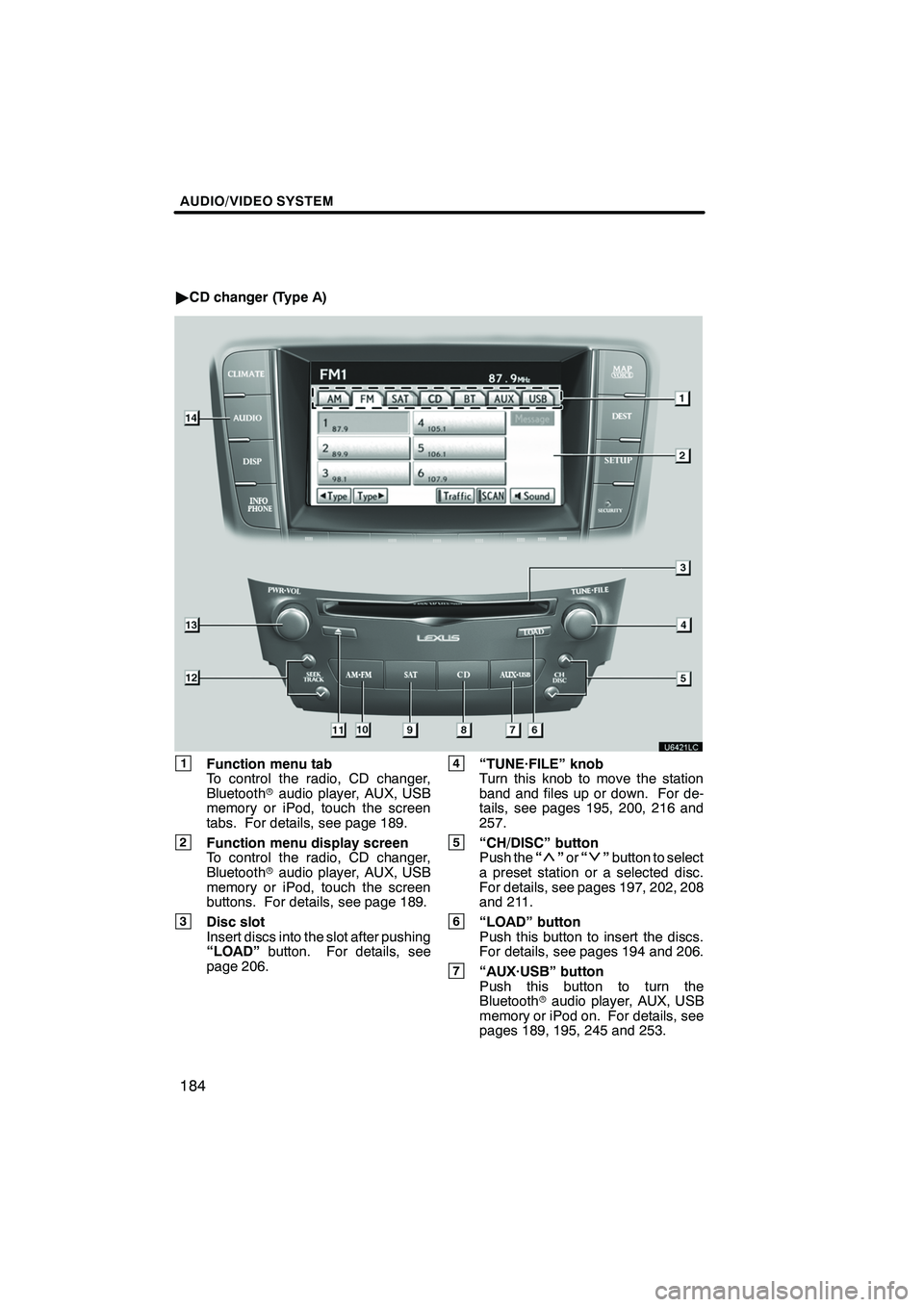
"CD changer (Type A)
1Function menu tab
To control the radio, CD changer,
Bluetooth raudio player, AUX, USB
memory or iPod, touch the screen
tabs. For details, see page 189.
2Function menu display screen
To control the radio, CD changer,
Bluetooth raudio player, AUX, USB
memory or iPod, touch the screen
buttons. For details, see page 189.
3Disc slot
Insert discs into the slot after pushing
“LOAD” button. For details, see
page 206.
4“TUNE·FILE” knob
Turn this knob to move the station
band and files up or down. For de-
tails, see pages 195, 200, 216 and
257.
5“CH/DISC” button
Push the “”or “”button to select
a preset station or a selected disc.
For details, see pages 197, 202, 208
and 211.
6“LOAD” button
Push this button to insert the discs.
For details, see pages 194 and 206.
7“AUX·USB” button
Push this button to turn the
Bluetooth raudio player, AUX, USB
memory or iPod on. For details, see
pages 189, 195, 245 and 253.
ISF/IS NAVI (U)
Finish
Page 187 of 393

AUDIO/VIDEO SYSTEM
186
"CD changer (Type B)
1Function menu tab
To control the radio, CD changer,
Bluetooth raudio player, AUX, USB
memory or iPod, touch the screen
tabs. For details, see page 189.
2Function menu display screen
To control the radio, CD changer,
Bluetooth raudio player, AUX, USB
memory or iPod, touch the screen
buttons. For details, see page 189.
3Disc slot
Insert discs into the slot after pushing
“LOAD” button. For details, see
page 206.
4“TUNE·FILE” knob
Turn this knob to move the station
band and files up or down. For de-
tails, see pages 195, 200, 216 and
257.
5“CH/DISC” button
Push the “”or “”button to select
a preset station or a selected disc.
For details, see pages 197, 202, 208
and 211.
6“LOAD” button
Push this button to insert the discs.
For details, see pages 194 and 206.
ISF/IS NAVI (U)
Finish
Page 188 of 393
AUDIO/VIDEO SYSTEM
187
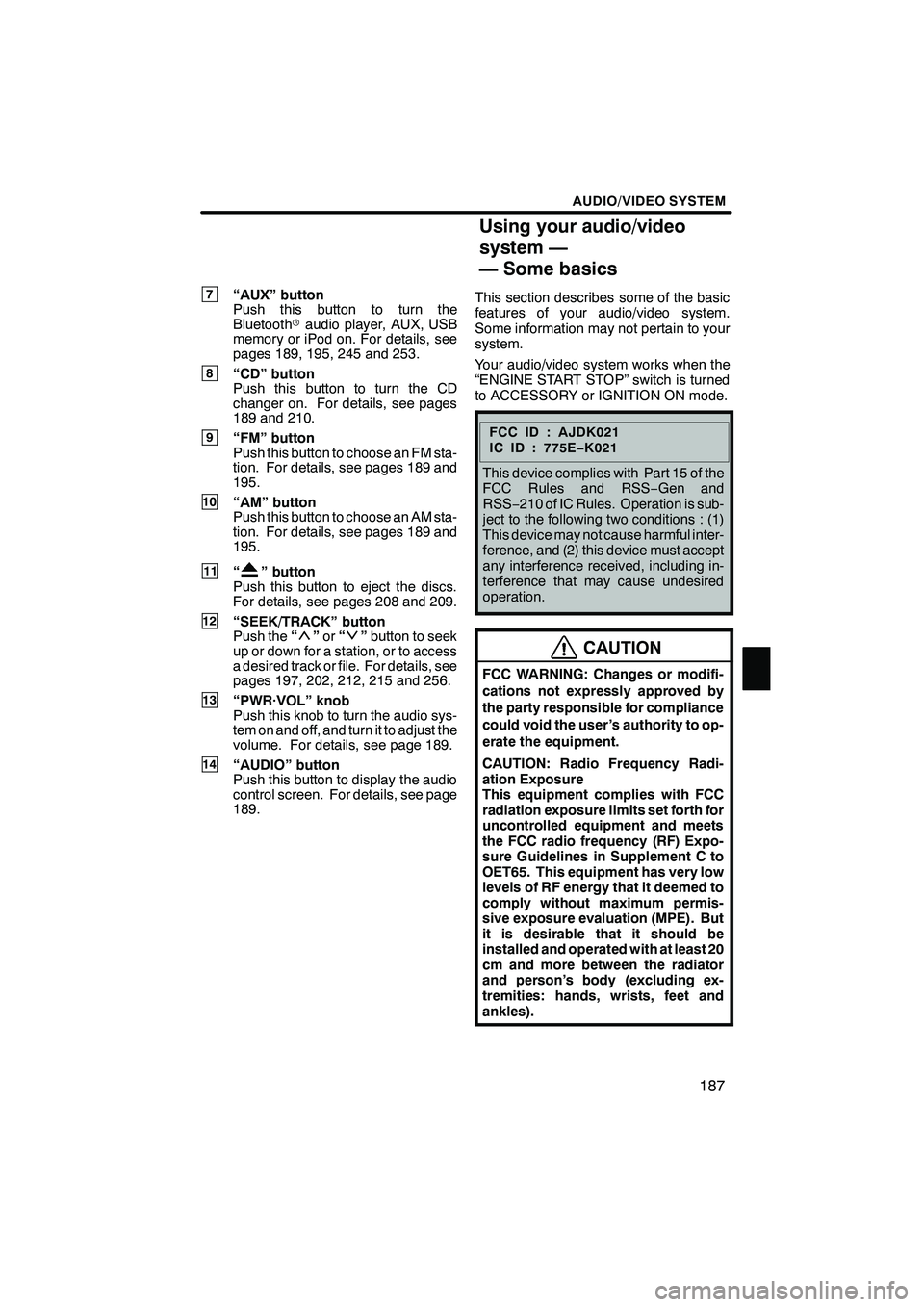
7“AUX” button
Push this button to turn the
Bluetoothraudio player, AUX, USB
memory or iPod on. For details, see
pages 189, 195, 245 and 253.
8“CD” button
Push this button to turn the CD
changer on. For details, see pages
189 and 210.
9“FM” button
Push this button to choose an FM sta-
tion. For details, see pages 189 and
195.
10“AM” button
Push this button to choose an AM sta-
tion. For details, see pages 189 and
195.
11“” button
Push this button to eject the discs.
For details, see pages 208 and 209.
12“SEEK/TRACK” button
Push the “”or “”button to seek
up or down for a station, or to access
a desired track or file. For details, see
pages 197, 202, 212, 215 and 256.
13“PWR·VOL” knob
Push this knob to turn the audio sys-
tem on and off, and turn it to adjust the
volume. For details, see page 189.
14“AUDIO” button
Push this button to display the audio
control screen. For details, see page
189. This section describes some of the basic
features of your audio/video system.
Some information may not pertain to your
system.
Your audio/video system works when the
“ENGINE START STOP” switch is turned
to ACCESSORY or IGNITION ON mode.
FCCID:AJDK021
IC ID : 775E
−K021
This device complies with Part 15 of the
FCC Rules and RSS −Gen and
RSS− 210 of IC Rules. Operation is sub-
ject to the following two conditions : (1)
This device may not cause harmful inter-
ference, and (2) this device must accept
any interference received, including in-
terference that may cause undesired
operation.
CAUTION
FCC WARNING: Changes or modifi-
cations not expressly approved by
the party responsible for compliance
could void the user’s authority to op-
erate the equipment.
CAUTION: Radio Frequency Radi-
ation Exposure
This equipment complies with FCC
radiation exposure limits set forth for
uncontrolled equipment and meets
the FCC radio frequency (RF) Expo-
sure Guidelines in Supplement C to
OET65. This equipment has very low
levels of RF energy that it deemed to
comply without maximum permis-
sive exposure evaluation (MPE). But
it is desirable that it should be
installed and operated with at least 20
cm and more between the radiator
and person’s body (excluding ex-
tremities: hands, wrists, feet and
ankles).
ISF/IS NAVI (U)
Finish
7
Using your audio/video
system —
— Some basics
7
Page 192 of 393

AUDIO/VIDEO SYSTEM
191
The screen buttons for radio, CD
changer, DVD changer, Bluetoothrau-
dio player, AUX, USB memory and iPod
operation are displayed on the screen
when the audio control mode is se-
lected.
Touch the tab to select the desired mode
when the audio control mode is selected.
INFORMATION
You cannot operate dimmed screen
buttons.
ISF/IS NAVI (U)
Finish
7
Page 199 of 393

AUDIO/VIDEO SYSTEM
198
“TypeA"”
If the system receives no RDS stations,
“NO− PTY” appears on the display.
Each time you touch “A Type ” or“Type
" ”, the program type changes as in the
following:
DROCK
DMISC (Miscellaneous)
DINFORM (Information)
DEASY LIS (Easy listening)
DCLS/JAZZ (Classical music and Jazz)
DR & B (Rhythm and Blues)
DRELIGION
DALART (Emergency message)
“TypeSeek”
When a program is set, “Type Seek” ap-
pears. Touch the button and the system
starts to seek the station in the relevant
program type.
If any type program station is not found,
“Nothing” appears on the display.
ISF/IS NAVI (U)
Finish
Page 246 of 393

AUDIO/VIDEO SYSTEM
245
The Bluetoothraudio system enables
users to enjoy music played on a porta-
ble player from the vehicle speaker via
wireless communication.
This audio system supports
Bluetooth r, a wireless data system
capable of playing portable audio
music without cables. If your portable
player does not support Bluetooth r,
the Bluetooth raudio system will not
function.
INFORMATION
Portable players must correspond to
the following specifications in order
to be connected to the Bluetooth rau-
dio system. However, please note
that some functions may be limited
depending on the type of portable
player.
D Bluetooth rSpecification
Ver.1.1 or higher
(Recommended: Ver.2.0 + EDR or
higher)
D Profile
G A2DP (Advanced Audio Dis-
tribution Profile) Ver.1.0 or higher
G AVRCP (Audio/Video Remote
Control Profile) Ver.1.0 or higher
(Recommended: Ver.1.3 or higher)
Please go to “http://www.lexus.com/”
to find approved Bluetooth rphones
for this system.
ISF/IS NAVI (U)
Finish
— Bluetooth raudio
operation
7
Page 247 of 393
AUDIO/VIDEO SYSTEM
246
Bluetooth is a trademark owned by
Bluetooth SIG. Inc.
CAUTION
Do not operate the player ’s controls
or connect to the Bluetoothraudio
system while driving.
NOTICE
Do not leave your portable player in
the car. In particular, high tempera-
tures inside the vehicle may damage
the portable player.
INFORMATION
DIn the following conditions, the
system may not function.
D The portable player is turned off.
D The portable player is not con-
nected.
D The portable player has a low bat-
tery.
DIt may take time, the phone connec-
tion is carried out during
Bluetooth raudio play.
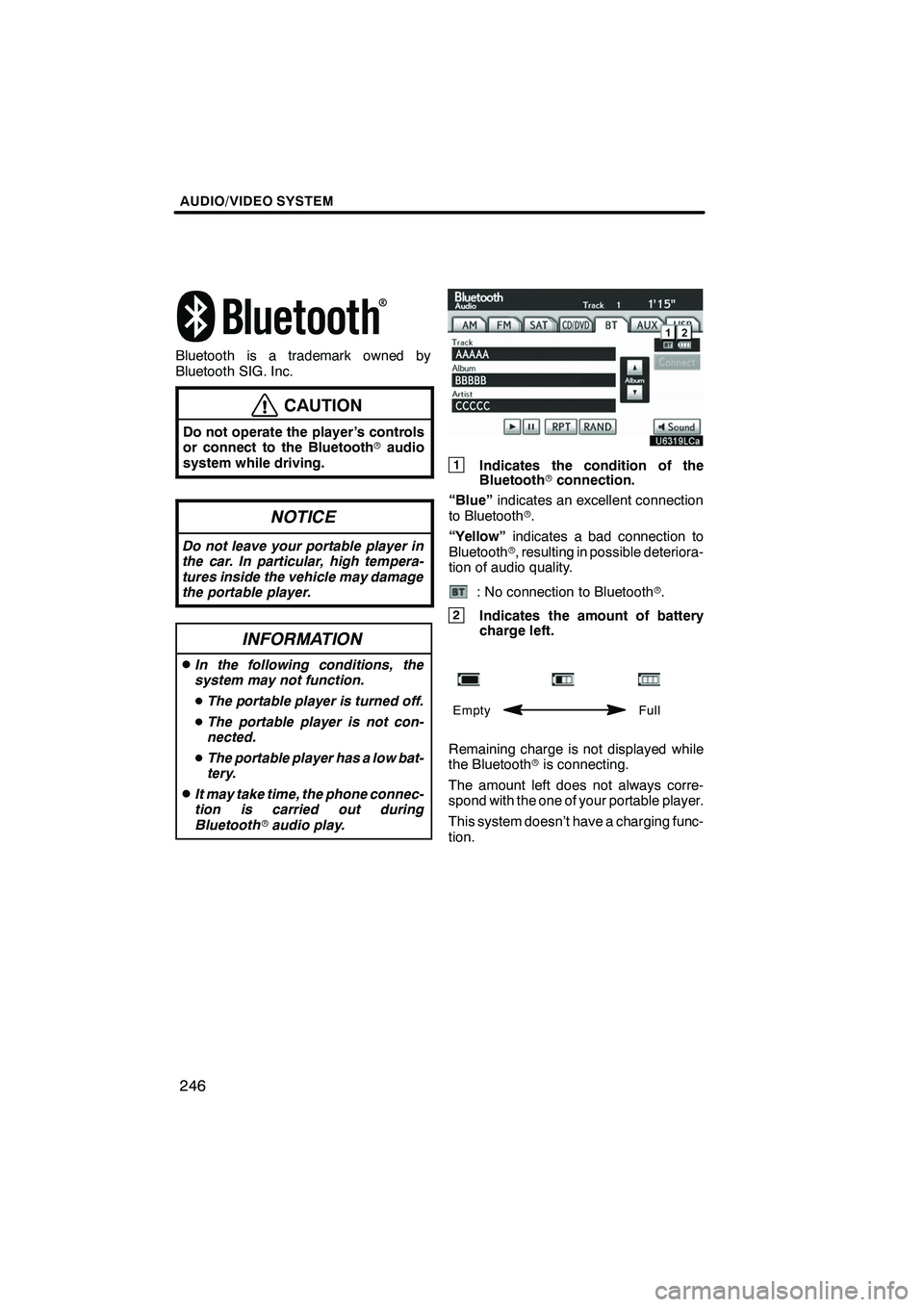
1Indicates the condition of the
Bluetooth rconnection.
“Blue” indicates an excellent connection
to Bluetooth r.
“Yellow” indicates a bad connection to
Bluetooth r, resulting in possible deteriora-
tion of audio quality.
: No connection to Bluetooth r.
2Indicates the amount of battery
charge left.
Empty Full
Remaining charge is not displayed while
the Bluetoothris connecting.
The amount left does not always corre-
spond with the one of your portable player.
This system doesn’t have a charging func-
tion.
ISF/IS NAVI (U)
Finish
Page 248 of 393

AUDIO/VIDEO SYSTEM
247
An antenna for the Bluetoothr
connection is built in to the instrument
panel. The indication of the Bluetooth r
connection may turn yellow and the
system may not function when you use
the Bluetooth rportable player in the
following conditions.
DYour portable player is hiding behind
from the display (behind the seat or in
the glove box or console box).
DYour portable player touches or is cov-
ered with metal materials.
Leave the Bluetooth rportable player in a
place where the “Blue” indication is dis-
played.
The portable player information is regis-
tered when the Bluetooth raudio system is
connected. When you release possession
of your vehicle, remove your portable play-
er. (See “(a) Removing a Bluetooth rau-
dio” on page 359.)
FCCID:AJDK021
IC ID: 775E −K021
This device complies with Part 15 of the
FCC Rules and RSS −Gen and
RSS− 210 of IC Rules. Operation is sub-
ject to the following two conditions : (1)
This device may not cause harmful inter-
ference, and (2) this device must accept
any interference received, including in-
terference that may cause undesired
operation.
CAUTION
FCC WARNING: Changes or modifi-
cations not expressly approved by
the party responsible for compliance
could void the user’s authority to op-
erate the equipment.
CAUTION: Radio Frequency Radi-
ation Exposure
This equipment complies with FCC
radiation exposure limits set forth for
uncontrolled equipment and meets
the FCC radio frequency (RF) Expo-
sure Guidelines in Supplement C to
OET65. This equipment has very low
levels of RF energy that it deemed to
comply without maximum permis-
sive exposure evaluation (MPE). But
it is desirable that it should be
installed and operated with at least 20
cm and more between the radiator
and person’s body (excluding ex-
tremities: hands, wrists, feet and
ankles).
Co− location: This transmitter must
not be co−located or operated in con-
junction with any other antenna or
transmitter.
ISF/IS NAVI (U)
Finish
7
Page 249 of 393
AUDIO/VIDEO SYSTEM
248
(a) Connecting Bluetoothraudio play-
er
To use the Bluetooth raudio system,
you need to enter your portable player
into the system. Once you have
registered it, you can enjoy your music
on the vehicle’s audio system. (See “—
Setting Bluetooth raudio” on page
357.)
For the operation procedure for the
portable player, see the instruction
manual that comes with it.
DWhen the connection method is
“From Vehicle”.
DWhen the auto connection is on
When the portable player is
standby for the connection, it
will be automatically connected
whenever the “ENGINE START
STOP” switch is in either AC-
CESSORY or IGNITION ON
mode.
DWhen the auto connection is offManually connect the portable
player in accordance with the
following procedure.
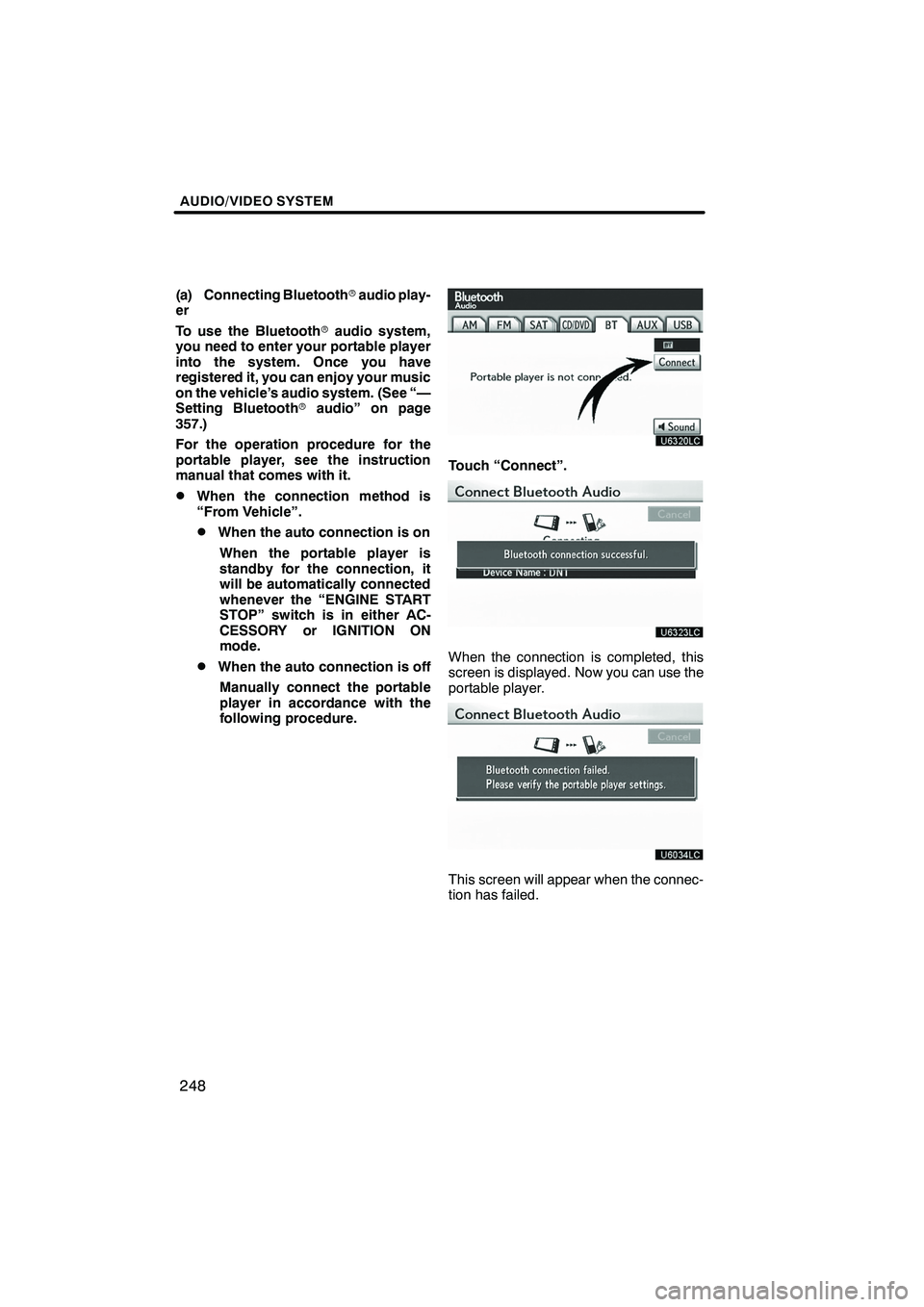
Touch “Connect”.
When the connection is completed, this
screen is displayed. Now you can use the
portable player.
This screen will appear when the connec-
tion has failed.
ISF/IS NAVI (U)
Finish