automatic transmission Lexus IS250 2012 Owner's Guide
[x] Cancel search | Manufacturer: LEXUS, Model Year: 2012, Model line: IS250, Model: Lexus IS250 2012Pages: 594, PDF Size: 7.2 MB
Page 151 of 594
150
2-1. Driving procedures
IS350/250_U
■When the “-” shift paddle switch is operated in the D position
When the “-” shift paddle switch is operated in the D position, a shift range will be
automatically selected. The highest gear of the first shift range will be one gear
lower than the gear in use during normal D position driving.
■Automatic deactivation of shift range selection in the D position
Shift range selection in the D position will be deactivated in the following situations:
●When the vehicle comes to a stop
●When range 6 is selected and the accelerator pedal is depressed
●If the accelerator pedal is depressed for more than a certain period of time
■To protect automatic transmission
A function is adopted that automatically selects a higher shift range when the fluid
temperature is high.
■Gear position display when driving
The current gear is displayed on the multi-information display. ( →P. 1 7 0 )
■Downshifting restrict ions warning buzzer
To help ensure safety and driving performance, downshifting operation may some-
times be restricted. In some circumstances, downshifting may not be possible even
when the shift lever or shift paddle switch is operated. (The warning buzzer will
sound twice.)
■When driving with the cruise control system
Engine braking will not occur during shift range selection in the D position or S
mode, even when downshifting to range 5 or 4. ( →P. 1 8 6 )
■Snow mode automatic deactivation
Snow mode is automatically deactivated if the “ENGINE START STOP” switch is
turned off after driving in snow mode.
■If the shift lever cannot be shifted from P
→P. 5 0 3
Page 152 of 594
151
2-1. Driving procedures
2
When driving
IS350/250_U
■If does not come on even after shifting the shift lever to S
This may indicate a malfunction in the automatic transmission system. Have the
vehicle inspected by your Lexus dealer immediately.
(In this situation, the vehicle will operate as if the shift lever is in D.)
■AI-SHIFT
The AI-SHIFT automatically shifts the gear to the suitable position according to the
driver performance and driving conditions.
The AI-SHIFT automatically operates when the shift lever is in the D position. How-
ever, operating the “-” shift paddle switch will restrict the function’s operation. (Shift-
ing the shift lever to the S position cancels the function.)
CAUTION
■When driving on slippery road surfaces
Be careful of downshifting and sudden acceleration, as this could result in the vehi-
cle skidding to the side or spinning.
Page 156 of 594
155
2-1. Driving procedures
2
When driving
IS350/250_U
Parking brake
■Usage in winter time
See “Winter driving tips” for parking brake usage in winter time. (→P. 206)
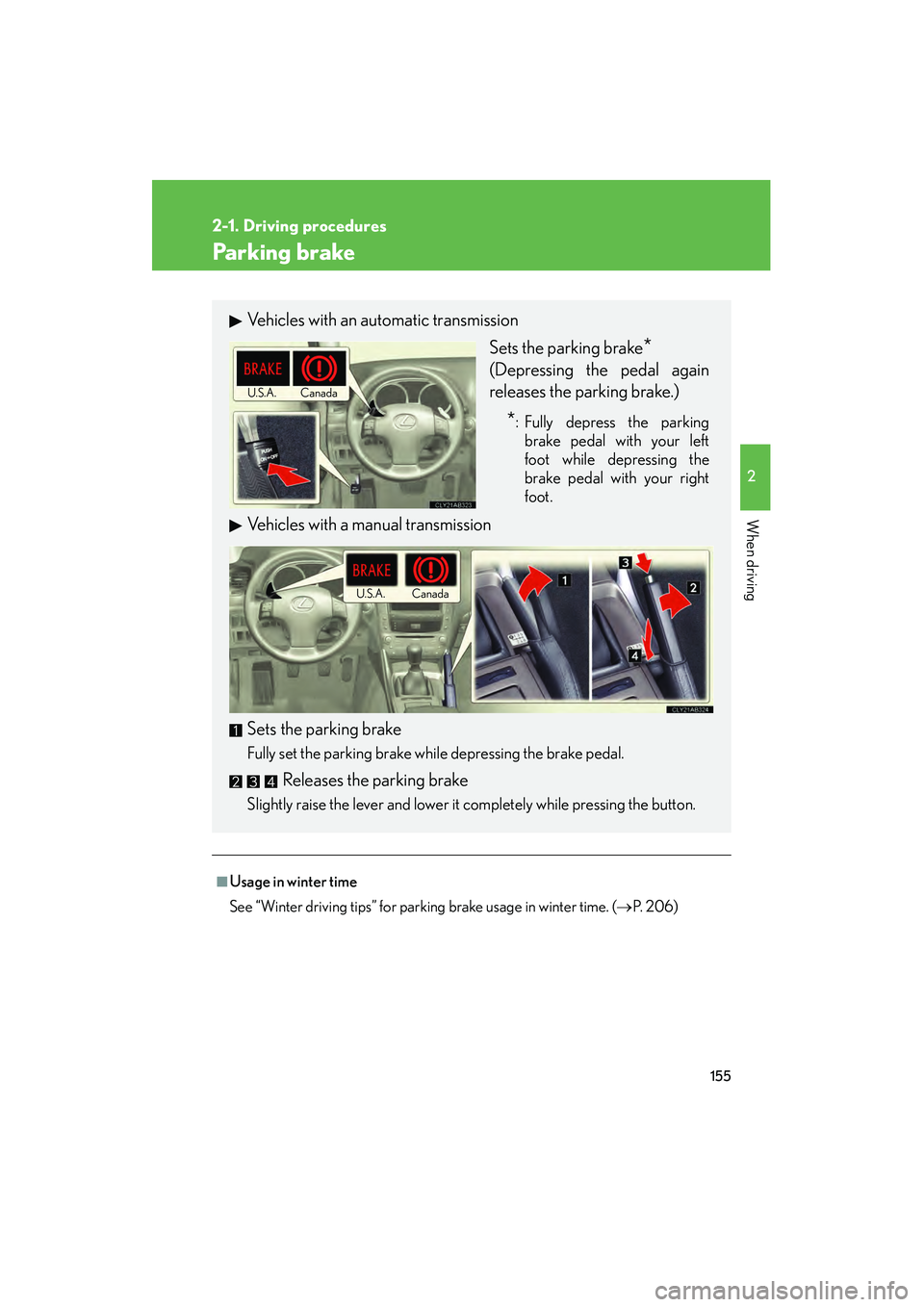
Vehicles with an automatic transmission
Sets the parking brake
*
(Depressing the pedal again
releases the parking brake.)
*: Fully depress the parkingbrake pedal with your left
foot while depressing the
brake pedal with your right
foot.
Vehicles with a manual transmission
Sets
the parking brake
Fully set the parking brake while depressing the brake pedal.
Releases the parking brake
Slightly raise the lever and lower it completely while pressing the button.
Canada
U.S.A.
Canada
U.S.A.
Page 166 of 594
165
2-2. Instrument cluster
2
When driving
IS350/250_U
■Indicators
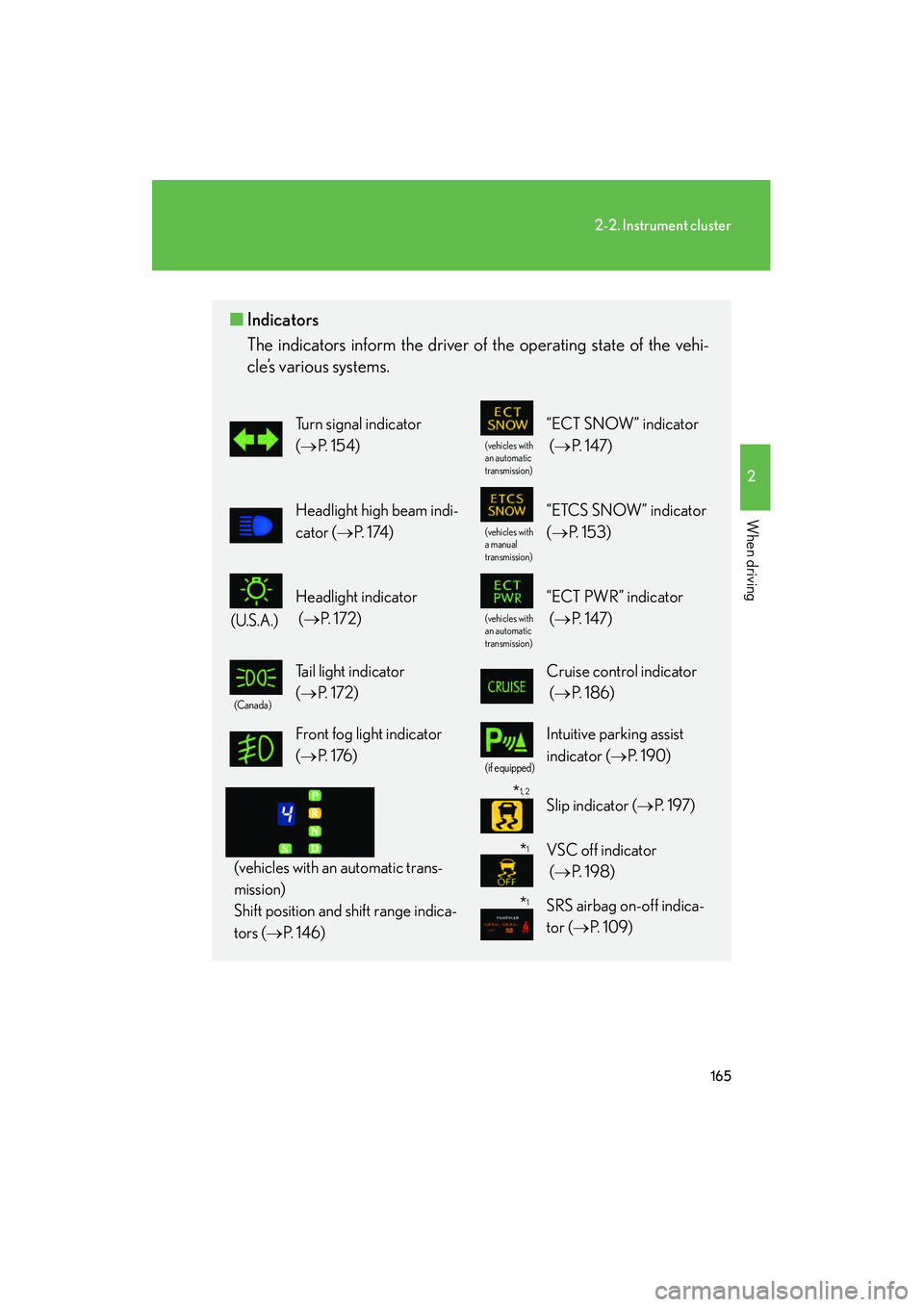
The indicators inform the driver of the operating state of the vehi-
cle’s various systems.
Turn signal indicator
(→ P. 1 5 4 )
(vehicles with
an automatic
transmission)
“ECT SNOW” indicator
(→ P. 1 4 7 )
Headlight high beam indi-
cator ( →P. 1 74 )
(vehicles with
a manual
transmission)
“ETCS SNOW” indicator
(→ P. 1 5 3 )
(U.S.A.)
Headlight indicator
(→ P. 1 7 2 )
(vehicles with
an automatic
transmission)
“ECT PWR” indicator
(→ P. 1 4 7 )
(Canada)
Tail light indicator
(→ P. 1 7 2 ) Cruise control indicator
(→ P. 1 8 6 )
Front fog light indicator
(→ P. 1 76 )
(if equipped)
Intuitive parking assist
indicator ( →P. 1 9 0 )
(vehicles with an automatic trans-
mission)
Shift position and shift range indica-
tors ( →P. 1 4 6 )
Slip indicator ( →P. 1 9 7 )
VSC off indicator
(→ P. 1 9 8 )
SRS airbag on-off indica-
tor ( →P. 1 0 9 )
*1
*1
*1, 2
Page 171 of 594

170
2-2. Instrument cluster
IS350/250_U■
Gear position display
(vehicles with an automatic transmission only)
Indicates the current gear, and the range of gears
that is available when the shift lever is in the D or S
position. The gear range is shown by the number of
dots ( •) and the current gear is shown as a number.
The transmission automatically selects the gears
within the driver selected gear range.
In the illustration to the left, a range of 6 available gears
(1 through 6) has been selected by the driver. (The shift
lever is in the D or S position with 6 ranges enabled.) It is
possible for the transmission to automatically select
between all 6 of the gears. In this case, the transmission
has selected third gear.
■System check display
After switching the “ENGINE START STOP” switch to IGNITION ON mode,
“CHECK” is displayed while system operation is checked. When the system check
is complete, “COMPLETED” is displayed before returning to the normal screen.
■Outside temperature display
In the following situations, the correct outside temperature may not be displayed, or
the display may take longer than normal to change.
●When stopped, or driving at low speeds (less than 12 mph [20 km/h])
●When the outside temperature has changed suddenly (at the entrance/exit of a
garage, tunnel, etc.)
Page 189 of 594
188
2-4. Using other driving systems
IS350/250_U
■Cruise control can be set when
●The shift lever is in the D or range 4 or higher of S has been selected.
●Range 4 or higher has been selected by using the paddle shift.
(vehicles with an automatic transmission)
●Vehicle speed is above approximately 25 mph (40 km/h).
■Accelerating after setting the vehicle speed
●The vehicle can be accelerated normally. After acceleration, the set speed
resumes.
●Even without canceling the cruise control, the set speed can be increased by
first accelerating the vehicle to the desired speed and then pushing the lever
down to set the new speed.
■Automatic cruise control cancelation
Cruise control will stop maintaining the vehicle speed in any of the following situa-
tions.
●Actual vehicle speed falls more than approximately 10 mph (16 km/h) below the
preset vehicle speed.
At this time, the memorized set speed is not retained.
●Actual vehicle speed is below approximately 25 mph (40 km/h).
●VSC is activated.
■If the cruise control indicator light flashes
Press the “ON-OFF” button once to deactivate the system, and then press the but-
ton again to reactivate the system.
If the cruise control speed cannot be set or if the cruise control cancels immediately
after being activated, there may be a malfunction in the cruise control system. Have
the vehicle inspected by your Lexus dealer.
Page 197 of 594

196
2-4. Using other driving systems
IS350/250_U
Driving assist systems
To help enhance driving safety and performance, the following systems
operate automatically in response to various driving situations. Be aware,
however, that these systems are supplementary and should not be relied
upon too heavily when operating the vehicle.
■ ABS (Anti-lock Brake System)
Helps to prevent wheel lock when the brakes are applied suddenly, or if
the brakes are applied while driving on a slippery road surface.
■Brake assist
Generates an increased level of braking force after the brake pedal is
depressed, when the system detects a panic stop situation.
■VSC (Vehicle Stability Control)
Helps the driver to control skidding when swerving suddenly or turning on
slippery road surfaces.
■TRAC (Traction Control)
Maintains drive power and prevents the rear wheels (2WD models) or all
wheels (AWD models) from spinning wh en starting the vehicle or acceler-
ating on slippery roads.
■ Hill-start assist control (vehicles with an automatic transmission)
Helps to prevent the vehicle from rolling backward when starting on an
incline or slippery slope.
■EPS (Electric Power Steering)
Employs an electric motor to reduce the amount of effort needed to turn
the steering wheel.
Page 202 of 594
201
2-4. Using other driving systems
2
When driving
IS350/250_U
CAUTION
■TRAC may not operate effectively when
Directional control and power may not be achievable while driving on slippery road
surfaces, even if the TRAC system is operating.
Do not drive the vehicle in conditions where stability and power may be lost.
■If hill-start assist control does not operate effectively
(vehicles with an automatic transmission)
Do not overly rely on the hill-start assist control. The hill-start assist control may not
operate effectively on steep inclines and roads covered in ice.
■When the VSC is activated
The slip indicator light flashes. Always drive carefully. Reckless driving may cause
an accident, resulting in death or serious injury. Exercise particular care when the
indicator light flashes.
■When TRAC and VSC are off
Be especially careful and drive at a speed appropriate to the road conditions. As
these are systems to help enhance vehicle stability and driving force, do not turn off
TRAC and VSC unless necessary.
■Replacing tires
Make sure that all tires are of the specified size, brand, tread pattern and total load
capacity. In addition, make sure that the tires are inflated to the recommended tire
pressure level.
The ABS, VSC and TRAC systems will not function correctly if different tires are fit-
ted on the vehicle.
Contact your Lexus dealer for further information when replacing tires or wheels.
■Handling of tires and suspension
Using tires with any kind of problem or modifying the suspension will affect the driv-
ing assist systems, and may cause the system to malfunction.
Page 208 of 594
207
2-5. Driving information
2
When driving
IS350/250_U
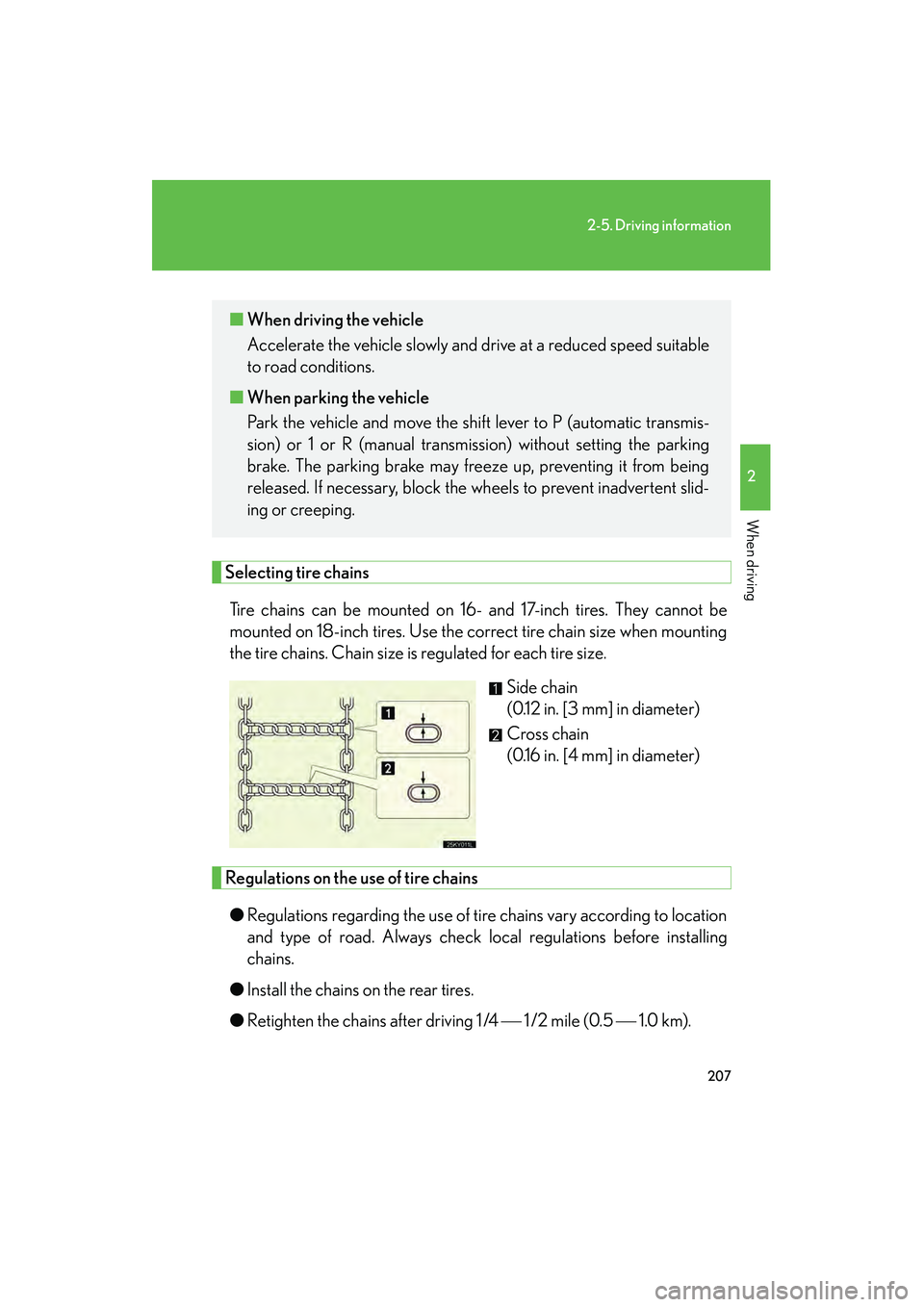
Selecting tire chainsTire chains can be mounted on 16- and 17-inch tires. They cannot be
mounted on 18-inch tires. Use the correct tire chain size when mounting
the tire chains. Chain size is regulated for each tire size. Side chain
(0.12 in. [3 mm] in diameter)
Cross chain
(0.16 in. [4 mm] in diameter)
Regulations on the use of tire chains
● Regulations regarding the use of tire chains vary according to location
and type of road. Always check local regulations before installing
chains.
● Install the chains on the rear tires.
● Retighten the chains after driving 1 /4 1 /2 mile (0.5 1.0 km).
■When driving the vehicle
Accelerate the vehicle slowly and drive at a reduced speed suitable
to road conditions.
■ When parking the vehicle
Park the vehicle and move the shift lever to P (automatic transmis-
sion) or 1 or R (manual transmission) without setting the parking
brake. The parking brake may freeze up, preventing it from being
released. If necessary, block the wheels to prevent inadvertent slid-
ing or creeping.
Page 212 of 594
211
2-5. Driving information
2
When driving
IS350/250_U
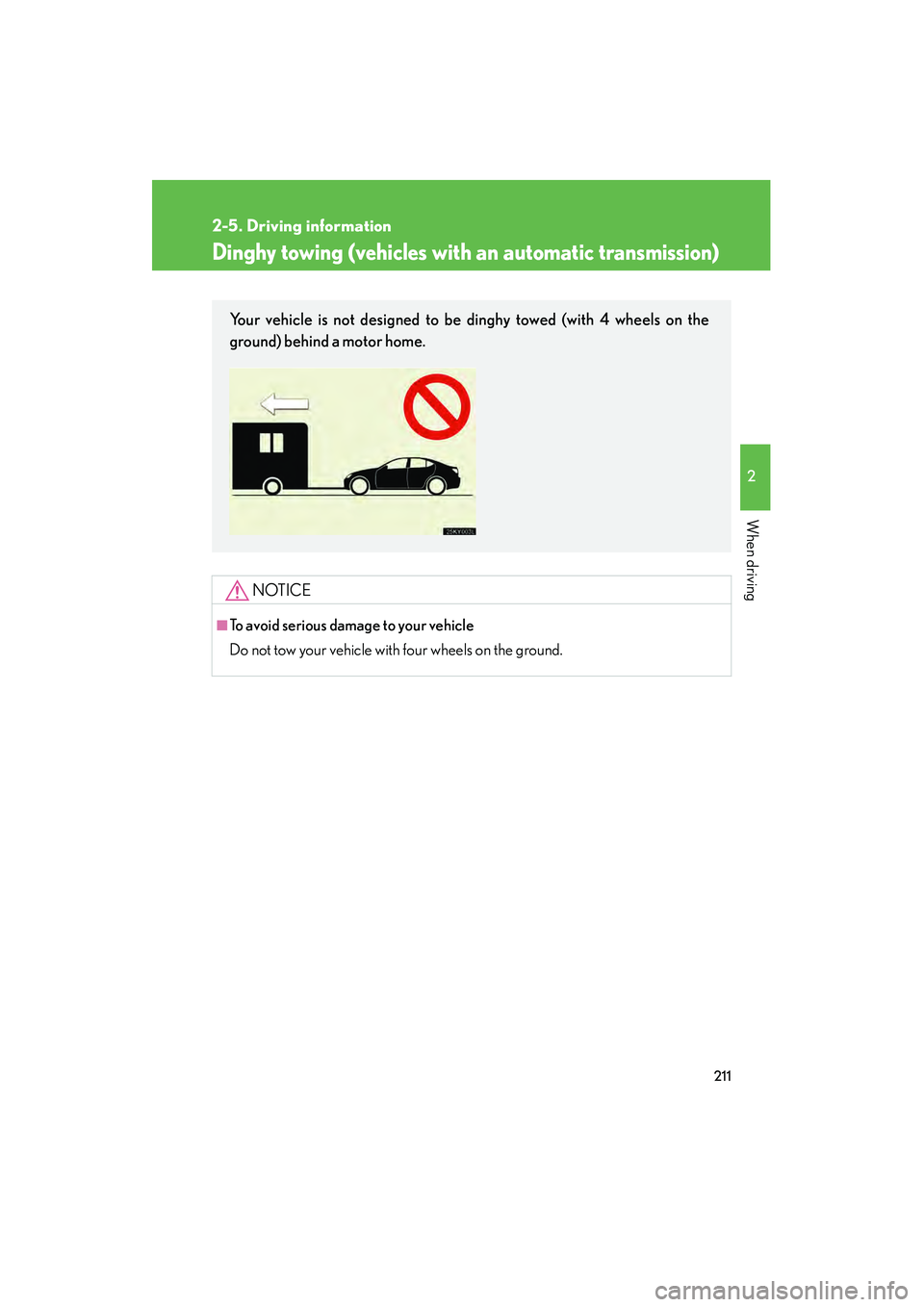
Dinghy towing (vehicles with an automatic transmission)
NOTICE
■To avoid serious damage to your vehicle
Do not tow your vehicle with four wheels on the ground.
Your vehicle is not designed to be dinghy towed (with 4 wheels on the
ground) behind a motor home.