lock Lexus IS250 2012 Workshop Manual
[x] Cancel search | Manufacturer: LEXUS, Model Year: 2012, Model line: IS250, Model: Lexus IS250 2012Pages: 594, PDF Size: 7.2 MB
Page 86 of 594
85
1-4. Opening and closing the windows and moon roof
1
Before driving
IS350/250_U
■If the moon roof closes but then re-opens slightlyStop the vehicle.
Press and hold the “CLOSE” switch until the moon roof completely
closes.
During the operation, the moon roof will move in the manner outlined
below. If the switch is released during the operation, the operation will
have to be performed again from the beginning.
The moon roof will close, open and then pause for approximately 10 sec-
onds. Then it will close, tilt up and pause for approximately 1 second, after
which it will tilt down and open and then close.
If the moon roof does not fully close even after performing the above procedure
correctly, have the vehicle inspected by your Lexus dealer.
■If the moon roof tilts down but then tilts back up Stop the vehicle.
Press and hold the “TILT” switch until the moon roof moves into the tilt up
position and stops.
Release the “TILT” switch once and then press and hold the “TILT” switch
until the moon roof completely closes.
After moving to the tilt up position, the moon roof will move in the follow-
ing manner. If the switch is released during the operation, the operation
will have to be performed again from the beginning.
The moon roof will pause for approximately 10 seconds while in the tilt up
position and then make some fine adjustments. Following this, it will pause
for approximately 1 second, tilt down, open and then close.
If the moon roof does not fully close even after performing the above procedure
correctly, have the vehicle inspected by your Lexus dealer.
■Customization that can be configured at Lexus dealer
Settings (e.g. linked door lock operation) can be changed.
(Customizable features →P. 553)
STEP1
STEP2
STEP1
STEP2
STEP3
Page 93 of 594
92
1-6. Theft deterrent system
IS350/250_U
Alarm
The system sounds the alarm and flashes the lights when forcible entry is
detected.
■Triggering of the alarm
The alarm is triggered in the following situations when the alarm is
set:
● A locked door or trunk is unlocked or opened in any way other
than using the entry function, wireless remote door lock function
or mechanical key.
● The hood is opened.
■ Setting the alarm system
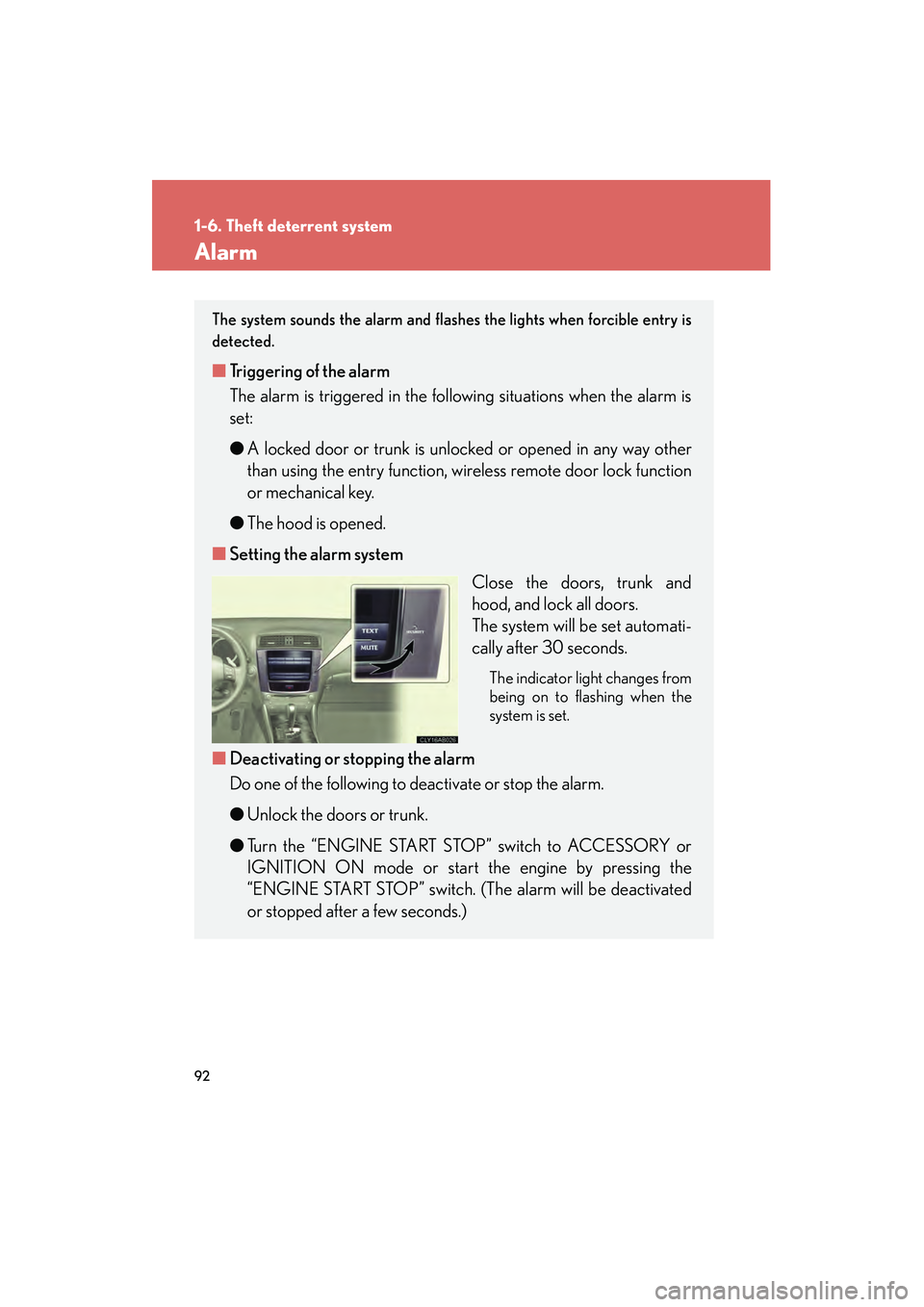
Close the doors, trunk and
hood, and lock all doors.
The system will be set automati-
cally after 30 seconds.
The indicator light changes from
being on to flashing when the
system is set.
■Deactivating or stopping the alarm
Do one of the following to deactivate or stop the alarm.
● Unlock the doors or trunk.
● Turn the “ENGINE START STOP” switch to ACCESSORY or
IGNITION ON mode or start the engine by pressing the
“ENGINE START STOP” switch. (The alarm will be deactivated
or stopped after a few seconds.)
Page 94 of 594
93
1-6. Theft deterrent system
1
Before driving
IS350/250_U
■System maintenance
The vehicle has a maintenance-free type alarm system.
■Points to remember before locking the doors
To prevent unexpected triggering of the alarm, make sure to check the following
before locking the doors:
●Nobody is in the vehicle.
●The windows and moon roof are closed before the alarm is set.
●The alarm system does not guarantee absolute security. To help prevent theft,
make sure to check that no valuables and so forth are left in the vehicle.
■Unexpected triggering of the alarm
In the following situations, perform an operation that will deactivate or stop the
alarm (→P. 9 2 )
■When the battery is disconnected
Be sure to deactivate the alarm system.
If the battery is disconnected before deactivating the alarm system, the alarm may
be triggered when the battery is reconnected.
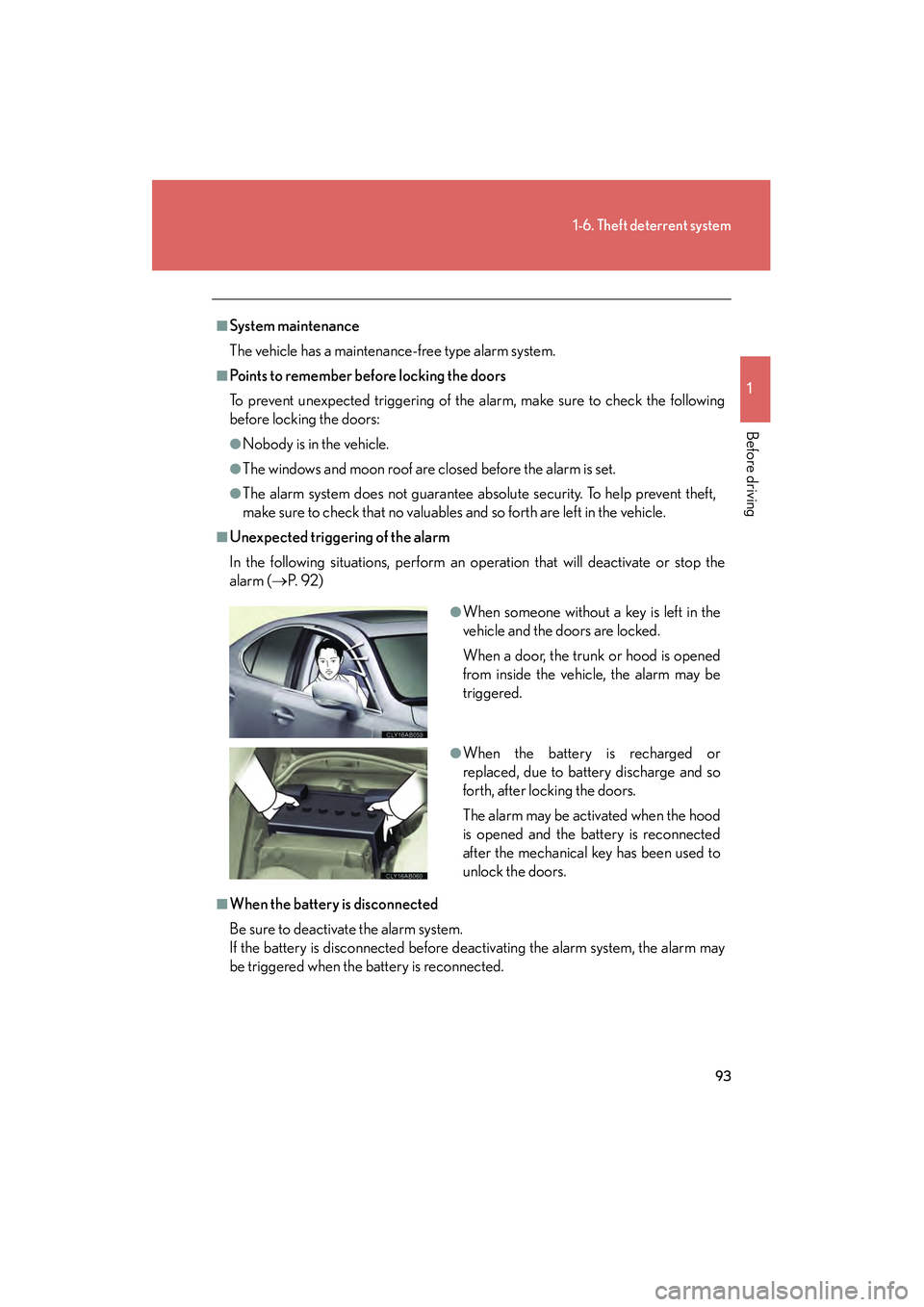
●When someone without a key is left in the
vehicle and the doors are locked.
When a door, the trunk or hood is opened
from inside the vehicle, the alarm may be
triggered.
●When the battery is recharged or
replaced, due to battery discharge and so
forth, after locking the doors.
The alarm may be activated when the hood
is opened and the battery is reconnected
after the mechanical key has been used to
unlock the doors.
Page 95 of 594
94
1-6. Theft deterrent system
IS350/250_U
■Alarm-operated door lock
●When the alarm is operating, the doors are locked automatically to prevent
intruders.
●Do not leave the key inside the vehicle when the alarm is operating, and make
sure the key is not inside the vehicle when recharging or replacing the battery.
NOTICE
■To ensure the system operates correctly
Do not modify or remove the system. If modified or removed, the proper operation
of the system cannot be guaranteed.
Page 97 of 594
96
IS350/250_U
1-7. Safety information
Correct driving posture
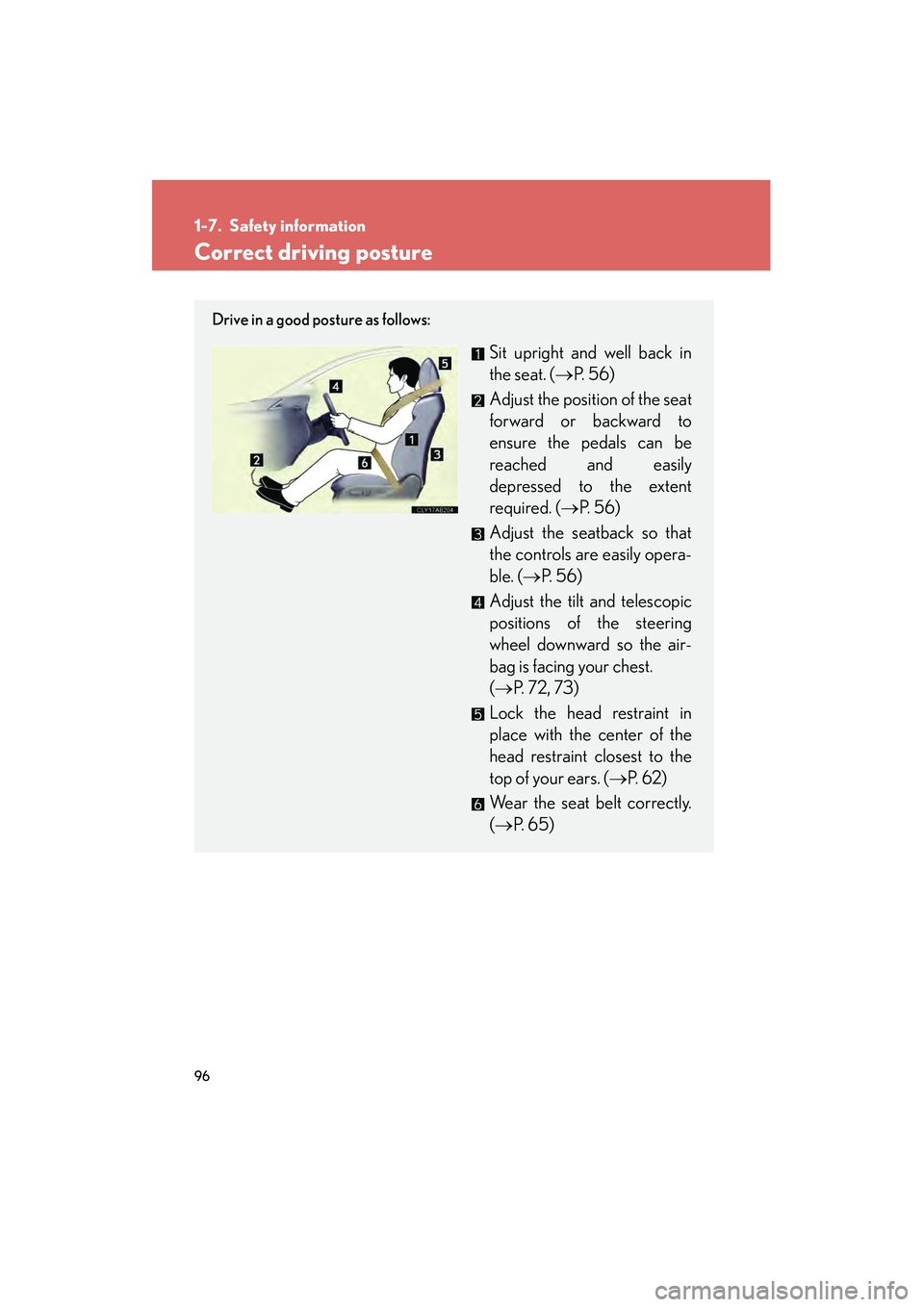
Drive in a good posture as follows:
Sit upright and well back in
the seat. (→P. 56)
Adjust the position of the seat
forward or backward to
ensure the pedals can be
reached and easily
depressed to the extent
required. ( →P. 56)
Adjust the seatback so that
the controls are easily opera-
ble. ( →P. 56)
Adjust the tilt and telescopic
positions of the steering
wheel downward so the air-
bag is facing your chest.
(→ P. 7 2 , 7 3 )
Lock the head restraint in
place with the center of the
head restraint closest to the
top of your ears. ( →P. 6 2 )
Wear the seat belt correctly.
(→ P. 6 5 )
Page 98 of 594
97
1-7. Safety information
1
Before driving
IS350/250_U
CAUTION
■While driving
●Do not adjust the position of the driver’s seat while driving.
Doing so could cause the driver to lose control of the vehicle.
●Do not place a cushion between the driver or passenger and the seatback.
A cushion may prevent correct posture from being achieved, and reduce the
effectiveness of the seat belt and head restraint, increasing the risk of death or
serious injury to the driver or passenger.
●Do not place anything under the front seats.
Objects placed under the front seats may become jammed in the seat tracks and
stop the seat from locking in place. This may lead to an accident. The adjustment
mechanism may also be damaged.
■Adjusting the seat position:
●Take care when adjusting the seat position to ensure that other passengers are
not injured by the moving seat.
●Do not put your hands under the seat or near the moving parts to avoid injury.
Fingers or hands may become jammed in the seat mechanism.
Page 119 of 594

118
1-7. Safety information
IS350/250_U
Installing child restraints
Follow the child restraint system manufacturer's instructions. Firmly
secure child restraints to the rear seats using the LATCH anchors or a seat
belt. Attach the top tether strap when installing a child restraint.
The lap/shoulder belt can be used if your child restraint system is not com-
patible with the LATCH (Lower Anchor s and Tethers for Children) system.
Child restraint LATCH anchors
LATCH anchors are provided
for the outside rear seats. (But-
tons displaying the location of
the anchors are attached to the
seats.)
Seat belts equipped with a child
restraint locking mechanism
(ALR/ELR belts except driver’s
seat belt) (→P. 6 5 )
Anchor bracket (for top tether
strap)
Anchor brackets are provided
for all rear seats.
Page 122 of 594
121
1-7. Safety information
1
Before driving
IS350/250_U
Installing child restraints using a seat belt (child restraint lock function belt)
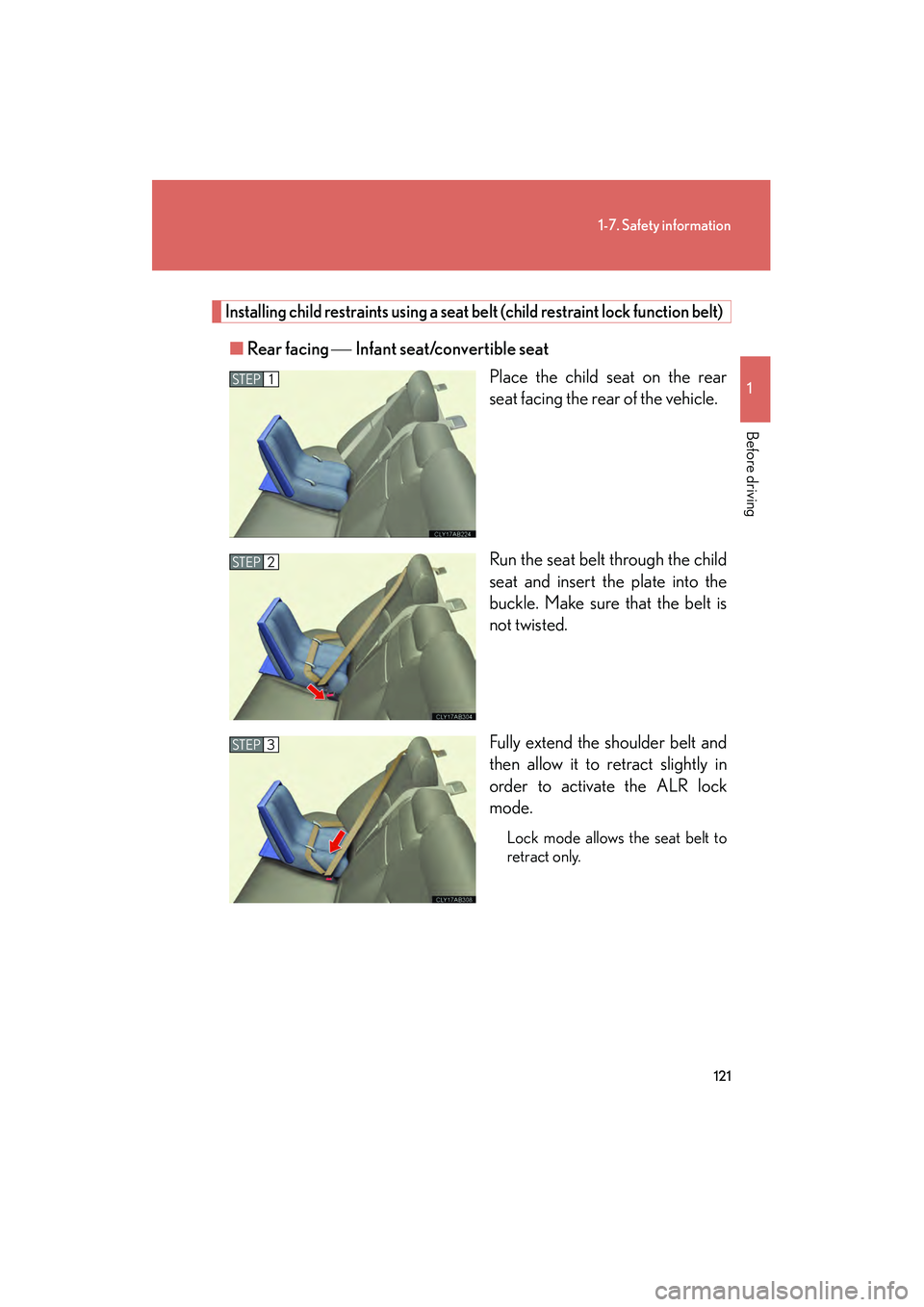
■Rear facing Infant seat/convertible seat
Place the child seat on the rear
seat facing the rear of the vehicle.
Run the seat belt through the child
seat and insert the plate into the
buckle. Make sure that the belt is
not twisted.
Fully extend the shoulder belt and
then allow it to retract slightly in
order to activate the ALR lock
mode.
Lock mode allows the seat belt to
retract only.
STEP1
STEP2
STEP3
Page 123 of 594
122
1-7. Safety information
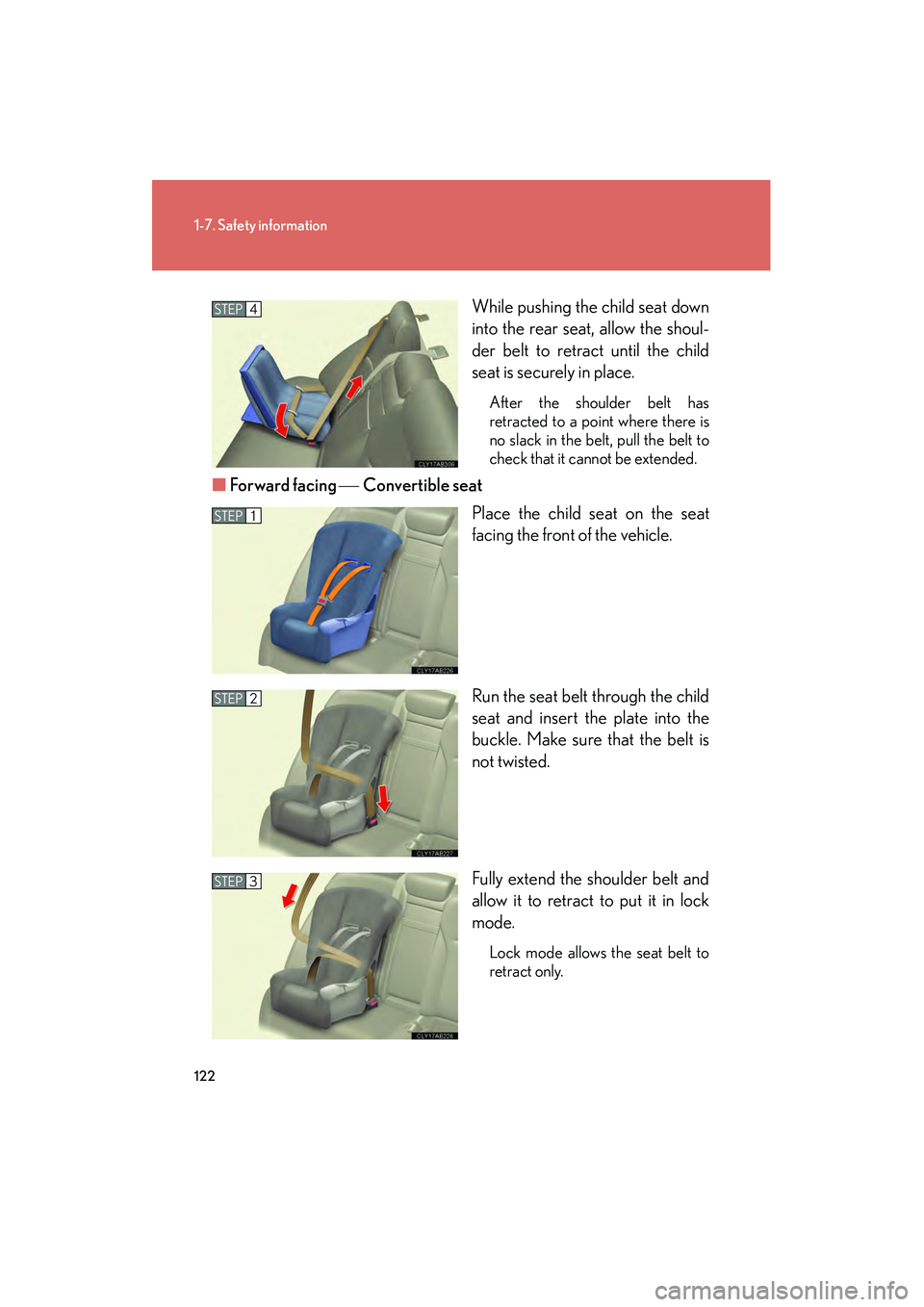
IS350/250_UWhile pushing the child seat down
into the rear seat, allow the shoul-
der belt to retract until the child
seat is securely in place.
After the shoulder belt has
retracted to a point where there is
no slack in the belt, pull the belt to
check that it cannot be extended.
■
Forward facing Convertible seat
Place the child seat on the seat
facing the front of the vehicle.
Run the seat belt through the child
seat and insert the plate into the
buckle. Make sure that the belt is
not twisted.
Fully extend the shoulder belt and
allow it to retract to put it in lock
mode.
Lock mode allows the seat belt to
retract only.
STEP4
STEP1
STEP2
STEP3
Page 125 of 594
124
1-7. Safety information
IS350/250_U
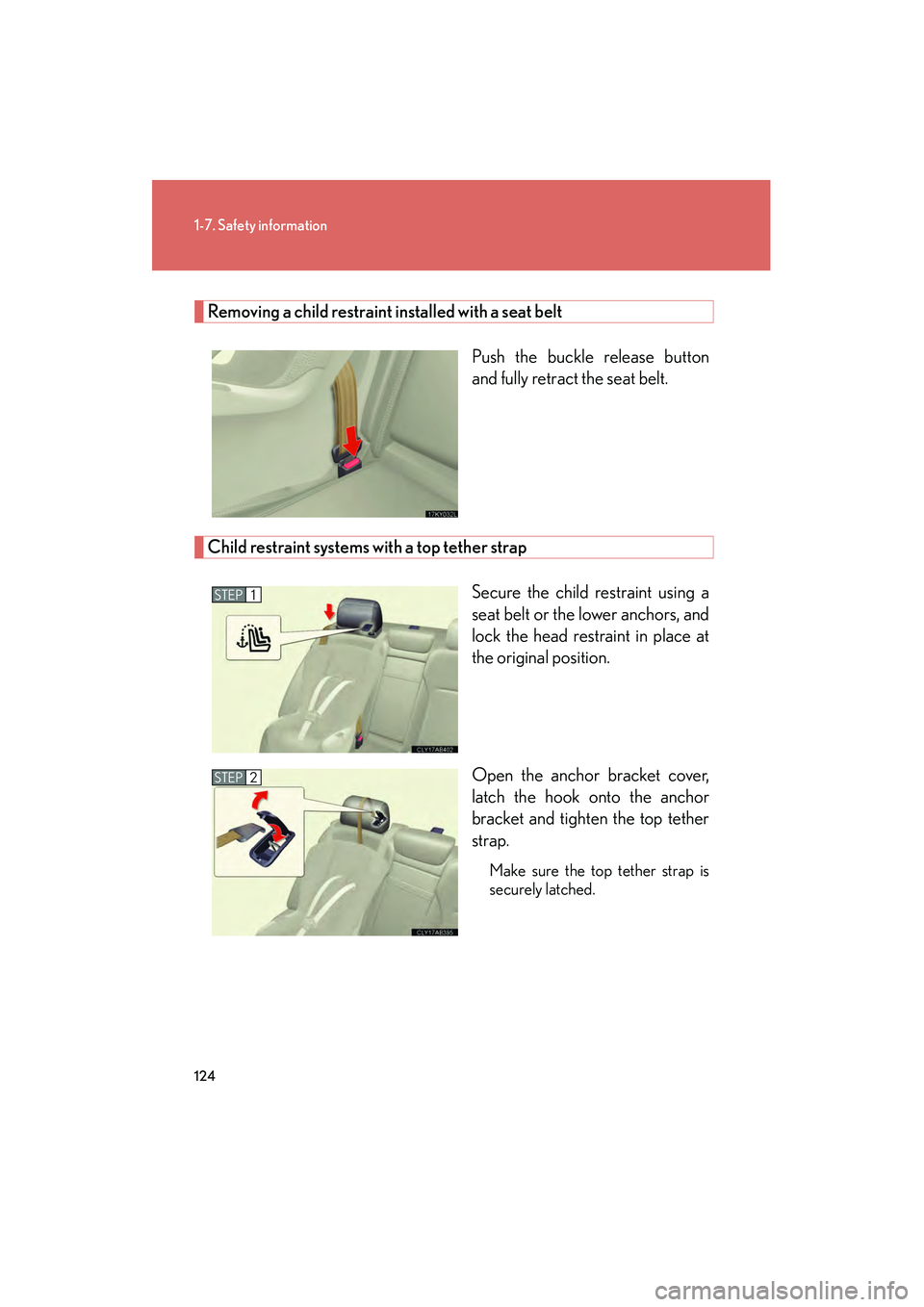
Removing a child restraint installed with a seat beltPush the buckle release button
and fully retract the seat belt.
Child restraint systems with a top tether strapSecure the child restraint using a
seat belt or the lower anchors, and
lock the head restraint in place at
the original position.
Open the anchor bracket cover,
latch the hook onto the anchor
bracket and tighten the top tether
strap.
Make sure the top tether strap is
securely latched.
STEP1
STEP2