turn signal Lexus IS250 2012 Owner's Manual
[x] Cancel search | Manufacturer: LEXUS, Model Year: 2012, Model line: IS250, Model: Lexus IS250 2012Pages: 594, PDF Size: 7.2 MB
Page 4 of 594
1
2
3
4
5
6
7
3
IS350/250_U
2-1. Driving proceduresDriving the vehicle ........................ 130
Engine (ignition) switch ................ 141
Automatic transmission.............. 146
Manual transmission .................... 152
Turn signal lever ............................ 154
Parking brake ................................. 155
Horn.................................................... 157
2-2. Instrument cluster Gauges and meters ..................... 158
Indicators and warning lights................................................. 164
Multi-information display........... 167
2-3. Operating the lights and windshield wipers
Headlight switch ............................. 172
Fog light switch .............................. 176
Windshield wipers and washer............................................. 178
Headlight cleaner switch ........... 185 2-4. Using other driving systems
Cruise control ................................ 186
Intuitive parking assist ................. 190
Driving assist systems.................. 196
2-5. Driving information Cargo and luggage ..................... 202
Vehicle load limits....................... 205
Winter driving tips ....................... 206
Trailer towing .................................. 210
Dinghy towing (vehicles with an automatic
transmission) .................................. 211
Dinghy towing (vehicles with a manual
transmission) ................................ 212
2When driving
Page 9 of 594
IS350/250_U
8
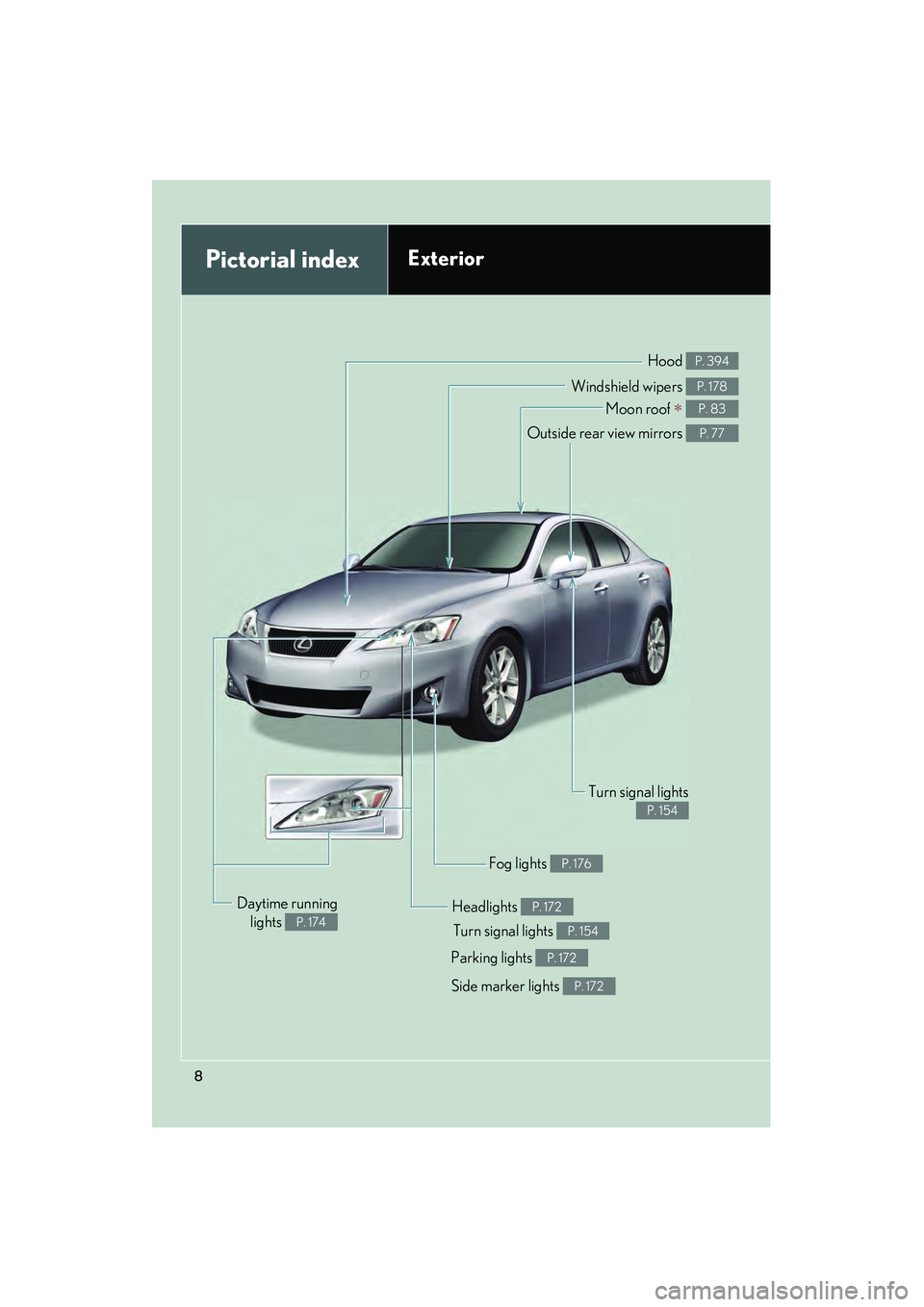
Pictorial indexExterior
Turn signal lights P. 154
Fog lights P. 176
Side marker lights P. 172
Headlights P. 172
Hood P. 394
Parking lights P. 172
Windshield wipers P. 178
Moon roof ∗ P. 83
Outside rear view mirrors P. 77
Turn signal lights
P. 154
Daytime runninglights
P. 174
Page 10 of 594
IS350/250_U
9
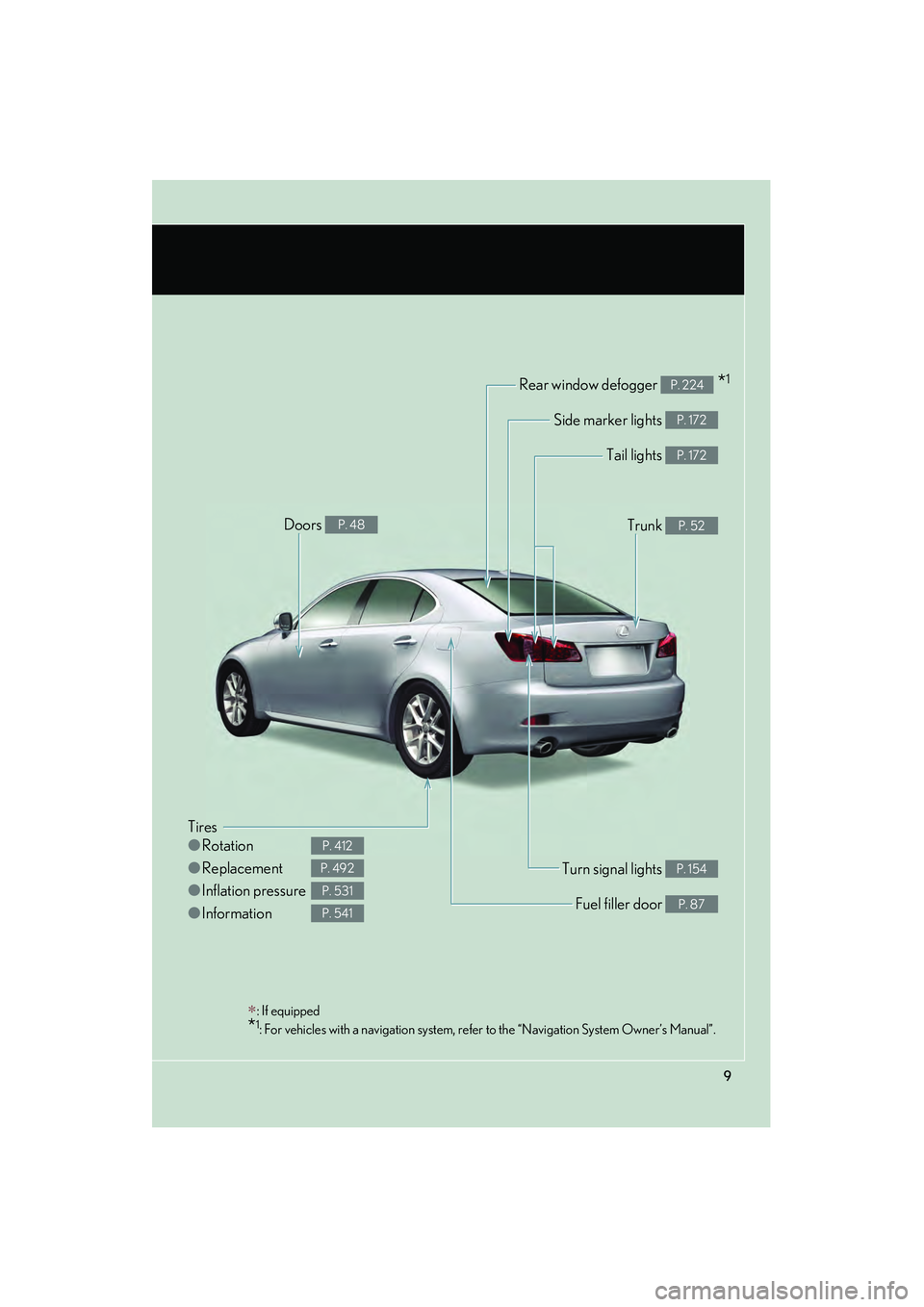
Tires
●Rotation
● Replacement
● Inflation pressure
● Information
P. 412
P. 492
P. 531
P. 541
Tail lights P. 172
Side marker lights P. 172
Trunk P. 52
Rear window defogger *1P. 224
Doors P. 48
Fuel filler door P. 87
Turn signal lights P. 154
∗: If equipped
*1: For vehicles with a navigation system, refer to the “Navigation System Owner’s Manual”.
Page 15 of 594
IS350/250_U
14
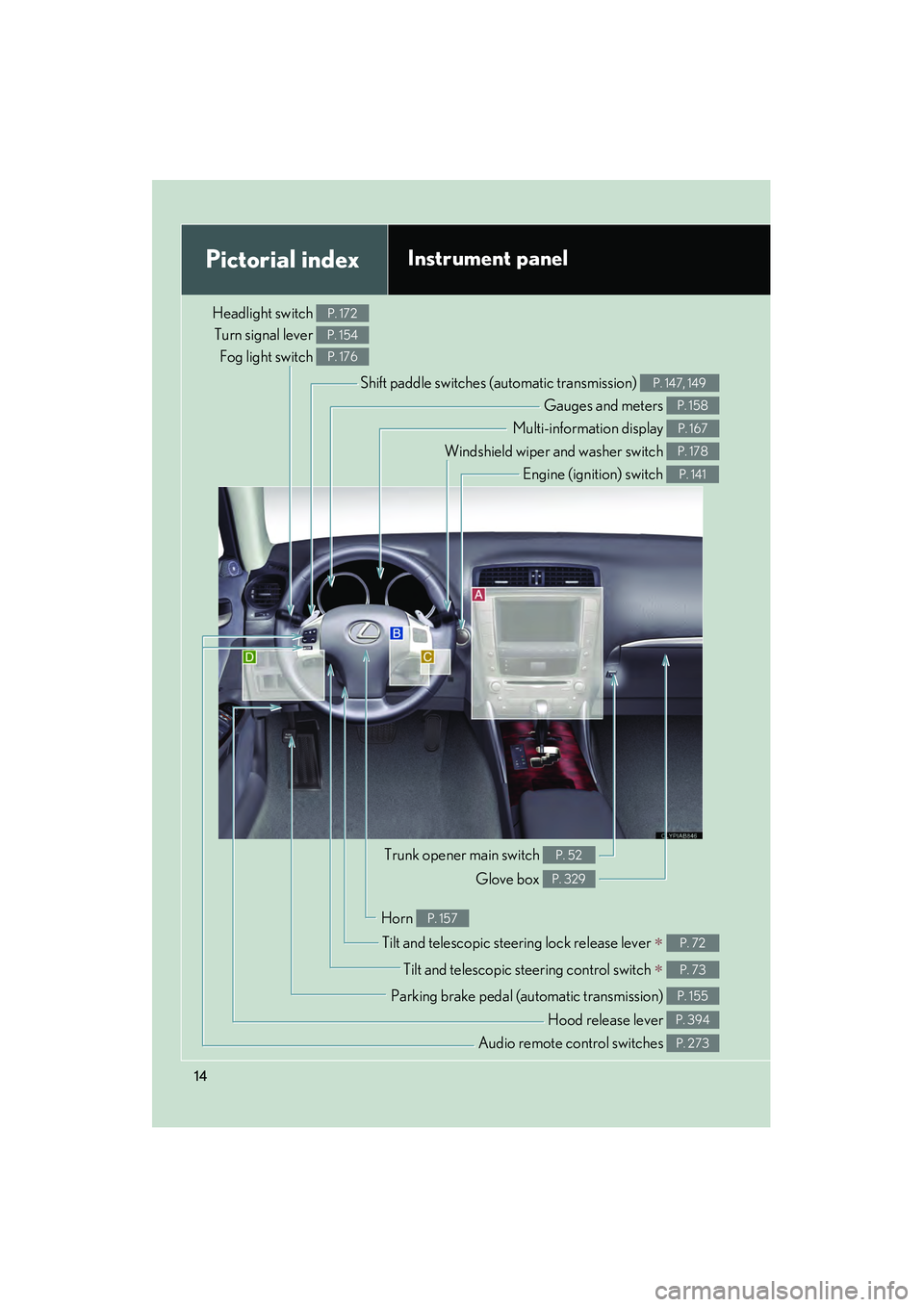
Pictorial indexInstrument panel
Headlight switch Turn signal lever
Fog light switch P. 172
P. 154
P. 176
Shift paddle switches (automatic transmission) P. 147, 149
Gauges and meters P. 158
Multi-information display P. 167
Windshield wiper and washer switch P. 178
Engine (ignition) switch P. 141
Trunk opener main switch P. 52
Glove box P. 329
Tilt and telescopic steering lock release lever ∗ P. 72
Tilt and telescopic steering control switch ∗ P. 73
Parking brake pedal (automatic transmission) P. 155
Audio remote control switches P. 273
Horn P. 157
Hood release lever P. 394
Page 61 of 594
60
1-3. Adjustable components (seats, mirrors, steering wheel)
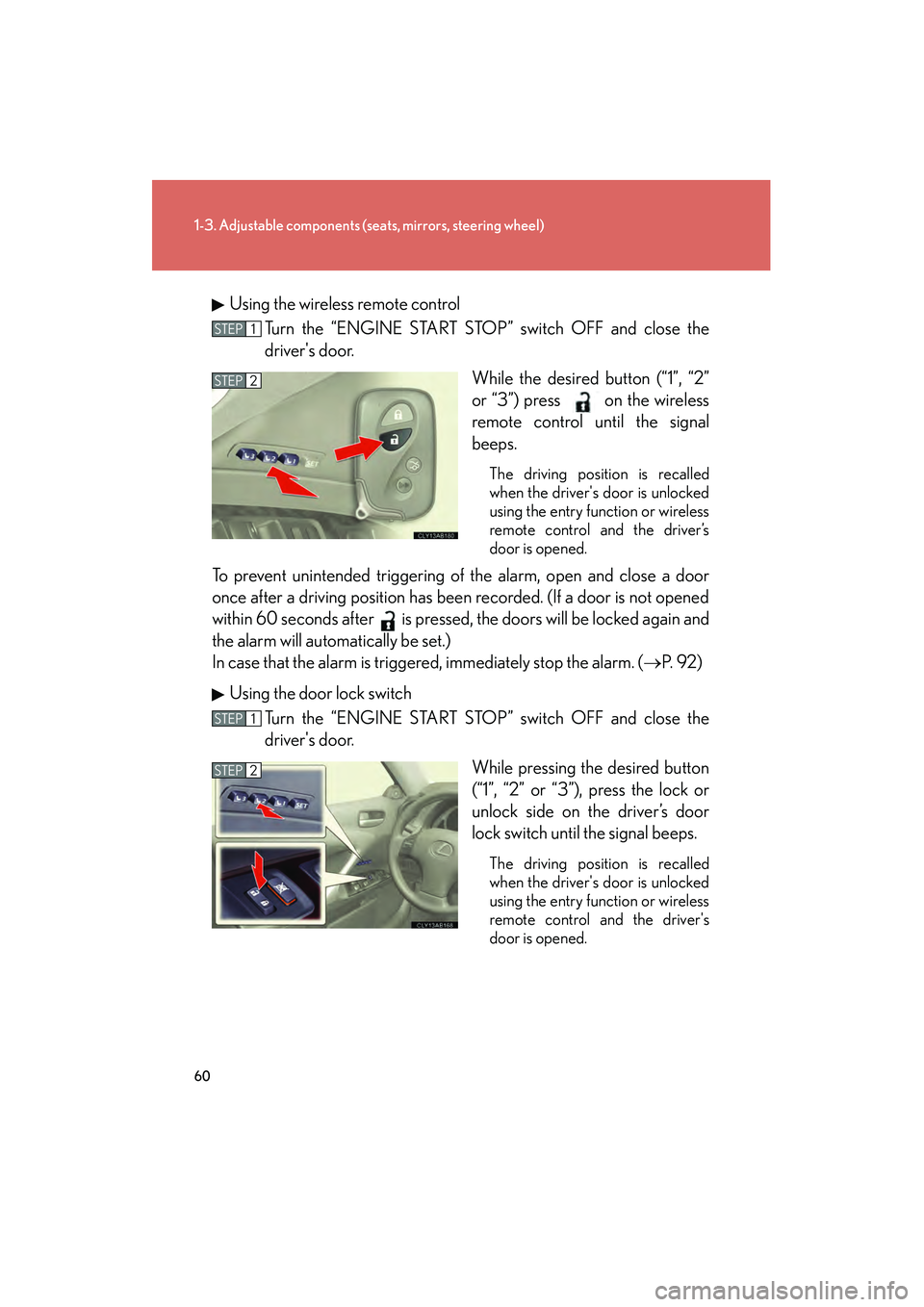
IS350/250_UUsing the wireless remote control
Turn the “ENGINE START STOP” switch OFF and close the
driver's door.
While the desired button (“1”, “2”
or “3”) press on the wireless
remote control until the signal
beeps.
The driving position is recalled
when the driver's door is unlocked
using the entry function or wireless
remote control and the driver’s
door is opened.
To prevent unintended triggering of the alarm, open and close a door
once after a driving position has been recorded. (If a door is not opened
within 60 seconds after is pressed, the doors will be locked again and
the alarm will automatically be set.)
In case that the alarm is triggere d, immediately stop the alarm. (→P. 9 2 )
Using the door lock switch Turn the “ENGINE START STOP” switch OFF and close the
driver's door.
While pressing the desired button
(“1”, “2” or “3”), press the lock or
unlock side on the driver’s door
lock switch until the signal beeps.
The driving position is recalled
when the driver's door is unlocked
using the entry function or wireless
remote control and the driver's
door is opened.
STEP1
STEP2
STEP1
STEP2
Page 62 of 594
61
1-3. Adjustable components (seats, mirrors, steering wheel)
1
Before driving
IS350/250_U
■Canceling the linked door unlock operationTurn the “ENGINE START STOP” switch OFF and close the driver's door.
Using the wireless remote control: While pushing the “SET” button, press on the wireless remote control until the signal beeps.
Using the door lock switch: While pressing the “SET” button, press the
lock or unlock side on the door lock switch until the signal beeps.
■Operating the driving position memo ry after turning the “ENGINE START
STOP” switch OFF
Memorized positions (except for the steering wheel position) can be activated up
to 180 seconds after the driver's door is opened and another 60 seconds after it is
closed again, even after turning the “ENGINE START STOP” switch OFF.
■To cancel seat position recall
Perform any of the following operations.
●Push the “SET” button.
●Push button “1”, “2” or “3”.
●Adjust the seat using the switches (only cancels seat position recall).
■If the battery is disconnected
The memorized positions are erased when the battery is disconnected.
CAUTION
■Seat adjustment caution
Take care during seat adjustment that the seat does not strike the rear passenger or
squeeze your body against the steering wheel.
STEP1
STEP2
Page 130 of 594

When driving2
129
IS350/250_U
2-1. Driving proceduresDriving the vehicle.................. 130
Engine (ignition) switch .......... 141
Automatic transmission ........ 146
Manual transmission .............. 152
Turn signal lever ....................... 154
Parking brake ........................... 155
Horn ............................................ 157
2-2. Instrument cluster Gauges and meters ................ 158
Indicators and warning lights ......................................... 164
Multi-information display ..... 167
2-3. Operating the lights and windshield wipers
Headlight switch...................... 172
Fog light switch ......................... 176
Windshield wipers and washer ..................................... 178
Headlight cleaner switch...... 185 2-4. Using other driving
systems
Cruise control.......................... 186
Intuitive parking assist ........... 190
Driving assist systems ............ 196
2-5. Driving information Cargo and luggage ............... 202
Vehicle load limits .................. 205
Winter driving tips ................. 206
Trailer towing ........................... 210
Dinghy towing (vehicles with an
automatic transmission)...... 211
Dinghy towing (vehicles with a
manual transmission) .......... 212
Page 155 of 594

154
2-1. Driving procedures
IS350/250_U
Turn signal lever
■Turn signals can be operated when
The “ENGINE START STOP” switch is in IGNITION ON mode.
■If the indicators flash faster than usual
Check that a light bulb in the turn signal lights has not burned out.
Right turn
Left turn
Move and hold the lever part-
way to signal a lane change
The right hand signal will flash
until you release the lever.
Move and hold the lever part-
way to signal a lane change
The left hand signal will flash
until you release the lever.
Page 166 of 594
165
2-2. Instrument cluster
2
When driving
IS350/250_U
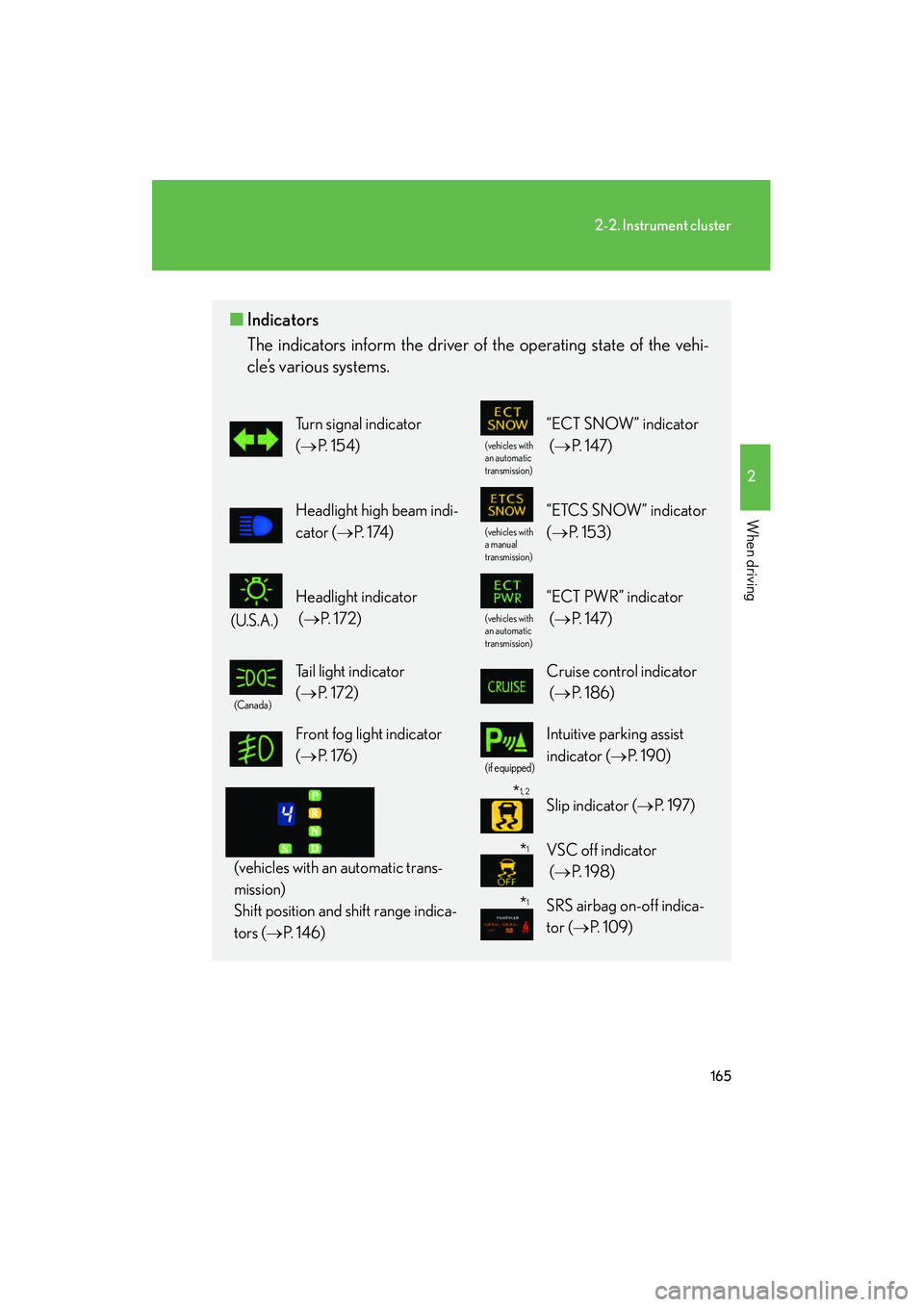
■Indicators
The indicators inform the driver of the operating state of the vehi-
cle’s various systems.
Turn signal indicator
(→ P. 1 5 4 )
(vehicles with
an automatic
transmission)
“ECT SNOW” indicator
(→ P. 1 4 7 )
Headlight high beam indi-
cator ( →P. 1 74 )
(vehicles with
a manual
transmission)
“ETCS SNOW” indicator
(→ P. 1 5 3 )
(U.S.A.)
Headlight indicator
(→ P. 1 7 2 )
(vehicles with
an automatic
transmission)
“ECT PWR” indicator
(→ P. 1 4 7 )
(Canada)
Tail light indicator
(→ P. 1 7 2 ) Cruise control indicator
(→ P. 1 8 6 )
Front fog light indicator
(→ P. 1 76 )
(if equipped)
Intuitive parking assist
indicator ( →P. 1 9 0 )
(vehicles with an automatic trans-
mission)
Shift position and shift range indica-
tors ( →P. 1 4 6 )
Slip indicator ( →P. 1 9 7 )
VSC off indicator
(→ P. 1 9 8 )
SRS airbag on-off indica-
tor ( →P. 1 0 9 )
*1
*1
*1, 2
Page 236 of 594

235
3-2. Using the audio system
3
Interior features
IS350/250_U
■If the satellite radio does not operate normally
If a problem occurs with the XM
® tuner, a message will appear on the display. Refer
to the table below to identify the problem, and take the suggested corrective action.
“A N T E N N A”
The XM® antenna is not connected. Check whether
the XM® antenna cable is attached securely.
There is a short-circuit in the antenna or the surround-
ing antenna cable. See a Lexus certified dealer.
“UNAUTH”
You have not subscribed to the XM® Satellite Radio.
The radio is being updated with the latest encryption
code. Contact the XM
® Satellite Radio for subscrip-
tion information. When a contract is canceled, you can
choose the “CH000” and all free-to-air channels.
The premium channel you selected is not authorized.
Wait for about 2 seconds until the radio returns to the
previous channel or “CH001”. If it does not change
automatically, select another channel. If you want to lis-
ten to the premium channel, contact XM
® Satellite
Radio.
“NO SIGNAL”
The XM® signal is too weak at the current location.
Wait until your vehicle reaches a location with a stron-
ger signal.
“LOADING”The unit is acquiring audio or program information.
Wait until the unit has received the information.
“OFF AIR”The channel you selected is not broadcasting any pro-
gramming. Select another channel.
“-----”
There is no song/program title or artist name/feature
associated with the channel at that time. No action
needed.