radio Lexus IS250 2014 User Guide
[x] Cancel search | Manufacturer: LEXUS, Model Year: 2014, Model line: IS250, Model: Lexus IS250 2014Pages: 588, PDF Size: 98.77 MB
Page 292 of 588
292
IS250_EE(OM53C51E)
5-1. Basic Operations
Lexus Display Audio
System ......................................... 294
Steering wheel audio
switches...................................... 300
USB/AUX ports .......................... 301
5-2. Setup
Setup menu ..................................302
General settings.........................303
Voice settings ..............................306
Display settings ........................... 307
5-3. Using the audio system
Selecting the audio
source ......................................... 308
Optimal use of the audio
system ..........................................309
Audio settings .............................. 310
Audio menu screen
operation ..................................... 314
5-4. Using the radio
Radio operation ............................317
5-5. Playing an audio CD and
MP3/WMA/AAC discs
CD player operation ................. 319
Page 294 of 588
294
IS250_EE(OM53C51E)5-1. Basic Operations
Lexus Display Audio System∗
∗
: If equipped
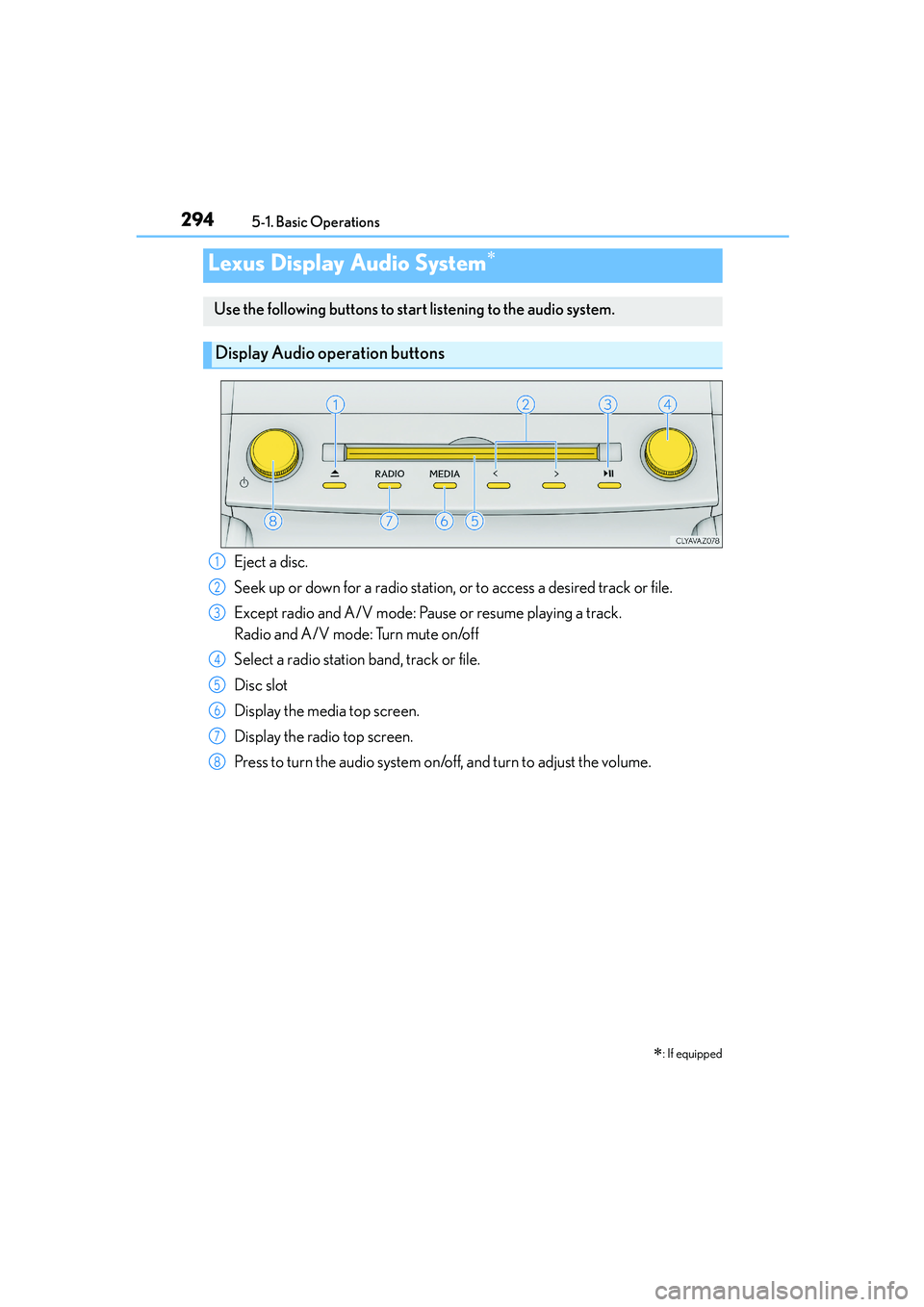
Use the following buttons to start listening to the audio system.
Display Audio operation buttons
Eject a disc.
Seek up or down for a radio station, or to access a desired track or file.
Except radio and A/V mode: Pause or resume playing a track.
Radio and A/V mode: Turn mute on/off
Select a radio station band, track or file.
Disc slot
Display the media top screen.
Display the radio top screen.
Press to turn the audio system on/off, and turn to adjust the volume.1
2
3
4
5
6
7
8
Page 300 of 588

3005-1. Basic Operations
IS250_EE(OM53C51E)
Volume switch
• Increases/decreases volume
• Press and hold: Continuously
increases/decreases volume
Radio mode:
• Press (except manual mode):
Select a radio station
• Press (manual mode): Seek up/
down
• Press and hold (manual mode): Continuously seek up/down
CD, MP3/WMA/AAC disc, Bluetooth
®, iPod or USB mode:
• Press: Select a track/file/song/video
• Press and hold: Select a folder/album (MP3/WMA/AAC disc or USB)
“MODE” switch
• Turns the power on, selects audio source
• Press and hold this switch to mute or pause the current operation. To can-
cel the mute or pause, press and hold.
Steering wheel audio switches
Some audio features can be controlled using the switches on the steering
wheel.
Operation may differ depending on the type of audio system or navigation
system. For details, refer to the manual provided with the audio system or nav-
igation system.
Operating the audio system using the steering wheel switches
1
2
CAUTION
■To reduce the risk of an accident
Exercise care when operating the audio switches on the steering wheel.
3
Page 302 of 588
302
IS250_EE(OM53C51E)5-2. Setup
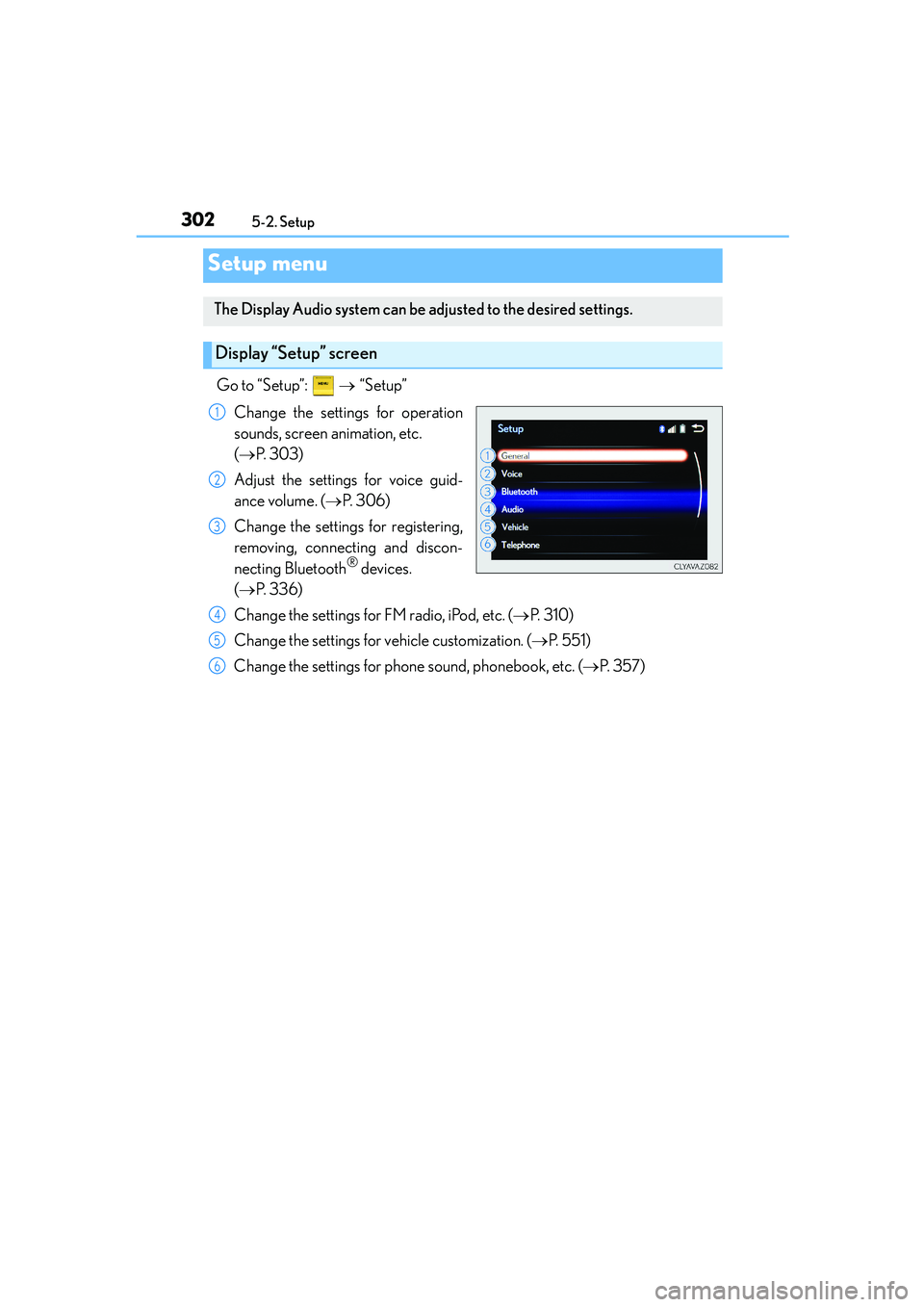
Go to “Setup”: → “Setup”
Change the settings for operation
sounds, screen animation, etc.
(→P. 303)
Adjust the settings for voice guid-
ance volume. (→P. 3 0 6 )
Change the settings for registering,
removing, connecting and discon-
necting Bluetooth
® devices.
(→P. 3 3 6 )
Change the settings for FM radio, iPod, etc. (→P. 3 1 0 )
Change the settings for vehicle customization. (→P. 5 5 1 )
Change the settings for phone sound, phonebook, etc. (→P. 3 5 7 )
Setup menu
The Display Audio system can be adjusted to the desired settings.
Display “Setup” screen
1
2
3
4
5
6
Page 305 of 588
3055-2. Setup
5
Lexus Display Audio system
IS250_EE(OM53C51E)
→ “Setup” → “General” → “Delete personal data”
Select “Delete”.
Check carefully beforehand, as data cannot be retrieved once deleted.
The following personal data will be deleted or changed to its default settings.
•Phonebook data
•Voice tag
• Call history data
•Favorite data
• Bluetooth
® devices data
• Phone sound settings
• Detailed Bluetooth
® settings
• Audio/video setting
• Preset switch data
• Last used radio station
• Customized image data
•FM info setting
• iPod tagging information
• Software update history
• Software update detail information
• Phone display setting
• Contact/call history setting
• Messaging setting
NOTICE
■If the console box lid cannot be fully closed
→P. 3 3 3
■To prevent damage to the USB memory device or its terminals
→P. 3 3 3
Deleting personal data
1
2
Page 308 of 588
308
IS250_EE(OM53C51E)5-3. Using the audio system
Press the button to display the “Source” screen.
If the “Source” screen is not displayed, press the button again.
Select the desired audio source.
The audio source can be selected by pressing the “RADIO” or “MEDIA” button.
Press the “MODE” switch when the audio system is turned on. The audio source
changes each time the “MODE” switch is pressed.
■Rearranging the list
The listing order of the source list can be rearranged.
Move the controller to the left while on the “Source” screen.
Select “Audio source select”.
Select an item you wish to move and then select where to move the item to.
Selecting the audio source
Switching between audio sources such as radio and CD are explained in this
section.
Changing audio source
Using the steering wheel switches to change audio sources
1
2
1
2
3
Page 310 of 588
3105-3. Using the audio system
IS250_EE(OM53C51E)
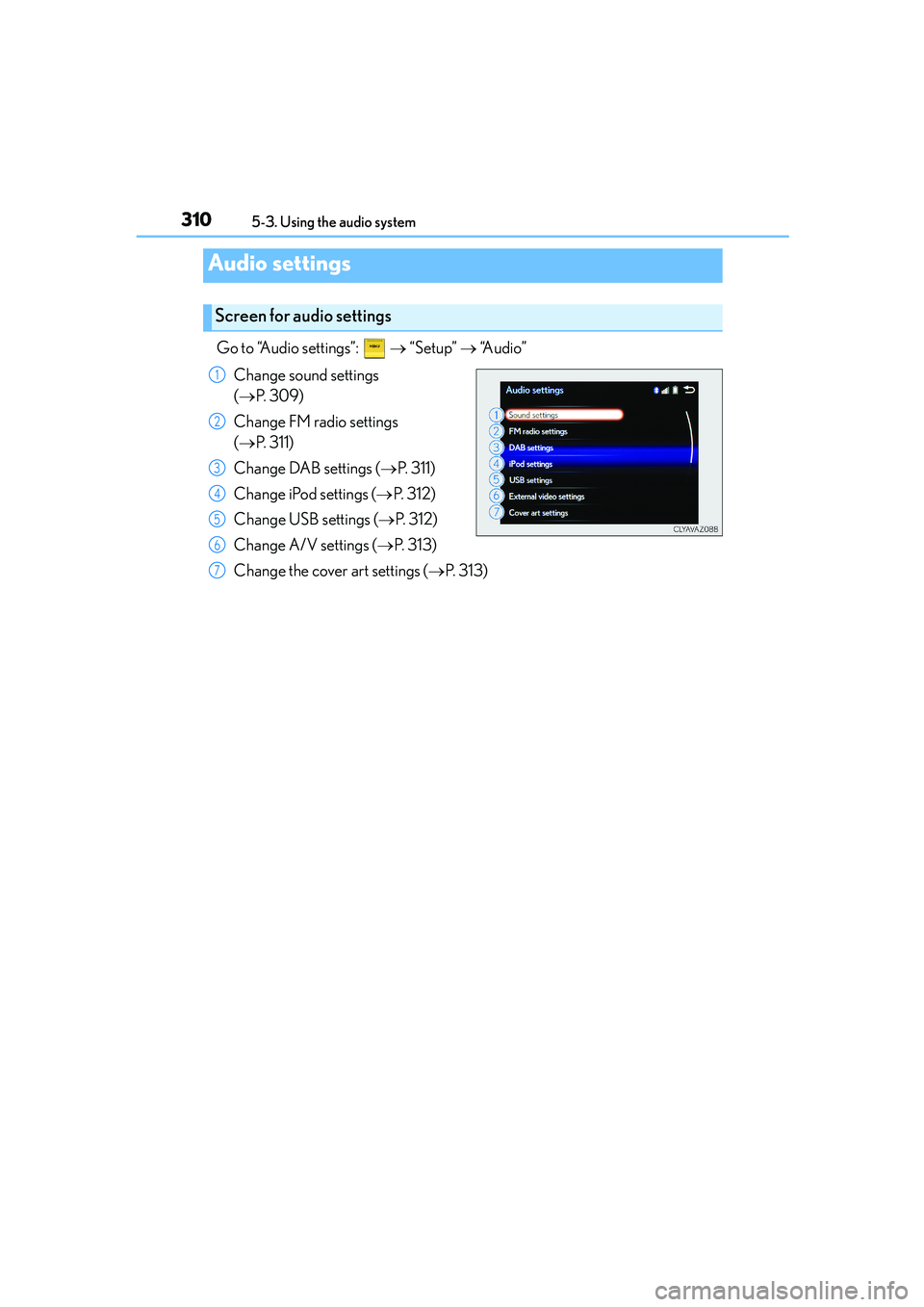
Go to “Audio settings”: → “Setup” → “Audio”
Change sound settings
(→P. 3 0 9 )
Change FM radio settings
(→P. 311)
Change DAB settings (→P. 311)
Change iPod settings (→P. 3 1 2 )
Change USB settings (→P. 3 1 2 )
Change A/V settings (→P. 3 1 3 )
Change the cover art settings (→P. 313)
Audio settings
Screen for audio settings
1
2
3
4
5
6
7
Page 311 of 588
3115-3. Using the audio system
5
Lexus Display Audio system
IS250_EE(OM53C51E)
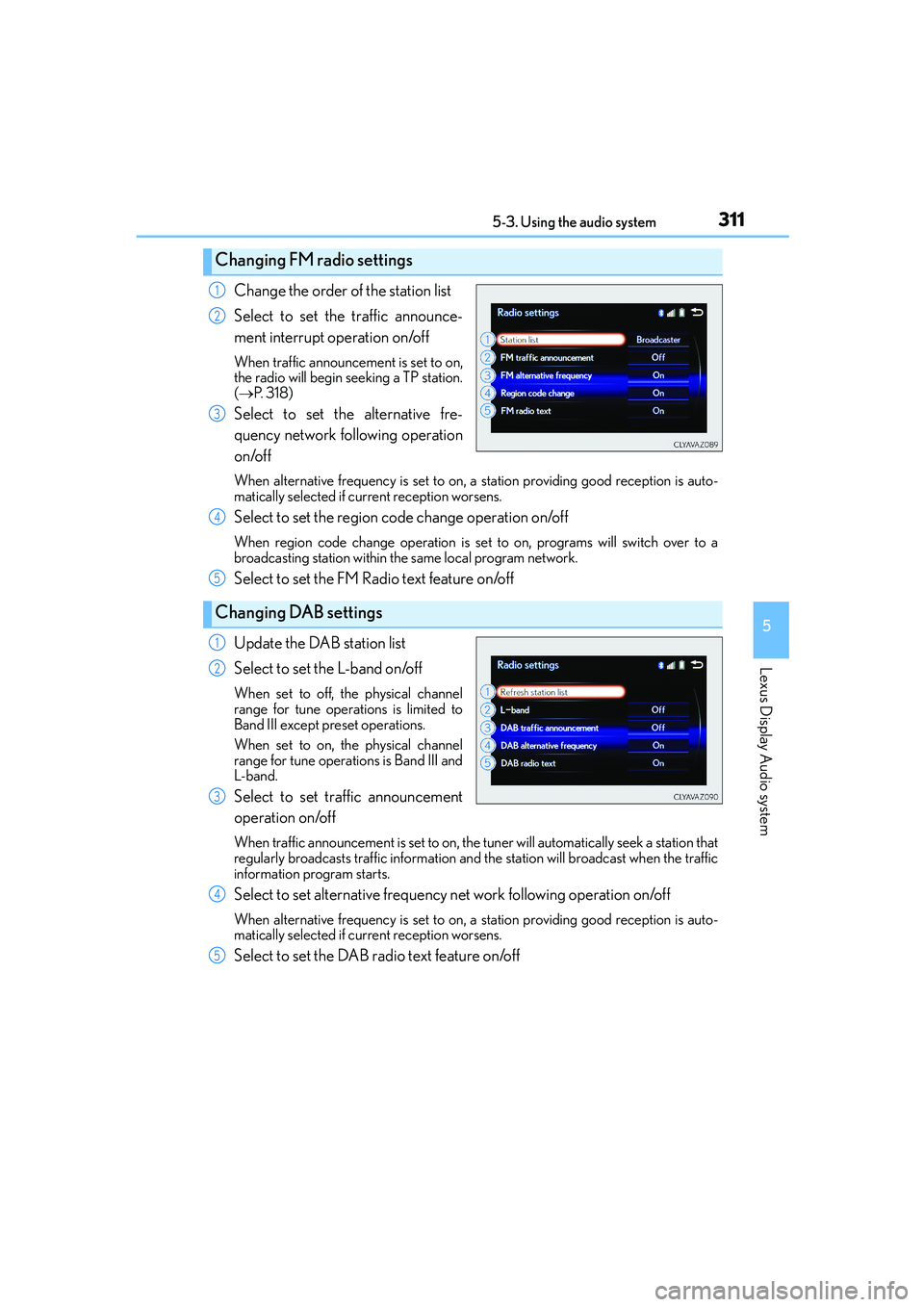
Change the order of the station list
Select to set the traffic announce-
ment interrupt operation on/off
When traffic announcement is set to on,
the radio will begin seeking a TP station.
(→P. 3 1 8 )
Select to set the alternative fre-
quency network following operation
on/off
When alternative frequency is set to on, a station providing good reception is auto-
matically selected if current reception worsens.
Select to set the region code change operation on/off
When region code change operation is set to on, programs will switch over to a
broadcasting station within the same local program network.
Select to set the FM Radio text feature on/off
Update the DAB station list
Select to set the L-band on/off
When set to off, the physical channel
range for tune operations is limited to
Band III except preset operations.
When set to on, the physical channel
range for tune operations is Band III and
L-band.
Select to set traffic announcement
operation on/off
When traffic announcement is set to on, the tuner will automatically seek a station that
regularly broadcasts traffic information and the station will broadcast when the traffic
information program starts.
Select to set alternative frequency net work following operation on/off
When alternative frequency is set to on, a station providing good reception is auto-
matically selected if current reception worsens.
Select to set the DAB radio text feature on/off
Changing FM radio settings
1
2
3
Changing DAB settings
4
5
1
2
3
4
5
Page 314 of 588

3145-3. Using the audio system
IS250_EE(OM53C51E)
To display the audio menu screen, move the controller to the left while on an
audio top screen.
XFM or AM radio
Seek a station of the nearest fre-
quency (stops when a station is
found) (manual mode)
Change FM radio settings
(→P. 311)
Change DAB settings (→P. 311)
XDAB
Adjust the playback offset time on
time shift mode
Cancel time shift operation
Select an ensemble (manual
mode)
Select a service (manual mode)
Change FM radio settings
(→P. 311)
Change DAB settings (→P. 311)
Audio menu screen operation
You can change the settings and control functions for each audio source.
Audio menu screen
1
2
3
1
2
3
4
5
6
Page 317 of 588

317
5
Lexus Display Audio system
IS250_EE(OM53C51E)5-4. Using the radio
Pressing the “RADIO” button displays the radio top screen from any screen of
the selected source.
■Menu screen
→P. 3 1 4
Move the controller to the right to display the right menu screen.
Change the radio top screen to the
preset selection screen.
Change the radio top screen to the
station list selection screen. (FM and
DAB)
Change the radio top screen to the
manual selection screen.
Change the radio top screen to the
time shift operation screen. (DAB)
(→P. 3 1 8 )
Tune in to the desired station using one of the following methods.
■Seek tuning
Manual screen: Press or press and hold “<” or “>” button.
Preset or station list screen: Press and hold “<” or “>” button.
Seek turning can also be operated on the menu screen. (→P. 3 1 4 )
The radio will begin seeking up or down for a station of the nearest frequency
and will stop when a station is found.
Radio operation
Select “AM”, “FM” or “DAB” on the “Source” screen to begin listening to the
radio.
Radio top screen
Changing the top screen mode
1
2
3
4
Selecting a station