warning light Lexus IS250 2014 Owner's Guide
[x] Cancel search | Manufacturer: LEXUS, Model Year: 2014, Model line: IS250, Model: Lexus IS250 2014Pages: 588, PDF Size: 98.77 MB
Page 252 of 588

2524-5. Using the driving support systems
IS250_EE(OM53C51E)
■Sensor detection information
●The sensor’s detection areas are limited to the areas around the vehicle’s front corner
and rear bumpers.
●Certain vehicle conditions and the surrounding environment may affect the ability of
the sensor to correctly detect obstacles. Particular instances where this may occur are
listed below.
• There is dirt, snow or ice on the sensor. (Wiping the sensors will resolve this prob-
lem.)
• The sensor is frozen. (Thawing the area will resolve this problem.)
In especially cold weather, if a sensor is frozen the screen may show an abnormal
display, or obstacles may not be detected.
• The sensor is covered in any way.
• The vehicle is leaning considerably to one side.
• On an extremely bumpy road, on an incline, on gravel, or on grass.
• The vicinity of the vehicle is noisy due to vehicle horns, motorcycle engines, air
brakes of large vehicles, or other loud noises producing ultrasonic waves.
• There is another vehicle equipped with parking assist sensors in the vicinity.
• The sensor is coated with a sheet of spray or heavy rain.
• The vehicle is equipped with a fender pole or wireless antenna.
• Towing eyelets are installed.
• The bumper or sensor receives a strong impact.
• The vehicle is approaching a tall or curved curb.
• In harsh sunlight or intense cold weather.
• The area directly under the bumpers is not detected.
• If obstacles draw too close to the sensor.
• A non-genuine Lexus suspension (lowered suspension etc.) is installed.
• People may not be detected if they are wearing certain types of clothing.
In addition to the examples above, there are instances in which, because of their shape,
signs and other objects may be judged by the sensor to be closer than they are.
●The shape of the obstacle may prevent the sensor from detecting it. Pay particular
attention to the following obstacles:
• Wires, fences, ropes, etc.
• Cotton, snow and other materials that absorb sound waves
• Sharply-angled objects
• Low obstacles
• Tall obstacles with upper sections projecting outwards in the direction of your vehi-
cle
●The following situations may occur during use.
• Depending on the shape of the obstacle and other factors, the detection distance
may shorten, or detection may be impossible.
• Obstacles may not be detected if they are too close to the sensor.
• There will be a short delay between obstacle detection and display. Even at slow
speeds, there is a possibility that the obstacle will come within the sensor’s detection
areas before the display is shown and the warning beep sounds.
• Thin posts or objects lower than the sensor may not be detected when approached,
even if they have been detected once.
• It might be difficult to hear beeps due to the volume of the audio system or air flow
noise of the air conditioning system.
■If a message is displayed on the multi-information display
→P. 4 8 4
Page 267 of 588
2674-5. Using the driving support systems
4
Driving
IS250_EE(OM53C51E)
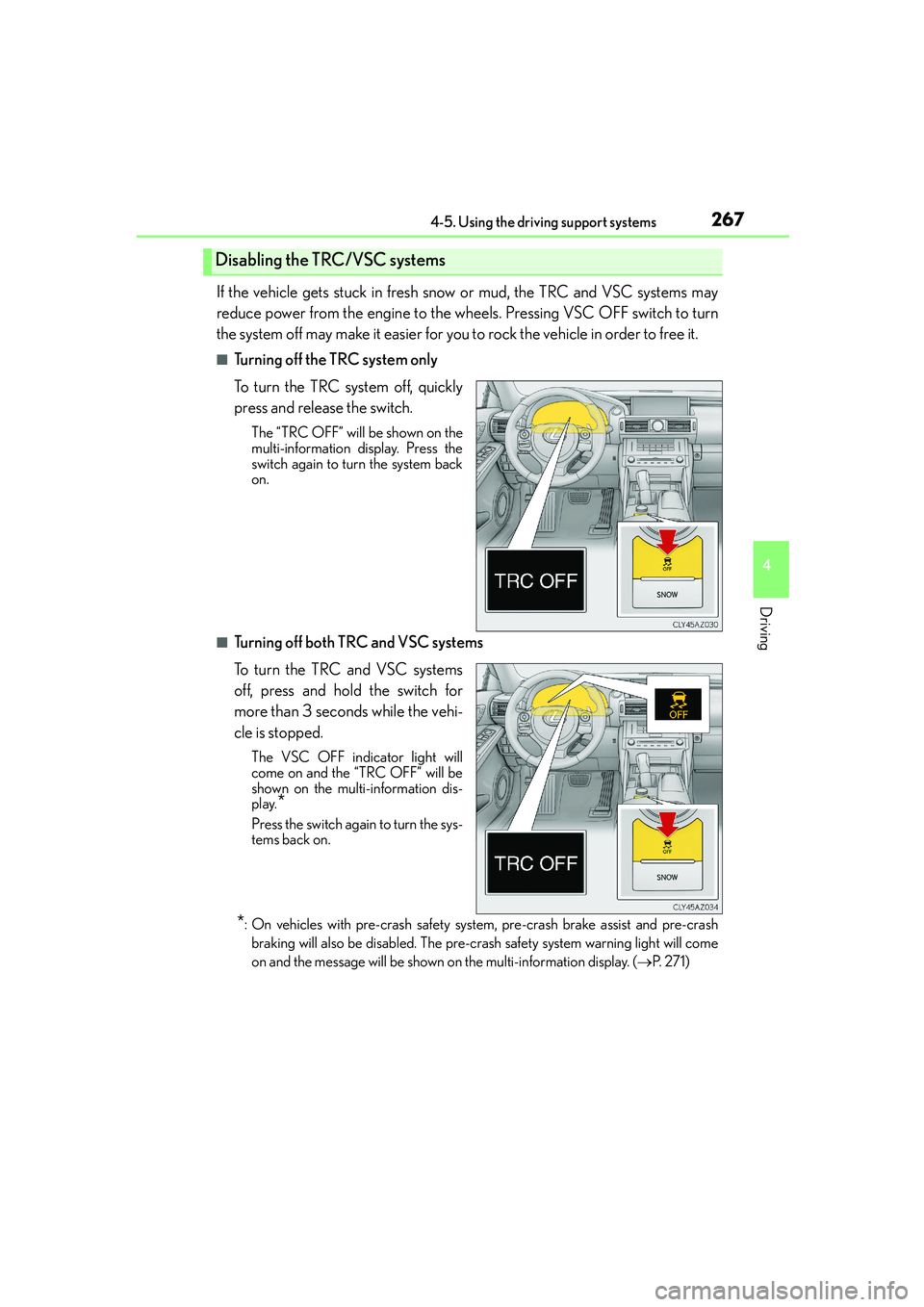
If the vehicle gets stuck in fresh snow or mud, the TRC and VSC systems may
reduce power from the engine to the wheels. Pressing VSC OFF switch to turn
the system off may make it easier for you to rock the vehicle in order to free it.
■Turning off the TRC system only
To turn the TRC system off, quickly
press and release the switch.
The “TRC OFF” will be shown on the
multi-information display. Press the
switch again to turn the system back
on.
■Turning off both TRC and VSC systems
To turn the TRC and VSC systems
off, press and hold the switch for
more than 3 seconds while the vehi-
cle is stopped.
The VSC OFF indicator light will
come on and the “TRC OFF” will be
shown on the multi-information dis-
play.
*
Press the switch again to turn the sys-
tems back on.
*: On vehicles with pre-crash safety system, pre-crash brake assist and pre-crash
braking will also be disabled. The pre-crash safety system warning light will come
on and the message will be shown on the multi-information display. (→P. 2 7 1 )
Disabling the TRC/VSC systems
Page 271 of 588

2714-5. Using the driving support systems
4
Driving
IS250_EE(OM53C51E)
◆Pre-crash warning
When a high possibility of a frontal
collision is detected, the pre-crash
safety system warning light flashes, a
buzzer sounds and a message is
shown on the multi-information dis-
play to urge the driver to take eva-
sive action.
◆Pre-crash brake assist
When there is a high possibility of a frontal collision, the system applies
greater braking force in relation to how strongly the brake pedal is depressed.
The system may not warn the driver using a warning light, warning display and
buzzer when the system detects and judges braking operations.
◆Pre-crash braking
When there is a high possibility of a frontal collision, the system warns the
driver using a warning light, warning display and buzzer. If the system deter-
mines that a collision is unavoidable, the brakes are automatically applied to
reduce the collision speed.
PCS (Pre-Crash Safety system)∗
∗
: If equipped
When the radar sensor detects the possibility of a frontal collision, brakes are
automatically engaged to lessen impact as well as vehicle damage.
The pre-crash safety system can be turned on and off as necessary by operat-
ing the switch. (→P. 2 7 2 )
Page 272 of 588
2724-5. Using the driving support systems
IS250_EE(OM53C51E)
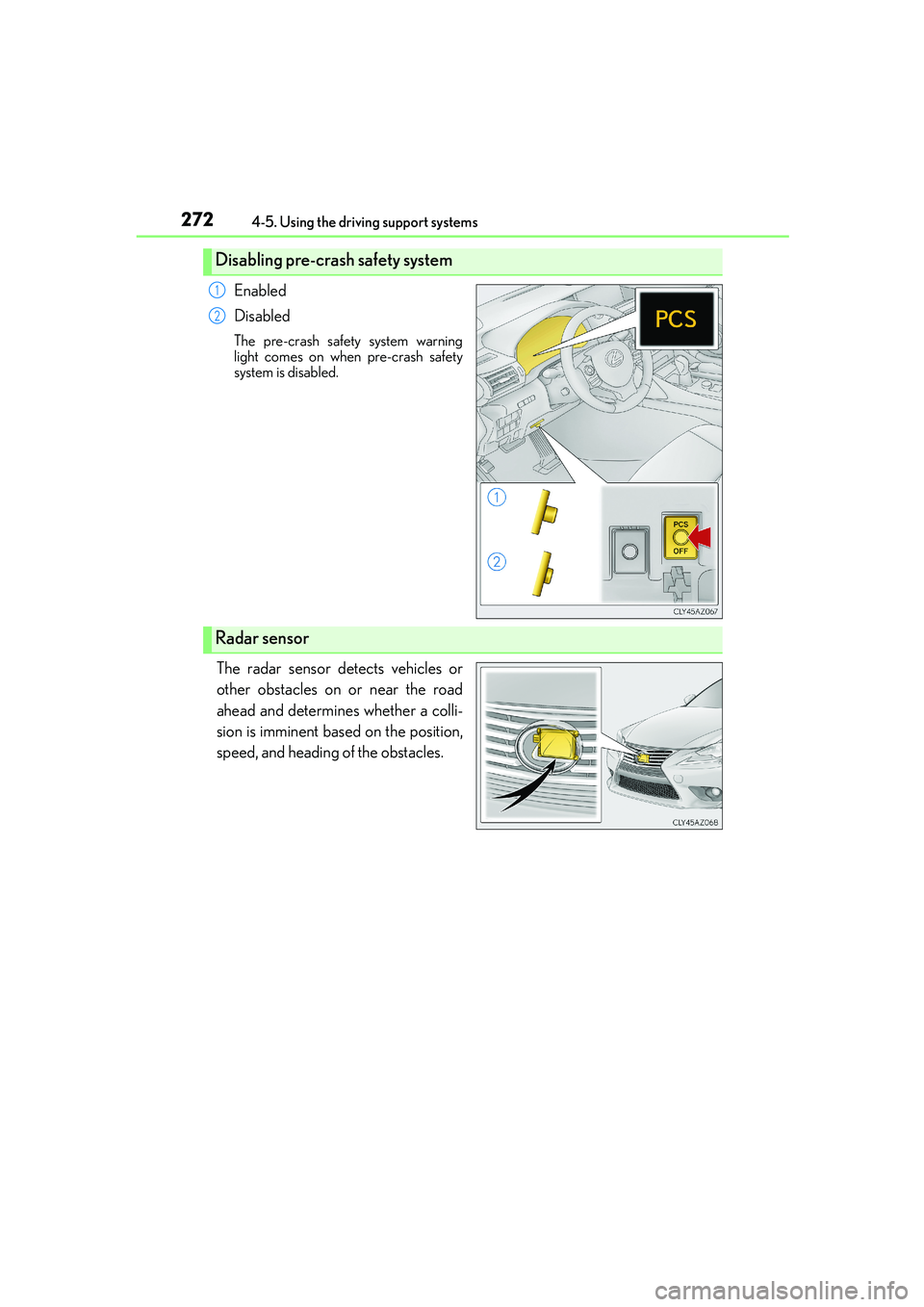
Enabled
Disabled
The pre-crash safety system warning
light comes on when pre-crash safety
system is disabled.
The radar sensor detects vehicles or
other obstacles on or near the road
ahead and determines whether a colli-
sion is imminent based on the position,
speed, and heading of the obstacles.
Disabling pre-crash safety system
1
2
Radar sensor
Page 274 of 588
2744-5. Using the driving support systems
IS250_EE(OM53C51E)
■Obstacles not detected
The sensor cannot detect plastic obstacles such as traffic cones. There may also be occa-
sions when the sensor cannot detect pedestrians, animals, bicycles, motorcycles, trees,
or snowdrifts.
■Situations in which the pre-crash safety system does not function properly
The system may not function effectively in situations such as the following:
●On roads with sharp bends or uneven surfaces
●If a vehicle suddenly moves in front of your vehicle, such as at an intersection
●If a vehicle suddenly cuts in front of your vehicle, such as when overtaking
●In inclement weather such as heavy rain, fog, snow or sand storms
●If the vehicle is skidding when VSC is not operating
●When an extreme change in vehicle height occurs
●When only part of your vehicle’s front end collides with, or contacts, a vehicle or object
in a frontal collision
●When the radar sensor moves off position due to its surrounding area being subjected
to a strong impact
■Automatic cancelation of the pre-crash safety system
When a malfunction occurs due to sensor contamination, etc. that results in the sensors
being unable to detect obstacles, the pre-crash safety system will be automatically dis-
abled. In this case, the system will not activate even if there is a collision possibility.
■When there is a malfunction in the system
The pre-crash safety system warning light will flash and warning messages will be dis-
played. (→P. 477, 487)
Page 279 of 588
2794-5. Using the driving support systems
4
Driving
IS250_EE(OM53C51E)
■The outside rear view mirror indicators visibility
When under strong sunlight, the outside rear view mirror indicator may be difficult to
see.
■Rear Crossing Traffic Alert buzzer hearing
Rear Crossing Traffic Alert function may be difficult to hear over loud noises such as high
audio volume.
■When there is a malfunction in the Blind Spot Monitor
If a system malfunction is detected due to any of the following reasons, warning mes-
sages will be displayed: (→P. 486, 487)
●There is a malfunction with the sensors
●The sensors have become dirty
●The outside temperature is extremely high or low
●The sensor voltage has become abnormal
■Certification for the Blind Spot Monitor
XFor vehicles sold in Russia
type approval number : POCC DE.ML05.H01144
XFor vehicles sold in Ukraine
type approval number : UA1.155.0029691-12
Page 428 of 588
4287-3. Do-it-yourself maintenance
IS250_EE(OM53C51E)
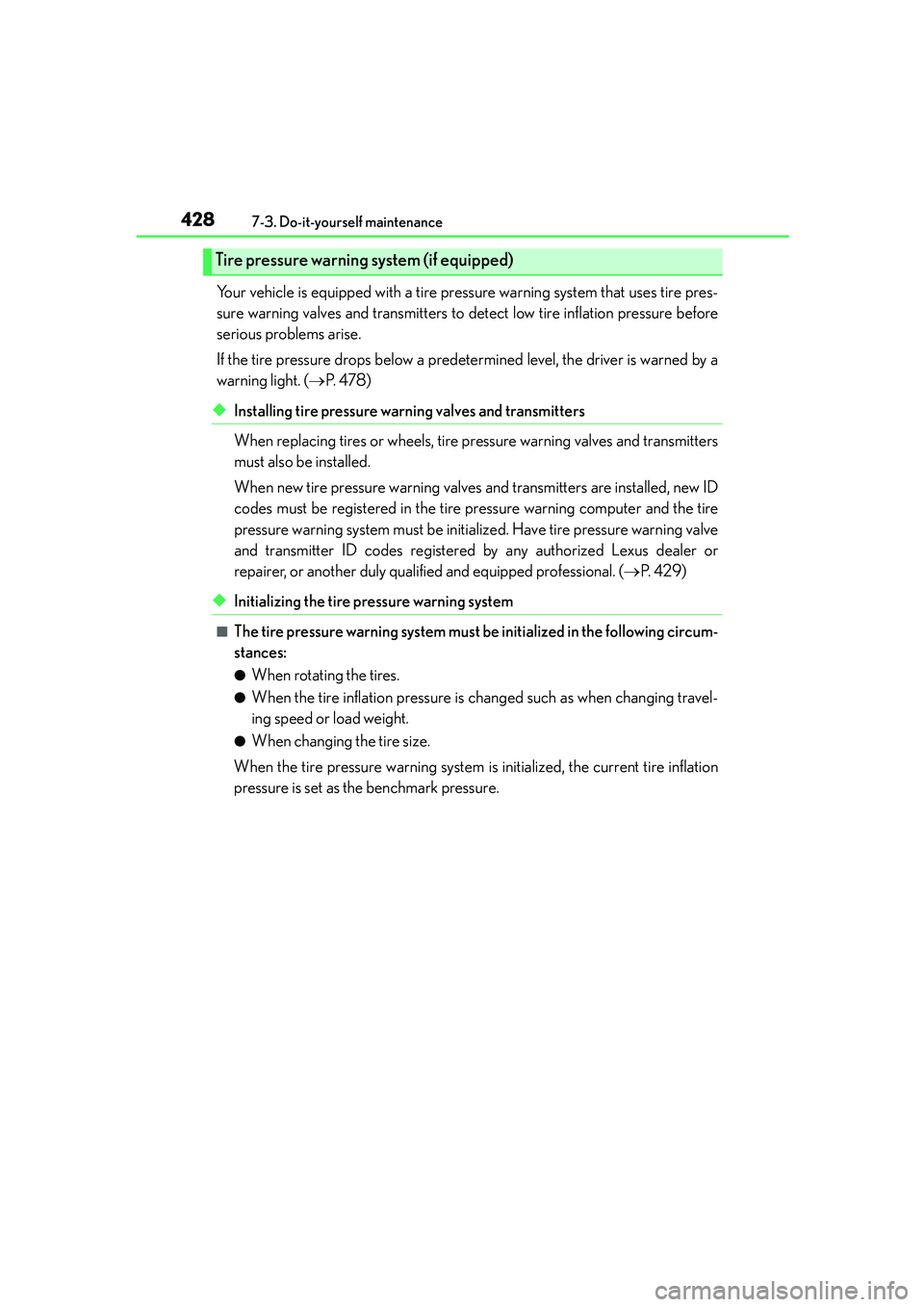
Your vehicle is equipped with a tire pressure warning system that uses tire pres-
sure warning valves and transmitters to detect low tire inflation pressure before
serious problems arise.
If the tire pressure drops below a predetermined level, the driver is warned by a
warning light. (→P. 4 7 8 )
◆Installing tire pressure warning valves and transmitters
When replacing tires or wheels, tire pressure warning valves and transmitters
must also be installed.
When new tire pressure warning valves and transmitters are installed, new ID
codes must be registered in the tire pressure warning computer and the tire
pressure warning system must be initialized. Have tire pressure warning valve
and transmitter ID codes registered by any authorized Lexus dealer or
repairer, or another duly qualified and equipped professional. (→P. 4 2 9 )
◆Initializing the tire pressure warning system
■The tire pressure warning system must be initialized in the following circum-
stances:
●When rotating the tires.
●When the tire inflation pressure is changed such as when changing travel-
ing speed or load weight.
●When changing the tire size.
When the tire pressure warning system is initialized, the current tire inflation
pressure is set as the benchmark pressure.
Tire pressure warning system (if equipped)
Page 429 of 588
4297-3. Do-it-yourself maintenance
7
Maintenance and care
IS250_EE(OM53C51E)
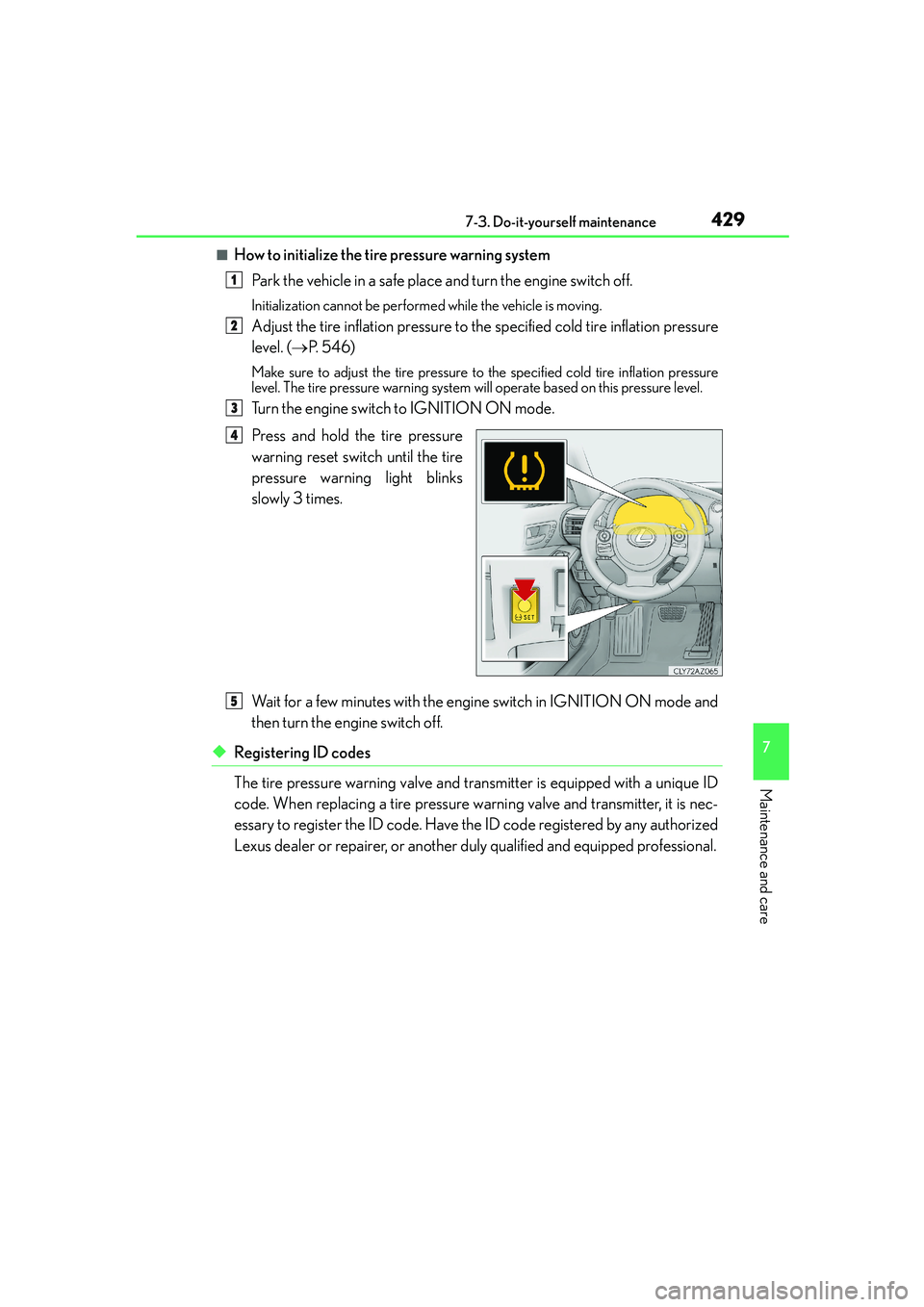
■How to initialize the tire pressure warning system
Park the vehicle in a safe place and turn the engine switch off.
Initialization cannot be performed while the vehicle is moving.
Adjust the tire inflation pressure to the specified cold tire inflation pressure
level. (→P. 5 4 6 )
Make sure to adjust the tire pressure to the specified cold tire inflation pressure
level. The tire pressure warning system will operate based on this pressure level.
Turn the engine switch to IGNITION ON mode.
Press and hold the tire pressure
warning reset switch until the tire
pressure warning light blinks
slowly 3 times.
Wait for a few minutes with the engine switch in IGNITION ON mode and
then turn the engine switch off.
◆Registering ID codes
The tire pressure warning valve and transmitter is equipped with a unique ID
code. When replacing a tire pressure warning valve and transmitter, it is nec-
essary to register the ID code. Have the ID code registered by any authorized
Lexus dealer or repairer, or another duly qualified and equipped professional.
1
2
3
4
5
Page 430 of 588
4307-3. Do-it-yourself maintenance
IS250_EE(OM53C51E)
■When to replace your vehicle’s tires
Tires should be replaced if:
●You have tire damage such as cuts, splits, cracks deep enough to expose the fabric, and
bulges indicating internal damage
●A tire goes flat repeatedly or cannot be properly repaired due to the size or location of
a cut or other damage
If you are not sure, consult any authorized Lexus dealer or repairer, or another duly qual-
ified and equipped professional.
■Replacing tires and wheels (vehicles with a tire pressure warning system)
If the ID code of the tire pressure warning valve and transmitter is not registered, the tire
pressure warning system will not work properly. After driving for about 10 minutes, the
tire pressure warning light blinks for 1 minute and stays on to indicate a system malfunc-
tion.
■Tire life
Any tire over 6 years old must be checked by a qualified technician even if it has seldom
or never been used or damage is not obvious.
■Routine tire inflation pressure checks
The tire pressure warning system does not replace routine tire inflation pressure checks.
Make sure to check tire inflation pressure as part of your routine of daily vehicle checks.
■Low profile tires (except 16-inch tires)
Generally, low profile tires will wear more rapidly and tire grip performance will be
reduced on snowy and/or icy roads when compared to standard tires. Be sure to use
snow tires or tire chains
* on snowy and/or icy roads and drive carefully at a speed appro-
priate for road and weather conditions.
*: Tire chains cannot be mounted on the 18-inch tires. Snow tires should be used instead.
■If the tread on snow tires wears down below 4 mm (0.16 in.)
The effectiveness of the tires as snow tires is lost.
Page 432 of 588
4327-3. Do-it-yourself maintenance
IS250_EE(OM53C51E)
■When initialization of the tire pressure warning system has failed (vehicles with a tire
pressure warning system)
Initialization can be completed in a few minutes. However, in the following cases, the set-
tings have not been recorded and the system will not operate properly. If repeated
attempts to record tire inflation pressure settings are unsuccessful, have the vehicle
inspected by any authorized Lexus dealer or repairer, or another duly qualified and
equipped professional.
●When operating the tire pressure warning reset switch, the tire pressure warning light
does not blink 3 times.
●After carrying out the initialization procedure, the tire pressure warning light blinks for 1
minute then stays on after driving for 20 minutes.
■Registering ID codes (vehicles with a tire pressure warning system)
The ID codes of the tire pressure warning valve and transmitters for two sets of wheels
can be registered.
It is not necessary to register the ID codes when replacing normal tires with snow tires, if
the ID codes for the wheels of both normal tires and snow tires are registered before-
hand.
For information about changing ID codes, ask any authorized Lexus dealer or repairer,
or another duly qualified and equipped professional.