ECU Lexus IS250 2014 Owner's Guide
[x] Cancel search | Manufacturer: LEXUS, Model Year: 2014, Model line: IS250, Model: Lexus IS250 2014Pages: 588, PDF Size: 98.77 MB
Page 75 of 588
751-1. For safe use
1
For safety and security
IS250_EE(OM53C51E)
CAUTION
■When installing a child restraint system
●If child restraint system regulations exist in the country where you reside, please con-
tact any authorized Lexus dealer or repairer, or another duly qualified and equipped
professional for the child restraint system installation.
●When a junior seat is installed, always ensure that the shoulder belt is positioned
across the center of the child’s shoulder. The belt should be kept away from the child’s
neck, but not so that it could fall off the child’s shoulder. Failing to do so may result in
death or serious injury in the event of sudden braking, sudden swerving or an acci-
dent.
●Ensure that the belt and plate are securely locked and the seat belt is not twisted.
●Shake the child restraint system left and right, and forward and backward to ensure
that it has been securely installed.
●After securing a child restraint system, never adjust the seat.
●Follow all installation instructions provided by the child restraint system manufacturer.
■To correctly attach a child restraint system to the anchors
When using the lower anchors, be sure that there are no foreign objects around the
anchors and that the seat belt is not caught behind the child restraint system. Make sure
the child restraint system is securely attached, or it may cause death or serious injury to
the child or other passengers in the event of a sudden braking, sudden swerve or an
accident.
Page 77 of 588
77
1
For safety and security
IS250_EE(OM53C51E)1-2. Theft deterrent system
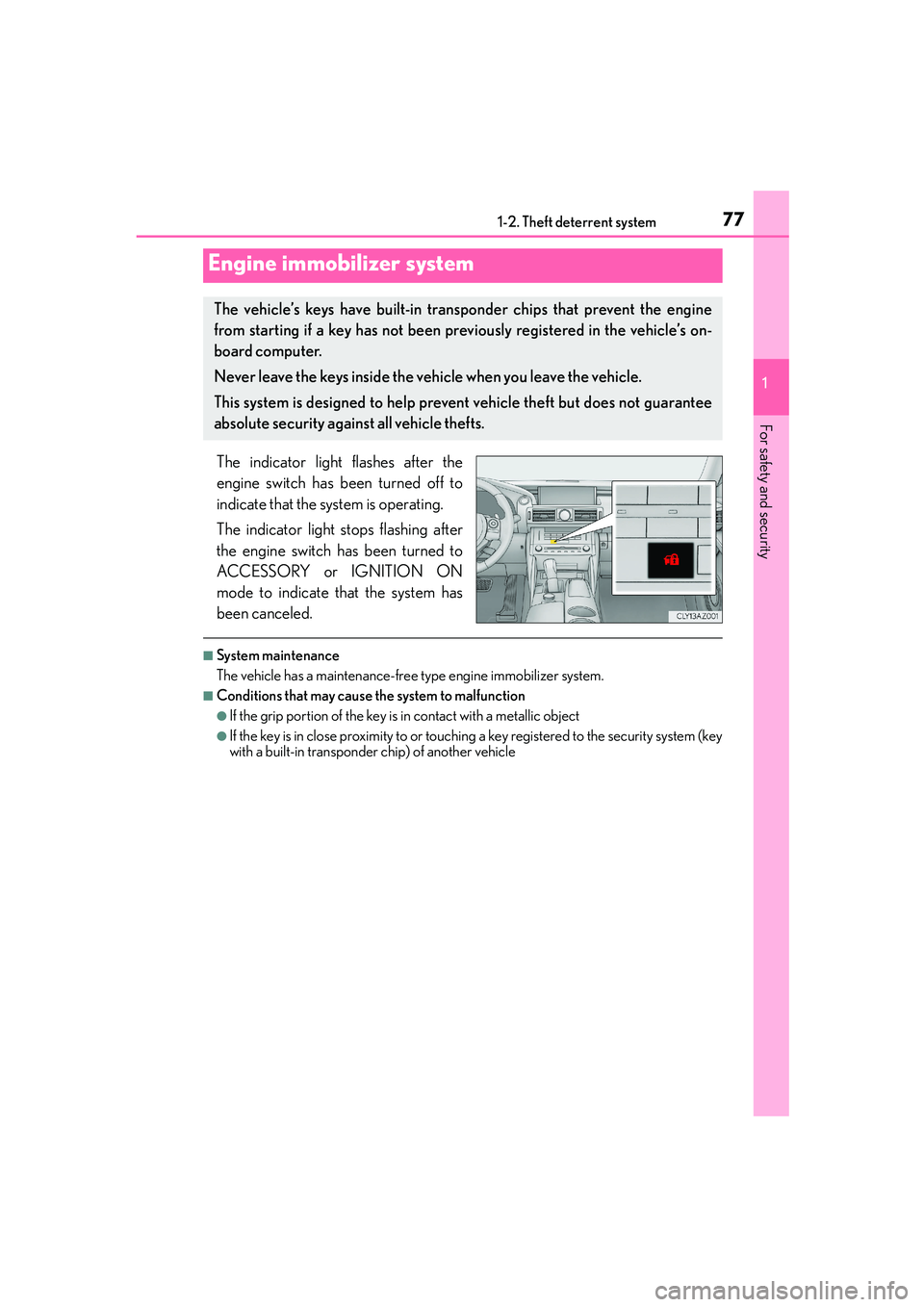
The indicator light flashes after the
engine switch has been turned off to
indicate that the system is operating.
The indicator light stops flashing after
the engine switch has been turned to
ACCESSORY or IGNITION ON
mode to indicate that the system has
been canceled.
■System maintenance
The vehicle has a maintenance-free type engine immobilizer system.
■Conditions that may cause the system to malfunction
●If the grip portion of the key is in contact with a metallic object
●If the key is in close proximity to or touching a key registered to the security system (key
with a built-in transponder chip) of another vehicle
Engine immobilizer system
The vehicle’s keys have built-in transponder chips that prevent the engine
from starting if a key has not been previously registered in the vehicle’s on-
board computer.
Never leave the keys inside the vehicle when you leave the vehicle.
This system is designed to help prevent vehicle theft but does not guarantee
absolute security against all vehicle thefts.
Page 79 of 588
791-2. Theft deterrent system
1
For safety and security
IS250_EE(OM53C51E)
Page 81 of 588

811-2. Theft deterrent system
1
For safety and security
IS250_EE(OM53C51E)
NOTICE
■To ensure the system operates correctly
Do not modify or remove the system. If modified or removed, the proper operation of
the system cannot be guaranteed.
Page 83 of 588
831-2. Theft deterrent system
1
For safety and security
IS250_EE(OM53C51E)
The alarm uses light and sound to give an alert when an intrusion is detected.
The alarm is triggered in the following situations when the alarm is set:
●A locked door or trunk is unlocked or opened in any way other than using the
entry function or wireless remote control. (The door will lock again automati-
cally.)
●The hood is opened.
●The intrusion sensor detects something moving inside the vehicle. (An
intruder gets in the vehicle.) (if equipped)
●The tilt sensor detects a change of vehicle inclination. (if equipped)
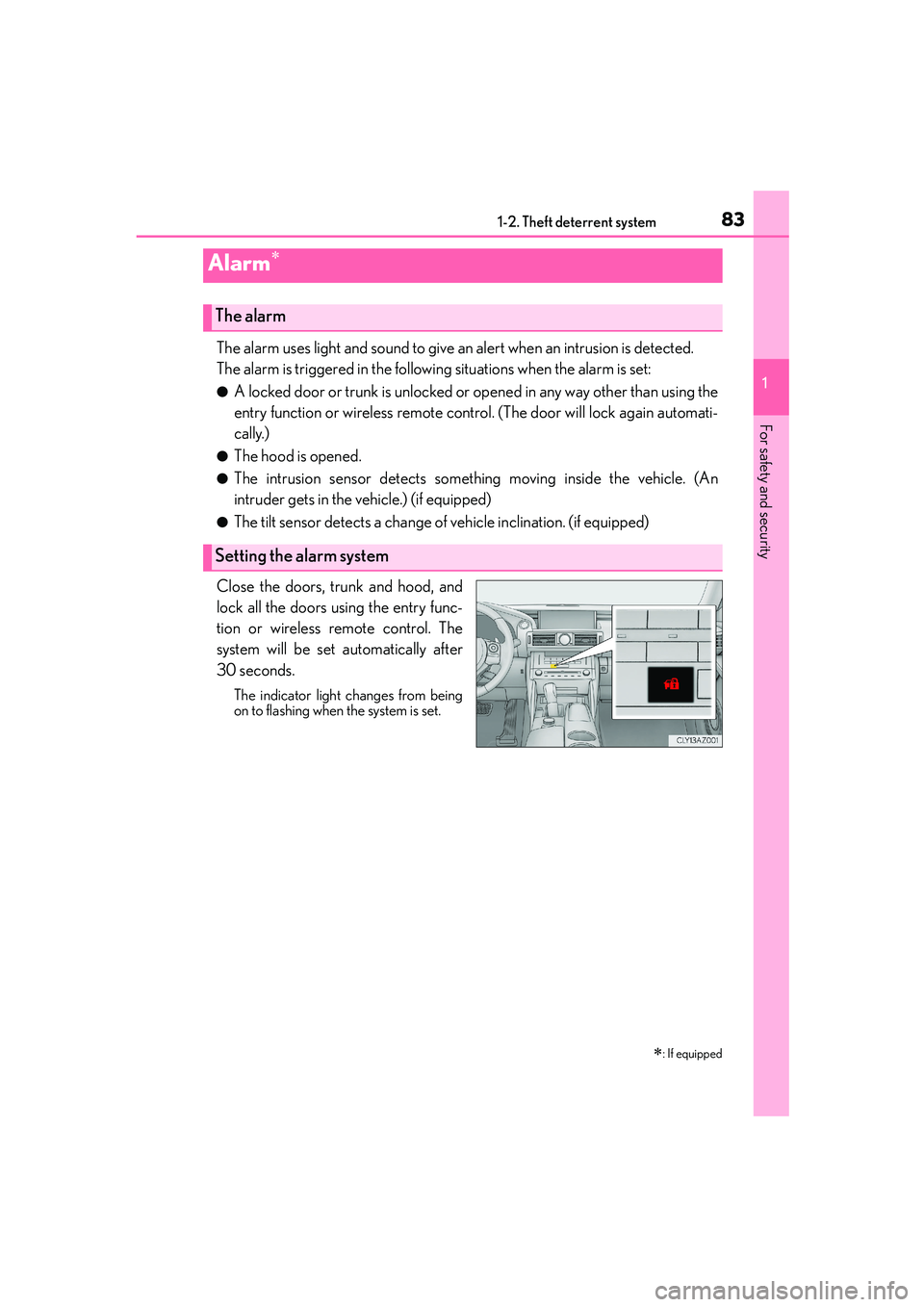
Close the doors, trunk and hood, and
lock all the doors using the entry func-
tion or wireless remote control. The
system will be set automatically after
30 seconds.
The indicator light changes from being
on to flashing when the system is set.
Alarm∗
∗
: If equipped
The alarm
Setting the alarm system
Page 85 of 588

851-2. Theft deterrent system
1
For safety and security
IS250_EE(OM53C51E)
■Triggering of the alarm
The alarm may be triggered in the following situations:
(Stopping the alarm deactivates the alarm system.)
■Alarm-operated door lock
In the following situations, the doors are locked automatically to prevent intruders:
●The doors are unlocked manually without the mechanical key and the alarm is trig-
gered.
●While the alarm is operating, the doors are unlocked manually without the mechanical
key.
●The doors or trunk are unlocked using the
mechanical key.
●A person inside the vehicle opens a door, the
trunk or hood, or unlocks the vehicle using a
inside lock button.
●The battery is recharged or replaced when the
vehicle is locked. (→P. 5 2 9 )
NOTICE
■To ensure the system operates correctly
Do not modify or remove the system. If modified or removed, the proper operation of
the system cannot be guaranteed.
Page 86 of 588

861-2. Theft deterrent system
IS250_EE(OM53C51E)
●The intrusion sensor detects intruders or movement in the vehicle.
●The tilt sensor detects changes in vehicle inclination, such as when the vehicle
is towed away.
This system is designed to deter and prevent vehicle theft but does not guarantee
absolute security against all intrusions.
■Setting the intrusion sensor and tilt sensor
The intrusion sensor and tilt sensor will be set automatically when the alarm is
set. (→P. 8 3 )
■Canceling the intrusion sensor and tilt sensor
If you are leaving pets or other moving things inside the vehicle, make sure to
disable the intrusion sensor and tilt sensor before setting the alarm, as they will
respond to movement inside the vehicle.
Turn the engine switch off.
Press the intrusion sensor and tilt
sensor cancel switch.
Press the switch again to re-enable
the intrusion sensor and tilt sensor.
Each time the intrusion sensor is can-
celed/set, a message will be shown
on the multi-information display in
the instrument cluster.
Intrusion sensor and tilt sensor (if equipped)
1
2
Page 87 of 588

871-2. Theft deterrent system
1
For safety and security
IS250_EE(OM53C51E)
■Canceling and automatic re-enabling of the intrusion sensor and tilt sensor
●The alarm will still be set even when the intrusion sensor and tilt sensor are canceled.
●After the intrusion sensor and tilt sensor are canceled, pressing the engine switch or
unlocking the doors using the entry function or wireless remote control will re-enable
the intrusion sensor and tilt sensor.
●The intrusion sensor and tilt sensor will automatically be re-enabled when the alarm
system is deactivated.
■Intrusion sensor detection considerations
The sensor may trigger the alarm in the following situations:
●Places with extreme vibrations or noises, or situations in which the vehicle is subject to
repeated impacts or vibrations:
• When parked in a parking garage
• When the vehicle is transported on a ferry, trailer, train, etc.
• When ice adhering to the vehicle is removed
• When the vehicle is in an automatic or high-pressure car wash
• When in a hail or lightning storm
●A window or the moon roof is open.
In this case, the sensor may detect the follow-
ing:
• Wind or the movement of objects such as
leaves and insects inside the vehicle
• Ultrasonic waves emitted from devices
such as the intrusion sensors of other vehi-
cles
• The movement of people outside the vehi-
cle
●Unstable items, such as dangling accessories
or clothes hanging on the coat hooks, are in
the vehicle.
Page 92 of 588
922. Instrument cluster
IS250_EE(OM53C51E)
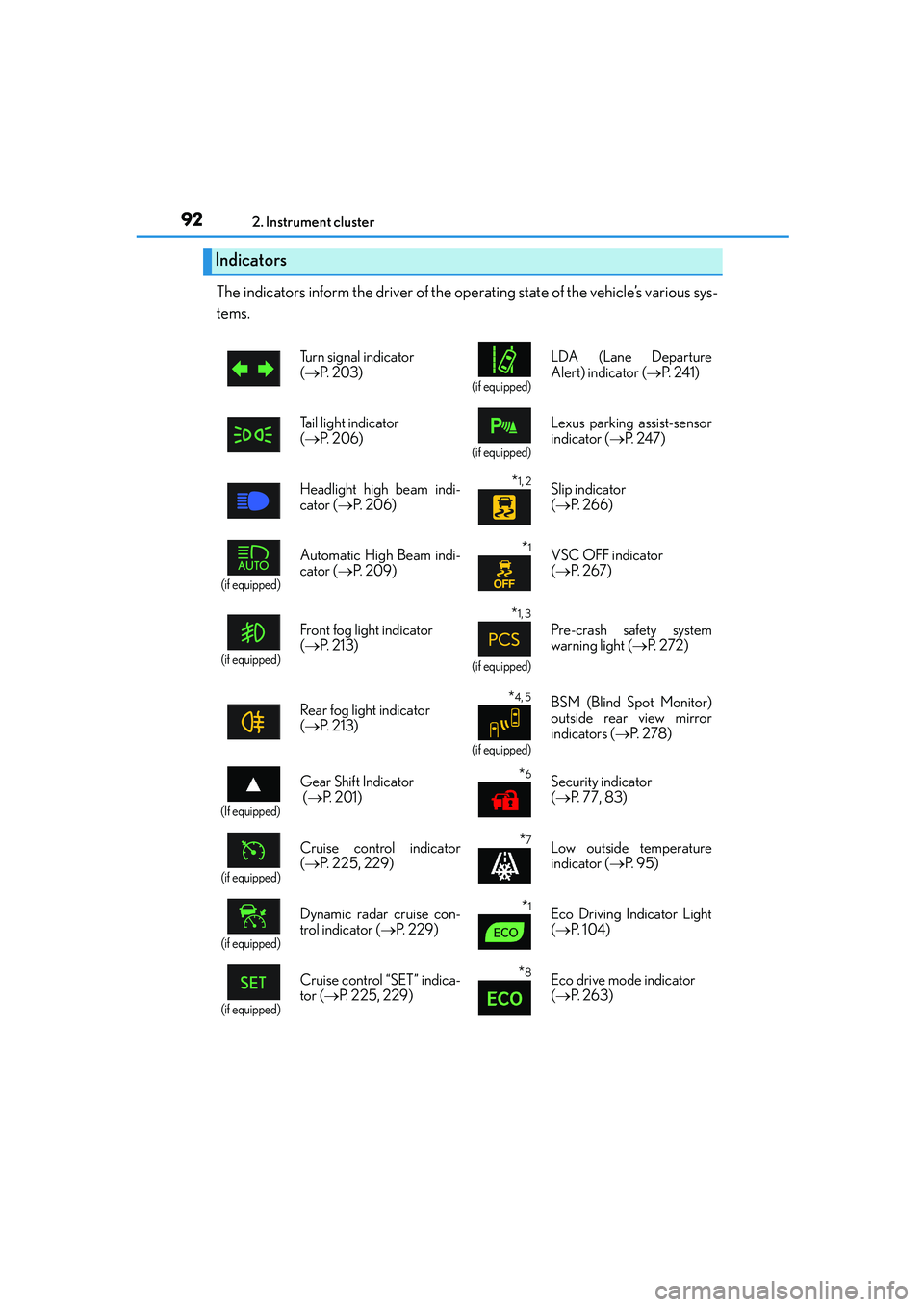
The indicators inform the driver of the operating state of the vehicle’s various sys-
tems.
Indicators
Turn signal indicator
(→P. 2 0 3 )
(if equipped)
LDA (Lane Departure
Alert) indicator (→P. 2 4 1 )
Tail light indicator
(→P. 2 0 6 )
(if equipped)
Lexus parking assist-sensor
indicator (→P. 2 4 7 )
Headlight high beam indi-
cator (→P. 2 0 6 )
*1, 2 Slip indicator
(→P. 2 6 6 )
(if equipped)
Automatic High Beam indi-
cator (→P. 2 0 9 )*1VSC OFF indicator
(→P. 2 6 7 )
(if equipped)
Front fog light indicator
(→P. 2 1 3 )
*1, 3
(if equipped)
Pre-crash safety system
warning light (→P. 2 7 2 )
Rear fog light indicator
(→P. 2 1 3 )
*4, 5
(if equipped)
BSM (Blind Spot Monitor)
outside rear view mirror
indicators (→P. 2 7 8 )
(If equipped)
Gear Shift Indicator
(→P. 2 0 1 )*6Security indicator
(→P. 77, 83)
(if equipped)
Cruise control indicator
(→P. 225, 229)*7Low outside temperature
indicator (→P. 9 5 )
(if equipped)
Dynamic radar cruise con-
trol indicator (→P. 229)*1Eco Driving Indicator Light
(→P. 1 0 4 )
(if equipped)
Cruise control “SET” indica-
tor (→P. 225, 229)*8Eco drive mode indicator
(→P. 2 6 3 )
Page 114 of 588
1143-1. Key information
IS250_EE(OM53C51E)
■Card key (if equipped)
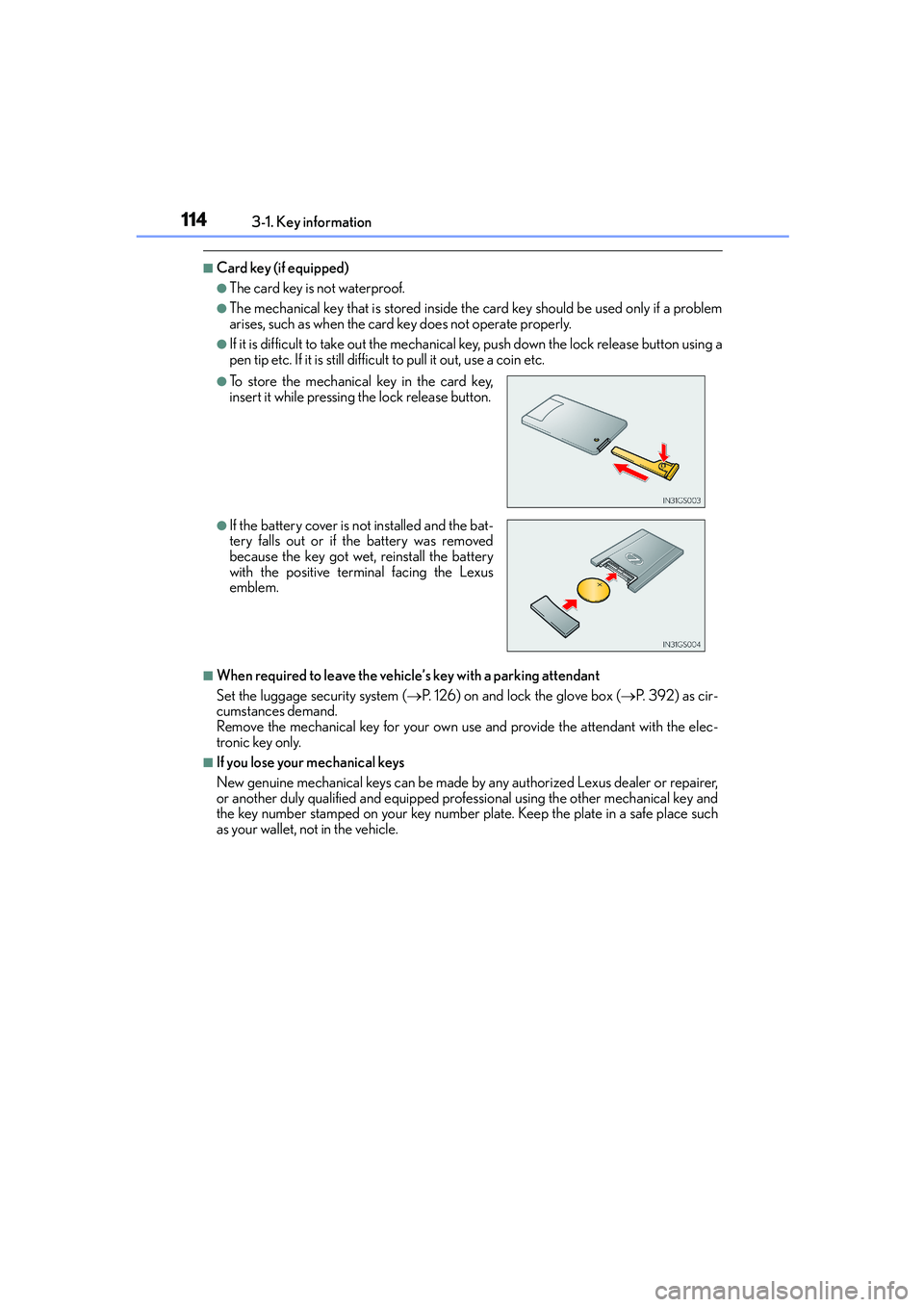
●The card key is not waterproof.
●The mechanical key that is stored inside the card key should be used only if a problem
arises, such as when the card key does not operate properly.
●If it is difficult to take out the mechanical key, push down the lock release button using a
pen tip etc. If it is still difficult to pull it out, use a coin etc.
■When required to leave the vehicle’s key with a parking attendant
Set the luggage security system (→P. 126) on and lock the glove box (→P. 392) as cir-
cumstances demand.
Remove the mechanical key for your own use and provide the attendant with the elec-
tronic key only.
■If you lose your mechanical keys
New genuine mechanical keys can be made by any authorized Lexus dealer or repairer,
or another duly qualified and equipped professional using the other mechanical key and
the key number stamped on your key number plate. Keep the plate in a safe place such
as your wallet, not in the vehicle.
●To store the mechanical key in the card key,
insert it while pressing the lock release button.
●If the battery cover is not installed and the bat-
tery falls out or if the battery was removed
because the key got wet, reinstall the battery
with the positive terminal facing the Lexus
emblem.