mirror Lexus IS250 2014 Owner's Manual
[x] Cancel search | Manufacturer: LEXUS, Model Year: 2014, Model line: IS250, Model: Lexus IS250 2014Pages: 588, PDF Size: 98.77 MB
Page 3 of 588
3
1
9 8
7
6 4 3
2
IS250_EE(OM53C51E)
5
3-4. Adjusting the steering
wheel and mirrors
Steering wheel ............................. 159
Inside rear view mirror ................ 161
Outside rear view mirrors ....... 163
3-5. Opening, closing the
windows and moon roof
Power windows .............................167
Moon roof ...................................... 170
4-1. Before driving
Driving the vehicle ....................... 176
Cargo and luggage .................... 183
Trailer towing................................. 184
4-2. Driving procedures
Engine (ignition) switch ............ 192
Automatic transmission .............197
Turn signal lever ..........................203
Parking brake.............................. 205
4-3. Operating the lights and
wipers
Headlight switch .........................206
Automatic High Beam .............209
Fog light switch............................. 213
Windshield wipers and
washer........................................... 2154-4. Refueling
Opening the fuel tank cap....... 221
4-5. Using the driving support
systems
Cruise control ............................. 225
Dynamic radar cruise
control.......................................... 229
LDA
(Lane Departure Alert) ..........241
Lexus parking
assist-sensor ...............................247
Rear view monitor system ...... 254
Driving mode select
switch ........................................... 263
Driving assist systems ............... 265
PCS (Pre-Crash Safety
system)...........................................271
BSM (Blind Spot Monitor) ..... 278
•The Blind Spot Monitor
function.....................................283
• The Rear Crossing Traffic
Alert function .........................285
4-6. Driving tips
Winter driving tips .................... 288
4Driving
Page 5 of 588
5
1
9 8
7
6 4 3
2
IS250_EE(OM53C51E)
5
5-9. Bluetooth® Phone
Using a Bluetooth
®
Phone ...........................................345
Making a call ................................ 347
Receiving a call .......................... 350
Speaking on the phone............. 351
Using a Bluetooth
® phone
messages ....................................353
Using the steering wheel
switches.......................................356
Bluetooth
® phone
settings......................................... 357
5-10. Phonebook
Contact settings .........................359
Messaging setting...................... 362
5-11. Bluetooth
®
Bluetooth®..................................363
5-12. Other function
“Information” screen ................ 368
MirrorLink.................................369
USB photo ......................................371
Speech command system ...... 3736-1. Using the air conditioning
system
Automatic air conditioning
system ...........................................376
Heated steering wheel/
seat heaters/
seat ventilators ......................... 387
6-2. Using the interior lights
Interior lights list......................... 389
• Interior lights ......................... 390
• Personal lights....................... 390
6-3. Using the storage features
List of storage features.............. 391
• Glove box................................ 392
• Console box........................... 392
•Cup holders/
Bottle holders ........................393
Trunk features ..............................395
6-4. Using the other interior
features
Other interior features ........... 398
• Sun visors ............................... 398
• Vanity mirrors ....................... 398
• Clock........................................ 398
• Power outlet ...........................399
• Armrest .................................. 400
• Rear sunshade...................... 400
• Assist grips..............................402
• Coat hooks .............................402
6Interior features
Page 12 of 588

12
IS250_EE(OM53C51E)Pictorial index
Pictorial index
■Exterior
The shape of the headlights may differ depending on the grade, etc. (→P. 4 5 0 )
Doors . . . . . . . . . . . . . . . . . . . . . . . . . . . . . . . . . . . . . . . . . . . . . . . . . . . . . . . . . . . . . . . . . P. 118
Locking/unlocking. . . . . . . . . . . . . . . . . . . . . . . . . . . . . . . . . . . . . . . . . . . . . . . . . . . . . . . P. 1 1 8
Opening/closing the door glasses . . . . . . . . . . . . . . . . . . . . . . . . . . . . . . . . . . . . . . . P. 167
Locking/unlocking by using the mechanical key . . . . . . . . . . . . . . . . . . . . . . . . P. 524
Warning lights/warning messages . . . . . . . . . . . . . . . . . . . . . . . . . . . . . . . . P. 478, 484
Trunk . . . . . . . . . . . . . . . . . . . . . . . . . . . . . . . . . . . . . . . . . . . . . . . . . . . . . . . . . . . . . . . . . .P. 125
Opening from inside the cabin. . . . . . . . . . . . . . . . . . . . . . . . . . . . . . . . . . . . . . . . . . P. 125
Opening from outside . . . . . . . . . . . . . . . . . . . . . . . . . . . . . . . . . . . . . . . . . . . . . . . . . . P. 125
Opening by using the mechanical key . . . . . . . . . . . . . . . . . . . . . . . . . . . . . . . . . . P. 524
Warning lights/warning messages . . . . . . . . . . . . . . . . . . . . . . . . . . . . . . . . P. 478, 484
Outside rear view mirrors. . . . . . . . . . . . . . . . . . . . . . . . . . . . . . . . . . . . . . . . . . . . P. 163
Adjusting the mirror angle . . . . . . . . . . . . . . . . . . . . . . . . . . . . . . . . . . . . . . . . . . . . . . P. 163
Folding the mirrors . . . . . . . . . . . . . . . . . . . . . . . . . . . . . . . . . . . . . . . . . . . . . . . . . . . . . P. 164
Driving position memory
*1 . . . . . . . . . . . . . . . . . . . . . . . . . . . . . . . . . . . . . . . . . . . . . . P. 151
Defogging the mirrors . . . . . . . . . . . . . . . . . . . . . . . . . . . . . . . . . . . . . . . . . . . . . . . . . .P. 382
1
2
3
Page 17 of 588

17Pictorial index
IS250_EE(OM53C51E)
Driving position memory switches*1. . . . . . . . . . . . . . . . . . . . . . . . . . . . . . . . . P. 151
Outside rear view mirror switches . . . . . . . . . . . . . . . . . . . . . . . . . . . . . . . . . . . P. 163
Door lock switches . . . . . . . . . . . . . . . . . . . . . . . . . . . . . . . . . . . . . . . . . . . . . . . . . . . P. 121
Power window switches . . . . . . . . . . . . . . . . . . . . . . . . . . . . . . . . . . . . . . . . . . . . . . P. 167
Window lock switch . . . . . . . . . . . . . . . . . . . . . . . . . . . . . . . . . . . . . . . . . . . . . . . . . . P. 167
Tire pressure warning reset switch
*1 . . . . . . . . . . . . . . . . . . . . . . . . . . . . . . . P. 429
PCS OFF switch
*1. . . . . . . . . . . . . . . . . . . . . . . . . . . . . . . . . . . . . . . . . . . . . . . . . . . P. 272
1
2
3
4
5
6
7
*1: If equipped
*2: For vehicles with a navigation or multimedia system, refer to
“NAVIGATION AND MULTIMEDIA SYSTEM OWNER’S MANUAL”.
Page 21 of 588

21Pictorial index
IS250_EE(OM53C51E)
Inside rear view mirror . . . . . . . . . . . . . . . . . . . . . . . . . . . . . . . . . . . . . . . . . . . . . . . .P. 161
Sun visors
*1. . . . . . . . . . . . . . . . . . . . . . . . . . . . . . . . . . . . . . . . . . . . . . . . . . . . . . . . . . P. 398
Vanity mirrors. . . . . . . . . . . . . . . . . . . . . . . . . . . . . . . . . . . . . . . . . . . . . . . . . . . . . . . . P. 398
Interior light . . . . . . . . . . . . . . . . . . . . . . . . . . . . . . . . . . . . . . . . . . . . . . . . . . . . . . . . .P. 390
Personal lights
*2 . . . . . . . . . . . . . . . . . . . . . . . . . . . . . . . . . . . . . . . . . . . . . . . . . . . . P. 390
Moon roof switches
*3. . . . . . . . . . . . . . . . . . . . . . . . . . . . . . . . . . . . . . . . . . . . . . . . P. 170
Intrusion sensor cancel switch
*3 . . . . . . . . . . . . . . . . . . . . . . . . . . . . . . . . . . . . .P. 86
Intrusion sensor and tilt sensor cancel switch
*3. . . . . . . . . . . . . . . . . . . . . .P. 86
1
2
3
4
5
6
*1: NEVER use a rearward facing child re-
straint on a seat protected by an AC-
TIVE AIRBAG in front of it, DEATH or
SERIOUS INJURY to the CHILD can
occur. (→P. 74 )
*2: The illustration shows the front, but they are also equipped in the rear.
*3: If equipped
Page 25 of 588

25Pictorial index
IS250_EE(OM53C51E)
PCS OFF switch*1. . . . . . . . . . . . . . . . . . . . . . . . . . . . . . . . . . . . . . . . . . . . . . . . . . . P. 272
Tire pressure warning reset switch . . . . . . . . . . . . . . . . . . . . . . . . . . . . . . . . . . P. 429
Outside rear view mirror switches . . . . . . . . . . . . . . . . . . . . . . . . . . . . . . . . . . . P. 163
Driving position memory switches
*1. . . . . . . . . . . . . . . . . . . . . . . . . . . . . . . . . P. 151
Window lock switch . . . . . . . . . . . . . . . . . . . . . . . . . . . . . . . . . . . . . . . . . . . . . . . . . . P. 167
Power window switches . . . . . . . . . . . . . . . . . . . . . . . . . . . . . . . . . . . . . . . . . . . . . . P. 167
Door lock switches . . . . . . . . . . . . . . . . . . . . . . . . . . . . . . . . . . . . . . . . . . . . . . . . . . . P. 121
*1: If equipped
*2: For vehicles with a navigation or multimedia system, refer to
“NAVIGATION AND MULTIMEDIA SYSTEM OWNER’S MANUAL”.
1
2
3
4
5
6
7
Page 29 of 588
29Pictorial index
IS250_EE(OM53C51E)
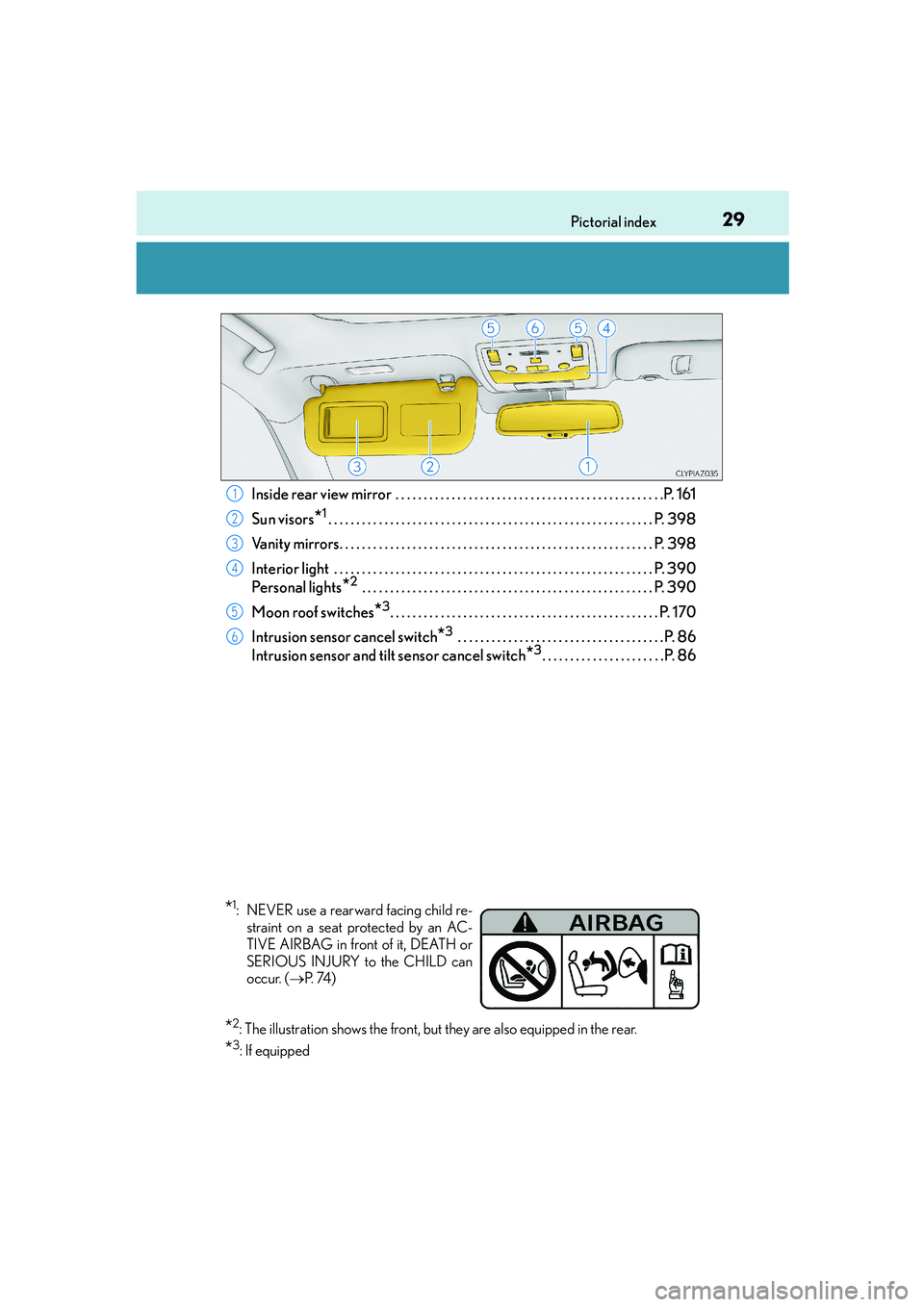
Inside rear view mirror . . . . . . . . . . . . . . . . . . . . . . . . . . . . . . . . . . . . . . . . . . . . . . . .P. 161
Sun visors
*1. . . . . . . . . . . . . . . . . . . . . . . . . . . . . . . . . . . . . . . . . . . . . . . . . . . . . . . . . . P. 398
Vanity mirrors. . . . . . . . . . . . . . . . . . . . . . . . . . . . . . . . . . . . . . . . . . . . . . . . . . . . . . . . P. 398
Interior light . . . . . . . . . . . . . . . . . . . . . . . . . . . . . . . . . . . . . . . . . . . . . . . . . . . . . . . . .P. 390
Personal lights
*2 . . . . . . . . . . . . . . . . . . . . . . . . . . . . . . . . . . . . . . . . . . . . . . . . . . . . P. 390
Moon roof switches
*3. . . . . . . . . . . . . . . . . . . . . . . . . . . . . . . . . . . . . . . . . . . . . . . . P. 170
Intrusion sensor cancel switch
*3 . . . . . . . . . . . . . . . . . . . . . . . . . . . . . . . . . . . . .P. 86
Intrusion sensor and tilt sensor cancel switch
*3. . . . . . . . . . . . . . . . . . . . . .P. 86
1
2
3
4
5
6
*1: NEVER use a rearward facing child re-
straint on a seat protected by an AC-
TIVE AIRBAG in front of it, DEATH or
SERIOUS INJURY to the CHILD can
occur. (→P. 74 )
*2: The illustration shows the front, but they are also equipped in the rear.
*3: If equipped
Page 34 of 588
341-1. For safe use
IS250_EE(OM53C51E)
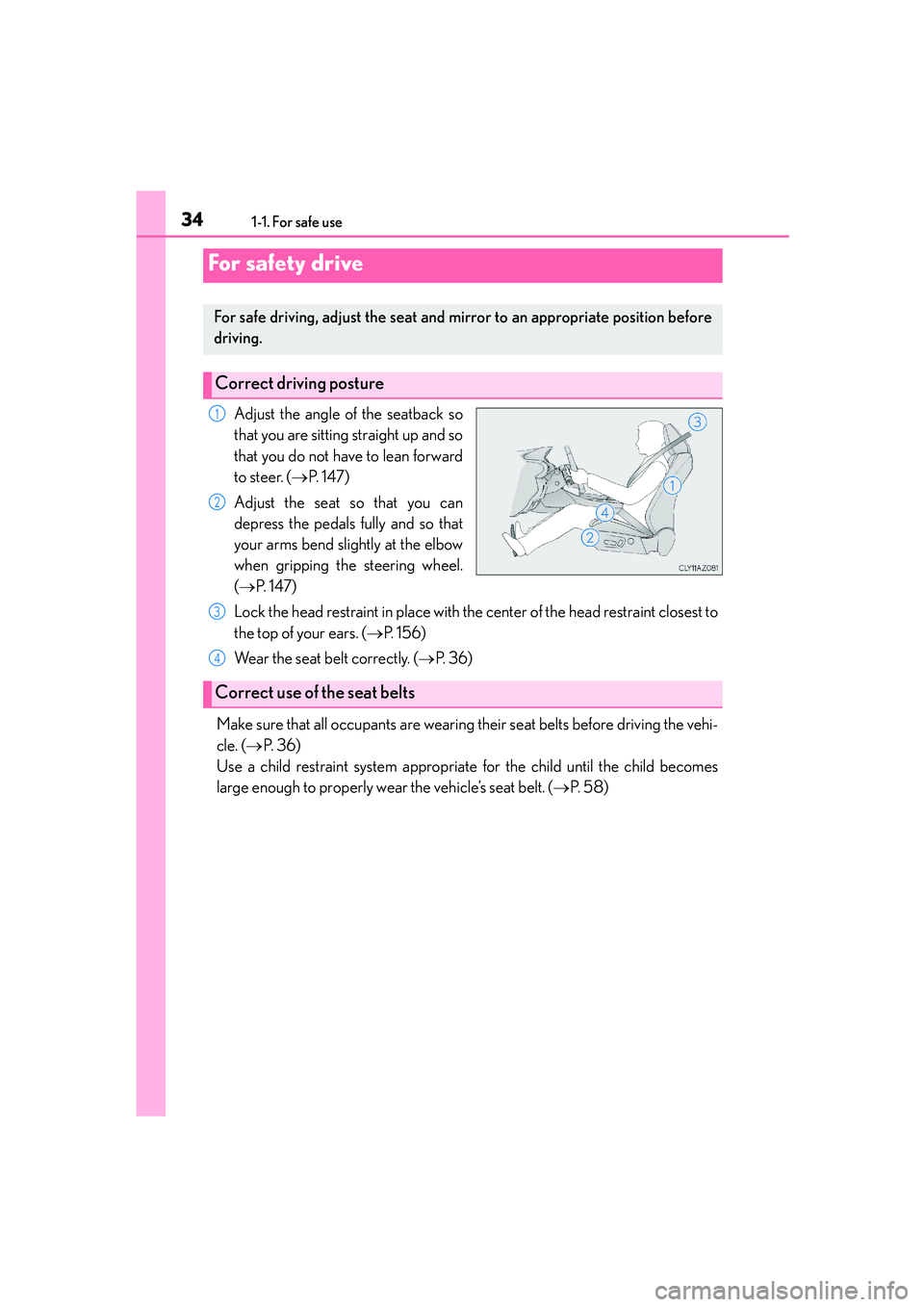
Adjust the angle of the seatback so
that you are sitting straight up and so
that you do not have to lean forward
to steer. (→P. 1 4 7 )
Adjust the seat so that you can
depress the pedals fully and so that
your arms bend slightly at the elbow
when gripping the steering wheel.
(→P. 1 4 7 )
Lock the head restraint in place with the center of the head restraint closest to
the top of your ears. (→P. 1 5 6 )
Wear the seat belt correctly. (→P. 36)
Make sure that all occupants are wearing their seat belts before driving the vehi-
cle. (→P. 3 6 )
Use a child restraint system appropriate for the child until the child becomes
large enough to properly wear the vehicle’s seat belt. (→P. 5 8 )
For safety drive
For safe driving, adjust the seat and mirror to an appropriate position before
driving.
Correct driving posture
1
2
Correct use of the seat belts
3
4
Page 35 of 588
351-1. For safe use
1
For safety and security
IS250_EE(OM53C51E)
Make sure that you can see backward clearly by adjusting the inside and outside
rear view mirrors properly. (→P. 161, 163)
Adjusting the mirrors
CAUTION
Observe the following precautions.
Failure to do so may result in death or serious injury.
●Do not adjust the position of the driver’s seat while driving.
Doing so could cause the driver to lose control of the vehicle.
●Do not place a cushion between the driver or passenger and the seatback.
A cushion may prevent correct posture from being achieved, and reduce the effec-
tiveness of the seat belt and head restraint.
●Do not place anything under the front seats.
Objects placed under the front seats may become jammed in the seat tracks and stop
the seat from locking in place. This may lead to an accident and the adjustment mech-
anism may also be damaged.
●When driving over long distances, take regular breaks before you start to feel tired.
Also, if you feel tired or sleepy while driving, do not force yourself to continue driving
and take a break immediately.
Page 92 of 588
922. Instrument cluster
IS250_EE(OM53C51E)
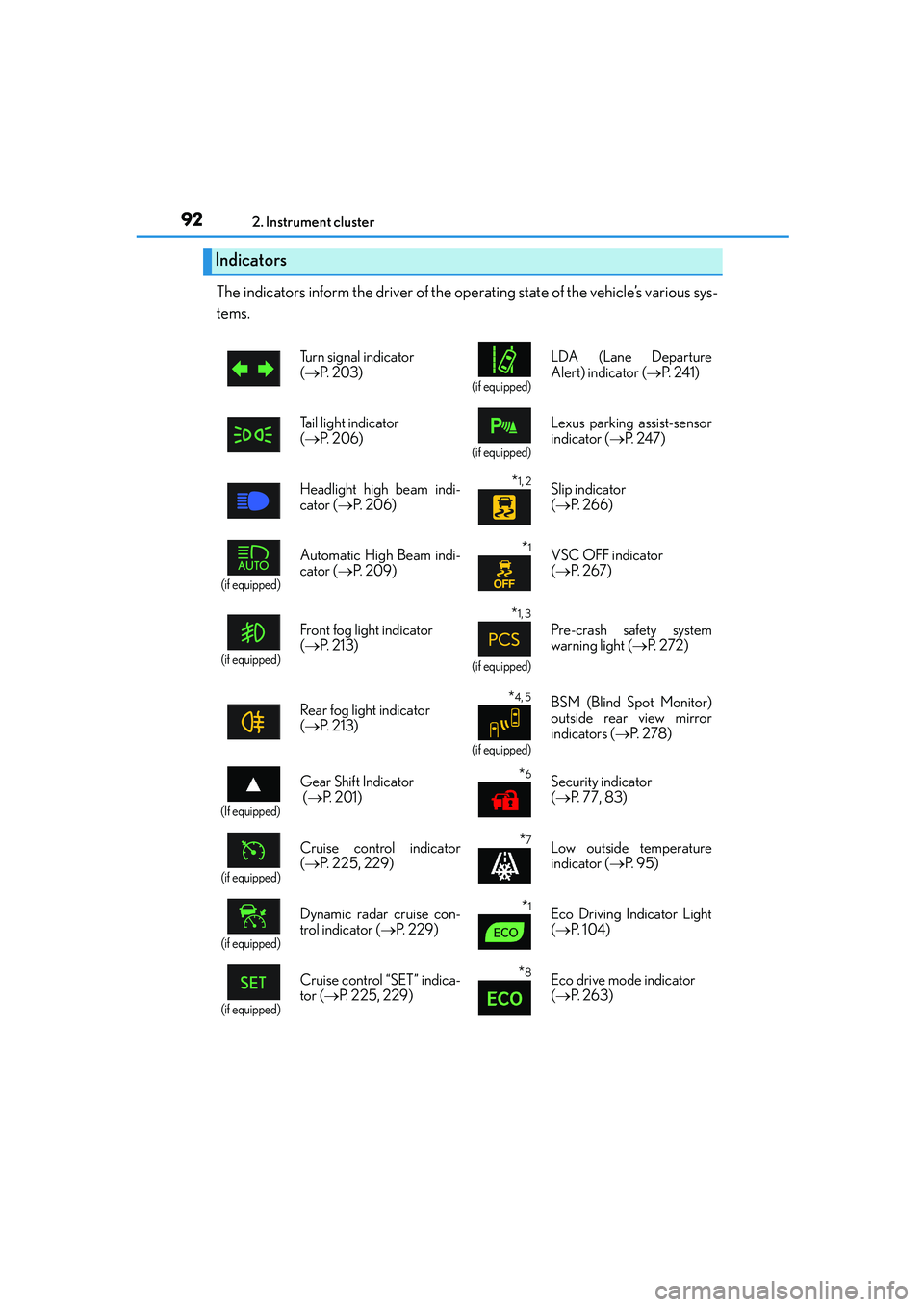
The indicators inform the driver of the operating state of the vehicle’s various sys-
tems.
Indicators
Turn signal indicator
(→P. 2 0 3 )
(if equipped)
LDA (Lane Departure
Alert) indicator (→P. 2 4 1 )
Tail light indicator
(→P. 2 0 6 )
(if equipped)
Lexus parking assist-sensor
indicator (→P. 2 4 7 )
Headlight high beam indi-
cator (→P. 2 0 6 )
*1, 2 Slip indicator
(→P. 2 6 6 )
(if equipped)
Automatic High Beam indi-
cator (→P. 2 0 9 )*1VSC OFF indicator
(→P. 2 6 7 )
(if equipped)
Front fog light indicator
(→P. 2 1 3 )
*1, 3
(if equipped)
Pre-crash safety system
warning light (→P. 2 7 2 )
Rear fog light indicator
(→P. 2 1 3 )
*4, 5
(if equipped)
BSM (Blind Spot Monitor)
outside rear view mirror
indicators (→P. 2 7 8 )
(If equipped)
Gear Shift Indicator
(→P. 2 0 1 )*6Security indicator
(→P. 77, 83)
(if equipped)
Cruise control indicator
(→P. 225, 229)*7Low outside temperature
indicator (→P. 9 5 )
(if equipped)
Dynamic radar cruise con-
trol indicator (→P. 229)*1Eco Driving Indicator Light
(→P. 1 0 4 )
(if equipped)
Cruise control “SET” indica-
tor (→P. 225, 229)*8Eco drive mode indicator
(→P. 2 6 3 )