fold Lexus IS250 2014 VOICE COMMAND SYSTEM OPERATION / LEXUS 2014 IS250,IS350 OWNERS MANUAL (OM53758U)
[x] Cancel search | Manufacturer: LEXUS, Model Year: 2014, Model line: IS250, Model: Lexus IS250 2014Pages: 573, PDF Size: 7.43 MB
Page 14 of 573
14
IS350/250_U (OM53758U)Pictorial index
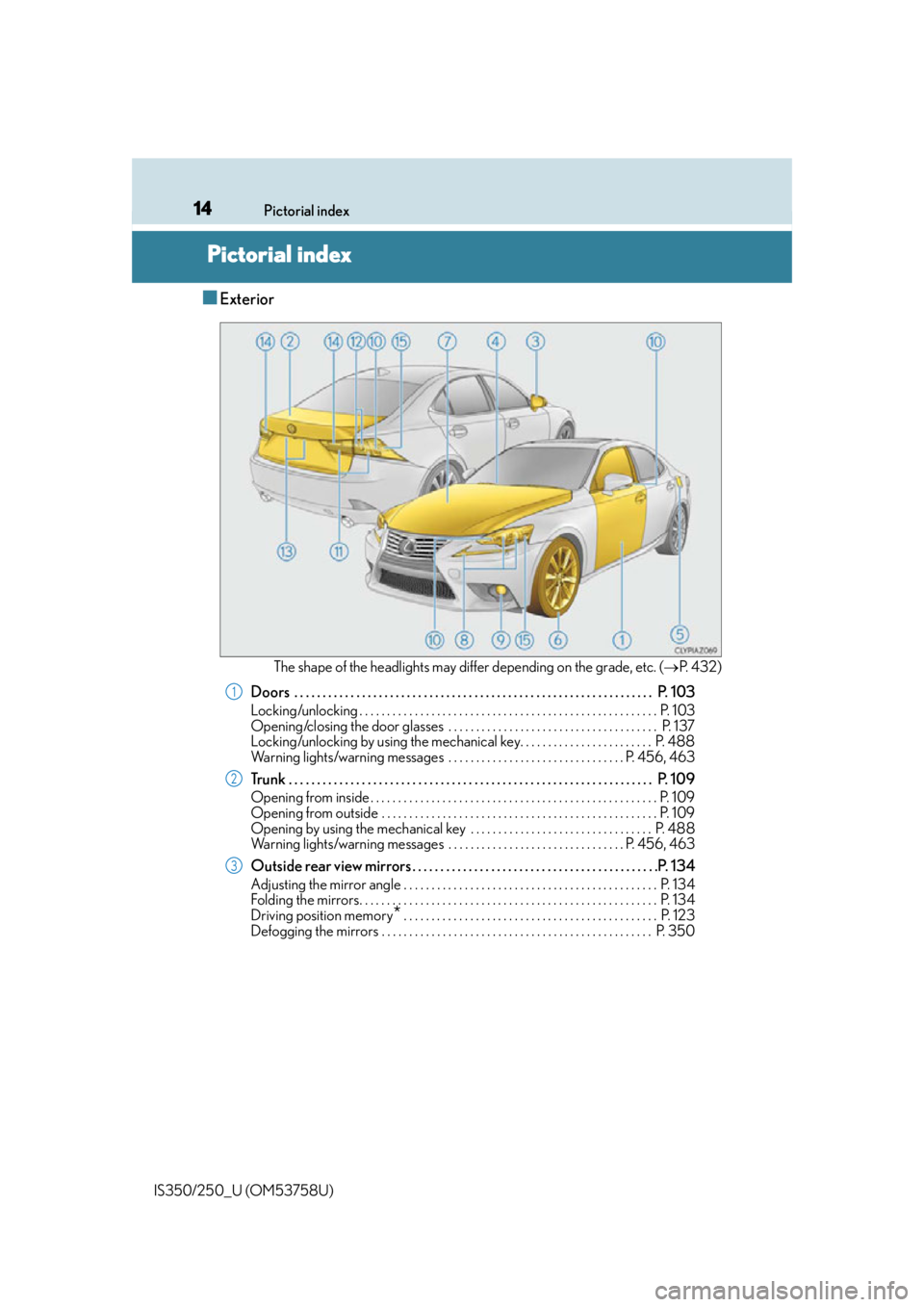
Pictorial index
■Exterior
The shape of the headlights may differ depending on the grade, etc. (
P. 4 3 2 )
Doors . . . . . . . . . . . . . . . . . . . . . . . . . . . . . . . . . . . . . . . . . . . . . . . . . . . . . . . . . . . . . . . . P. 103
Locking/unlocking . . . . . . . . . . . . . . . . . . . . . . . . . . . . . . . . . . . . . . . . . . . . . . . . . . . . . . P. 103
Opening/closing the door glasses . . . . . . . . . . . . . . . . . . . . . . . . . . . . . . . . . . . . . . P. 137
Locking/unlocking by using the mechanical key. . . . . . . . . . . . . . . . . . . . . . . . P. 488
Warning lights/warning messages . . . . . . . . . . . . . . . . . . . . . . . . . . . . . . . . P. 456, 463
Trunk . . . . . . . . . . . . . . . . . . . . . . . . . . . . . . . . . . . . . . . . . . . . . . . . . . . . . . . . . . . . . . . . . P. 109
Opening from inside . . . . . . . . . . . . . . . . . . . . . . . . . . . . . . . . . . . . . . . . . . . . . . . . . . . . P. 1 09
Opening from outside . . . . . . . . . . . . . . . . . . . . . . . . . . . . . . . . . . . . . . . . . . . . . . . . . . P. 109
Opening by using the mechanical key . . . . . . . . . . . . . . . . . . . . . . . . . . . . . . . . . P. 488
Warning lights/warning messages . . . . . . . . . . . . . . . . . . . . . . . . . . . . . . . . P. 456, 463
Outside rear view mirrors . . . . . . . . . . . . . . . . . . . . . . . . . . . . . . . . . . . . . . . . . . . .P. 134
Adjusting the mirror angle . . . . . . . . . . . . . . . . . . . . . . . . . . . . . . . . . . . . . . . . . . . . . . P. 134
Folding the mirrors. . . . . . . . . . . . . . . . . . . . . . . . . . . . . . . . . . . . . . . . . . . . . . . . . . . . . . P. 1 3 4
Driving position memory
* . . . . . . . . . . . . . . . . . . . . . . . . . . . . . . . . . . . . . . . . . . . . . . P. 123
Defogging the mirrors . . . . . . . . . . . . . . . . . . . . . . . . . . . . . . . . . . . . . . . . . . . . . . . . . P. 350
1
2
3
Page 111 of 573

1103-2. Opening, closing and locking the doors and trunk
IS350/250_U (OM53758U)
Using the trunk grip, lower the trunk
without applying force to the side and
push the trunk down from the outside
to close it.
To protect luggage stored in the trunk against theft, the luggage security system
can be set to on. Folding type rear seats only: Move
the luggage security system levers to
the lock position.
To disable the trunk opener, turn the
main switch in the glove box offOn
Off
When the main switch is off, the trunk
lid cannot be opened even with the
wireless remote control or entry
function.
When closing the trunk
Luggage security system
1
2
1
2
Page 122 of 573

1213-3. Adjusting the seats
3
Operation of each component
IS350/250_U (OM53758U)
Check that the luggage security sys-
tem lever in the trunk is in the unlock
position.
Pull the seatback lock release lever
and fold the seatback down.
To return the rear seatbacks to their
original position, lift them up until they
lock.
P. 1 1 0
Rear seats (folding type)
: If equipped
The rear seatbacks can be folded down.
Folding down the rear seatbacks
1
2
Luggage security system
Page 123 of 573

1223-3. Adjusting the seats
IS350/250_U (OM53758U)
CAUTION
Observe the following precautions. Failure to do so may result in death or serious injury.
■When folding the rear seatbacks down
●Do not fold the seatbacks down while driving.
●Stop the vehicle on level ground, set the parking brake and shift the shift lever to P.
●Do not allow anyone to sit on a folded seatback or in the trunk while driving.
●Do not allow children to enter the trunk.
■After returning the rear seatback to the upright position
●Check that the seat belts are not twisted or caught in the seatback.
●Make sure that the seatback is securely
locked in position by lightly pushing it back
and forth.
If the seatback is not securely locked, the red
marking will be visible on the seatback lock
release knob. Make sure that the red marking
is not visible.
Page 135 of 573

1343-4. Adjusting the steering wheel and mirrors
IS350/250_U (OM53758U)
To select a mirror to adjust, press the
switch. Left
Right
Pressing the same switch again will
put the switch in neutral.
To adjust the mirror, press the switch.
Up
Right
Down
Left
Push the mirror back in the direction of
the vehicle’s rear.
Outside rear view mirrors
Adjustment procedure
1
1
2
2
1
2
3
4
Folding the mirrors
Page 137 of 573

1363-4. Adjusting the steering wheel and mirrors
IS350/250_U (OM53758U)
CAUTION
■Important points while driving
Observe the following precautions while driving.
Failure to do so may result in loss of control of the vehicle and cause an accident, result-
ing in death or serious injury.
●Do not adjust the mirrors while driving.
●Do not drive with the mirrors folded.
●Both the driver and passenger side mirror s must be extended and properly adjusted
before driving.
■When the mirror defoggers are operating
Do not touch the rear view mirror surfaces, as they can become very hot and burn you.
Page 156 of 573

1554-1. Before driving
4
Driving
IS350/250_U (OM53758U)
CAUTION
■Things that must not be carried in the trunk
The following things may cause a fire if loaded in the trunk:
●Receptacles containing gasoline
●Aerosol cans
■Storage precautions
Observe the following precautions.
Failure to do so may prevent the pedals from being depressed properly, may block the
driver’s vision, or may result in items hittin g the driver or passengers, possibly causing
an accident.
●Stow cargo and luggage in the trunk whenever possible.
●To prevent cargo and luggage from sliding forward during braking, do not stack any-
thing in the enlarged trunk. Keep cargo and luggage low, as close to the floor as pos-
sible.
●When you fold down the rear seats, long items should not be placed directly behind
the front seats.
●Never allow anyone to ride in the enlarged trunk. It is not designed for passengers.
They should ride in thei r seats with their seat belts properly fastened.
●Do not place cargo or luggage in or on the following locations.
• At the feet of the driver
• On the front passenger or rear seats (when stacking items)
• On the package tray
• On the instrument panel
•On the dashboard
• In front of the navigation system scre en (if equipped) or Lexus Display Audio
screen (if equipped)
●Secure all items in th e occupant compartment.
■Capacity and distribution
●Do not exceed the maximum axle weight ra ting or the total vehicle weight rating.
●Even if the total load of occupant’s weight and the cargo load is less than the total load
capacity, do not apply the load unevenly. Improper loading may cause deterioration
of steering or braking control which may cause death or serious injury.
Page 270 of 573

2695-2. Setup
5
Lexus Display Audio system
IS350/250_U (OM53758U)
Go to “Customize Images”: “Setup” “General” “Customize
Images”
Select “Set Images” and then select the desired image.
Set as startup image.
Set as screen off image.
Set as startup image and screen
off image.
■Adding an imageConnect a USB memory device. ( P. 2 6 6 )
Select “Copy from USB” on the “Customize Images” screen and then
select the desired image.
Move the controller to the left and then select “Copy”.
Up to 10 images can be downloaded.
■Deleting images
Select “Delete Images” on the “Customize Images” screen and then select the
desired images.
■USB memory
When saving the images to a USB memory device, name the folder that the images are
saved to “Image”.
●Compatible device formats
The following device format can be used: • The image’s file format must be JPEG
• USB communication format: USB2.0 FS (480 Mbps)
• File system format: FAT16/32 (Windows)
• Correspondence class: Mass storage class
●JPEG file compatibility
Compatible image size: Maximum 5MB
Customizing images
1
2
1
2
3
1
2
3
Page 280 of 573

2795-3. Using the audio system
5
Lexus Display Audio system
IS350/250_U (OM53758U)
CD, MP3/WMA/AAC disc, iPod, USB or Bluetooth®
Play or pause a track/file
Select a track/file
Select a folder/album (MP3/
WMA/AAC disc or USB)
Select and hold: Fast-forward or
reverse a track/file
Select a repeat mode. (P. 2 8 0 )
Select a random/shuffle play
mode. ( P. 2 8 0 )
Select a full screen mode (iPod
video mode)
Change iPod settings (iPod)
( P. 2 76 )
Change USB settings (USB)
( P. 2 7 7 )
Connect a Bluetooth device (Bluetooth
®) ( P. 3 0 4 )
Change the cover art settings (CD or MP3/WMA/AAC disc) ( P. 2 7 7 )
Change sound settings ( P. 2 74 )
A/V
Select full screen mode
Change A/V settings ( P. 2 76 )
Change sound settings
( P. 2 74 )
1
2
3
4
5
6
7
8
9
10
11
12
1
2
3
Page 281 of 573

2805-3. Using the audio system
IS350/250_U (OM53758U)
Repeat play
ModeActionTarget audio source
File/track repeat All media
Folder repeat MP3/WMA/AAC disc, USB
Album repeat USB, Bluetooth
®
Random/shuffle playback
ModeActionTarget audio source
Random/shuffle play of the disc/
folder/album All media
Random play of all folders MP3/WMA/AAC disc, USB
Random/shuffle play of all albums iPod, USB, Bluetooth
®