audio Lexus IS250 2015 Owner's Manual
[x] Cancel search | Manufacturer: LEXUS, Model Year: 2015, Model line: IS250, Model: Lexus IS250 2015Pages: 586, PDF Size: 8.66 MB
Page 359 of 586
358
IS350/250_U (OM53C50U)6-1. Using the air conditioning system
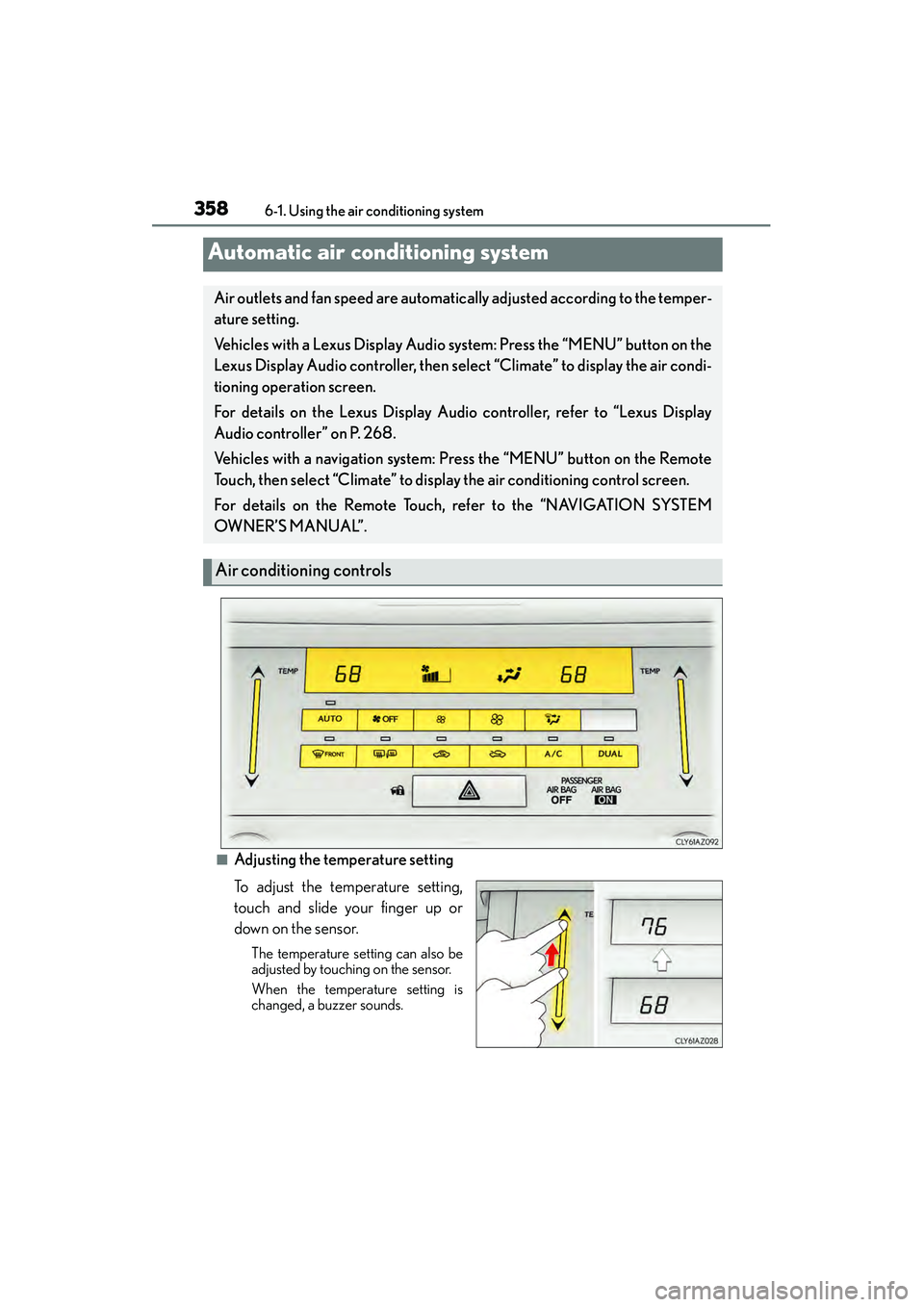
■Adjusting the temperature setting
To adjust the temperature setting,
touch and slide your finger up or
down on the sensor.
The temperature setting can also be
adjusted by touching on the sensor.
When the temperature setting is
changed, a buzzer sounds.
Automatic air conditioning system
Air outlets and fan speed are automatically adjusted according to the temper-
ature setting.
Vehicles with a Lexus Display Audio system: Press the “MENU” button on the
Lexus Display Audio controller, then select “Climate” to display the air condi-
tioning operation screen.
For details on the Lexus Display Audio controller, refer to “Lexus Display
Audio controller” on P. 268.
Vehicles with a navigation system:
Press the “MENU” button on the Remote
Touch, then select “Climate” to display the air conditioning control screen.
For details on the Remote Touch, refer to the “NAVIGATION SYSTEM
OW N ER’S M A NUA L”.
Air conditioning controls
Page 360 of 586
3596-1. Using the air conditioning system
6
Interior features
IS350/250_U (OM53C50U)
■Fan speed setting
Press to increase the fan speed.
Press to decrease the fan speed.
■Change the airflow mode
To change the airflow, press .
The air outlets used are switched each time the button is pressed.
■Other functions
●Switching between outside air and recirculated air modes ( →P. 3 6 1 )
●Defogging the windshield ( →P. 3 6 2 )
●Defogging the rear window and outside rear view mirrors ( →P. 3 6 2 )
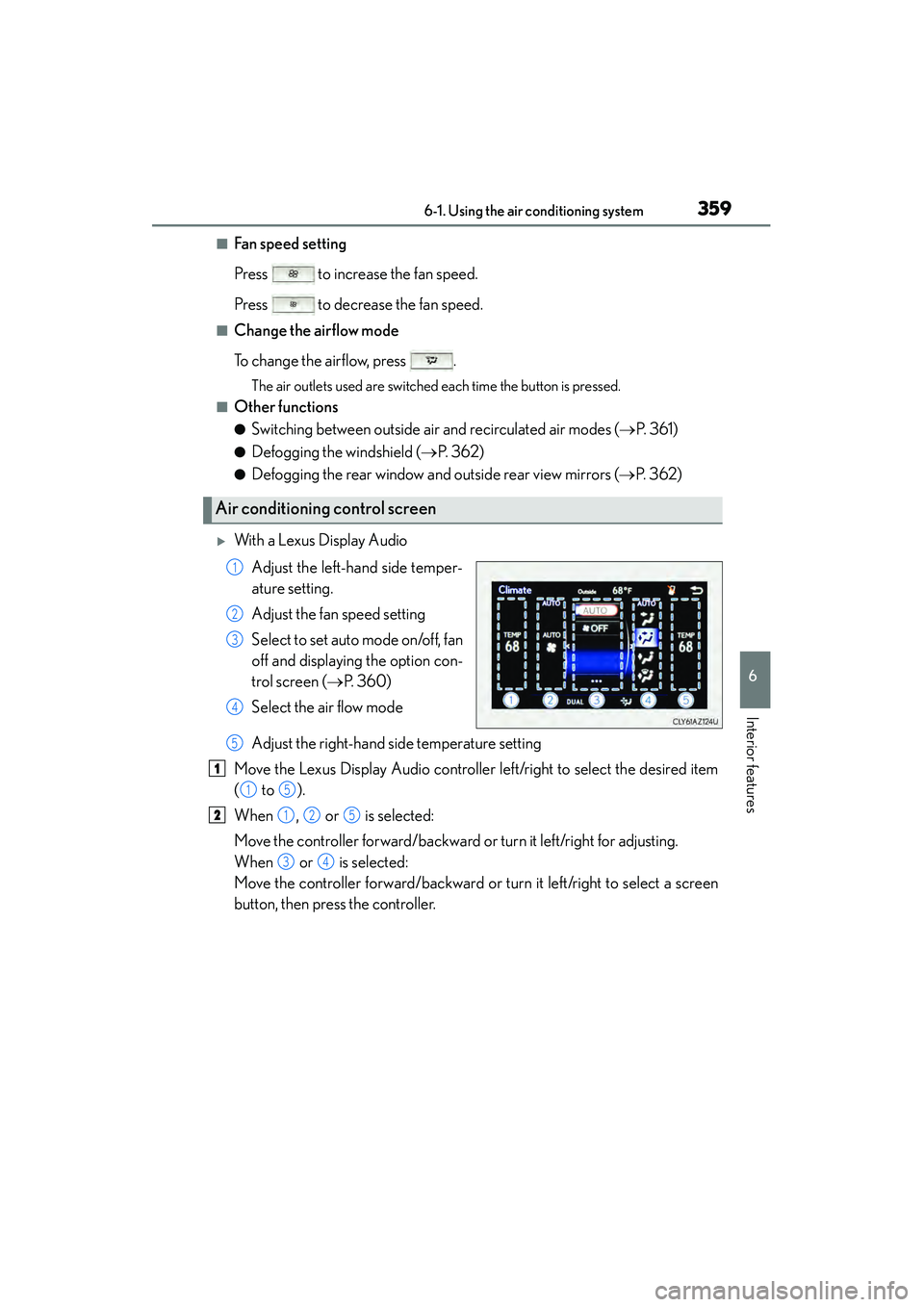
XWith a Lexus Display Audio
Adjust the left-hand side temper-
ature setting.
Adjust the fan speed setting
Select to set auto mode on/off, fan
off and displaying the option con-
trol screen ( →P. 360)
Select the air flow mode
Adjust the right-hand side temperature setting
Move the Lexus Display Audio controller left/right to select the desired item
( to ).
When , or is selected:
Move the controller forward/backward or turn it left/right for adjusting.
When or is selected:
Move the controller forward/backward or turn it left/right to select a screen
button, then press the controller.
Air conditioning control screen
1
2
3
4
5
1
15
2125
34
Page 402 of 586
4017-1. Maintenance and care
7
Maintenance and care
IS350/250_U (OM53C50U)
NOTICE
■Cleaning detergents
●Do not use the following types of detergent, as they may discolor the vehicle interior
or cause streaks or damage to painted surfaces:
• Non-seat portions: Organic substances such as benzene or gasoline, alkaline or
acidic solutions, dye, and bleach
• Seats: Alkaline or acidic solutions, such as thinner, benzene, and alcohol
●Do not use polish wax or polish cleaner. The instrument panel’s or other interior part’s
painted surface may be damaged.
■Preventing damage to leather surfaces
Observe the following precautions to avoid damage to and deterioration of leather
surfaces:
●Remove any dust or dirt from leather surfaces immediately.
●Do not expose the vehicle to direct sunlight for extended periods of time. Park the
vehicle in the shade, especially during summer.
●Do not place items made of vinyl, plastic, or containing wax on the upholstery, as they
may stick to the leather surface if the vehicle interior heats up significantly.
■Water on the floor
Do not wash the vehicle floor with water.
Vehicle systems such as the audio system may be damaged if water comes into contact
with electrical components such as the audio system above or under the floor of the
vehicle. Water may also cause the body to rust.
■When cleaning the inside of the windshield (vehicles with LDA [Lane Departure
Alert])
Be careful not to touch the camera sensor ( →P. 2 0 8 ) .
If the camera is accidentally scratched or hit, LDA may not operate properly or may
cause a malfunction.
■Cleaning the inside of the rear window
●Do not use glass cleaner to clean the rear window, as this may cause damage to the
rear window defogger heater wires or antenna. Use a cloth dampened with luke-
warm water to gently wipe the window clean. Wipe the window in strokes running
parallel to the heater wires or antenna.
●Be careful not to scratch or damage the heater wires or antenna.
Page 470 of 586
4698-2. Steps to take in an emergency
8
When trouble arises
IS350/250_U (OM53C50U)
■SRS warning light
This warning light system monitors the airbag sensor assembly, front impact sensors, side
impact sensors (front door), side impact sensors (front), side impact sensors (rear),
driver’s seat position sensor, driver’s seat belt buckle switch, front passenger occupant
classification system, “AIR BAG ON” indicat or light, “AIR BAG OFF” indicator light,
front passenger’s seat belt buckle switch, seat belt pret ensioner assemblies, airbags,
interconnecting wiring and power sources. ( →P. 3 8 )
■Front passenger detection sensor, seat belt reminder and warning buzzer
If luggage is placed on the front passenger seat, the front passenger detection sensor
may cause the warning light to flash and the warning buzzer to sound even if a passenger
is not sitting in the seat.
■If the malfunction indicator lamp comes on while driving
First check the following:
●Is the fuel tank empty?
If it is, fill the fuel tank immediately.
●Is the fuel tank cap loose?
If it is, tighten it securely.
The light will go off after several driving trips.
If the light does not go off even after several trips, contact your Lexus dealer as soon as
possible.
■Electric power steering system warning light (warning buzzer)
When the battery charge becomes insufficient of the voltage temporarily drops, the
electric power steering system warning light may come on and the warning buzzer may
sound.
■When the tire pressure warning light comes on
Check the tire inflation pressure and adjust to the appropriate level. Pushing the tire
pressure warning reset switch will not turn off the tire pressure warning light.
■The tire pressure warning light may come on due to natural causes
The tire pressure warning light may come on due to natural causes such as natural air
leaks and tire inflation pressure changes caused by temperature. In this case, adjusting
the tire inflation pressure will turn off the warning light (after a few minutes).
■When a tire is replaced with the spare tire
The compact spare tire is not equipped with a tire pressure warning valve and transmit-
ter. If a tire goes flat, the tire pressure warning light will not turn off even though the flat
tire has been replaced with the spare tire.
■Conditions that the tire pressure warning system may not function properly
→ P. 4 2 8
■If the tire pressure warning light freque ntly comes on after blinking for 1 minute
If the tire pressure warning light frequently comes on after blinking for 1 minute when the
engine switch is turned to IGNITION ON mode, have it checked by your Lexus dealer.
■Warning buzzer
In some cases, the buzzer may not be heard due to being in a noisy location or audio
sound.
Page 505 of 586
5048-2. Steps to take in an emergency
IS350/250_U (OM53C50U)
■Starting the engine when the battery is discharged
The engine cannot be started by push-starting.
■To prevent battery discharge
●Turn off the headlights and the audio system while the engine is off.
●Turn off any unnecessary electrical components when the vehicle is running at a low
speed for an extended period, such as in heavy traffic.
■Charging the battery
The electricity stored in the battery will discharge gradually even when the vehicle is not
in use, due to natural discharge and the draining effects of certain electrical appliances. If
the vehicle is left for a long time, the battery may discharge, and the engine may be
unable to start. (The battery recharges automatically during driving.)
■When recharging or replacing the battery
●Make sure that the key is not inside the vehicle when recharging or replacing the bat-
tery. The key may be locked in the vehicle if the alarm is activated. ( →P. 7 2 )
●In some cases, it may not be possible to unlock the doors using the smart access system
with push-button start when the battery is discharged. Use the wireless remote control
or the mechanical key to lock or unlock the doors.
●The engine may not start on the first attempt after the battery has recharged but will
start normally after the second attempt. This is not a malfunction.
●The engine switch mode is memorized by the vehicle. When the battery is recon-
nected, the system will return to the mode it was in before the battery was discharged.
Before disconnecting the battery, turn the engine switch off.
If you are unsure what mode the engine switch was in before the battery discharged, be
especially careful when reconnecting the battery.
Page 538 of 586
537
IS350/250_U (OM53C50U)
9
Vehicle specifications
9-2. Customization
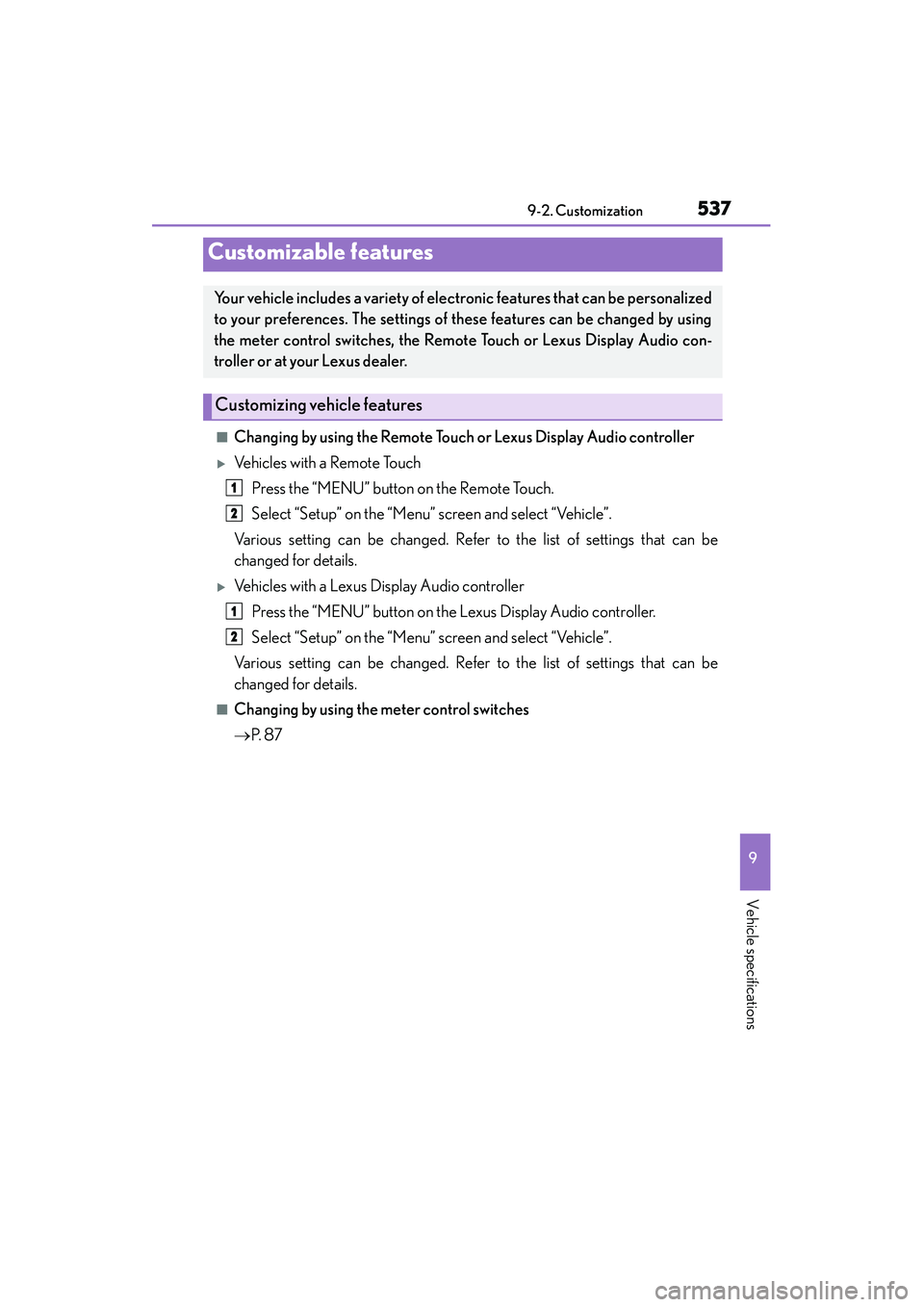
■Changing by using the Remote Touch or Lexus Display Audio controller
XVe h i c l e s w i t h a R e m o t e To u c hPress the “MENU” button on the Remote Touch.
Select “Setup” on the “Menu” screen and select “Vehicle”.
Various setting can be changed. Refer to the list of settings that can be
changed for details.
XVehicles with a Lexus Display Audio controller Press the “MENU” button on the Lexus Display Audio controller.
Select “Setup” on the “Menu” screen and select “Vehicle”.
Various setting can be changed. Refer to the list of settings that can be
changed for details.
■Changing by using the meter control switches
→ P. 8 7
Customizable features
Your vehicle includes a variety of electronic features that can be personalized
to your preferences. The settings of these features can be changed by using
the meter control switches, the Remote Touch or Lexus Display Audio con-
troller or at your Lexus dealer.
Customizing vehicle features
1
2
1
2
Page 539 of 586
5389-2. Customization
IS350/250_U (OM53C50U)
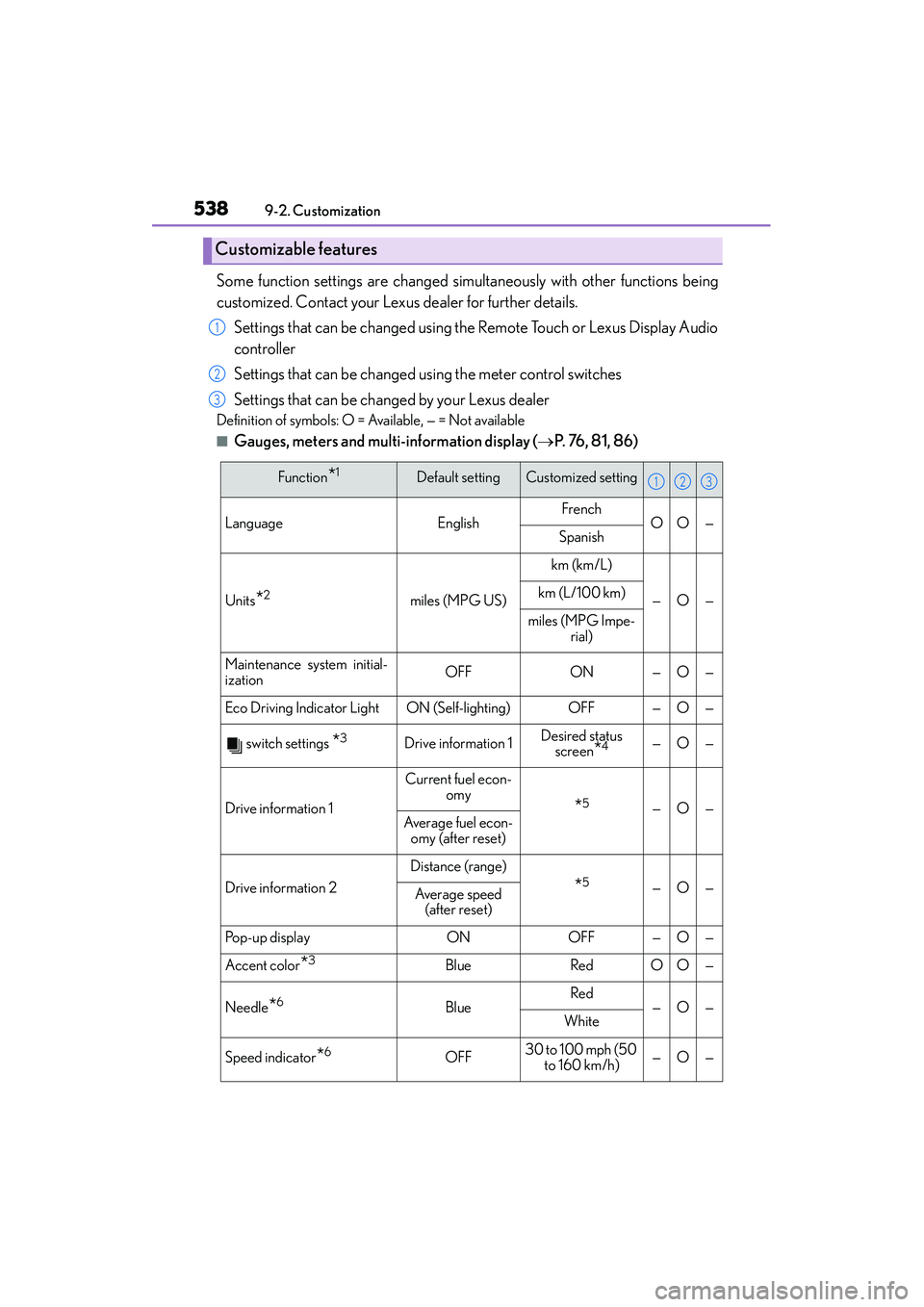
Some function settings are changed simu ltaneously with other functions being
customized. Contact your Lexus dealer for further details.
Settings that can be changed using the Remote Touch or Lexus Display Audio
controller
Settings that can be changed using the meter control switches
Settings that can be changed by your Lexus dealer
Definition of symbols: O = Available, — = Not available
■Gauges, meters and multi-information display (→ P. 76, 81, 86)
Customizable features
1
2
3
Function*1Default settingCustomized setting
LanguageEnglishFrenchOO—Spanish
Units*2miles (MPG US)
km (km/L)
—O—km (L/100 km)
miles (MPG Impe-
rial)
Maintenance system initial-
izationOFFON—O—
Eco Driving Indicator LightON (Self-lighting)OFF—O—
switch settings *3Drive information 1Desired status screen*4—O—
Drive information 1
Current fuel econ- omy
*5—O—Average fuel econ-
omy (after reset)
Drive information 2
Distance (range)
*5—O—Average speed (after reset)
Pop-up displayONOFF—O—
Accent color*3BlueRedOO—
Needle*6BlueRed—O—White
Speed indicator*6OFF30 to 100 mph (50
to 160 km/h)—O—
123
Page 546 of 586
5459-2. Customization
9
Vehicle specifications
IS350/250_U (OM53C50U)
■Vehicle customization
●When the smart access system with push-button start is off, the entry unlock function
cannot be customized.
●When the doors remain closed after unlocking the doors and the timer activated auto-
matic door lock function activates, signals will be generated in accordance with the
operation buzzer volume and operational signal (Emergency flashers) function set-
tings.
■When customizing using the Remote Touch or Lexus Display Audio controller
Stop the vehicle in a safe place, apply the parking brake, and shift the shift lever to P. Also,
to prevent battery discharge, leave the engine running while customizing the features.
CAUTION
■During customization
As the engine needs to be running during customization, ensure that the vehicle is
parked in a place with adequate ventilation. In a closed area such as a garage, exhaust
gases including harmful carbon monoxide (CO) may collect and enter the vehicle. This
may lead to death or a serious health hazard.
NOTICE
■During customization
To prevent battery discharge, ensure that the engine is running while customizing fea-
tures.
Page 560 of 586
559
Index
IS350/250_U (OM53C50U)
What to do if... (Troubleshooting)................................560
Alphabetical index................................. 564
For vehicles with a navigation system, refer to the “NAVIGATION
SYSTEM OWNER’S MANUAL” for information regarding the
equipment listed below.
•Navigation system
• Audio/video system • Intuitive parking assist
• Rear view monitor system
Page 566 of 586
565Alphabetical index
IS350/250_U (OM53C50U)
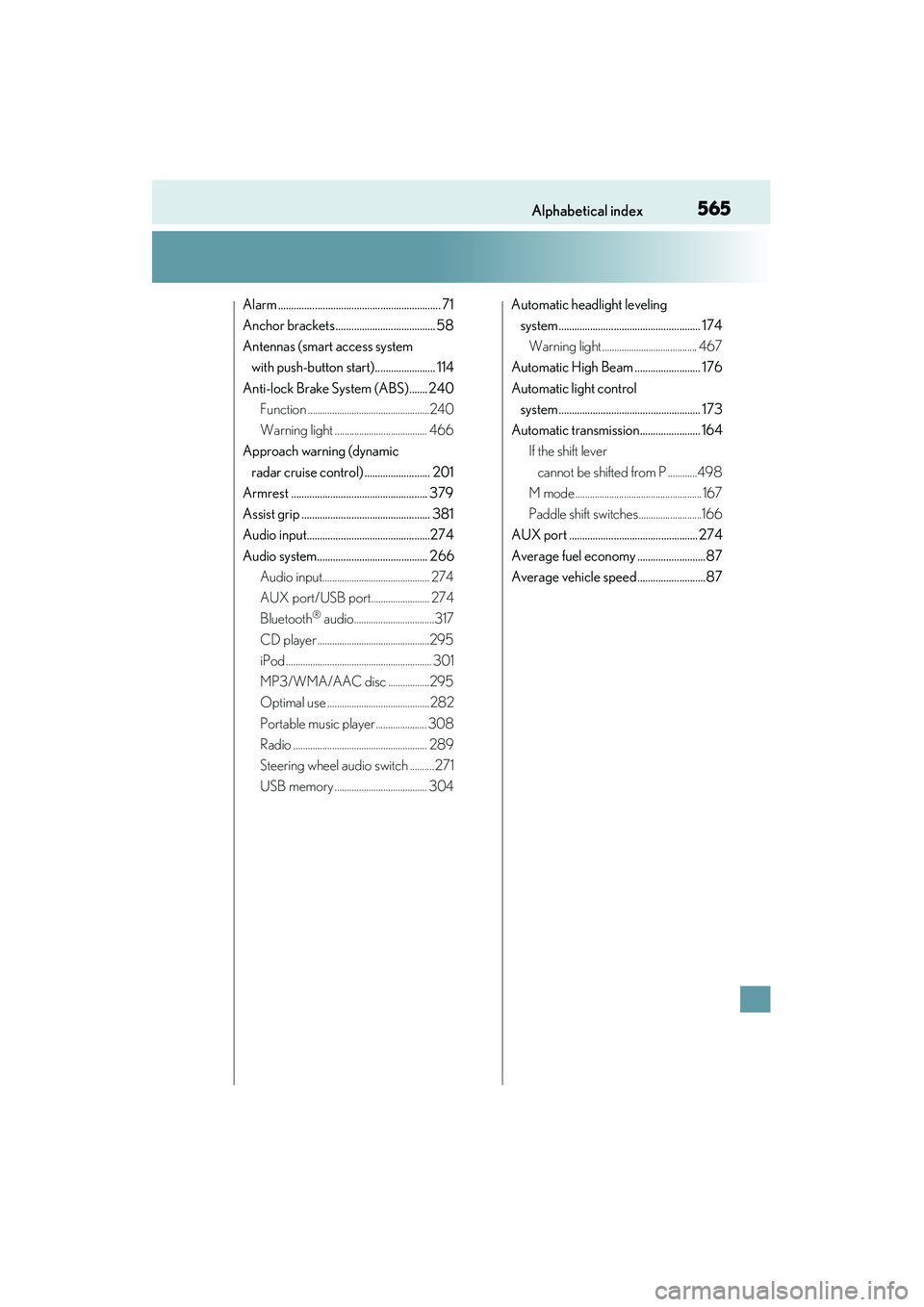
Alarm .............................................................. 71
Anchor brackets ...................................... 58
Antennas (smart access system with push-button start) ....................... 114
Anti-lock Brake System (ABS)....... 240 Function ..................................................240
Warning light ...................................... 466
Approach warning (dynamic
radar cruise control) ......................... 201
Armrest .................................................... 379
Assist grip ................................................. 381
Audio input...............................................274
Audio system.......................................... 266 Audio input............................................ 274
AUX port/USB port........................ 274
Bluetooth
® audio.................................317
CD player ..............................................295
iPod ............................................................ 301
MP3/WMA/AAC disc .................295
Optimal use ..........................................282
Portable music player ..................... 308
Radio ....................................................... 289
Steering wheel audio switch .......... 271
USB memory ...................................... 304 Automatic headlight leveling
system...................................................... 174
Warning light ....................................... 467
Automatic High Beam ......................... 176
Automatic light control system...................................................... 173
Automatic transmission....................... 164 If the shift lever
cannot be shifted from P ............498
M mode .................................................... 167
Paddle shift switches..........................166
AUX port ................................................. 274
Average fuel economy ..........................87
Average vehicle speed..........................87