engine Lexus IS250 2015 Owner's Guide
[x] Cancel search | Manufacturer: LEXUS, Model Year: 2015, Model line: IS250, Model: Lexus IS250 2015Pages: 586, PDF Size: 8.66 MB
Page 117 of 586
1163-2. Opening, closing and locking the doors and trunk
IS350/250_U (OM53C50U)
■Conditions affecting operation
The smart access system with push-button start uses weak radio waves. In the following
situations, the communication between the electronic key and the vehicle may be
affected, preventing the smart access system with push-button start, wireless remote
control and engine immobilizer system from operating properly. (Ways of coping:
→ P. 4 9 9 )
●When the electronic key battery is depleted
●Near a TV tower, electric power plant, gas station, radio station, large display, airport or
other facility that generates strong radio waves or electrical noise
●When carrying a portable radio, cellular phone, cordless phone or other wireless com-
munication device
●When the electronic key is in contact with , or is covered by the following metallic
objects
• Cards to which aluminum foil is attached
• Cigarette boxes that have aluminum foil inside
• Metallic wallets or bags
•Coins
•Hand warmers made of metal
• Media such as CDs and DVDs
●When other wireless keys (that emit radio waves) are being used nearby
●When carrying the electronic key together with the following devices that emit radio
waves
• Another vehicle’s electronic key or a wireless key that emits radio waves
• Personal computers or personal digital assistants (PDAs)
• Digital audio players
• Portable game systems
●If window tint with a metallic content or me tallic objects are attached to the rear win-
dow
Page 118 of 586
1173-2. Opening, closing and locking the doors and trunk
3
Operation of each component
IS350/250_U (OM53C50U)
■Note for the entry function
●Even when the electronic key is within the effective range (detection areas), the system
may not operate properly in the following cases:
• The electronic key is too close to the window or outside door handle, near the
ground, or in a high place when the doors are locked or unlocked.
• The electronic key is near the ground or in a high place, or too close to the rear
bumper center when the trunk is opened.
• The electronic key is on the instrument panel, rear package tray or floor, or in the door pockets or glove box when the engine is started or engine switch modes are
changed.
●Do not leave the electronic key on top of the instrument panel or near the door pockets
when exiting the vehicle. Depending on the radio wave reception conditions, it may be
detected by the antenna outside the cabin and the doors will become lockable from the
outside, possibly trapping the electronic key inside the vehicle.
●As long as the electronic key is within th e effective range, the doors may be locked or
unlocked by anyone. However, only the doors detecting the electronic key can be used
to unlock the vehicle.
●Even if the electronic key is not inside the vehicle, it may be possible to start the engine
if the electronic key is near the window.
●The doors may unlock or lock if a large amou nt of water splashes on the door handle,
such as in the rain or in a car wash, when th e electronic key is within the effective range.
(The doors will automatically be locked after approximately 30 seconds if the doors
are not opened and closed.)
●If the wireless remote control is used to lock the doors when the electronic key is near
the vehicle, there is a possibility that the door may not be unlocked by the entry func-
tion. (Use the wireless remote control to unlock the doors.)
●Touching the door lock or unlock sensor while wearing gloves may prevent lock or
unlock operation.
●When the lock operation is performed using the lock sensor, recognition signals will be
shown up to two consecutive times. After this, no recognition signals will be given.
●If the door handle becomes wet while the electronic key is within the effective range,
the door may lock and unlock repeatedly. In this case, follow the following correction
procedures to wash the vehicle:
• Place the electronic key in a location 6 ft. (2 m) or more away from the vehicle. (Take care to ensure that the key is not stolen.)
• Set the electronic key to battery-saving mode to disable the smart access system with push-button start. ( →P. 1 1 5 )
●If the electronic key is inside the vehicle and a door handle becomes wet during a car
wash, a message may be shown on the multi-information display and a buzzer will
sound outside the vehicle. To turn off the alarm, lock all the doors.
●The lock sensor may not work properly if it comes into contact with ice, snow, mud, etc.
Clean the lock sensor and attempt to operate it again, or use the lock sensor on the
lower part of the door handle.
●A sudden handle operation or a handle operation immediately after entering the effec-
tive range may prevent the doors from being unlocked. Touch the door unlock sensor
and check that the doors are unlocked before pulling the door handle again.
●Unlocking the vehicle may take more time if another electronic key is within the effec-
tive range.
Page 119 of 586
1183-2. Opening, closing and locking the doors and trunk
IS350/250_U (OM53C50U)
■When the vehicle is not driven for extended periods
●To prevent theft of the vehicle, do not leave the electronic key within 6 ft. (2 m) of the
vehicle.
●The smart access system with push-button start can be deactivated in advance.
( → P. 5 3 7 )
■To operate the system properly
●Make sure to carry the electronic key when operating the system. Do not get the elec-
tronic key too close to the vehicle when op erating the system from the outside of the
vehicle.
Depending on the position and holding condit ion of the electronic key, the key may not
be detected correctly and the system may not operate properly. (The alarm may go off
accidentally, or the door lock prevention function may not operate.)
●Do not leave the electronic key inside the luggage compartment.
The key confinement prevention function may not operate, depending on the location
of the key (close to a spare tire, the inside edge of the luggage compartment), condi-
tions (inside a metal bag, close to metallic ob jects) and the radio waves in the surround-
ing area. ( →P. 111)
■If the smart access system with push-b utton start does not operate properly
●Locking and unlocking the doors and opening the trunk: Use the mechanical key.
(→ P. 4 9 9 )
●Starting the engine: →P. 5 0 0
■Customization
Settings (e. g. smart access system with push-button start) can be changed.
(Customizable features: →P. 5 3 7 )
■If the smart access system with push-button start has been deactivated in a customized
setting
●Locking and unlocking the doors and opening the trunk:
Use the wireless remote control or mechanical key. ( →P. 103, 109, 499)
●Starting the engine and changing engine switch modes: →P. 5 0 0
●Stopping the engine: →P. 1 5 9
Page 121 of 586
120
IS350/250_U (OM53C50U)3-3. Adjusting the seats
■Power easy access system (if equipped)
The driver’s seat and steering wheel move in accordance with engine switch mode and
the driver’s seat belt condition. (
→P. 1 2 3 )
■When adjusting the seat
●Take care when adjusting the seat so that the head restraint does not touch the ceiling.
●Vehicles with folding type rear seats: When folding down a rear seatback, if it interferes
with a front seatback, adjust the front seat po sition so that the seats no longer interfere
with each other. However, if adjusting the front seat position causes the correct driving
posture to not be maintained, return the re ar seatback to its original position. (→P. 121)
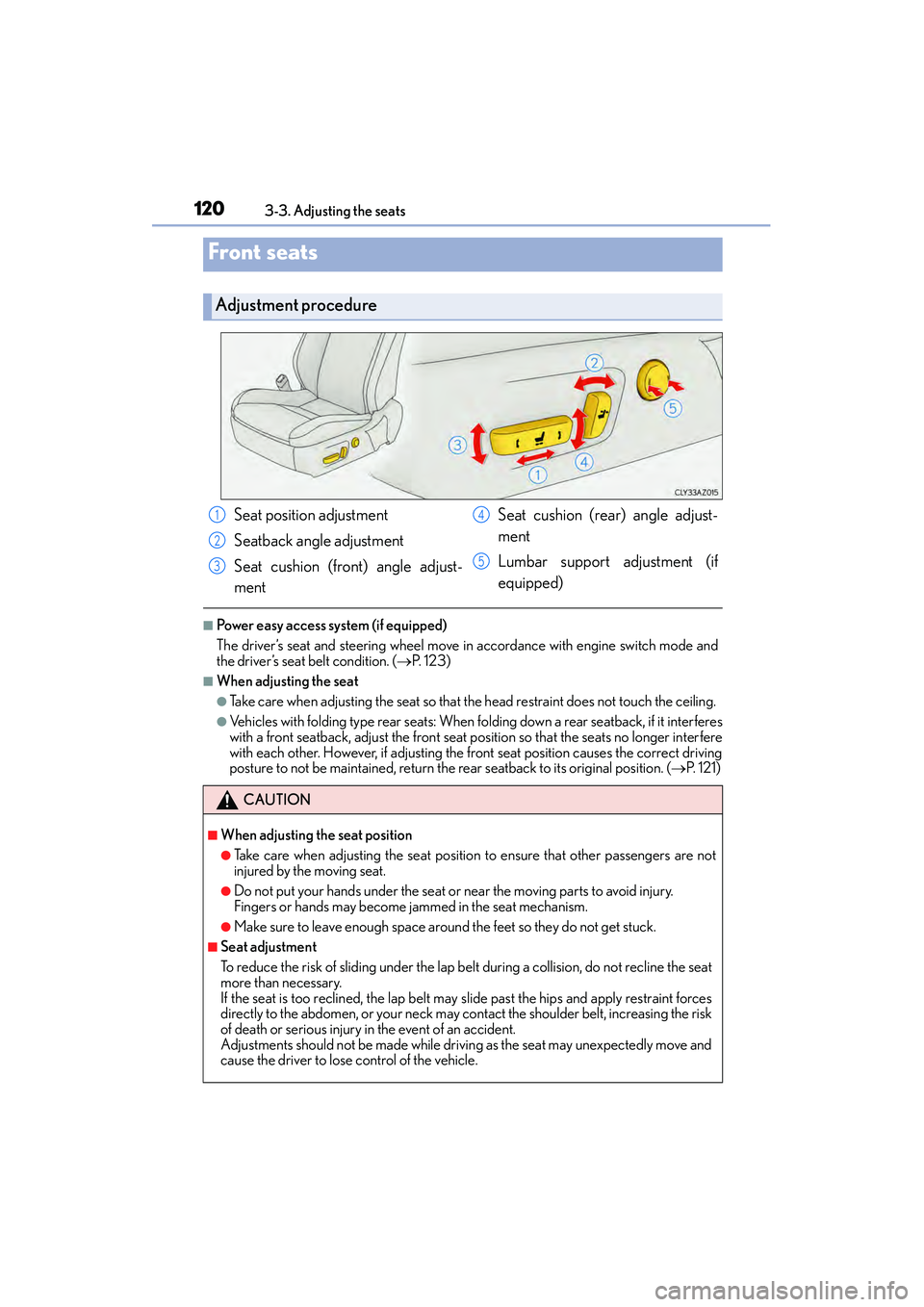
Front seats
Adjustment procedure
Seat position adjustment
Seatback angle adjustment
Seat cushion (front) angle adjust-
ment Seat cushion (rear) angle adjust-
ment
Lumbar support adjustment (if
equipped)
CAUTION
■When adjusting the seat position
●Take care when adjusting the seat position to ensure that other passengers are not
injured by the moving seat.
●Do not put your hands under the seat or near the moving parts to avoid injury.
Fingers or hands may become jammed in the seat mechanism.
●Make sure to leave enough space around the feet so they do not get stuck.
■Seat adjustment
To reduce the risk of sliding under the lap be
lt during a collision, do not recline the seat
more than necessary.
If the seat is too reclined, th e lap belt may slide past the hips and apply restraint forces
directly to the abdomen, or your neck may contact the shoulder belt, increasing the risk
of death or serious injury in the event of an accident.
Adjustments should not be made while drivin g as the seat may unexpectedly move and
cause the driver to lose control of the vehicle.
1
2
3
4
5
Page 124 of 586
1233-3. Adjusting the seats
3
Operation of each component
IS350/250_U (OM53C50U)
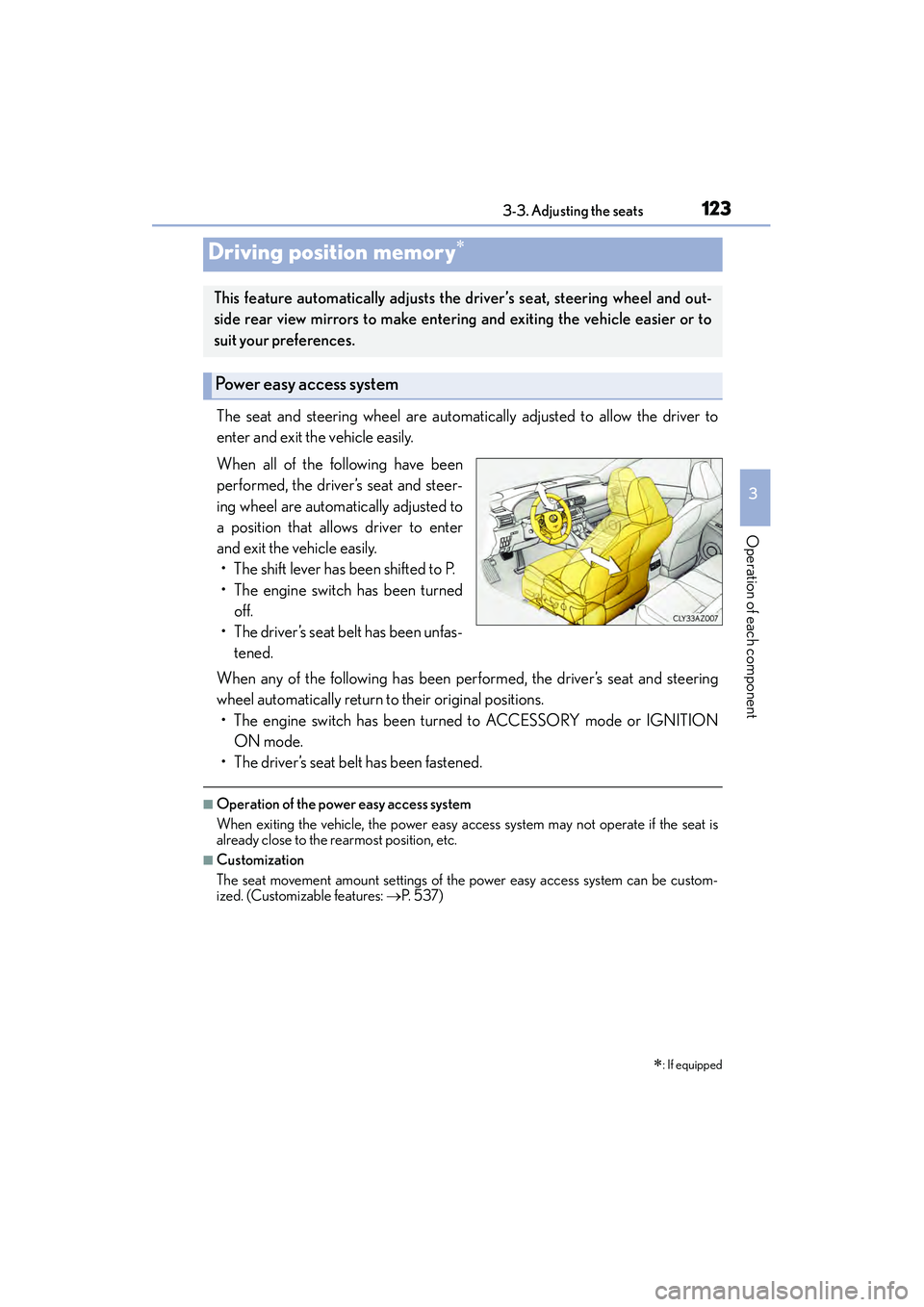
The seat and steering wheel are automatically adjusted to allow the driver to
enter and exit the vehicle easily.
When all of the following have been
performed, the driver’s seat and steer-
ing wheel are automatically adjusted to
a position that allows driver to enter
and exit the vehicle easily.• The shift lever has been shifted to P.
• The engine switch has been turned off.
• The driver’s seat belt has been unfas- tened.
When any of the following has been performed, the driver’s seat and steering
wheel automatically return to their original positions. • The engine switch has been turned to ACCESSORY mode or IGNITION ON mode.
• The driver’s seat belt has been fastened.
■Operation of the power easy access system
When exiting the vehicle, the power easy access system may not operate if the seat is
already close to the rearmost position, etc.
■Customization
The seat movement amount settings of the power easy access system can be custom-
ized. (Customizable features: →P. 5 3 7 )
Driving position memory∗
∗
: If equipped
This feature automatically adjusts the driver’s seat, steering wheel and out-
side rear view mirrors to make entering and exiting the vehicle easier or to
suit your preferences.
Power easy access system
Page 125 of 586
1243-3. Adjusting the seats
IS350/250_U (OM53C50U)
Your preferred driving position (the position of the driver’s seat, steering wheel
and outside rear view mirrors) can be recorded and recalled by pressing a but-
ton.
Three different driving positions can be recorded into memory.
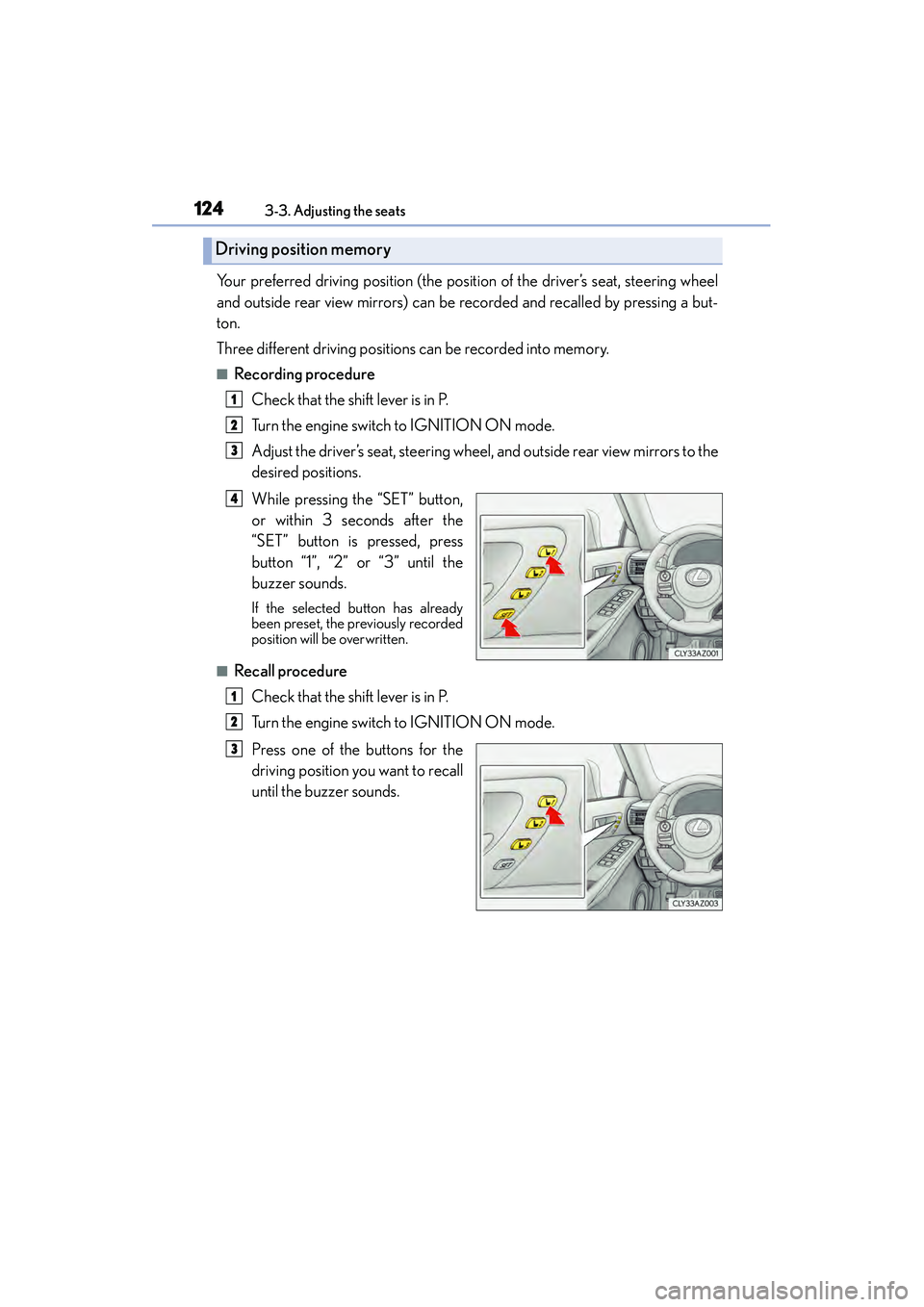
■Recording procedure Check that the shift lever is in P.
Turn the engine switch to IGNITION ON mode.
Adjust the driver’s seat, steering wheel, and outside rear view mirrors to the
desired positions.
While pressing the “SET” button,
or within 3 seconds after the
“SET” button is pressed, press
button “1”, “2” or “3” until the
buzzer sounds.
If the selected button has already
been preset, the previously recorded
position will be overwritten.
■Recall procedureCheck that the shift lever is in P.
Turn the engine switch to IGNITION ON mode.
Press one of the buttons for the
driving position you want to recall
until the buzzer sounds.
Driving position memory
1
2
3
4
1
2
3
Page 126 of 586
1253-3. Adjusting the seats
3
Operation of each component
IS350/250_U (OM53C50U)
■To stop the position recall operation part-way through
Perform any of the following operations:
●Press the “SET” button.
●Press button “1”, “2” or “3”.
●Operate any of the seat adjustment switches (only cancels seat position recall).
●Operate the tilt and telescopic steering control switch (only cancels steering wheel
position recall).
■Seat positions that can be memorized (→P. 1 2 0 )
The adjusted positions other th an the position adjusted by lumbar support switch can be
memorized.
■Operating the driving position memory after turning the engine switch off
Recorded seat positions can be activated up to 180 seconds after the driver’s door is
opened and another 60 seconds after it is closed again. Recorded steering wheel posi-
tion can be activated by pressing the engine switch.
■In order to correctly use the driving position memory function
If a seat position is already in the furthest possible position and the seat is operated in the
same direction, the recorded position may be slightly different when it is recalled.
Page 127 of 586
1263-3. Adjusting the seats
IS350/250_U (OM53C50U)
Each electronic key (including a card key) can be registered to recall your pre-
ferred driving position.
■Registering procedure
Record your driving position to button “1”, “2” or “3” before performing the
following:
Carry only the key you want to register, and then close the driver’s door. If 2 or
more keys are in the vehicle, the driving position cannot be recorded properly.
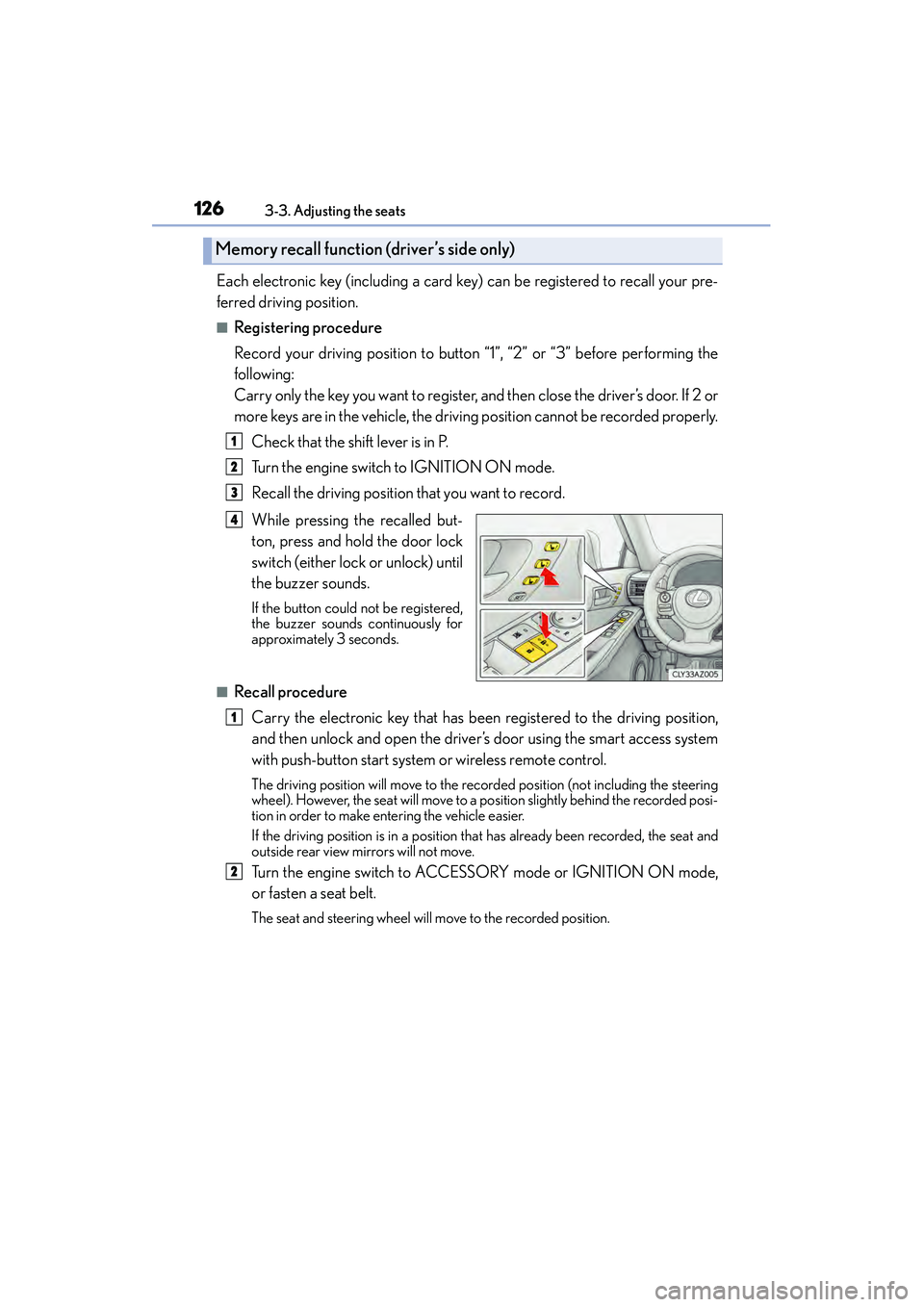
Check that the shift lever is in P.
Turn the engine switch to IGNITION ON mode.
Recall the driving position that you want to record.
While pressing the recalled but-
ton, press and hold the door lock
switch (either lock or unlock) until
the buzzer sounds.
If the button could not be registered,
the buzzer sounds continuously for
approximately 3 seconds.
■Recall procedureCarry the electronic key that has been registered to the driving position,
and then unlock and open the driver’s door using the smart access system
with push-button start system or wireless remote control.
The driving position will move to the recorded position (not including the steering
wheel). However, the seat will move to a position slightly behind the recorded posi-
tion in order to make entering the vehicle easier.
If the driving position is in a position that has already been recorded, the seat and
outside rear view mirrors will not move.
Turn the engine switch to ACCESSORY mode or IGNITION ON mode,
or fasten a seat belt.
The seat and steer ing wheel will move to the recorded position.
Memory recall function (driver’s side only)
1
2
3
4
1
2
Page 128 of 586
1273-3. Adjusting the seats
3
Operation of each component
IS350/250_U (OM53C50U)
■Cancelation procedure
Carry only the key you want to cancel and then close the driver’s door. If 2 or
more keys are in the vehicle, the driving position cannot be canceled properly.
Turn the engine switch to IGNITION ON mode.
While pressing the “SET” button, press and hold the door lock switch
(either lock or unlock) until the buzzer sounds twice.
If the button could not be canceled, the buzzer sounds continuously for approxi-
mately 3 seconds.
■Recalling the driving position using the memory recall function
●Different driving positions can be registered for each electronic key. Therefore, the
driving position that is recalled may be di fferent depending on the key being carried.
●If a door other than the driver’s door is unlocked with the smart access system with
push-button start system, the driving position cannot be recalled. In this case, press the
driving position button which has been set.
■Customization
The unlock door settings of the memory recall function can be customized.
(Customizable features: →P. 5 3 7 )
CAUTION
■Seat adjustment caution
Take care during seat adjustment so that the seat does not strike the rear passenger or
squeeze your body against the steering wheel.
1
2
Page 133 of 586
1323-4. Adjusting the steering wheel and mirrors
IS350/250_U (OM53C50U)
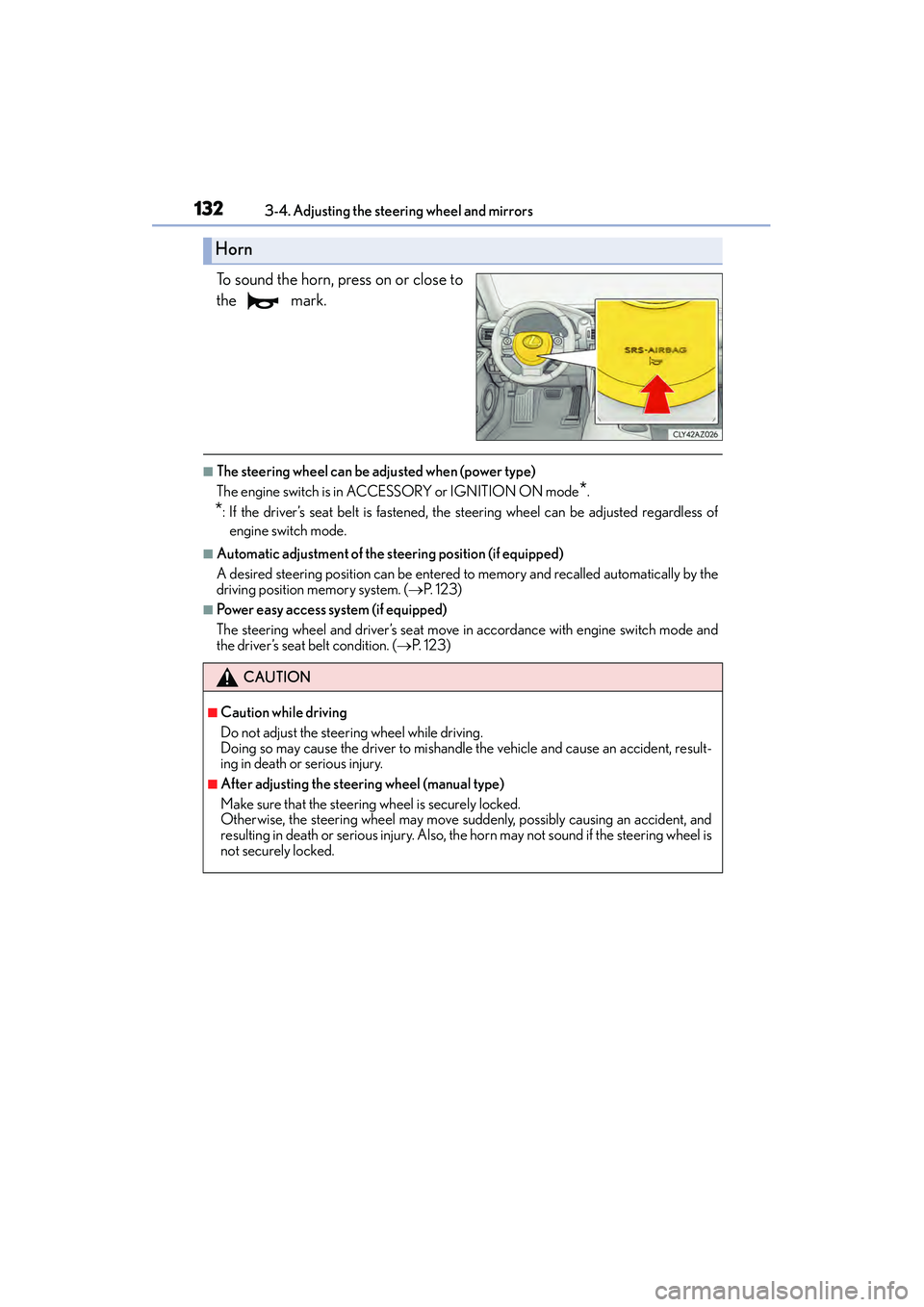
To sound the horn, press on or close to
the mark.
■The steering wheel can be adjusted when (power type)
The engine switch is in AC CESSORY or IGNITION ON mode
*.
*: If the driver’s seat belt is fastened, the steering wheel can be adjusted regardless of
engine switch mode.
■Automatic adjustment of the steering position (if equipped)
A desired steering position can be entered to memory and recalled automatically by the
driving position memory system. ( →P. 1 2 3 )
■Power easy access system (if equipped)
The steering wheel and driver’s seat move in accordance with engine switch mode and
the driver’s seat belt condition. ( →P. 1 2 3 )
Horn
CAUTION
■Caution while driving
Do not adjust the steer ing wheel while driving.
Doing so may cause the driver to mishandle the vehicle and cause an accident, result-
ing in death or serious injury.
■After adjusting the steering wheel (manual type)
Make sure that the steering wheel is securely locked.
Otherwise, the steering wheel may move suddenly, possibly causing an accident, and
resulting in death or serious injury. Also, th e horn may not sound if the steering wheel is
not securely locked.