Seat belt Lexus IS250 2015 Service Manual
[x] Cancel search | Manufacturer: LEXUS, Model Year: 2015, Model line: IS250, Model: Lexus IS250 2015Pages: 586, PDF Size: 8.66 MB
Page 121 of 586
120
IS350/250_U (OM53C50U)3-3. Adjusting the seats
■Power easy access system (if equipped)
The driver’s seat and steering wheel move in accordance with engine switch mode and
the driver’s seat belt condition. (
→P. 1 2 3 )
■When adjusting the seat
●Take care when adjusting the seat so that the head restraint does not touch the ceiling.
●Vehicles with folding type rear seats: When folding down a rear seatback, if it interferes
with a front seatback, adjust the front seat po sition so that the seats no longer interfere
with each other. However, if adjusting the front seat position causes the correct driving
posture to not be maintained, return the re ar seatback to its original position. (→P. 121)
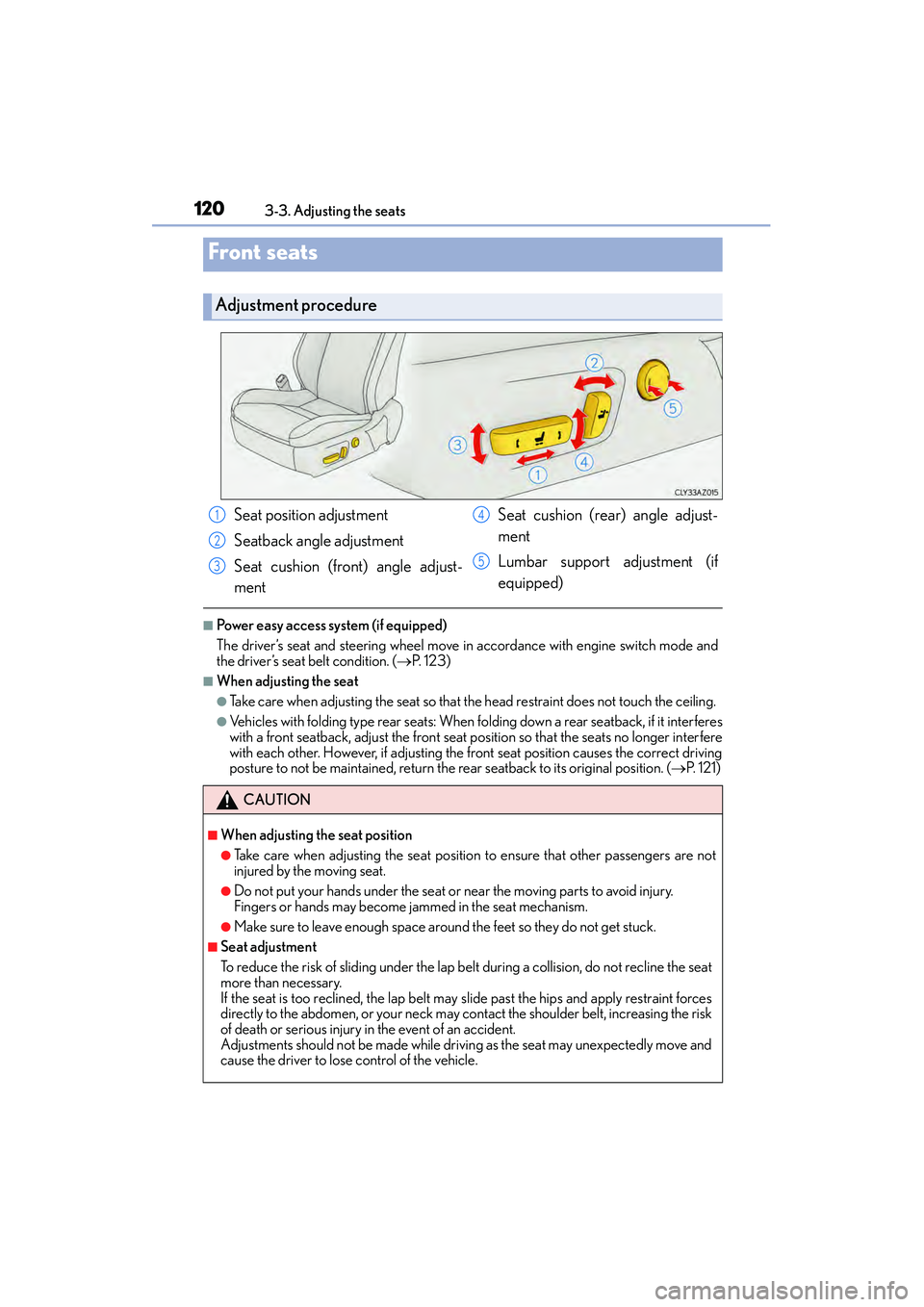
Front seats
Adjustment procedure
Seat position adjustment
Seatback angle adjustment
Seat cushion (front) angle adjust-
ment Seat cushion (rear) angle adjust-
ment
Lumbar support adjustment (if
equipped)
CAUTION
■When adjusting the seat position
●Take care when adjusting the seat position to ensure that other passengers are not
injured by the moving seat.
●Do not put your hands under the seat or near the moving parts to avoid injury.
Fingers or hands may become jammed in the seat mechanism.
●Make sure to leave enough space around the feet so they do not get stuck.
■Seat adjustment
To reduce the risk of sliding under the lap be
lt during a collision, do not recline the seat
more than necessary.
If the seat is too reclined, th e lap belt may slide past the hips and apply restraint forces
directly to the abdomen, or your neck may contact the shoulder belt, increasing the risk
of death or serious injury in the event of an accident.
Adjustments should not be made while drivin g as the seat may unexpectedly move and
cause the driver to lose control of the vehicle.
1
2
3
4
5
Page 123 of 586
1223-3. Adjusting the seats
IS350/250_U (OM53C50U)
CAUTION
Observe the following precautions. Failure to do so may result in death or serious injury.
■When folding the rear seatbacks down
●Do not fold the seatbacks down while driving.
●Stop the vehicle on level ground, set the parking brake and shift the shift lever to P.
●Do not allow anyone to sit on a folded seatback or in the trunk while driving.
●Do not allow children to enter the trunk.
■After returning the rear seatback to the upright position
●Check that the seat belts are not twisted or caught in the seatback.
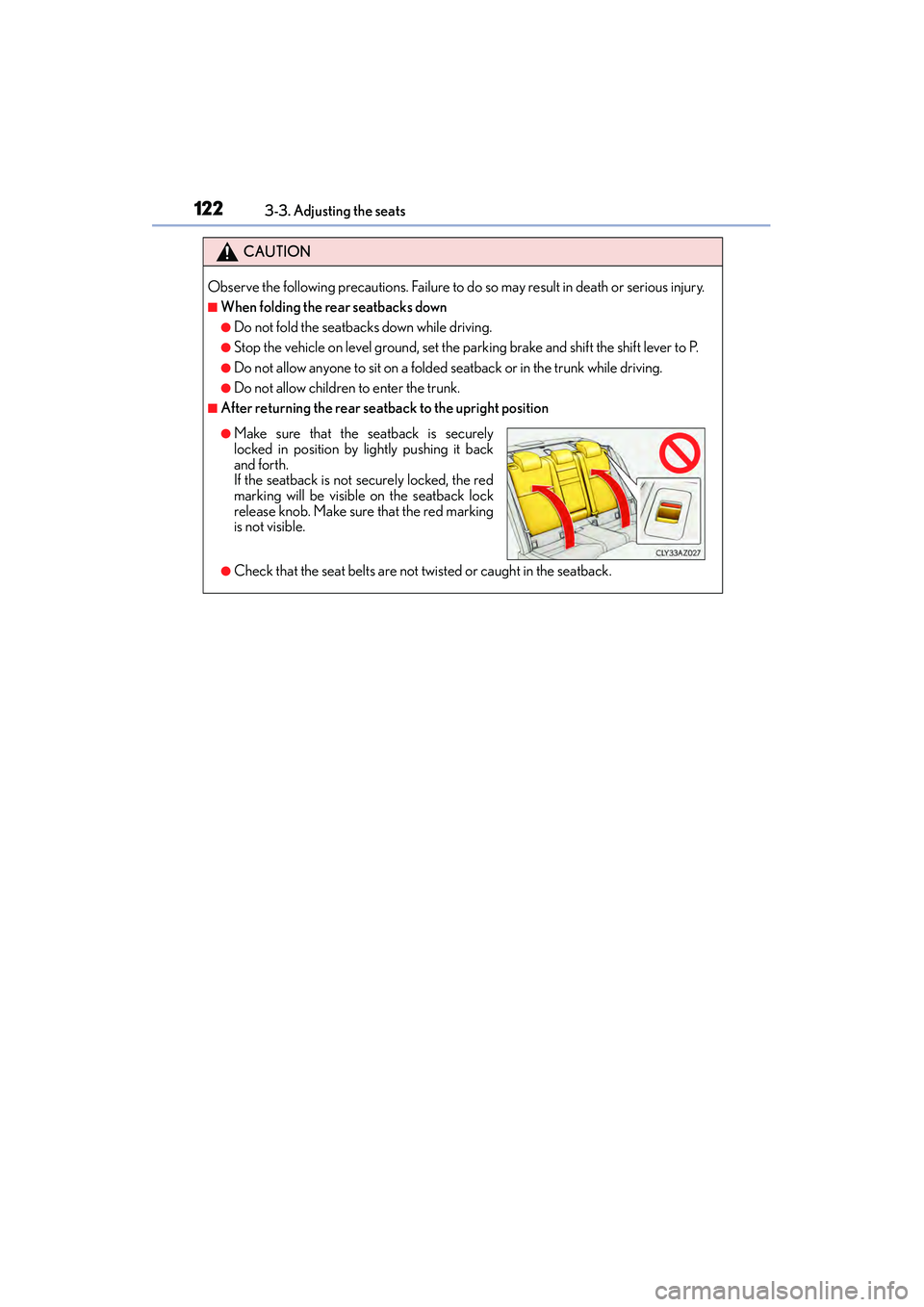
●Make sure that the seatback is securely
locked in position by lightly pushing it back
and forth.
If the seatback is not securely locked, the red
marking will be visible on the seatback lock
release knob. Make sure that the red marking
is not visible.
Page 124 of 586
1233-3. Adjusting the seats
3
Operation of each component
IS350/250_U (OM53C50U)
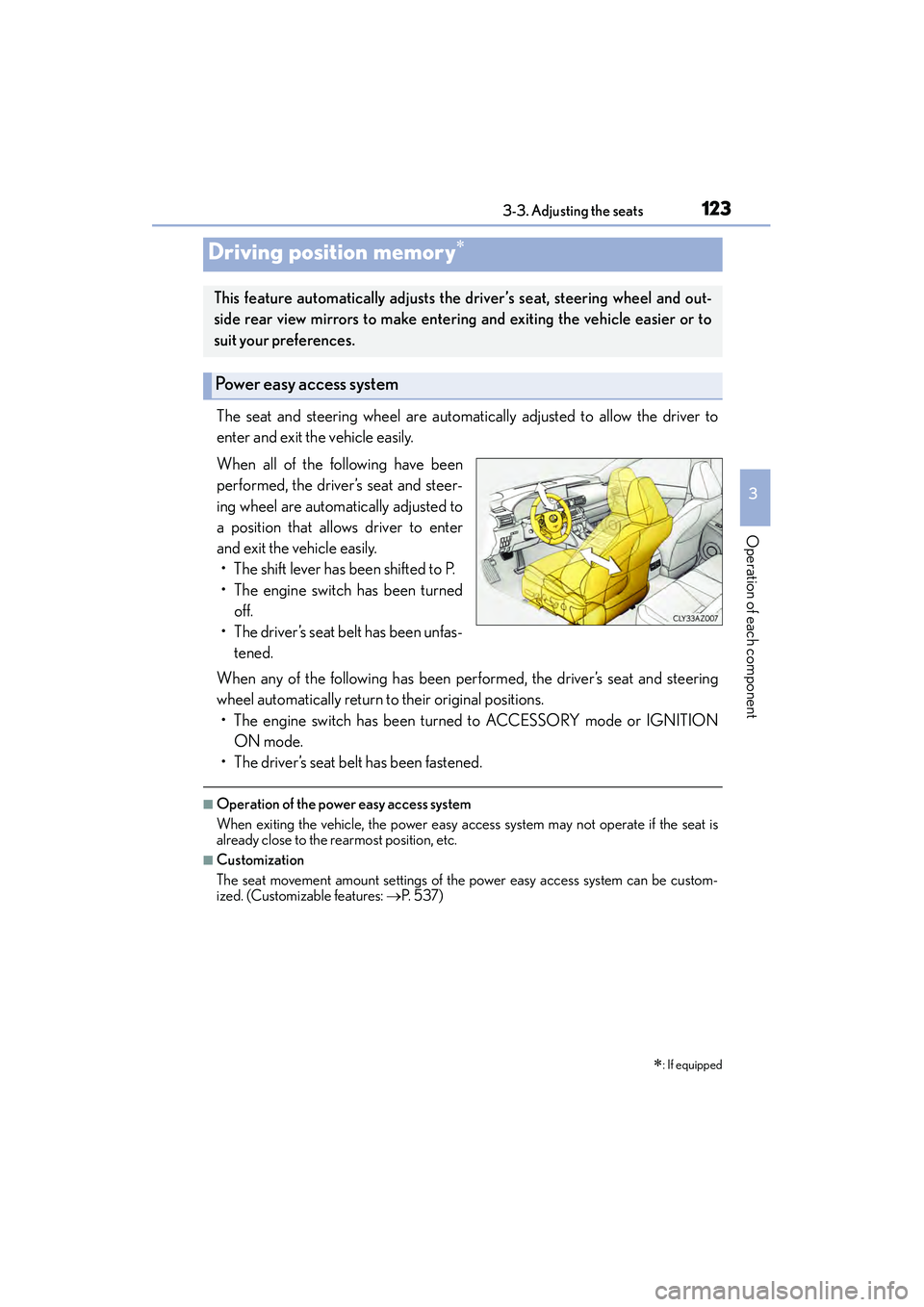
The seat and steering wheel are automatically adjusted to allow the driver to
enter and exit the vehicle easily.
When all of the following have been
performed, the driver’s seat and steer-
ing wheel are automatically adjusted to
a position that allows driver to enter
and exit the vehicle easily.• The shift lever has been shifted to P.
• The engine switch has been turned off.
• The driver’s seat belt has been unfas- tened.
When any of the following has been performed, the driver’s seat and steering
wheel automatically return to their original positions. • The engine switch has been turned to ACCESSORY mode or IGNITION ON mode.
• The driver’s seat belt has been fastened.
■Operation of the power easy access system
When exiting the vehicle, the power easy access system may not operate if the seat is
already close to the rearmost position, etc.
■Customization
The seat movement amount settings of the power easy access system can be custom-
ized. (Customizable features: →P. 5 3 7 )
Driving position memory∗
∗
: If equipped
This feature automatically adjusts the driver’s seat, steering wheel and out-
side rear view mirrors to make entering and exiting the vehicle easier or to
suit your preferences.
Power easy access system
Page 127 of 586
1263-3. Adjusting the seats
IS350/250_U (OM53C50U)
Each electronic key (including a card key) can be registered to recall your pre-
ferred driving position.
■Registering procedure
Record your driving position to button “1”, “2” or “3” before performing the
following:
Carry only the key you want to register, and then close the driver’s door. If 2 or
more keys are in the vehicle, the driving position cannot be recorded properly.
Check that the shift lever is in P.
Turn the engine switch to IGNITION ON mode.
Recall the driving position that you want to record.
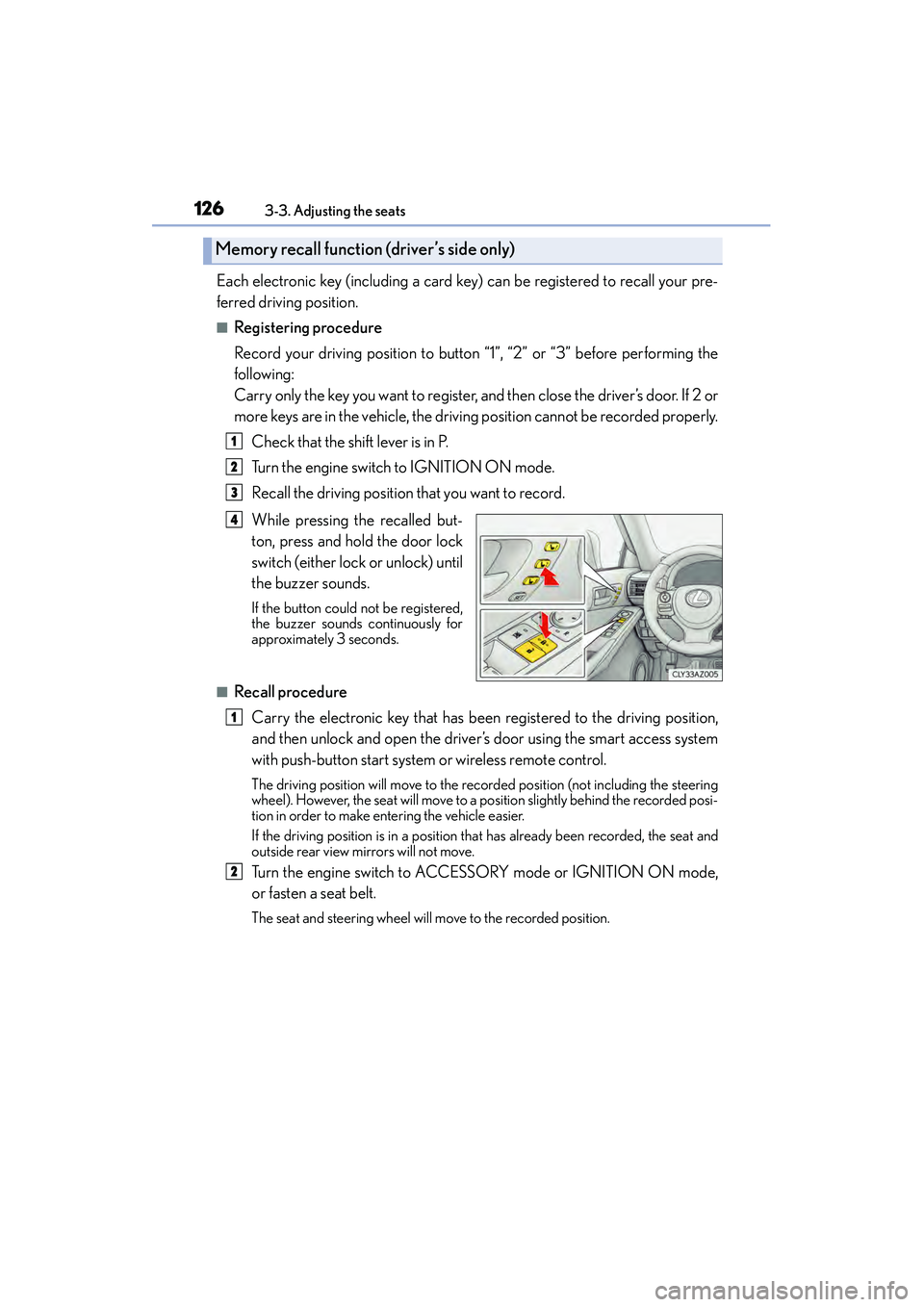
While pressing the recalled but-
ton, press and hold the door lock
switch (either lock or unlock) until
the buzzer sounds.
If the button could not be registered,
the buzzer sounds continuously for
approximately 3 seconds.
■Recall procedureCarry the electronic key that has been registered to the driving position,
and then unlock and open the driver’s door using the smart access system
with push-button start system or wireless remote control.
The driving position will move to the recorded position (not including the steering
wheel). However, the seat will move to a position slightly behind the recorded posi-
tion in order to make entering the vehicle easier.
If the driving position is in a position that has already been recorded, the seat and
outside rear view mirrors will not move.
Turn the engine switch to ACCESSORY mode or IGNITION ON mode,
or fasten a seat belt.
The seat and steer ing wheel will move to the recorded position.
Memory recall function (driver’s side only)
1
2
3
4
1
2
Page 133 of 586
1323-4. Adjusting the steering wheel and mirrors
IS350/250_U (OM53C50U)
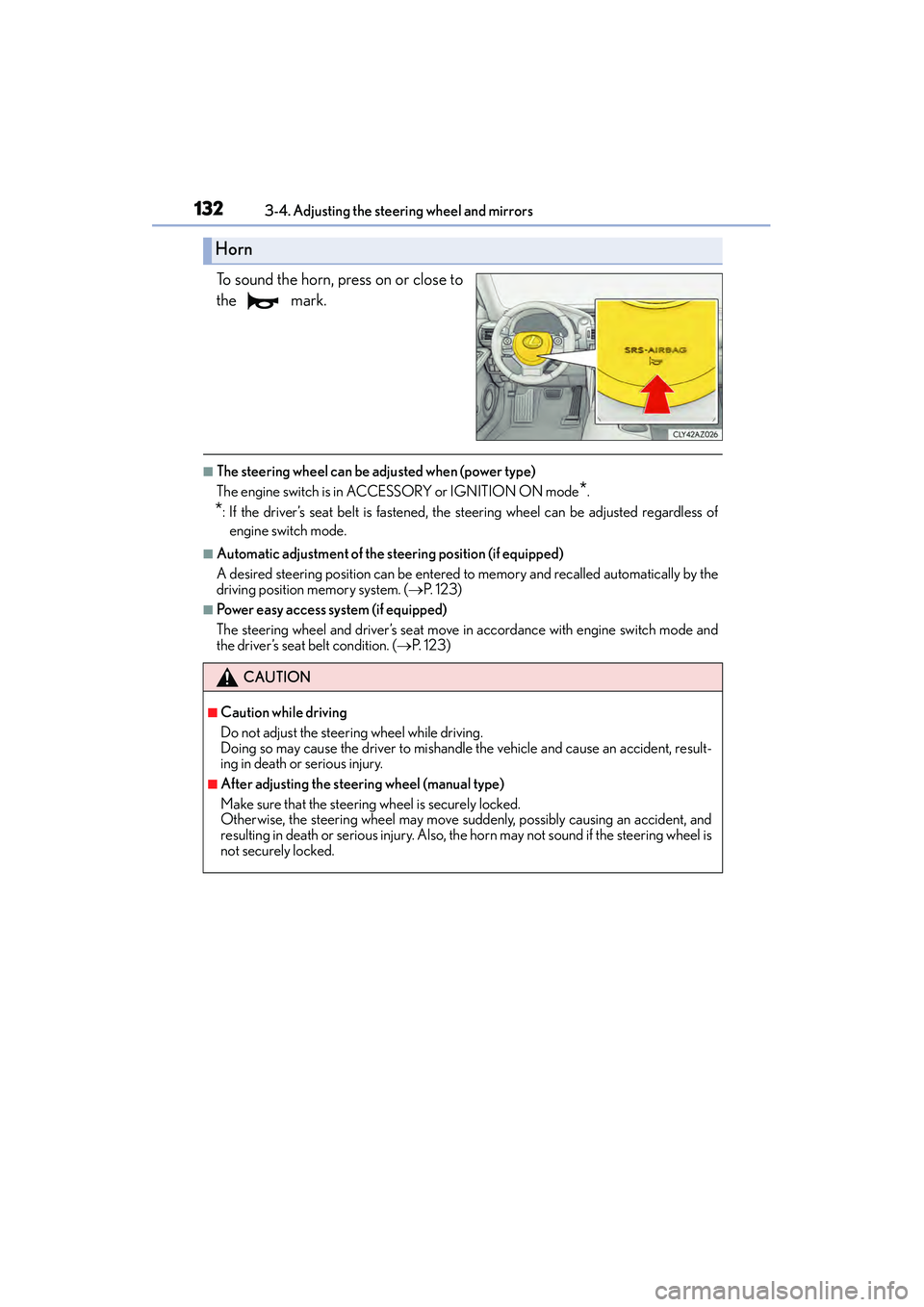
To sound the horn, press on or close to
the mark.
■The steering wheel can be adjusted when (power type)
The engine switch is in AC CESSORY or IGNITION ON mode
*.
*: If the driver’s seat belt is fastened, the steering wheel can be adjusted regardless of
engine switch mode.
■Automatic adjustment of the steering position (if equipped)
A desired steering position can be entered to memory and recalled automatically by the
driving position memory system. ( →P. 1 2 3 )
■Power easy access system (if equipped)
The steering wheel and driver’s seat move in accordance with engine switch mode and
the driver’s seat belt condition. ( →P. 1 2 3 )
Horn
CAUTION
■Caution while driving
Do not adjust the steer ing wheel while driving.
Doing so may cause the driver to mishandle the vehicle and cause an accident, result-
ing in death or serious injury.
■After adjusting the steering wheel (manual type)
Make sure that the steering wheel is securely locked.
Otherwise, the steering wheel may move suddenly, possibly causing an accident, and
resulting in death or serious injury. Also, th e horn may not sound if the steering wheel is
not securely locked.
Page 156 of 586
1554-1. Before driving
4
Driving
IS350/250_U (OM53C50U)
CAUTION
■Things that must not be carried in the trunk
The following things may cause a fire if loaded in the trunk:
●Receptacles containing gasoline
●Aerosol cans
■Storage precautions
Observe the following precautions.
Failure to do so may prevent the pedals from being depressed properly, may block the
driver’s vision, or may result in items hitting the driver or passengers, possibly causing
an accident.
●Stow cargo and luggage in the trunk whenever possible.
●To prevent cargo and luggage from sliding forward during braking, do not stack any-
thing in the enlarged trunk. Keep cargo and luggage low, as close to the floor as pos-
sible.
●When you fold down the rear seats, long items should not be placed directly behind
the front seats.
●Never allow anyone to ride in the enlarged trunk. It is not designed for passengers.
They should ride in their seats with their seat belts properly fastened.
●Do not place cargo or luggage in or on the following locations.
• At the feet of the driver
• On the front passenger or rear seats (when stacking items)
• On the package tray
• On the instrument panel
• On the dashboard
• In front of the navigation system screen (if equipped) or Lexus Display Audio
screen (if equipped)
●Secure all items in the occupant compartment.
■Capacity and distribution
●Do not exceed the maximum axle weight rating or the total vehicle weight rating.
●Even if the total load of occupant’s weight and the cargo load is less than the total load
capacity, do not apply the load unevenly. Improper loading may cause deterioration
of steering or braking control which may cause death or serious injury.
Page 401 of 586
4007-1. Maintenance and care
IS350/250_U (OM53C50U)
■Caring for leather areas
Lexus recommends cleaning the interior of the vehicle at least twice a year to maintain
the quality of the vehicle’s interior.
■Shampooing the carpets
There are several commercial foaming-type cleaners available. Use a sponge or brush to
apply the foam. Rub in overlapping circles. Do not use water. Wipe dirty surfaces and let
them dry. Excellent results are obtained by keeping the carpet as dry as possible.
■Seat belts
Clean with mild soap and lukewarm water using a cloth or sponge. Also check the belts
periodically for excessive wear, fraying or cuts.
■When cleaning the carpeted portions of the glove box, console box, etc.
If a strong adhesive tape is used, there is a possibility that the surface of the carpet could
be damaged.
CAUTION
■Water in the vehicle
●Do not splash or spill liquid in the vehicle.
Doing so may cause electrical components etc. to malfunction or catch fire.
●Do not get any of the SRS components or wiring in the vehicle interior wet.
( → P. 3 8 )
An electrical malfunction may cause the airbags to deploy or not function properly,
resulting in death or serious injury.
■Cleaning the interior (especially instrument panel)
Do not use polish wax or polish cleaner. The instrument panel may reflect off the wind-
shield, obstructing the driver’s view and le ading to an accident, resulting in death or
serious injury.
Page 407 of 586
4067-2. Maintenance
IS350/250_U (OM53C50U)
Vehicle interior
ItemsCheck points
Accelerator pedal• The accelerator pedal should move smoothly (with- out uneven pedal effort or catching).
Automatic transmission
“Park” mechanism• When parked on a slope and the shift lever is in P, is
the vehicle securely stopped?
Brake pedal
• Does the brake pedal move smoothly?
• Does the brake pedal have appropriate clearance from the floor? ( →P. 5 1 8 )
• Does the brake pedal have the correct amount of
free play? (→ P. 5 1 8 )
Brakes
• The vehicle should not pull to one side when the
brakes are applied.
• The brakes should work effectively.
• The brake pedal should not feel spongy.
• The brake pedal should not get too close to the floor when the brakes are applied.
Head restraints• Do the head restraints move smoothly and lock
securely?
Indicators/buzzers• Do the indicators and buzzers function properly?
Lights• Do all the lights come on?
Parking brake•Moves smoothly?
• When parked on a slope and the parking brake is on,is the vehicle securely stopped?
Seat belts• Do the seat belts operate smoothly?
• The seat belts should not be damaged.
Seats• Do the seat controls operate properly?
Steering wheel
• Does the steering wheel rotate smoothly?
• Does the steering wheel have the correct amount offree play?
• There should not be any strange sounds coming from the steering wheel.
Page 467 of 586
4668-2. Steps to take in an emergency
IS350/250_U (OM53C50U)
If a warning light turns on or a warning buzzer
sounds
Calmly perform the following actions if any of the warning lights comes on or
flashes. If a light comes on or flashes, but then goes off, this does not necessar-
ily indicate a malfunction in the system. However, if this continues to occur,
have the vehicle inspected by your Lexus dealer.
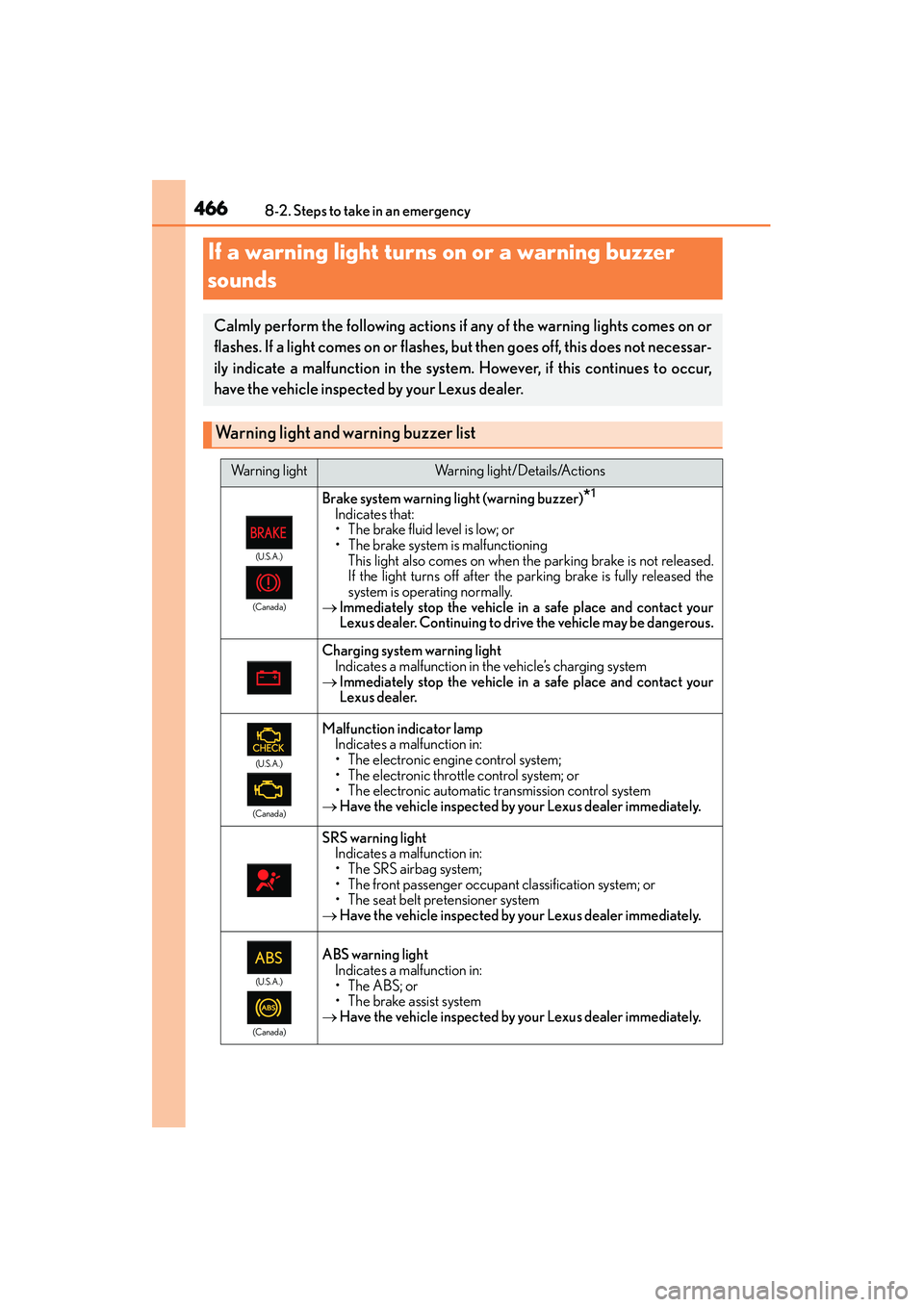
Warning light and warning buzzer list
Warning lightWarning light/Details/Actions
(U.S.A.)
(Canada)
Brake system warning light (warning buzzer)*1
Indicates that:
• The brake fluid level is low; or
• The brake system is malfunctioning This light also comes on when th e parking brake is not released.
If the light turns off after the parking brake is fully released the
system is operating normally.
→ Immediately stop the vehicle in a safe place and contact your
Lexus dealer. Continuing to drive the vehicle may be dangerous.
Charging system warning light
Indicates a malfunction in the vehicle’s charging system
→ Immediately stop the vehicle in a safe place and contact your
Lexus dealer.
(U.S.A.)
(Canada)
Malfunction indicator lamp Indicates a malfunction in:
• The electronic engine control system;
• The electronic throttle control system; or
• The electronic automatic transmission control system
→ Have the vehicle inspected by your Lexus dealer immediately.
SRS warning light
Indicates a malfunction in:
• The SRS airbag system;
• The front passenger occupant classification system; or
• The seat belt pr etensioner system
→ Have the vehicle inspected by your Lexus dealer immediately.
(U.S.A.)
(Canada)
ABS warning light Indicates a malfunction in:
•The ABS; or
• The brake assist system
→ Have the vehicle inspected by your Lexus dealer immediately.
Page 468 of 586
4678-2. Steps to take in an emergency
8
When trouble arises
IS350/250_U (OM53C50U)
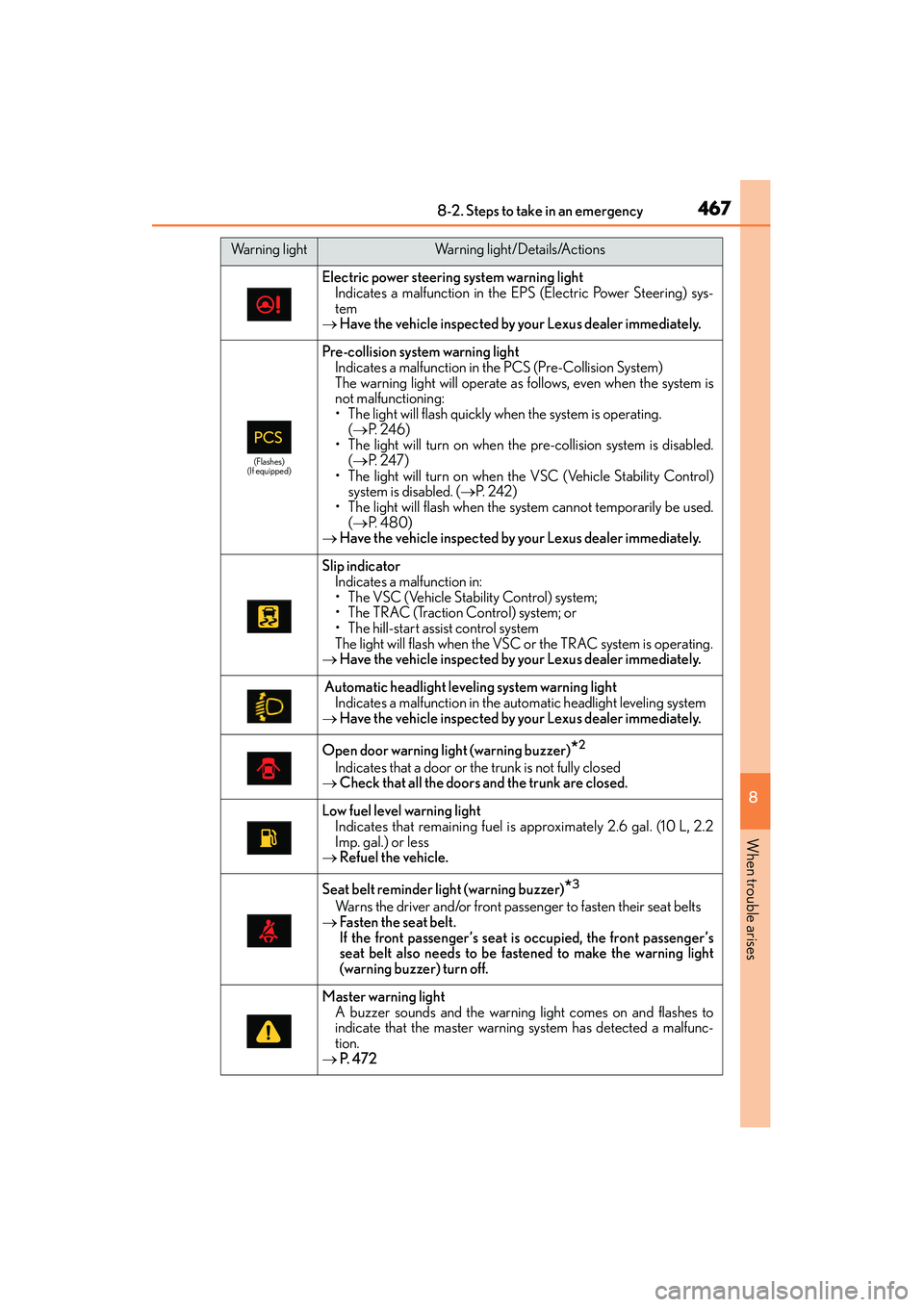
Electric power steering system warning lightIndicates a malfunction in the EPS (Electric Power Steering) sys-
tem
→ Have the vehicle inspected by your Lexus dealer immediately.
(Flashes)
(If equipped)
Pre-collision system warning light Indicates a malfunction in the PCS (Pre-Collision System)
The warning light will operate as follows, even when the system is
not malfunctioning:
• The light will flash quickly when the system is operating.
(→ P. 2 4 6 )
• The light will turn on when the pre-collision system is disabled. (→ P. 2 4 7 )
• The light will turn on when the VSC (Vehicle Stability Control) system is disabled. ( →P. 2 4 2 )
• The light will flash when the system cannot temporarily be used.
(→ P. 4 8 0 )
→ Have the vehicle inspected by your Lexus dealer immediately.
Slip indicator
Indicates a malfunction in:
• The VSC (Vehicle Stability Control) system;
• The TRAC (Traction Control) system; or
• The hill-start assist control system
The light will flash when the VSC or the TRAC system is operating.
→ Have the vehicle inspected by your Lexus dealer immediately.
Automatic headlight leveling system warning light
Indicates a malfunction in the au tomatic headlight leveling system
→ Have the vehicle inspected by your Lexus dealer immediately.
Open door warning light (warning buzzer)*2
Indicates that a door or the trunk is not fully closed
→ Check that all the doors and the trunk are closed.
Low fuel level warning light
Indicates that remaining fuel is approximately 2.6 gal. (10 L, 2.2
Imp. gal.) or less
→ Refuel the vehicle.
Seat belt reminder light (warning buzzer)*3
Warns the driver and/or front passenger to fasten their seat belts
→ Fasten the seat belt.
If the front passenger’s seat is occupied, the front passenger’s
seat belt also needs to be fastened to make the warning light
(warning buzzer) turn off.
Master warning light
A buzzer sounds and the warning light comes on and flashes to
indicate that the master warning system has detected a malfunc-
tion.
→ P. 4 7 2
Warning lightWarning light/Details/Actions