media Lexus IS250 2015 Owner's Manual
[x] Cancel search | Manufacturer: LEXUS, Model Year: 2015, Model line: IS250, Model: Lexus IS250 2015Pages: 586, PDF Size: 8.66 MB
Page 30 of 586
291-1. For safe use
1
For safety and security
IS350/250_U (OM53C50U)
Make sure that you can see backward clearly by adjusting the inside and outside
rear view mirrors properly. (→P. 133, 135)
Adjusting the mirrors
CAUTION
Observe the following precautions.
Failure to do so may result in death or serious injury.
●Do not adjust the position of the driver’s seat while driving.
Doing so could cause the driver to lose control of the vehicle.
●Do not place a cushion between the driver or passenger and the seatback.
A cushion may prevent correct posture from being achieved, and reduce the effec-
tiveness of the seat belt and head restraint.
●Do not place anything under the front seats.
Objects placed under the front seats may become jammed in the seat tracks and stop
the seat from locking in place. This may lead to an accident and the adjustment mech-
anism may also be damaged.
●When driving over long distances, take regular breaks before you start to feel tired.
Also, if you feel tired or sleepy while driving, do not force yourself to continue driving
and take a break immediately.
Page 35 of 586
341-1. For safe use
IS350/250_U (OM53C50U)
CAUTION
■People suffering illness
Obtain medical advice and wear the seat belt in the proper way. (→P. 3 0 )
■When children are in the vehicle
Do not allow children to play with the seat belt. If the seat belt becomes twisted around
a child’s neck, it may lead to choking or othe r serious injuries that could result in death.
If this occurs and the buckle cannot be unfastened, scissors should be used to cut the
belt.
■Seat belt pretensioners
●Do not place anything, such as a cushion, on the front passenger’s seat. Doing so will
disperse the passenger’s weight, which prevents the sensor from detecting the pas-
senger’s weight properly. As a result, the seat belt pretensioner for the front passen-
ger’s seat may not activate in the event of a collision.
●If the pretensioner has activated, the SRS warning light will come on. In that case, the
seat belt cannot be used again and must be replaced at your Lexus dealer.
■Adjustable shoulder anchor
Always make sure the shoulder belt is posi tioned across the center of your shoulder.
The belt should be kept away from your neck, but not falling off your shoulder. Failure to
do so could reduce the amount of protection in an accident and cause death or serious
injuries in the event of a sudden stop, sudden swerve or accident. ( →P. 3 1 )
■Seat belt damage and wear
●Do not damage the seat belts by allowing the belt, plate, or buckle to be jammed in
the door.
●Inspect the seat belt system periodically. Check for cu ts, fraying, and loose parts. Do
not use a damaged seat belt until it is replaced. Damaged seat belts cannot protect an
occupant from death or serious injury.
●Ensure that the belt and plate are locked and the belt is not twisted.
If the seat belt does not function correctly, immediately contact your Lexus dealer.
●Replace the seat assembly, including the belts, if your vehicle has been involved in a
serious accident, even if there is no obvious damage.
●Do not attempt to install, remove, modify, disassemble or dispose of the seat belts.
Have any necessary repairs carried out by your Lexus dealer. Inappropriate handling
may lead to incorrect operation.
Page 43 of 586
421-1. For safe use
IS350/250_U (OM53C50U)
CAUTION
■SRS airbag precautions
●Do not hang coat hangers or hard objects on the coat hooks. All of these items could
become projectiles and may cause death or serious injury, should the SRS curtain
shield airbags deploy.
●If a vinyl cover is put on the area where the SRS knee airbag will deploy, be sure to
remove it.
●Do not use seat accessories which cover the parts where the SRS side airbags inflate
as they may interfere with inflation of the airbags. Such accessories may prevent the
side airbags from activating correctly, disable the system or cause the side airbags to
inflate accidentally, resulting in death or serious injury.
●Do not strike or apply significant levels of force to the area of the SRS airbag compo-
nents.
Doing so can cause the SRS airbags to malfunction.
●Do not touch any of the component parts immediately after the SRS airbags have
deployed (inflated) as they may be hot.
●If breathing becomes difficult after the SRS airbags have deployed, open a door or
window to allow fresh air in, or leave the vehicle if it is safe to do so. Wash off any resi-
due as soon as possible to prevent skin irritation.
●If the areas where the SRS airbags are stored, such as the steering wheel pad and
front and rear pillar garnishes are damaged or cracked, have them replaced by your
Lexus dealer.
●Do not place anything, such as a cushion, on the front passenger's seat. Doing so will
disperse the passenger's weight, which prevents the sensor from detecting the pas-
senger's weight properly. As a result, the SRS front passenger airbag may not deploy
in the event of a collision.
Page 53 of 586
521-1. For safe use
IS350/250_U (OM53C50U)
CAUTION
■Front passenger occupant classification system precautions
●Do not recline the front passenger seatback so far that it touches the rear seat. This
may cause the “AIR BAG OFF” indicator light to be illuminated, which indicates that
the SRS airbags for the front passenger will not deploy in the event of a severe acci-
dent. If the seatback touches the rear seat, return the seatback to a position where it
does not touch the rear seat. Keep the front passenger seatback as upright as possi-
ble when the vehicle is moving. Reclining the seatback excessively may lessen the
effectiveness of the seat belt system.
●If an adult sits in the front passenger seat , the “AIR BAG ON” indicator light is illumi-
nated. If the “AIR BAG OFF” indicator is illuminated, ask the passenger to sit up
straight, well back in the seat, feet on the floor, and with the seat belt worn correctly. If
the “AIR BAG OFF” indicator still remains illuminated, either ask the passenger to
move to the rear seat, or if that is not possible, move the front passenger seat fully
rearward.
●When it is unavoidable to in stall a forward-facing child restraint system on the front
passenger seat, install the ch ild restraint system on the front passenger seat in the
proper order. ( →P. 5 8 )
●Do not modify or remove the front seats.
●Do not kick the front passenger seat or subject it to severe impact. Otherwise, the
SRS warning light may come on to indicat e a malfunction of the front passenger
occupant classification system. In this case, contact your Lexus dealer immediately.
●Child restraint systems installed on the rear seat should not contact the front seat-
backs.
●Do not use a seat accessory, such as a cushion and seat cover, that covers the seat
cushion surface.
●Do not modify or replace the upholstery of the front seat.
●Do not place anything between the console box and front passenger seat. Other-
wise, the system may not detect the front passenger properly, leading to improper
operation of the airbags.
●Adjust the front passenger seat so that the head restraint does not touch the ceiling. If
the head restraint is left in contact with th e ceiling, the system may not detect the front
passenger properly, leading to improper operation of the airbags.
Page 81 of 586

802. Instrument cluster
IS350/250_U (OM53C50U)
CAUTION
■If a safety system warning light does not come on
Should a safety system light such as the ABS and SRS warning light not come on when
you start the engine, this could mean that these systems are not available to help pro-
tect you in an accident, which could result in death or serious injury. Have the vehicle
inspected by your Lexus dealer immediately if this occurs.
Page 86 of 586
852. Instrument cluster
2
Instrument cluster
IS350/250_U (OM53C50U)
NOTICE
■To prevent damage to the engine and its components
●Do not let the indicator needle of the tachometer enter the red zone, which indicates
the maximum engine speed.
●The engine may be overheating if the engine coolant temperature gauge is in the red
zone (H). In this case, immediately stop the vehicle in a safe place, and check the
engine after it has cooled completely. (→P. 5 0 6 )
Page 103 of 586
1023-1. Key information
IS350/250_U (OM53C50U)
NOTICE
■To prevent key damage
●Do not drop the keys, subject them to strong shocks or bend them.
●Do not expose the keys to high temperatures for long periods of time.
●Do not get the keys wet or wash them in an ultrasonic washer etc.
●Do not attach metallic or magnetic materials to the keys or place the keys close to
such materials.
●Do not disassemble the keys.
●Do not attach a sticker or anything else to the surface of the electronic key.
●Do not place the keys near objects that produce magnetic fields, such as TVs, audio
systems and induction cookers, or medical electrical equipment, such as low-fre-
quency therapy equipment.
■Carrying the electronic key on your person
Carry the electronic key 3.9 in. (10 cm) or more away from electric appliances that are
turned on. Radio waves emitted from electric appliances within 3.9 in. (10 cm) of the
electronic key may interfere with the key, causing the key to not function properly.
■In case of a smart access system with push-button start malfunction or other key-
related problems
Take your vehicle with all the electronic keys provided with your vehicle, including the
card key, to your Lexus dealer.
■When an electronic key is lost
If the electronic key remains lost, the risk of vehicle theft increases significantly. Visit
your Lexus dealer immediately with all remaining electronic keys and the card key that
were provided with your vehicle.
■Handling the card key
●Do not apply excess force when inserting the mechanical key into the card key. Doing
so may damage the card key.
●If the battery or card key terminals get wet, the battery may corrode.
If the key is dropped into water, or if drin king water etc. is spilled on the key, immedi-
ately remove the battery cover and wipe the battery and terminals. (To remove the
battery cover, lightly grasp and pull it.) If the battery is corroded, have your Lexus
dealer replace the battery.
●Do not crush the battery cover or use a screwdriver to remove the battery cover.
Forcibly removing the battery cover may bend or damage the key.
●If the battery cover is frequently removed, the battery cover may become loose.
●When installing the battery, make sure to check the direction of the battery.
Installing the battery in the wrong direction may cause the battery to deplete rapidly.
●The surface of the card key may be damaged, or its coating may peel off in the follow-
ing situations:
• The card key is carried together with hard objects, such as coins and keys.
• The card key is scraped with a sharp object, such as the tip of a mechanical pencil.
• The surface of the card key is wiped with thinner or benzene.
Page 108 of 586
1073-2. Opening, closing and locking the doors and trunk
3
Operation of each component
IS350/250_U (OM53C50U)
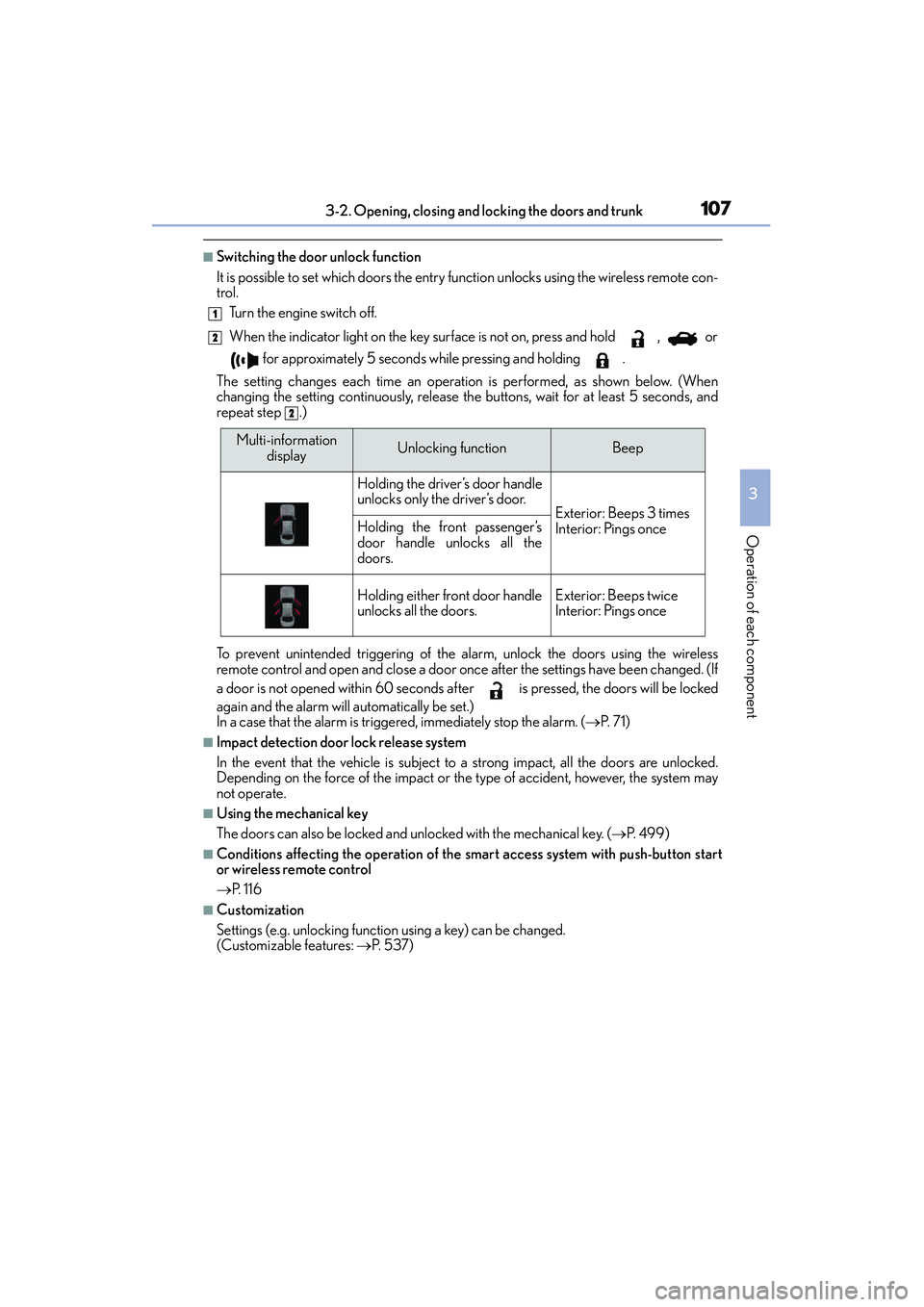
■Switching the door unlock function
It is possible to set which doors the entry function unlocks using the wireless remote con-
trol. Turn the engine switch off.
When the indicator light on the key surface is not on, press and hold , or
for approximately 5 seconds while pressing and holding .
The setting changes each time an operation is performed, as shown below. (When
changing the setting continuously, release th e buttons, wait for at least 5 seconds, and
repeat step .)
To prevent unintended triggering of the alarm, unlock the doors using the wireless
remote control and open and close a door once after the settings have been changed. (If
a door is not opened within 60 seconds af ter is pressed, the doors will be locked
again and the alarm will automatically be set.)
In a case that the alarm is triggered, immediately stop the alarm. (→ P. 7 1 )
■Impact detection door lock release system
In the event that the vehicle is subject to a strong impact, all the doors are unlocked.
Depending on the force of the impact or the type of accident, however, the system may
not operate.
■Using the mechanical key
The doors can also be locked and unlocked with the mechanical key. ( →P. 4 9 9 )
■Conditions affecting the operation of the smart access system with push-button start
or wireless remote control
→P. 116
■Customization
Settings (e.g. unlocking function using a key) can be changed.
(Customizable features: →P. 5 3 7 )
1
2
2
Multi-information
displayUnlocking functionBeep
Holding the driver’s door handle
unlocks only the driver’s door.
Exterior: Beeps 3 times
Interior: Pings onceHolding the front passenger’s
door handle unlocks all the
doors.
Holding either front door handle
unlocks all the doors.Exterior: Beeps twice
Interior: Pings once
Page 117 of 586
1163-2. Opening, closing and locking the doors and trunk
IS350/250_U (OM53C50U)
■Conditions affecting operation
The smart access system with push-button start uses weak radio waves. In the following
situations, the communication between the electronic key and the vehicle may be
affected, preventing the smart access system with push-button start, wireless remote
control and engine immobilizer system from operating properly. (Ways of coping:
→ P. 4 9 9 )
●When the electronic key battery is depleted
●Near a TV tower, electric power plant, gas station, radio station, large display, airport or
other facility that generates strong radio waves or electrical noise
●When carrying a portable radio, cellular phone, cordless phone or other wireless com-
munication device
●When the electronic key is in contact with , or is covered by the following metallic
objects
• Cards to which aluminum foil is attached
• Cigarette boxes that have aluminum foil inside
• Metallic wallets or bags
•Coins
•Hand warmers made of metal
• Media such as CDs and DVDs
●When other wireless keys (that emit radio waves) are being used nearby
●When carrying the electronic key together with the following devices that emit radio
waves
• Another vehicle’s electronic key or a wireless key that emits radio waves
• Personal computers or personal digital assistants (PDAs)
• Digital audio players
• Portable game systems
●If window tint with a metallic content or me tallic objects are attached to the rear win-
dow
Page 118 of 586
1173-2. Opening, closing and locking the doors and trunk
3
Operation of each component
IS350/250_U (OM53C50U)
■Note for the entry function
●Even when the electronic key is within the effective range (detection areas), the system
may not operate properly in the following cases:
• The electronic key is too close to the window or outside door handle, near the
ground, or in a high place when the doors are locked or unlocked.
• The electronic key is near the ground or in a high place, or too close to the rear
bumper center when the trunk is opened.
• The electronic key is on the instrument panel, rear package tray or floor, or in the door pockets or glove box when the engine is started or engine switch modes are
changed.
●Do not leave the electronic key on top of the instrument panel or near the door pockets
when exiting the vehicle. Depending on the radio wave reception conditions, it may be
detected by the antenna outside the cabin and the doors will become lockable from the
outside, possibly trapping the electronic key inside the vehicle.
●As long as the electronic key is within th e effective range, the doors may be locked or
unlocked by anyone. However, only the doors detecting the electronic key can be used
to unlock the vehicle.
●Even if the electronic key is not inside the vehicle, it may be possible to start the engine
if the electronic key is near the window.
●The doors may unlock or lock if a large amou nt of water splashes on the door handle,
such as in the rain or in a car wash, when th e electronic key is within the effective range.
(The doors will automatically be locked after approximately 30 seconds if the doors
are not opened and closed.)
●If the wireless remote control is used to lock the doors when the electronic key is near
the vehicle, there is a possibility that the door may not be unlocked by the entry func-
tion. (Use the wireless remote control to unlock the doors.)
●Touching the door lock or unlock sensor while wearing gloves may prevent lock or
unlock operation.
●When the lock operation is performed using the lock sensor, recognition signals will be
shown up to two consecutive times. After this, no recognition signals will be given.
●If the door handle becomes wet while the electronic key is within the effective range,
the door may lock and unlock repeatedly. In this case, follow the following correction
procedures to wash the vehicle:
• Place the electronic key in a location 6 ft. (2 m) or more away from the vehicle. (Take care to ensure that the key is not stolen.)
• Set the electronic key to battery-saving mode to disable the smart access system with push-button start. ( →P. 1 1 5 )
●If the electronic key is inside the vehicle and a door handle becomes wet during a car
wash, a message may be shown on the multi-information display and a buzzer will
sound outside the vehicle. To turn off the alarm, lock all the doors.
●The lock sensor may not work properly if it comes into contact with ice, snow, mud, etc.
Clean the lock sensor and attempt to operate it again, or use the lock sensor on the
lower part of the door handle.
●A sudden handle operation or a handle operation immediately after entering the effec-
tive range may prevent the doors from being unlocked. Touch the door unlock sensor
and check that the doors are unlocked before pulling the door handle again.
●Unlocking the vehicle may take more time if another electronic key is within the effec-
tive range.