automatic Lexus IS250 2015 VOICE COMMAND SYSTEM OPERATION / LEXUS 2015 IS250,IS350 OWNERS MANUAL QUICK GUIDE (OM53C80U)
[x] Cancel search | Manufacturer: LEXUS, Model Year: 2015, Model line: IS250, Model: Lexus IS250 2015Pages: 82, PDF Size: 1.58 MB
Page 1 of 82
Contents
The Quick Guide is not intended as a substitute for your Owner’s
Manual. We strongly encourage you to review the Owner’s
Manual and supplementary manual s so you will have a better
understanding of your vehicle’ s capabilities and limitations.
1
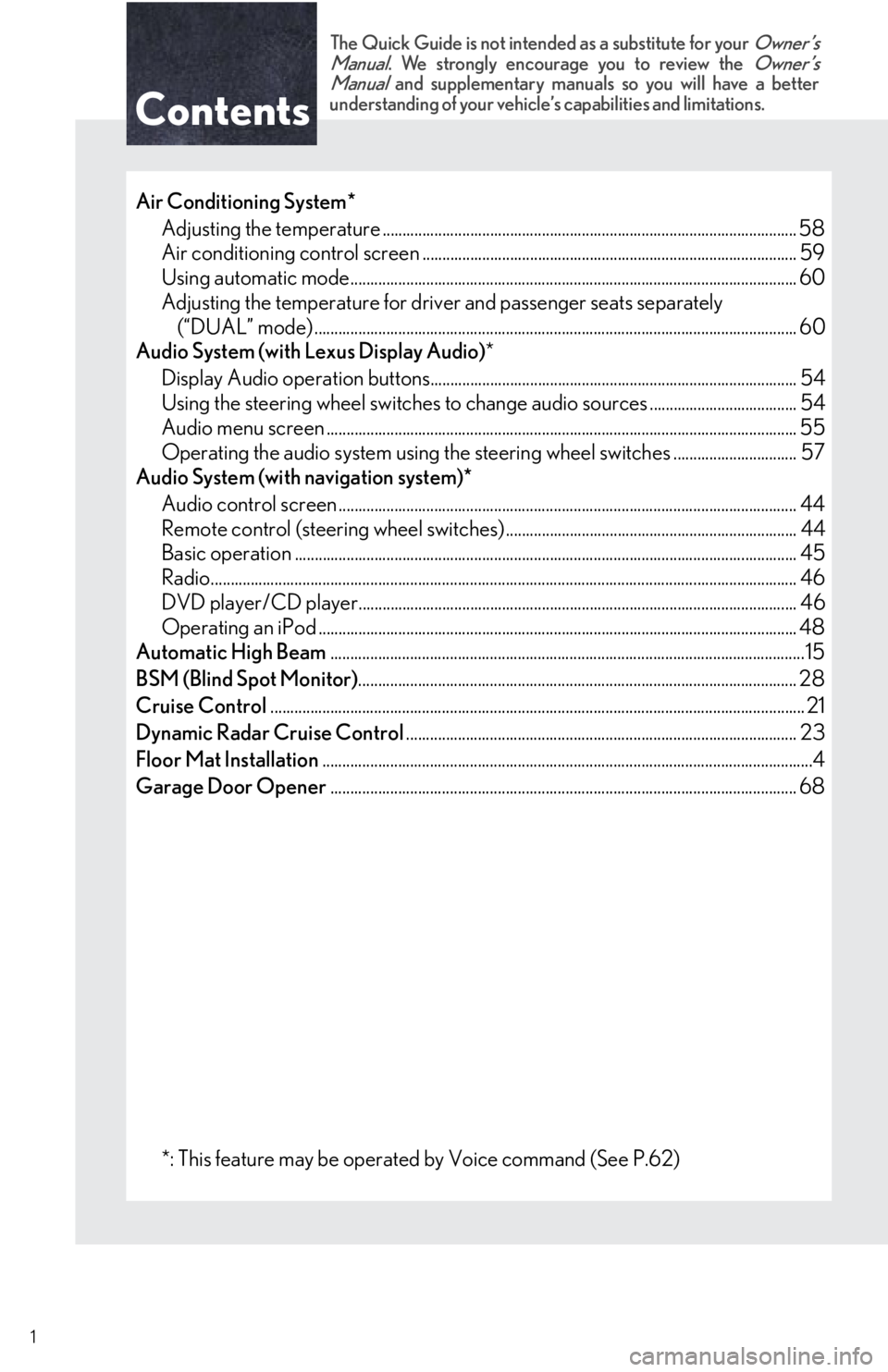
Air Conditioning System*
Adjusting the temperature ...................................................................................................... .. 58
Air conditioning control screen .............................................................................................. 59
Using automatic mode........................................................................................................... ..... 60
Adjusting the temperature for driver and passenger seats separately (“DUAL” mode) .................................................................................................................. ....... 60
Audio System (with Lexus Display Audio) *
Display Audio operation buttons............................................................................................ 54
Using the steering whee l switches to change audio sources ..................................... 54
Audio menu screen .............................................................................................................. ........ 55
Operating the audio system using the steering wheel switches ............................... 57
Audio System (with navigation system)*
Audio control screen ................................................................................................................... 44
Remote control (steering wheel switches) ......................................................................... 44
Basic operation ................................................................................................................ .............. 45
Radio.......................................................................................................................... ......................... 46
DVD player/CD player........................................................................................................... ... 46
Operating an iPod .............................................................................................................. .......... 48
Automatic High Beam .......................................................................................................................15
BSM (Blind Spot Monitor) .............................................................................................................. 28
Cruise Control ............................................................................................................................... ....... 21
Dynamic Radar Cruise Control .................................................................................................. 23
Floor Mat Installation ...........................................................................................................................4
Garage Door Opener ..................................................................................................................... 68
*: This feature may be operated by Voice command (See P.62)
Page 7 of 82
7
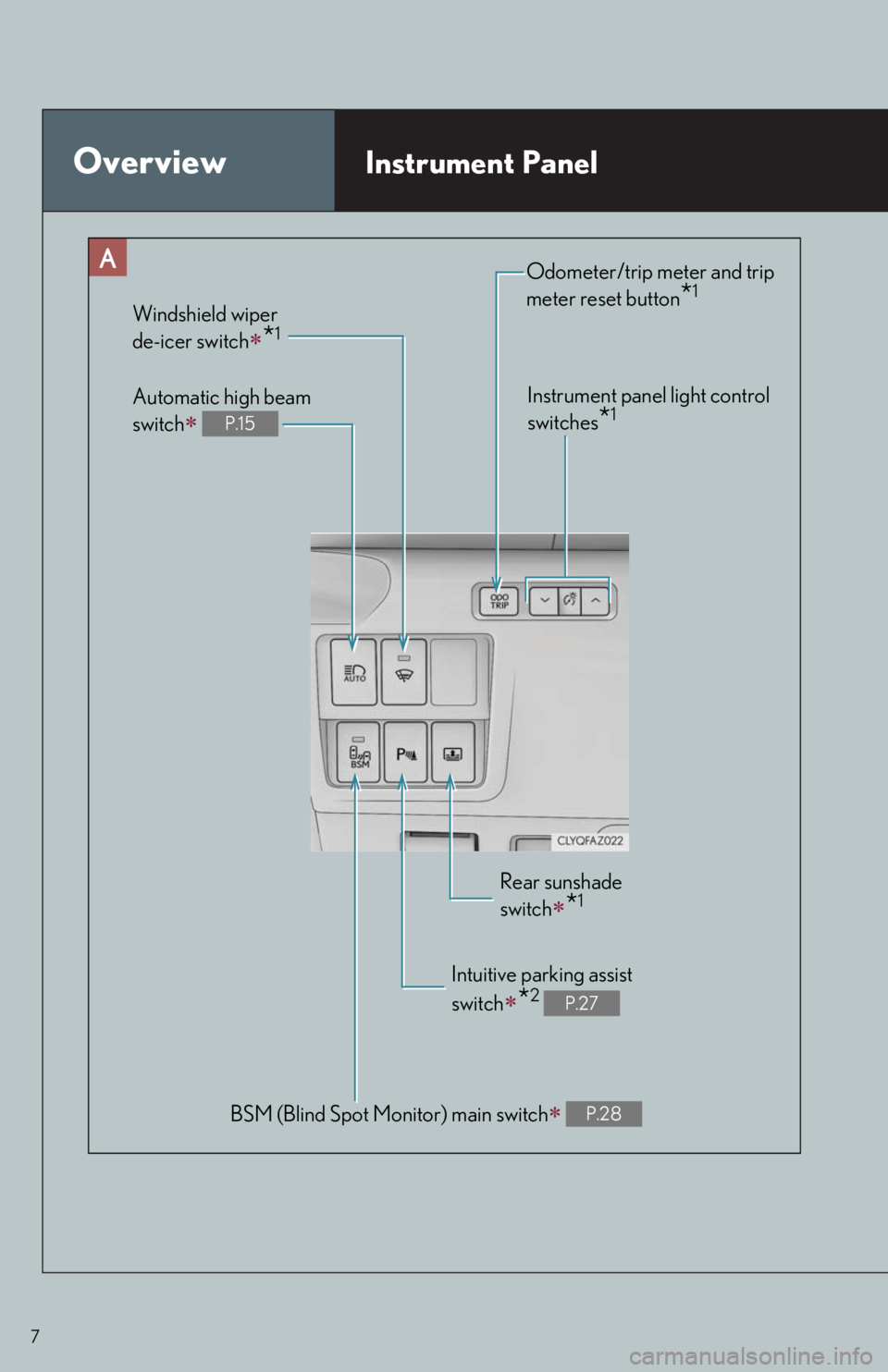
OverviewInstrument Panel
BSM (Blind Spot Monitor) main switch P.28
Odometer/trip meter and trip
meter reset button
*1
Instrument panel light control
switches
*1
Windshield wiper
de-icer switch
*1
Rear sunshade
switch
*1
Intuitive parking assist
switch
*2 P.27
Automatic high beam
switch
P.15
Page 14 of 82

14
Headlights
The side marker, parking, tail,
license plate and instrument
panel lights turn on.
The headlights and all lights
listed above turn on.
The headlights, daytime run-
ning lights and all the lights
listed above turn on and off
automatically. (When the
engine switch is in IGNITION
ON mode.)
Off
The daytime running lights turn
on.
■Turning on the high beam headlights
With the headlights on, push the lever
away from you to turn on the high
beams.
Pull the lever toward you to the center
position to turn the high beams off.
Pull the lever toward you and release it
to flash the high beams once.
You can flash the high beams with the
headlights on or off.
(Canada)
(U.S.A.)
1
2
3
4
(U.S.A.)
(Canada)
1
2
Page 15 of 82

15
Automatic High Beam (if equipped)
■Activating the Automatic High Beam system
Push the lever away from you with the
headlight switch in the or
position.
Press the Automatic High Beam
switch.
The Automatic High Beam indicator
will come on when the headlights are
turned on automatically to indicate that
the system is active.
The Automatic High Beam uses an in-vehicle camera sensor to assess the brightness of
streetlights, the lights of oncoming and prec eding vehicles, etc., and automatically turns
the high beam on or off as necessary.
1
2
Page 16 of 82

16
■Turning the high beam on/off manually
● Switching to low beam
Pull the lever to the original position.The Automatic High Beam indicator will
turn off.
Push the lever away from you to activate
the Automatic High Beam system again.
● Switching to high beam
Press the Automatic High Beam switch.The Automatic High Beam indicator will
turn off and the high beam indicator will
turn on.
Press the switch to activate the Auto-
matic High Beam system again.
Page 18 of 82

18
Wiper intervals can be adjusted when inter-
mittent operation is selected.Increases the intermittent windshield
wiper frequency
Decreases the interm ittent windshield
wiper frequency
Washer/wiper dual operation
The wipers will automatically operate a
couple of times after the washer
squirts.
Vehicles with headlight cleaners:
When the headlights are on and the
lever is pulled and held, the headlight
cleaners will operate once. After this,
the headlight cleaners will operate
every 5th time the lever is pulled.
5
6
7
Page 19 of 82

19
Rain-sensing windshield wipers
(U.S.A.) or (Canada)
Up 2 levels
Up 1 level
(U.S.A.) or (Canada)
Down 1 level
(U.S.A.) or (Canada)
Down 2 levels
AUTO mode on/off switch
With AUTO mode selected, the wipers
will operate automatically when the
sensor detects fallin g rain. The system
automatically adjusts wiper timing in
accordance with rain volume and vehi-
cle speed.
The AUTO mode indicator will turn on
when AUTO mode is selected.
*: After temporary operation, the mode will return to AUTO mode.
AUTO mode
indicator
1
2
3
4
5
or or or
OffTe m p o r a r y operationTe m p o r a r yoperationLow speedoperationHigh speed operation
Low speed operationOffOffHigh speed operationHigh speedoperation
High speed operationOffLow speedoperationNo changeNo change
AUTO mode
Intermit- tent
operation
Off
Te m p o r a r y
operation
*Low speed operationHigh speed operation
Continu- ouslyNo change
Status
before
operation
Operation
Page 20 of 82

20
When AUTO mode is selected, the sensor
sensitivity can be adjusted by turning the
switch ring.Increases the sensitivity
Decreases the sensitivity
Washer/wiper dual operation
The wipers will automatically operate a
couple of times after the washer
squirts.
Vehicles with headlight cleaners:
When the headlights are on and the
lever is pulled and held, the headlight
cleaners will operate once. After this,
the headlight cleaners will operate
every 5th time the lever is pulled.
6
7
8
Page 24 of 82

24
■Adjusting the set speed
Increases the speed
Decreases the speed
Fine adjustment: Momentarily move
the lever in the desired direction.
Large adjustment: Hold the lever in the
desired direction.
■ Changing the vehicle-to-vehicle distance
Pressing the button changes the vehicle-to-
vehicle distance as follows:
Long
Medium
Short
The vehicle-to-vehicle distance is set
automatically to long mode when the
engine switch is turned to IGNITION
ON mode.
If a vehicle is running ahead of you, the
preceding vehicle mark will also be dis-
played.
1
2
Preceding
vehicle mark
1
2
3
The vehicle-to-vehicle distance control mode maintains the preset cruising speed as long
as no vehicle is detected ahead.
Page 50 of 82
50
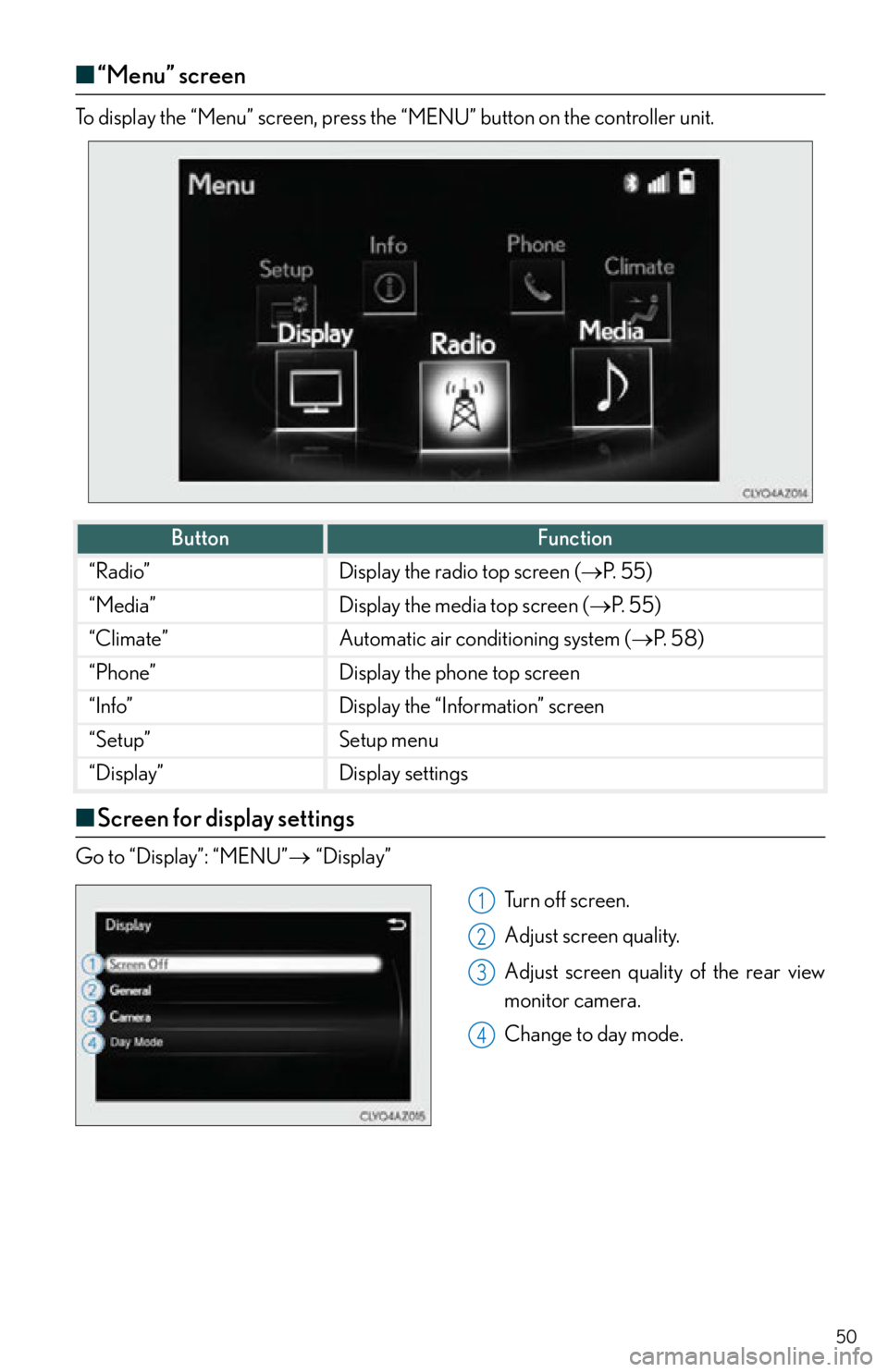
■“Menu” screen
“Menu” screenTo display the “Menu” screen, press the “MENU” button on the controller unit.
■Screen for display settings
Go to “Display”: “MENU” “Display”
Tu r n o f f s c r e e n .
Adjust screen quality.
Adjust screen quality of the rear view
monitor camera.
Change to day mode.
ButtonFunction
“Radio”Display the radio top screen ( P. 5 5 )
“Media”Display the media top screen ( P. 5 5 )
“Climate”Automatic air conditioning system ( P. 5 8 )
“Phone”Display the phone top screen
“Info”Display the “Information” screen
“Setup”Setup menu
“Display”Display settings
1
2
3
4