change time LEXUS IS250 2016 User Guide
[x] Cancel search | Manufacturer: LEXUS, Model Year: 2016, Model line: IS250, Model: LEXUS IS250 2016Pages: 542, PDF Size: 9.65 MB
Page 235 of 542
236
3-2. Using the audio system
Selecting files
nSelecting one file at a time
Turn or press “∧” or “∨” on to select the desired file.
nSelecting the desired file by cueing the files in the folder
Press .
When the desired file is reached, press once again.
Repeat play
nRepeating a file
Press (RPT).
nRepeating all of the files in a folder
Press and hold (RPT) until you hear a beep.
Random playback
nTo play files from a particular folder in random order
Press (RAND).
nTo play all of the files on a disc in random order
Press and hold (RAND) until you hear a beep.
Switching the display
Press .
Each time is pressed, the display changes in the order of Folder no./
File no./Elapsed time → Folder name → File name → Album title (MP3
only) → Track title → Artist name.
Page 241 of 542
242
3-2. Using the audio system
Adjusting the Automatic Sound Levelizer (ASL)
Press .
The ASL switches between on and off modes each time is
pressed.
ASL automatically adjusts the volume and tone quality according to the noise
level as you drive your vehicle.
Changing the listening position (type A only)
The sound feel setting can be changed to produce the best sound for
each listening position.
Press (position selector) to change the setting.
The display changes as follows each time is pressed.
Adjusting sound quality and volume balance
nChanging sound quality modes
Press
Pressing changes the sound mode in the following order.
“BAS”→“MID”→“TRE”→“FAD”→“BAL”→“SURROUND”*
*: Type B only
DisplayListening position
“DRIVER”Position best suited to the driver’s seat
“FRONT”Position best suited to the driver’s and front passenger
seats
“REAR”Position best suited to the rear seats
“A L L ”Position best suited to all seats
Page 244 of 542
245
3-2. Using the audio system
3
Interior features
Using the steering wheel audio switches
Turning on the power
Press when the audio system is turned off.
The audio system can be turned off by holding down for 1 second or
more.
Changing the audio source
Press when the audio system is turned on. The audio source
changes as follows each time is pressed. If no discs are inserted in
the player, that mode will be skipped.
FM1→FM2→CD changer→AUX→AM→SAT1→SAT2→SAT3
Adjusting the volume
Press “+” on to increase the volume and “-” to decrease the vol-
ume.
Hold down to continue increasing or decreasing the volume.
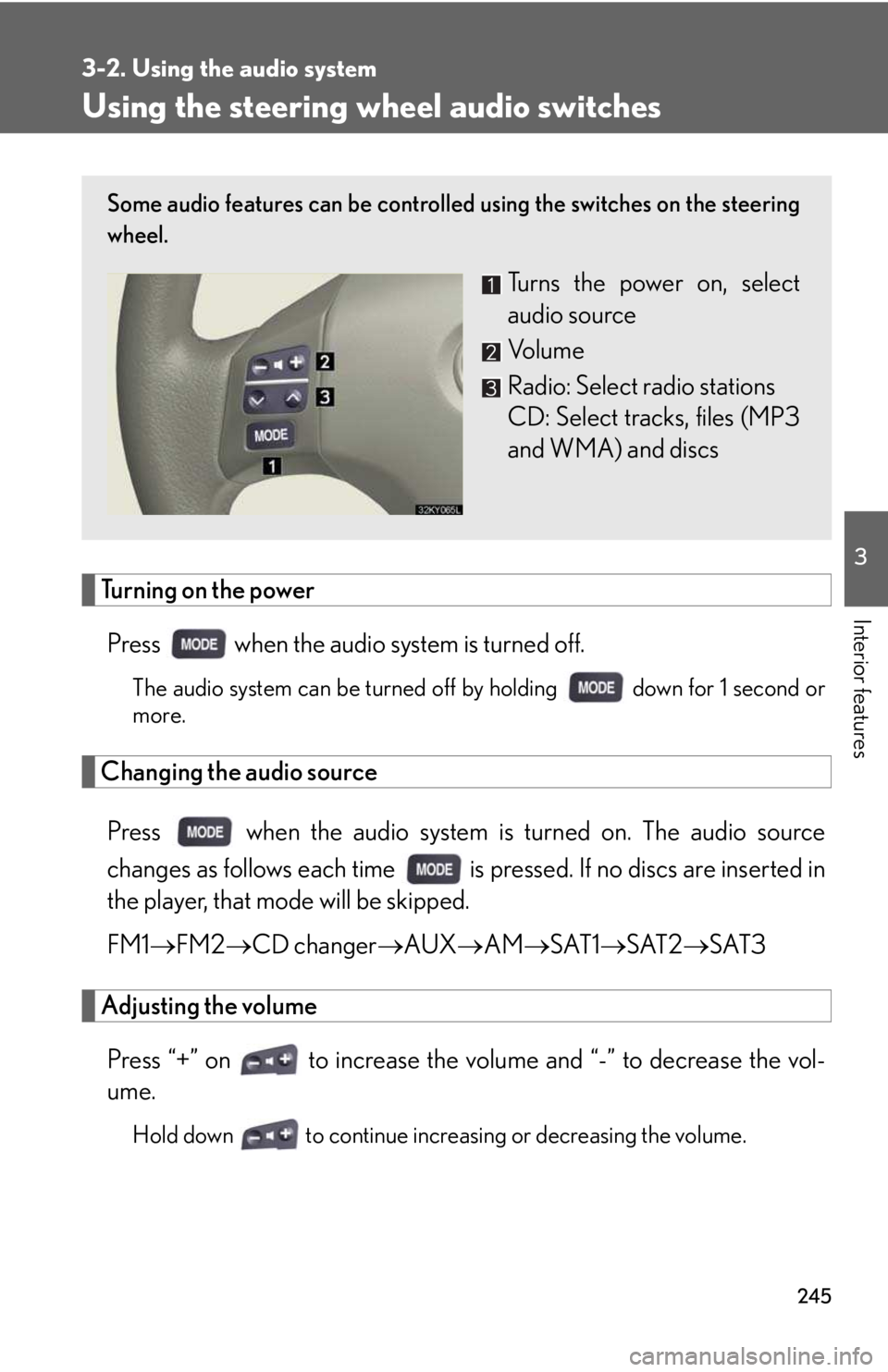
Some audio features can be controlled using the switches on the steering
wheel.
Turns the power on, select
audio source
Vo l u m e
Radio: Select radio stations
CD: Select tracks, files (MP3
and WMA) and discs
Page 247 of 542
248
3-3. Using the interior lights
nTo prevent the battery from being discharged
If the overhead courtesy lights and interior lights remain on when the door is not
fully closed and the interior light switch (door position on/off) is on, the lights will go
off automatically after 20 minutes.
nCustomization that can be configured at Lexus dealer
Setting (e.g. The time elapsed before lights turn off) can be changed. (Customiz-
able features →P. 4 6 1 )
Front door courtesy light
Front scuff lighting (if equipped)
Outer foot lights
Turning the instrument panel light control knob fully to the left disables the
shift lever lighting and front foot well lighting.
Page 416 of 542
5
When trouble arises
419
5-2. Steps to take in an emergency
To change “ENGINE START STOP” switch modes: Within 10
seconds of the buzzer sounding, release the brake pedal and
press the “ENGINE START STOP” switch. Modes can be
changed each time the switch is pressed.
(→P. 1 2 6 )
To start the engine: Press the “ENGINE START STOP” switch
within 10 seconds after the buzzer sounds, keeping the brake
pedal depressed.
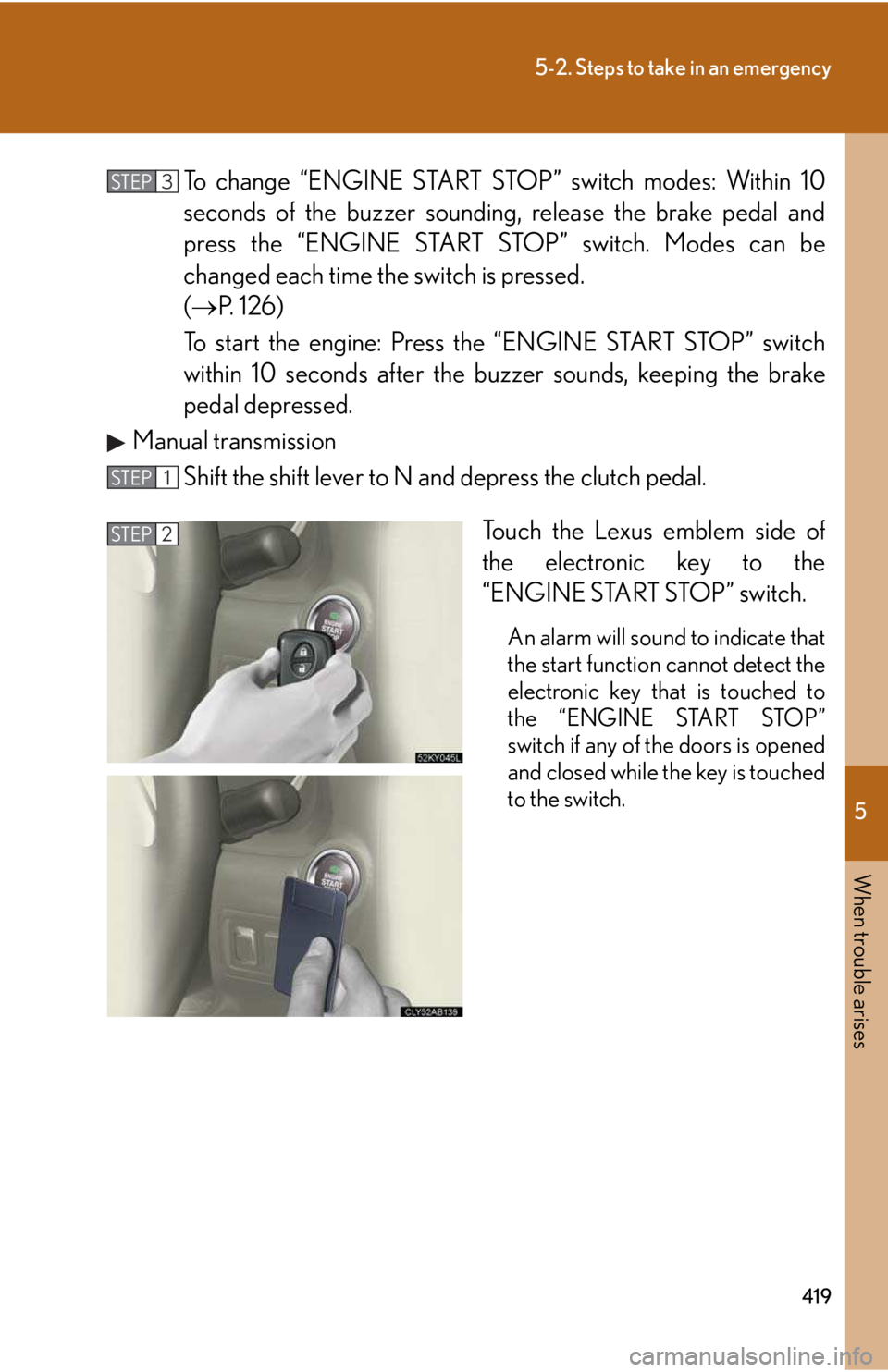
Manual transmission
Shift the shift lever to N and depress the clutch pedal.
Touch the Lexus emblem side of
the electronic key to the
“ENGINE START STOP” switch.
An alarm will sound to indicate that
the start function cannot detect the
electronic key that is touched to
the “ENGINE START STOP”
switch if any of the doors is opened
and closed while the key is touched
to the switch.
STEP3
STEP1
STEP2
Page 417 of 542
420
5-2. Steps to take in an emergency
To change “ENGINE START STOP” switch modes: Within 10
seconds of the buzzer sounding, release the clutch pedal and
press the “ENGINE START STOP” switch. Modes can be
changed each time the switch is pressed.
(→P. 1 2 6 )
To start the engine: Press the “ENGINE START STOP” switch
within 10 seconds after the buzzer sounds, keeping the clutch
pedal depressed.
In the event that the engine still cannot be started, contact your Lexus
dealer.
nStopping the engine
For vehicles with an automatic transmission: Shift the shift lever to P and press the
“ENGINE START STOP” switch as you normally do when stopping the engine.
For vehicles with a manual transmission: Shift the shift lever to N position and press
the “ENGINE START STOP” switch as you normally do when stopping the engine.
nReplacing the key battery
As the above procedure is the temporary measure, it is recommended that the
electronic key battery be replaced immediately when the battery depletes.
(→P. 3 4 5 )
STEP3
Page 500 of 542
Topic 3
When Driving
21
IS_U (L/O_0808)
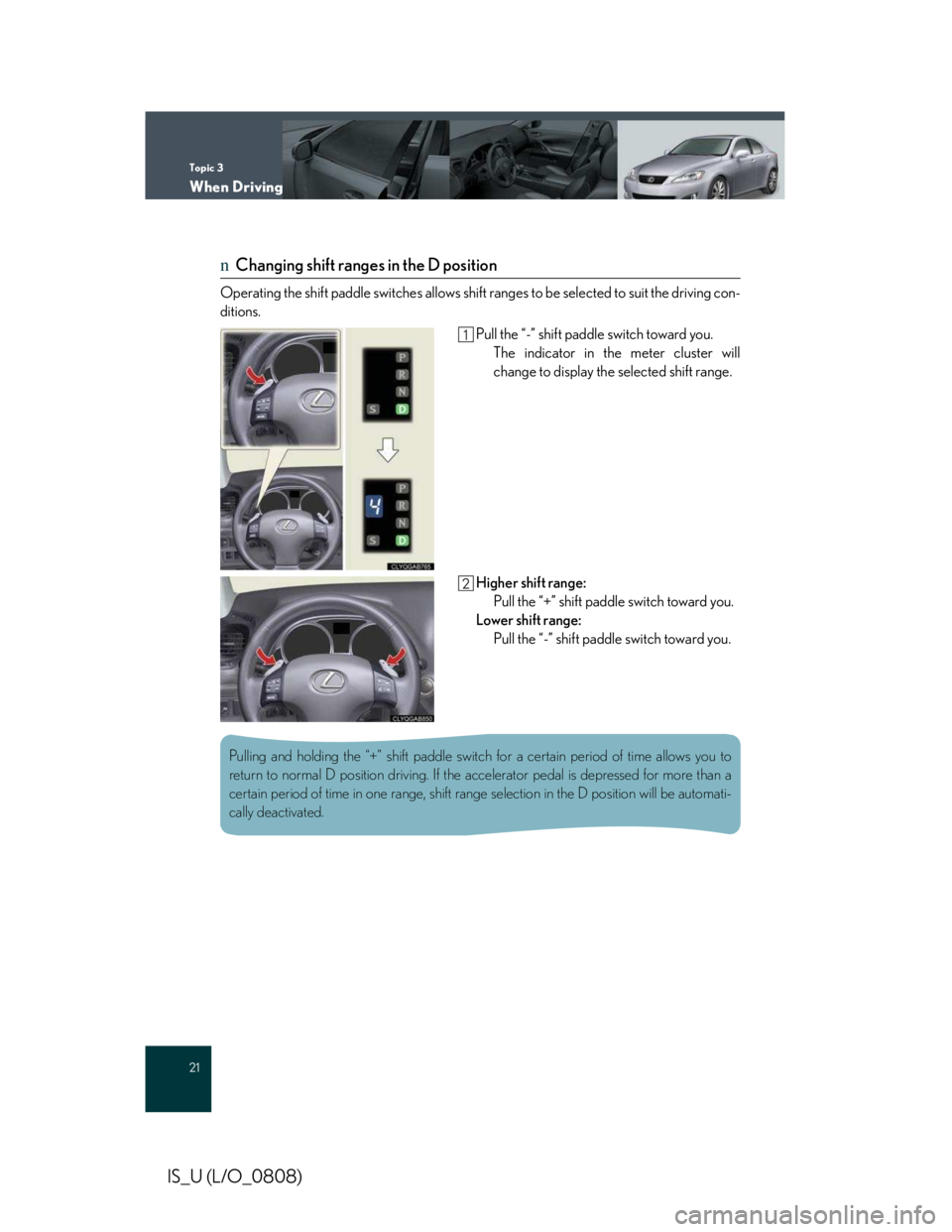
nChanging shift ranges in the D position
Operating the shift paddle switches allows shift ranges to be selected to suit the driving con-
ditions.
Pull the “-” shift paddle switch toward you.
The indicator in the meter cluster will
change to display the selected shift range.
Higher shift range:
Pull the “+” shift paddle switch toward you.
Lower shift range:
Pull the “-” shift paddle switch toward you.
Pulling and holding the “+” shift paddle switch for a certain period of time allows you to
return to normal D position driving. If the accelerator pedal is depressed for more than a
certain period of time in one range, shift range selection in the D position will be automati-
cally deactivated.
Page 539 of 542
Customizing Your Lexus
63
IS_U (L/O_0808)
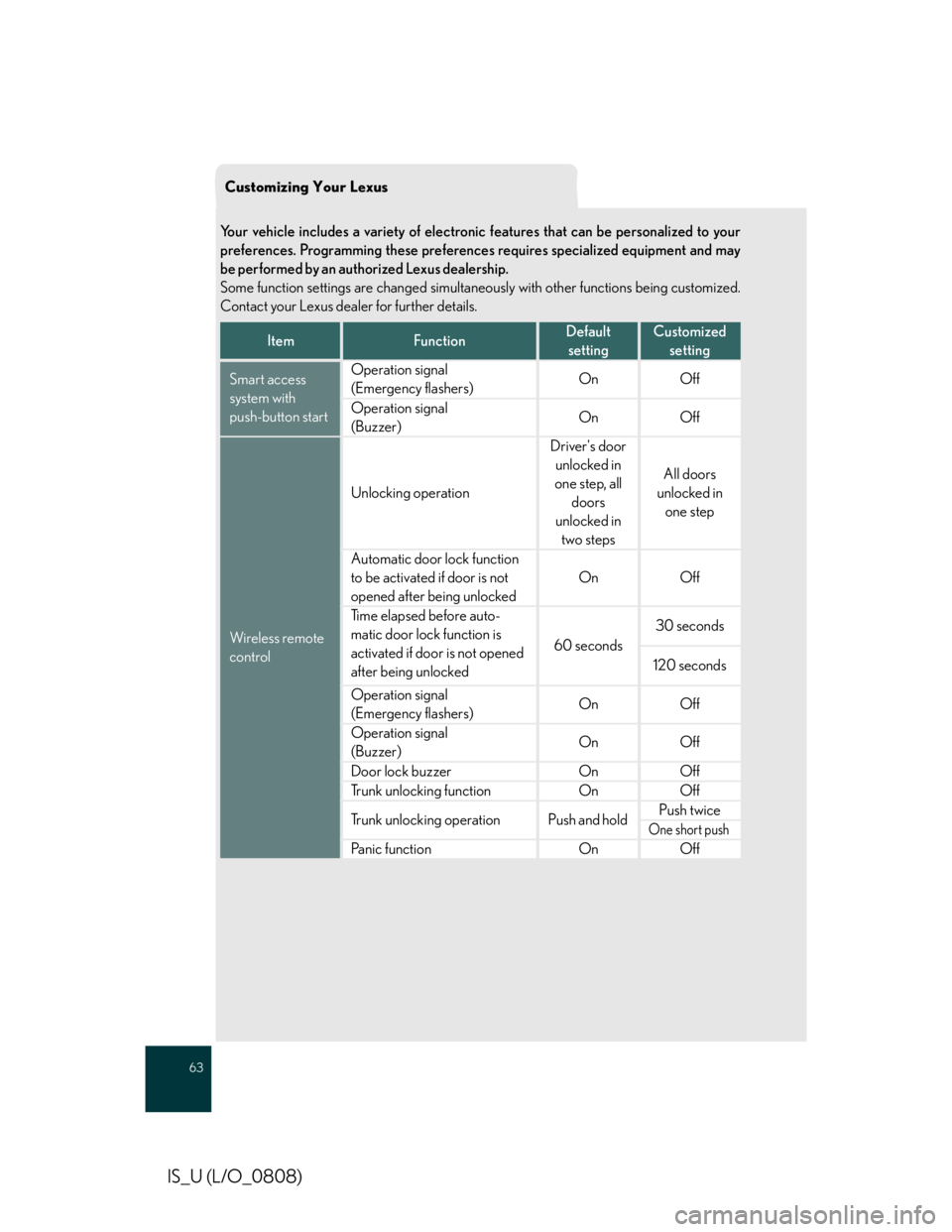
Your vehicle includes a variety of electronic features that can be personalized to your
preferences. Programming these preferences requires specialized equipment and may
be performed by an authorized Lexus dealership.
Some function settings are changed simultaneously with other functions being customized.
Contact your Lexus dealer for further details.
ItemFunctionDefault
setting
Customized
setting
Smart access
system with
push-button start
Operation signal
(Emergency flashers)OnOff
Operation signal
(Buzzer)OnOff
Wireless remote
control
Unlocking operation
Driver's door
unlocked in
one step, all
doors
unlocked in
two steps
All doors
unlocked in
one step
Automatic door lock function
to be activated if door is not
opened after being unlocked
OnOff
Time elapsed before auto-
matic door lock function is
activated if door is not opened
after being unlocked
60 seconds
30 seconds
120 seconds
Operation signal
(Emergency flashers)OnOff
Operation signal
(Buzzer)OnOff
Door lock buzzerOnOff
Trunk unlocking functionOnOff
Trunk unlocking operationPush and hold Push twice
One short push
Panic functionOnOff