lock LEXUS IS250 2016 User Guide
[x] Cancel search | Manufacturer: LEXUS, Model Year: 2016, Model line: IS250, Model: LEXUS IS250 2016Pages: 542, PDF Size: 9.65 MB
Page 24 of 542
25
1-2. Opening, closing and locking the doors and trunk
1
Before driving
Unlocking and locking the doors (front door handles only)
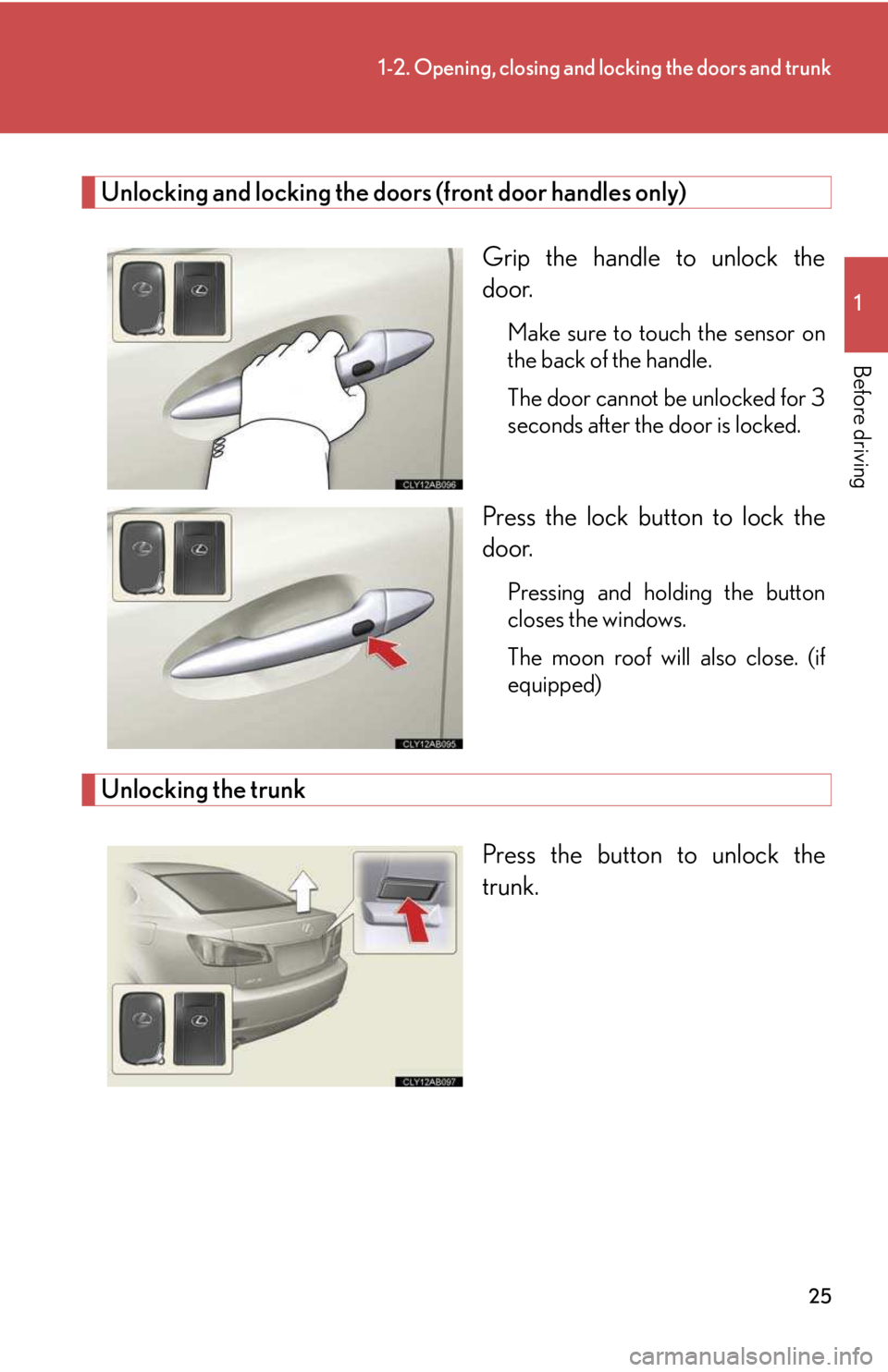
Grip the handle to unlock the
door.
Make sure to touch the sensor on
the back of the handle.
The door cannot be unlocked for 3
seconds after the door is locked.
Press the lock button to lock the
door.
Pressing and holding the button
closes the windows.
The moon roof will also close. (if
equipped)
Unlocking the trunk
Press the button to unlock the
trunk.
Page 25 of 542
26
1-2. Opening, closing and locking the doors and trunk
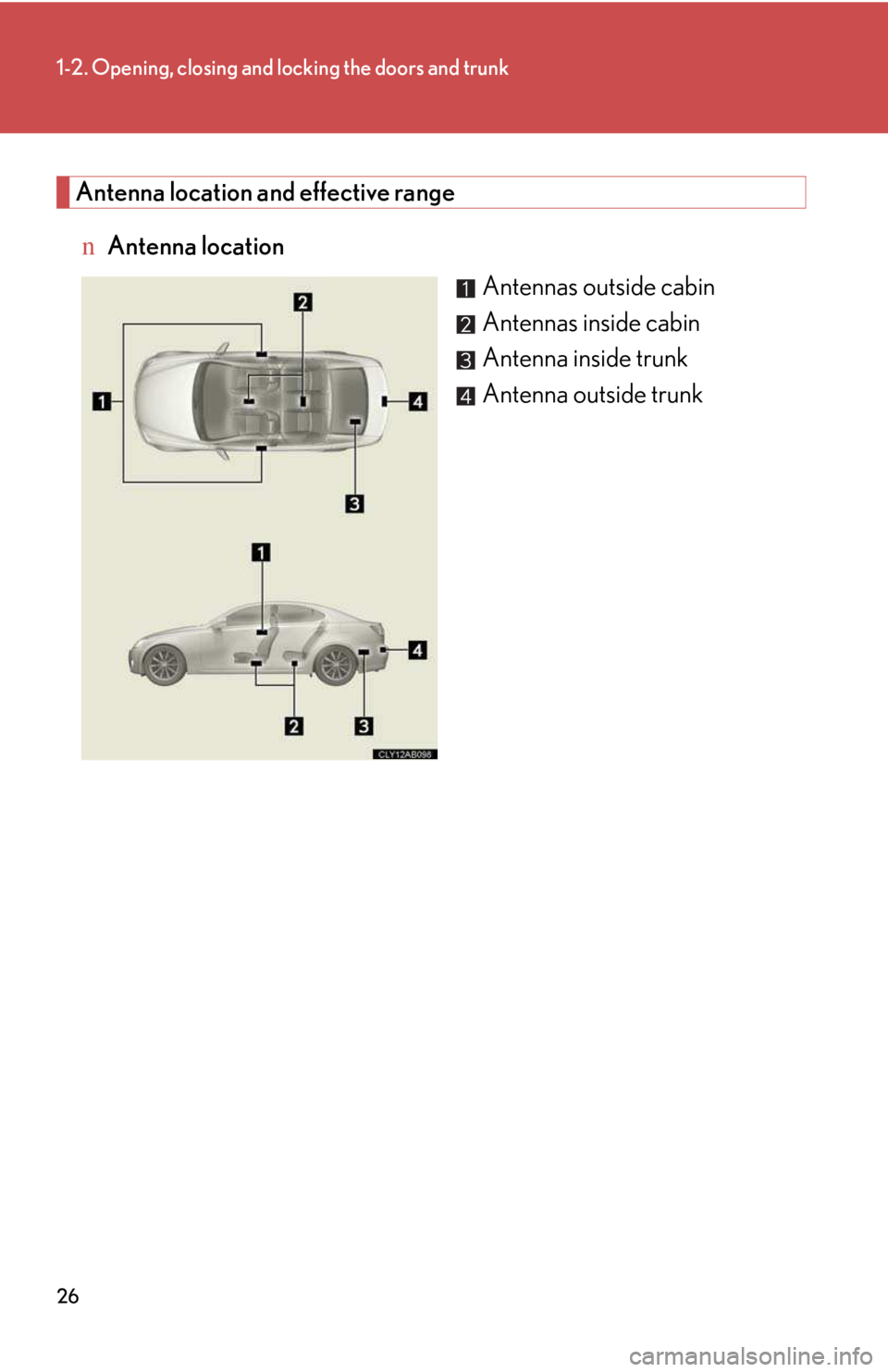
Antenna location and effective range
nAntenna location
Antennas outside cabin
Antennas inside cabin
Antenna inside trunk
Antenna outside trunk
Page 26 of 542
27
1-2. Opening, closing and locking the doors and trunk
1
Before driving
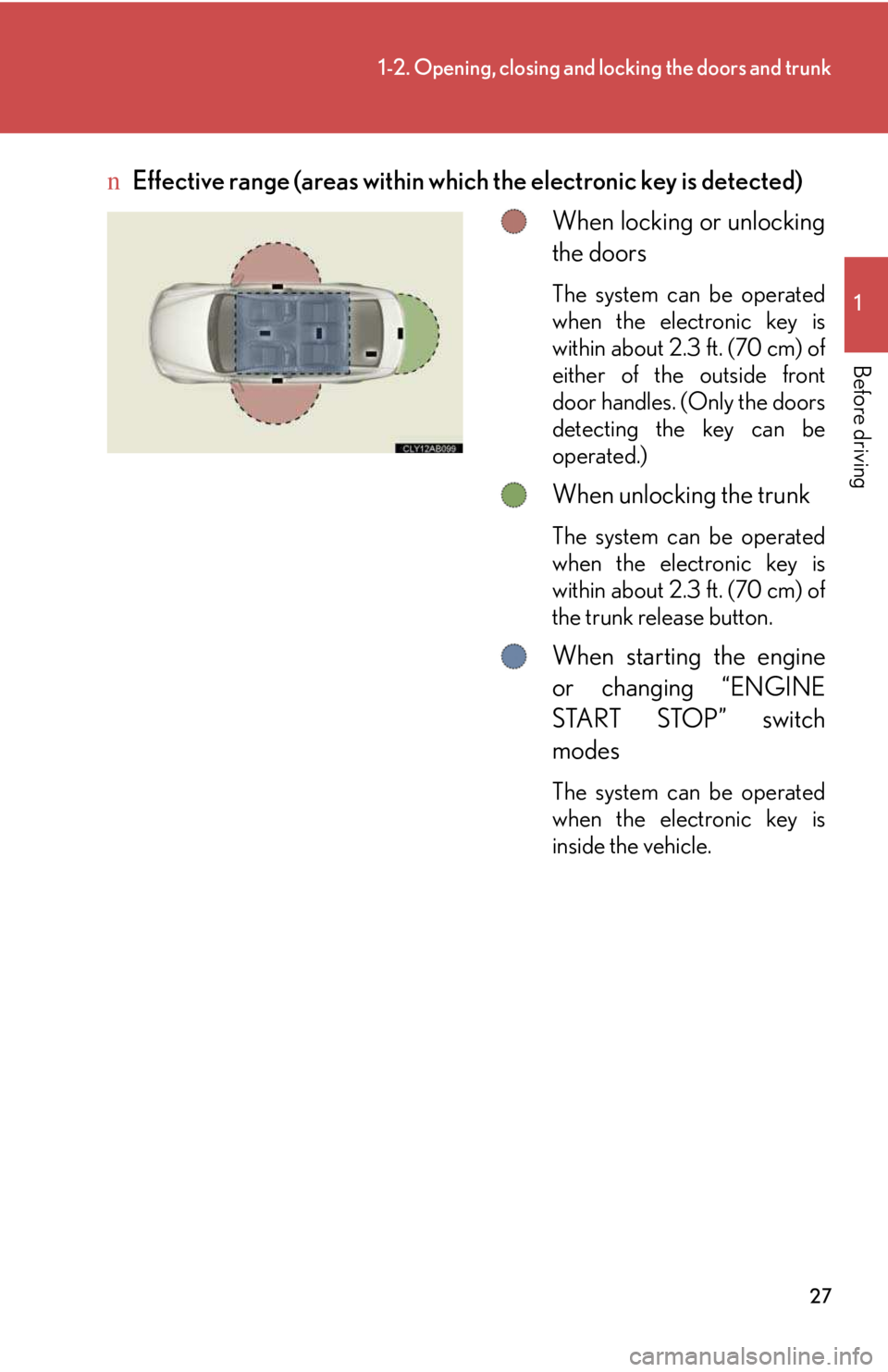
nEffective range (areas within which the electronic key is detected)
When locking or unlocking
the doors
The system can be operated
when the electronic key is
within about 2.3 ft. (70 cm) of
either of the outside front
door handles. (Only the doors
detecting the key can be
operated.)
When unlocking the trunk
The system can be operated
when the electronic key is
within about 2.3 ft. (70 cm) of
the trunk release button.
When starting the engine
or changing “ENGINE
START STOP” switch
modes
The system can be operated
when the electronic key is
inside the vehicle.
Page 27 of 542

28
1-2. Opening, closing and locking the doors and trunk
nOperation signals
A buzzer sounds and the emergency flashers flash to indicate that the doors have
been locked/unlocked. (Locked: Once; Unlocked: Twice)
nConditions affecting operation
The smart access system with push-button start uses weak radio waves. In the fol-
lowing situations, the communication between the electronic key and the vehicle
may be affected, preventing the smart access system with push-button start from
operating properly:
(Ways of coping: →P. 4 1 7 )
lWhen the electronic key battery is depleted
lNear a TV tower, electric power plant, gas station, radio station, large display,
airport or other facility that generates strong radio waves or electrical noise
lWhen carrying a portable radio, cellular phone, cordless phone or other wire-
less communication devices
lWhen the electronic key is in contact with, or is covered by the following metal-
lic objects
Page 28 of 542

29
1-2. Opening, closing and locking the doors and trunk
1
Before driving
nSwitching the door unlock function
It is possible to set which doors the entry function unlocks.
Turn the “ENGINE START STOP” switch OFF.
When the indicator on the key surface is turned off, push and
hold , or for approximately 5 seconds while pushing
on the key.
The setting changes each time an operation is performed, as shown below. (When
changing the setting continuously, release the buttons, wait for at least 5 seconds,
and repeat step 2.)
Unlock the doors using the electronic key and open one of the doors.
If a door is not opened within 60 seconds after is pressed, the doors
will be locked again and the alarm will automatically be set. In case that
the alarm is triggered, immediately stop the alarm. (→P. 7 9 )
STEP1
STEP2
Multi-information
displayUnlocking doorsBeep
Hold the driver's door handle
to unlock only the driver's
door. Exterior: Beeps three
times
Interior: Pings onceHold the front passenger’s
door handle to unlock all
doors.
Hold either front door handle
to unlock all doors.
Exterior: Beeps twice
Interior: Pings once
STEP3
Page 29 of 542

30
1-2. Opening, closing and locking the doors and trunk
nBattery-saving function
In the following circumstances, the entry function is disabled in order to prevent the
vehicle and electronic key batteries from discharging.
lWhen the entry function has not been used for a month or more
lWhen the electronic key has been left within approximately 3 ft. (1 m) of the
vehicle for 10 minutes or more
The system will resume operation when
lThe vehicle is locked using the door handle lock switch.
lThe vehicle is locked/unlocked using the wireless remote control function.
(→P. 36 )
lThe vehicle is locked/unlocked using the mechanical key. (→P. 41 7 )
nElectronic key battery depletion
lThe standard battery life is 1 to 2 years. (The card key battery life is about a year
and a half.)
lThe battery becomes depleted even if the electronic key is not used because
the key always transmits radio waves. If the smart access system with push-but-
ton start or the wireless remote control does not operate, or the detection area
becomes smaller, the battery may be depleted. Replace the battery when nec-
essary.
(→ P. 345)
lTo avoid serious deterioration, do not leave the electronic key within 3 ft. (1 m) of
the following electrical appliances that produce a magnetic field.
Page 30 of 542

31
1-2. Opening, closing and locking the doors and trunk
1
Before driving
nNote for the entry function
lEven when the electronic key is within the effective range (detection areas), the
system may not operate properly in the following cases.
Page 31 of 542

32
1-2. Opening, closing and locking the doors and trunk
nAlarms and warning indicators
A combination of exterior and interior alarms as well as warnings displayed on the
multi-information display are used to prevent theft of the vehicle and unforeseeable
accidents resulting from erroneous operation. Take appropriate measures in
response to any warning indications on the multi-information display. (→P. 3 9 2 )
The following table describes circumstances and correction procedures when only
alarms are sounded.
AlarmSituationCorrection procedure
Exterior alarm
sounds once for 2
seconds
Tried to lock the doors using
the entry function while the
electronic key is still inside
the passenger compartment
Retrieve the electronic
key from the passenger
compartment and lock
the doors again.
Closed the trunk while the
electronic key is still inside
and all doors are locked
Retrieve the electronic
key from the trunk and
close the trunk lid.
Exterior alarm
sounds once for 60
seconds
Tried to exit the vehicle with
the electronic key and lock
the doors without first turning
the “ENGINE START STOP”
switch OFF
Tu r n t h e “ E N G I N E
START STOP” switch
OFF and lock the doors
again.
Exterior alarm
sounds once for 10
seconds
Tried to lock the vehicle using
the entry function while a
door is open
Close all of the doors
and lock the doors
again.
Interior alarm
sounds continu-
ously*
Tried to open the door and
exit the vehicle without shift-
ing the shift lever to P
Shift the shift lever to P.
Page 32 of 542
33
1-2. Opening, closing and locking the doors and trunk
1
Before driving
*: Vehicles with an automatic transmission only
nIf the smart access system with push-button start does not operate properly
lLocking and unlocking the doors and trunk: Use the mechanical key.
(→P. 41 7 )
lStarting the engine:→P. 12 6
nWhen the electronic key battery is fully depleted
→P. 34 5
nCustomization that can be configured at Lexus dealer
It is possible to deactivate the operation signals of the system, such as the emer-
gency flashers. (Customizable features →P. 4 6 1 )
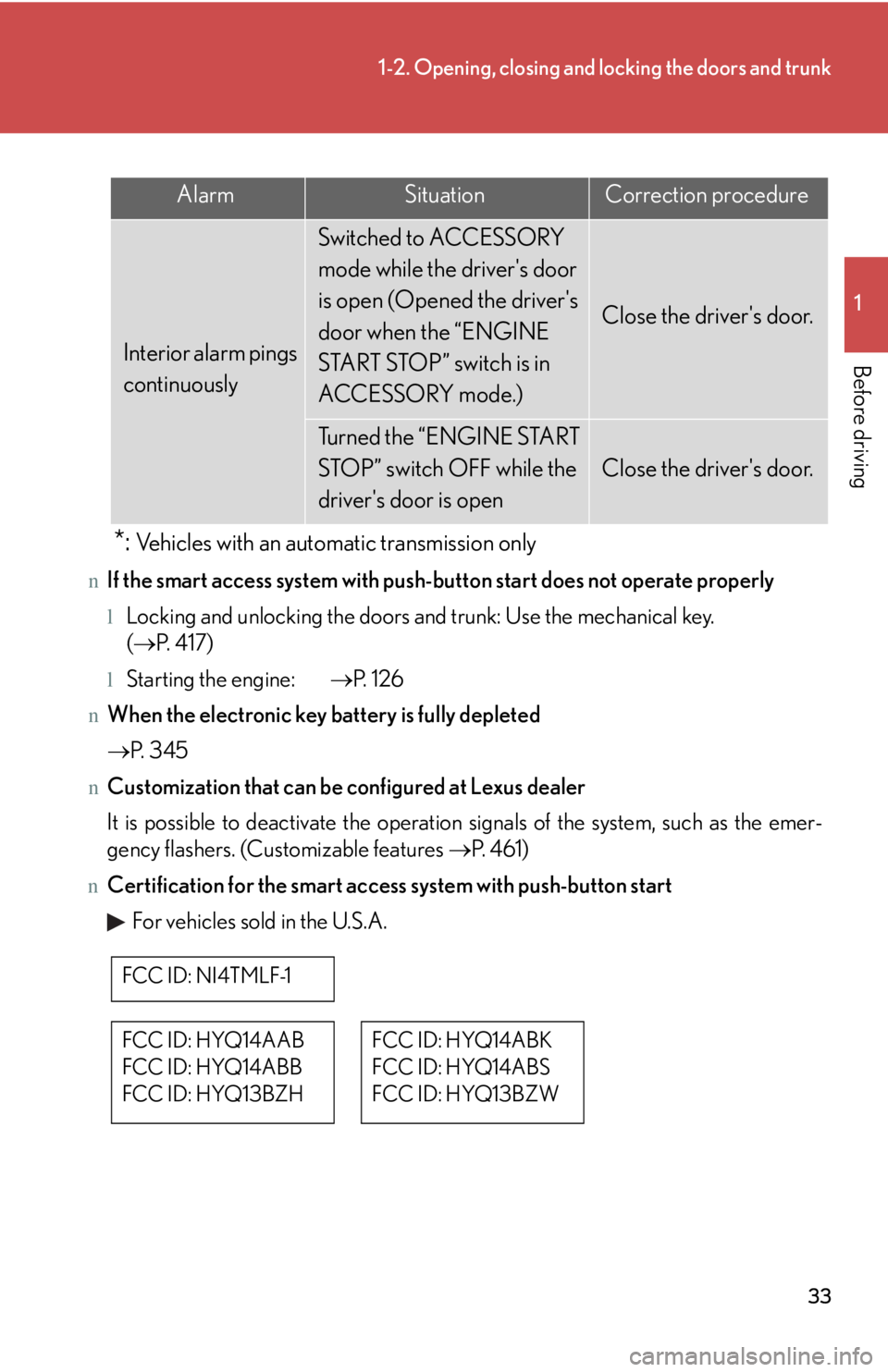
nCertification for the smart access system with push-button start
For vehicles sold in the U.S.A.
AlarmSituationCorrection procedure
Interior alarm pings
continuously
Switched to ACCESSORY
mode while the driver's door
is open (Opened the driver's
door when the “ENGINE
START STOP” switch is in
ACCESSORY mode.)
Close the driver's door.
Turned the “ENGINE START
STOP” switch OFF while the
driver's door is open
Close the driver's door.
FCC ID: NI4TMLF-1
FCC ID: HYQ14AAB
FCC ID: HYQ14ABB
FCC ID: HYQ13BZH
FCC ID: HYQ14ABK
FCC ID: HYQ14ABS
FCC ID: HYQ13BZW
Page 33 of 542

34
1-2. Opening, closing and locking the doors and trunk
NOTE:
This device complies with Part 15 of the FCC Rules. Operation is subject to the fol-
lowing two conditions: (1) This device may not cause harmful interference, and (2)
this device must accept any interference received, including interference that may
cause undesired operation.
FCC WARNING:
Changes or modifications not expressly approved by the party responsible for
compliance could void the user's authority to operate the equipment.
For vehicles sold in Canada
NOTE:
Operation is subject to the following two conditions: (1) this device may not cause
interference, and (2) this device must accept any interference, including interfer-
ence that may cause undesired operation of the device.