door lock LEXUS IS250 2016 Owner's Guide
[x] Cancel search | Manufacturer: LEXUS, Model Year: 2016, Model line: IS250, Model: LEXUS IS250 2016Pages: 542, PDF Size: 9.65 MB
Page 69 of 542
70
1-4. Opening and closing the windows and moon roof
nThe power windows can be operated when
The “ENGINE START STOP” switch is in IGNITION ON mode.
nDoor lock linked window operation
lThe power windows can be opened and closed using the mechanical key.
(→P. 41 7 )
lThe power windows can be opened using the wireless remote control. (→P. 36 )
nOperating the power windows after turning the “ENGINE START STOP” switch
OFF
The power windows can be operated for approximately 45 seconds even after the
“ENGINE START STOP” switch is switched to ACCESSORY mode or turned
OFF. They cannot, however, be operated once either front door is opened.
nJam protection function
If an object becomes caught between the window and the window frame, window
travel is stopped and the window is opened slightly.
nCustomization that can be configured at Lexus dealer
Settings (e.g. linked door lock operation) can be changed.
(Customizable features →P. 4 6 1 )
CAUTION
nClosing the windows
Observe the following precautions.
Failing to do so may result in death or serious injury.
lCheck to make sure that all passengers do not have any part of their body in a
position where it could be caught when a window is being operated.
lDo not allow children to operate the power windows.
Closing a power window on someone can cause serious injury, and in some
instances, even death.
nJam protection function
lNever try jamming any part of your body to activate the jam protection function
intentionally.
lThe jam protection function may not work if something gets caught just before
the window fully closes.
Page 71 of 542

72
1-4. Opening and closing the windows and moon roof
nThe moon roof can be operated when
The “ENGINE START STOP” switch is in IGNITION ON mode.
nMoon roof open warning buzzer
The buzzer sounds and a message is shown on the multi-information display in the
instrument panel when the “ENGINE START STOP” switch is turned OFF and the
driver's door is opened with the moon roof open.
nLinked door lock moon roof operation
lThe moon roof can be opened and closed using the mechanical key. (→P. 41 7 )
lThe moon roof can be opened using the wireless remote control. (→P. 36 )
lThe moon roof can be closed using the entry function. (→P. 25 )
nOperating the moon roof after turning the “ENGINE START STOP” switch OFF
The moon roof can be operated for approximately 45 seconds even after the
“ENGINE START STOP” switch is switched to ACCESSORY mode or turned
OFF. It cannot, however, be operated once either front door is opened.
nJam protection function
If an object is detected between the moon roof and the frame while closing or tilting
down, travel is stopped and the moon roof opens slightly.
nWhen the moon roof does not close normally
Pressing and holding the “CLOSE” switch will close the moon roof.
nTo reduce moon roof wind noise
Drive with the moon roof opened to slightly before the fully open position as driving
with the moon roof opened fully will cause wind noise.
nSunshade
The sunshade can be opened and closed manually. However, the sunshade will
open automatically when the moon roof is opened.
nCustomization that can be configured at Lexus dealer
Settings (e.g. linked door lock operation) can be changed.
(Customizable features →P. 4 6 1 )
Page 79 of 542
79
1
1-6. Theft deterrent system
Before driving
Alarm
The system sounds the alarm and flashes lights when forcible entry is
detected.
nTriggering of the alarm
The alarm is triggered in the following situations.
lA locked door or trunk is unlocked or opened in any way other
than using the entry function, wireless remote door lock function
or mechanical key with the alarm being set.
lThe hood is opened with the alarm being set.
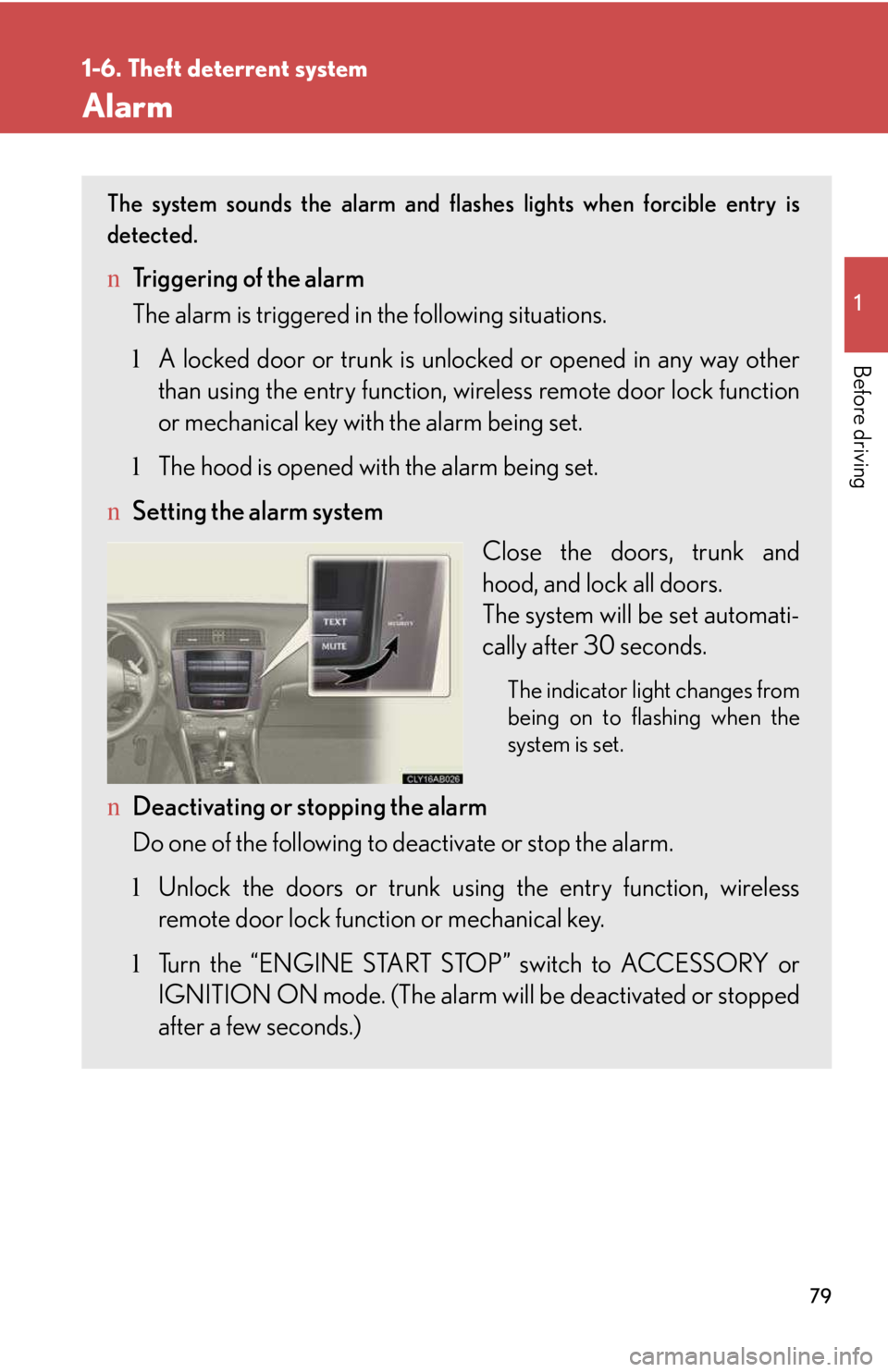
nSetting the alarm system
Close the doors, trunk and
hood, and lock all doors.
The system will be set automati-
cally after 30 seconds.
The indicator light changes from
being on to flashing when the
system is set.
nDeactivating or stopping the alarm
Do one of the following to deactivate or stop the alarm.
lUnlock the doors or trunk using the entry function, wireless
remote door lock function or mechanical key.
lTurn the “ENGINE START STOP” switch to ACCESSORY or
IGNITION ON mode. (The alarm will be deactivated or stopped
after a few seconds.)
Page 80 of 542

80
1-6. Theft deterrent system
nItems to check before locking the vehicle
To prevent unexpected triggering of the alarm and vehicle theft, make sure of the
following.
lNobody is in the vehicle.
lThe windows and moon roof are closed before the alarm is set.
lNo valuables or other personal items are left in the vehicle.
nTr i g g e r i n g o f t h e a l a r m
The alarm may be triggered in the following situations.
Stopping the alarm deactivates the system.
lA person inside the vehicle opens a door, the trunk or hood.
lThe battery is recharged or replaced when the vehicle is locked.
nWhen the battery is disconnected
Be sure to deactivate the alarm system.
If the battery is disconnected before deactivating the alarm system, the alarm may
be triggered when the battery is reconnected.
Page 117 of 542
117
2-1. Driving procedures
2
When driving
Starting on a steep uphill
Automatic transmission
Firmly set the parking brake and shift the shift lever to D.
Gently depress the accelerator pedal.
Release the parking brake.
Manual transmission
With the parking brake firmly set and the clutch pedal fully
depressed, shift the shift lever into 1.
Lightly depress the accelerator pedal at the same time as gradu-
ally releasing the clutch pedal.
Release the parking brake.
nParking the vehicle
Automatic transmission
With the shift lever in D, depress the brake pedal.
Set the parking brake. (→P. 140)
Shift the shift lever to P. (→P. 1 3 1 )
Press the “ENGINE START STOP” switch and stop the engine.
Lock the door, making sure that you have the electronic key on
your person.
Manual transmission
While depressing the clutch pedal, depress the brake pedal.
Set the parking brake. (→P. 140)
Shift the shift lever into N. (→P. 1 3 7 )
Press the “ENGINE START STOP” switch to stop the engine.
Lock the door, making sure that you have the electronic key on
your person.
STEP1
STEP2
STEP3
STEP4
STEP5
STEP1
STEP2
STEP3
STEP4
STEP5
STEP1
STEP2
STEP3
STEP1
STEP2
STEP3
Page 158 of 542
158
2-3. Operating the lights and windshield wipers
nAutomatic light off system
lWhen the headlights comes on: The headlights and tail lights turn off 30 sec-
onds after a door is opened and closed if the “ENGINE START STOP” switch
has been switched to ACCESSORY mode or turned OFF. (The light turns off
immediately if on the key is pressed after all doors are locked.)
lWhen only the tail lights come on: The tail lights turn off automatically if the
“ENGINE START STOP” switch is switched to ACCESSORY mode or turned
OFF and driver’s door is opened.
To turn the lights on again, switch to IGNITION ON mode, or turn the light switch
off once and then back to or .
nAutomatic headlight leveling system (vehicles with discharge headlights)
The level of the headlights is automatically adjusted according to the number of
passengers and the loading condition of the vehicle to ensure that the headlights do
not interfere with other road users.
nIf “AFS OFF” flashes... (vehicles with discharge headlights)
It may indicate a malfunction in the system. Contact your Lexus dealer.
nCustomization that can be configured at Lexus dealer
Settings (e.g. light sensor sensitivity) can be changed.
(Customizable features →P. 4 6 1 )
NOTICE
nTo prevent battery discharge
Do not leave the lights on longer than necessary when the engine is not running.
Page 246 of 542
247
3
Interior features
3-3. Using the interior lights
Interior lights list
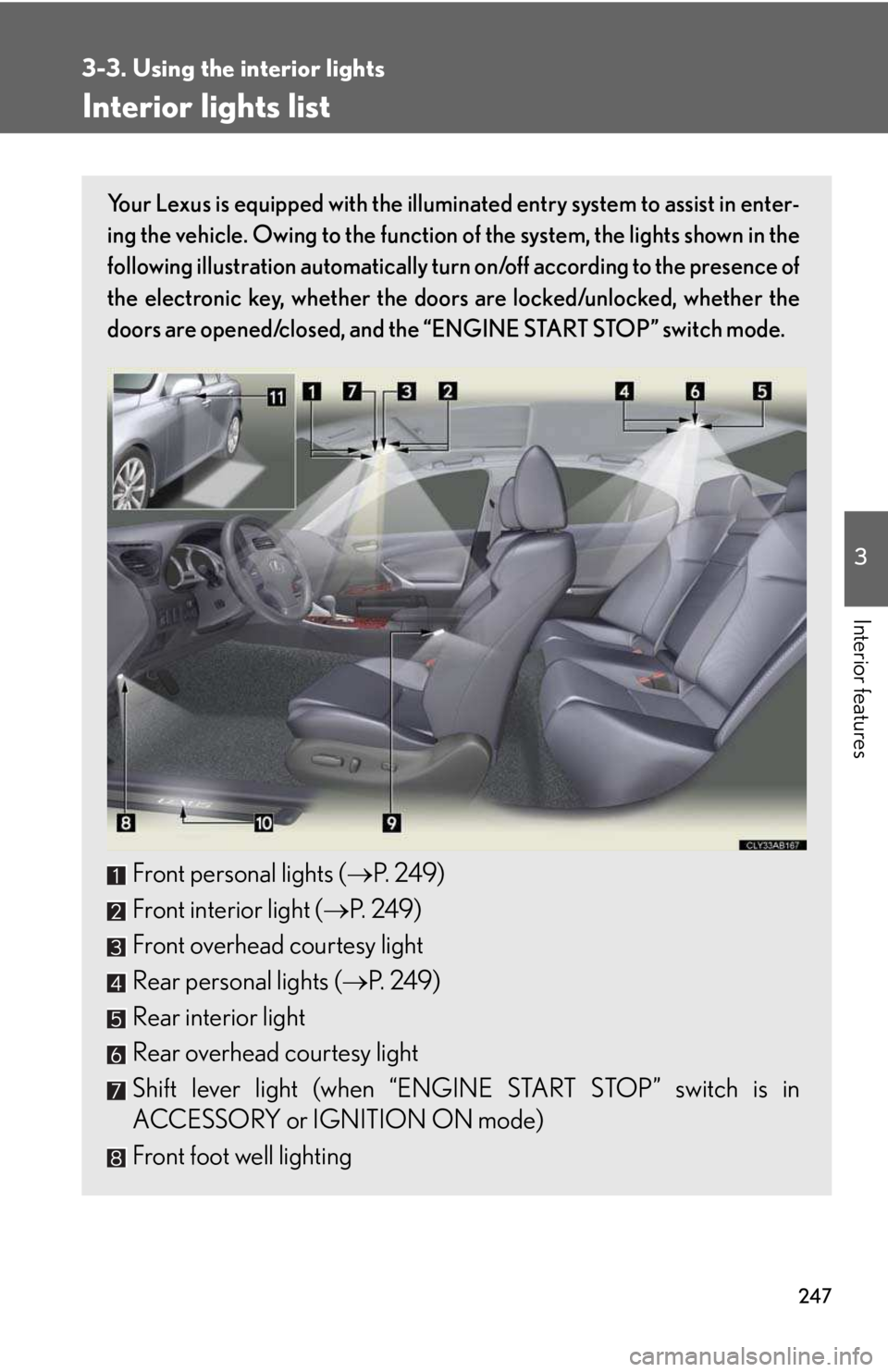
Your Lexus is equipped with the illuminated entry system to assist in enter-
ing the vehicle. Owing to the function of the system, the lights shown in the
following illustration automatically turn on/off according to the presence of
the electronic key, whether the doors are locked/unlocked, whether the
doors are opened/closed, and the “ENGINE START STOP” switch mode.
Front personal lights (→P. 2 4 9 )
Front interior light (→P. 2 4 9 )
Front overhead courtesy light
Rear personal lights (→P. 2 4 9 )
Rear interior light
Rear overhead courtesy light
Shift lever light (when “ENGINE START STOP” switch is in
ACCESSORY or IGNITION ON mode)
Front foot well lighting
Page 250 of 542
251
3
Interior features
3-4. Using the storage features
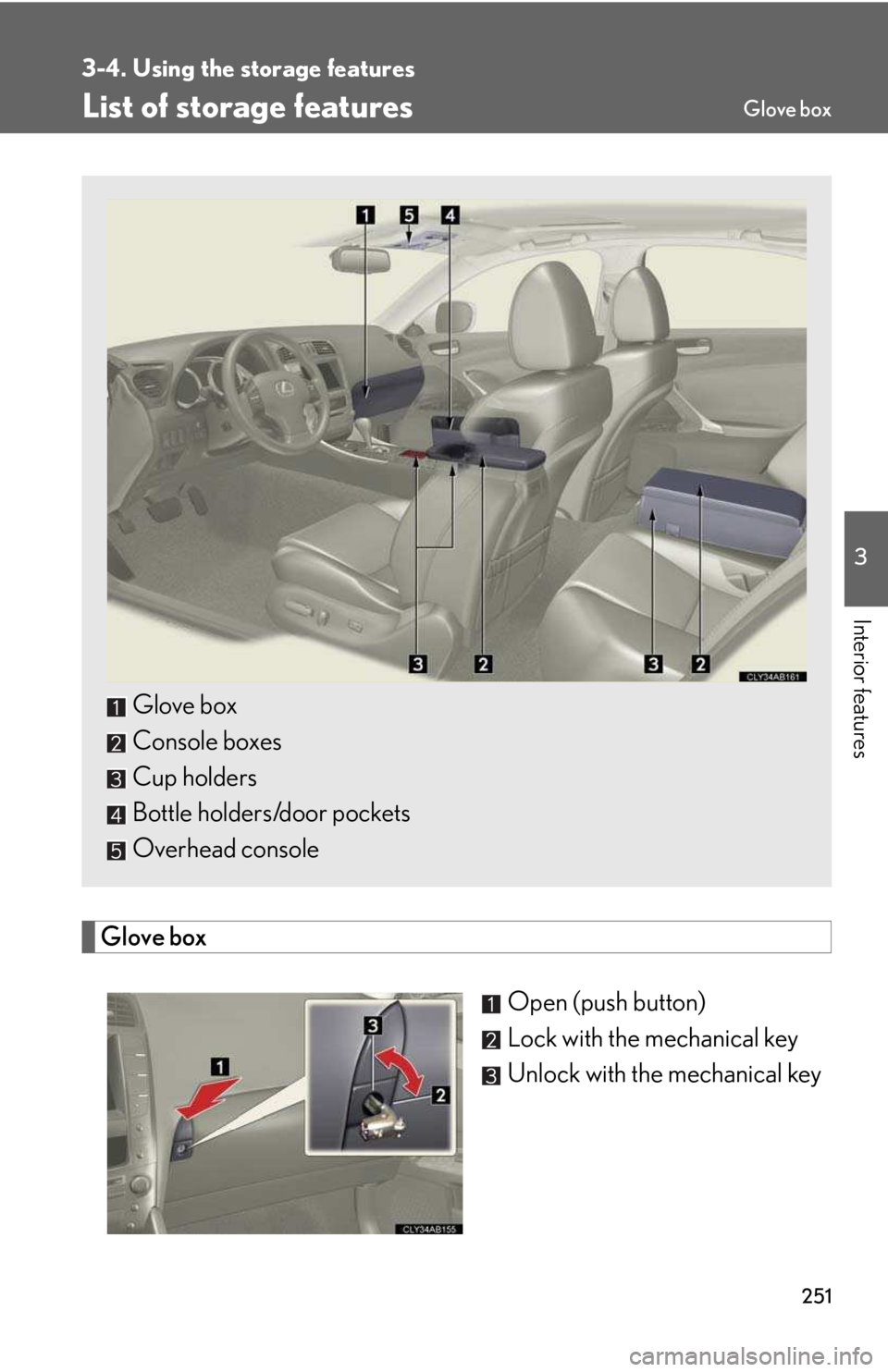
List of storage features
Glove box
Open (push button)
Lock with the mechanical key
Unlock with the mechanical key
Glove box
Console boxes
Cup holders
Bottle holders/door pockets
Overhead console
Glove box
Page 280 of 542
281
3-5. Other interior features
3
Interior features
Garage door opener
The garage door opener (HomeLink® Universal Transceiver) is manufactured
under license from HomeLink®.
Programming the HomeLink® (for U.S.A. owners)
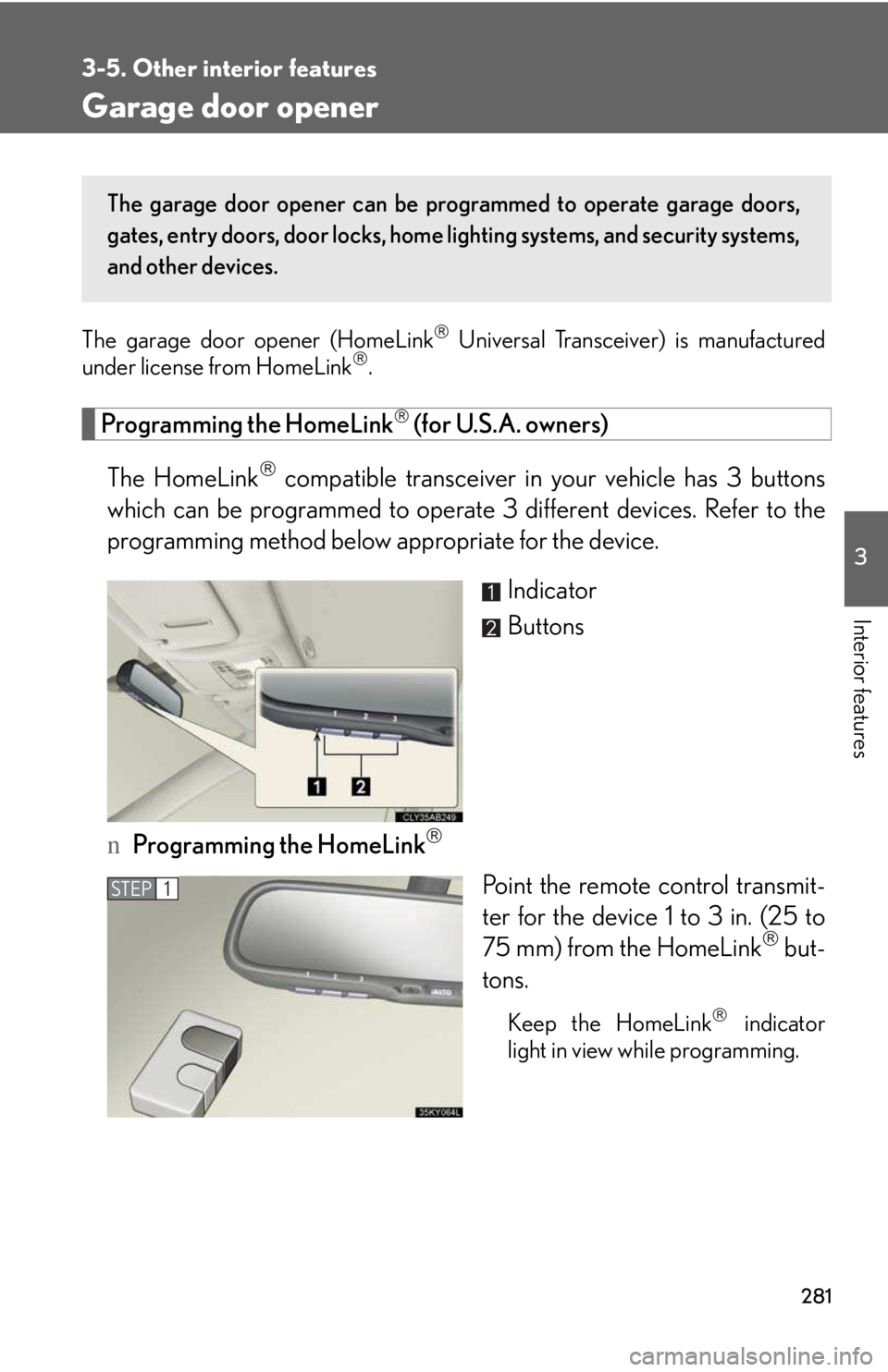
The HomeLink® compatible transceiver in your vehicle has 3 buttons
which can be programmed to operate 3 different devices. Refer to the
programming method below appropriate for the device.
Indicator
Buttons
nProgramming the HomeLink®
Point the remote control transmit-
ter for the device 1 to 3 in. (25 to
75 mm) from the HomeLink® but-
tons.
Keep the HomeLink® indicator
light in view while programming.
The garage door opener can be programmed to operate garage doors,
gates, entry doors, door locks, home lighting systems, and security systems,
and other devices.
STEP1
Page 283 of 542
284
3-5. Other interior features
Test the operation of the HomeLink® by pressing the newly pro-
grammed button. Check to see if the gate/device operates cor-
rectly.
Repeat the steps above to program another device for each of
the remaining HomeLink® buttons.
nProgramming other devices
To program other devices such as home security systems, home door
locks or lighting, contact your authorized Lexus dealer for assistance.
nReprogramming a button
The individual HomeLink® buttons cannot be erased but can be
reprogrammed. To reprogram a button, follow the “Reprogramming a
HomeLink® button” instructions.
Operating the HomeLink®
Press the appropriate HomeLink® button. The HomeLink® indicator
light should come on.
The HomeLink® compatible transceiver in your vehicle continues to send a
signal for up to 20 seconds as long as the button is pressed.
Reprogramming a HomeLink® button
Press and hold the desired HomeLink® button. After 20 seconds, the
HomeLink® indicator light will start flashing slowly. Next, while still press-
ing and holding the HomeLink® button, press and hold the button on the
transmitter until the HomeLink® indicator light changes from a slow to a
rapid flash.
STEP5
STEP6